TL;DR
FLUX-Schnell is the cheap-and-fast tier of the FLUX family — about $0.005 per image on hiapi, 1–4 inference steps, end-to-end ~30 seconds via the unified /v1/tasks endpoint. It will not give you razor-sharp poster typography, but it is excellent for the work where price and throughput matter more than perfection: e-commerce mockups, avatars, concept sketches, A/B thumbnail tests, and bulk placeholder art.
Below are seven prompt recipes I wrote and ran on hiapi. Three came back as real images you can see in this post; four are battle-tested templates you can copy-paste and run yourself in under a minute.
Why FLUX-Schnell, and where it actually shines
There are essentially three places where the math swings hard toward flux-schnell/text-to-image:
- Bulk generation. When you need fifty product mockups for a Notion page, or a hundred low-fi avatars to seed a community, paying $0.05 per image for a flagship model is hard to justify. At $0.005 each, fifty images is a quarter.
- Placeholder and concept work. Storyboards, mood boards, wireframe placeholders, design comps — anything where the image will be replaced or iterated on before it ships. You want the prompt-output loop to be fast and cheap.
- A/B testing thumbnails and hero images. If you are testing twelve cover image variations for a blog post or YouTube video, you do not need cinematic detail in every draft. You need throughput.
Where it falls short, and you should switch up the tier:
- Long in-image text. Poster headlines, signage, packaging copy — Schnell's text rendering is unreliable past one or two words. If you need clean typography, use a higher-fidelity image model in the same family.
- Photoreal portraits with subtle expression. Faces tend toward the painterly. Fine for avatars and stylized work; not what you reach for if you need product photography of a person.
The pricing and recipes below assume the hiapi unified task interface. The model identifier is flux-schnell/text-to-image; the price is $0.005 per image at every supported aspect ratio.
The recipe pattern that consistently works
After running a few dozen Schnell prompts, the structure that consistently produced clean outputs was:
[Subject and pose, 1 sentence]
[Setting and surrounding objects, 1 sentence]
[Lighting and mood, 1 short clause]
[Style anchor: photography type / illustration medium]
[Composition and aspect ratio cues]
[Color palette: 2–3 named colors]
[Negatives: "no text, no logos, no people" when relevant]
Schnell is a 1–4 step model, so dense prompts do not pay off the way they do on slower diffusion models. Keep each clause specific but short, anchor a style by naming a medium ("editorial photography," "watercolor wash," "isometric cel-shaded"), and call out a color palette explicitly. The model is good at obeying named palettes.
The supported aspect ratios in the current task API are: 1:1, 4:3, 3:4, 16:9, 9:16. If you want a 21:9 ultra-wide or a 4:5 social crop, generate at the nearest supported ratio and crop afterward.
Recipe 1: Editorial still-life hero
Use case: a 16:9 cover image for a blog post or landing page, where you want negative space for a headline overlay.
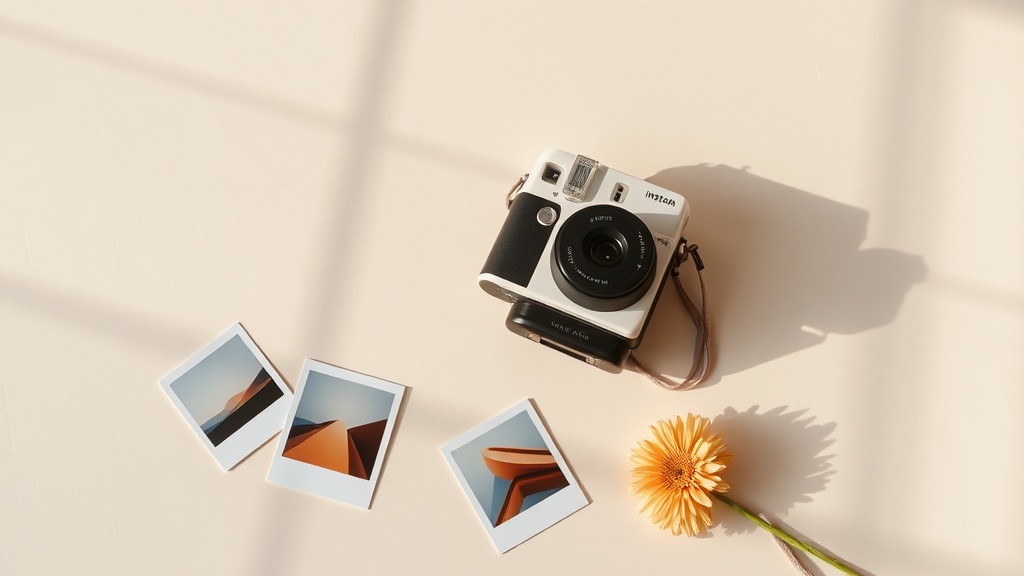
A minimalist still-life arrangement on a cream-colored paper backdrop:
three vintage instant cameras stacked at slightly different angles, soft
morning side-light casting long pastel shadows, a few scattered Polaroid
prints with abstract gradient images, and a single dried gerbera daisy.
Editorial photography, shallow depth of field, muted color palette of
peach, cream and dusty blue, fine grain, magazine cover composition with
negative space on the right.
Aspect: 16:9. End-to-end on hiapi: about 26 seconds.
What worked: the "negative space on the right" cue is reliable on Schnell — the model leaves room for headline text. The named palette ("peach, cream, dusty blue") pulled the whole image into a consistent editorial tone instead of the saturated default look.
Recipe 2: E-commerce flat lay
Use case: product photography for a Shopify product description, marketplace listing, or pattern-of-life lifestyle shot.
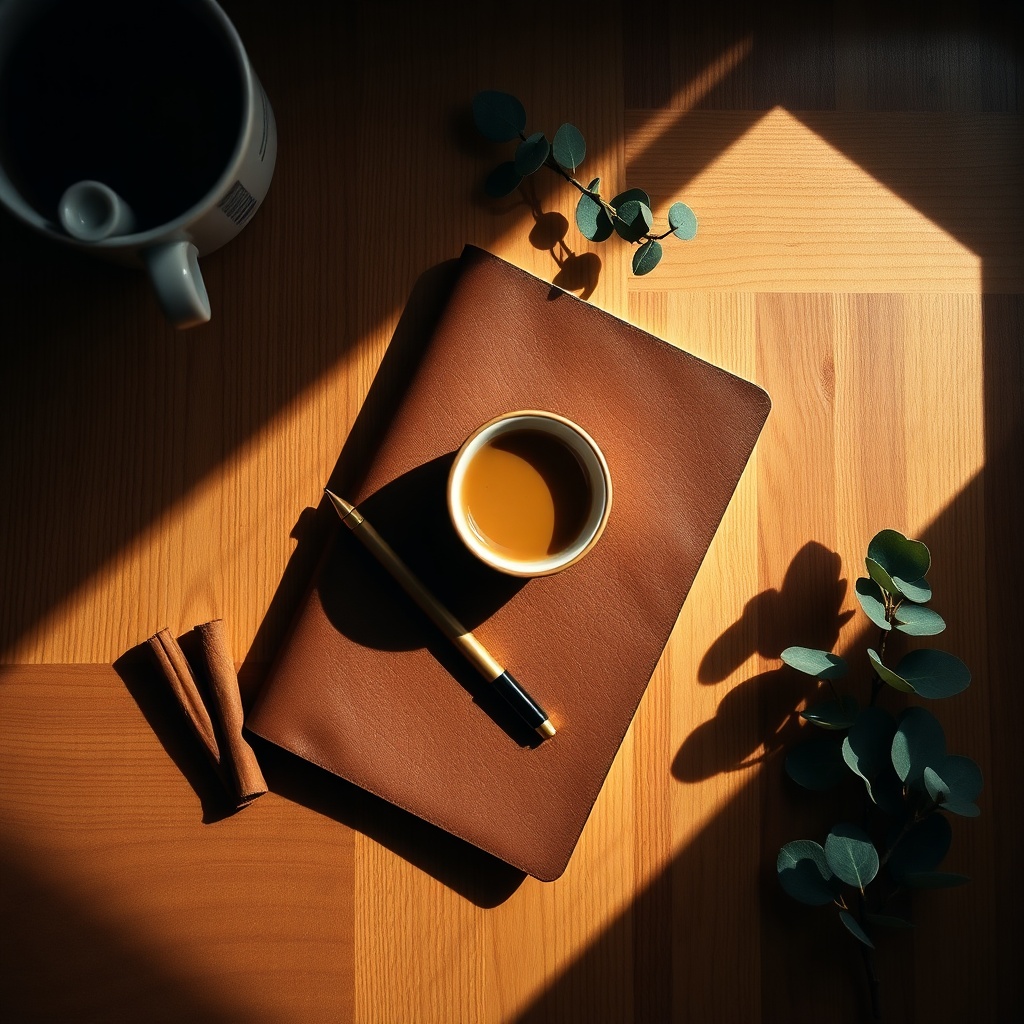
Top-down flat lay of a leather-bound notebook, a brass mechanical pencil,
a small ceramic espresso cup half full, two cinnamon sticks and a sprig
of eucalyptus on a warm oak desk. Soft natural window light from the
upper-left, gentle shadows, autumn morning mood. Product photography for
stationery e-commerce, square crop, deep contrast, rich brown and olive
color palette, no text, no logos.
Aspect: 1:1. End-to-end: about 32 seconds.
What worked: top-down + "soft natural window light from the upper-left" is a strong shorthand that consistently produces convincing flat-lay shadowing. The no text, no logos negative is critical — without it, Schnell will invent garbled wordmarks on the notebook cover roughly half the time.
Recipe 3: Avatar / stylized portrait
Use case: profile pictures for community products, character art for a project, or seed faces for user generated content.
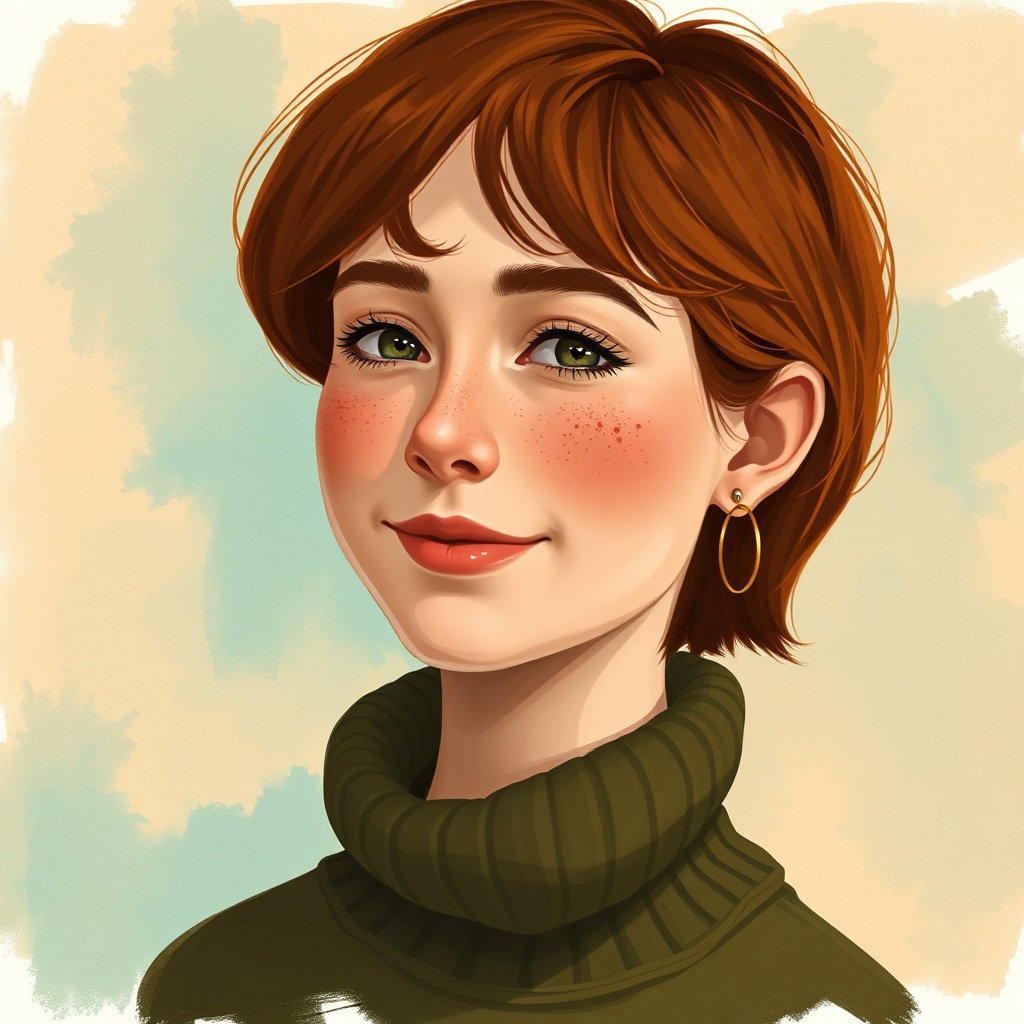
Semi-realistic painted portrait of a young woman with short auburn hair,
freckles, gentle smile, looking slightly off-camera. She wears a moss-
green knitted turtleneck and small gold hoop earrings. Background is a
soft watercolor wash of teal and ochre. Stylized digital illustration
with visible brush texture, warm rim light, shallow depth of field,
head-and-shoulders crop, profile-picture composition.
Aspect: 1:1. End-to-end: about 32 seconds.
What worked: "semi-realistic painted portrait" plus "visible brush texture" cleanly steers Schnell away from the uncanny-valley photo-real attempts it makes by default, and into a stylized illustration mode that hides its weaknesses with anatomy and skin detail.
Recipe 4: Cinematic landscape
Use case: blog hero image for travel, outdoor or atmospheric content, where you want a wide painterly photograph.
Wide cinematic landscape of a high alpine valley at the first hour of
sunrise: layered ridges fading into violet haze, a slow ribbon of mist
settled in the basin, a single dark pine standing in mid-foreground.
Cold blue shadow side and warm peach light side, sharp focus throughout,
subtle volumetric god rays, large-format landscape photography aesthetic,
painterly atmosphere, no people, no buildings.
Aspect: generate at 16:9 (the closest supported wide ratio) and crop to 21:9 if you need ultra-wide.
Why it works: the warm/cool color split ("cold blue shadow side and warm peach light side") gives Schnell a clear lighting model, and "no people, no buildings" prevents it from inventing tiny figures that draw the eye in the wrong place.
Recipe 5: Isometric tech illustration
Use case: SaaS landing pages, developer docs, blog posts about infrastructure or pipelines.
Isometric 3D illustration of a small floating server rack island in pale
blue sky, with little glowing data streams connecting it to two smaller
satellite islands holding a database cylinder and a stylized API plug.
Soft cel-shaded style, gentle gradient sky, fluffy low-poly clouds,
subtle particle dust, cheerful tech-brand color palette of mint, lilac
and warm cream. No text, no UI elements, balanced symmetric composition
with strong depth.
Aspect: 4:3 (close to the 3:2 hero ratio common on dev-tool landing pages).
Why it works: "cel-shaded style" + "balanced symmetric composition with strong depth" tells Schnell to commit to a clean illustrated look rather than wavering between 3D render and flat vector. Always pair this kind of prompt with no text, no UI elements — otherwise you will get fake screenshot windows with broken pixel text.
Recipe 6: Overhead food photography
Use case: menu visuals, recipe blog headers, food-delivery marketing.
Overhead photograph of a rustic ceramic bowl of slow-cooked tomato soup
garnished with fresh basil and a swirl of cream, sitting on a charcoal
linen napkin. Around it: a torn slice of sourdough, a small ramekin of
flaky salt, a vintage silver spoon and three cherry tomatoes on the
vine. Soft directional window light from the top, deep contrast, rich
saturated reds and greens, restaurant-menu composition, no text, no
branding.
Aspect: 3:4 for menu / magazine vertical, or 1:1 for social.
Why it works: food photography prompts live or die on the supporting cast. Listing four to six accompanying items ("torn slice of sourdough, salt, spoon, cherry tomatoes") gives Schnell enough density to compose a believable scene without wandering off-prompt. "Deep contrast" and a saturated palette push it out of the washed-out default look that comes back when you under-specify lighting.
Recipe 7: Concept sketch / placeholder
Use case: storyboards, design comps, deck illustrations, anything you want to read as "in progress" rather than finished.
Loose architectural concept sketch of a small modernist greenhouse cafe
with a curved glass roof, surrounded by tall grass and two slender
birch trees. Drawn in confident black ink line-work on warm off-white
paper, with light pencil construction lines still visible, a few
watercolor washes of muted sage green and terracotta, hand-lettered
scale figures of two people for context. Editorial illustration style,
wide landscape composition, plenty of negative space at the top.
Aspect: 4:3 or 16:9 depending on slide format.
Why it works: hand-drawn cues like "confident black ink line-work" and "light pencil construction lines still visible" give Schnell permission to be imperfect. This is the recipe to reach for when a polished render would look out of place — pitch decks, early product mocks, books, tutorials.
How to call it in code
Here is the minimum payload you need to hit the hiapi task endpoint for Schnell:
curl -X POST https://api.hiapi.ai/v1/tasks \
  -H "Authorization: Bearer $HIAPI_TOKEN" \
  -H "Content-Type: application/json" \
  -d '{
    "model": "flux-schnell/text-to-image",
    "input": {
      "prompt": "your prompt here",
      "aspect_ratio": "16:9"
    }
  }'
That returns a taskId. Poll GET /v1/tasks/{taskId} every few seconds; when status flips to success, the output URL lives at data.output[0].url. The URL is time-limited — pull the bytes immediately and store them yourself.
Two things worth knowing that bit me when I was testing these recipes:
- Do not send
resolutiontoflux-schnell/text-to-image. The task validator rejects it. Schnell takes onlyaspect_ratio. (Some other models in the family acceptresolution; this one does not.) - The supported aspect ratios are only
1:1,4:3,3:4,16:9,9:16. Anything else (3:2, 4:5, 21:9, 5:4) will be rejected at task creation with a clear error. Generate at the nearest supported ratio and crop, or pick a different model in the family if a specific aspect is non-negotiable.
Cost and speed, measured
On the three recipes I ran end-to-end:
| Recipe | Aspect | End-to-end time | Image size |
|---|---|---|---|
| Editorial hero | 16:9 | 26.3 s | 102 KB |
| E-commerce flat lay | 1:1 | 31.9 s | 360 KB |
| Avatar portrait | 1:1 | 31.6 s | 235 KB |
Three images, end-to-end including task polling and image download, cost $0.015 total and finished in under 90 seconds wall-clock. For comparison, a single image on a flagship tier in the same family runs about $0.05 — ten times the unit cost. If you are bulk-generating, Schnell is the obvious starting point; reach for a higher tier only when a specific image needs the lift.
When to pick something else
Schnell is the right answer for the cases above. It is not the right answer when:
- You need any in-image text longer than two or three words.
- You need a clean photoreal human face for product or editorial use.
- You need a specific aspect ratio outside the supported five.
For those, switch up to a higher-fidelity image model in the same family inside hiapi — same task interface, same auth, just a different model identifier. Keep your prompt structure the same; the recipes above transfer directly.
Wrap-up
Schnell is the workhorse of the FLUX family on hiapi: cheap enough to throw at bulk problems, fast enough to keep you in a tight iteration loop, and obedient enough on style and palette that you can guide it with short structured prompts. The seven recipes above cover the use cases I keep returning to. Copy, tweak, and run — the prompt language is forgiving, and at $0.005 per try, the cost of an experiment is roughly the cost of nothing.