Most "GPT Image 2 is amazing" posts show you a single render. That is the easy half. The hard half — and the half that actually matters when you are shipping image work into a product — is the second render and the third: keeping a character recognizable across a series, or restyling a hero asset without breaking what made it work in the first place.
gpt-image-2 on hiapi is two models, not one. The standard text-to-image variant draws the first frame; gpt-image-2/image-to-image takes that frame back as a reference and edits it. Used together at $0.03 per call, they cover the workflows that actually show up in production: character-consistent series, surgical scene swaps, brand-asset restyles. This piece walks through both, with original prompts, real outputs, and copy-paste code.
Two Models, One Workflow
Both variants speak hiapi's unified async task API — POST https://api.hiapi.ai/v1/tasks creates the generation and returns a task ID, GET /v1/tasks/:id hands back the finished image URL. The difference is what you put in the input object.
| Use case | Model | 1K price | 2K price | Input shape |
|---|---|---|---|---|
| First render from prompt | gpt-image-2 | $0.03 | $0.04 | Text only |
| Edit / restyle a reference | gpt-image-2/image-to-image | $0.03 | $0.04 | Text + 1–5 reference images |
Numbers above come straight from the live pricing page at the time of writing — that page is the source of truth. gpt-image-2 standard uses a multiplier curve (1K → 2K is 1.33×, 4K is 2×), so a 1K call costs $0.03 and a 4K canvas costs $0.06. The image-to-image variant matches the curve. There is no extra "edit surcharge" — both models land at the same per-call price for the same resolution.
The split matters because it changes how you think about a job. You are not paying for "the right image" in one expensive shot. You are paying $0.03 to get close, then $0.03 (or two) to get exact.
Capability One: Style Consistency Across a Series
The pattern that breaks most text-to-image workflows is the same subject in a different scene. Run the same prompt twice and you get two unrelated people; run two scene prompts that describe the subject loosely and you get cousins.
gpt-image-2 handles this surprisingly well when you do two things:
- Write a character bible inline. Not "a young woman with glasses." Specific traits the model can re-anchor to: hair color and length and texture, skin tone and freckles, glasses and glasses style, every garment piece you care about. Six to ten anchor traits is the sweet spot.
- Reuse the bible verbatim in every scene. Same word order, same modifiers. Treat the description like a JSON object: scene swaps in, character bible stays byte-identical.
Here is the same character bible run through two different scenes. The bible is unchanged across both calls; only the setting paragraph differs.
Character bible (re-used verbatim in both calls):
"a young woman in her late twenties, shoulder-length wavy dark-auburn hair,
warm olive skin, soft freckles across the bridge of her nose, tortoiseshell
round glasses, cream wool turtleneck, thin gold chain necklace, moss-green
linen blazer slung over her shoulders"

Scene A: marble cafe table by a tall north window, white flat-white cup with
latte art, navy leather notebook open, brass fountain pen, brass pendant
lights blurred in the background, 35mm film, shallow depth of field, 1:1.

Scene B: Mediterranean rooftop terrace at golden hour, terracotta pots with
rosemary and trailing ivy, holding the same navy leather notebook to her
chest, looking off toward warm rooftops and the sea, 35mm film, matching
natural palette to Scene A, shallow depth of field, 1:1.
Two calls, two scenes, the same person:


Face shape, hair length and color, glasses, turtleneck, blazer, necklace, even the notebook — all carry across. The lighting and palette shift with the scene, as they should; the subject does not.
A few practical notes from running this pattern at scale:
- Anchor with three or more correlated traits per body part. "Wavy dark-auburn hair" alone drifts. "Shoulder-length wavy dark-auburn hair" with the additional anchor of "tortoiseshell round glasses" two clauses later locks the face in much harder. The model treats co-occurring traits as a stronger identity signal than any single one.
- Keep the bible at the top of the prompt. Scene description goes after, not before. The model weights early tokens more heavily for subject identity.
- End every scene with one repeated style modifier ("35mm film, shallow depth of field, 1:1"). This pins the rendering aesthetic so two calls do not look like two different photographers.
For a short series (three to twelve frames of the same character), this pattern routinely lands above 80% consistency on first try. That is good enough for moodboards, blog illustrations, social series, marketing flights. For brand-critical work where every frame must match, jump to capability two.
Capability Two: Multi-Turn Editing With a Reference
Style consistency through prompts gets you close. The image-to-image variant gets you exact. You hand it a reference (one to five images) and a prompt that says what to change — it changes that, leaves the rest alone.
The most common use is scene swaps on a brand asset: the same product, the same chair, the same character in a different environment, with the subject preserved pixel-faithfully and the environment redrawn around it.
Reference shot — a single sculptural walnut lounge chair on a seamless cream backdrop, generated with gpt-image-2:
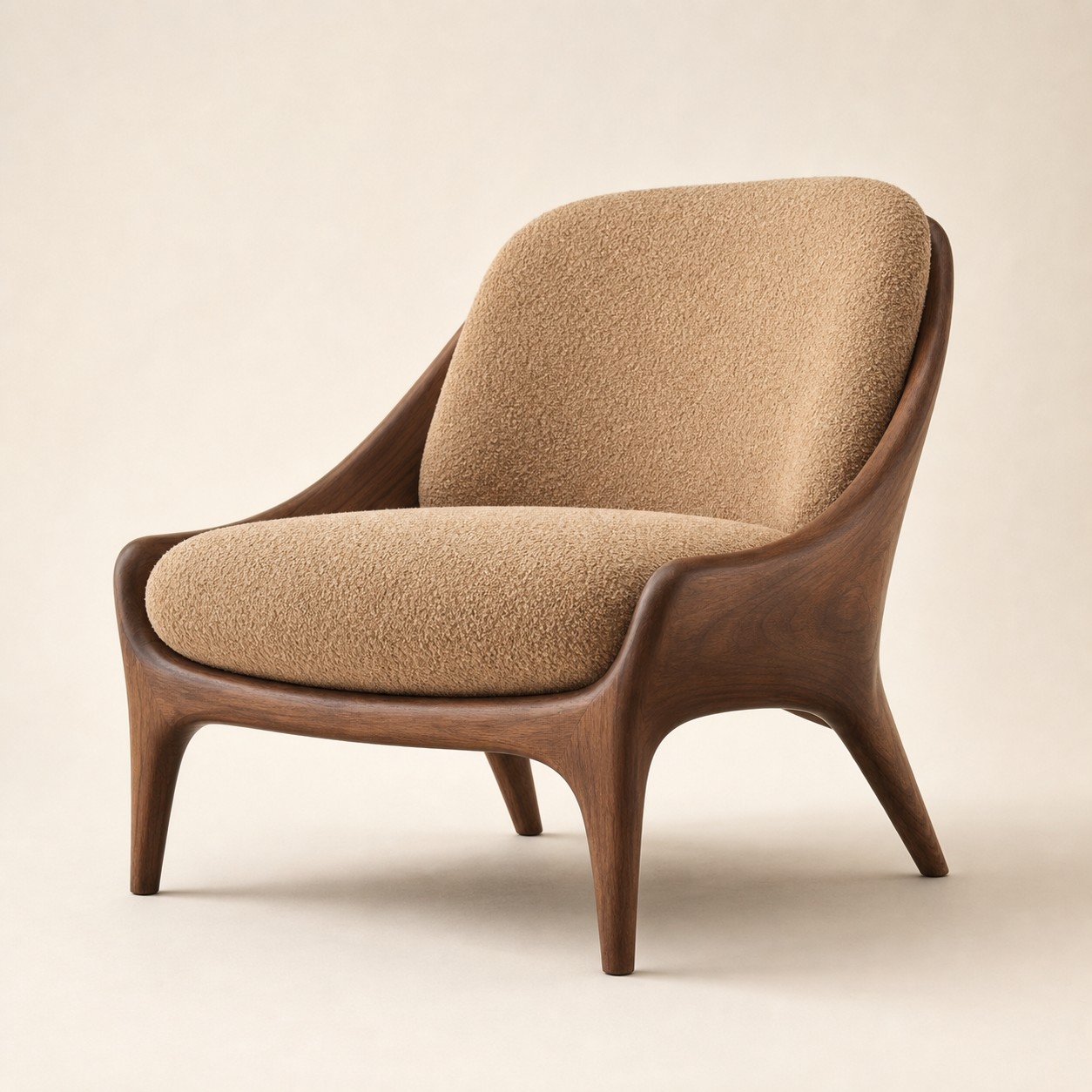
Now send that exact image to gpt-image-2/image-to-image with an environment-swap prompt:
Restyle this exact chair into a richly lit editorial environment scene
WITHOUT changing the chair itself: keep the walnut frame shape, the camel
boucle cushion, the leg proportions, the exact silhouette pixel-faithfully
identical. Replace the seamless cream backdrop with a warm sunlit reading
nook: a tall arched window on the upper left casting long late-afternoon
shadows across a wide oak plank floor, a small round side table of dark
stained ash to the right with a single ceramic vase holding three stems of
dried wheat, a folded natural-linen throw draped over one arm of the chair,
and a vintage Berber-style rug in soft cream and faded terracotta
underneath. Atmospheric warm late-afternoon light, slightly hazy air,
magazine interior photography, matching neutral palette.
Result — same chair, new room:

The frame shape, cushion fabric, color palette, and leg geometry carry across cleanly. The seamless backdrop is gone; a full environment is now drawn around the asset that was the brand-controlled element.
What the editing variant is good at:
- Scene swaps. Pulling an isolated subject into an environment, or moving an environment subject to a new one.
- Surgical attribute changes. "Change the cushion fabric to navy velvet, keep everything else identical" — works far better than re-prompting the whole scene from scratch.
- Composition refinement. "Same chair, same room, push the camera one step back and add a small dog on the rug" — the model edits rather than redraws.
- Brand-asset restyles. A campaign moodboard given as one reference, plus a prompt asking for three matching variants, holds tone better than three independent text prompts.
What it is not good at (run the standard text-to-image instead):
- Major composition rewrites. If 60%+ of the frame needs to change, you are better off starting from a fresh prompt.
- Character swaps. If "the same chair but different chair" is what you mean, that is a new prompt, not an edit.
The Code: Both Models, End to End
Both models answer at POST /v1/tasks. The text-to-image call sends a prompt in input; the image-to-image call adds an input_urls array carrying one to five reference image URLs.
Text-to-image (gpt-image-2)
import time, requests

API = "https://api.hiapi.ai/v1/tasks"
HEADERS = {"Authorization": f"Bearer {HIAPI_TOKEN}"}

resp = requests.post(API, headers=HEADERS, json={
    "model": "gpt-image-2/text-to-image",
    "input": {
        "prompt": (
            # Character bible first — early tokens carry identity.
            "A young woman in her late twenties, shoulder-length wavy "
            "dark-auburn hair, warm olive skin, soft freckles, "
            "tortoiseshell round glasses, cream wool turtleneck, thin "
            "gold chain, moss-green linen blazer. "
            # Scene next.
            "She sits at a marble cafe table by a tall window, latte "
            "in a white ceramic cup, navy leather notebook open. "
            # Style modifier last — pins the look across the series.
            "35mm film, warm cafe interior, shallow depth of field, 1:1."
        ),
        "aspect_ratio": "1:1",
        "resolution": "1K",
    },
}).json()
task_id = resp["data"]["taskId"]

while True:
    task = requests.get(f"{API}/{task_id}", headers=HEADERS).json()["data"]
    if task["status"] in ("success", "fail"):
        break
    time.sleep(5)

open("scene-a.png", "wb").write(
    requests.get(task["output"][0]["url"]).content)
For a 2K canvas, set "resolution": "2K". Pricing scales 1.33× per the live pricing page — same call shape, $0.04 instead of $0.03.
Image-to-image (gpt-image-2/image-to-image)
import time, requests

API = "https://api.hiapi.ai/v1/tasks"
HEADERS = {"Authorization": f"Bearer {HIAPI_TOKEN}"}

resp = requests.post(API, headers=HEADERS, json={
    "model": "gpt-image-2/image-to-image",
    "input": {
        "prompt": (
            "Restyle this exact chair into a warm sunlit reading "
            "nook: arched window upper left, oak plank floor, dark "
            "ash side table with dried wheat, Berber rug. Keep the "
            "walnut frame, boucle cushion, and silhouette IDENTICAL."
        ),
        "input_urls": ["https://your-cdn.example.com/chair-reference.png"],
        "aspect_ratio": "1:1",
        "resolution": "1K",
    },
}).json()
task_id = resp["data"]["taskId"]

while True:
    task = requests.get(f"{API}/{task_id}", headers=HEADERS).json()["data"]
    if task["status"] in ("success", "fail"):
        break
    time.sleep(5)

open("scene-edited.png", "wb").write(
    requests.get(task["output"][0]["url"]).content)
Up to five reference images can ride in the same call — append more URLs to the input_urls array. The model treats the references as a small style/identity context, then writes the edit specified in the prompt. Note that references are hosted URLs, not inline base64 — if your reference lives on disk, upload it somewhere reachable first (object storage, your CDN) and pass the link.
A couple of operational notes:
- Expect 60–120 seconds end to end at 1K; 2K is longer. The async flow means there is no long-held HTTP connection to time out — poll every few seconds, or set
callback.urlon the create call and let hiapi POST you the terminal state. - Do not block a request handler waiting on a generation. The API already hands you a job id — persist the
taskIdand let a poller or the callback finish the work instead of holding a serverless invocation open. - Two parameter combos to avoid on the editing variant:
aspect_ratio: "auto"(or omitting it) only supports1Kresolution, and1:1cannot pair with4K. - Reference images at the resolution you want out. Sending a 512×512 reference and asking for a 2K output works, but the model has less detail to anchor on. For brand-faithful edits, send references at the target output size.
When to Use Which (and What Else hiapi Serves)
gpt-image-2 and its image-to-image sibling are the right default when you need text rendering, character or product consistency across a small series, or surgical edits on a brand asset. They are not the only image options on hiapi, and the choice between them matters more than it looks:
| Need | Model | Why |
|---|---|---|
| First draft from a prompt, exploring | gpt-image-2 ($0.03) | Cheapest in the series; the bible-and-scene pattern carries you a long way. |
| Surgical edit / scene swap / brand restyle | gpt-image-2/image-to-image ($0.03) | Same price, but anchors on a reference. The right call any time the output must match an existing asset. |
| High-fidelity 4K marketing canvas | gpt-image-2 at 4K ($0.06) | The standard variant exposes a 4K tier with a clean 2× multiplier — cheapest path to a large canvas. |
| Production hero shot, regeneration cost is high | gpt-image-2-pro ($0.35) | Stability tier in the same family, ~10× the standard price for the small fraction of jobs where one bad render costs more than ten good ones. |
| Photorealistic single-subject portrait, no editing needed | flux-1.1-pro ($0.05) | FLUX 1.1 Pro on hiapi is the realism specialist when you do not need text rendering or multi-turn editing. |
| Speed-critical edits, character consistency at scale | Nano-Banana-2 ($0.085 at 1K) | Google's Gemini 3.1 Flash Image variant — different identity profile, similar editing pattern, faster turnaround at the cost of a higher per-call price. |
The pricing column above comes from the platform's live pricing — refresh it before quoting numbers in your own internal estimates.
A Pattern To Steal
If you have an existing pipeline that calls gpt-image-2 once per request, the cheapest upgrade is to introduce a second call:
def render(job):
    # 1) First draft from prompt.
    draft = run_task("gpt-image-2/text-to-image", input={
        "prompt": job.prompt,
        "aspect_ratio": "1:1",
        "resolution": "1K",
    })

    # 2) If the job is brand-critical or needs a scene swap,
    #    edit the draft instead of re-prompting.
    if job.needs_edit:
        return run_task("gpt-image-2/image-to-image", input={
            "prompt": job.edit_instruction,      # what to change
            "input_urls": [draft.output_url],    # what to preserve
            "resolution": "1K",
        })

    return draft
Two calls at $0.03 each is $0.06 total — still cheaper than a single gpt-image-2-pro call ($0.35), and for most jobs the second call replaces three or four discard-and-re-prompt rounds. The math gets better the more brand-faithful the output needs to be.
The Short Version
gpt-image-2 is the draft engine. gpt-image-2/image-to-image is the editor. Used together, they cover the workflows that single-call image generation cannot — character series, brand-asset restyles, surgical attribute changes — without escalating to the Pro tier.
The two patterns that pay off most are: (1) a verbatim character bible reused across scenes for series consistency, and (2) a first-render-then-edit two-call flow for any job where the output must look like an extension of an existing asset. Both clear at $0.03 a call on hiapi's /v1/tasks endpoint, and both ship in the same task payload shape — one worker function covers the pair.
Confirm the live pricing, write the bible once, and let the editor do the work that re-prompting cannot.