TL;DR
- 6 个场景,每个都有 Kling 4.0 的真实成片和完整提示词:电商产品、美食特写、旅行风光、生活片段、带声音的空镜、图生视频。
- 全部 720p、5 秒、16:9,每条 $1.10,声音跟画面一起生成。
- 点每条下面的「用这个提示词生成」,Kling 4.0 模型页会自动填好同一条提示词。新用户注册送 200 积分。
场景 1:电商产品镜头
Product shot of a glass perfume bottle on wet black stone, a single drop of water falls and splashes beside it, slow orbit around the bottle, soft studio rim light, crisp water drip sound
kling-4.0/text-to-video,16:9,720p,5 秒,$1.10。
一个主体、一个小动作(水滴)、一种运镜(环绕),产品镜头就够了。最后写上想要的声音,音轨会一起生成。
场景 2:美食特写
Top-down close-up of a bowl of ramen, chopsticks lift a tangle of noodles out of the steaming broth, broth drips back into the bowl, camera locked off, gentle slurp and broth simmering
kling-4.0/text-to-video,16:9,720p,5 秒,$1.10。
美食镜头写「camera locked off」固定机位,让动作集中在筷子和面上。叉烧、溏心蛋、葱花这些配料提示词里没写,模型自己补上了;想要固定的配料,就逐个写出来。
场景 3:旅行风光
Ultra-wide shot of a camel caravan crossing tall orange dunes at sunset, long shadows stretching across the sand, wind lifting fine sand off the ridgeline, slow pan from left to right, soft wind and distant camel bells
kling-4.0/text-to-video,16:9,720p,5 秒,$1.10。
风光镜头的关键是光线和时间(sunset、long shadows),再给一个慢速运镜。风声、驼铃这类声音写在最后,成片自带音轨,不用另配环境声。
场景 4:生活片段
Two friends laugh at a night market food stall, one hands the other a grilled skewer, smoke and steam rising from the grill under warm string lights, handheld medium shot, sizzling grill and lively crowd chatter
kling-4.0/text-to-video,16:9,720p,5 秒,$1.10。
人物镜头写清楚谁对谁做什么(one hands the other)。这条里递串、接串完整演完了。和 Kling 3.0 的同提示词对照见 Kling 4.0 vs Kling 3.0。
场景 5:带声音的空镜
An old steam train pulls slowly out of a mountain station at dawn, thick white steam billowing into low golden sunlight, pine forest on both sides, slow lateral tracking shot, cinematic depth of field, natural engine rumble and distant birdsong
kling-4.0/text-to-video 模型页示例,16:9,720p,5 秒,$1.10。
声音写在提示词最后,一主一次:主声音(引擎轰鸣)加一个远处的点缀(鸟鸣)。同一条换 1080p 的效果,见 Kling 4.0 API 价格。
场景 6:图生视频,让一张照片动起来
首帧:
成片:
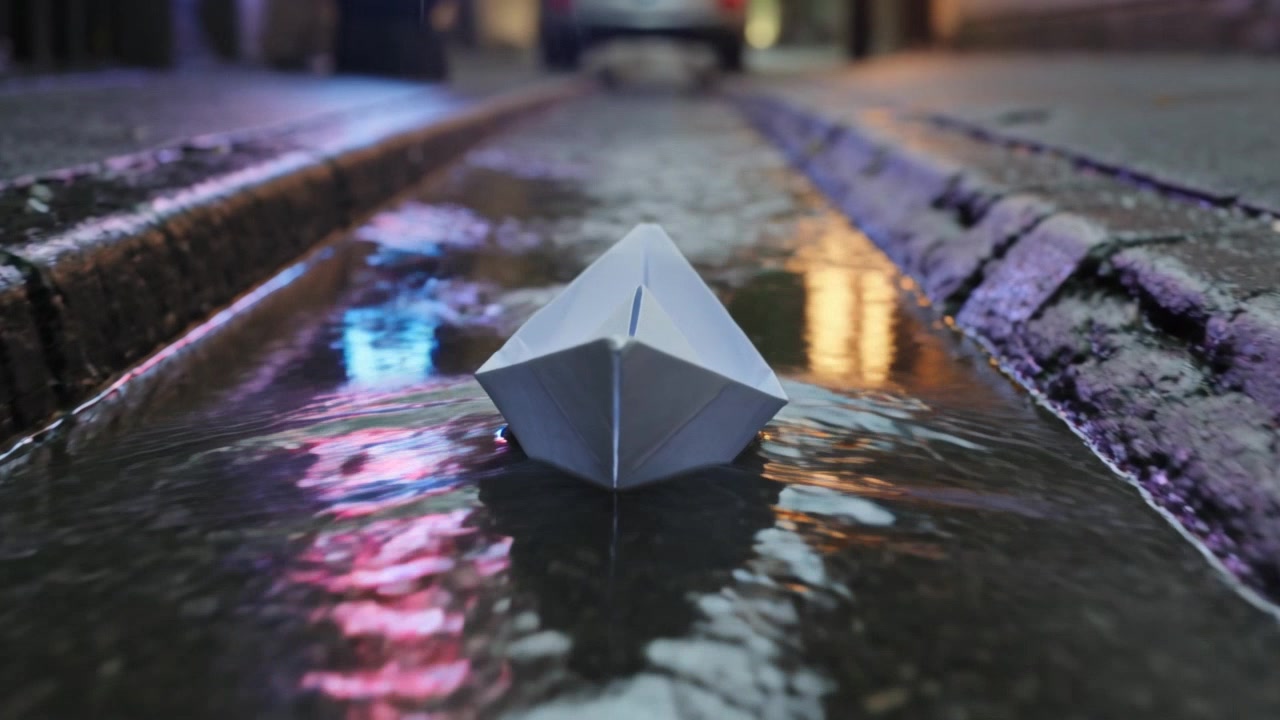
The small boat drifts forward across the calm water, gentle ripples spreading from the bow, mist slowly rolling over the surface, camera follows from behind, soft lapping water and a distant bird call
用这个提示词生成 →(在图生视频模型页上传你的首帧)
kling-4.0/image-to-video,720p,5 秒,$1.10。
首帧已经定了构图,提示词只写「怎么动」:船往哪走、水和雾怎么变、镜头怎么跟,再加上声音。
提示词怎么写
- 主体 + 动作 + 场景:一句话写清谁在哪里做什么,动作越具体越好。
- 光线 + 运镜:时间和光(dawn、sunset、rim light),再加一种运镜(tracking、orbit、push-in、locked off)。
- 声音放最后:主声音加一个远处的点缀,比如「engine rumble and distant birdsong」。
常见问题
每条多少钱?
本文每条 720p、5 秒,$1.10。1080p 每秒 $0.33,5 秒 $1.65;时长最长 30 秒,按秒计费。
生成一条要多久?
本文这几条 720p、5 秒的,从提交到完成约 3–4 分钟。
能不能不要声音?
每条都带同步声音,没有开关。提示词里写想要的声音,后期可以替换。
720p 还是 1080p?
先用 720p 调好画面,定稿再换 1080p,提示词不用改。两档同提示词的对照见 Kling 4.0 API 价格。
接入代码看 可灵 4.0 API 怎么用,价格看 Kling 4.0 API 价格。复制场景 1 的香水提示词,去模型页生成你的第一个产品镜头。