TL;DR
- What this is: a working recipe for generating e-commerce product images with flux-2/text-to-image on hiapi. Every image on this page was produced by the exact prompt printed right above it — no borrowed demos — so you can reproduce each one.
- Why flux-2 for products: it leans on prompt adherence and high fidelity, which is exactly what catalog work needs — an exact count of items, a specific colour, a clean seamless background, and blank (un-lettered) labels, all followed literally.
- Model facts (verified on the API): flux-2 runs on the async task endpoint (
/v1/tasks).input.resolutiontakes the megapixel form —0.5 MP,1 MP,2 MP, or4 MP— not1K/2K.aspect_ratiois optional and accepts values like1:1,3:2,16:9. - Pricing (per image):
0.5 MPis $0.0375,1 MPis $0.05,2 MPis $0.075,4 MPis $0.125. See pricing for the live numbers. - How to run it: POST to the task API, poll until
success, then download the image fromoutput[0].url(that URL expires — save the bytes immediately). Full copy-paste script at the end, including a batch loop.
Why flux-2 fits product photography
Most text-to-image models can draw a nice-looking mug. The problem in e-commerce isn't "nice" — it's exact. A product listing needs the right colour, the right number of items, a clean background with room for your own overlay, and labels that stay blank so you can drop in real copy later. When a model improvises — adds a fourth bottle, invents label text, tints the white background — you can't ship the shot.
flux-2 is tagged for prompt adherence and high fidelity, and in practice that means it tends to do what the prompt literally says. That's the whole game for catalog imagery: you write the constraints, and the model honours them instead of "creatively interpreting" them. The recipes below are built around that — each one leans on a specific constraint (a count, a colour, a layout) so you can see the adherence for yourself.
How to read these recipes
Each recipe has three parts: a one-line goal, the exact prompt (copy it as-is), and the image it generated. I wrote every prompt myself and ran it through flux-2 on the live task API. A few habits that consistently help with this model:
- State the background explicitly. "Seamless light-grey studio background" beats leaving it to chance, and it keeps the shot ready for a PDP.
- Say "no text, no logo" when you want blank labels. flux-2 will honour it, which means you can add real branding downstream.
- Give it countable, checkable constraints. "Exactly three bottles", "left amber, middle clear, right teal" — concrete instructions are where adherence pays off.
- Reserve negative space in the prompt ("generous empty space at top for a headline") when the image is going under overlaid copy.
Recipe 1 — The clean packshot
Goal: the bread-and-butter listing shot — one product, seamless background, even margins, ready to drop onto a product page.
A single matte-white ceramic coffee mug centered on a seamless light-grey studio background, three-quarter front angle, empty and unbranded. Soft even top-light with one subtle rim highlight down the left edge, a soft grounded contact shadow beneath. Studio e-commerce packshot, perfectly centered, wide even margins on all sides, photoreal, high detail, no text, no logo.
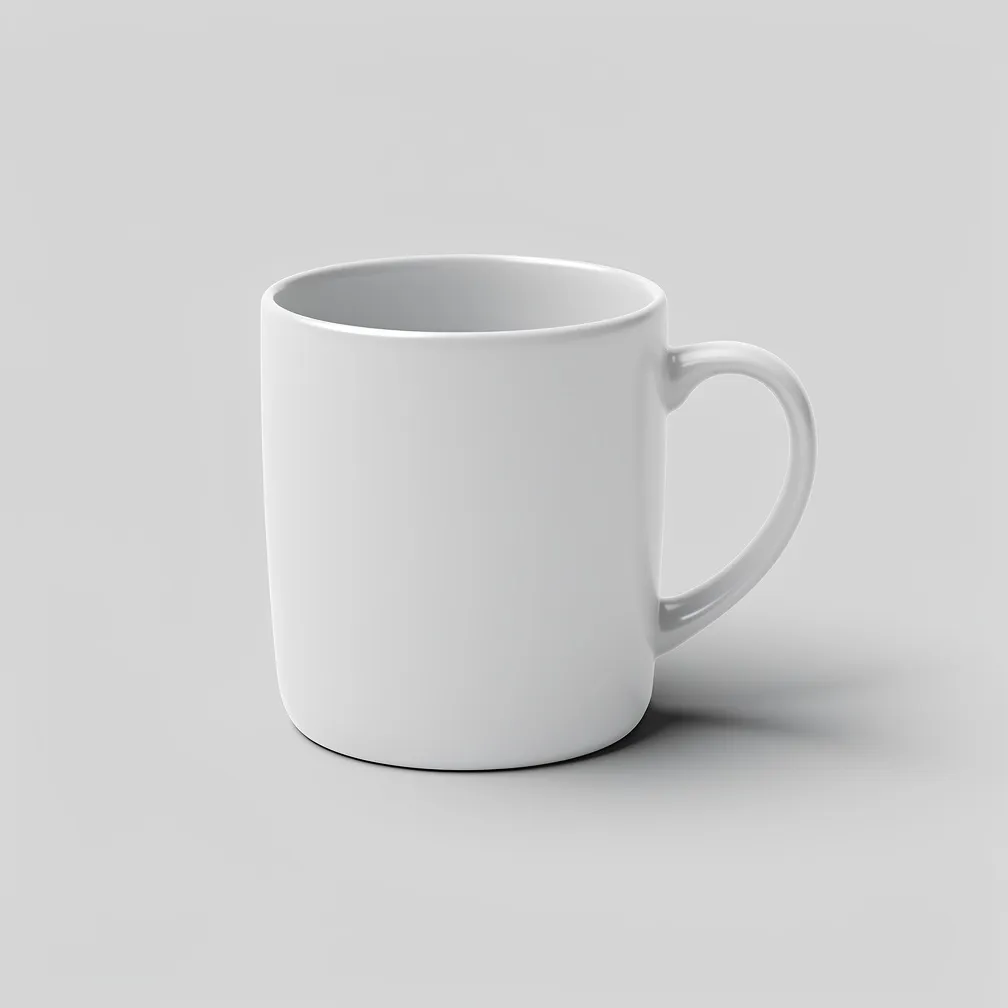
The margins and centering come straight from the prompt — asking for them explicitly is what keeps the crop usable across a grid of listings.
Recipe 2 — Prompt adherence, tested
Goal: prove the model follows exact, countable instructions — the reason to reach for flux-2 on product work in the first place.
Product photo of exactly three glass spray bottles standing in a row on a white acrylic surface: the left bottle filled with pale amber liquid, the middle bottle filled with clear liquid, the right bottle filled with soft teal liquid. All three have matte-black fine-mist pump tops and blank labels with no writing. Even frontal studio light, soft reflections on the acrylic, seamless white background. Photoreal commercial product photography, sharp focus, no text anywhere in the image.
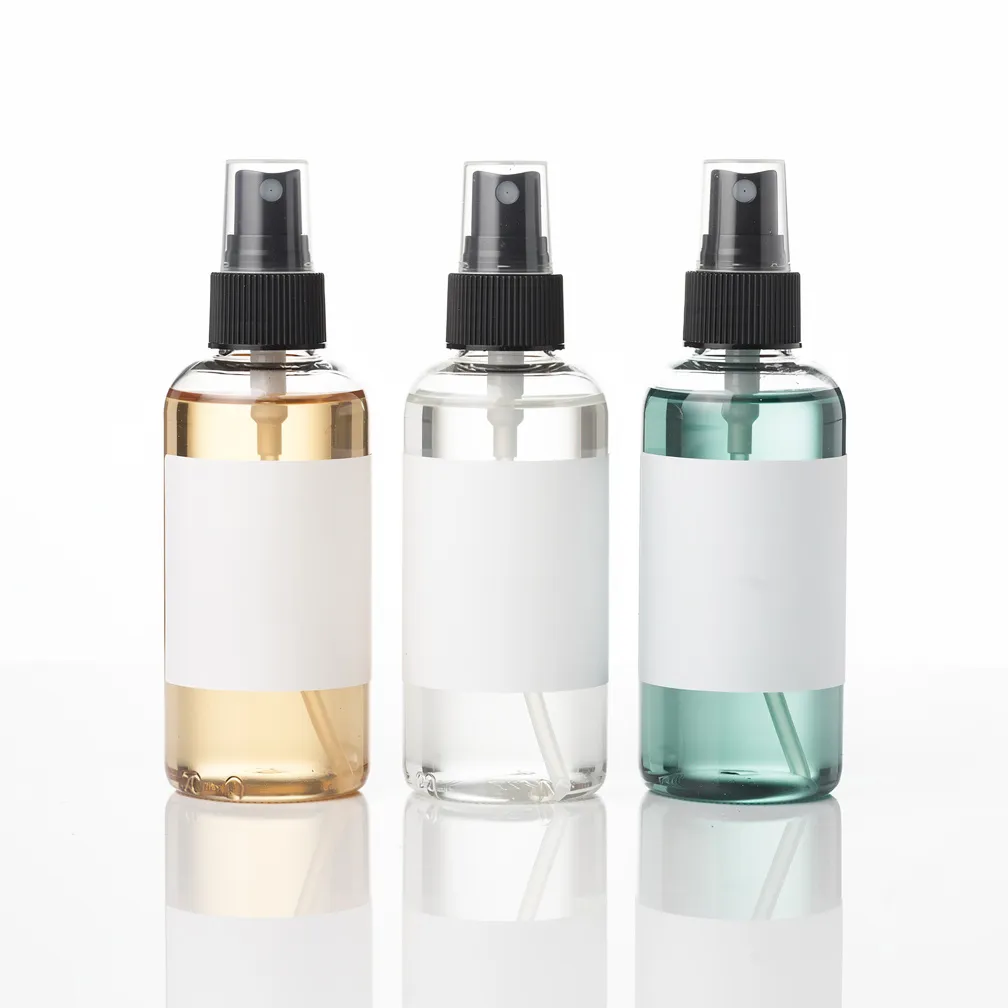
Count it: three bottles, not four. Left-to-right the fills are amber, clear, teal — in order. The pump tops are matte black. The labels are blank, so real copy can go on later. That's the payoff — you specify, it complies, and the shot is usable as-is.
Recipe 3 — The lifestyle / in-context shot
Goal: stage the product in a scene without burying it — the "in use" image that sits alongside packshots on a listing.
Lifestyle e-commerce shot of a tan leather crossbody bag resting on a pale oak cafe table beside a folded newspaper and a cup of espresso, soft morning window light from the left, warm out-of-focus cafe interior in the background with creamy bokeh. The bag is the clear hero, sharp and well-lit, staged naturally but uncluttered. Photoreal, editorial product-in-use photography, warm neutral palette, shallow depth of field, no visible brand marks or text.
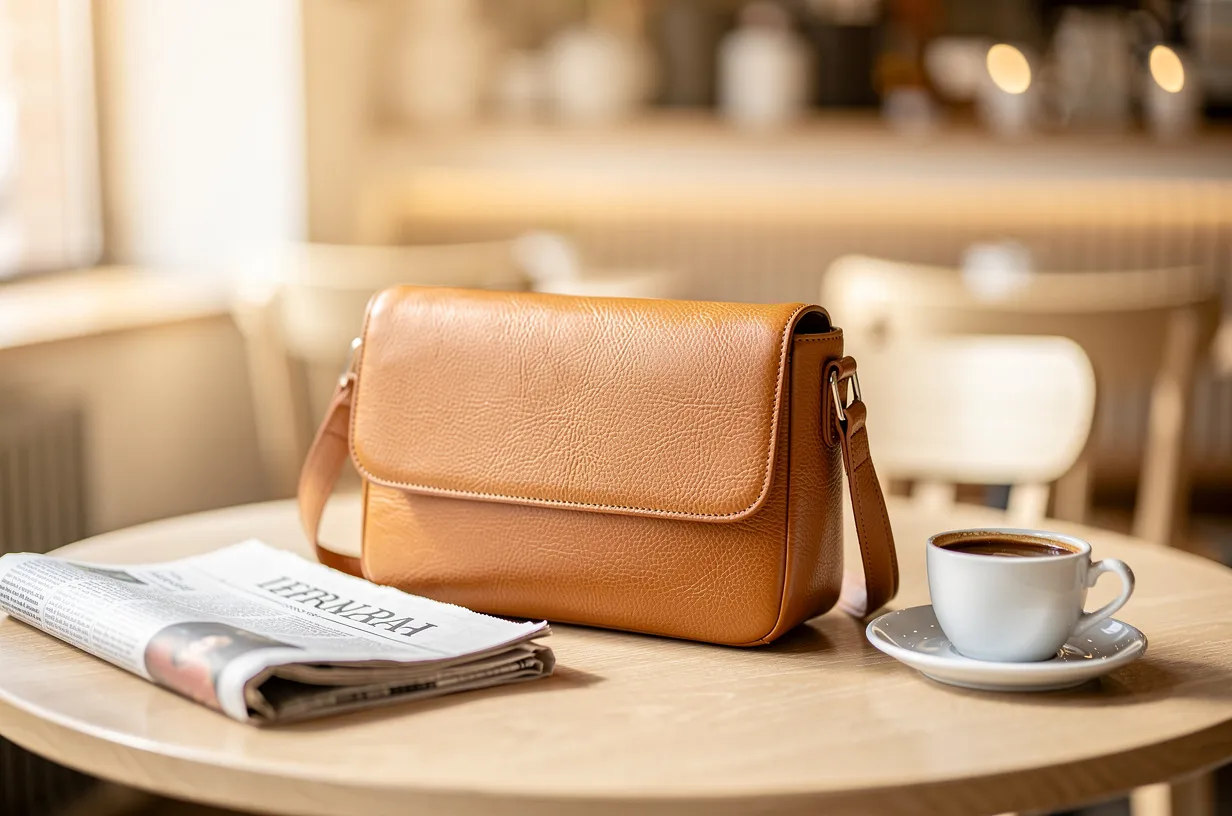
Naming the hero ("the bag is the clear hero, sharp") and pushing everything else into bokeh keeps the product legible while still telling a story — the balance a lifestyle shot needs.
Recipe 4 — The multi-angle PDP set
Goal: the angle set a product-detail page uses — several consistent views of one item, matched in lighting and scale.
A clean product-detail-page angle set of one pair of low-top canvas sneakers in off-white, shown as three separate views arranged left to right on a seamless light-grey background: a straight side profile, a three-quarter front angle, and a top-down overhead view. Consistent soft studio lighting and identical scale across all three, even spacing, soft contact shadows. Catalog-grade e-commerce photography, photoreal, crisp, unbranded, no text or labels.
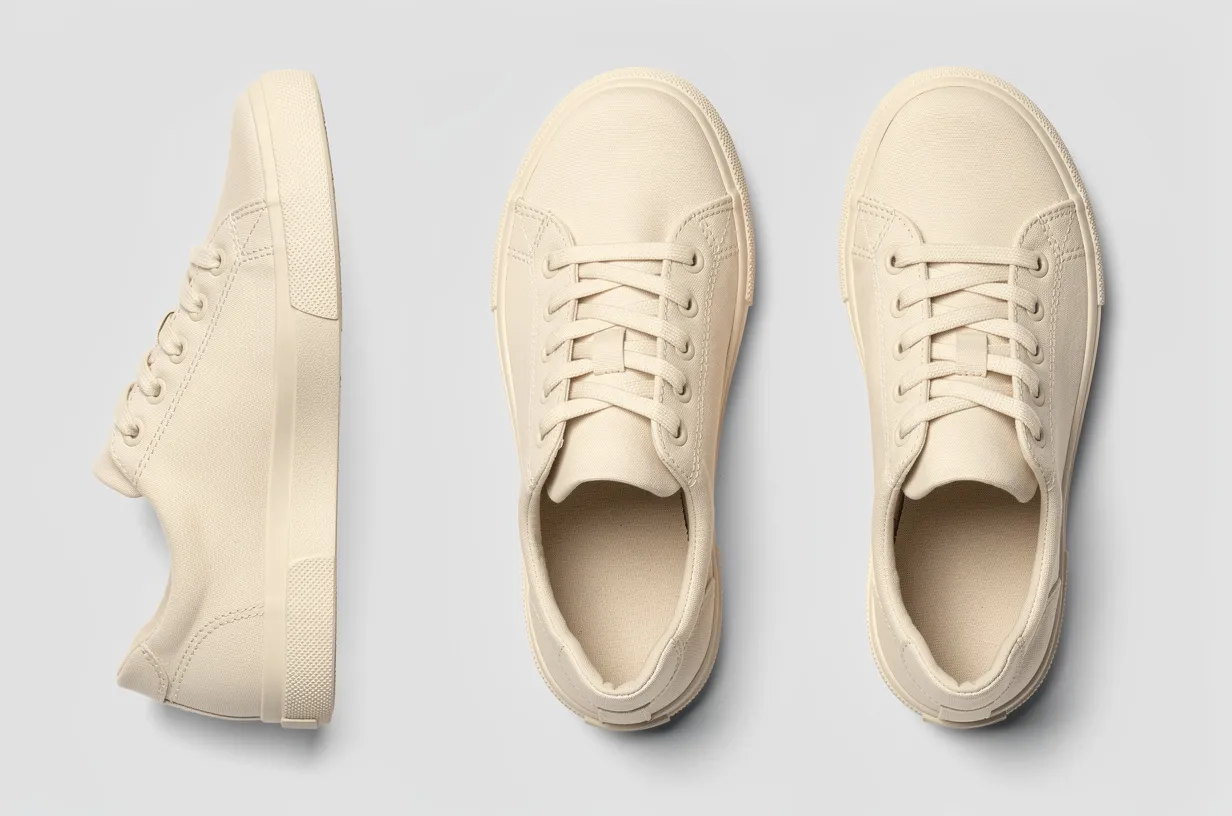
Asking for "consistent lighting and identical scale across all three" is what makes the set feel like one product instead of three loose renders. It won't replace a real 360 rig, but it's a fast way to mock up a PDP layout before shooting.
Running flux-2 on the task API
flux-2 uses hiapi's async task protocol — you create a task, poll it, then download the result. The one thing to get right: resolution is the megapixel form. Send "1 MP", not "1K", or the API returns a 400 telling you the value must be one of 0.5 MP / 1 MP / 2 MP / 4 MP.
1. Create the task
curl -s https://api.hiapi.ai/v1/tasks \
  -H "Authorization: Bearer $HIAPI_TOKEN" \
  -H "Content-Type: application/json" \
  -d '{
    "model": "flux-2/text-to-image",
    "input": {
      "prompt": "A single matte-white ceramic coffee mug centered on a seamless light-grey studio background, three-quarter front angle, soft even top-light, photoreal e-commerce packshot, no text, no logo",
      "aspect_ratio": "1:1",
      "resolution": "1 MP"
    }
  }'
# -> {"code":200,"data":{"taskId":"tk-hiapi-..."},"message":"success"}
2. Poll until it's done, then download
import os, time, requests

TOKEN = os.environ["HIAPI_TOKEN"]
BASE = "https://api.hiapi.ai/v1/tasks"
HEADERS = {"Authorization": f"Bearer {TOKEN}"}


def generate(prompt, aspect_ratio="1:1", resolution="1 MP"):
    # create
    r = requests.post(BASE, headers=HEADERS, json={
        "model": "flux-2/text-to-image",
        "input": {"prompt": prompt, "aspect_ratio": aspect_ratio, "resolution": resolution},
    }).json()
    task_id = r["data"]["taskId"]

    # poll (a single image usually lands well under two minutes)
    deadline = time.time() + 600
    while time.time() < deadline:
        task = requests.get(f"{BASE}/{task_id}", headers=HEADERS).json()["data"]
        if task["status"] == "success":
            # output[0].url is a temporary link — download the bytes now
            url = task["output"][0]["url"]
            return requests.get(url, timeout=120).content
        if task["status"] == "fail":
            raise RuntimeError(task.get("error"))
        time.sleep(5)
    raise TimeoutError(task_id)


img = generate("A single matte-white ceramic coffee mug on a seamless light-grey background, photoreal e-commerce packshot, no text")
open("mug.jpg", "wb").write(img)
The URL in
output[0].urlcarries anexpireAttimestamp — it's a short-lived link. Download the bytes and push them to your own storage right away; don't hotlink it into a live listing.
Generating a whole catalog in a batch
For a real store you're not making one image — you're making one per SKU. Keep a list of prompts, reuse the generate() function above, and save each result under its SKU:
catalog = {
    "SKU-1001": "A single matte-white ceramic coffee mug on a seamless light-grey studio background, three-quarter angle, soft even top-light, photoreal e-commerce packshot, no text, no logo",
    "SKU-1002": "A tan leather crossbody bag on a seamless light-grey studio background, front-on, soft studio light, grounded contact shadow, photoreal packshot, no visible brand marks",
    "SKU-1003": "A pair of off-white low-top canvas sneakers, side profile, seamless light-grey background, crisp catalog lighting, photoreal, unbranded, no text",
}

for sku, prompt in catalog.items():
    img = generate(prompt, aspect_ratio="1:1", resolution="1 MP")
    open(f"{sku}.jpg", "wb").write(img)
    print(f"{sku} done")
A couple of things worth knowing before you scale it up:
- Resolution drives the bill. At
1 MPeach image is $0.05; step up to2 MP($0.075) or4 MP($0.125) only for hero shots where the extra detail earns its keep. A 200-SKU catalog at1 MPis about $10. Check pricing for the current figures before you budget. - Run tasks concurrently. Each SKU is an independent task — create several, then poll them in parallel rather than one-at-a-time, and a large batch finishes in a fraction of the wall-clock time.
- Keep a consistent "house" clause. Notice the shared tail in every prompt above ("seamless light-grey studio background … photoreal packshot, no text"). Locking that phrasing is what makes a batch look like one catalog instead of a grab-bag.
Takeaways
- flux-2's strength on product work is doing what you literally asked — exact counts, exact colours, blank labels — so write the constraints explicitly and let it comply.
- Always state the background and reserve negative space in the prompt; it's what makes a render drop straight into a listing.
- On the task API, send
resolutionin megapixels (1 MP), poll/v1/tasks/{id}tosuccess, and downloadoutput[0].urlbefore it expires. - Price scales with resolution — batch your catalog at
1 MPand reserve2 MP/4 MPfor hero shots.
Ready to try it? Grab a key, point model at flux-2/text-to-image, and check the live rates on the pricing page before you batch a catalog.




