Mirelo SFX 2.0 turns text into 1–30 second WAV sound effects for video foley, games, and short-form content. Try it online and view pricing and API examples.

Provider: Mirelo AI

Category: sound effects

Endpoint: /v1/tasks

Status: Available

Cost: See live page pricing

Back to Models

Mirelo SFX 2.0

New
by Mirelo AIAudio

Mirelo SFX 2.0 turns text into 1–30 second WAV sound effects for video foley, games, and short-form content. Try it online and view pricing and API examples.

Pricing

Standard Usage

43 Credits/ s

Input

0 / 2000

More parameters

Generation settings

Length of the generated sound effect, an integer from 1 to 30. Defaults to 5 seconds; longer clips cost more; Range: 1 - 30, Integer only

Estimated cost215 Credits43 Credits / s × 5s

Output

Ready for generation

Configure your parameters and click "Run" to see the output here.

--

Hear a generated sound effect

Each case keeps the playable effect, the full sound description, and the real duration used for the request so you can judge impact, space, and tail.

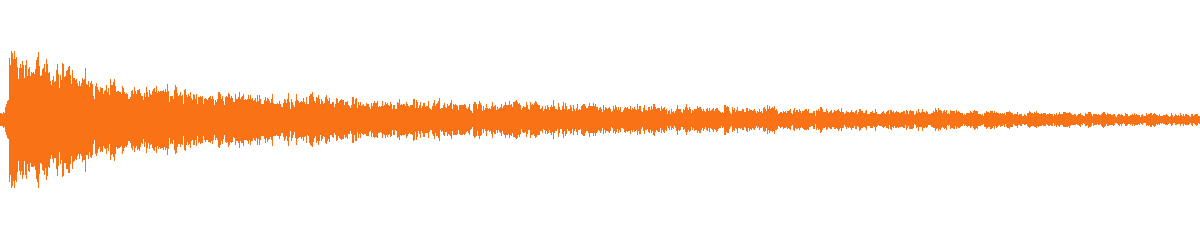
Foley · Metal impact · 1 s

Hammer strike on steel

A one-second close-perspective hammer strike with a sharp transient and a long metallic ring.

0:00
--:--

Measured 1.00 s · WAV · PCM 16-bit / 48 kHz / mono

Sound description

A single heavy hammer strike on a steel beam in a large empty warehouse, sharp transient, long metallic ring, close perspective.

duration
1
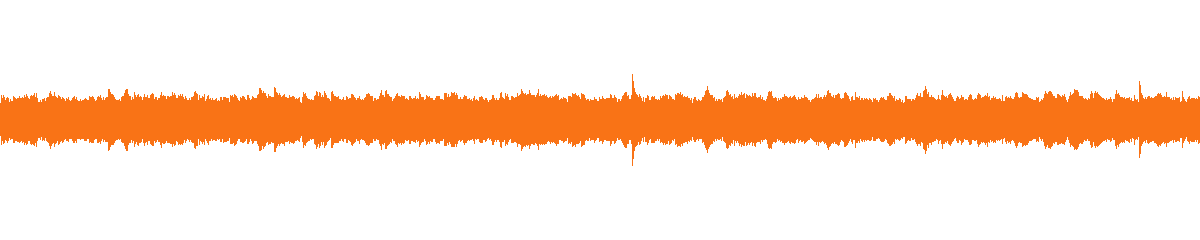
Ambience · Rain at night · 10 s

Rain on a metal roof at night

A ten-second night ambience with dense droplets on corrugated metal, distant rolling thunder, and water running into a gutter.

0:00
--:--

Measured 10.00 s · WAV · PCM 16-bit / 48 kHz / mono

Sound description

Heavy rain at night on a corrugated metal roof, dense overlapping droplets, distant rolling thunder, water running into a gutter, close-to-mid perspective, steady ambience with no music and no voices.

duration
10
Game audio · UI feedback · 2 s

Sci-fi interface confirmation

A two-second cockpit UI confirmation: holographic tap, bright two-tone digital chime, and a short sub-bass pulse.

0:00
--:--

Measured 2.00 s · WAV · PCM 16-bit / 48 kHz / mono

Sound description

A short sci-fi interface confirmation in a quiet cockpit: a soft holographic tap, a bright two-tone digital chime, and a quick sub-bass pulse, clean and close, with a very short room tail.

duration
2
Character SFX · Creature roar · 3 s

Canyon creature roar

A three-second guttural roar from a large creature, with raspy throat texture, chest-heavy low end, and a distant rocky echo.

0:00
--:--

Measured 3.00 s · WAV · PCM 16-bit / 48 kHz / mono

Sound description

A deep guttural roar from a large creature in a stone canyon, raspy throat texture, sharp attack, chest-heavy low end, distant rocky echo, mid perspective.

duration
3

Related audio models

Choose an adjacent route for music, single-speaker speech, or multi-speaker dialogue.

MIRELO SFX 2.0

Turn one sound description into a usable effect

Mirelo SFX 2.0 is a text-to-sound-effect model: the input is a text description and a duration, and the output is a 1–30 second WAV effect. It fits video foley, game audio, short-form video, and podcast sound design; it does not generate songs, speech, or dialogue.

Billed per output second, starting at 1 second; see the live price card at the top of the page.

Text-to-sound-effects1–30 second integer durationOne WAV per request4 real examples
Mirelo SFX 2.0 model cover artwork

MODEL OVERVIEW

What is Mirelo SFX 2.0

Mirelo SFX 2.0 is Mirelo AI's text-to-sound-effect model. It turns one description into a single effect: a hammer on a steel beam, rain on a metal roof, a sci-fi interface confirmation, or a canyon creature roar, each described through source, material, action, distance, and environment. Every request returns one WAV file, 1–30 seconds long and 5 seconds by default.

This page exposes the text-to-sound-effect route. The input is text and a duration; you do not upload footage and the model does not perform automatic video foley. It does not generate songs, speech, or dialogue: use a music model for complete tracks and a speech model for narration or multi-speaker dialogue. Clear boundaries prevent wasted iteration in the wrong task.

Effect quality depends heavily on how specific the description is. Naming the object, the material, how they meet, the distance, the space, and the attack and tail works better than stacking words like "huge" or "cinematic". The four examples on this page cover metal foley, night ambience, game UI, and a creature roar; each one is playable, shows the full prompt, and copies the real request input.

All four examples come from real requests rather than promotional audio. Each one records the full prompt, duration, measured length, and WAV format, and the file plays directly on the page. Use them first to judge whether the model fits the project, then rewrite your own description in the same structure and adjust material, distance, and tail step by step.

If this is your first text-to-sound-effect model, start with the one-second metal foley: material and transient problems are easiest to hear there. Then try the ten-second ambience to see whether the model holds its layers over time, and finish with the UI and creature roar, which need emotion and space. That order builds a judgment about the model faster than starting with a complex scene.

KEY FEATURES

Six core capabilities of Mirelo SFX 2.0

Every capability maps to a real example, a public parameter, or the request structure on this page. The waveforms come from the actual generated audio, not placeholders.

01

Turn 1 description into 1 complete effect across 6 sound dimensions

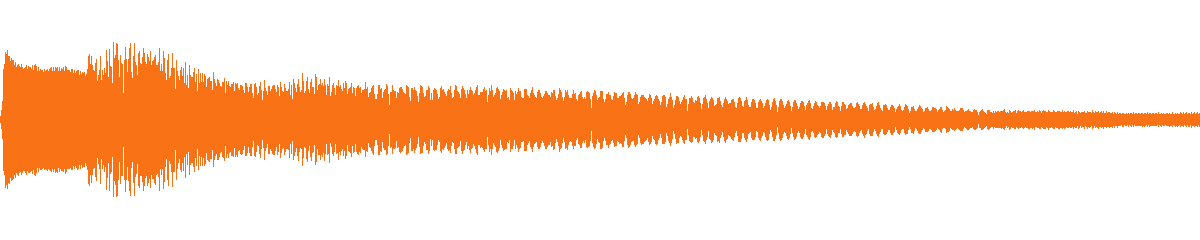
Put the source, material, action, distance and space, environment, and attack and tail into one description, and Mirelo SFX 2.0 returns one complete effect rather than a sample that still needs assembly. The first example on this page uses only one second: a hammer strike on a steel beam in a large empty warehouse, close perspective, sharp transient and long metallic ring. The result keeps a clear transient and a metallic tail.

For editing and game audio, this means you can describe the sound against the picture and get a usable file back, instead of auditioning a library for the same amount of time. One description that covers one event is usually steadier; if you need an impact, a break, and falling debris at once, separate requests are easier to control than one crowded sentence.

Real generated waveformFoley · Metal impact · 1 s
Hammer strike on steel audio waveform

Hammer strike on steel

A one-second close-perspective hammer strike with a sharp transient and a long metallic ring.

Measured 1.00 s · WAV · PCM 16-bit / 48 kHz / mono

Go to the audio player

02

Generate exactly 1–30 integer seconds to match the shot

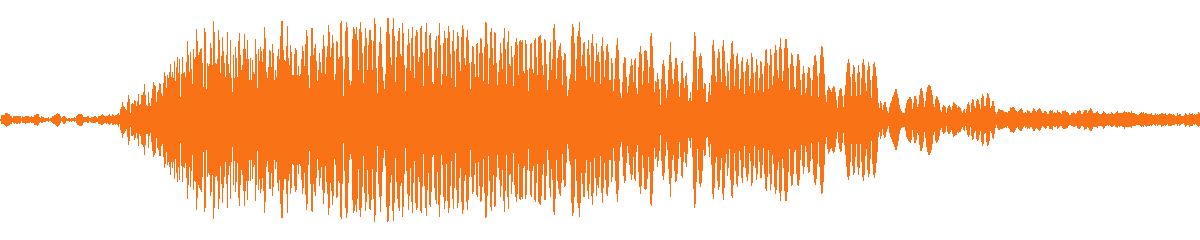
duration accepts an integer from 1 to 30 seconds and defaults to 5. A single action, UI feedback, or transition suits 1–3 seconds; rain, machinery, and room tone can use 10–30 seconds to cover a whole shot. The rain example on this page sets duration to 10 seconds, and the result covers a continuous ambience without loop-splicing in the edit.

Integer seconds are predictable: ask for 10 and the file is 10 seconds, which makes batch planning and timeline alignment straightforward. Decide the length from the shot first, then write the description; that is usually faster than generating long and trimming. If the final cut is still moving, validate the timbre at 1–3 seconds, then generate the final length.

Real generated waveformAmbience · Rain at night · 10 s
Rain on a metal roof at night audio waveform

Rain on a metal roof at night

A ten-second night ambience with dense droplets on corrugated metal, distant rolling thunder, and water running into a gutter.

Measured 10.00 s · WAV · PCM 16-bit / 48 kHz / mono

Go to the audio player

03

Use up to 2,000 prompt characters for a full sound brief

The public contract allows up to 2,000 characters and at least one non-whitespace character. That is enough for source, material, action, distance, space, environment, attack, and tail, plus boundaries such as "no music and no voices". For teams that turn sound specs into templates, a long prompt is easier to reuse and review than a handful of keywords.

There is no prompt_influence slider; control comes from the description itself. Write the details you want and exclude the elements you do not want. The request on the right is a complete request example: prompt and duration are the entire public input, so you can copy it and submit without adding hidden parameters.

Real request example
{
  "model": "mirelo-sfx-2.0",
  "input": {
    "prompt": "An old wooden door creaks open slowly in a quiet room, low hinge friction, a soft latch click, close perspective.",
    "duration": 6
  }
}

04

Get 1 WAV file that opens directly in editors and engines

Each request returns one WAV file. Measured output is PCM 16-bit, 48 kHz, mono, which common editors, game engines, and audio tools read directly without transcoding. The first release does not offer MP3, Opus, or other formats, and does not return multiple samples per request; submit separate requests or change one description variable for another version.

One format keeps the handoff simple: the file goes straight into a timeline or engine without first checking sample rate, bit depth, and mono or stereo layout. If your downstream pipeline requires a compressed format, transcode once at that stage; keeping the generated file lossless avoids an extra lossy step.

Real generated waveformGame audio · UI feedback · 2 s
Sci-fi interface confirmation audio waveform

Sci-fi interface confirmation

A two-second cockpit UI confirmation: holographic tap, bright two-tone digital chime, and a short sub-bass pulse.

Measured 2.00 s · WAV · PCM 16-bit / 48 kHz / mono

Go to the audio player

05

Trial in 3 seconds, then generate the final length

The expensive mistake in sound iteration is generating a long file in the wrong direction. Validate material, transient, and space at 1–3 seconds first, then extend duration to the length the shot needs. The creature-roar example on this page uses a three-second trial: throat texture, low-end weight, and canyon echo are all audible within those three seconds.

A short trial is still a real request, and its output can be kept or used as a reference for the longer version. Managing trial and final versions separately keeps the team from spending long-generation time before the direction is approved; once it is, generate the 10–30 second version, usually with fewer total iterations.

Real generated waveformCharacter SFX · Creature roar · 3 s
Canyon creature roar audio waveform

Canyon creature roar

A three-second guttural roar from a large creature, with raspy throat texture, chest-heavy low end, and a distant rocky echo.

Measured 3.00 s · WAV · PCM 16-bit / 48 kHz / mono

Go to the audio player

06

Describe material and space to shape transient and reverb

The same action against a different material produces a different attack and tail: a steel beam rings, a wooden door is low friction and a short latch, and a stone wall returns echo. Distance and space matter too: close perspective emphasizes the transient, while an empty warehouse or canyon lengthens the tail. Naming the object, material, distance, and space works better than adjectives such as "huge", "real", or "cinematic".

This mirrors how foley is actually planned: decide the object and how it is contacted, then how far the camera is, then the surrounding space. Once that order becomes a template, the same effect can move between projects by swapping only the material and space keywords while the description structure stays reusable.

CASE NOTES

Four real examples: how one description structure adapts

All four examples follow the same order: source, material, action, distance and space, environment, attack, and tail. Each keeps only the information the task needs. The breakdown below does not repeat the prompt text; it explains what to listen for and what to change next.

01

Metal foley: why a one-second strike needs material and space

The point of the one-second example is not the hammer; it is material and space. The description supplies a steel beam, an empty warehouse, close perspective, a sharp transient, and a long metallic ring, giving the model enough information to decide how hard the attack is and how long the tail runs. A bare "impact sound" can land closer to wood or plastic; adding metal, space, and tail keeps the result in one material world. Listen for the attack first, then the metallic tail, and judge level last.

Hear this example
02

Night rain: keeping music and voices out of a ten-second bed

A ten-second ambience is easy to reduce to "rain". This example adds a corrugated metal roof, dense droplets, distant rolling thunder, water in a gutter, and a close-to-mid perspective, then explicitly excludes music and voices. The hard part of ambience is not one event but sustained layering: droplet density should vary, thunder should sit far away, and the gutter should stay continuous. Listen for obvious repetition or a sudden seam inside the ten seconds; if you hear one, shorten the clip, remove an element, or describe a larger space next time.

Hear this example
03

Sci-fi UI: shaping attack and tail inside two seconds

A two-second UI sound succeeds or fails on attack and tail, not on how much information it contains. This example uses a holographic tap, a two-tone digital chime, a short sub-bass pulse, a quiet cockpit, and a very short room tail, splitting "confirmation" into three connected actions. UI sounds usually need to be short, clean, and repeatable; a long tail interrupts the interaction rhythm. If it feels sluggish, shorten the tail first, then trim the low pulse.

Hear this example
04

Creature roar: throat texture and canyon echo in three seconds

A three-second creature roar has to carry size, emotion, and space at once. This example describes a deep guttural roar, raspy throat texture, sharp attack, chest-heavy low end, a distant rocky echo, and a mid perspective, so the sound has close-up force and canyon distance together. Listen for low-end weight first, then throat texture, then whether the echo pushes the sound away. If the echo feels too close, describe a wider space or replace "distant" with a concrete distance to the rock wall.

Hear this example

MODEL COMPARISON

Mirelo SFX 2.0 vs ElevenLabs SFX vs general effect APIs

The comparison below covers only capability boundaries published in the documentation: duration, output format, prompt length, and control parameters. It does not compare price or subjective quality rankings, and it does not treat one vendor's marketing as a general conclusion.

01

Duration granularity: integer 1–30 s vs fractional 0.5–30 s with auto estimation

Both models cap output at 30 seconds, but they expose duration differently. Mirelo SFX 2.0 accepts only integer seconds from 1 to 30, defaults to 5, and the value maps directly to the output length; ElevenLabs Sound Effects accepts a duration_seconds value from 0.5 to 30 and estimates the length when the field is omitted.

When the effect must align to a cut and batches are planned in whole seconds, integer duration is more direct. When a UI accent needs a sub-second tick, ElevenLabs' fractional duration is more flexible. Both fit short video and game audio; the choice is between predictable whole seconds and a finer scale.

02

Output format: one WAV vs MP3 by default with multiple alternatives

Mirelo SFX 2.0 returns exactly one WAV per request. Measured output is PCM 16-bit, 48 kHz, mono, ready for an editor or game engine. ElevenLabs Sound Effects returns MP3 by default, also offers 48 kHz WAV for non-looping effects, and its API exposes PCM, μ-law, A-law, Opus, and several other output formats.

When the handoff is a single WAV with minimal post-processing, Mirelo's one format is simpler. When MP3, PCM, or Opus must be chosen by bandwidth, engine, or storage, ElevenLabs offers more options. General effect APIs commonly default to a compressed format and offer lossless or higher-sample-rate output as an option; if your pipeline already normalizes formats, this difference mostly disappears.

03

Prompt and controls: a 2,000-character brief vs short text with sliders and general parameters

Mirelo SFX 2.0 exposes only prompt and duration; the prompt can run to 2,000 characters and all control lives in the description. ElevenLabs Sound Effects is also text-led but adds a prompt_influence value from 0 to 1 (default 0.3) and a loop option; its public API reference does not list a text character maximum, so check the current documentation before relying on a limit.

Some general effect APIs add loop, seed, and negative_prompt controls. Mirelo narrows the surface to two fields, which makes the request simple and the description itself the spec; ElevenLabs and those APIs move some control out of the text into sliders and dedicated fields. When the sound spec must be a reviewable long template, Mirelo's character budget is clearer; when you need to nudge text influence or build a seamless loop, the parameter-rich route is more direct.

This comparison uses only capability boundaries from the public documentation. It does not cover price or subjective quality rankings. Capabilities change; check the current documentation and page parameters before integration. If a capability is mandatory for your project, validate it with one minimal request before committing, rather than deciding from the table alone.

PROMPT GUIDE

Six prompt patterns you can reuse for sound effects

The order below is a checklist rather than strict syntax. Read the prompt against it and you will usually see whether the missing piece is material, distance, or tail.

  1. 01

    Start with source and material: which object, which material, how they meet. Material drives the transient and tail; steel, wood, stone, and glass differ more than adjectives do.

  2. 02

    Then write the action and contact: strike, scrape, drop, push open, close. One verb should describe one event; avoid stacking three or four actions into one prompt.

  3. 03

    Name distance and space: close, distant, indoors, an empty warehouse, a metal pipe, or a stone canyon. Space changes reverb and low end noticeably.

  4. 04

    Add attack and tail: sharp, dull, short, long metallic ring, fading out. A concrete sound shape is more useful than words like "huge" or "real".

  5. 05

    State exclusions directly: no music, no voices, no audience applause. Clearer boundaries keep the result closer to a single effect.

  6. 06

    Change one variable at a time and trial at 1–3 seconds; generate the 10–30 second final only after it sounds right. Separate requests are not guaranteed to be identical.

QUALITY CHECK

Pre-flight check: 5 questions that tell you if the prompt is specific enough

You do not need to fill 2,000 characters every time, but the prompt should answer these five questions. If one has no answer, the result usually becomes vague on exactly that dimension. They are a troubleshooting order rather than a scorecard: source and material first, then action, space, envelope, and exclusions. Change one answer at a time so you can tell which one moved the result.

01

Check 1: are the source and material explicit?

"An impact" is not a source; "a hammer striking a steel beam" is. Material drives transient and tail: steel, wood, stone, glass, and cloth produce different attacks and decays from the same action. If the result sounds like another material, change the material word before adding adjectives.

02

Check 2: does the action describe one event?

A prompt that asks for an impact, a break, falling debris, and fire at the same time gives the model no clear priority. Put the main event first and split other layers into separate requests. If one file must contain the sequence, state the order explicitly: impact first, then the break, then debris landing.

03

Check 3: are distance and space defined?

Close perspective emphasizes the transient; distance softens highs and adds reverb. A room, an empty warehouse, a metal pipe, and a stone canyon each reflect differently. "Close perspective in an empty warehouse" is more controllable than "with reverb" because it defines distance and space type together.

04

Check 4: can the attack and tail be judged?

Attack is how quickly the sound reaches its peak; tail is how it decays afterward. "Sharp attack, short decay" or "soft attack, long metallic ring" guides generation better than "sounds real". Listen to the first 200 milliseconds, then the final segment, and you can usually judge whether the envelope matches.

05

Check 5: are exclusions stated?

Effect generation can drift into music, voices, applause, or an extra ambience layer. Writing "no music, no voices, no audience" into the prompt is easier than cleaning the file afterward. Exclusions do not need length, but they do need specificity. If unwanted elements persist, remove some mood and scene words from the description to narrow the result.

HOW TO USE

How to generate and integrate a sound effect with Mirelo SFX 2.0

Four steps take you from listening to integration. The first two happen on this page; the last two move the validated parameters into code. Each step has a concrete output, so you do not need to read the entire API reference first.

01

Step 1: trial the timbre at 1–3 seconds in the Playground

Enter the description in the Playground at the top of the page and set duration to 1–3 seconds to check material, transient, and space. A short trial quickly exposes missing pieces: no distance makes the sound too close, no space makes the tail too dry. Once the direction works, set duration to the length the shot needs. All four examples on this page are playable and serve as prompt references.

02

Step 2: get an API key and confirm the model ID

Create an API key in the HiAPI console and use the model ID mirelo-sfx-2.0 in the request. Sound effects, music, and speech share one task entry point, and the platform manages the API key, so you do not maintain a separate credential per model. For the first integration, reuse a prompt already validated in the Playground instead of debugging the description and the code at the same time.

03

Step 3: build the prompt and duration request

Send an asynchronous task to POST /v1/tasks with model and input in the body. Input needs at least prompt and can include duration. Write source, material, action, distance and space, environment, and attack and tail into the prompt; set duration to an integer from 1 to 30. The quickstart below is the real request for the first example on this page and can be copied as-is.

04

Step 4: poll the task or use a callback in production

Creating a task returns a taskId immediately while the audio is generated in the background. Poll GET /v1/tasks/:id or provide callback.url to receive a completion notice, then read the audio URL from the result. In production, store the taskId, prompt, and duration so each generation can be traced. Failed tasks are refunded; do not automatically resubmit them.

APPLICATIONS

Six ways teams use Mirelo SFX 2.0

Each scenario names who uses it, what goes in, and where the asset ends up. Every one maps to a capability shown in the examples above, with no extra assumptions. If your scenario is not listed, validate the input and output with a one-second case before extending it to a longer version.

01

Build video foley: fill the missing sound at every cut

Common gaps in an edit are impacts, switches, footsteps, cloth movement, and room tone. Generate 1–5 second effects to match a cut, or a 10–30 second ambience to cover a scene. This suits independent editors, advertising post teams, and short-form studios that need to fill a sound layer without a recorded foley session.

02

Create game UI and world audio: build a feedback layer from short effects

Buttons, pickups, ability triggers, doors, and mechanisms all need short, repeatable feedback. Use 1–2 second durations for UI sounds and 3–10 seconds for ambience beds or mechanism loops, then import the WAV into the engine. This fits indie games, prototypes, and interactive installations that need a complete feedback layer before hiring an audio team.

03

Develop short-form video and ads: let ambience carry the space

Much of a shot's sense of space comes from sound: a rainy night, a street, a room, and a metal warehouse each have their own room tone and reverb. Lay a 10–30 second ambience underneath and add 1–3 second action effects on top to make the picture feel complete without extra production spend. This suits brand films, product ads, and social content.

04

Automate podcast and spoken content: add transitions and accents

Podcasts and audiobooks need transitions, accents, page turns, and switches, but a one-off sound rarely justifies a long-term library subscription. Generate a 1–3 second effect from one description, keep material and space consistent with the show, then reuse it across segments. This fits podcast producers, spoken-content teams, and course creators.

05

Generate prototypes and previz: validate timing before recording

Before a foley session, a library purchase, or a recording day, use a generated version to validate timing, length, and mood. Prototype at 1–5 seconds, iterate quickly, and only then decide whether to book a stage or license a library sound. This fits animation previz, game greyboxing, and advertising pitches.

06

Scale production: turn sound descriptions into reusable templates

Turn a recurring sound spec into a template with slots for source, material, action, distance, space, attack, and tail, then swap keywords per project. Every generation follows the same structure, which makes review and reuse easier across a team. This fits content platforms, game studios, and automation tools that produce effects continuously.

RELATED AUDIO MODELS

Effect, music, or speech: choosing the adjacent model

Mirelo SFX 2.0 solves one thing: a single effect or ambience layer. If you need a complete song, a score, narration, or multi-speaker dialogue, switching to an adjacent model is more effective than iterating here.

Mirelo SFX 2.0

When you need one effect or ambience layer with a controlled length and a WAV output.

Lyria 3.5

When you need a complete song, instrumental, or score rather than one effect.

Eleven Music v2.5

For music up to 10 minutes, chunk-level plans, or reference-audio guidance.

WHY HIAPI

Why run Mirelo SFX 2.0 on HiAPI

These six points describe integration and collaboration, not a quality ranking. They determine how much engineering time sits between the first listen and production. They do not change the model's capability, but they do change the distance between the first request and launch.

One API key for effects, music, and speech

HiAPI brings sound effects, music, speech synthesis, and multi-speaker dialogue onto one platform. One API key reaches the different audio capabilities, so you do not open a separate account or maintain a second credential for each model. For a product building audio features, a unified entry point makes later model changes and additions easier.

One async task protocol, so a model switch does not rewrite the client

Sound effects, music, and speech all submit through POST /v1/tasks and return a taskId for polling or a callback. Submission, polling, error handling, and artifact retrieval share the same shape; switching models mainly changes model and input, not the task framework.

The Playground and the API share one request shape

The Playground and the API quickstart use the same model ID and input shape. Listen and adjust prompt and duration in the Playground, then copy the validated parameters into code. That narrows the gap between a working demo and a working request.

Estimate before generation, settle by output seconds after

Effects are billed by duration, and the Playground shows an estimate from the duration so batch size can be planned before generation. The successful task is the final charge, failed tasks are refunded, and every price entry points to the live price rather than a number hard-coded in the copy.

Task status, callbacks, and artifacts are handled by the platform

The platform handles task state, polling, callbacks, and artifact URLs, so you do not integrate the model service's task protocol directly. In production, one less self-built queue and state machine means less integration and maintenance work.

Chinese and English docs share one parameter contract

Parameters, examples, error guidance, and the Chinese and English documentation come from one public contract. Chinese- and English-speaking team members see the same fields and the same limits, which reduces request errors caused by docs drifting apart.

SPECIFICATIONS

Mirelo SFX 2.0 specifications and integration

These specifications reflect the current public request contract; pricing follows the live price on this page.

Input and output

Input
Text description (prompt), 1–2,000 characters
Duration
Integer 1–30 seconds, default 5
Output
One WAV per request; measured PCM 16-bit / 48 kHz / mono
Capability boundary
Effects and ambience; no songs, speech, or dialogue

Task and result retrieval

Submit
POST /v1/tasks with model mirelo-sfx-2.0
Result
Poll GET /v1/tasks/:id or use callback.url
Billing
Per output second, following the live price on this page

API QUICKSTART

Generate your first effect with the API

Copy the minimal request and replace prompt and duration. The API documentation covers complete parameters, task retrieval, and error codes.

Endpoint
POST /v1/tasks
Model ID
mirelo-sfx-2.0
cURL
curl -X POST "https://api.hiapi.ai/v1/tasks" \
  -H "Authorization: Bearer YOUR_API_KEY" \
  -H "Content-Type: application/json" \
  -d '{
  "model": "mirelo-sfx-2.0",
  "input": {
    "prompt": "A single heavy hammer strike on a steel beam in a large empty warehouse, sharp transient, long metallic ring, close perspective.",
    "duration": 1
  }
}'

The create request immediately returns a taskId; audio generation continues asynchronously.

Async tasks and result retrieval

Creating a task returns a taskId immediately while the audio is generated in the background. Poll GET /v1/tasks/:id or provide callback.url, then read the audio URL from the result. In production, record the taskId, prompt, and duration for reproduction and debugging.

Failures and retries

Validation failures return an error at submission; failed tasks are refunded. Do not automatically resubmit a failed task. Check that the prompt is non-empty and duration is between 1 and 30 before deciding to generate again.

Read the full API documentation

Describe a sound and generate your first effect

Name the source, material, action, distance, and environment in the Playground, trial 1–3 seconds, then set duration to the length the shot needs. If you want a starting point, return to the four examples above, copy a full prompt, and change one variable.

Need to compare models and billing tiers?View live pricing for all models

Frequently asked questions

What is Mirelo SFX 2.0?

Mirelo SFX 2.0 is Mirelo AI's text-to-sound-effect model: describe the source, material, action, distance, and environment, and it generates a 1–30 second WAV sound effect. It fits video foley, game audio, short-form video, and podcast sound design; it is not a song, speech, or dialogue model.

How is it different from Mirelo's video-to-audio product?

This page exposes the text-to-sound-effect route. The input is a text description and a duration; you do not upload a video and the model does not analyze footage. Video-driven foley is a separate capability. If you already have footage, decide what each shot needs, then write that description for this model.

How long can the prompt be?

The public contract allows up to 2,000 characters and at least one non-whitespace character. That is enough for source, material, action, distance, space, environment, attack, and tail, plus boundaries such as "no music and no voices".

How long can a generated effect be?

duration accepts an integer from 1 to 30 seconds and defaults to 5. Short actions and UI feedback suit 1–3 seconds; ambience and sustained machinery can use 10–30 seconds to cover a shot. Trial the timbre at 1–3 seconds before generating the final length.

What is the output format, and how many files come back?

Each request returns one WAV file. Measured output is PCM 16-bit, 48 kHz, mono, which editors and game engines can read directly. The first release does not offer MP3, Opus, or other formats, and does not return multiple samples per request; submit separate requests for another version.

Can it generate music, speech, or dialogue?

No. Mirelo SFX 2.0 produces sound effects and ambience only. For songs and instrumentals, use Lyria 3.5 or MiniMax Music; for single-speaker speech or multi-speaker dialogue, use a speech model.

How can I make a sound more consistent?

Change one variable at a time: fix the duration, then adjust the source, material, distance, or space description. Naming which object, which material, how far away, and in what space works better than stacking words like "huge" or "cinematic". Separate requests are not guaranteed to be identical.

How do I call it through the API?

Send an asynchronous task to POST /v1/tasks with model set to mirelo-sfx-2.0 and prompt in input, plus duration when needed. The call returns a taskId immediately; receive the result through callback.url or poll GET /v1/tasks/:id.

How is it billed?

By the seconds of generated audio, set by duration in the request. Failed tasks are refunded. See the live price on this page for the current rate; the header price card and the Playground estimate use the same basis.