TL;DR
- FIBO 1.5 是「生成 + 编辑」一对接口:
fibo-gen-1.5/text-to-image写实文生图(画面里的文字也能准确呈现),fibo-edit-1.5/image-to-image用一句话改图(最多参考 4 张图,也能蒙版改局部)。打开 Gen 模型页就能试,新用户注册送 200 积分。 - 两边同价:$0.0575 一张,先生成再编辑一条流水线 $0.115(见价格页)。
- 调用走 HiAPI
/v1/tasks接口:提交任务拿taskId,再查询结果;编辑接口的指令字段叫instruction,不是prompt。
它能做什么
- 写实出图 + 文字准确:产品标签、门店招牌这类画面文字能逐字写对(下面案例的标签是 NOIR 07)。
- 一句话改图:Edit 用
instruction描述要改什么,姿势、面部、背景这些没提的部分保持不变。 - 最多 4 张图做合成:换装、换背景、产品进场景,
image_urls按顺序引用。 - 蒙版只改局部:白色 = 要改的区域,黑色 = 保持。
下面是 Gen 的真实成品:
Luxury product photo of an amber glass perfume bottle on wet black marble, gold cap, soft rim light, droplets on the glass, the label reads 'NOIR 07' in elegant serif letters
(中文意思:奢华香水产品照:湿润黑色大理石上的琥珀色玻璃瓶,金色瓶盖,柔和轮廓光,瓶身有水珠,标签写着 NOIR 07。比例选 4:5。)
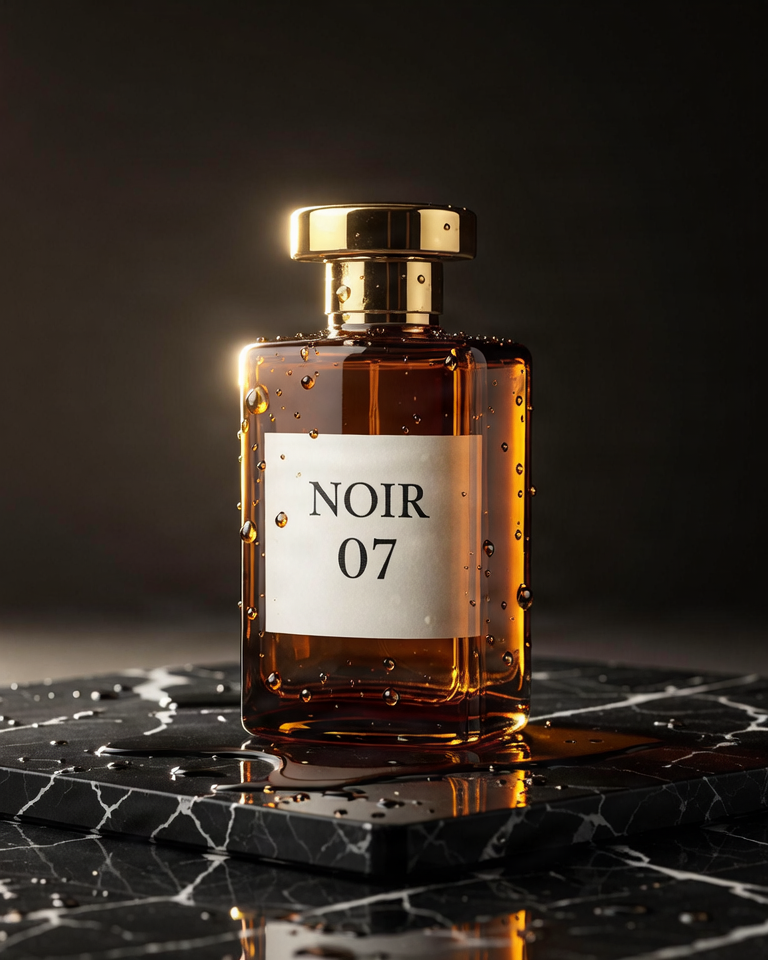
fibo-gen-1.5/text-to-image,4:5,768×960,$0.0575。
两个接口怎么选
fibo-gen-1.5/text-to-image | fibo-edit-1.5/image-to-image | |
|---|---|---|
| 做什么 | 从文字生成写实图片 | 用一句话修改已有图片 |
| 必填输入 | prompt | image_urls(1–4 张)+ instruction |
| 价格 | $0.0575/张 | $0.0575/张 |
| 特色参数 | aspect_ratio 9 种、seed(默认 5555) | mask_url 蒙版、seed(默认 5555) |
| 适合 | 出新图、带文字的物料 | 换装/换背景/合成、局部微调 |
典型流水线:Gen 出底图 → Edit 改成套图(换背景、换色、加元素)。按场景挑提示词看提示词大全。
两条上手路线
浏览器 3 步:打开模型页 → 粘贴提示词、选比例 → 点生成,一张 $0.0575。
API 3 步:POST /v1/tasks 提交 → 拿 taskId → GET /v1/tasks/<taskId> 查到 success 后下载。
curl:第一张
curl -X POST https://api.hiapi.ai/v1/tasks \
  -H "Authorization: Bearer YOUR_API_KEY" \
  -H "Content-Type: application/json" \
  -H "Idempotency-Key: your-unique-key-001" \
  -d '{
  "model": "fibo-gen-1.5/text-to-image",
  "input": {
    "prompt": "Luxury product photo of an amber glass perfume bottle on wet black marble, gold cap, soft rim light, droplets on the glass, the label reads '"'"'NOIR 07'"'"' in elegant serif letters",
    "aspect_ratio": "4:5",
    "seed": 2026
  }
}'
编辑接口:model 换 fibo-edit-1.5/image-to-image,指令写在 instruction,按顺序引用图片(两图合成试穿):
curl -X POST https://api.hiapi.ai/v1/tasks \
  -H "Authorization: Bearer YOUR_API_KEY" \
  -H "Content-Type: application/json" \
  -d '{
  "model": "fibo-edit-1.5/image-to-image",
  "input": {
    "image_urls": [
      "https://static.hiapi.ai/gallery/2026/10/78f963cb21d0242c.jpg",
      "https://static.hiapi.ai/gallery/2026/10/36246b7cabde4a1a.jpg"
    ],
    "instruction": "Dress the woman in image 1 with the mustard corduroy jacket from image 2, worn open over her white t-shirt. Keep her pose, face and the studio background.",
    "aspect_ratio": "3:4"
  }
}'
蒙版局部编辑:mask_url 只能配 1 张图,白色 = 要改的区域(和 Ideogram 4.5 Edit 正好相反):
curl -X POST https://api.hiapi.ai/v1/tasks \
  -H "Authorization: Bearer YOUR_API_KEY" \
  -H "Content-Type: application/json" \
  -d '{
  "model": "fibo-edit-1.5/image-to-image",
  "input": {
    "image_urls": ["https://static.hiapi.ai/gallery/2026/10/d9037da1559e78a6.jpg"],
    "mask_url": "https://static.hiapi.ai/gallery/2026/10/cae371f9e4689db5.png",
    "instruction": "Replace the floor under the sneaker with light wooden planks."
  }
}'
Python:提交、轮询、下载
import time, uuid, requests

BASE = "https://api.hiapi.ai/v1/tasks"
HEADERS = {
    "Authorization": "Bearer YOUR_API_KEY",
    "Content-Type": "application/json",
}

payload = {
    "model": "fibo-gen-1.5/text-to-image",
    "input": {
        "prompt": "Luxury product photo of an amber glass perfume bottle on wet black marble, gold cap, soft rim light, droplets on the glass, the label reads 'NOIR 07' in elegant serif letters",
        "aspect_ratio": "4:5",
        "seed": 2026,
    },
}

resp = requests.post(
    BASE,
    headers={**HEADERS, "Idempotency-Key": str(uuid.uuid4())},
    json=payload,
    timeout=30,
)
resp.raise_for_status()
task_id = resp.json()["taskId"]

while True:
    task = requests.get(f"{BASE}/{task_id}", headers=HEADERS, timeout=30).json()
    print(task["status"])
    if task["status"] in ("success", "fail"):
        break
    time.sleep(3)

if task["status"] == "success":
    image_url = task["output"][0]["url"]   # 临时地址,尽快下载保存
    img = requests.get(image_url, timeout=60)
    with open("output_image", "wb") as f:
        f.write(img.content)
    print("saved")
参数表
fibo-gen-1.5/text-to-image
| 字段 | 必填 | 取值 | 说明 |
|---|---|---|---|
prompt | 是 | 1–10000 字符 | 画面描述;要出现的文字放引号里(the label reads '…') |
aspect_ratio | 否 | 1:1 / 2:3 / 3:2 / 3:4 / 4:3 / 4:5 / 5:4 / 9:16 / 16:9,默认 1:1 | 9 种比例同价 |
seed | 否 | 整数,默认 5555 | 不传也固定:同提示词同结果;要变化就换 seed |
fibo-edit-1.5/image-to-image
| 字段 | 必填 | 取值 | 说明 |
|---|---|---|---|
image_urls | 是 | 1–4 张 | 顺序有意义,instruction 按顺序引用(image 1、image 2) |
instruction | 是 | ≥1 字符 | 要改什么;没提到的内容保持不变 |
aspect_ratio | 否 | 同上 9 种 | 仅 2 张及以上图时生效;单图输出保持原图比例 |
mask_url | 否 | 图片地址 | 仅单图编辑;白色 = 改,黑色 = 保持;尺寸须与原图一致 |
seed | 否 | 整数,默认 5555 | 相同输入复现 |
请求体里出现表外字段会直接 400。
你会遇到的报错(接口原文)
| 你做了什么 | 返回 |
|---|---|
Gen 没传 prompt | 400 invalid input: prompt: missing required field "prompt" |
Gen 的 seed 传了字符串 | 400 invalid input: seed: got string, want integer |
aspect_ratio 拼错 | 400 invalid input: aspect_ratio: value must be one of '1:1', '2:3', '3:2', '3:4', '4:3', '4:5', '5:4', '9:16', '16:9' |
Edit 没传 instruction | 400 invalid input: instruction: missing required field "instruction" |
| Edit 传了 5 张图 | 400 invalid input: image_urls: maxItems: got 5, want 4 |
| 蒙版配了 2 张图 | 400(mask_url 存在时 image_urls 只能 1 张) |
| 余额不足 | 402 insufficient account balance; top up and retry |
同一个 Idempotency-Key 重复提交返回 409 或 422,换新 key 再试。
上线前注意
- 回调:请求体顶层传
"callback": {"url": "https://..."},终态自动通知,省轮询。 - 及时转存:
output[0].url是临时地址,拿到就下载。 - 指令里点名图序:多图合成用 image 1 / image 2 引用,顺序就是
image_urls的顺序。 - 蒙版黑白语义:FIBO 白色 = 改、黑色 = 保持;从别的编辑模型迁移脚本时先翻蒙版。
常见问题
- 是的,编辑指令字段叫
instruction,不是prompt;写错字段名会报缺字段。 - 是的,最多 4 张输入图,第 5 张会直接 400。
- 是的,seed 默认 5555 且固定,同一输入会复现;想要不同结果显式换 seed。
- 是的,两个接口同价同调用方式,只换
model和input字段。