TL;DR
- Krea 3(
krea-3/text-to-image)是文生图模型:一句描述出写实摄影、插画和概念图,出图前会先理解和扩写提示词,两个变体 berry(质量优先,默认)/ jam(速度优先)同价切换。打开模型页就能试,新用户注册送 200 积分。 - 价格按张算:Krea 3 $0.036;同家族还有更省的 Krea 2 Medium Turbo(
krea-2-medium-turbo)$0.0215。 - 调用走 HiAPI
/v1/tasks接口:提交任务拿taskId,再查询结果,成功后从output[0].url下载图片。
它能做什么
- 一句提示词也出完整画面:模型出图前先做推理扩写,只写
a lighthouse也会补上时间、光线和构图;写得具体就按你的描述走。 - berry / jam 两个变体一个 ID:
variant切换,参数和价格完全一样;同 seed 下两者构图和色调不同,可以各跑一次当两个方案挑。 - 6 种尺寸预设到 1K:正方、竖版、横版共 6 种(1024×1024 到 1024×576),输出 PNG 或 JPEG。
- 带标题文字的海报也能出:文字放进引号,短标题通常准确。
下面这张是 berry 的真实成品:
Studio product photograph of a frosted glass perfume bottle with a brushed brass cap standing on a block of travertine, hard afternoon sunlight casting a long palm-leaf shadow across a warm beige wall, crisp reflections, high-end editorial look
(中文意思:影棚产品摄影:磨砂玻璃香水瓶配拉丝黄铜瓶盖,立在一块洞石上,午后硬光把棕榈叶的长影投在暖米色墙面上,反光清晰,高端杂志质感。尺寸用默认 square_hd。)
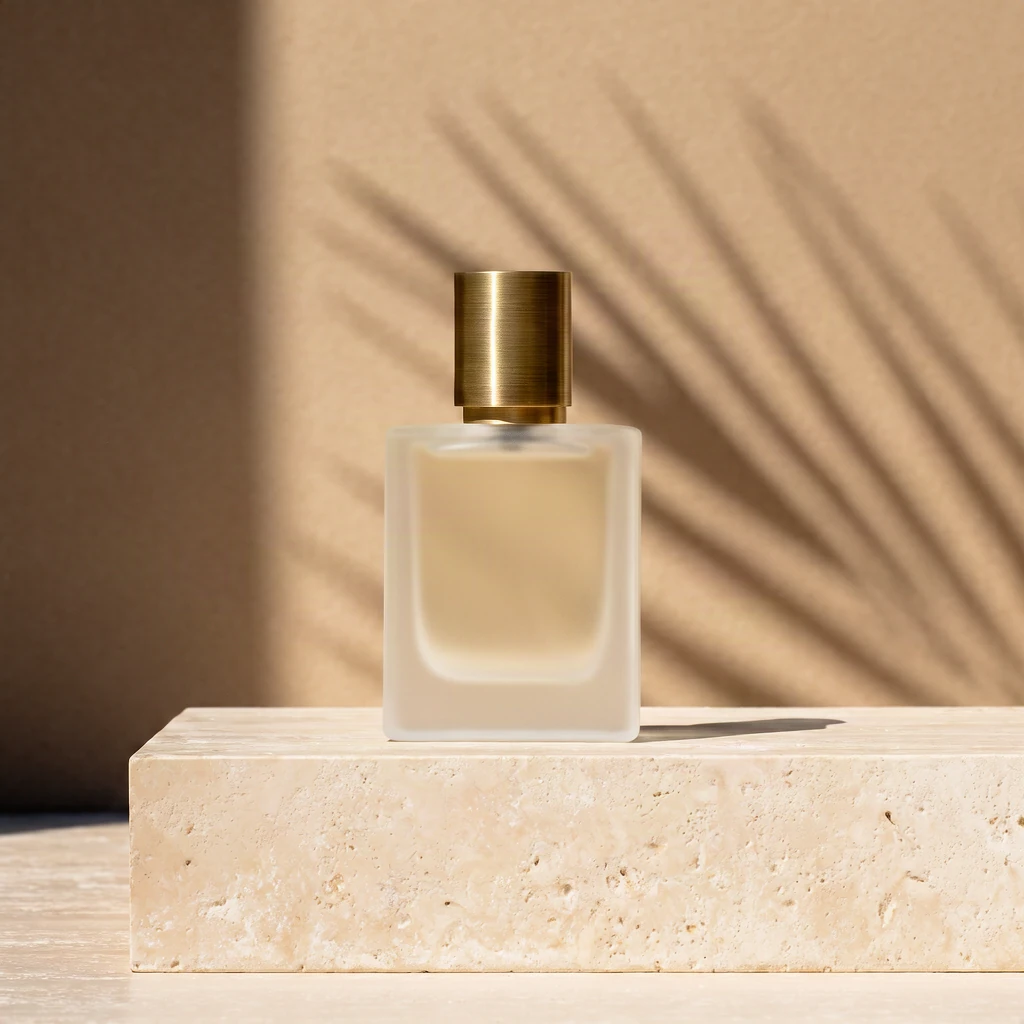
krea-3/text-to-image,berry,square_hd,1024×1024,$0.036。
两个模型怎么选
krea-3/text-to-image(Krea 3) | krea-2-medium-turbo(Krea 2 Medium Turbo) | |
|---|---|---|
| 每张 | $0.036 | $0.0215 |
| 尺寸 | 6 种预设(最大 1024×1024),不支持自定义 | aspect_ratio 8 种比例,含 2.35:1 电影宽幅 |
| 特色参数 | variant(berry/jam)、reasoning_level(推理扩写)、negative_prompt(仅 berry) | creativity 4 档(raw/low/medium/high) |
| 提示词处理 | 出图前推理扩写,短句也能出完整画面 | 按原文直出,写多细出多细 |
| 适合 | 定稿出图、短提示词快速探索、带文字海报 | 批量出图、宽幅构图、预算敏感的日常生产 |
两个模型可以串着用:Krea 2 草稿定方向,Krea 3 出定稿,一张草稿加一张定稿 $0.0575。按场景挑提示词看提示词大全。
两条上手路线
浏览器 3 步:打开模型页 → 粘贴提示词、选尺寸 → 点生成,一张 $0.036。
API 3 步:POST /v1/tasks 提交 → 拿 taskId → GET /v1/tasks/<taskId> 查到 success 后下载。
curl:第一张
curl -X POST https://api.hiapi.ai/v1/tasks \
  -H "Authorization: Bearer YOUR_API_KEY" \
  -H "Content-Type: application/json" \
  -H "Idempotency-Key: your-unique-key-001" \
  -d '{
  "model": "krea-3/text-to-image",
  "input": {
    "prompt": "Studio product photograph of a frosted glass perfume bottle with a brushed brass cap standing on a block of travertine, hard afternoon sunlight casting a long palm-leaf shadow across a warm beige wall, crisp reflections, high-end editorial look",
    "image_size": "square_hd",
    "variant": "berry",
    "reasoning_level": "medium"
  }
}'
换 Krea 2 Medium Turbo 只改 model 和 input 字段:
curl -X POST https://api.hiapi.ai/v1/tasks \
  -H "Authorization: Bearer YOUR_API_KEY" \
  -H "Content-Type: application/json" \
  -d '{
  "model": "krea-2-medium-turbo",
  "input": {
    "prompt": "Futuristic city skyline at dusk, neon reflections on wet streets, cinematic widescreen",
    "aspect_ratio": "2.35:1",
    "creativity": "low"
  }
}'
返回里的 taskId 就是查询凭证。
Python:提交、轮询、下载
import time, uuid, requests

BASE = "https://api.hiapi.ai/v1/tasks"
HEADERS = {
    "Authorization": "Bearer YOUR_API_KEY",
    "Content-Type": "application/json",
}

payload = {
    "model": "krea-3/text-to-image",
    "input": {
        "prompt": "Studio product photograph of a frosted glass perfume bottle with a brushed brass cap standing on a block of travertine, hard afternoon sunlight casting a long palm-leaf shadow across a warm beige wall, crisp reflections, high-end editorial look",
        "image_size": "square_hd",
        "variant": "berry",
        "reasoning_level": "medium",
    },
}

# 提交:带 Idempotency-Key,网络重试不会重复建任务
resp = requests.post(
    BASE,
    headers={**HEADERS, "Idempotency-Key": str(uuid.uuid4())},
    json=payload,
    timeout=30,
)
resp.raise_for_status()
task_id = resp.json()["taskId"]

# 轮询:queued -> handling -> archiving -> success / fail
while True:
    task = requests.get(f"{BASE}/{task_id}", headers=HEADERS, timeout=30).json()
    print(task["status"])
    if task["status"] in ("success", "fail"):
        break
    time.sleep(3)

if task["status"] == "success":
    image_url = task["output"][0]["url"]   # 临时地址,尽快下载保存
    img = requests.get(image_url, timeout=60)
    with open("output_image", "wb") as f:  # 扩展名按实际返回的格式命名
        f.write(img.content)
    print("saved")
参数表(krea-3/text-to-image)
| 字段 | 必填 | 取值 | 说明 |
|---|---|---|---|
prompt | 是 | 1–5000 字符 | 画面描述;写得越具体越按描述走 |
image_size | 否 | square_hd / square / portrait_4_3 / portrait_16_9 / landscape_4_3 / landscape_16_9,默认 square_hd | 尺寸预设,最大 1024×1024;不支持 auto 和自定义宽高 |
variant | 否 | berry / jam,默认 berry | berry 质量优先,jam 速度优先;同价 |
reasoning_level | 否 | low / medium,默认 medium | 提示词推理扩写程度;短提示词用 medium,写得具体用 low |
negative_prompt | 否 | ≤1024 字符 | 不希望出现的内容;仅 berry 生效 |
output_format | 否 | png / jpeg,默认 png | 输出格式 |
seed | 否 | 整数 0–2147483647 | 同变体内复现;berry 和 jam 互不复现 |
Krea 2 Medium Turbo 的字段不同:prompt(必填)、aspect_ratio(8 种,默认 1:1)、creativity(raw/low/medium/high,默认 low)、seed。请求体里出现表外字段会直接 400。
你会遇到的报错(接口原文)
| 你做了什么 | 返回 |
|---|---|
image_size 传了 auto | 400 invalid input: image_size: value must be one of 'square_hd', 'square', 'portrait_4_3', 'portrait_16_9', 'landscape_4_3', 'landscape_16_9' |
传了表外字段(如 num_images) | 400 invalid input: <root>: additional properties 'num_images' not allowed |
prompt 为空 | 400 invalid input: prompt: minLength: got 0, want 1 |
variant 拼错 | 400 invalid input: variant: value must be one of 'berry', 'jam' |
| 余额不足 | 402 insufficient account balance; top up and retry |
参数校验没通过的请求不扣费。同一个 Idempotency-Key 重复提交返回 409(处理中)或 422(参数不一致),换新 key 再试。
上线前注意
- 回调:请求体顶层传
"callback": {"url": "https://..."},任务到终态会通知你的服务,省掉轮询。 - 及时转存:
output[0].url是临时地址,拿到就下载存进自己的存储。 - 尺寸只有 6 种:要 2.35:1 电影宽幅或更多比例,用 Krea 2 Medium Turbo 的
aspect_ratio。 - seed 只在变体内复现:berry 和 jam 用同一个 seed 会得到不同的图,做系列图固定 variant + seed。
常见问题
- 是的,短提示词也能出图。 模型会推理扩写,
a lighthouse一句就能出完整画面;想控制细节就把提示词写具体。 - 不是,berry 和 jam 不只是快慢之分。 同 seed 下两者构图和色调不同、画质相当,当成两个方案各跑一次再挑。
- 是的,negative_prompt 只对 berry 生效,给 jam 传了也不起作用。
- 是的,一次只出 1 张,要多张就多提交任务或换 seed 重跑。
- 是的,$10 就能开始。 新用户注册送 200 积分(1 美元 = 2,000 积分),Krea 3 $0.036 一张,$10 约出 277 张。