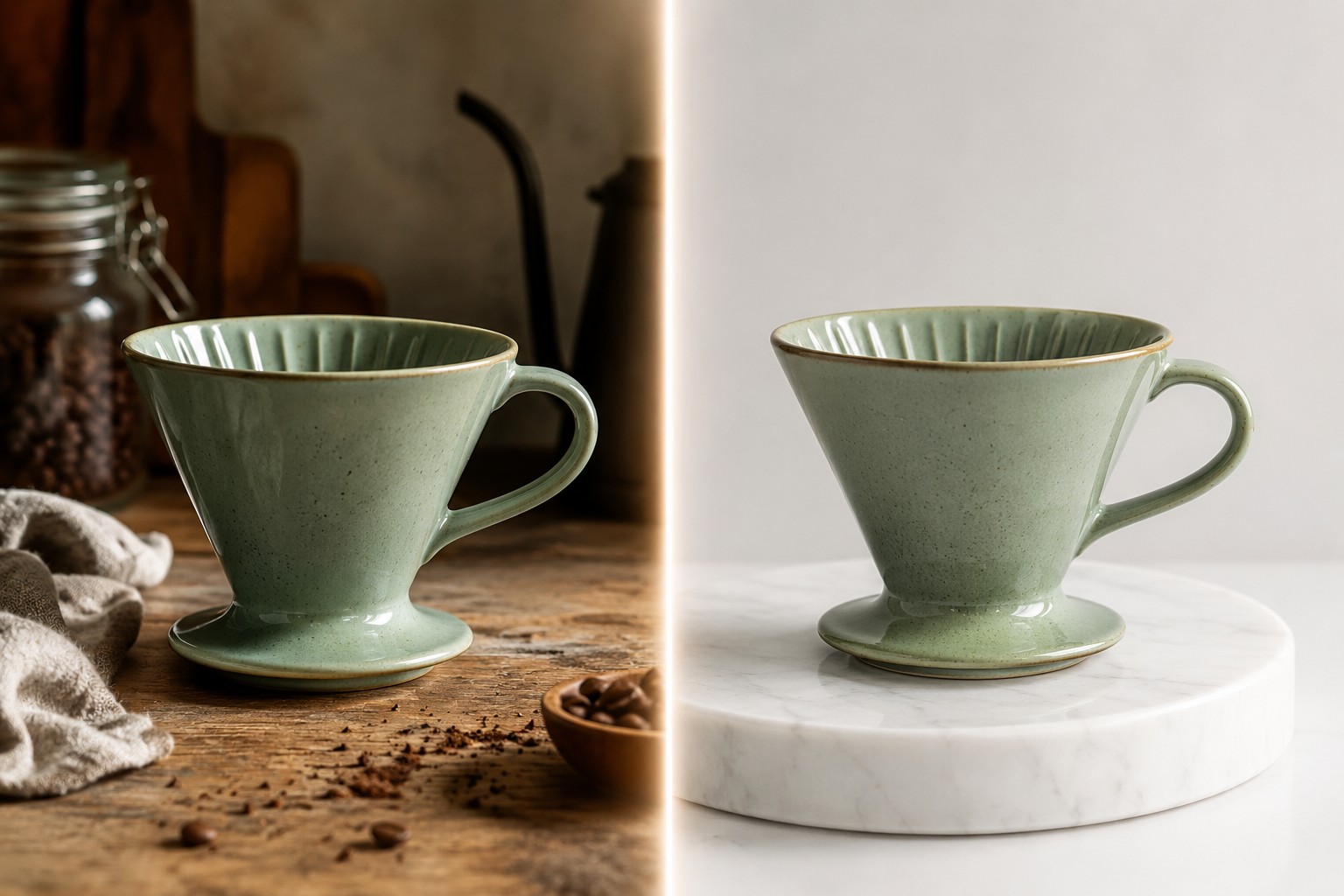
Most "best image-to-image API" roundups compare spec sheets. We compared outputs. We took one source photo — a sage green ceramic pour-over dripper on a cluttered kitchen counter — sent the identical edit instruction to three image-to-image models through the same hiapi task endpoint, and put the results side by side, unretouched. This post shows every image, the exact prompt, the live per-image prices, and the API schema differences you only discover when you actually call these things.
The test: one image, one prompt, three models
The contenders, all called through hiapi's async task API:
gpt-image-2/image-to-image@ext— the extended GPT Image 2 editing endpoint: up to 16 reference images, 4K output, three quality tiersnano-banana-2— the current Nano Banana workhorse: image editing plus generation, 4K output, strong text renderingnano-banana-pro— the premium tier of the same family, aimed at hero-asset quality
The source image is deliberately messy — crumbs on the counter, a linen towel, window clutter — because that's what real "clean this up for the listing" jobs look like. (We generated it earlier with gpt-image-2/text-to-image; it's now our standard i2i test input.)
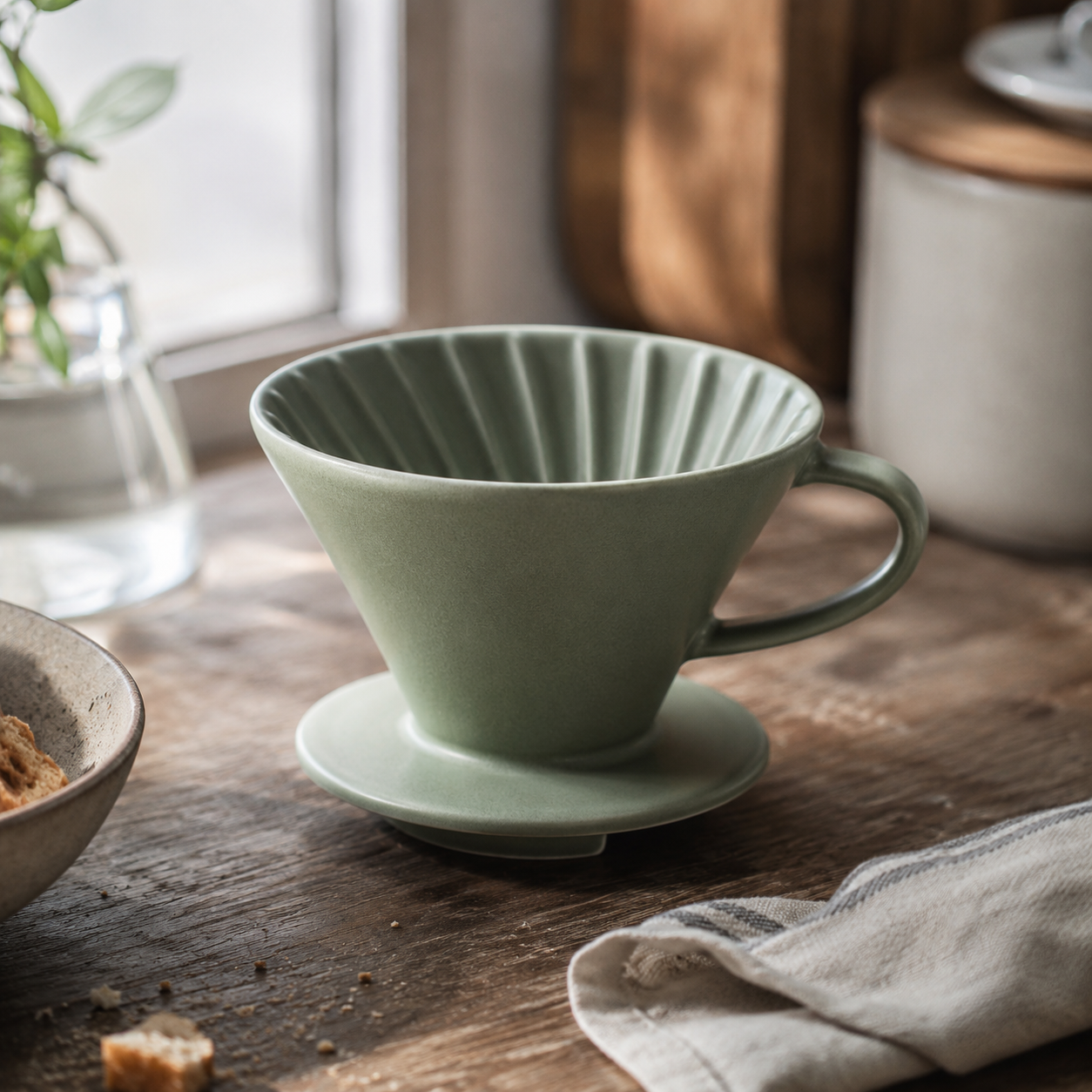
Every model received exactly this instruction, verbatim:
Replace the background: put this exact sage green ceramic pour-over coffee
dripper, unchanged - same shape, same matte glaze, same camera angle - on a
polished white marble countertop against a seamless pale warm-grey studio
backdrop. Remove the crumbs, cloth and clutter. Soft diffused studio lighting,
gentle realistic shadow under the product, professional e-commerce catalog
photography. No text.
A classic e-commerce background swap: keep the product, replace the world. It's the single most common commercial use of image-to-image APIs, and it stresses exactly the thing spec sheets can't tell you — identity preservation, whether the model hands back your product or a convincing lookalike.
What each model returned
gpt-image-2/image-to-image@ext
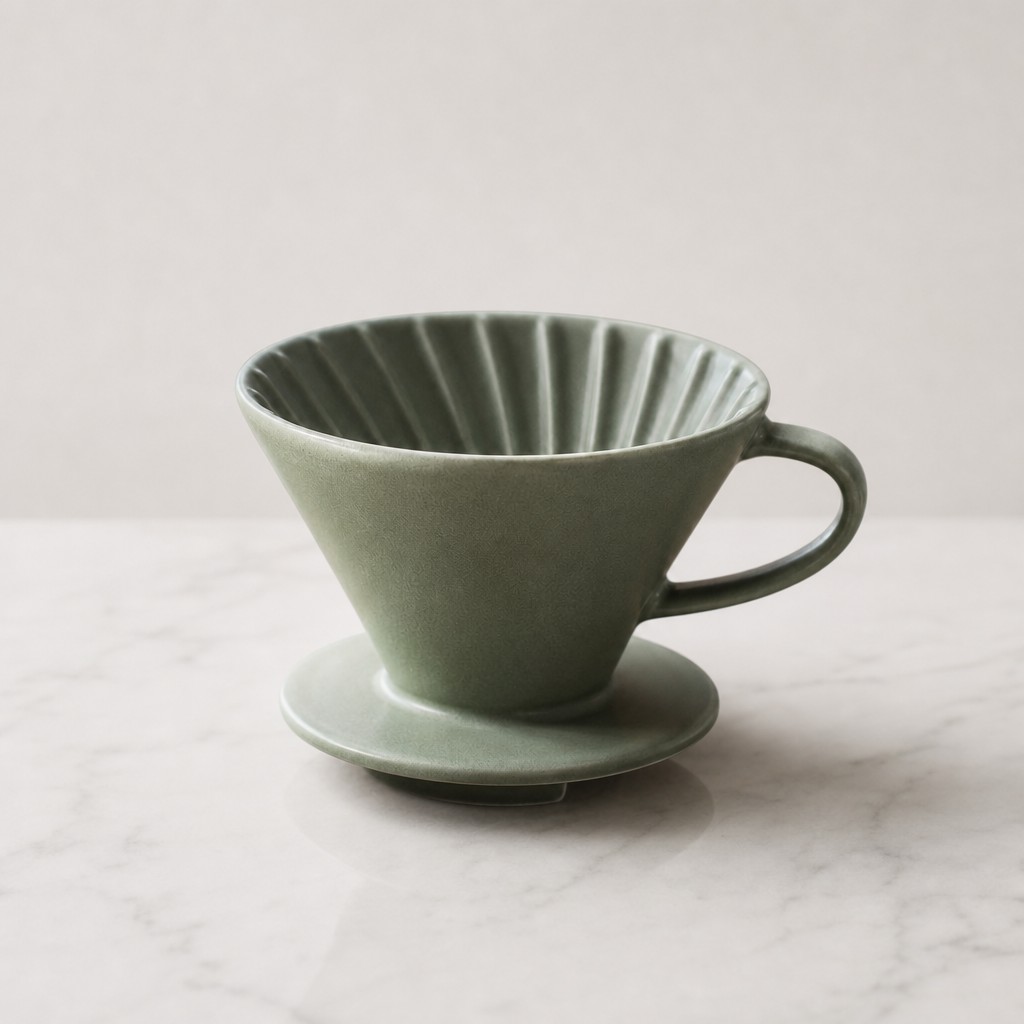
Instruction compliance is excellent: marble countertop, seamless warm-grey backdrop, clutter gone, soft studio shadow, catalog framing. But look at the product itself. The glaze came back glossier and more speckled than the matte original, and the rim gained a thin tan accent line that doesn't exist on the source. Shape, fluted interior and handle are all correct — the material drifted. For concept work and mood boards that's irrelevant; for a live product listing, your merchandiser will spot it.
This run used quality: "medium" at 1K — $0.061 for the image.
nano-banana-2
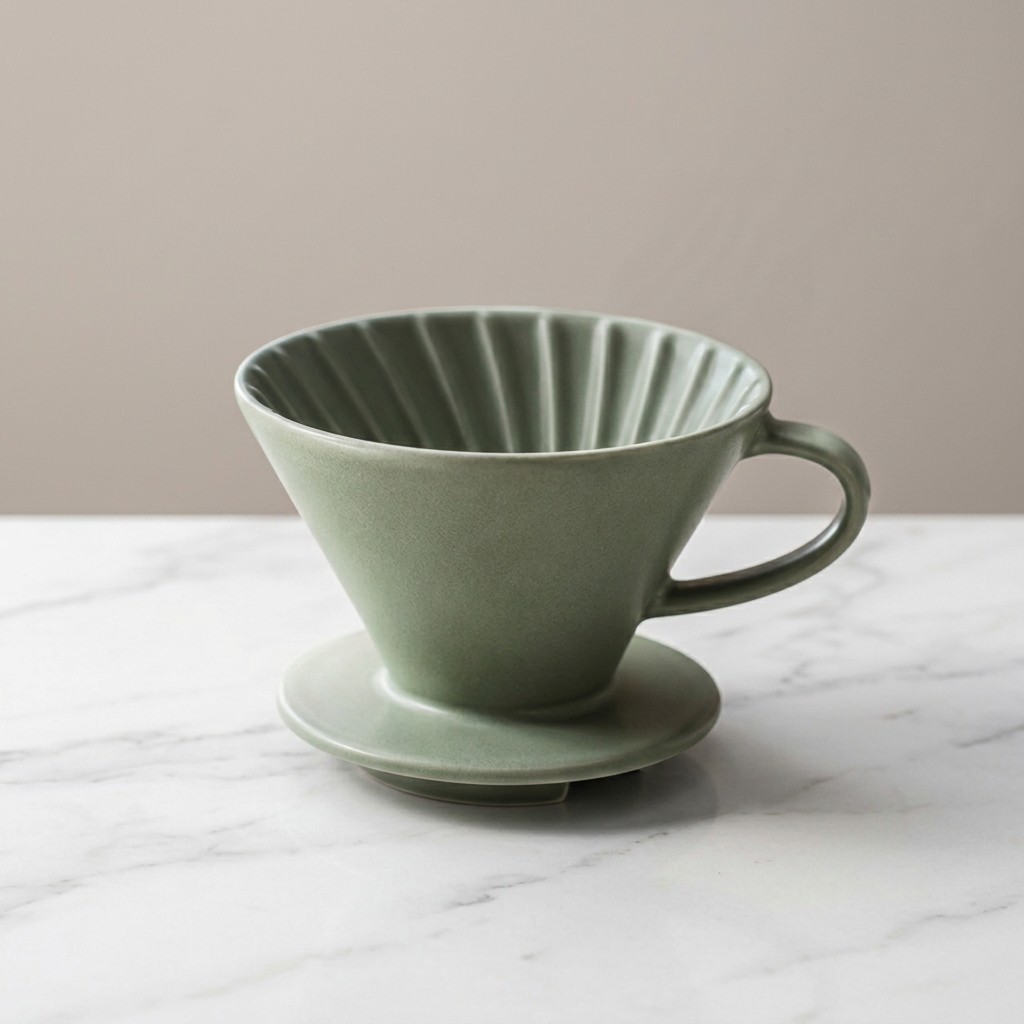
This is the result that made us re-check we hadn't mixed up files. The matte glaze, the fluting, the unglazed rim, the handle, even the camera angle are essentially untouched, while the counter and backdrop swapped to marble and warm grey exactly as asked. If the job is "this exact SKU in a new scene," nano-banana-2 had the best identity preservation of the three in this test — at $0.085 for 1K, and oddly less at 2K ($0.076, see pricing below).
nano-banana-pro
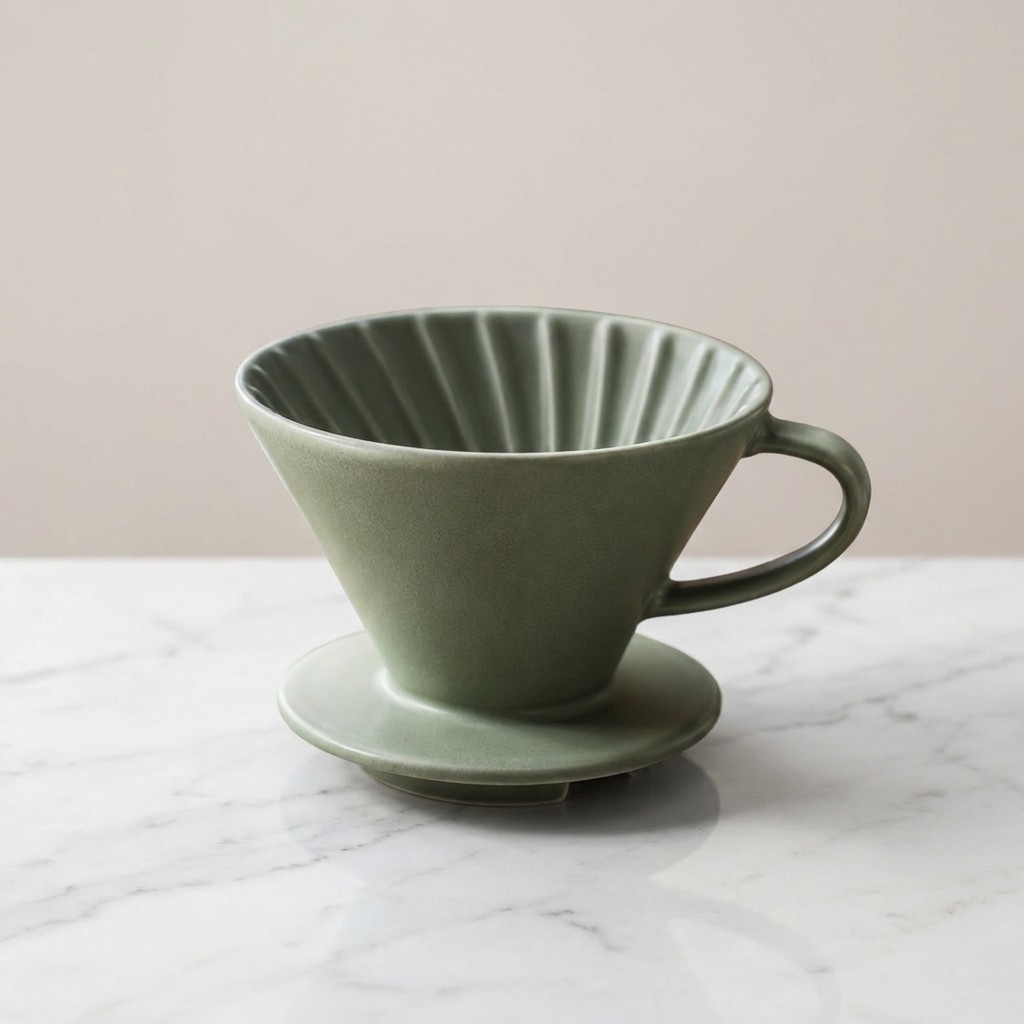
Same family, same fidelity: the product survives with its matte finish intact, and the scene shifts slightly warmer with more pronounced marble veining — it reads a touch more "editorial" straight out of the box. Whether that's worth roughly double nano-banana-2's price ($0.17 at 1K or 2K) depends on the job; Pro's edge tends to show in complex multi-element compositions and top-tier hero assets rather than a single-product swap like this one.
Scorecard
| Model | Followed the edit | Kept product identity | Reference images | Max output | Per image |
|---|---|---|---|---|---|
| gpt-image-2/image-to-image@ext | Fully | Partial — glaze and rim drifted | up to 16 | 4K | $0.007–0.76 |
| nano-banana-2 | Fully | Near-exact | multiple | 4K | $0.076–0.114 |
| nano-banana-pro | Fully | Near-exact | multiple | 4K | $0.17–0.2992 |
These observations come from one controlled edit, run July 5, 2026. Different subject matter (faces, fabric, typography) can rank the models differently — the whole point of this post is that you can re-run the experiment on your own image in minutes.
Pricing, verified against the live pricing page
All prices below were checked against the hiapi pricing page on July 5, 2026. Everything is per-image, pay-as-you-go, no subscription tier required.
gpt-image-2/image-to-image@ext bills by quality × resolution:
| Quality | 1K | 2K | 4K |
|---|---|---|---|
| low | $0.007 | $0.015 | $0.022 |
| medium | $0.061 | $0.132 | $0.217 |
| high | $0.245 | $0.535 | $0.76 |
The Nano Banana models bill by resolution only:
| Model | 1K | 2K | 4K |
|---|---|---|---|
| nano-banana-2 | $0.085 | $0.076 | $0.114 |
| nano-banana-pro | $0.17 | $0.17 | $0.2992 |
Three practical notes:
- The cheapest way to iterate on an edit prompt is gpt-image-2 at low/1K: $0.007 per attempt. Prototype there, then re-run the finalist prompt at higher quality or on a Nano Banana model.
- nano-banana-2's 2K tier costs less than its 1K tier ($0.076 vs $0.085). There is no reason not to ask for 2K.
- Higher quality tiers sharpen rendering; they don't change identity behavior. The material drift we saw at medium would be a sharper material drift at high.
The input schemas are not interchangeable
All three models sit behind one endpoint — POST https://api.hiapi.ai/v1/tasks — but the input schema differs by model family, and this is where most first-integration bugs come from.
The GPT Image 2 editing endpoint takes image_urls, and both quality and resolution are required:
curl -s -X POST https://api.hiapi.ai/v1/tasks \
  -H "Authorization: Bearer $HIAPI_API_KEY" \
  -H "Content-Type: application/json" \
  -d '{
    "model": "gpt-image-2/image-to-image@ext",
    "input": {
      "prompt": "Replace the background: put this exact product on a marble countertop...",
      "image_urls": ["https://your-cdn.example.com/source.jpg"],
      "quality": "medium",
      "resolution": "1K"
    }
  }'
The Nano Banana models take image_input, with aspect_ratio and resolution:
curl -s -X POST https://api.hiapi.ai/v1/tasks \
  -H "Authorization: Bearer $HIAPI_API_KEY" \
  -H "Content-Type: application/json" \
  -d '{
    "model": "nano-banana-2",
    "input": {
      "prompt": "Replace the background: put this exact product on a marble countertop...",
      "image_input": ["https://your-cdn.example.com/source.jpg"],
      "aspect_ratio": "1:1",
      "resolution": "1K"
    }
  }'
Both return a task ID in data.taskId. Poll the task detail endpoint until status is success, then download output[0].url promptly — output URLs are time-limited, so persist the bytes to your own storage right away. Our edits each came back within a couple of minutes on the async queue.
One redeeming detail: if you send the wrong field name, the 400 response spells out the expected schema ("image_urls: missing required field"), so a wrong guess costs you seconds, not a debugging session.
Where multi-reference editing changes the game
A single-source edit is the bread-and-butter case, but both families accept more than one input image, and that's where product and character consistency work happens:
gpt-image-2/image-to-image@extaccepts up to 16 reference images inimage_urls— enough to feed a whole brand board (product shots, palette refs, layout refs) into a single edit.- The Nano Banana models take multiple
image_inputreferences and are notably good at keeping a subject stable across scenes.
Two nano-banana-2 outputs from our own asset library show what that looks like in practice — both were driven by reference images of the same bottle and the same person:
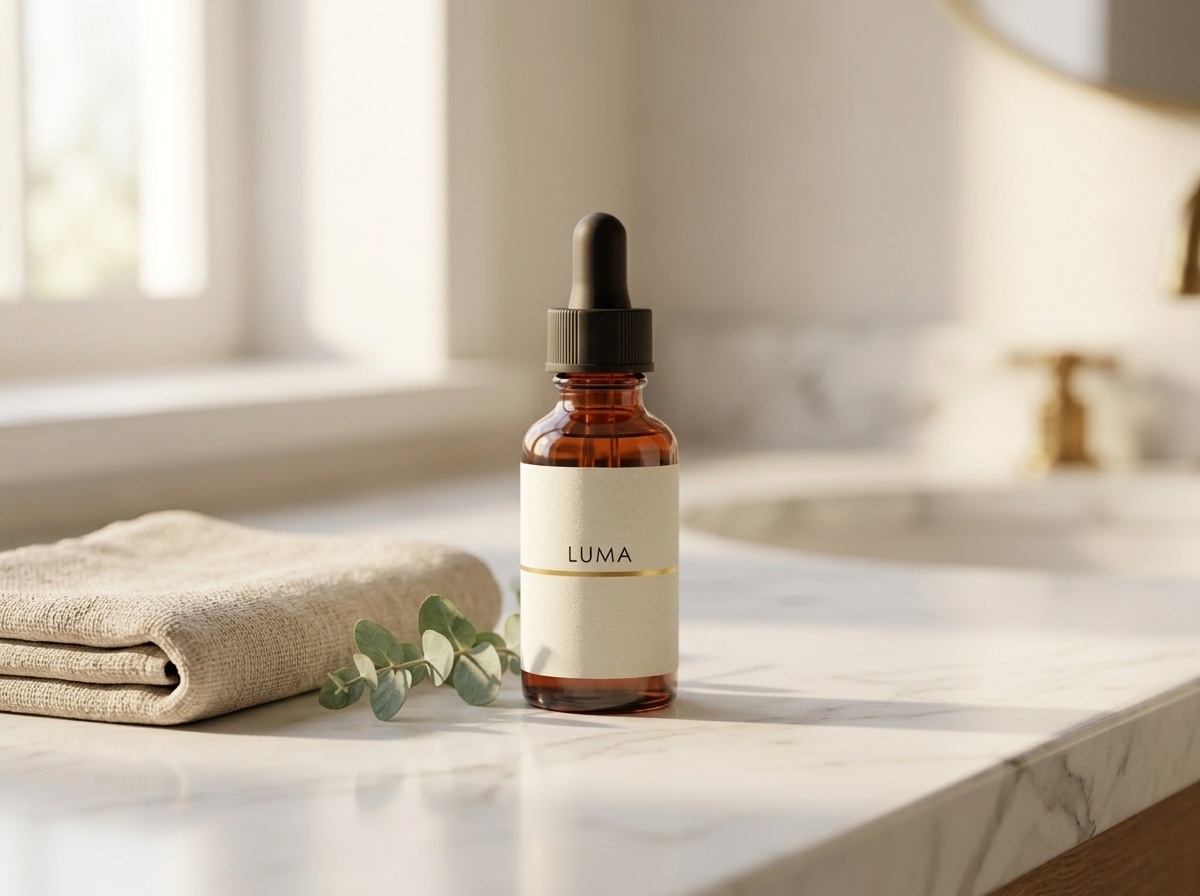
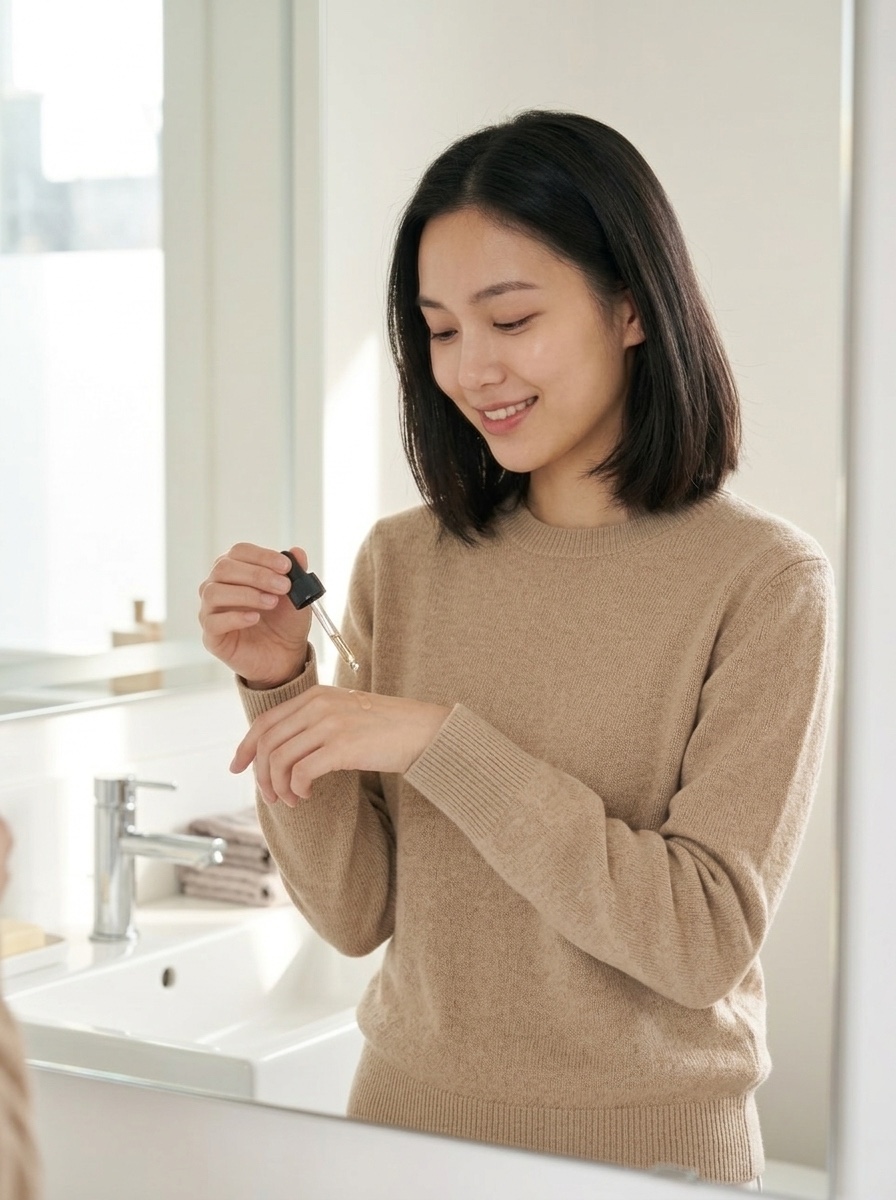
The trick is in the prompt: name the things that must not change ("this exact serum bottle, unchanged — same amber glass, same black dropper cap") and let the model rebuild everything else. There's a full walkthrough in our Nano Banana product-shot guide.
How to choose
- Editing your own product or character, and identity is non-negotiable → start with nano-banana-2. It had the best fidelity-per-dollar in our test; request 2K, it's the cheapest tier.
- High-volume, cost-sensitive iteration → gpt-image-2/image-to-image@ext at low/1K, $0.007 per attempt. Iterate cheap, then upgrade the winning prompt.
- Brand-board workflows that need many references at once → gpt-image-2/image-to-image@ext, the only one of the three that takes 16 refs.
- Premium 4K hero assets → nano-banana-pro, but A/B it against nano-banana-2 at $0.114/4K first — for single-subject work the gap is smaller than the price suggests.
If you're weighing this against integrating each model vendor separately, the criteria that actually matter in production are: per-image prices you can verify on a public page, one authentication and one task-polling loop instead of several, and the ability to swap "model" strings without rewriting your pipeline. That's the case for a unified endpoint; weigh it against whatever your existing stack already gives you.
FAQ
What's the difference between an image-to-image API and a text-to-image API? Text-to-image generates a picture from a description alone. Image-to-image takes one or more input images plus an instruction, and returns a modified image — background swaps, style changes, object edits, or compositions built from multiple references. The models in this test all do i2i; most also generate from scratch.
Which is the cheapest image-to-image API in this comparison?
By list price, gpt-image-2/image-to-image@ext at low quality and 1K: $0.007 per image. The cheapest edit that also kept our product's exact appearance was nano-banana-2 at 2K: $0.076.
How many reference images can I send?
Up to 16 with gpt-image-2/image-to-image@ext via the image_urls array. The Nano Banana models accept multiple references via image_input — used for exactly the consistency workflows shown above.
Can these models render text inside the edited image? nano-banana-2 lists text rendering as a headline strength and is the safer pick when the edit involves labels or packaging copy. Whichever model you use, proofread rendered text before publishing — model-generated typography still needs a human check.
Run the test on your own image
The fastest way to settle "which image-to-image model fits my content" is the same way we did it: pick one source image, write one edit prompt, and run it across gpt-image-2/image-to-image@ext, nano-banana-2, and nano-banana-pro — on hiapi that's three identical POSTs with the model string swapped. Grab an API key from the quickstart guide and the whole three-model experiment costs about $0.32 at the tiers we used. Cheaper than the coffee that dripper would make.