TL;DR
- What this is: four copy-paste motion prompts for grok-imagine-1.5/image-to-video@preview, each shown with the source still it started from and the real clip it produced on the live API — raw first outputs, no retries hidden, hosted here permanently.
- The one thing to understand about this model: the API has no motion or camera parameters at all. The input schema (verified live) is just
prompt+image_urls, plus optionalduration,resolution, andaspect_ratio. Every camera move, motion style, and pacing decision happens inside the prompt text — which is exactly what these recipes are for. - Schema facts (verified against the live task API on 2026-07-07):
image_urlsis a required array of publicly reachable image URLs;durationis an integer from 1 to 15 seconds;resolutionis 480p or 720p;aspect_ratioacceptsauto,1:1,16:9,9:16,3:2,2:3. Anything else (motion_mode,seed, …) is rejected with a 400. - Pricing (per second of output, from the pricing page): $0.0114/s at 480p and $0.0214/s at 720p. Duration is the only multiplier — a 6-second 720p clip is about $0.13, and a 4-second 480p probe costs under a nickel.
- Total media bill for this article: four gpt-image-2 stills at $0.03 each plus 22 seconds of 720p video — about $0.59 all in. That's the point of image-to-video: the still is a one-time cost you can re-animate as many times as you like.
How These Recipes Were Made
Each recipe has three parts: the source still, the exact motion prompt (copy it as-is), and the clip it generated. I generated every still with gpt-image-2, wrote every motion prompt myself, and ran each one through grok-imagine-1.5 on the live hiapi task API. Settings and real cost are printed in every caption so you can reproduce the exact call.
Because grok-imagine-1.5 takes no motion parameters, prompt wording does all the work. Habits that consistently paid off:
- Lead with the camera verb. "Slow steady dolly push-in", "camera glides slowly to the left" — put it first and the model treats it as the spine of the clip.
- Ask for one continuous move and say "no cuts". Left to itself, the model will sometimes invent an edit. Closing the prompt with "one continuous shot, no cuts" reliably suppresses that.
- Describe what keeps moving, not just the camera. Steam, rain, reflections, crowds — naming the ambient motion keeps the frame alive instead of feeling like a pan across a photograph.
- For people, ask for micro-motion and lock the camera. "Camera locked off on a tripod … facial features stay perfectly stable, no warping" is the difference between a living portrait and a melting one.
Recipe 1 — Camera Language: Slow Push-In
Goal: classic cinematic dolly-in that travels down the street and lands on the food stall, while rain, steam, and reflections keep working.
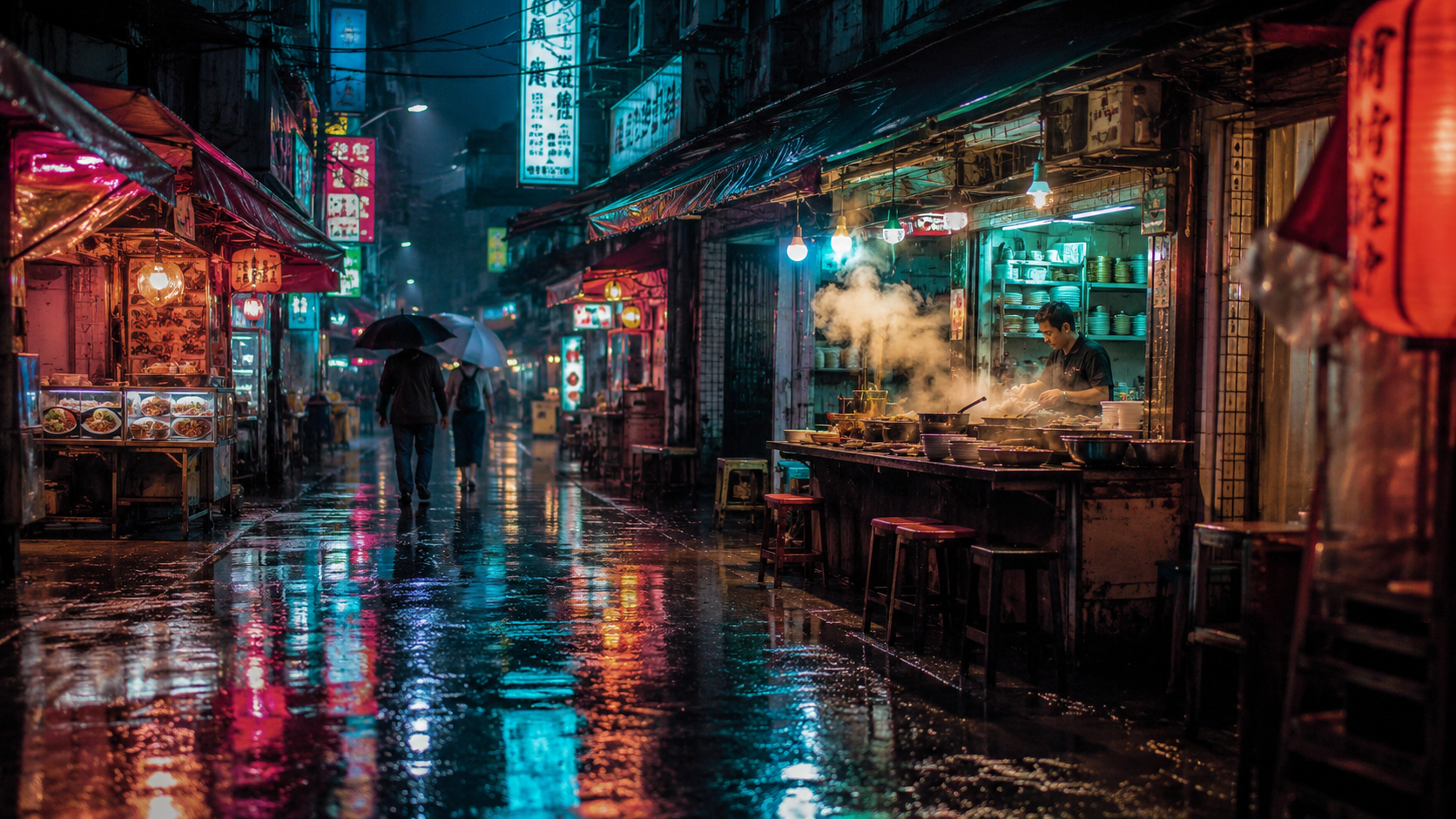
Source still (gpt-image-2, 16:9, $0.03). Recipes 1 and 2 both animate this same frame.
Slow steady dolly push-in down the rain-soaked market street toward the glowing noodle stall, steam rising and curling from the pots, rain falling in thin streaks, neon sign reflections shimmering on the wet pavement, pedestrians walking slowly away under umbrellas, smooth constant camera speed, one continuous shot, no cuts, cinematic pacing
Slow dolly push-in toward the noodle stall — grok-imagine-1.5/image-to-video@preview, 6s @ 720p, 16:9, $0.13. Real output, generated for this guide.
Why it works: the push-in is the first clause, so the model commits to it for the full six seconds. The prompt then hands it a checklist of things that must keep moving — steam, rain streaks, reflections, pedestrians — which is what sells the shot as video rather than a zoom on a still. Note how much closer the cook and the pots are by the final frame: that's genuine camera travel, not a crop.
Recipe 2 — Same Still, Different Camera Verb: Lateral Track
Goal: re-animate the exact same still with a sideways tracking move, to show that with grok-imagine-1.5 the camera language lives entirely in the prompt — swap one verb, get a different shot.
Camera glides slowly to the left in a smooth lateral tracking move, strong parallax between the near market stalls and the far end of the street, rain keeps falling, neon reflections slide across the wet ground, the cook keeps stirring behind the counter, steam drifts sideways, one continuous move, no cuts, no zoom
Lateral tracking move across the market street — grok-imagine-1.5/image-to-video@preview, 6s @ 720p, 16:9, $0.13. Real output, generated for this guide.
Why it works: "glides slowly to the left" plus an explicit ask for parallax between near stalls and the far end of the street gives the model a depth cue to animate against. This is also the cheapest way to iterate: the still is a sunk cost of $0.03, so each new camera treatment of it only costs video seconds — two treatments here for about $0.26 total. If you're exploring a look, re-prompt the same frame before you ever regenerate the image.
Recipe 3 — Subject-Driven Motion: Portrait Micro-Motion (9:16)
Goal: a vertical, social-ready portrait where the subject breathes, blinks, and her hair and scarf move — and nothing else does.
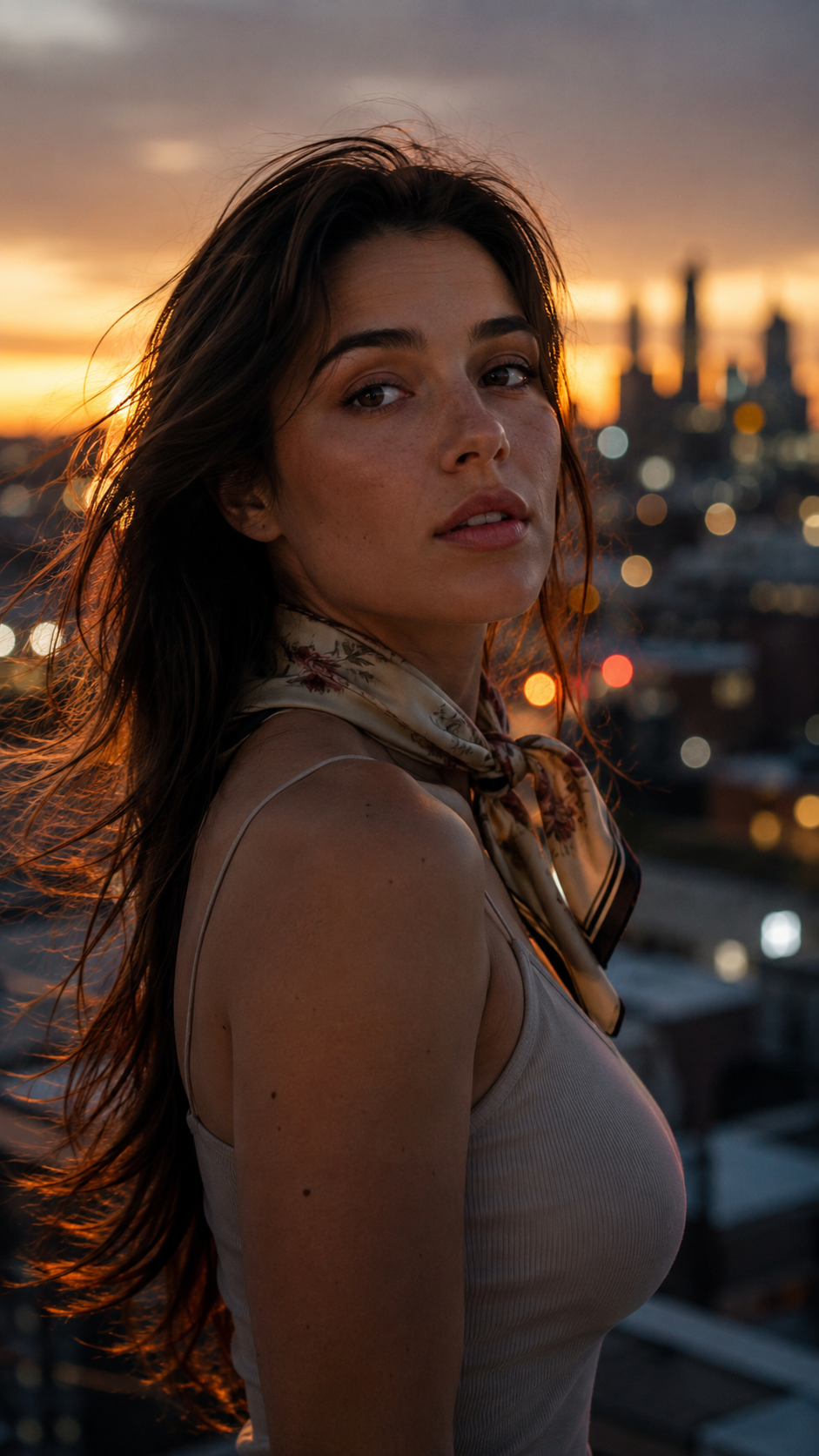
Source still (gpt-image-2, 9:16, $0.03).
Gentle micro-motion only: her hair lifts and drifts in a soft evening breeze, the silk scarf ripples lightly, she blinks naturally and takes one calm slow breath, city bokeh lights flicker softly behind her, camera locked off on a tripod, facial features stay perfectly stable, no warping, subtle photoreal motion
Portrait micro-motion: hair, scarf, breath — grok-imagine-1.5/image-to-video@preview, 6s @ 720p, 9:16, $0.13. Real output, generated for this guide.
Why it works: portraits are where image-to-video models melt faces, so the prompt spends most of its words on constraints: "micro-motion only", "camera locked off", "facial features stay perfectly stable, no warping". The motion budget goes to safe, high-payoff elements — hair, silk, a blink, a breath. Shot at 9:16 for feeds; the aspect ratio is a first-class API field, not a crop.
Recipe 4 — Ambient Atmosphere: Let the Scene Do the Moving
Goal: a static-camera nature loop where all the motion comes from the scene itself — waves, fog, and a sweeping lighthouse beam. Four seconds is plenty.
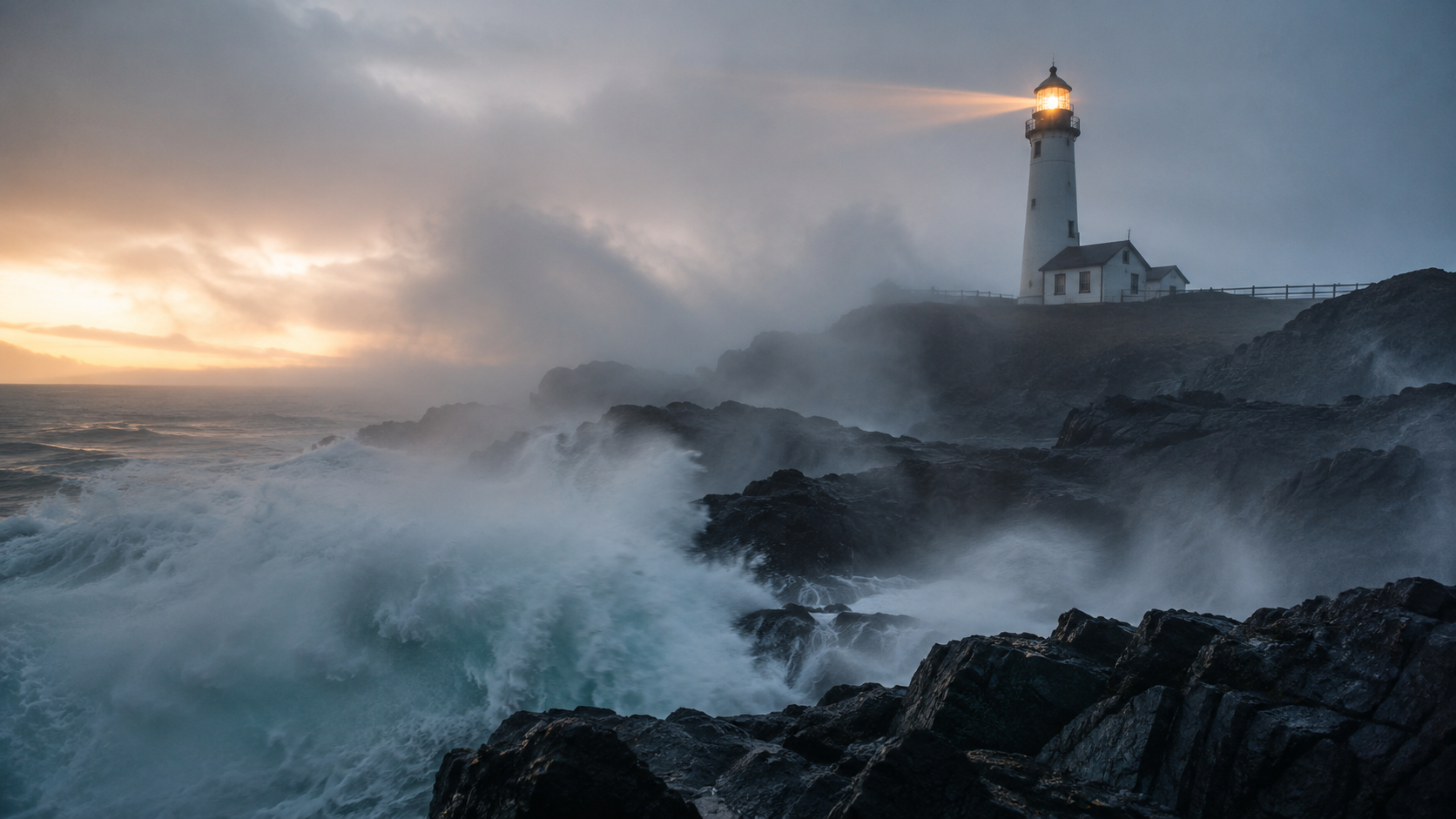
Source still (gpt-image-2, 16:9, $0.03).
Waves keep rolling in and bursting against the dark rocks in slow rhythm, sea spray and fog drift across the frame, the lighthouse beam sweeps slowly through the mist, clouds crawl overhead, camera completely static on a tripod, natural documentary motion, no camera movement
Ambient seascape: waves, fog, sweeping beam — grok-imagine-1.5/image-to-video@preview, 4s @ 720p, 16:9, $0.09. Real output, generated for this guide.
Why it works: declaring "camera completely static on a tripod" frees the model to spend everything on water physics and volumetric fog, which grok-imagine-1.5 handles impressively — watch the beam actually sweep through the mist. At 4 seconds and 720p this clip cost $0.09; ambient loops rarely need more.
Keeping the Per-Second Bill Down
Video pricing here is refreshingly one-dimensional: duration × per-second rate, nothing else. That suggests a simple workflow:
| Move | Math | Cost |
|---|---|---|
| Probe a motion idea | 4s × $0.0114 (480p) | $0.05 |
| Iterate the prompt at delivery quality | 6s × $0.0214 (720p) | $0.13 |
| Max-length take | 15s × $0.0214 (720p) | $0.32 |
| Re-animate a still you already have | image cost | $0 extra |
Three habits fall out of this table. Probe at 480p and short durations — a failed idea should cost a nickel, not a dollar. Reuse stills relentlessly — recipes 1 and 2 above are the same $0.03 image wearing two different camera moves. Ask for exactly the seconds you need — duration goes down to 1, and ambient shots like recipe 4 stop improving after a few seconds anyway. All four clips on this page came to $0.47 of video total.
Run It Yourself: Submit, Poll, Download
The model is task-based: POST /v1/tasks returns a task id, you poll until it succeeds, then download the output URL (it expires — save the file, not the link). One thing to know: image_urls must be publicly reachable — if you pass a private or local URL the submit fails with a normalize input media error before the model ever runs.
import requests, time

API = "https://api.hiapi.ai/v1/tasks"
HEADERS = {"Authorization": "Bearer YOUR_HIAPI_KEY"}

task = requests.post(API, headers=HEADERS, json={
    "model": "grok-imagine-1.5/image-to-video@preview",
    "input": {
        "prompt": ("Slow steady dolly push-in down the rain-soaked "
                   "market street toward the glowing noodle stall, "
                   "steam rising, one continuous shot, no cuts"),
        "image_urls": ["https://your-host.com/your-still.jpg"],
        "duration": 6,          # int, 1-15 seconds
        "resolution": "720p",   # 480p | 720p
        "aspect_ratio": "16:9", # auto | 1:1 | 16:9 | 9:16 | 3:2 | 2:3
    },
}).json()
task_id = task["data"]["taskId"]

while True:
    t = requests.get(f"{API}/{task_id}", headers=HEADERS).json()["data"]
    if t["status"] in ("success", "fail"):
        break
    time.sleep(5)

assert t["status"] == "success", t.get("error")
url = t["output"][0]["url"]  # expiring link - download it now
open("clip.mp4", "wb").write(requests.get(url).content)
Full request walkthroughs (curl included) are in the grok-imagine image-to-video API guide, and the text-to-video guide covers the prompt-only sibling. General platform docs live here.
Quick Schema Reference
| Field | Required | Values (verified live) |
|---|---|---|
prompt | recommended | free text — this is your only motion control |
image_urls | yes | array of publicly reachable image URLs |
duration | no | integer, 1–15 (seconds) |
resolution | no | 480p, 720p |
aspect_ratio | no | auto, 1:1, 16:9, 9:16, 3:2, 2:3 |
There is no motion_mode, no seed, no negative prompt — the schema rejects unknown fields with a 400, so don't bother cargo-culting parameters from other models. If you want a different motion, write a different sentence.
If your clips need more length or native audio, seedance-2.0-fast plays in that range, and the seedance-2.0-mini recipe collection uses the same submit-poll-download pattern — prompts and plumbing transfer with minor edits.
All four prompts are yours to copy. Grab a key, point the snippet above at grok-imagine-1.5, and animating your first still at 480p will cost you about a nickel.




