Creatify Boreal API: turn one prompt into product, UGC and presenter videos with native speech and sound, with optional image or audio input, up to 20s and 2K.

Provider: Creatify

Category: video generation

Status: In progress

Back to Models

Creatify Boreal

Coming soon
by CreatifyVideo

Creatify Boreal API: turn one prompt into product, UGC and presenter videos with native speech and sound, with optional image or audio input, up to 20s and 2K.

Integration in progress

Creatify Boreal is coming to HiAPI

Turn one prompt into product, UGC and presenter videos with native speech and sound, optionally guided by an image or audio, up to 20 seconds and 2K.

Product close-up: orbiting camera with synced fizz
Vertical UGC: a creator speaks the line to camera
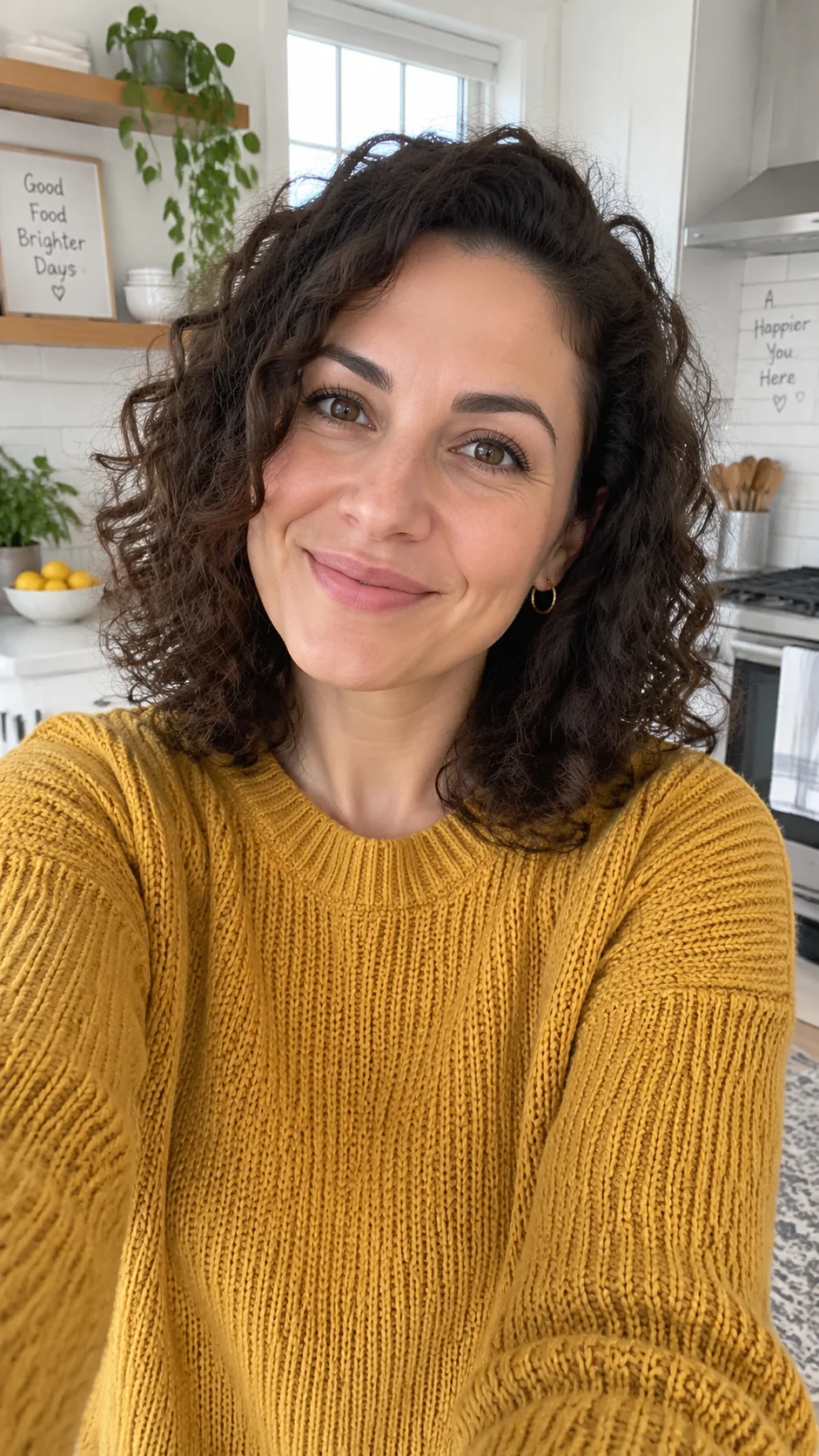
Image to video: keeps the presenter's look and outfit
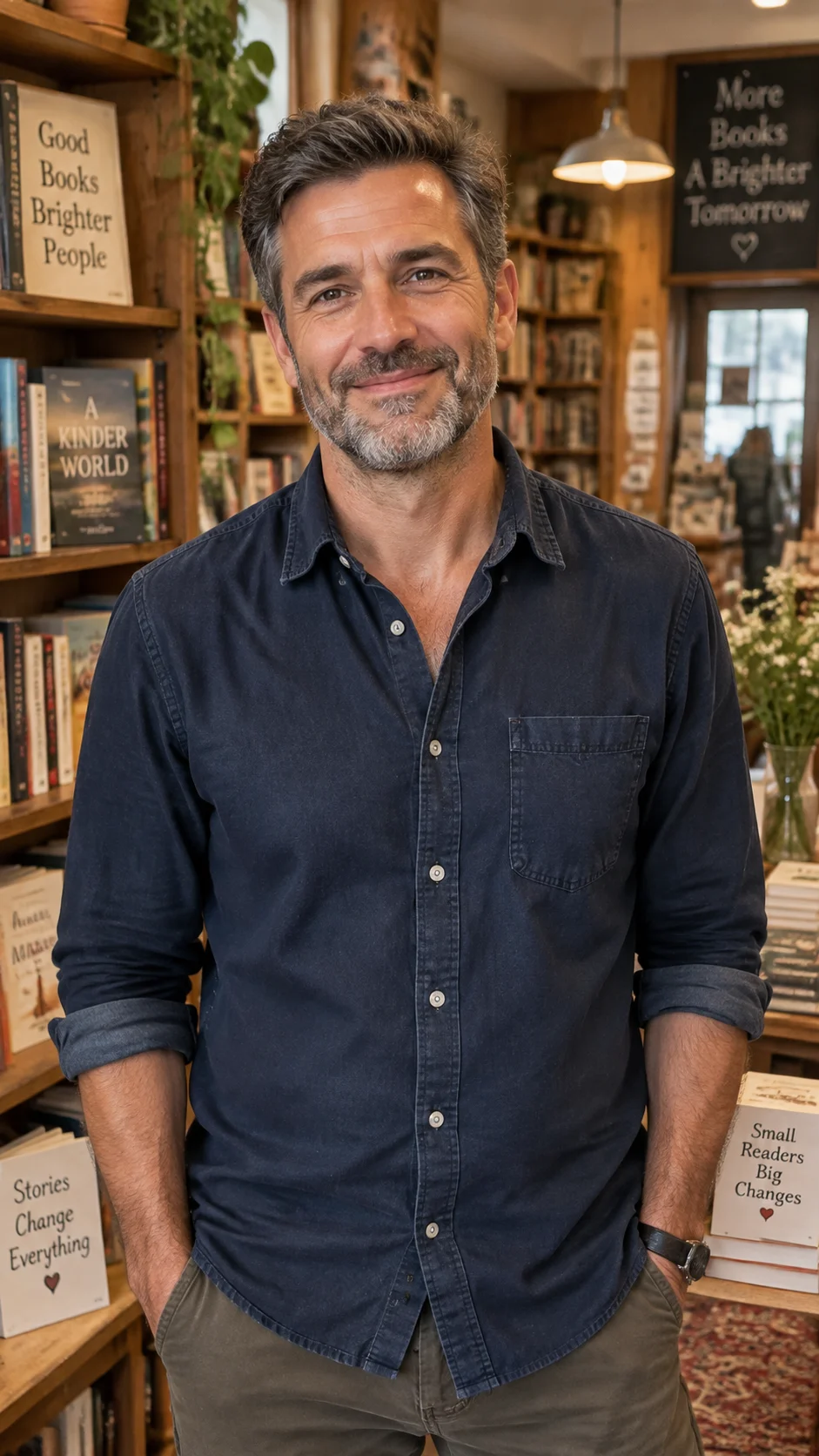
Audio driven: lips follow the narration you provide

Make a Boreal video in three steps

  1. 1

    Write the prompt in four parts

    Use [VISUAL] for the shot and camera, [SPEECH] for the line, [SOUNDS] for effects and music and [TEXT] for on-screen text. English prompts give the steadiest results.

  2. 2

    Add an image or audio if needed

    A reference image sets the subject and composition, and auto ratio follows it; driving audio is kept as-is in the video.

  3. 3

    Pick resolution and length

    Choose 720p, 1080p or 2K and a whole-second length from 1 to 20, then download when the task finishes.

curl -X POST 'https://api.hiapi.ai/v1/tasks' \
  -H 'Authorization: Bearer YOUR_API_KEY' \
  -H 'Content-Type: application/json' \
  -d '{
    "model": "creatify-boreal",
    "input": {
      "prompt": "[VISUAL] Macro shot of a chilled sparkling-water can on wet black stone, slow orbit. [SPEECH] None [SOUNDS] Fizzing and ice clinks. [TEXT] None",
      "aspect_ratio": "16:9",
      "resolution": "720p",
      "duration": 8
    }
  }'

Creatify Boreal examples

Text, reference-image and audio-driven generation across landscape, vertical and square frames.

Text to video · 16:9

Sparkling-water product close-up

One prompt sets the shot and the sound; fizz and ice clinks land on the matching frames.

720p16:98s
Prompt (copyable)
Macro product shot of a chilled sparkling-water can on wet black stone, condensation droplets sliding down, slow orbit camera, fizzing and ice clinking sounds, crisp commercial lighting.
Output

Text to video · 9:16

Vertical UGC pitch

A vertical talking-to-camera clip for feeds, with natural room tone.

720p9:168s
Prompt (copyable)
Vertical selfie-style UGC video: a young woman in a bright bedroom holds up a pastel lip balm and says to camera: "Okay, this is the only lip balm that survived my winter." Natural room tone.
Output

Text to video · 1:1

Square lifestyle clip

A square frame for product pages and social cards.

720p1:18s
Prompt (copyable)
Square lifestyle clip: hands arrange fresh flowers in a linen-wrapped bouquet on a wooden table, morning sunlight, gentle paper rustling and soft acoustic guitar.
Output

Image to video

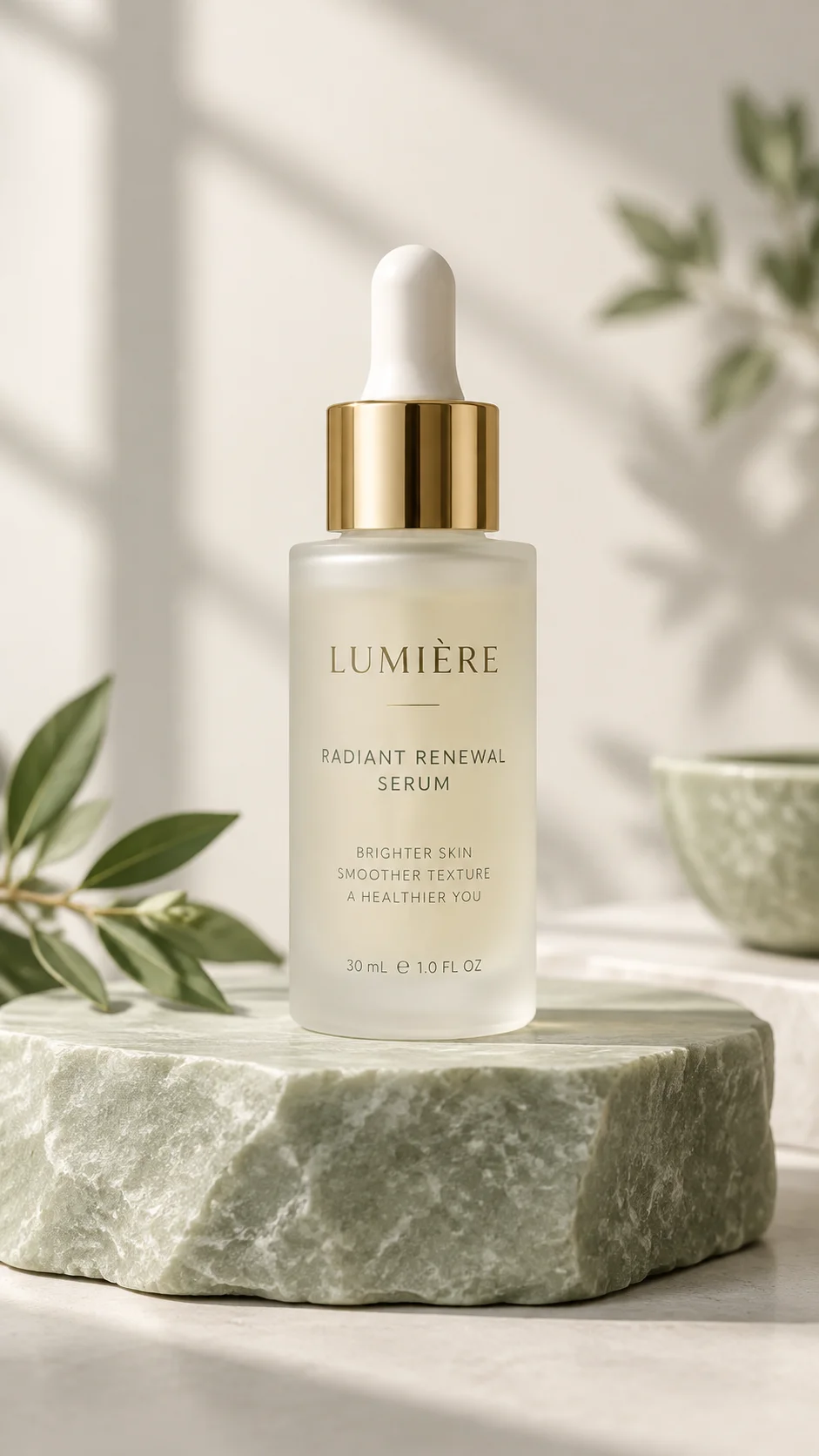
One product photo becomes a showcase

With auto ratio the video keeps the reference image's ratio and the product's look.

720pauto8s
Prompt (copyable)
Soft light moves across the serum bottle as a drop falls from the gold dropper and ripples; a gentle voice says: "Calm skin, all day." Light airy ambience.
Input
Reference image: frosted glass serum bottle on a stone pedestal
Output

Image to video · presenter

A presenter photo starts talking

The image supplies the presenter; [SPEECH] supplies the line.

720pauto8s
Prompt (copyable)
The woman smiles and talks to the camera in her kitchen: "I swapped my coffee for this oat latte mix and honestly, I am not going back." Natural kitchen ambience.
Input
Reference image: presenter in a kitchen
Output

Audio driven

Drive the presenter with your narration

The uploaded audio is kept in the video; the duration setting decides how much of it is used.

720p9:1612s
Prompt (copyable)
The presenter speaks the narration to the camera, friendly and relaxed, small hand gestures, cozy bookshop background.
Input
Reference image: presenter in a bookshop
Input
Output

VIDEO WITH NATIVE SOUND

Creatify Boreal: picture, line and sound in one prompt, delivered as one finished clip

  • Native speech and sound
  • Image or audio input
  • 720p · 1080p · 2K
  • 1–20 seconds
  • 5 aspect ratios plus auto

What Creatify Boreal is

Creatify Boreal is a video model built for ads and content: the shot, the spoken line, the sound and on-screen text live in one prompt, and the result arrives with audio, with no separate voice-over or mixing step.

It covers text-to-video, image-to-video and audio-driven generation for product showcases, UGC pitches and explainers. Output is 24fps MP4 with C2PA metadata and an invisible watermark, and a visible AI-generated label can be switched on.

What Boreal does well

One prompt for picture, line and sound

[VISUAL], [SPEECH], [SOUNDS] and [TEXT] describe the shot, the line, the sound and on-screen text; write None for parts you do not need. Separate sections are easier for the model to follow than one mixed paragraph.

A reference image locks subject and composition

With a reference image, the subject's look, outfit and composition follow the image. Auto ratio keeps the image's ratio; a named ratio centre-crops it.

Drive it with existing audio

If you already have narration, dialogue or a soundtrack, upload it and the video keeps it; longer audio is trimmed to the duration and shorter audio is padded with silence.

Vertical pitches in one step

Pick 9:16 and write the line in [SPEECH] to get a vertical talking-to-camera clip with ambient sound, ready for feeds and short-video platforms.

5 aspect ratios plus auto

Auto, 16:9, 9:16, 1:1, 4:3 and 3:4 let one idea become a landscape ad, a vertical short and a square card.

Three resolution tiers, up to 20 seconds

Choose 720p, 1080p or 2K and any whole-second length from 1 to 20 to match each project.

720p vs 1080p

The same prompt and 5 seconds at 720p and 1080p. Settle the shot and line at 720p, then render the final cut at a higher tier; 2K is available when you need more detail.

720pFor drafts and social feeds
1080pFor product pages and standard ads

Where it fits

E-commerce product videos

One product photo and a prompt produce showcase videos for product pages and ads at scale.

UGC-style ads

Vertical talking-to-camera clips with a natural feel for short-video feeds.

Explainers and training

Drive a presenter with narration audio to turn out explainers quickly.

Brand shorts

Picture, sound and on-screen text in one pass for launches and social posts.

Creatify Boreal specifications

Provider
Creatify
Input
Prompt (required, up to 5,000 characters)Reference image, driving audio (optional, http(s) URL)
Resolution
720p · 1080p · 2K, default 720p
Aspect ratio
auto · 16:9 · 9:16 · 1:1 · 4:3 · 3:4
Duration
1–20 whole seconds, default 10
Output
MP4 (H.264 + AAC, 24fps) with C2PA metadata
Billing
Billed by requested duration and resolution
Endpoint
POST /v1/tasksmodel: creatify-boreal

Only need a portrait to speak along with audio?

Creatify Boreal generates picture, speech and sound from one prompt and also accepts a reference image and driving audio. If you only need a portrait photo to speak along with audio, you can also compare the photo-avatar and audio-driven portrait models on HiAPI.

Try it with one prompt

Write a four-part prompt in the Playground above and get a video with sound in a few minutes.

Need to compare models and billing tiers?View live pricing for all models

Frequently asked questions

What inputs does Creatify Boreal accept?

A prompt is required; one reference image and one driving audio file are optional. Use the prompt alone or combine all three.

How should I write the prompt?

Use four sections: [VISUAL] for the shot and camera, [SPEECH] for the line, [SOUNDS] for effects and music and [TEXT] for on-screen text. Write None for sections you do not need.

Does it support languages other than English?

English prompts give the steadiest results today; other languages are not guaranteed, so start in English.

How long can a video be?

1 to 20 whole seconds, 10 by default.

Which resolutions are supported?

720p, 1080p and 2K, 720p by default. 2K is 2016 px on the long edge for 16:9 and 9:16 and the 1440p tier for 1:1, 4:3 and 3:4.

How do aspect ratios work?

Choose auto, 16:9, 9:16, 1:1, 4:3 or 3:4. Auto follows the reference image, or 16:9 without one; a named ratio with a reference image centre-crops the image.

How does driving audio work?

Upload narration, dialogue or a soundtrack and the video keeps it. Only the first duration seconds are used, and shorter audio is padded with silence.

What does the reference image do?

It sets the subject's look, outfit and composition, so a product photo or portrait can become a video.

What is the output format?

MP4 (H.264 video + AAC audio, 24fps) with generated speech and sound.

Is there a watermark?

Every video carries C2PA metadata and an invisible watermark; turning on the AI label also adds a visible AI-generated mark.

How is it billed?

By the requested duration and the chosen resolution; see the live price on this page. Failed tasks are refunded in full.

How do I call it through the API?

Submit a task to POST /v1/tasks with model creatify-boreal, then poll the task for the video URL. See the API docs for details.