1. 即梦 Seedance 2.5 正式发布
继 Dreamina Seedance 2.0 开启多模态创作之后,我们一直在探索如何为创作者带来极致的“控制力”和更广阔的叙事空间。今天,Dreamina Seedance 2.5 正式到来,成为专业创作的新标杆!
回顾 Dreamina 多模态:Seedance 2.0 支持图片、视频、音频和文本四种输入模式。
如果说 Dreamina Seedance 2.0 让你体验到当“导演”的快乐,那么 Dreamina Seedance 2.5 为你带来一座全能的专业数字片场:更长、更真实、更听话,让创作真正实现“指哪打哪”。
针对用户对 Seedance 2.0 最集中的反馈,我们进行了全新优化。
2. 参数设置
在 Dreamina Seedance 2.5 中,多模态生成能力得到全面升级。系统继续支持首帧、首尾帧和多模态参考输入,同时大幅放宽参考素材的数量与时长限制,并新增纯音频驱动,为创作提供更灵活、更广阔的空间。
图片
| 项目 | 限制 |
|---|---|
| 数量 | 每次最多 30 张 |
| 格式 | JPEG、PNG、WebP、BMP、TIFF、GIF、HEIC、HEIF |
| 宽高比 | 0.4-2.5 |
| 边长 | 300-6000 px |
| 单张大小 | 小于 30 MB |
官方稳定性建议:主体图片包含 1-8 个主体时效果较好;9-12 个仍可尝试,但稳定性会下降。同一主体需要多视角时,拆成多张单视角图片通常比把多个视角拼进一张图更稳。
视频
| 项目 | 限制 |
|---|---|
| 数量 | 最多 10 段 |
| 单段时长 | 2-30 秒(实际容差约 1.8-30.2 秒) |
| 总时长 | 不超过 30 秒(实际容差约 30.2 秒) |
| 格式 | MP4、MOV |
| 分辨率 | 480p-4K |
| 帧率 | 24-60 FPS |
| 单段大小 | 不超过 200 MB |
用于视频编辑时,官方建议原片控制在 20 秒内;参考图 1-5 张通常更稳定,6-8 张可以尝试但更依赖多次生成筛选。
音频
| 项目 | 限制 |
|---|---|
| 数量 | 最多 10 段 |
| 单段时长 | 2-30 秒 |
| 总时长 | 不超过 30 秒 |
| 格式 | WAV、MP3 |
| 单段大小 | 不超过 15 MB |
| 纯音频驱动 | 支持,不必强制搭配图片或视频 |
输出
- 标准生成时长:4-30 秒,对应约 97-721 帧。
- 输出分辨率:480p、720p。
- 长视频:切换到 Long Video 后可选择 30-180 秒。
3. 功能交互
四种创作模式
进入 Dreamina 的 AI Video 页面,选择 Dreamina Seedance 2.5 后,可以从模式菜单切换:
- Omni Reference:图片、视频、音频多模态参考。
- Smart Edit:上传视频后用文字修改。
- Long Video:一次生成 30-180 秒长视频。
- First and last Frames:首尾帧约束。
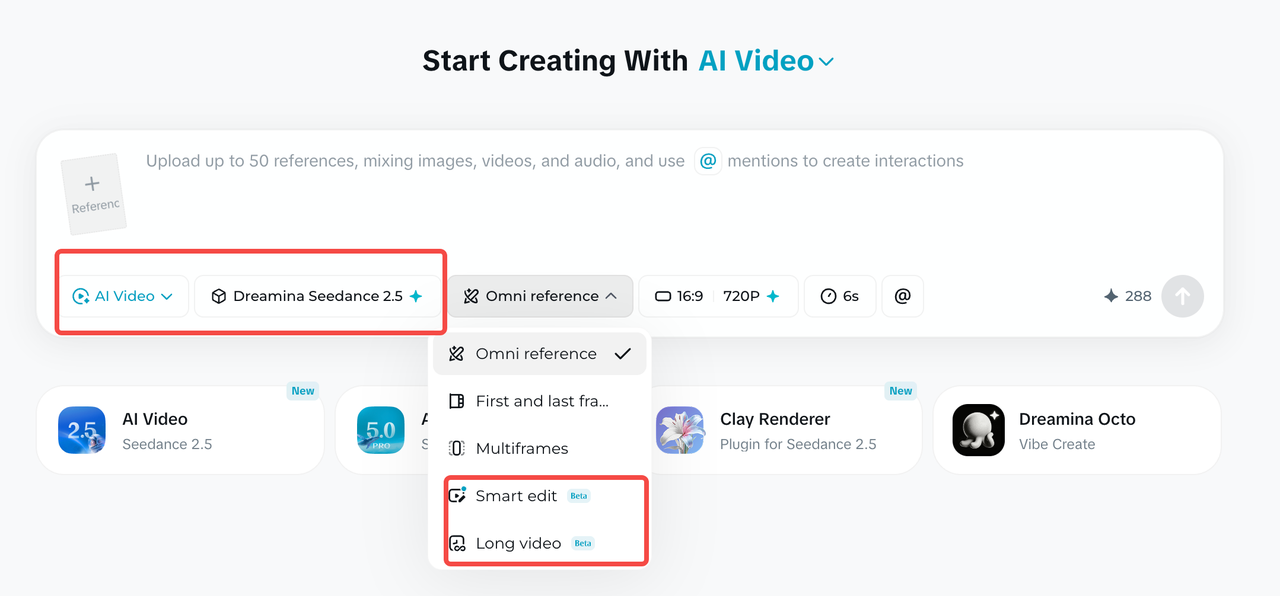
Long Video:一次生成 30-180 秒
- 填写完整的视频脚本或提示词。
- 打开默认可能显示为 Omni Reference 的模式菜单,选择 Long Video。
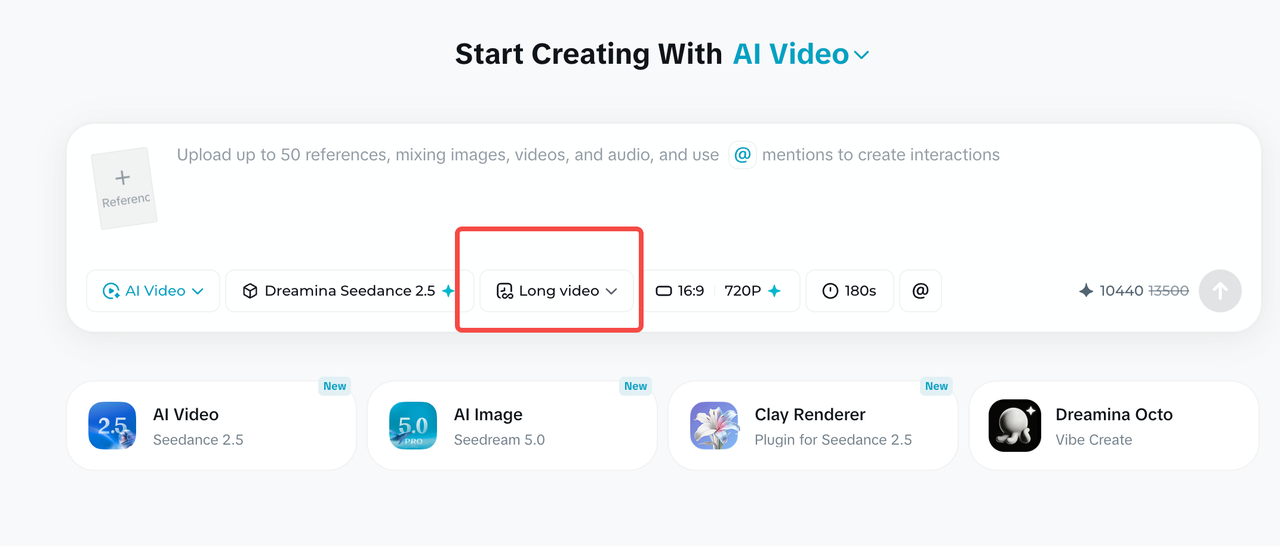
- 点击工具栏中的时钟图标。
- 拖动时间轴或直接输入数值,选择 30-180 秒。
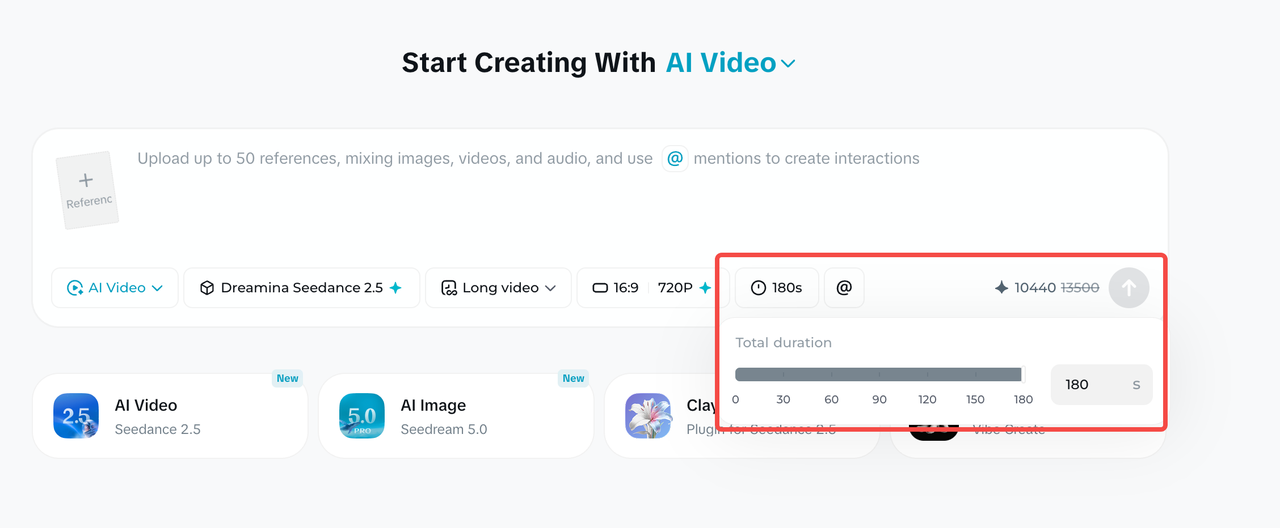
- 确认画幅、分辨率与时长,点击 Generate。
Extend Video:连续延长视频
Extend Video 只对 30 秒以内的原始视频开放。每次可选择 4-30 秒的新增时长,提示词只描述新增部分。
- 在生成流中选中目标视频,点击下方的 Extend Video。
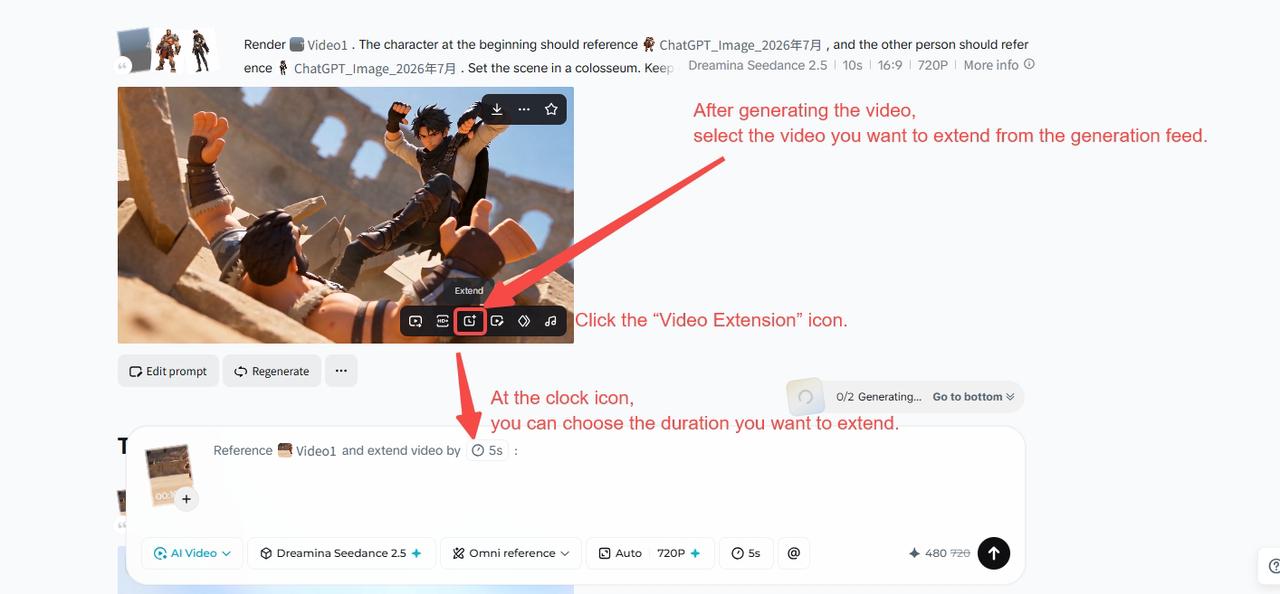
- 点击时钟,拖动时间轴或输入新增时长。

- 在文本框中写新增段落的画面、动作与衔接方式,再生成完整视频。

官方英文示例保留如下:
Reference the content of @video1, extend the video by 10s to continue the story. Require to use a "mask transition" at the cut (hard cuts are prohibited, objects appearing out of thin air are prohibited). Shot A shows the muscular warrior in @image1 who is defending (close-up), a gust of wind blows, a normal-sized fallen leaf drifts towards the camera, the leaf completely covers the camera causing the full screen to go dark; then the camera pulls back through the leaf, directly revealing the next scene: the young ranger in @image2 is leaning against a tree, raising his bow and arrow taking aim. Require the scene to be switched naturally. Naturally switch from the warrior's close-up to the ranger's medium shot.
Smart Edit:文字修改视频
Smart Edit 适合不需要画笔标记、可以直接用文字说清楚的修改。写法是:
[具体修改对象] + [动作与变化描述] + [生效时间段]
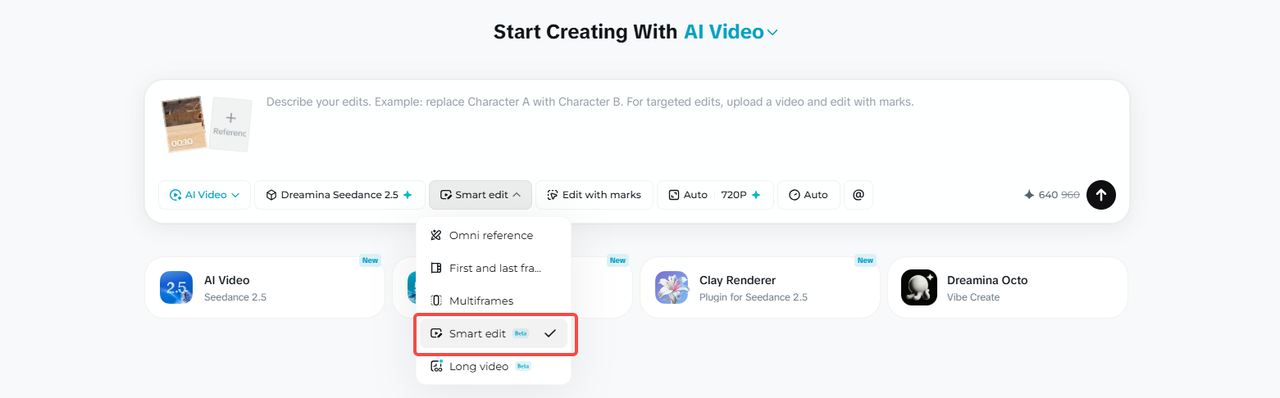
官方示例:
Modify everything entirely from 0 to 8 seconds of the overall video. Change the whale in the video to a white dragon. Remove the BGM.
Edit with marks:圈选后局部修改
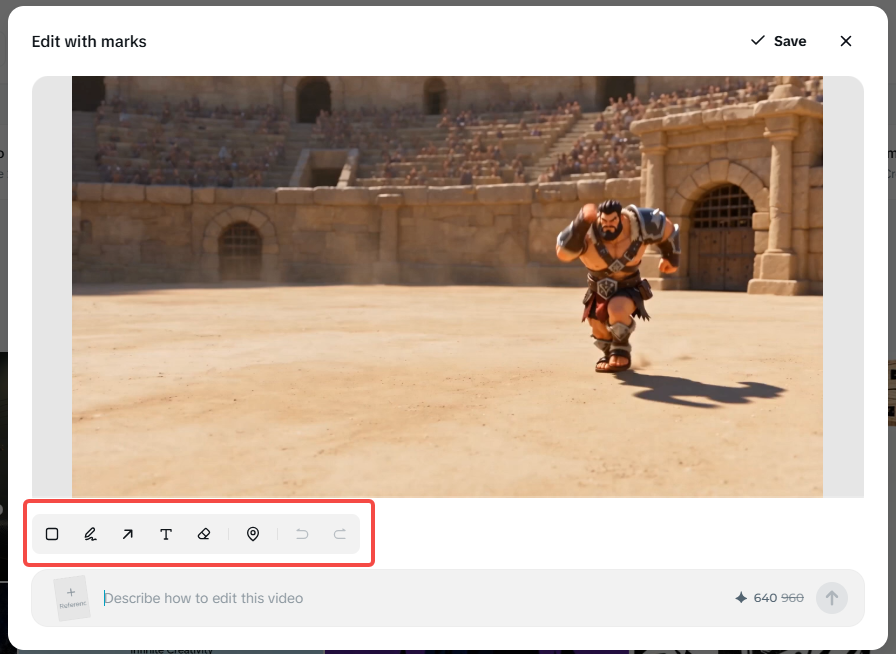
上传本地视频后,输入区会出现 Edit with marks 入口。它适合“只改画面中的这个位置”,可用框选、画笔、箭头或锚点标记对象。
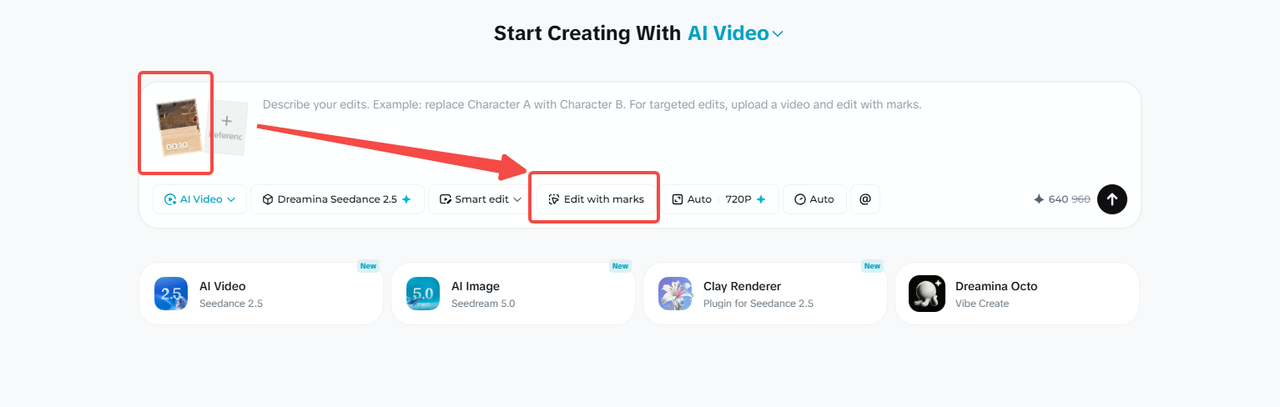
在标记界面中圈出目标,补充文字要求并确认。系统会把标记帧和时间戳加入输入,再按要求修改整段或指定时间段。
Edit Video:编辑已经生成的视频
Edit Video 面向生成流中的成片。选中视频下方的编辑入口后,可继续替换角色、改变服装、调整机位、移除对象或修改背景。它和 Edit with marks 的区别主要在入口:前者编辑已生成成片,后者也可以处理本地上传视频。
4. 基础提示词公式
官方给出的基础提示词公式:
完整提示词 = [素材说明] + [一句话概括] + [具体情节描述] + [全局补充]
| 模块 | 写法 |
|---|---|
| 素材说明 | 按上传顺序写明每份素材用于角色、场景、动作、音色还是镜头参考 |
| 一句话概括 | 主体 + 地点 + 事件 + 主题/风格 + 特殊运镜 |
| 具体情节 | 按时间线写画面、运镜、动作、对白、音效和转场 |
| 全局补充 | 再次锁定机位、环境、灯光、声音、人物一致性与禁止项 |
官方英文示例节选:
Realistic nature documentary style, cinematic realistic lighting. In the morning mist, within a vast wetland reed bed @image1, an elegant red-crowned crane is spreading its wings and dancing. @image2 The red-crowned crane features snow-white feathers, a bright red crown, a slender and upright posture, and light, noble movements.

0s-3s: A red-crowned crane stands quietly in the shallow water with an elegant posture. It slowly begins to unfold its broad black-and-white wings with gentle movements. The airflow from the flapping wings creates ripples on the water surface.

3s-8s: The red-crowned crane leaps lightly on the water, its feet alternately tapping the surface, splashing crystal-clear water droplets. Its slender neck tilts backward with its beak pointing to the sky.

Low-angle, slight handheld camera feel, moving up and down slightly to follow the crane's jumping trajectory. Natural environmental sounds: flowing water, the powerful flapping of wings, and the crane's call. The overall atmosphere is peaceful, ethereal, and highly aesthetic.
5. 真人角色公式
真人角色的提示词公式如下:
Character = [Age/Race] + [Skin Color/Skin Texture] + [Facial Details] + [Eye/Soul] + [Hairstyle/Hair Color] + [Clothing/Clothing Texture] + [Body Type/Emotion/Temperament] + [Other Requirements]
中文公式:
角色 = 年龄/种族 + 肤色/皮肤质感 + 五官细节 + 眼神/灵魂 + 发型/发色 + 服装/衣着质感 + 体型/情绪/气质 + 其他要求
公式中的角色信息包括:
- 皮肤:冷暖调、真实毛孔、细纹、雀斑或自然瑕疵。
- 五官:眼型、眉骨、鼻梁、唇形、颧骨与下颌线,至少 3-4 项。
- 眼神:注视方向、底层情绪与人物关系。
- 头发:具体发色、质感、发型及风吹或运动后的状态。
- 服装:剪裁、颜色、面料、新旧状态和穿着细节。
- 体态:骨架、肩线、构图、动作与整体气质。
官方英文示例:
22-year-old East Asian woman, with a highly classical, gentle cinematic face. Cool-toned fair skin, revealing a delicate and moist texture, retaining realistic fine pores and natural skin texture. Slender and elegant eyes, a delicate and straight nose bridge, full lips with a faint, gentle smile at the corners, and a soft jawline. Extremely affectionate and expressive gaze, eyes shimmering like spring water. Jet-black hair pinned into a casual yet elegant classical low bun, secured only by a plain jade hairpin. Wearing a minimalist, pure white traditional cross-collar dress. Slender figure with delicate narrow shoulders, exuding a gentle, graceful, and deeply affectionate classical romantic aura.
6. 时间戳控制
Seedance 2.5 支持通过文本指定具体时间戳。创作者可以把指令精确到具体秒数,控制画面中的动作演进和场景转换,实现脚本级的精确还原。
官方英文时间戳示例:
0-5s: Open with a close-up of the Overlord from @Image 2. The camera slowly circles his upper body and transitions into a medium shot. The Overlord spins and turns, his body and back flags sweeping quickly past the lens to form a natural occlusion.

6-10s: The camera steadily circles Consort Yu in a medium shot from @Image 1, following her water sleeves through the arc. She raises her arm, flicks her wrist, unfurls the sleeves, and half-turns.

11-20s: The male warrior from @Image 3 enters with an aerial flip. The camera slowly pulls back from a medium-close shot of the warrior to a full stage view. At the end, all three face the audience and strike a synchronized Peking opera finale pose.
7. 多语言视频
Seedance 2.5 全面支持小语种输入,优先优化中文、英语、西班牙语、印尼语和马来语,并覆盖泰语、阿拉伯语、葡萄牙语、越南语、日语和韩语。不同语言的创作者可以直接使用自己最熟悉的母语表达创意。
8. 去除字幕和背景音乐
Seedance 2.5 大幅优化了生成稳定性,有效解决随机字幕和无关背景音乐的问题,为后期自行添加文字和音乐提供更干净的基础视频素材。
移除背景音乐、保留原视频中的人声和其他元素时,可使用:
Remove the background music from @Video 1. Keep the original dialogue, voice, ambient sound, and on-screen subtitles unchanged.
9. 多模态参考升级
单次最多可输入 30 张图片、10 段视频和 10 段音频。升级不只是数量增加,还包括:
- 迁移参考视频的动作、镜头语言、情绪氛围与创意结构。
- 分离或移除背景音乐,同时保留人声和画面元素。
- 局部消除、对象替换和空间视角修改。
- 参考更多音色,并提高多人同框时的身份独立性。
- 绿幕编辑、无缝视频转场和多宫格分镜参考。
10. Clay Renderer 白模渲染
Clay Renderer 允许 Maya、Blender 等 3D 工作流先用无材质白模确定空间结构、人物站位、运动路径和机位,再交给模型补材质、灯光和风格。
提示词公式:
[白模参考的内容] + [角色/场景参考] + [材质与灯光] + [风格] + [完整故事顺序]
官方英文示例:
Refer to @Clay Render 1 for camera movement, pacing, shot-size transitions, subject trajectory, and blocking. Refer to @Image 2 for character design, scene, materials, lighting, color, and fairy-tale atmosphere, and render the white model as a dreamy, warm, 3D animated short with a childlike fantasy feel. The story unfolds as follows: flight through a fantasy sky → mythical beasts flying alongside through a sea of clouds → a dive into the ocean → weaving through the deep with manta rays → passing through a mirrored rift in spacetime → picking stars from the cosmos → transforming back into the bedroom → father tucking in the blanket → the picture book closes and holds on the final frame.
11. 官方素材输入建议
| 场景 | 官方建议 |
|---|---|
| 素材输入上限 | 图片最多 30 张,支持 4K;视频最多 10 段,总时长不超过 30 秒;音频最多 10 段,总时长不超过 30 秒。 |
| 音视频主体数量 | 1-5 个主体效果较好;可尝试 6-10 个主体,但稳定性会下降,可能需要多次生成。 |
| 音视频主体时长 | 5-10 秒效果较好;时长增加后稳定性会下降,可能需要多次生成。 |
| 主体图片数量 | 1-8 个主体效果较好;可尝试 9-12 个主体,但稳定性会下降,可能需要多次生成。 |
| 不同视角的主体图片 | 1-5 个主体时,单视角和多视角均可;超过 5 个主体时,单视角更稳定。需要多个视角时,建议拆成多张不同视角图片,不要把多个视角放进同一张图片。 |
| 视频编辑时长 | 20 秒以内效果较好;时长增加后稳定性会下降,可能需要多次生成。 |
| 视频参考图数量 | 1-5 张参考图效果较好;可尝试 6-8 张,但稳定性会下降,可能需要多次生成。 |
12. FAQ
最长能生成多长的视频?
Dreamina 的 Long Video 模式支持一次生成 30-180 秒,最长 180 秒。标准单次生成是 4-30 秒。Extend Video 可对 30 秒以内的原视频追加 4-30 秒,多轮组合最长可到 60 秒。
一次能上传多少参考素材?
最多 30 张图片、10 段视频和 10 段音频。视频和音频各自总时长不超过 30 秒。数量是上限,不是稳定性建议;复杂任务建议从较少素材开始逐步增加。
怎样减少人物 AI 感?
不要只写“真人、电影感”。按年龄/种族、肤色与毛孔、五官、眼神、发型、服装材质、体型气质逐项描述,并保留雀斑、细纹、发丝凌乱和衣料磨损等真实细节。多人场景要给每个人独立的脸型、发色、服装和站位。
怎样通过时间戳控制长视频?
先写全局设定,再把时长切成连续且不重叠的区间,如 00:00-00:06、00:07-00:13。每段分别写镜头、主体动作、对白/声音和转场,最后补充全局一致性与禁止项。
HiAPI 现在能否直接调用 Seedance 2.5?
可以。 Seedance 2.5 已在 HiAPI 上线,模型为 seedance-2.5/text-to-video、seedance-2.5/image-to-video 和 seedance-2.5/reference-to-video。文生视频和图生视频 720p 每秒 $0.204、1080p 每秒 $0.516;参考生视频 480p 每秒 $0.1215 起,按「参考视频时长 + 输出时长」计费。API 单个任务可生成 4 到 30 秒;长视频、延长和智能编辑是即梦 App 的功能。
用 API 接入,按你手里的素材选对应的中文教程:
- 只有提示词:Seedance 2.5 文生视频 API 教程
- 有首帧或首尾帧图片:Seedance 2.5 图生视频 API 教程
- 有参考视频,想沿用运镜换主体:Seedance 2.5 参考生视频 API 教程
规格和价格详见 Seedance 2.5 详解 和 Seedance 2.5 API 价格。