Subject
Scene
Camera and light
01
Describe subject and scene
Start with the subject, environment, and visual goal, then add material, light, camera, and exact text.
Explore GPT Image 2.5 Flare for fast creative work, with photography, ads, comics, pixel art and recurring-character examples. Generate images online or integrate with HiAPI.
Provider: OpenAI
Category: image generation
Endpoint: /v1/tasks
Status: Available
Cost: See live page pricing
GPT Image 2.5 Flare text-to-image model with prompt, aspect ratio, resolution, and background controls.
Pricing
Standard Usage
Background mode. Supported only at 1K resolution; omit for 2K/4K
Ready for generation
Configure your parameters and click "Run" to see the output here.
Browse results across different aspect ratios, complete prompts, and visual detail.
Choose by task: create or edit images, or handle text, coding and reasoning.
Choose inputs and output settings for your creative goal with gpt-image-2.5-flare.
Pricing is per output image and resolution tier. See the estimate before generating.
Start with an idea, add an image if needed, and create in three steps.
Start with the subject, environment, and visual goal, then add material, light, camera, and exact text.
Draft
1K
Final
4K
Generate from text, or add reference images for editing. Choose a layout, quality, and file format; each request returns one image. Use PNG or WebP for transparency.
Confirm the result in Playground, then reuse the same prompt and model ID in an asynchronous task.
Copy the request example and use your own API key and image URLs. See the documentation for parameters, callbacks and result retrieval.
POST /v1/tasksgpt-image-2.5-flare/text-to-imagecurl -X POST "https://api.hiapi.ai/v1/tasks" \
-H "Authorization: Bearer YOUR_API_KEY" \
-H "Content-Type: application/json" \
-d '{
"model": "gpt-image-2.5-flare/text-to-image",
"input": {
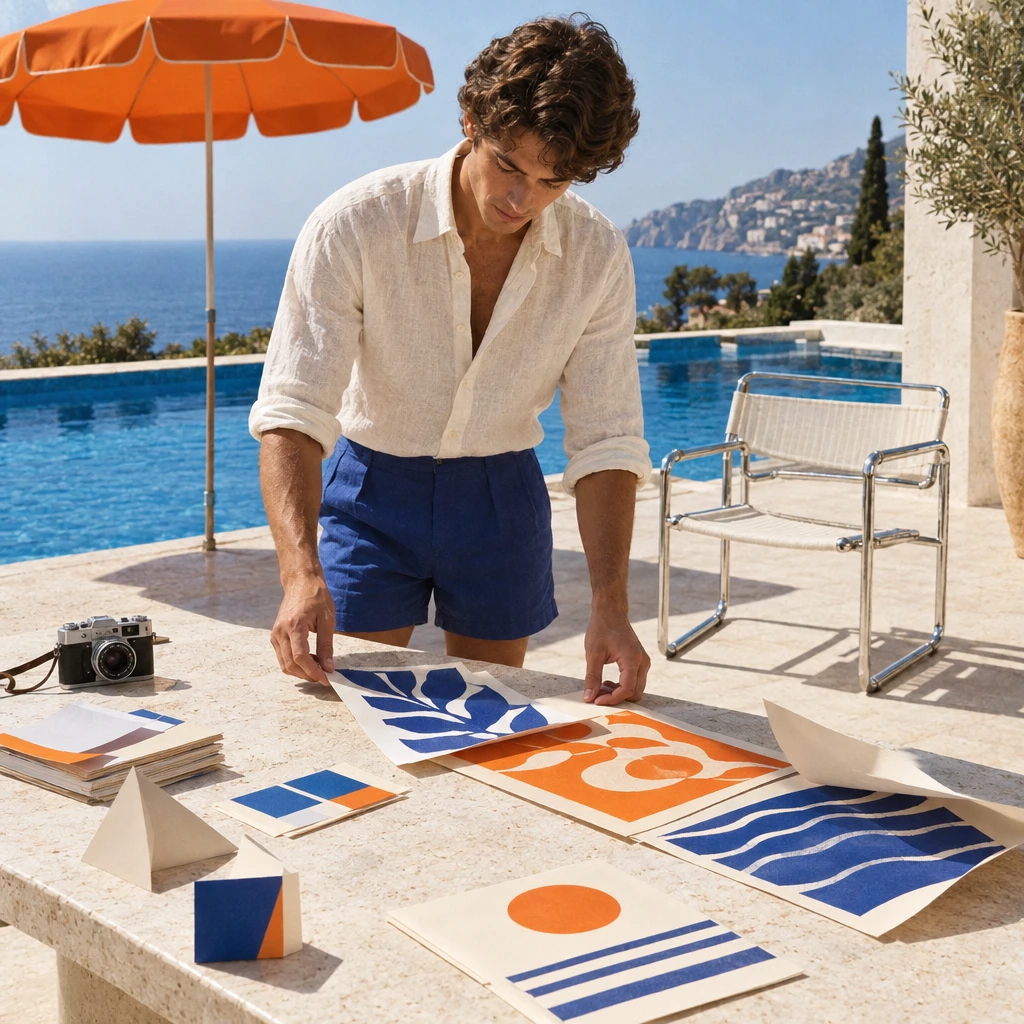
"prompt": "Create a premium square editorial lifestyle photograph set at a sunlit 1960s Mediterranean poolside creative studio. One stylish young adult designer in an ivory linen shirt and cobalt shorts is arranging bold ultramarine, tangerine, and cream print samples on a white travertine table. Behind them: a cobalt-blue swimming pool, one sculptural orange parasol, a chrome tubular chair, a compact analog camera, and a few geometric paper mockups lifting slightly in a warm sea breeze. Crisp midday sunlight, elegant hard-edged shadows, natural skin, tactile paper and linen, subtle film grain, refined Italian resort color palette, sophisticated magazine art direction, balanced negative space, photorealistic, no cyberpunk, no neon, no logos, no watermark, no readable text.",
"aspect_ratio": "auto",
"resolution": "1K"
}
}'The create request immediately returns a taskId; image generation continues asynchronously.
GPT IMAGE 2.5 / FLARE
Flare is a speed-focused image model built for high-quality everyday generation, creative exploration and applications with frequent image requests. It accepts text and image inputs for both new creations and edits.
EVERYDAY IMAGE CREATION
Its role spans photography, advertising, illustration and visual prototypes. Content tools that produce many revisions benefit from a model that balances responsiveness with usable images. References can anchor new versions to a person, product or style.
The poolside example brings together light, a person, printed paper and stone. The Flare examples below extend to lettering, sequential stories and pixel art, covering everyday content and stylized visual design.
Flare serves applications that need high-quality images with lower latency. These Flare examples span portraits, advertising, sequential images and style references.
A photographic scene depends on skin, clothing and environmental detail working together. In this example, a sailor repairs a net with a dog beside him. The hands, knots and worn clothing ground the portrait in an everyday activity.
Flare can create editorial portraits, lifestyle imagery and scene concepts. Text can describe the person alongside framing, ambient light and photographic texture.
Flare · Sailor portrait
A clothing campaign brings outfits, interaction and branding into one composition. This example gives the lettering a readable position while keeping the street setting and clothing visible.
This form of generation supports ad concepts, social promotions and campaign covers. Lettering can be generated with the image, with spelling and layout available for subsequent refinement.
Flare · Clothing campaign
The four-panel pet story places one character in successive moments and actions. Each panel carries part of the narrative, with the order of the images explaining what happens.
Flare also supports comic drafts, short-form storyboards and narrative proposals. A multi-panel image can cover a short event, while further generations extend the characters and settings.
Flare · Four-panel pet story
The farmers market example organizes product listings, pictures, prices and navigation into a phone-screen preview. It communicates a visual structure for discussing hierarchy and interface style.
These interface concepts support product proposals and design exploration, helping teams compare layouts, palettes and content organization visually.
Flare · Mobile interface concept
A reference can supply pixel structure, palette and visual language while the output introduces a different subject. Here, a game-screen reference informs a pixel-art motorcycle rider.
Style references support game-art drafts, stylized illustrations and character concepts whose treatment relates to an existing design.
Style reference
Flare · Pixel-art rider
The greeting-card example builds a theme around a teddy bear, a window and interior light. Subject, decoration and space for lettering form one design for seasonal messages and social content.
For products with regularly changing content, Flare’s speed-focused positioning suits frequent image requests while retaining reference-based editing.
Flare · Holiday greeting card
The first image establishes the character’s clothing, appearance and storybook style. The next image takes that character into a new scene in the snow, extending the story around a recurring subject.
These Flare outputs illustrate continuation from a prior image for character stories, picture-book proposals and illustration series.
Character and opening scene
The next scene in the snow
ARENA LEADERBOARD
GPT Image 2.5 Flare ranks second in text-to-image, image editing and multi-image editing, with strong results across both generation and reference-based creation.
| Rank / Model | Score |
|---|---|
| 1Sunburst | 1421 |
| 2Flare | 1399 |
| 3GPT Image 2 (medium) | 1381 |
| Rank / Model | Score |
|---|---|
| 1Sunburst | 1520 |
| 2Flare | 1491 |
| 3GPT Image 2 (medium) | 1461 |
| Rank / Model | Score |
|---|---|
| 1Sunburst | 1535 |
| 2Flare | 1501 |
| 3GPT Image 2 (medium) | 1454 |
Image generation for covers, social posts and short stories in frequently updated tools.
Turn product, style and setting choices into images that users can explore visually.
Communicate proposals through photographs, illustrations and interface concepts.
Repeatable image generation for catalog imagery, content variations and personalized visuals.
Try photography, graphic layouts and illustrations online, then integrate image generation into your content product. Find settings, estimates and request examples on this page.
Flare focuses on speed and high-quality everyday generation for creator tools, ad drafts, visual prototypes and frequent image requests. It also supports editing and reference fidelity.
It also accepts images. A reference can supply a person, product or style for a new creation or edit. The pixel-art rider on this page uses an image as a style reference.
Yes. The sailor and poolside examples show photographic treatments of people, materials and ambient light. Camera and lighting descriptions guide appearance.
The requested wording can be described alongside the visual brief. The clothing-campaign example combines people, outfits and a headline in one image. Headlines, colors and styling can be refined in subsequent versions.
The page shows a four-panel pet story and a forest character continued into another scene. Flare can arrange sequential panels in one image or use a previous output as a reference for the next creation.
Flare can create visual concepts for mobile apps, product listings and content pages. These images present layout, color, navigation and information hierarchy for proposals and design discussions.
Yes. The pixel-art example uses a game-screen reference to create a motorcycle rider. The prompt can specify which stylistic elements to borrow and what the new image should contain.
Yes. Flare supports text-to-image generation and reference-based editing with a focus on lower generation latency, making it relevant to content tools, design applications and product displays with frequent image updates.
Flare prioritizes everyday generation and responsiveness. Consider Sunburst for demanding visual requirements or precise edits. Both models generate and edit images; their positioning reflects a quality and latency tradeoff.
HiAPI offers six quality settings, square and landscape or portrait formats, and listed pixel dimensions. Choose PNG, JPEG or WebP, using PNG or WebP for transparency. The specifications and Playground list the options.
An application can submit image tasks and retrieve results through polling or callbacks. Each HiAPI request produces one image, so the application manages task volume and concurrency.
Billing is per output image and selected quality, with no extra reference-image fee. Playground displays the estimate for the chosen settings.
HiAPI Blog