Product photography is usually the slowest part of listing a catalog: a studio shoot for every SKU, a re-shoot for every seasonal background, another for every marketplace's aspect-ratio rules. gpt-image-2.5-flare on hiapi collapses most of that into one model ID that both generates a product shot from a text prompt and edits an existing photo — swap the backdrop, stage it in a lifestyle scene, resize it for a different channel — without touching the product itself. This guide walks through three real workflows with unedited API outputs, then shows the batch pattern for running it across a whole catalog instead of one image at a time.
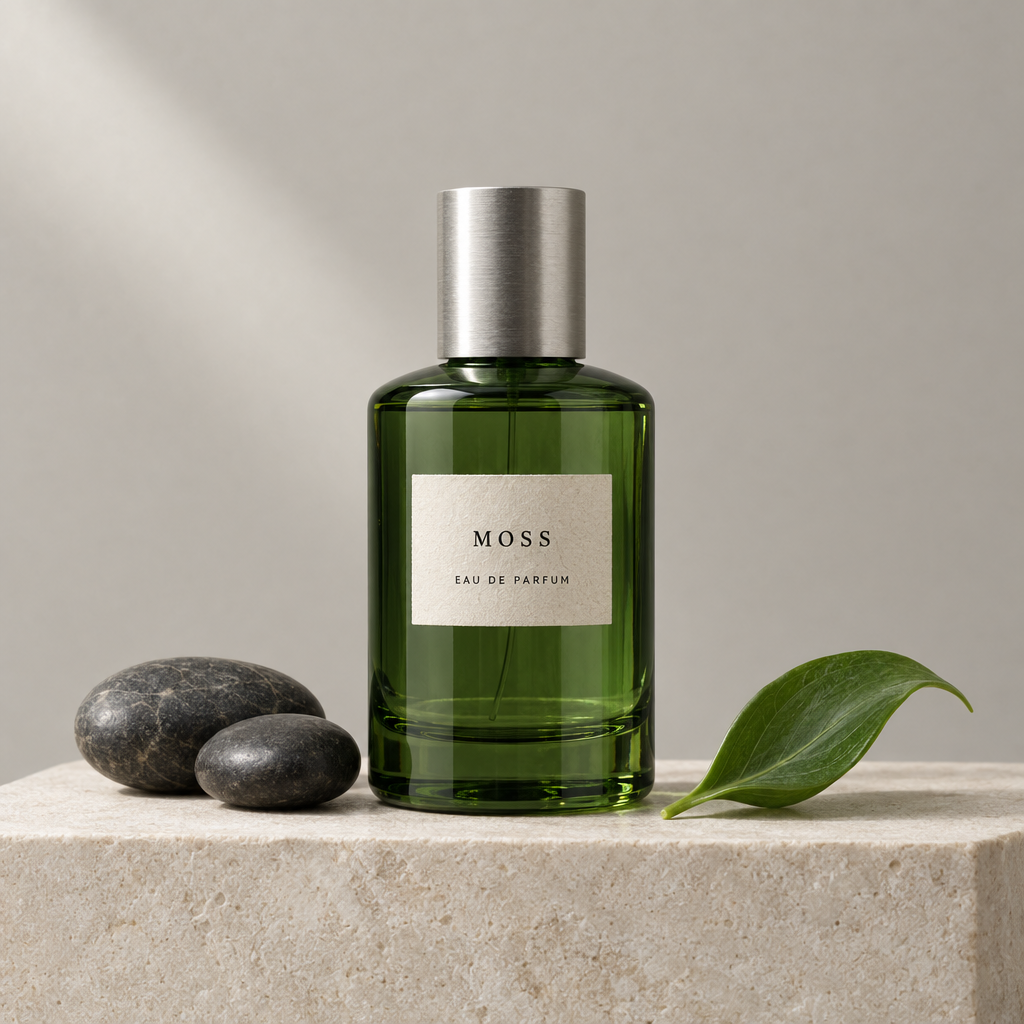
The product shown below (a green glass bottle labeled "MOSS", and a cobalt-blue kettle labeled "AER") are concept props used to demonstrate the technique, not real client photography — but every image is a genuine, unedited output from the hiapi API, not a mockup.
Why one model ID is the point
gpt-image-2.5-flare handles two different jobs depending on what you send it:
- Omit
image_urlsand it generates from your text prompt alone (text-to-image). - Add
image_urlsand it edits the supplied photo instead (image-to-image) — same model, same endpoint, same pricing.
For a catalog, that matters more than it sounds: you don't juggle two model IDs or two pricing schedules depending on whether you're shooting a product for the first time or re-using an existing photo. Two other details make it a good fit for batch work specifically:
- Quality tiers, not a single fixed cost. You choose
low/medium/high/xhigh/maxper request, so a 500-SKU thumbnail pass and a dozen hero images for your homepage don't have to cost the same per image. - Flexible aspect ratios.
1:1,4:5,9:16,16:9, and others are available per request, so the same product photo can be re-cut for a square marketplace grid, a vertical mobile feed, or a wide banner without a re-shoot.
Every call goes through hiapi's async task API: POST /v1/tasks to submit, then poll GET /v1/tasks/{id} (or use a callback) until the status is success. There's no synchronous "image in the response" call — generation and editing both take several seconds.
Step 1: Generate a clean studio shot from scratch
Start with a plain, well-lit studio photograph — the base asset you'll edit in later steps.
import os
import time
import requests

API_KEY = os.environ["HIAPI_API_KEY"]
BASE = "https://api.hiapi.ai/v1/tasks"
HEADERS = {"Authorization": f"Bearer {API_KEY}", "Content-Type": "application/json"}


def create_task(prompt, quality="medium", aspect_ratio="1:1", image_urls=None, idempotency_key=None):
    payload = {"model": "gpt-image-2.5-flare",
               "input": {"prompt": prompt, "quality": quality, "aspect_ratio": aspect_ratio}}
    if image_urls:
        payload["input"]["image_urls"] = image_urls
    headers = dict(HEADERS)
    if idempotency_key:
        headers["Idempotency-Key"] = idempotency_key
    resp = requests.post(BASE, headers=headers, json=payload, timeout=60)
    resp.raise_for_status()
    return resp.json()["data"]["taskId"]


def wait_for_task(task_id, timeout_s=300, poll_every=5):
    deadline = time.time() + timeout_s
    while time.time() < deadline:
        resp = requests.get(f"{BASE}/{task_id}", headers=HEADERS, timeout=30)
        resp.raise_for_status()
        task = resp.json()["data"]
        if task["status"] == "success":
            return task["output"][0]["url"]  # download or re-upload immediately — it expires
        if task["status"] == "fail":
            raise RuntimeError(task.get("error"))
        time.sleep(poll_every)
    raise TimeoutError(f"task {task_id} did not finish in {timeout_s}s")


studio_shot_url = wait_for_task(create_task(
    "Photorealistic square studio product photograph. Center exactly one translucent forest-green "
    "glass perfume bottle with a brushed silver cylindrical cap on a pale ivory stone pedestal. A "
    "small rectangular cream label reads \"MOSS\" in a thin serif font. Soft diffused studio lighting, "
    "seamless pale warm-gray background, subtle reflection, no props, no text elsewhere in frame.",
    quality="medium",
    aspect_ratio="1:1",
))
quality="medium" is a reasonable default for a first pass — it's the same tier used for every image in this article. Bump individual SKUs to high only where the extra detail is worth the cost (see the pricing table below).
Step 2: Restyle the background without regenerating the product
This is the workflow that actually saves catalog work: send the studio shot back in as image_urls, describe only the change you want, and the product itself stays pixel-consistent — same bottle shape, same cap, same label — while the backdrop changes.
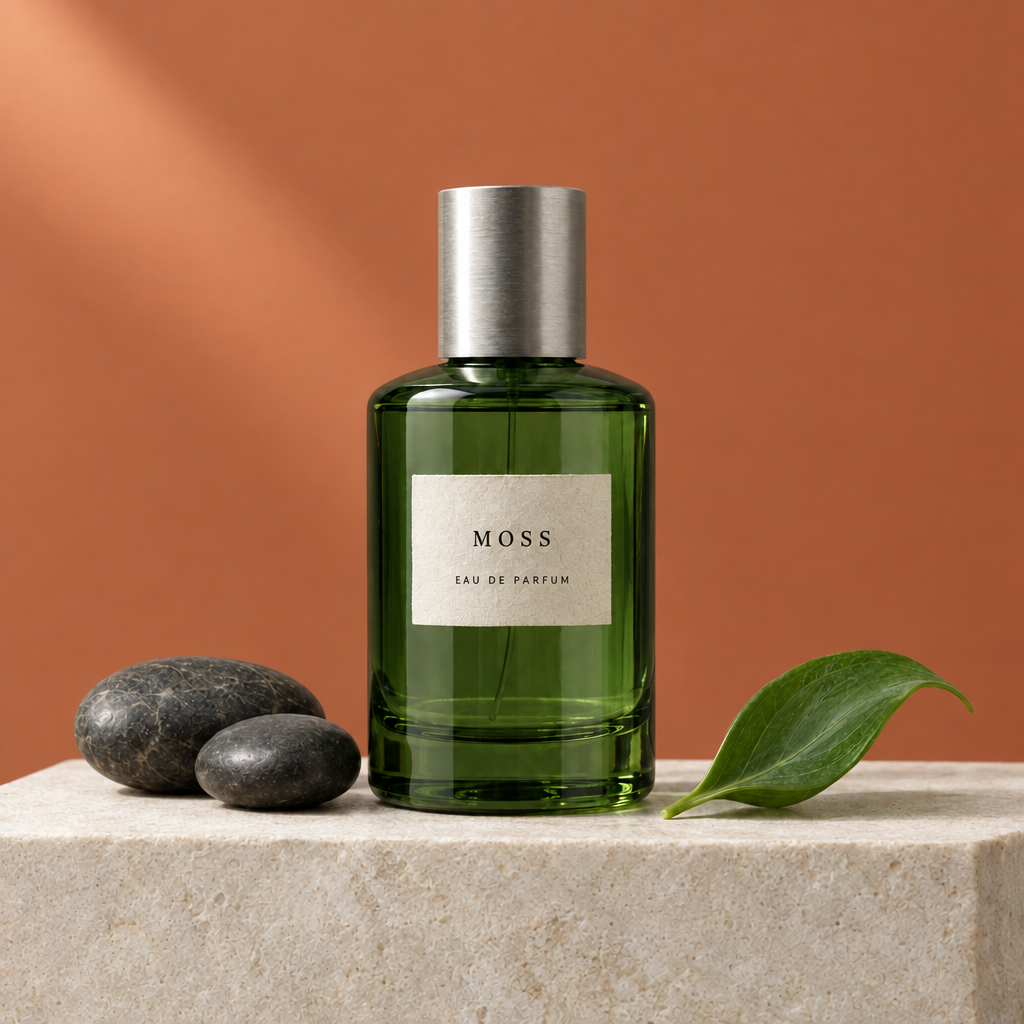
seasonal_variant_url = wait_for_task(create_task(
    "Edit the supplied product photograph. Change ONLY the seamless background from pale warm gray "
    "to muted terracotta orange. Preserve the exact bottle shape and green glass color, the silver "
    "cap, the cream label and all its text, the lighting direction, and the camera angle exactly.",
    quality="medium",
    aspect_ratio="1:1",
    image_urls=[studio_shot_url],
))
The same pattern works on a completely different product — here's a cobalt-blue kettle with its background swapped to a warm peach studio backdrop, produced the same way:
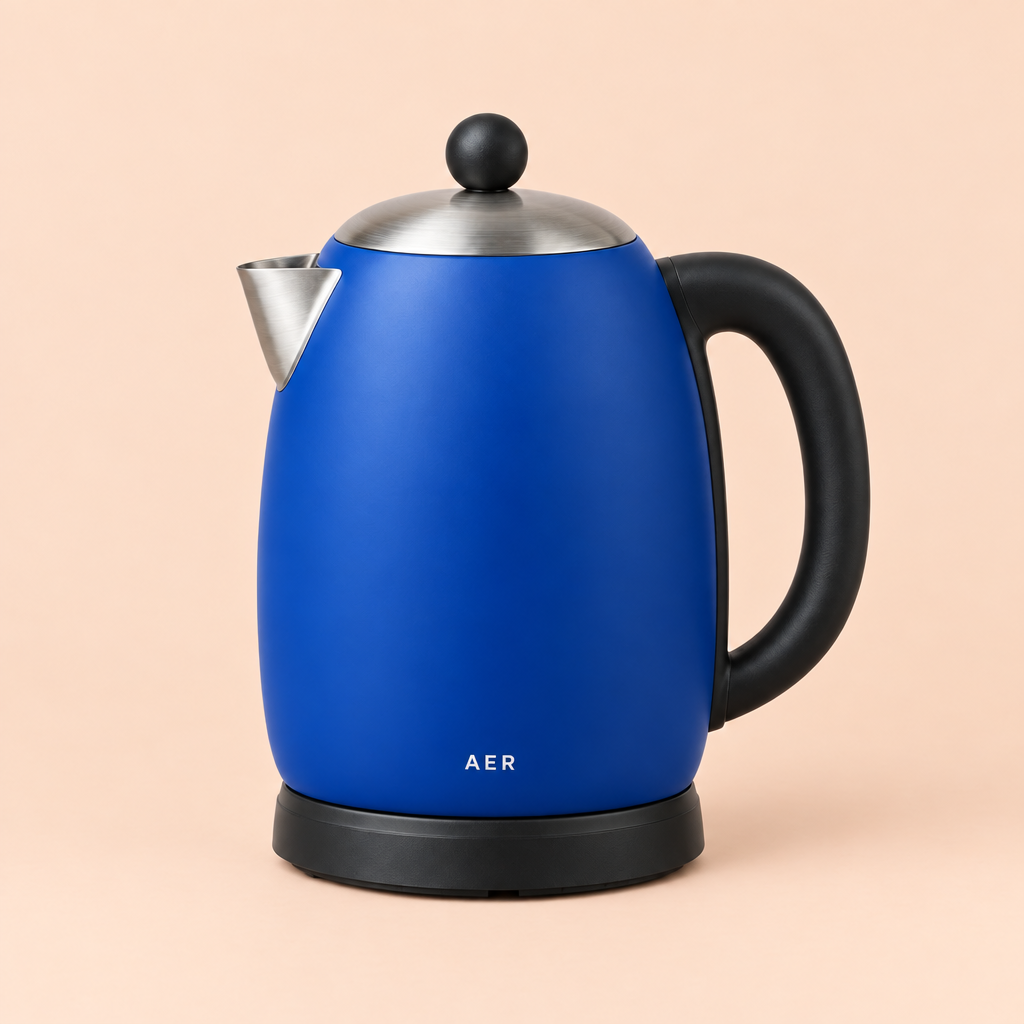
That's the core of a "seasonal refresh" or "new marketplace theme" job: one edit call per SKU, product untouched, background changed. Run it 500 times and you've re-themed a whole catalog without a re-shoot.
Step 3: Stage the product in a lifestyle scene
Studio shots work for a marketplace grid; a lifestyle scene sells the product on a landing page or an ad. Same edit pattern, more ambitious prompt — the model places the exact product into a plausible real-world setting instead of just changing the backdrop color.
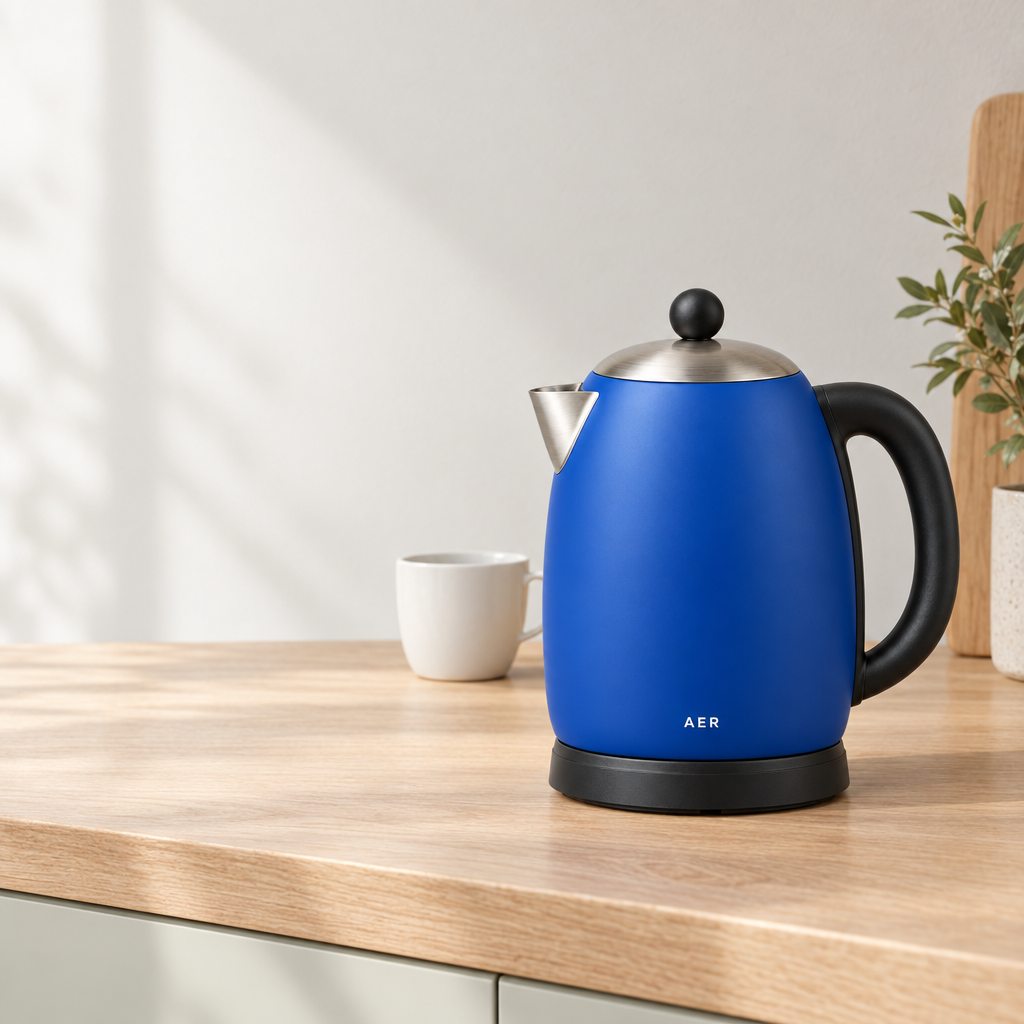
lifestyle_url = wait_for_task(create_task(
    "Create a photorealistic square lifestyle product photograph using the supplied blue kettle as "
    "the exact product reference. Keep the original cobalt-blue kettle, black handle and base, "
    "brushed-metal spout and lid, black knob, and all lettering completely unchanged. Place it on a "
    "sunlit kitchen countertop with soft natural morning light, a few blurred kitchen props in the "
    "background, shallow depth of field.",
    quality="medium",
    aspect_ratio="1:1",
    image_urls=["<your kettle product photo URL>"],
))
Keep the constraint language ("keep the original ... completely unchanged") in every edit prompt — it's what stops the model from drifting the product while it changes everything around it.
Batch automation for a full catalog
A single edit call is useful; the value at catalog scale is running the same pattern across every SKU unattended. The shape that works well in production:
import concurrent.futures
import csv

QUALITY_BY_USE = {"thumbnail": "low", "listing": "medium", "hero": "high"}


def process_row(row):
    idem_key = f"{row['sku']}-{row['use']}-{row['background']}"
    prompt = (
        f"Edit the supplied product photograph. Change ONLY the seamless background to "
        f"{row['background']}. Preserve the exact product shape, color, materials, label text, "
        f"lighting direction, and camera angle."
    )
    try:
        task_id = create_task(
            prompt,
            quality=QUALITY_BY_USE[row["use"]],
            aspect_ratio=row["aspect_ratio"],
            image_urls=[row["source_photo_url"]],
            idempotency_key=idem_key,
        )
        return row["sku"], wait_for_task(task_id)
    except Exception as exc:
        return row["sku"], f"ERROR: {exc}"


with open("catalog.csv") as f:
    rows = list(csv.DictReader(f))  # sku,source_photo_url,background,use,aspect_ratio

with concurrent.futures.ThreadPoolExecutor(max_workers=4) as pool:
    results = list(pool.map(process_row, rows))
A few things that matter once you're past a handful of images:
- Per-row idempotency keys. Send a distinct
Idempotency-Keyheader per SKU/variant so a retried request after a timeout doesn't create — and re-bill — a duplicate task. - Cap concurrency, don't fire everything at once. A small thread pool (or an async semaphore) avoids tripping rate limits; back off and retry on a 429 rather than treating it as a hard failure.
- Pick the quality tier by where the image is used, not uniformly: thumbnails and grid listings rarely need more than
low/medium, while a homepage hero or an ad creative can justifyhighorxhigh. - Fan out aspect ratios from the same edited source, not from the original — run the background-swap edit once, then request
1:1,4:5, and9:16crops from that same result so every channel shows an identical product presentation. - Download or re-upload output URLs immediately. Task outputs expire; don't store the temporary URL as your permanent image source.
Pricing
gpt-image-2.5-flare bills per output image, by quality tier — same rate whether you're generating from scratch or editing:
| Quality | Price per image |
|---|---|
low | $0.0172 |
medium | $0.0672 |
high | $0.1829 |
xhigh | $0.3572 |
auto | $0.3572 |
max | $0.7143 |
At medium, re-theming a 500-SKU catalog with one background-swap edit per product costs roughly $33.60. See the pricing page for the full, current rate card across every model.
FAQ
Will editing accidentally change my product? Keep edit prompts scoped to a single change ("change ONLY the background...") and explicitly list what must stay the same (shape, color, label text, camera angle). The examples above show the product held constant across every edit.
Can the same model both generate and edit? Yes — gpt-image-2.5-flare is one model ID. Include image_urls to edit an existing photo; omit it to generate from your prompt alone.
How many source images can I pass in one edit call? Up to 16 via image_urls, though most product-catalog edits only need one — the photo you're restyling.
How do I avoid double-billing on retries? Send a unique Idempotency-Key header per request. A retried request with the same key returns the original task instead of creating a new one.
Related reading
If you're setting up your first call, start with the gpt-image-2.5-flare API guide for a minimal working example and the async task lifecycle in more depth. For more prompt patterns beyond product photography, see GPT Image 2.5 Flare Prompts: Copy-Paste Recipes With Real Outputs. Full parameters and schema live on the model page, and general API conventions (auth, task polling, callbacks) are in the hiapi docs.
Ready to try it on your own catalog? Grab an API key from the hiapi dashboard and run the studio-shot example above against your first product photo.