wan2.7-image-standard is the cheaper tier of Wan 2.7 Image on hiapi: one model id that handles both text-to-image and reference-based editing, at a flat $0.0345 per image for 1K or 2K output. The API guide covers the request schema. This post covers what to put in the prompt field.
Below are seven prompts you can copy and paste, plus one corrected retake. Each image is the first output from the exact prompt and settings shown: 2K resolution, seed: 20261104, no cherry-picking. When the model ignored part of a prompt, we say so and show the fix.
How we ran these
Every recipe uses the same async task call. Only the input block changes:
curl -X POST https://api.hiapi.ai/v1/tasks \
  -H "Authorization: Bearer $HIAPI_API_KEY" \
  -H "Content-Type: application/json" \
  -d '{
    "model": "wan2.7-image-standard",
    "input": {
      "prompt": "PASTE A RECIPE PROMPT HERE",
      "aspect_ratio": "3:4",
      "resolution": "2K",
      "seed": 20261104
    }
  }'
# -> {"data": {"taskId": "tk-hiapi-..."}}

curl https://api.hiapi.ai/v1/tasks/TASK_ID \
  -H "Authorization: Bearer $HIAPI_API_KEY"
# poll until "status": "success", then download output[0].url right away (it expires)
What we saw across the eight tasks in this post:
- Speed: every task finished in 35–43 seconds at 2K, editing included.
- Output sizes at 2K:
1:1→ 2048×2048,3:4→ 1536×2048,16:9→ 2560×1440,8:1→ 4096×512. The files came back as PNG. - Strict schema: the input accepts only
prompt,aspect_ratio,resolution,image_urlsandseed. There is nonegative_promptfield, so anything you want to exclude has to be written into the prompt.
Recipe 1: Bilingual poster with Chinese calligraphy
Settings: aspect_ratio: "3:4", resolution: "2K"
A vertical promotional poster for a fictional loose-leaf tea brand. At the top, large Chinese brush calligraphy reading '山间茶事'. Directly below it, a thin serif English line reading 'MOUNTAIN TEA HOUSE'. In the center, a celadon porcelain teacup on a weathered wooden tray, thin steam curling upward, misty green tea terraces fading into the background. At the bottom, a small line of text reading 'SPRING HARVEST 2026'. Muted palette of sage green, cream and ink black, generous negative space, soft paper texture, elegant minimalist layout.
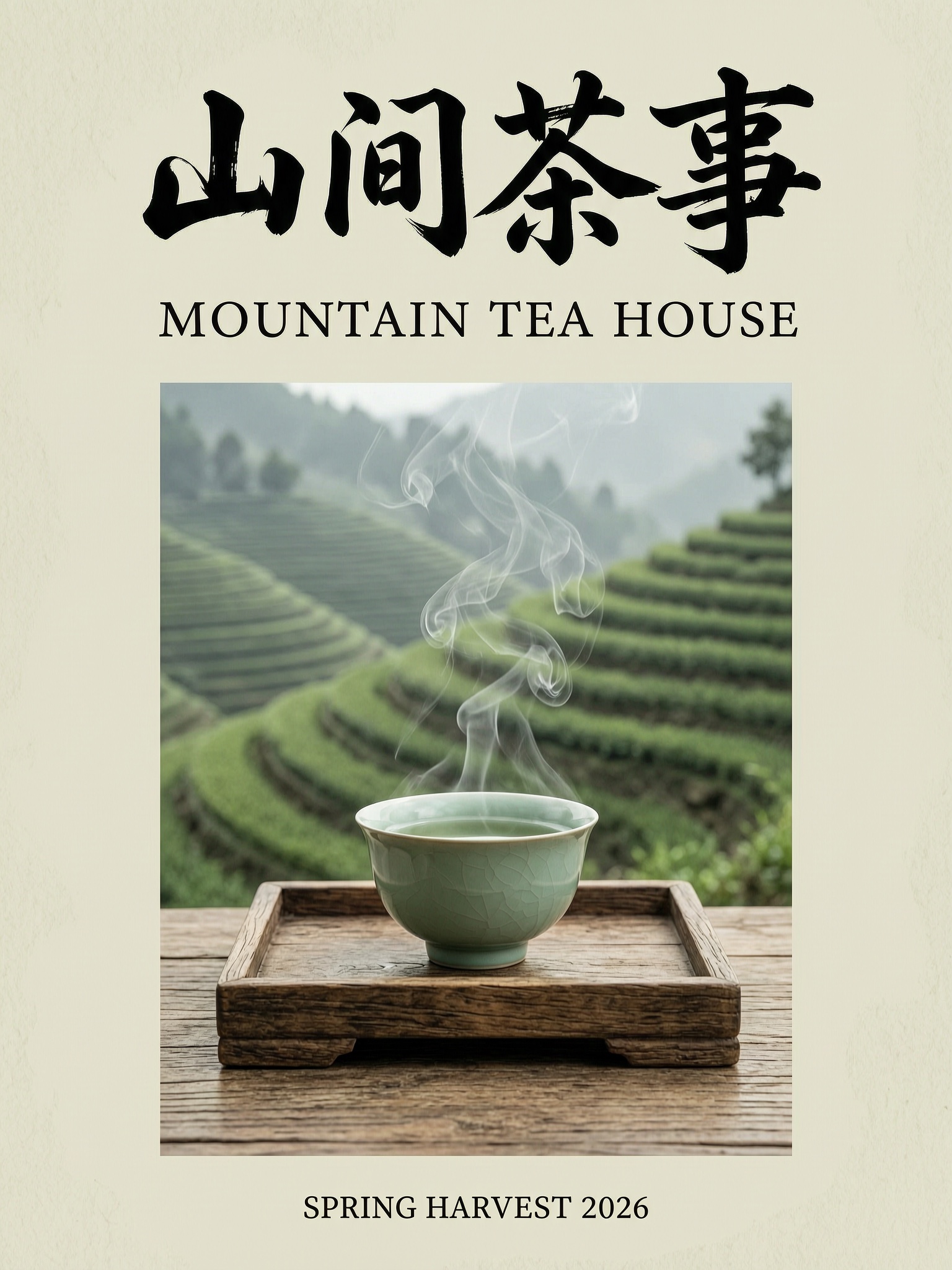
All three strings rendered correctly on the first try: the four-character brush title, the serif subtitle, and the small footer line, each where the prompt placed it.
Why it works: each string is in quotes and tied to one position (at the top, directly below it, at the bottom). The style words come last, so they describe the scene and don't interfere with the lettering.
Make it yours: swap the brand and strings, but keep one quoted string per position. Three text blocks is a comfortable load. Small text at the bottom of the frame still came out legible at 2K.
Recipe 2: Studio product shot with a blank label
Settings: aspect_ratio: "1:1", resolution: "2K"
Studio product photograph of a single frosted amber glass serum bottle with a black dropper cap, standing on a wet slab of dark green marble. A blank cream label on the bottle. Three fresh rosemary sprigs lie to the left of the bottle, two small water droplets on the marble surface. Soft key light from the upper right, a thin rim light outlining the bottle edge, deep charcoal seamless background, crisp reflections, commercial skincare advertising look, 100mm macro lens, f/8.
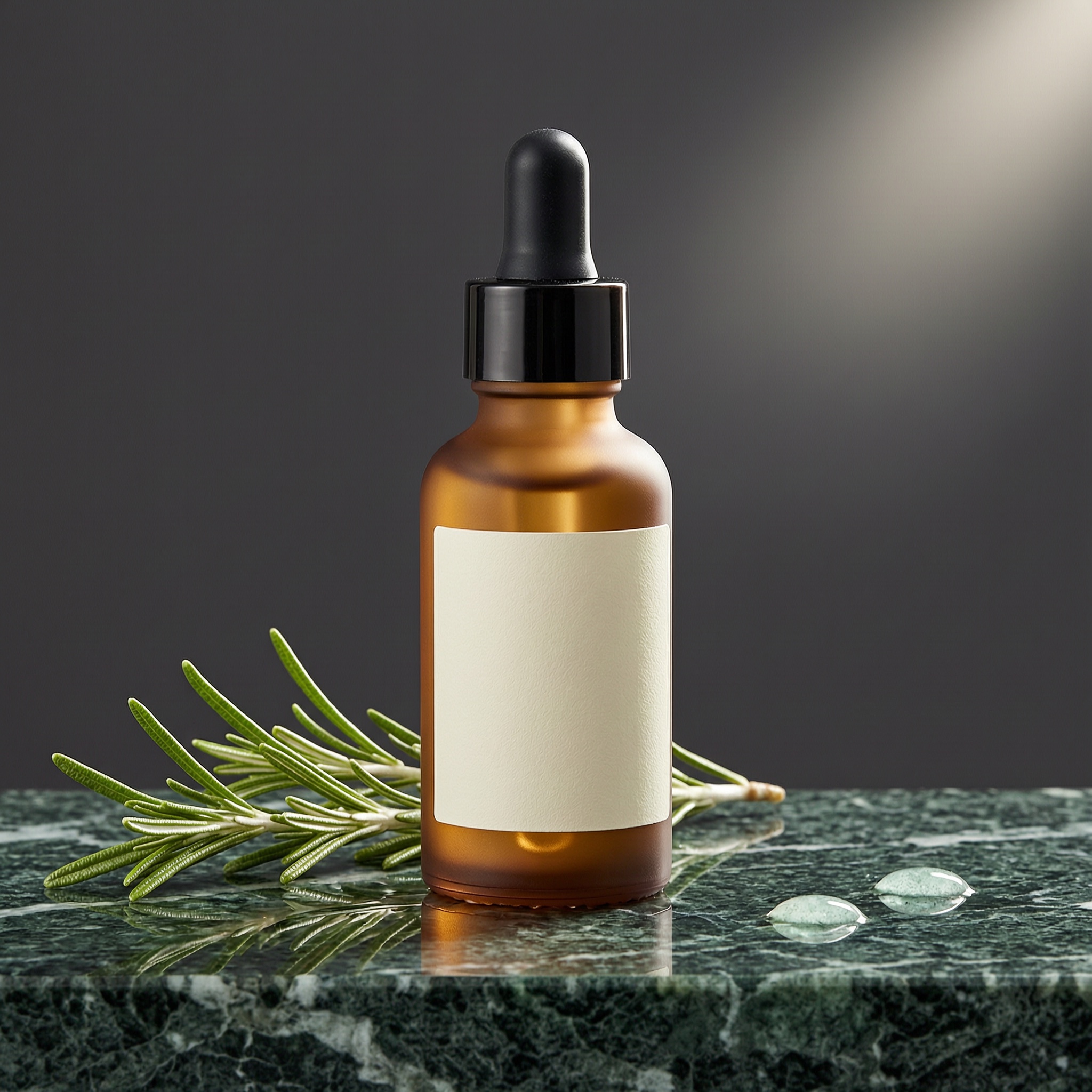
The material, the label, the light direction and the "two droplets" all match the prompt. The rosemary is the one miss: we asked for three sprigs and got what looks like one or two overlapping stems. Counts on a single small object are less reliable than counts on separate objects (see Recipe 4).
Why it works: each part of the photo is described in its own clause: subject and material, surface, props with positions, lighting, background, then lens. A "blank" label gives you a clean area to add brand text later, which is the safer choice for the small print on packaging.
Make it yours: this image is also the input for the editing recipe below. Shooting a neutral hero first and then restyling it with edits is cheaper than writing a full prompt for every colorway.
Recipe 3: Editorial portrait with natural skin
Settings: aspect_ratio: "3:4", resolution: "2K"
Editorial portrait of a woman in her late sixties with short silver hair, wearing a mustard wool turtleneck and round tortoiseshell glasses, sitting at a ceramics wheel in a sunlit pottery studio, hands and forearms dusted with grey clay, looking calmly at the camera. Shelves of unglazed bowls behind her, late afternoon window light from the left, natural skin texture with visible wrinkles, 85mm lens, shallow depth of field, Kodak Portra film color.
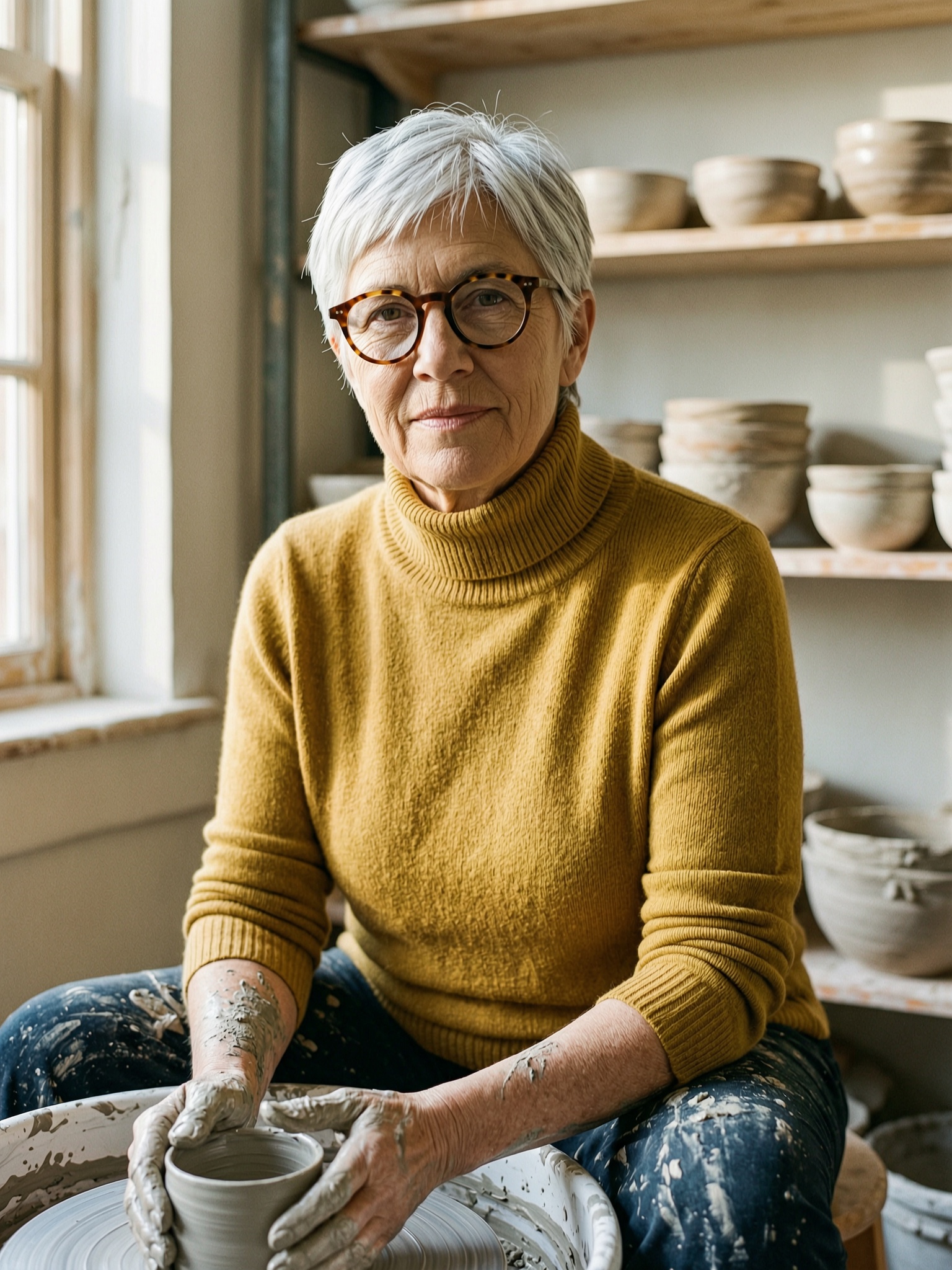
Every specified detail is there: age, hair, mustard knit, tortoiseshell frames, clay on the forearms, shelves of unglazed bowls, and light coming from the left. The skin keeps its wrinkles instead of being smoothed.
Why it works: asking for "natural skin texture with visible wrinkles" directly counters the beauty-filter look that portrait prompts tend to drift toward. A film stock name sets the color grade in two words.
Make it yours: keep the structure (who, wearing what, doing what, where, light direction, lens) and change the profession. Dirty hands and work clothes from the person's craft make a portrait read as documentary rather than stock.
Recipe 4: Labeled isometric diagram
Settings: aspect_ratio: "16:9", resolution: "2K"
A clean isometric illustration explaining how a home solar system works, on a plain off-white background. Exactly four labeled parts connected by thin blue arrows from left to right: a rooftop with solar panels labeled 'SOLAR PANELS', a wall-mounted box labeled 'INVERTER', a tall white cabinet labeled 'BATTERY', and a kitchen with a glowing lamp labeled 'HOME'. Flat vector style, soft shadows, limited palette of navy, sky blue, warm yellow and white, sans-serif labels in dark navy, generous spacing, infographic layout.
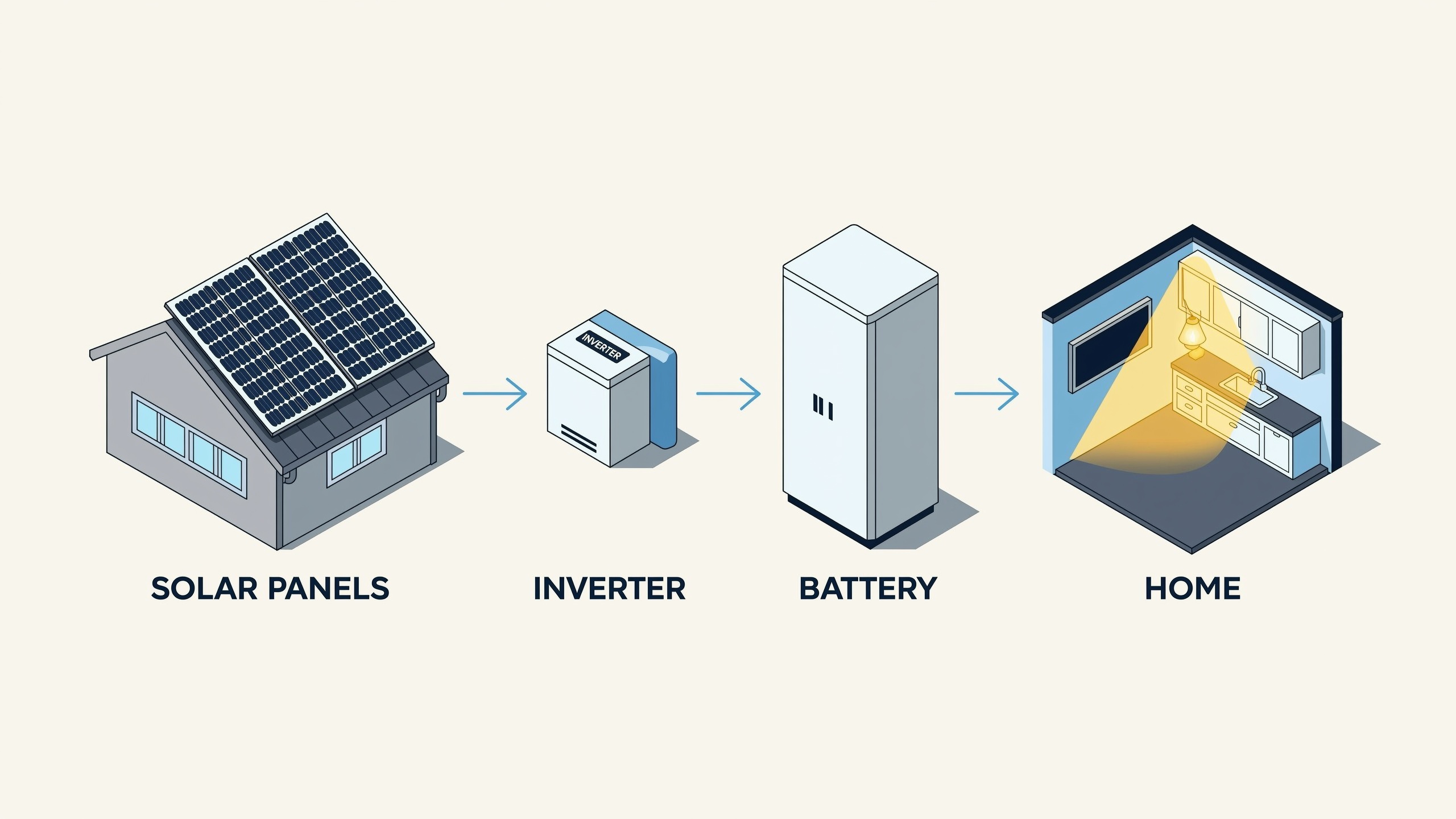
It drew four parts in the stated order with three arrows and four correctly spelled labels. The model also added a small "INVERTER" plate on the inverter box itself, which we didn't ask for but which is spelled correctly.
Why it works: "exactly four" combined with a left-to-right list gives the model both the count and the order. Separate objects in a list held their count here, unlike the rosemary in Recipe 2.
Make it yours: this works for any linear process: data pipelines, onboarding steps, supply chains. Keep it to four or five nodes and use one-word labels.
Recipe 5: 8:1 website banner
Settings: aspect_ratio: "8:1", resolution: "2K" → 4096×512 output
An ultra-wide website hero banner for an autumn outdoor gear sale. On the left third, bold white sans-serif text reading 'AUTUMN TRAIL SALE'. The rest of the banner is a panoramic landscape: a winding dirt trail through orange and red maple forest, a distant blue mountain ridge, a lone hiker with a yellow backpack walking toward the right side. Golden hour light, light haze, cinematic color grading, the text sits on a calm area of dark forest for contrast.

8:1 and 1:8 are native aspect ratios on this model, so you can generate strip banners at the right shape instead of cropping a 16:9 image. The headline is placed in the left third over dark trees as requested, and the composition holds across the full 4096 px width. The hiker walks into the frame toward the mountains rather than strictly "toward the right side", which is close enough for a banner.
Why it works: the prompt states which zone holds the text and what kind of background sits behind it ("a calm area of dark forest for contrast"). In very wide formats, unless you tell the model where empty space goes, the text tends to land on busy detail.
Make it yours: use 1:8 with the same structure for vertical sidebar ads. Put the text in the top third and describe what fills the rest of the strip.
Recipe 6: Writing the prompt in Chinese, and fixing a direction it ignored
Settings: aspect_ratio: "16:9", resolution: "2K"
Wan 2.7 accepts Chinese prompts directly. First take:
雨后夜晚的老城区小巷,青石板路面倒映着霓虹灯光,左侧是一家亮着暖黄灯光的面馆,门口挂着红色灯笼,招牌上写着“老街面馆”四个大字,右侧一位撑透明雨伞的年轻人正走进巷子深处,空气中有淡淡的雾气,电影感构图,35mm 镜头,青橙色调,写实摄影风格。
(Roughly: a rainy old-town alley at night, neon reflections on wet flagstones, a warm-lit noodle shop on the left with red lanterns and a sign reading "老街面馆", a young person with a clear umbrella on the right walking deeper into the alley, light mist, cinematic, 35mm, teal-orange, photorealistic.)
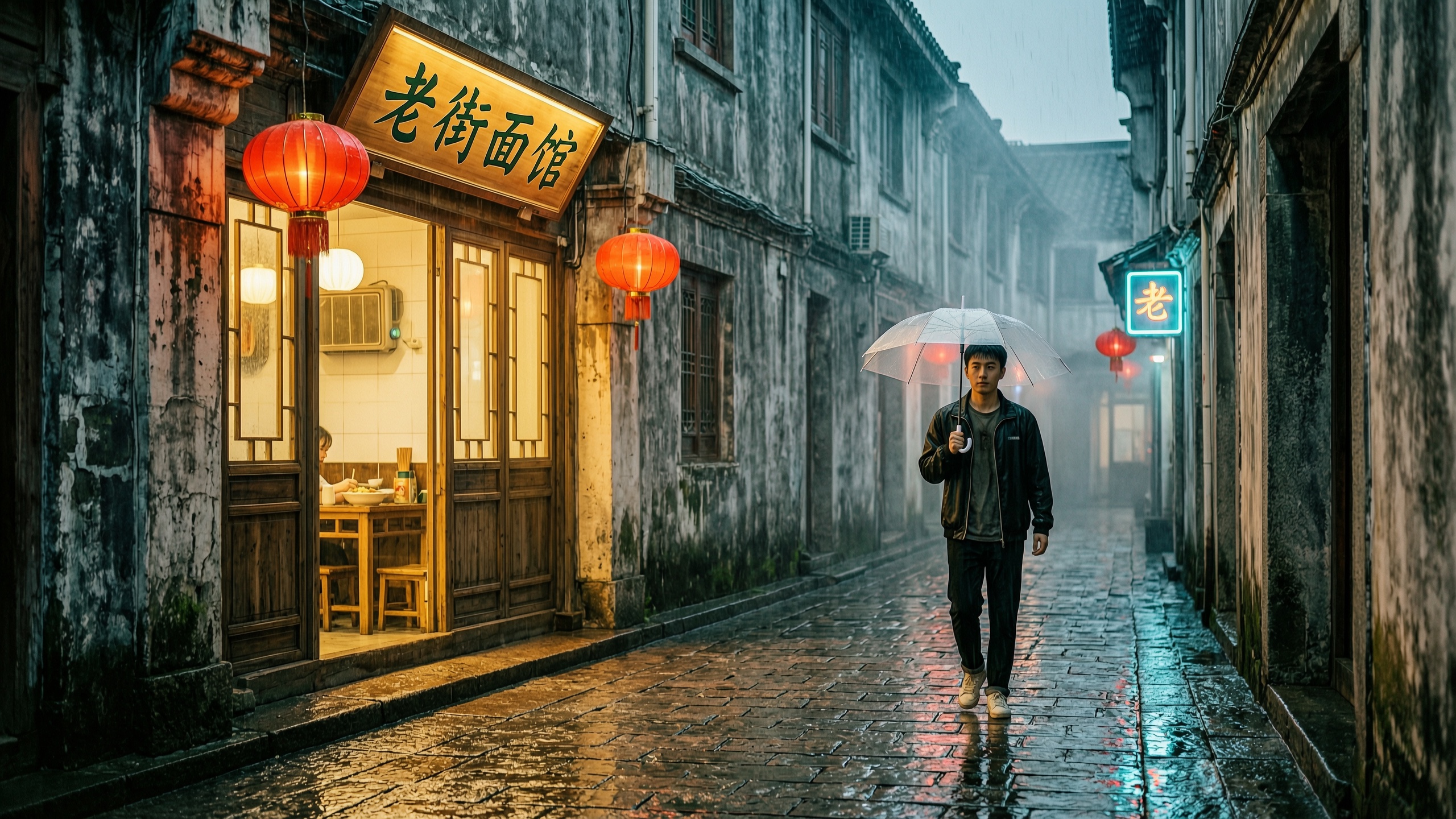
The sign text 老街面馆 is correct and the atmosphere matches, but the man walks toward the camera instead of into the alley. "走进巷子深处" (walking deeper into the alley) wasn't strong enough to override the model's tendency to show faces.
The fix: say what the camera sees, not only where the person is going. We added "only one person, seen from behind, we only see his back" (画面中只有一个人……背对镜头……我们只看到他的背影) and kept everything else the same, including the seed:
雨后夜晚的老城区小巷,青石板路面倒映着霓虹灯光,左侧是一家亮着暖黄灯光的面馆,门口挂着红色灯笼,招牌上写着“老街面馆”四个大字。画面中只有一个人:一位撑透明雨伞的年轻人背对镜头,正朝巷子深处走去,我们只看到他的背影。空气中有淡淡的雾气,电影感构图,35mm 镜头,青橙色调,写实摄影风格。
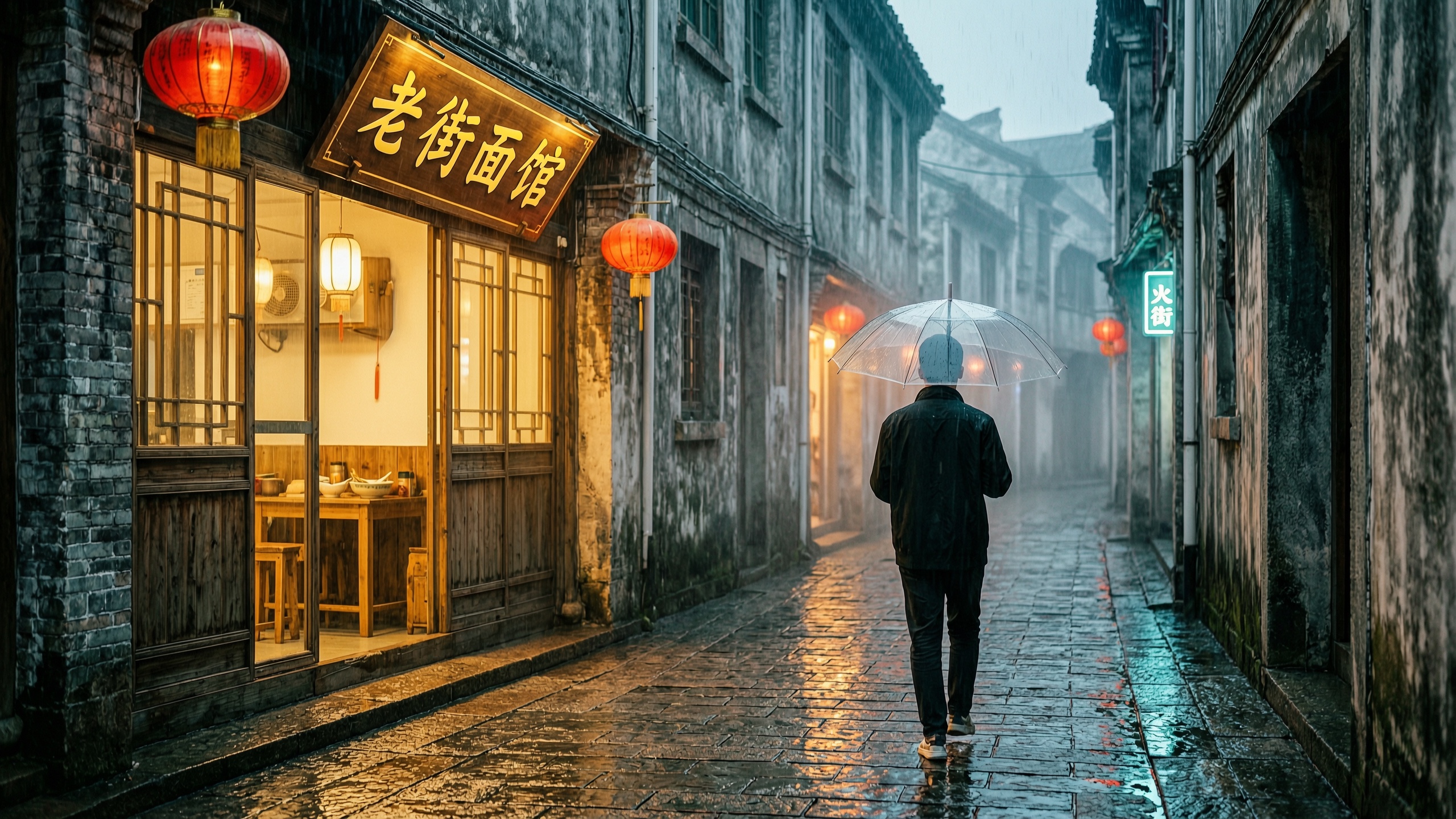
The retake works: back view, walking away, same sign. One caveat appeared in both takes: the model added a small unrequested neon sign on the right wall. If you need a scene with no extra text, say so explicitly (for example "no other signs or text"), because there is no negative-prompt field to fall back on.
Recipe 7: Reference edit with the same model id
Settings: image_urls: [Recipe 2 output], aspect_ratio: "1:1", resolution: "2K"
Editing needs no separate endpoint. Add image_urls (up to nine references) to the same wan2.7-image-standard call:
{
  "model": "wan2.7-image-standard",
  "input": {
    "prompt": "Keep the amber serum bottle, its black dropper cap and the blank cream label exactly as they are in the reference image, same size and same position. Replace the dark green marble with a slab of pale travertine stone, replace the rosemary with three dried orange slices, and change the charcoal background to a soft warm peach backdrop. Bright, even morning daylight instead of the dramatic spotlight. Commercial skincare photography.",
    "image_urls": ["https://static.hiapi.ai/blog/wan2-7-image-standard-prompt-recipes/r2-serum-product.jpg"],
    "aspect_ratio": "1:1",
    "resolution": "2K",
    "seed": 20261104
  }
}
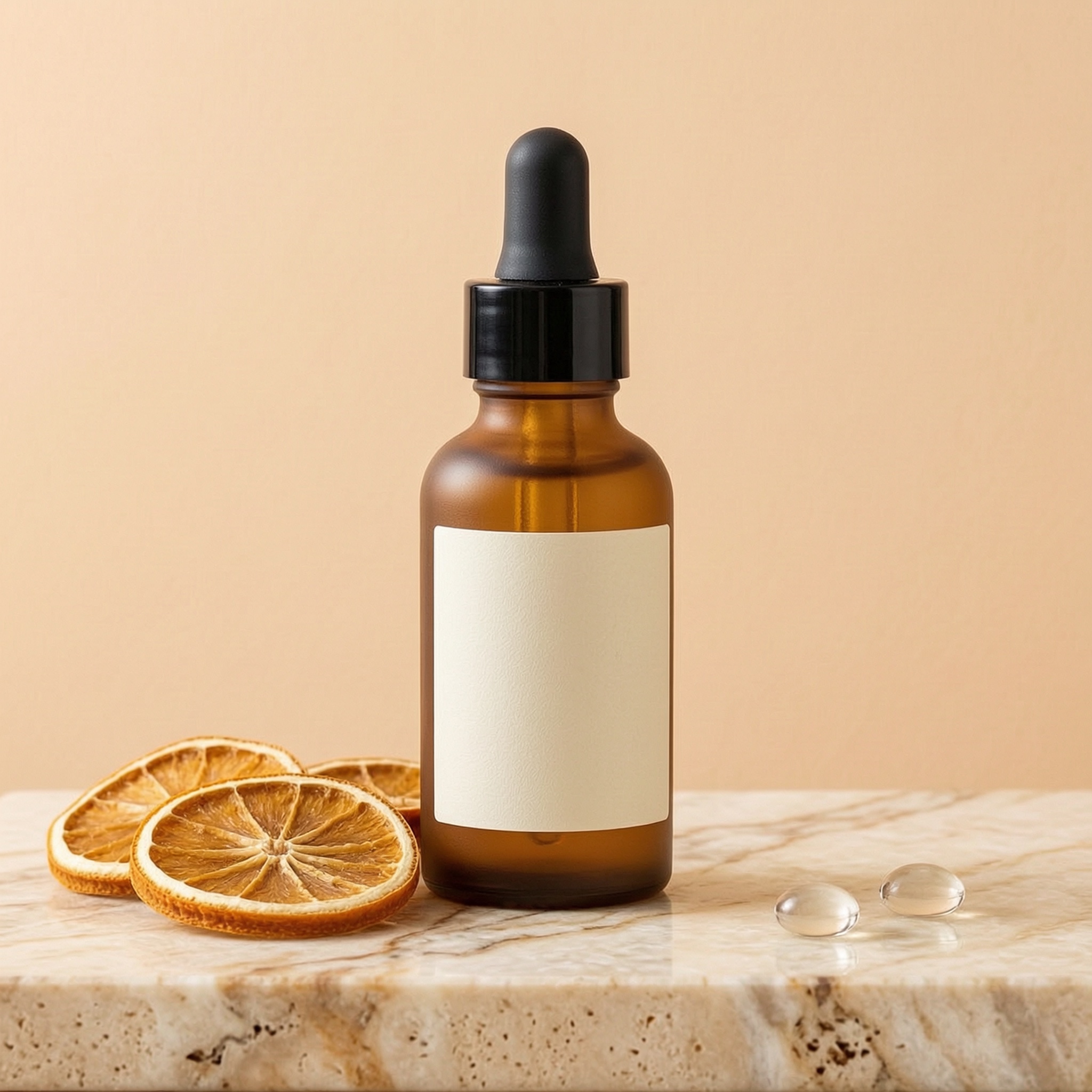
Bottle, cap and blank label carried over. All four requested swaps happened: travertine surface, three orange slices (this count held), peach backdrop, and soft daylight. The two water droplets from the original stayed, because the prompt didn't mention them.
Why it works: the prompt first says what to keep and then lists each change as a "replace X with Y" pair. Anything not mentioned tends to survive, which here is the behavior you want.
Make it yours: run one hero image through several edit prompts to produce a seasonal or colorway set at $0.0345 each. Note that a bad URL in image_urls is not rejected at submit time. The task is created and then fails a second later with INVALID_REQUEST, so always poll for the final status.
Standard or Pro?
Both tiers are on the pricing page. The facts we verified on November 4, 2026:
| wan2.7-image-standard | wan2.7-image/text-to-image (Pro) | |
|---|---|---|
| Price | $0.0345 per image (1K and 2K) | $0.08 per image |
| Max resolution | 2K | 4K |
| Reference editing | Yes, up to 9 images via image_urls | No, text-to-image only |
If you need 4K output, use Pro. If you're iterating on prompts, producing variant sets, or editing from references, Standard costs less than half as much and does both jobs with one id. The Wan 2.7 API pricing breakdown has the Pro numbers, and the e-commerce product photo walkthrough shows Pro used at 4K.
FAQ
How much did this post cost to generate? Eight tasks at $0.0345 each, about $0.28 in total. Pricing is flat across aspect ratios and across 1K and 2K.
Does wan2.7-image-standard support negative prompts?
No. The schema rejects a negative_prompt field. Put exclusions in the prompt itself, such as "no other signs or text" or "a blank label".
Can I write prompts in Chinese? Yes. Recipe 6 is entirely in Chinese, and the Chinese sign text rendered correctly. English text in English prompts (Recipes 1, 4 and 5) also rendered correctly.
Is the seed reproducible?
seed is an accepted integer field, and we used the same seed for every task here. Fixing the seed while changing one clause, as in the Recipe 6 retake, is a useful way to isolate what a prompt change does.
Which aspect ratios are available?
1:1, 16:9, 4:3, 21:9, 3:4, 9:16, 8:1 and 1:8. The default is 16:9.
Start with one recipe
Pick the recipe closest to your use case, paste it into the request above, and change one clause at a time. The wan2.7-image-standard model page lists the live price and schema, and the API guide walks through the full polling loop in Python.