Search

Search HiAPI models, tools, and resources.

  • Free
  • No sign-up
  • Images not stored

Free Image to Prompt Generator

Upload any picture and get a detailed AI prompt that describes its subject, composition, lighting, colors and text. Copy it into any AI image generator.

No image handy? Try a sample

Your image is used only for this analysis and is not stored.
Real exampleUpload your image and a ready-to-use prompt appears here.
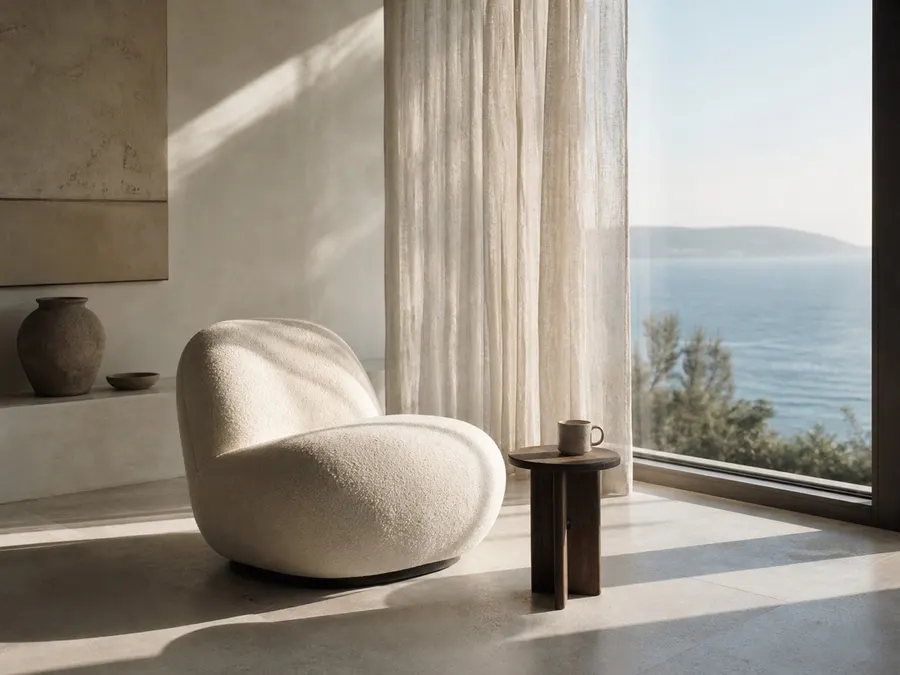
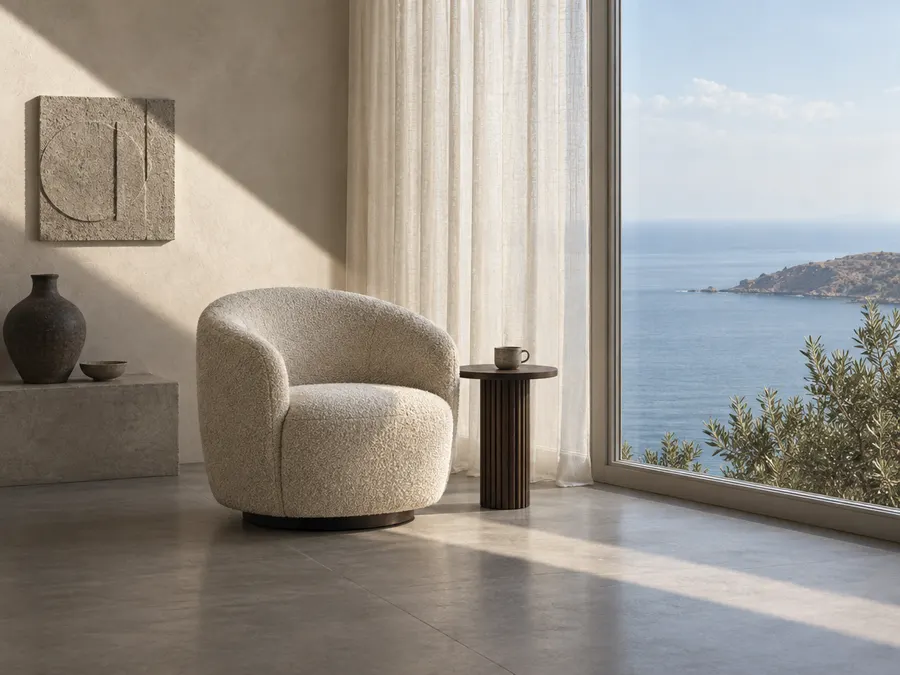
Minimalist coastal living room with a bouclé chair

Original

Minimalist coastal living room with a bouclé chair (generated from the prompt)

Generated from the prompt

Landscape photograph of a serene minimalist interior opening onto a seascape, built around a diagonal band of hard sunlight that slices from the upper left across the wall, over the armchair and down across the floor toward the lower right. In the centre-left midground sits a single rounded barrel armchair upholstered in nubby off-white bouclé, its back curving into a soft scoop, resting on a low dark swivel base; beside its right arm stands a small round dark-stained wood pedestal side table with a vertical slat leg, holding one small grey-brown ceramic mug. To the left, a pale plaster wall carries a square textured concrete relief panel above a low concrete ledge on which a large dark stoneware vase with a narrow neck and a small shallow bowl sit. A floor-to-ceiling sheer cream linen curtain hangs in a soft vertical band through the centre, its hem brushing the floor. The right third is a large glass window framing a calm hazy blue sea and a low brown headland, with olive-green shrub branches in the lower right corner. The floor is smooth pale grey concrete with faint tile seams; a wide light-grey window frame borders the glass. Shot from a low, slightly wide eye level, deep focus, natural daylight from the window, slightly warm, muted, natural neutral-to-warm white balance, brightest in the upper third and darker in the lower third; fine photographic grain, matte natural textures.
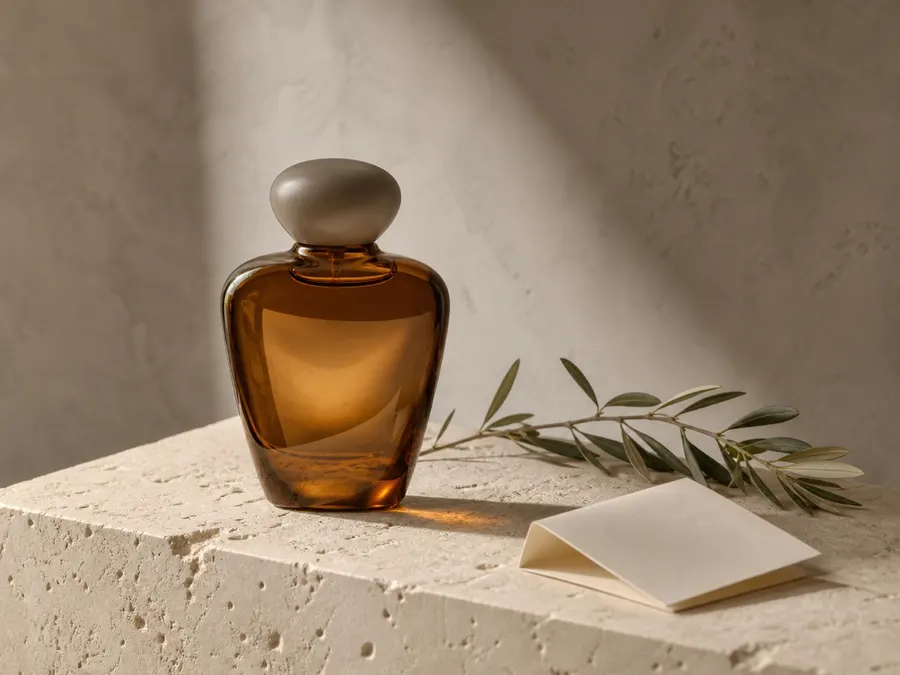
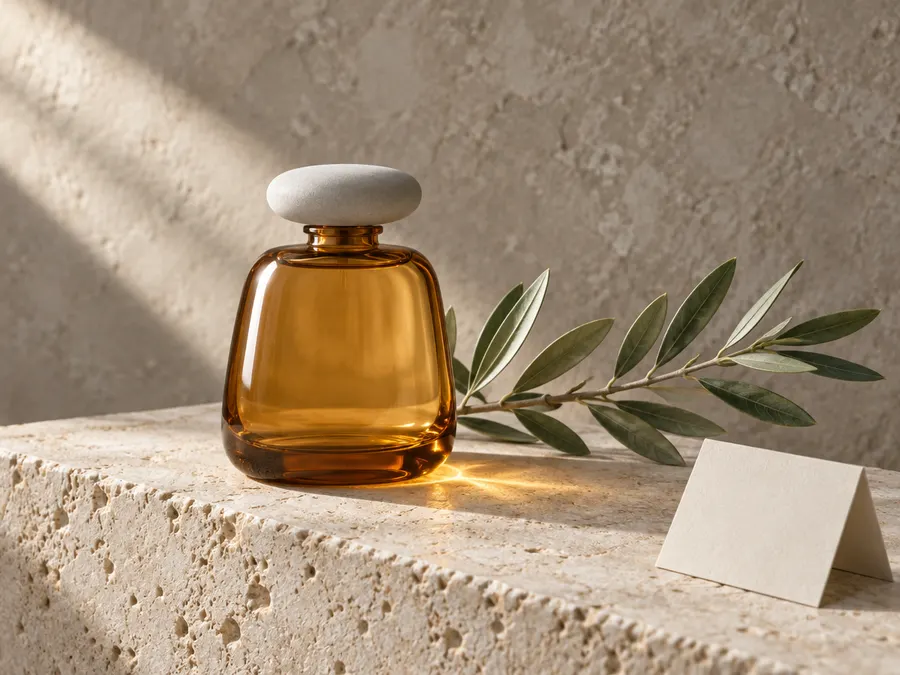
Image to prompt examples

Real results from this tool: the original image, the prompt it wrote, and a new image generated from that prompt alone. Scroll each prompt to read it in full.

Minimalist coastal living room with a bouclé chair
Original image
Minimalist coastal living room with a bouclé chair (generated from the prompt)
Generated from the prompt

Interior photo

Landscape photograph of a serene minimalist interior opening onto a seascape, built around a diagonal band of hard sunlight that slices from the upper left across the wall, over the armchair and down across the floor toward the lower right. In the centre-left midground sits a single rounded barrel armchair upholstered in nubby off-white bouclé, its back curving into a soft scoop, resting on a low dark swivel base; beside its right arm stands a small round dark-stained wood pedestal side table with a vertical slat leg, holding one small grey-brown ceramic mug. To the left, a pale plaster wall carries a square textured concrete relief panel above a low concrete ledge on which a large dark stoneware vase with a narrow neck and a small shallow bowl sit. A floor-to-ceiling sheer cream linen curtain hangs in a soft vertical band through the centre, its hem brushing the floor. The right third is a large glass window framing a calm hazy blue sea and a low brown headland, with olive-green shrub branches in the lower right corner. The floor is smooth pale grey concrete with faint tile seams; a wide light-grey window frame borders the glass. Shot from a low, slightly wide eye level, deep focus, natural daylight from the window, slightly warm, muted, natural neutral-to-warm white balance, brightest in the upper third and darker in the lower third; fine photographic grain, matte natural textures.
Amber perfume bottle on a limestone block with an olive branch
Original image
Amber perfume bottle on a limestone block with an olive branch (generated from the prompt)
Generated from the prompt

Product photo

Landscape 4:3 still-life product photograph of a perfume bottle on a stone pedestal against a plaster wall. Centered slightly left, a squat amber glass flacon with a rounded trapezoid silhouette, softly curved shoulders, a short narrow neck and a flattened oval matte pale-grey cap; the glass is translucent honey-amber with bright specular highlights down its left edge and darker amber density at the base. The bottle rests on a thick cream limestone block whose top edge runs as a diagonal from lower left to mid-right, its porous pitted surface lit brightly. A slender olive branch lies behind and to the right of the bottle, entering near the bottle's base and extending to the right frame edge, with narrow grey-green lance-shaped leaves along it. At the lower right, a small blank off-white folded card leans open on the stone, tilted toward the viewer. Behind, a mottled grey-beige plaster wall fills the upper half, crossed by a soft diagonal shaft of light from the upper left. Soft directional daylight from the upper left, gently diffused, casting a warm amber glow and reflection on the stone just right of the bottle base and a soft shadow behind it. Warm white balance, mid-tone exposure, moderately saturated muted earth palette of amber, greige, cream and sage green. Fine photographic texture, shallow depth of field on the wall. No text.

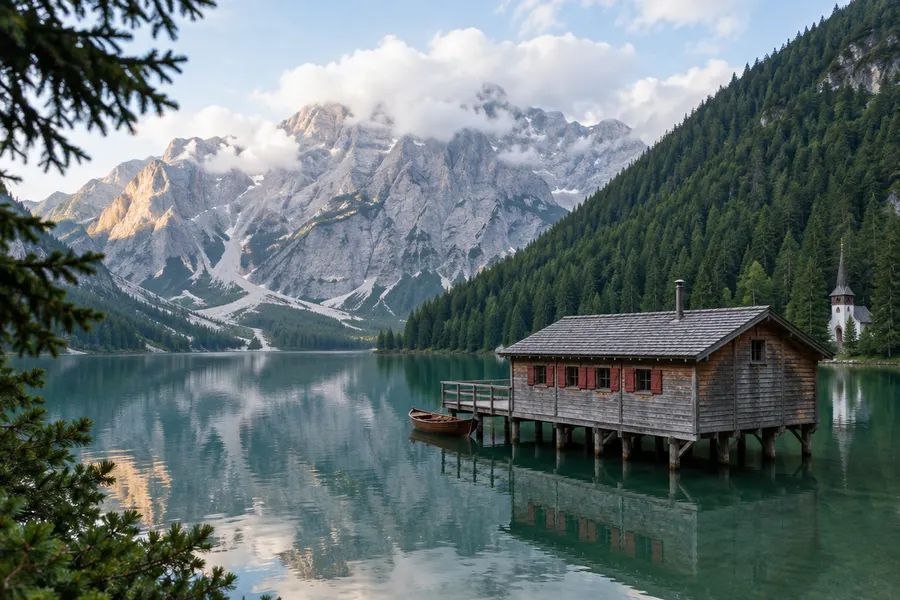
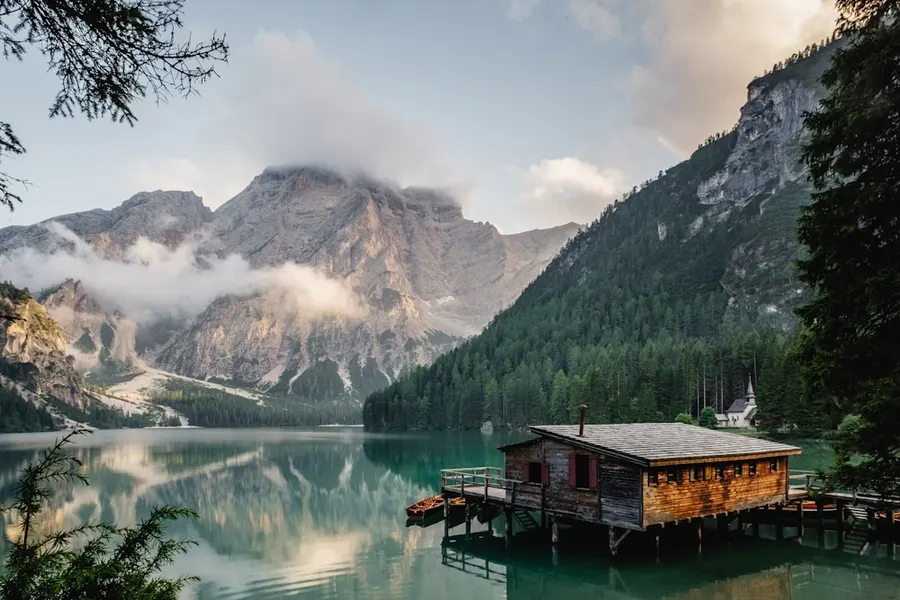
Alpine lake with a wooden boathouse on stilts
Original image
Alpine lake with a wooden boathouse on stilts (generated from the prompt)
Generated from the prompt

Landscape photo

Landscape photograph of an alpine lake scene, wider than tall, built around a calm reflective lake that fills the lower half and a diagonal forested slope rising from lower right to upper right. In the right third, a weathered wooden boathouse stands on wooden stilts above the water: grey shingled gable roof, small metal chimney pipe, a row of small windows along its side with dark red shutters, and a plank deck with railing on its left where a small dark wooden rowboat is moored. Further back at the far right lake edge, a small white chapel with a slender pointed spire and dark roof sits among the trees. Across the background, a pale grey limestone mountain massif rises left of center, its ridges partly veiled by low white clouds, with a warm sunlit rock face on its left flank and scree slopes below. A dense dark green conifer forest covers the right slope rising toward the frame edge. In the left foreground, dark out-of-focus fir branches intrude at the top-left corner, and more pine branches occupy the bottom-left corner. Still pale green water mirrors the mountains and sky. Soft diffuse daylight from the upper left, brightest sky at the top of frame, neutral white balance, muted natural color, deep green forest, teal lake, grey rock, pale blue sky. Sharp foreground-to-background focus, wide-angle landscape framing, subtle film grain.

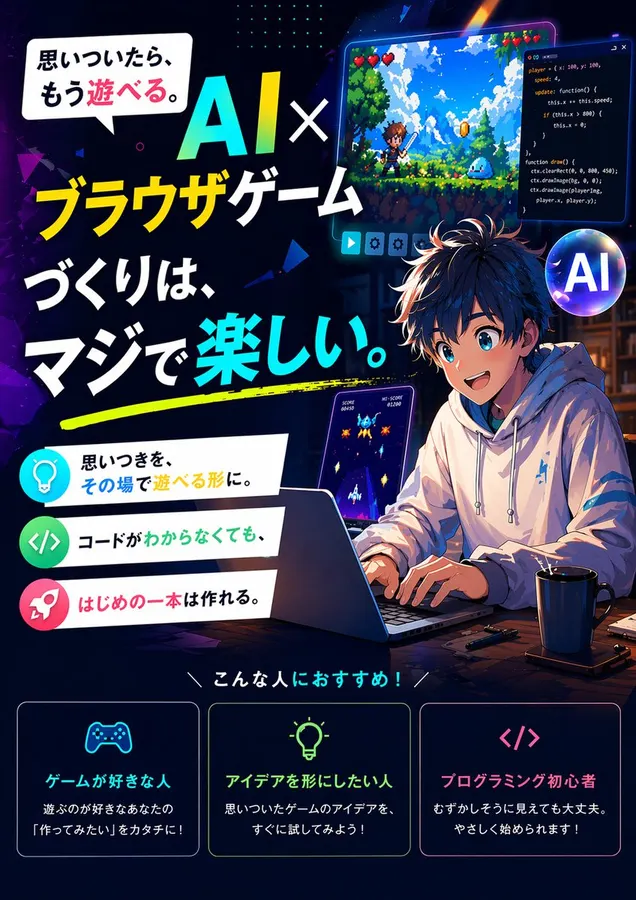
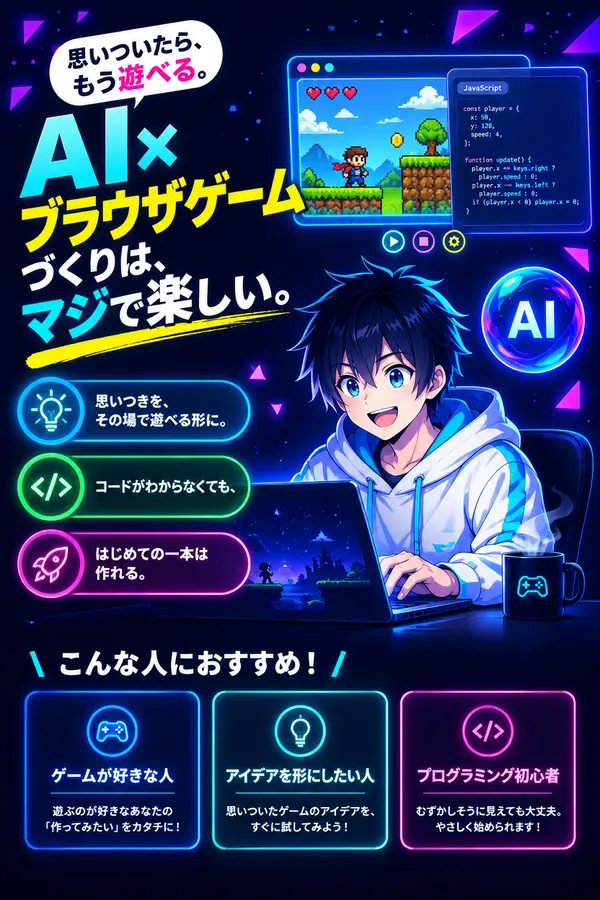
Japanese anime poster for an AI browser game course
Original image
Japanese anime poster for an AI browser game course (generated from the prompt)
Generated from the prompt

Text-heavy poster

Portrait 2:3 Japanese promotional poster for an AI browser-game creation tool, built on a near-black navy background with rounded neon UI panels arranged in stacked horizontal bands and glowing cyan, magenta, yellow and green accents. Top left: a white rounded speech bubble containing the black-and-pink line "思いついたら、もう遊べる。" next to a huge headline reading "AI×" in gradient cyan-to-teal letters, "ブラウザゲーム" in bright yellow bold sans-serif, "づくりは、" in white, and "マジで楽しい。" in white with the leading characters in cyan, underscored by a yellow brush swipe. Top right: a floating rounded game window showing a pixel-art side-scrolling platformer with a green field, blue sky, three red hearts and a tiny hero sprite, with a translucent JavaScript code editor panel on its right showing small monospace code, and three small round UI buttons below. Center-right foreground: an anime boy with spiky dark blue-black hair, large blue eyes and an open cheerful smile, wearing a white hoodie with cyan accents, seated at a dark laptop with both hands on the keyboard, a dark steaming mug at his right; the laptop screen shows a starry dark-blue game scene. Left column: three rounded pill cards, each with a glowing circular icon — a turquoise lightbulb with "思いつきを、その場で遊べる形に。", a green code icon with "コードがわからなくても、", and a pink rocket with "はじめての一本は作れる。" A glossy blue-purple glass sphere labelled "AI" floats at the right. Bottom: the white header "こんな人におすすめ!" above three bordered panels — a blue one with a controller icon, "ゲームが好きな人" and "遊ぶのが好きなあなたの「作ってみたい」をカタチに!"; a teal one with a bulb icon, "アイデアを形にしたい人" and "思いついたゲームのアイデアを、すぐに試してみよう!"; and a pink one with a code icon, "プログラミング初心者" and "むずかしそうに見えても大丈夫。やさしく始められます!" Scattered purple and magenta triangular shards and speckled dots fill the upper corners. Cool glowing screen light falls on the character's face and hoodie; dark low-key cool grade, deepest black in the bottom third, clean digital vector-and-anime-illustration finish. No other text.

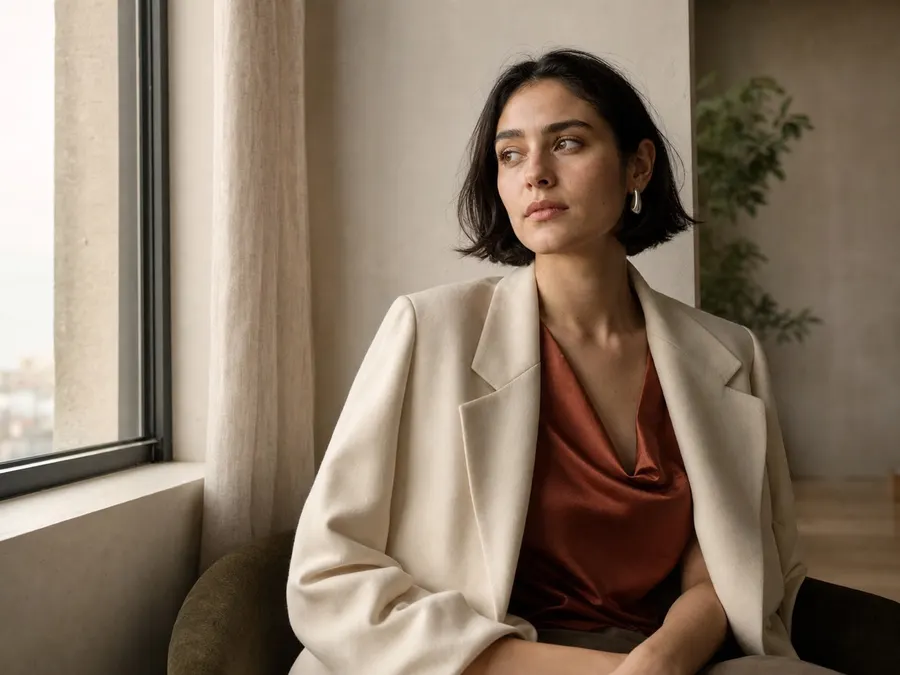
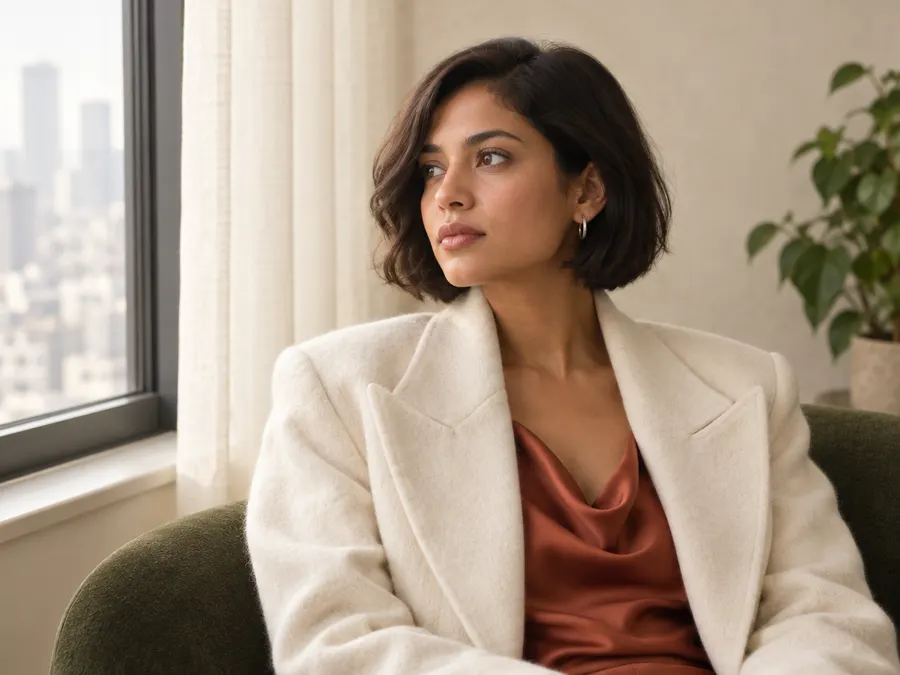
Woman in a cream blazer seated by a window
Original image
Woman in a cream blazer seated by a window (generated from the prompt)
Generated from the prompt

Portrait photo

A warm-toned indoor photographic portrait, landscape orientation, built around a diagonal gaze line that runs from the woman's head in the centre-right toward the bright window on the left third. A single seated woman fills the centre and right of frame in a medium chest-up shot, body angled slightly right, head turned left with her eyes looking off-frame past the window; her expression is calm and pensive, eyes open, lips closed, brows relaxed. She has a short dark chin-length bob with a soft side sweep, warm light-brown skin, and a small silver hoop earring in her visible ear. She wears an oversized ivory wool blazer with wide peaked lapels over a rust-terracotta satin cowl-neck top that catches soft highlights, and she rests on a dark olive-green upholstered chair in the lower foreground. Behind her left is a tall window with a dark grey metal frame, a narrow pale windowsill, and a sheer cream curtain hanging in soft vertical folds; hazy pale city buildings show faintly through the glass. To the right sits a smooth pale plaster wall with a potted green plant whose leaves are softly out of focus. Diffuse daylight enters from the window on the left, softly wrapping her face and blazer with gentle falloff toward the right and a slight rim on her cheek; no hard shadows. Natural warm white balance, moderately saturated, mid-tone exposure with the brightest tones in the pale wall and curtain and the darkest in the chair and shadowed fabric. Smooth photographic texture, shallow depth of field with the background gently blurred.

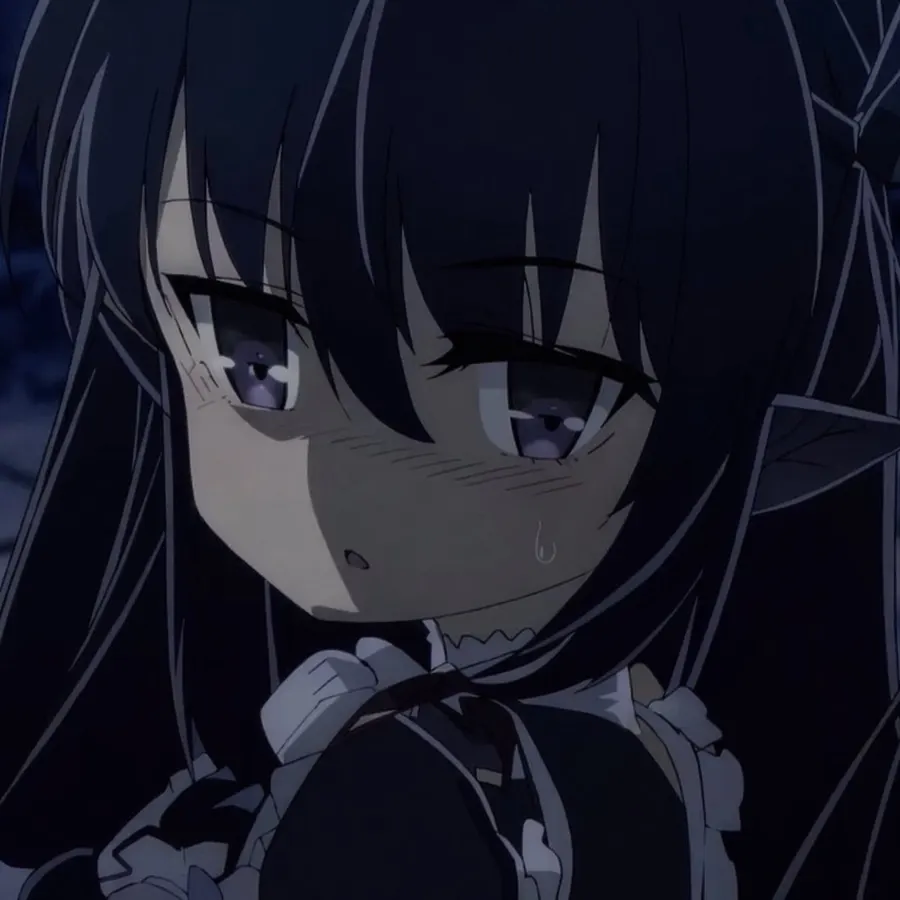
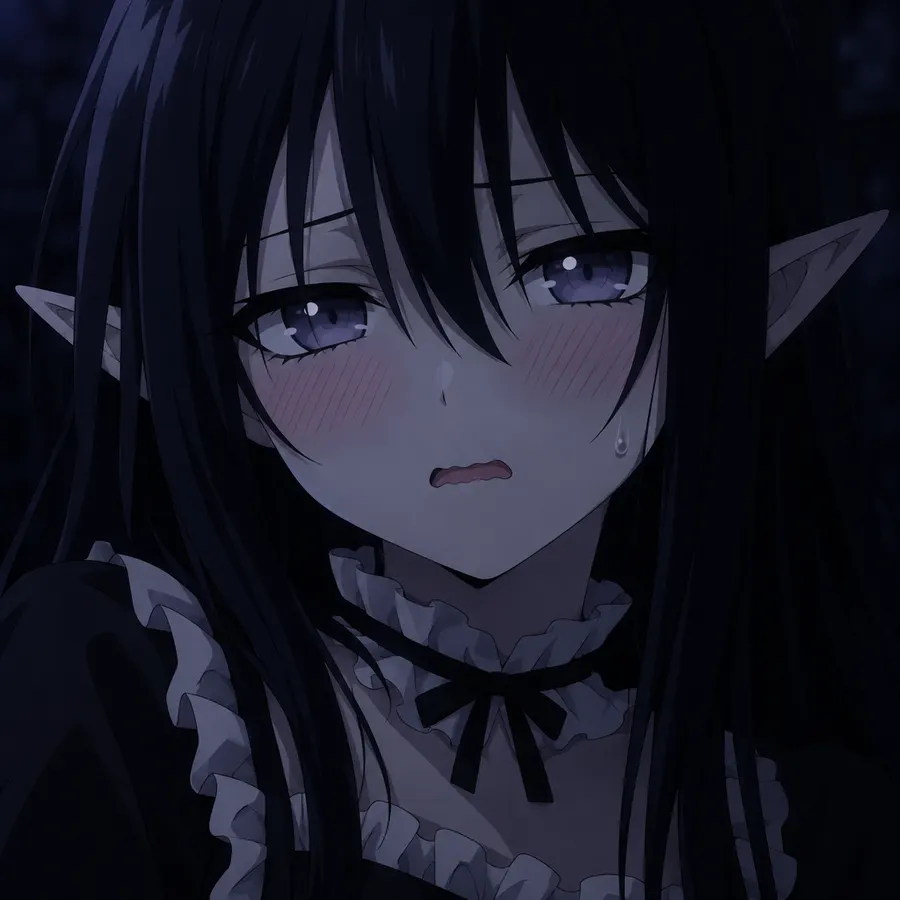
Anime close-up of a girl with long black hair and pointed ears
Original image
Anime close-up of a girl with long black hair and pointed ears (generated from the prompt)
Generated from the prompt

Anime illustration

A 2D anime cel-style digital illustration in square format: a tight close-up portrait of one young anime girl, head and upper shoulders, centered and filling most of the frame. She has long straight very dark blue-black hair with long bangs and thin strands cutting across her forehead and cheeks, long pointed elf ears rising behind the hair on both sides, a pale bluish-grey face, and large half-lidded violet-grey eyes with white sparkle highlights and heavy dark lashes. Her expression is flustered: diagonal pink blush hatching across both cheeks, a tiny open wavy mouth, and a single small sweat drop on her right cheek below the eye. She wears a black garment with a white ruffled frilled collar across the chest and a small black ribbon bow at the throat; lighter frills and straps fall across the lower left. The background is an out-of-focus near-black cool navy void with a few faint dark shapes, no readable detail. Soft dim frontal-top light, angled slightly from the upper left, gently models the face and leaves the hair and background in shadow; low-key, moody, heavily shadowed lighting. Overall very dark exposure, deep navy near-black, slightly cool white balance, muted desaturated skin tones with a violet cast, small grey-lavender highlights. Crisp cel line art with flat shadow blocks and clean hard edges, subtle digital grain.

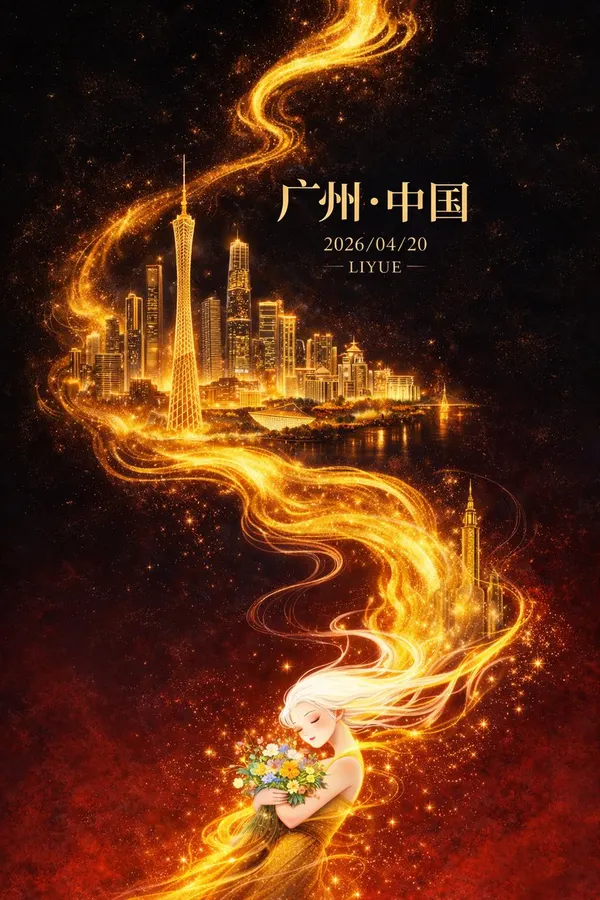
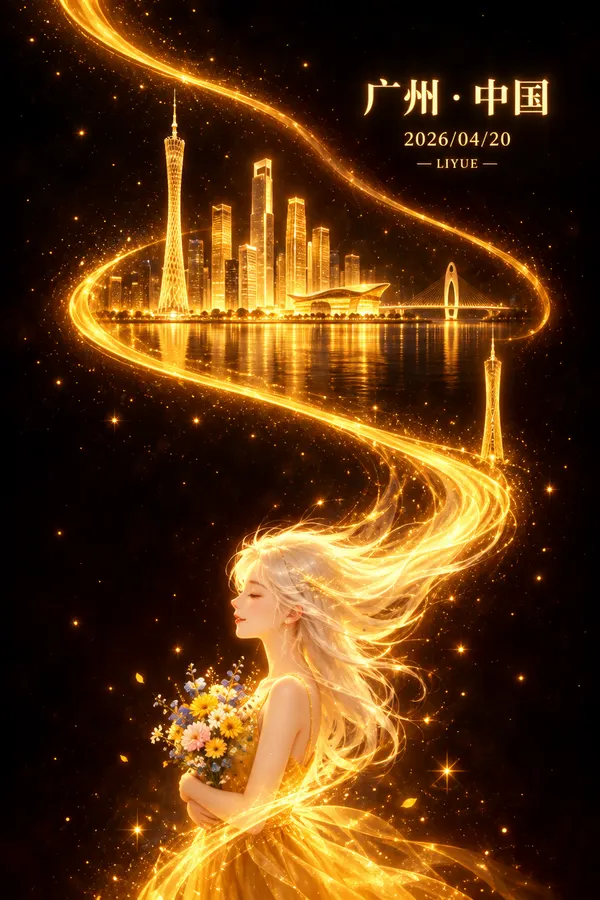
Guangzhou city poster with a golden light ribbon
Original image
Guangzhou city poster with a golden light ribbon (generated from the prompt)
Generated from the prompt

Chinese city poster

Portrait digital fantasy poster illustration, taller than wide, built around a single glowing golden ribbon of light that enters at the upper left, sweeps down in a wide S-curve through the middle of the frame, bends right, and trails off into the hair of a figure at the bottom. Inside the bend of the ribbon, in the upper-middle area, sits a luminous golden city skyline: a slim lattice tower with a needle spire at its left, a cluster of tall rectangular skyscrapers, a low curved-roof building and a bridge at the right, all rendered as translucent gold light with faint reflections on a dark river below. Farther down the right side of the ribbon stands one isolated slender gold tower. In the bottom third a pale stylized girl is shown from the waist up in profile facing left, eyes gently closed with a soft smile, wearing a gold dress and cradling a small bouquet of blue, yellow, white and pink flowers; her long white-gold hair streams upward and dissolves into the light ribbon, and the ribbon's tail wraps her lower body. Scattered gold sparks and star-like dots fill the black background. Right of center near the top, glowing gold text reads "广州·中国" in a large serif face, with "2026/04/20" smaller beneath it and "— LIYUE —" smaller still below that. No other text. Flat frontal poster framing, no horizon, dark vignette at the edges. Light appears to emanate from the gold ribbon and skyline, glowing against near-black surroundings. Very dark, low-key, highly saturated warm color: deep black and dark maroon ground, hot gold, amber and orange highlights, with the lower third the brightest region.

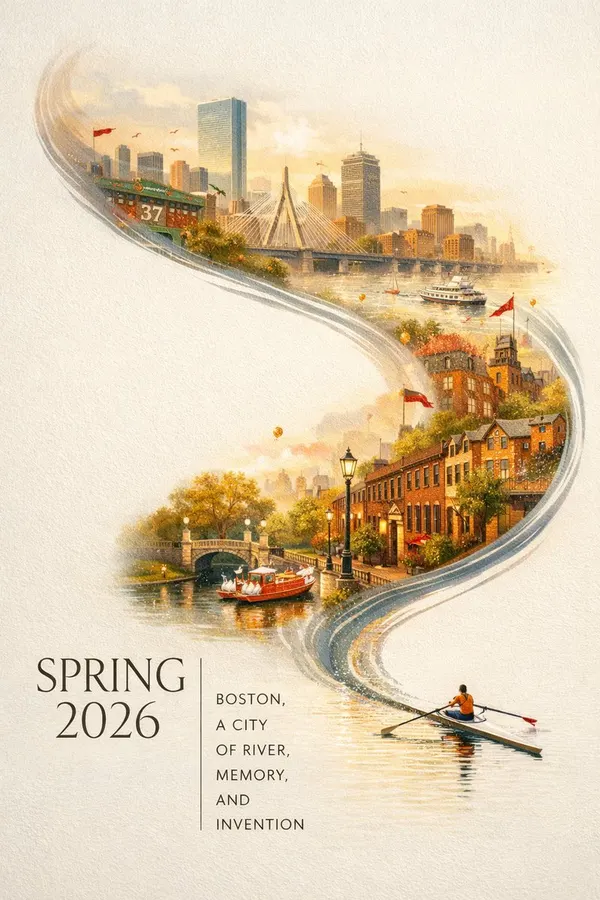
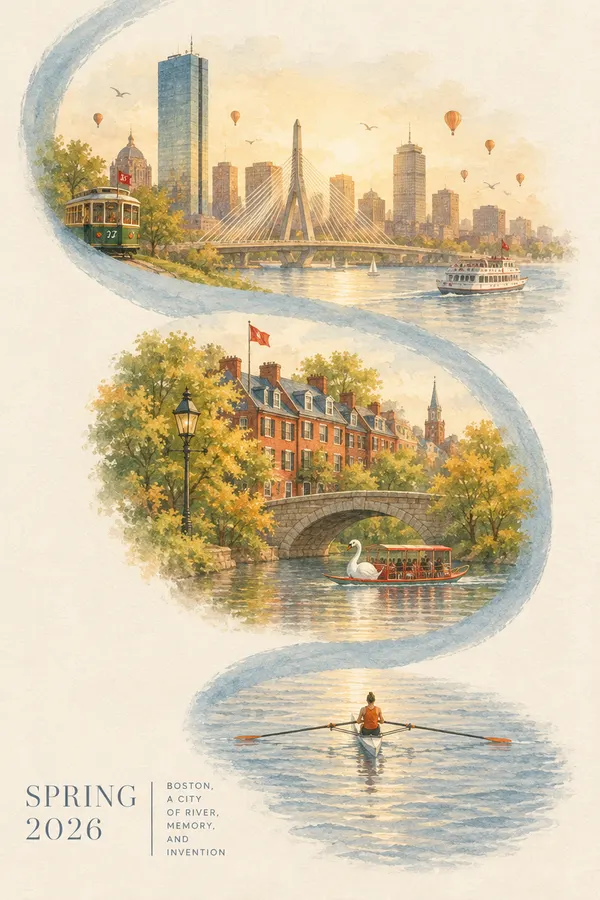
Illustrated Boston poster with a winding river ribbon
Original image
Illustrated Boston poster with a winding river ribbon (generated from the prompt)
Generated from the prompt

Illustrated poster

Vertical poster illustration in a soft painterly watercolor-and-gouache style, 2:3 portrait, built around one dominant river-shaped ribbon: a broad pale blue-grey S-curve band that enters at the top left, sweeps down through the upper middle, bows right past the center, curls back at the lower middle and pools into flat water at the bottom of the frame. Riding inside the upper arc is a warm hazy Boston skyline: a tall glass skyscraper left of center, a cable-stayed bridge with a fan of white cables at center, a cluster of tan and brown towers behind it, a green trolley car with a red flag at far left marked "37", small birds scattered in the sky, a white ferry with a red flag on the water at right, and several small orange balloons drifting. In the middle of the curve sit historic red-brick Boston townhouses with pitched roofs, dormers and a red flag on a pole, a black street lamp, autumn-green and gold trees, an arched stone bridge, and a white-and-red swan boat on the river. At the bottom of the ribbon, on flat rippled water, one rower in an orange top sits in a narrow single scull, oars extended left and right. Flat poster view, no perspective distortion, generous empty cream margins. Light is soft, diffuse and hazily golden, glowing from behind the skyline with no hard shadows. Color grade is warm cream, amber, terracotta brick and muted slate blue, low saturation, neutral paper white, no cold cast. Texture: visible fibrous paper grain, soft feathered edges where the scene fades into the page. Lower-left text block: large thin serif "SPRING" on one line and "2026" beneath it, a thin vertical rule to the right, then small uppercase sans-serif lines "BOSTON," "A CITY" "OF RIVER," "MEMORY," "AND" "INVENTION", left-aligned. No other text.

What is image to prompt?

Image to prompt, also called reverse prompting or image-to-text for AI art, turns a picture back into the words an AI image model needs to draw it. You start from a photo, ad, poster or artwork you like and end with a prompt you can read, edit and reuse.

The tool reads your image in two passes. It first lists everything visible: the medium, each subject and where it sits, the shapes that make the picture recognizable, the light, and any legible text. It then writes that list as one prompt in plain sentences, ordered from most to least important. Brightness and white balance are measured from the pixels instead of guessed, so the prompt doesn't push a neutral photo warm or a sunny scene gloomy.

How to turn an image into a prompt

  1. 1

    Upload your image

    Drop, paste or choose a JPG, PNG or WebP up to 20 MB. Your browser resizes it and removes camera metadata before upload.

  2. 2

    Generate the prompt

    In a few seconds you get a prompt, a short title and a breakdown of subject, composition, light and color.

  3. 3

    Edit and use it

    Change any sentence you like, copy the prompt and paste it into your favorite AI image generator.

What a good image prompt contains

Prompts that recreate an image well cover the same seven things, in roughly this order. The tool writes every one of them.

  1. 1Medium

    Studio product photograph

    Photo, 3D render, watercolor, anime cel art or poster design. It sets the whole look.

  2. 2Subject

    a squat amber glass perfume bottle with a flat oval stone cap

    Count, shape and materials. Exact silhouettes beat generic nouns.

  3. 3Composition

    left of center, eye level, olive branch trailing to the right

    Where each element sits and where the camera stands.

  4. 4Lighting

    a diagonal shaft of warm sunlight from the upper left

    Direction, softness and the shadow shapes the light casts.

  5. 5Color

    beige, amber and sage green, muted

    Main and accent colors plus saturation and temperature.

  6. 6Text

    headline "SPRING 2026" in a thin serif, lower left

    Exact words in quotes with their position and type style.

  7. 7Finish

    shallow depth of field, fine film grain

    Camera look and surface texture, never empty words like 8K.

What can you turn into a prompt?

Product photos

Keeps the product's silhouette, materials, props and studio light, so you can create a matching set for a store or ad.

Portraits

Describes pose, gaze, clothing, light and lens look without identifying the person.

Anime and illustration

Captures expression, hair, outfit colors, line art and shading from screenshots and character art.

Posters and social graphics

Describes readable English, Chinese or Japanese text in quotes with its position and type style. Check important wording against the original before generating.

Landscapes and interiors

Keeps depth layers, sky, water, window light and true-to-life color.

Logos and UI

Describes shapes, layout grids, icon style and color system for design references.

Tips for better image prompts

  • Start with a clear image

    Use a sharp, well-lit picture at least 512 pixels wide. Blurry or tiny images lose the details the prompt depends on.

  • Keep the aspect ratio

    Generate at the ratio the tool suggests. A wide landscape squeezed into a square loses its composition.

  • Edit one sentence at a time

    If one detail comes out wrong, change only that sentence. The rest of the prompt already works.

  • Add a reference image for a near copy

    Text alone gives a close relative of the picture. For a near-identical result, give the image model the original as a reference too.

  • Swap the subject, keep the style

    Replace the subject sentence and keep the light, color and composition sentences to put something new in the same look.

  • Avoid filler words

    Words like masterpiece, 8K or ultra detailed add nothing. Concrete materials and light do the work.

Use image to prompt in your AI agent

Install the open-source HiAPI Image to Prompt skill in Claude Code, Codex or any agent that supports skills. Your agent then looks at local images itself and writes prompts with the same method as this page, one image or a whole folder, with no API key.

View on GitHub

Claude Code

npx --yes --package=github:HiAPIAI/hiapi-image-to-prompt-skill hiapi-image-to-prompt-install --claude

Codex

npx --yes --package=github:HiAPIAI/hiapi-image-to-prompt-skill hiapi-image-to-prompt-install --codex

Or just tell your agent:

Install the skill from https://github.com/HiAPIAI/hiapi-image-to-prompt-skill and turn the images in this folder into prompts.

Frequently asked questions

How do I turn an image into an AI prompt?

Upload the image on this page and select Generate prompt. In a few seconds you get a detailed prompt covering subject, composition, lighting, colors and any text, ready to copy into an AI image generator.

Is this image to prompt generator free?

Yes. There is no sign-up and no watermark. You get 10 successful prompts every 24 hours, and failed attempts don't count.

Can I get the original prompt used to make an AI image?

No tool can recover it, because the prompt is not saved inside the image. This tool writes a new prompt from what is visible, which reproduces the same subject, layout and style.

Do the prompts work in Midjourney, Stable Diffusion and FLUX?

Yes. The prompt is plain descriptive language that works in GPT Image, Nano Banana, Seedream, FLUX, Midjourney and Stable Diffusion. In Midjourney, add --ar with the suggested ratio at the end.

Can it read the text in my image?

Yes. It can include readable English, Chinese, Japanese and other text in quotes, with its position and font style. Small or densely packed text may be misread or omitted, so check important wording against the original and edit it before generating.

Is it safe to upload my images?

Your image is used only to write the prompt and is never stored. The browser also removes camera metadata such as location before uploading.

Can I use image to prompt in Claude Code or Codex?

Yes. Install the open-source HiAPI Image to Prompt skill and your agent can turn any local image into a prompt on its own, with no API key needed.

How do I convert many images to prompts at once?

Use the open-source skill in your AI agent and point it at a folder, or call a vision model through the HiAPI API for batch jobs inside your own app.

Create images from your prompts on HiAPI

One account and one API key for GPT Image, Nano Banana, Seedream, FLUX and more. Try them in the browser or call them from your app.