TL;DR
- Z-Image is Alibaba Tongyi's fast text-to-image model. On HiAPI the model id is
z-imageand it costs $0.008 per image: 1,000 images for $8. - The request has two fields:
prompt(up to 1,000 characters) andaspect_ratio(1:1,4:3,3:4,16:9,9:16). There's no size, resolution, seed or image input. - It's good at photoreal product shots with short English text on them. In the four tests below, every string came out right. Open the Z-Image model page to try it; new accounts get 200 free credits.
Pricing
| Images | Cost on z-image |
|---|---|
| 1 | $0.008 |
| 100 | $0.80 |
| 600 (200 products × 3 shots) | $4.80 |
| 1,000 | $8.00 |
Live HiAPI price, checked October 20, 2026. One price for every aspect ratio. Failed tasks aren't charged.
Against other low-cost models on HiAPI:
| Model | Per image | Text on the image |
|---|---|---|
flux-schnell/text-to-image | $0.005 | Not its strength |
z-image | $0.008 | Short English text, reliable in our tests |
qwen-image-2.1-turbo | $0.02 | Chinese and English; also takes reference images |
gpt-image-2/text-to-image | $0.03 at 1K | Strong; also edits images |
More options, including video, are in the cheapest image and video APIs on HiAPI.
Real outputs: product shots with text
Price tag (1:1)
Studio e-commerce product photo: a matte black insulated steel water bottle centered on a seamless light-gray background with soft shadow. A rectangular coral paper card leans against the bottle. The card contains ONLY these two lines of bold clean sans-serif text and no other words: "SUMMER SALE" on line one, "$19.99" on line two. Text flat-on to camera, large, perfectly legible. Photorealistic.
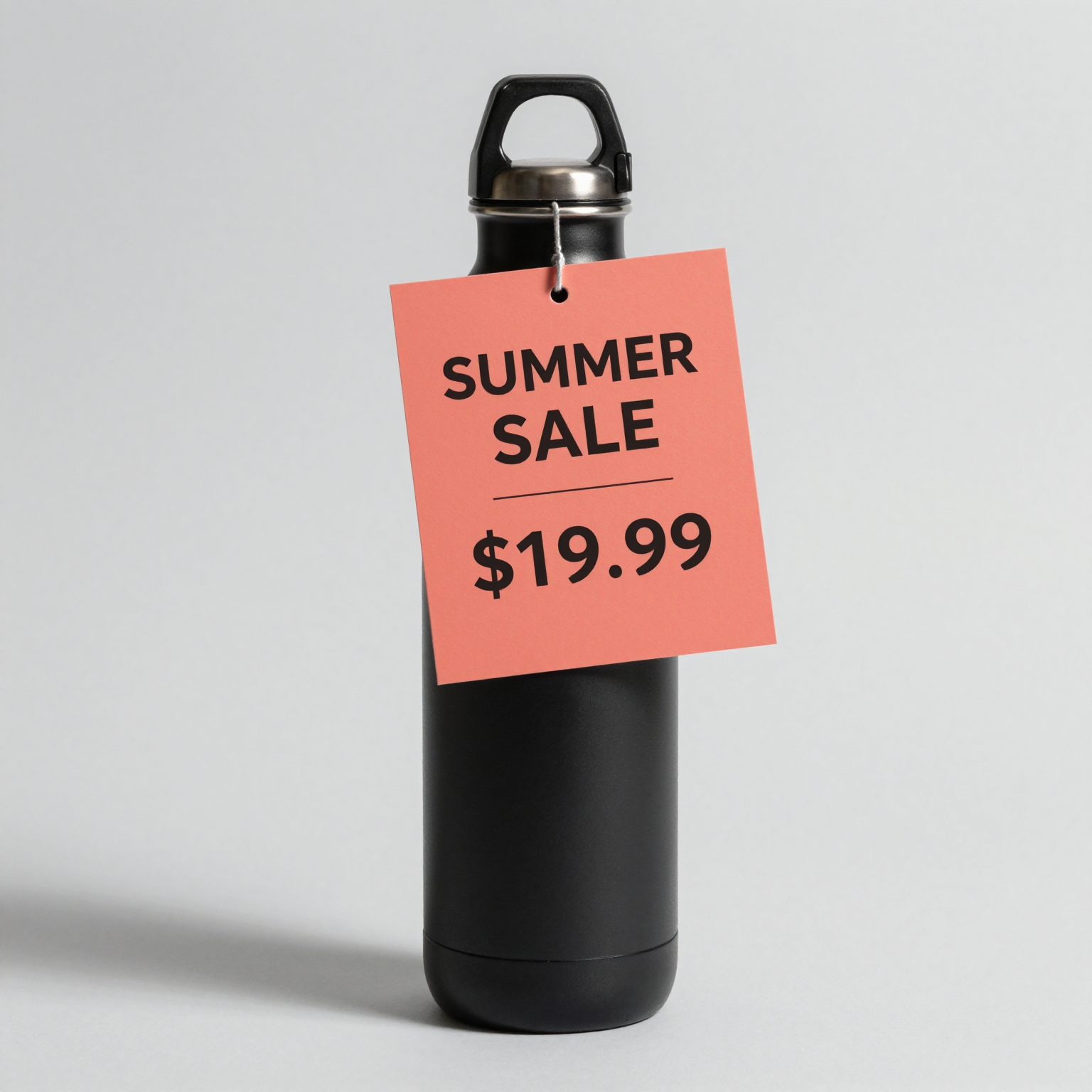
z-image, 1:1, 1536×1536, $0.008.
Both lines are correct. The card ended up hanging from the bottle's handle instead of leaning against it. The first version of this prompt said "reads exactly: SUMMER SALE on the first line and $19.99 on the second line", and the model printed the word "ON" between the two lines. Put the exact words in quotes and keep instructions outside them.
Wide banner (16:9)
Wide e-commerce promo banner, photorealistic flat-lay of white sneakers and a kraft shipping box on a pastel blue background. On the right side, bold navy sans-serif text with exactly these four words and amount, nothing else: "FREE SHIPPING OVER $50". All four words must appear. Text large, straight, perfectly legible. Clean commercial studio lighting.
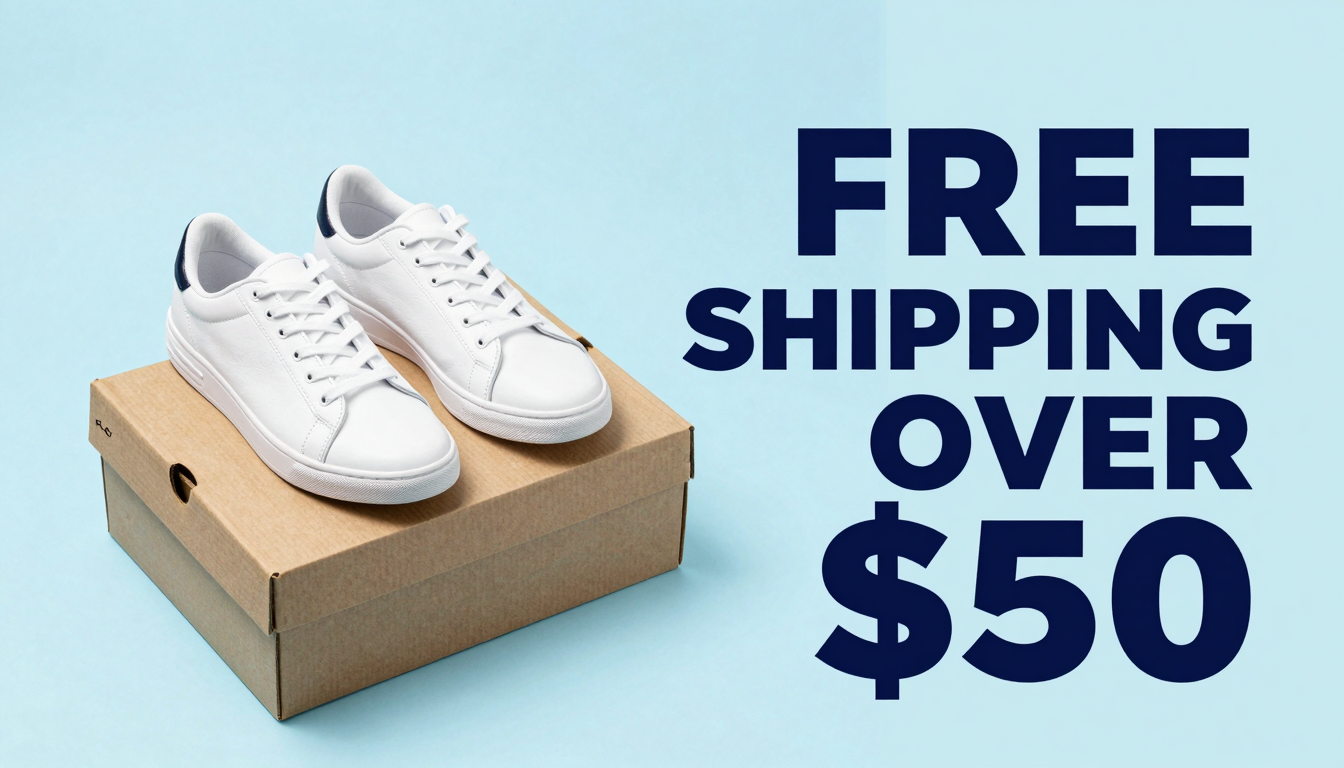
z-image, 16:9, 1344×768, $0.008.
Social card (3:4)
Vertical social-media product card: a small brown glass cosmetic dropper bottle on a warm beige podium, soft daylight. Above the bottle, bold black modern sans-serif headline text reads exactly: 30% OFF TODAY ONLY. Text flat to camera, large and perfectly legible. Minimalist premium e-commerce style, photorealistic.
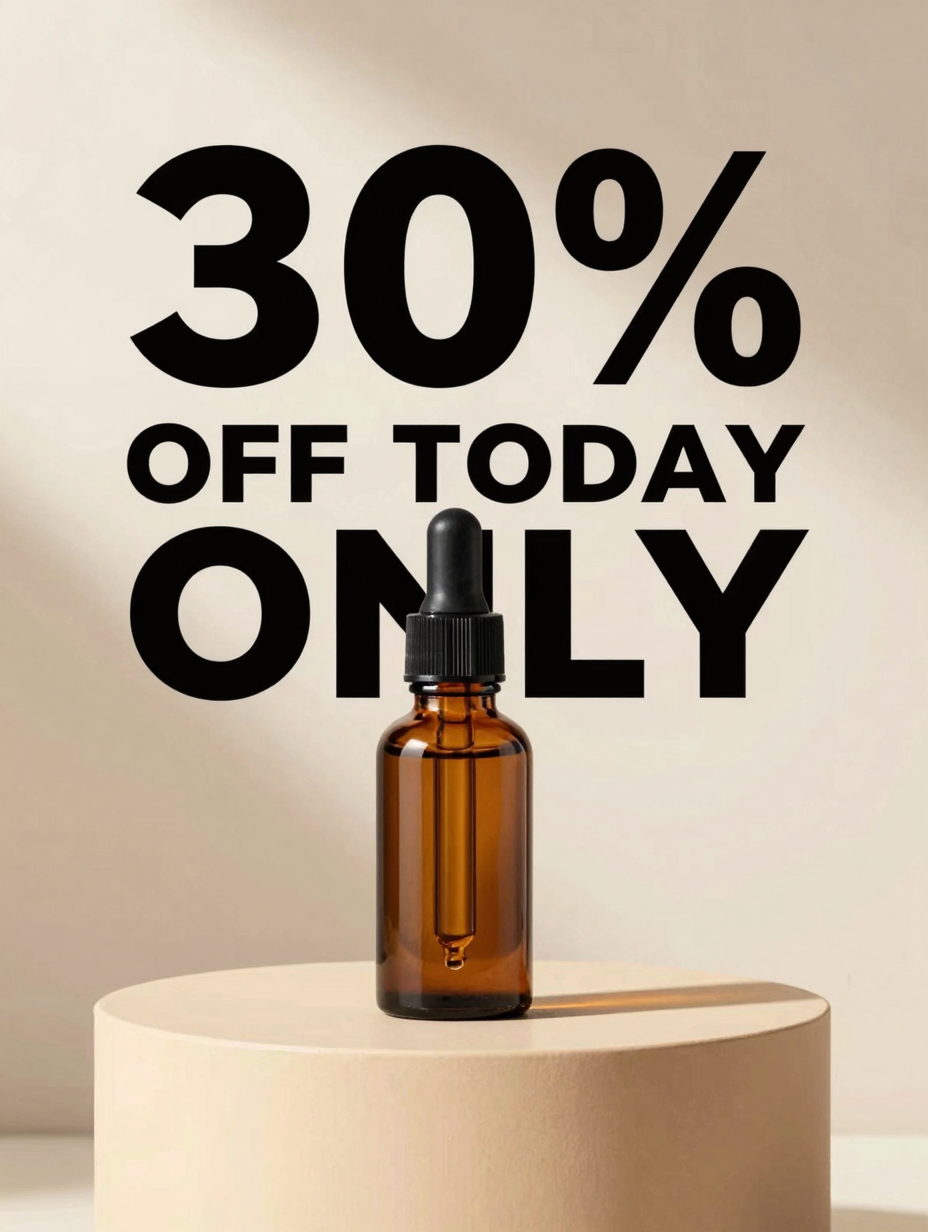
z-image, 3:4, 928×1232, $0.008.
The text is right, but the dropper overlaps the word "ONLY". If the headline has to stay clear, say where the product sits ("in the lower half, below the text").
Small label text (3:4)
Macro e-commerce product photo of a frosted glass skincare bottle with a clean white label. The label text, printed in elegant dark sans-serif, reads exactly: GLOW SERUM on the first line and VITAMIN C 10% on the second line. Straight-on angle, label fully visible and sharp, soft studio lighting, photorealistic, white background.
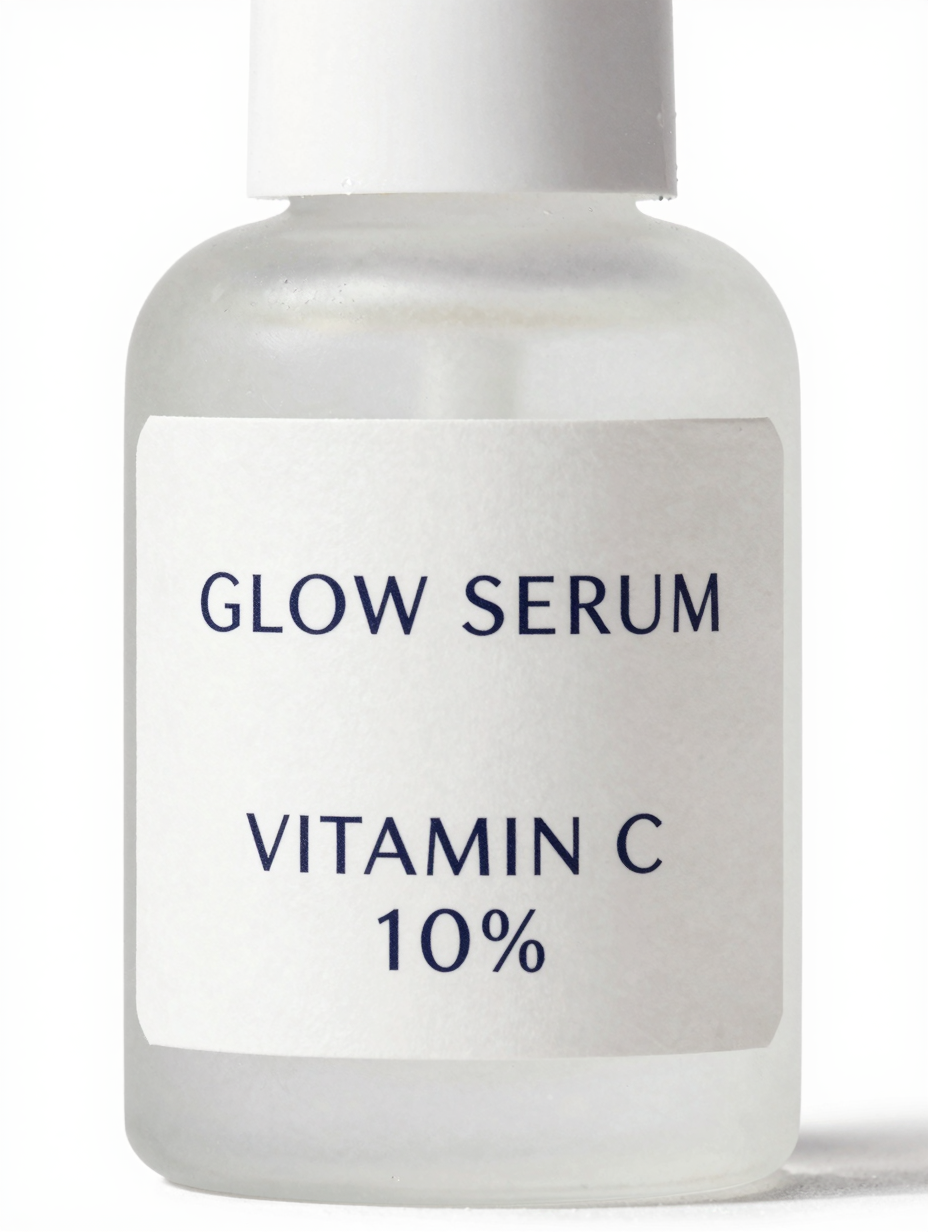
z-image, 3:4, 928×1232, $0.008.
Small type on a curved surface is the hardest of the four, and it came out clean. The model set "VITAMIN C 10%" on two lines.
Rules for text that comes out right
- Put the exact words in quotes.
- Add "and no other words" so the model doesn't invent extra badge copy.
- Keep text flat to the camera. Angled or curved text breaks first.
- One or two text blocks per image. Set longer copy in a design tool afterwards.
- Check every image before it ships. At $0.008, regenerating a miss costs almost nothing.
curl
curl -s -X POST https://api.hiapi.ai/v1/tasks \
  -H "Authorization: Bearer $HIAPI_KEY" \
  -H "Content-Type: application/json" \
  -d '{
    "model": "z-image",
    "input": {
      "prompt": "A cozy coffee shop at golden hour, a wooden A-frame sign on the sidewalk reading \"FRESH COFFEE\", warm window light, photorealistic",
      "aspect_ratio": "16:9"
    }
  }'
You get a taskId back. Poll GET https://api.hiapi.ai/v1/tasks/{taskId} until data.status is success, then download data.output[0].url. Status moves through queued, handling and archiving before success or fail. The link expires about 7 days after the task finishes.
Python: a small batch
# pip install requests; export HIAPI_KEY=your-key first
import os, time, requests

API = "https://api.hiapi.ai/v1/tasks"
H = {"Authorization": f"Bearer {os.environ['HIAPI_KEY']}"}

def submit(prompt, ratio="1:1"):
    r = requests.post(API, json={"model": "z-image", "input": {"prompt": prompt, "aspect_ratio": ratio}},
                      headers=H, timeout=30).json()
    if r.get("code") != 200:
        raise RuntimeError(r)
    return r["data"]["taskId"]

def wait(task_id, timeout_s=300):
    deadline = time.time() + timeout_s
    while time.time() < deadline:
        d = requests.get(f"{API}/{task_id}", headers=H, timeout=30).json()["data"]
        if d["status"] in ("success", "fail"):
            return d
        time.sleep(3)
    raise TimeoutError(task_id)

products = {"mug-sage": "sage green", "mug-navy": "navy blue", "mug-terracotta": "terracotta"}
tasks = {sku: submit(f'Studio photo of a {color} ceramic coffee mug on white, a small card reads "NEW"')
         for sku, color in products.items()}   # submit all first, then collect

for sku, task_id in tasks.items():
    d = wait(task_id)
    if d["status"] == "success":
        with open(f"{sku}.png", "wb") as f:
            f.write(requests.get(d["output"][0]["url"], timeout=120).content)
    else:
        print(sku, "failed:", d.get("error"))
Parameters and errors
| Field | Required | Values |
|---|---|---|
prompt | Yes | Up to 1,000 characters |
aspect_ratio | No | 1:1, 4:3, 3:4, 16:9, 9:16 |
These return HTTP 400 at submit, with nothing created or billed:
additional properties 'size' not allowed(orresolution,width): useaspect_ratio.aspect_ratio: value must be one of ...: there's no 21:9 or 4:5. Render 16:9 or 3:4 and crop.- A model id like
z-image-turbo: the only id on HiAPI isz-image.
When to use something else
- You need to edit an existing image: Z-Image only generates from text. Use an image-to-image model such as
qwen-image-2.1-turbo($0.02) orgpt-image-2/image-to-image. - Long or dense text, or a lot of Chinese: try Qwen Image, which is built for bilingual layouts.
- Lowest possible price, no text:
flux-schnell/text-to-imageis $0.005.
FAQ
What is the model id?
z-image. There's no separate z-image-turbo id on HiAPI; Turbo is the upstream name of this fast variant.
How do I get an API key?
Sign up at hiapi.ai, create a key in the dashboard, and send it as Authorization: Bearer <key>. The same key works for every model.
Can it render Chinese text?
Alibaba lists bilingual text as a strength. All four tests above are English, so check Chinese output on your own prompts before relying on it.
Is there a resolution setting?
No. Output size follows the aspect ratio: 1:1 came back at 1536×1536, 16:9 at 1344×768 and 3:4 at 928×1232 in the tests above.
To try a prompt without code, open the Z-Image model page.