GPT Image 2.5 makes its strongest case when you need to edit an existing image. For outfit changes, product backgrounds, and ad revisions, the upgrade focuses on keeping the subject intact, changing the right details, and maintaining consistency through successive edits.
If your work is mostly social graphics and early concepts, the faster Flare model is the natural starting point. If you repeatedly refine portraits, products, or finished ads, Sunburst is the closer fit. Workflows that already produce reliable results with Image 2 do not need to move all at once.
GPT Image 2 vs 2.5: What Changes?
Image 2 already supports image generation and editing. Version 2.5 develops that editing control further and offers two models with different priorities: speed and precision. The practical question is whether you can change an image while keeping the parts you already like.
| Area | GPT Image 2 | GPT Image 2.5 |
|---|---|---|
| Generation and editing | Supported | Supported, with stronger editing control |
| Reference images | High-fidelity image inputs | Improved preservation of subject details |
| Local edits | Image editing supported | Greater emphasis on changing only the requested content |
| Repeated revisions | Supports iterative editing workflows | Improved consistency across edits |
| Complex compositions | Supports images with text | Stronger handling of complex instructions and layouts |
| Speed and precision | One main model | Flare prioritizes speed; Sunburst prioritizes precision |
Editing is the clearest reason to consider upgrading. Changing an outfit, background, headline, or color palette requires the model to understand both what should change and what should stay. A standalone illustration without a reference image usually has fewer constraints, leaving more room to choose based on the results you prefer.
Portrait Editing: A New Outfit, the Same Person
An outfit change is only useful if the person still looks like themselves. Clothing, lighting, and surroundings may change, but facial features, expression, and pose should not drift unnecessarily. Better reference fidelity directly addresses that need.
In the example below, the red top becomes a light formal outfit with a black bow tie. The basic pose and blue background remain, keeping the edit focused on the clothing rather than rearranging the portrait.
| Input Photo | Image 2.5 Outfit Edit |
|---|---|
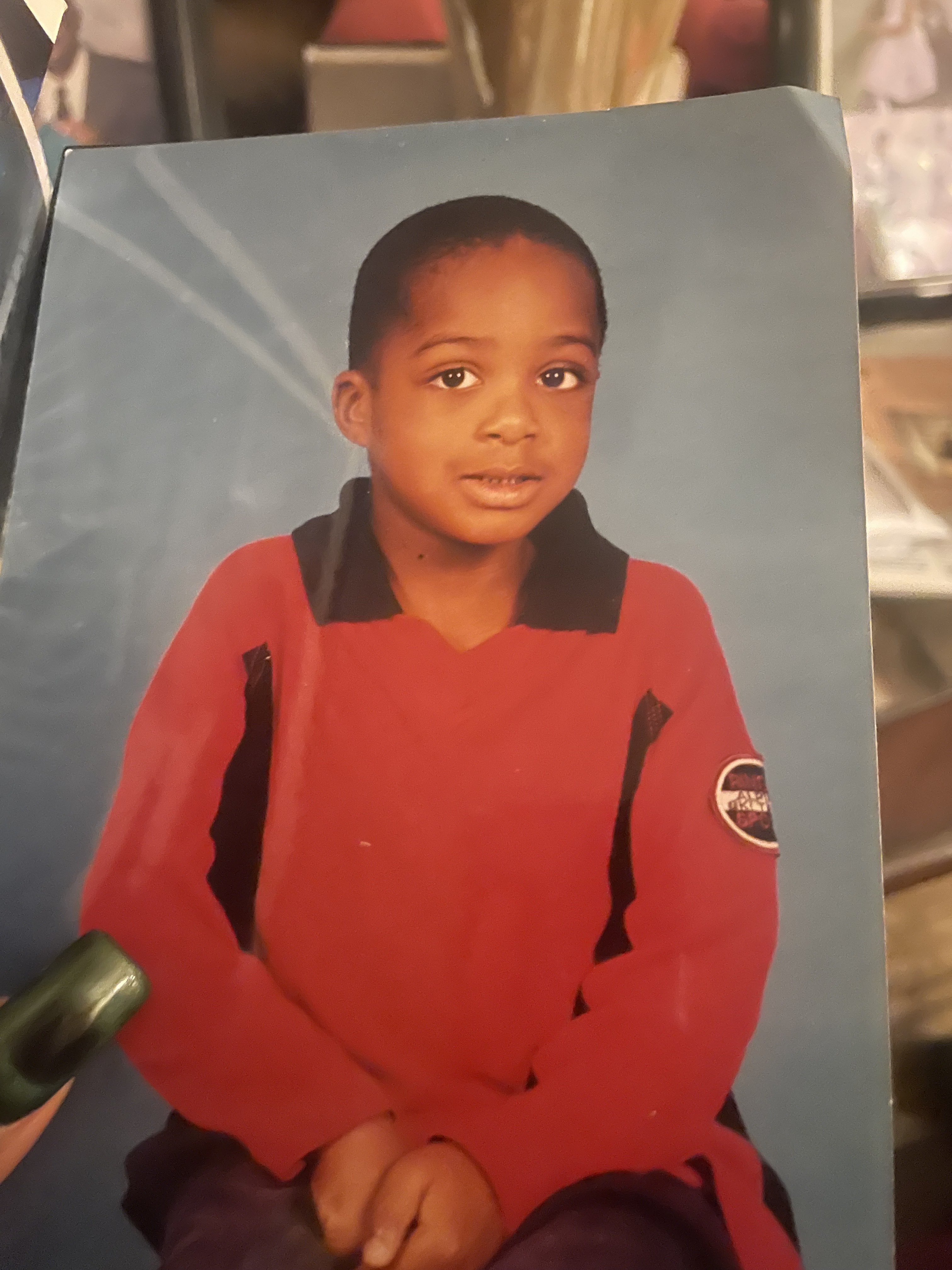 | 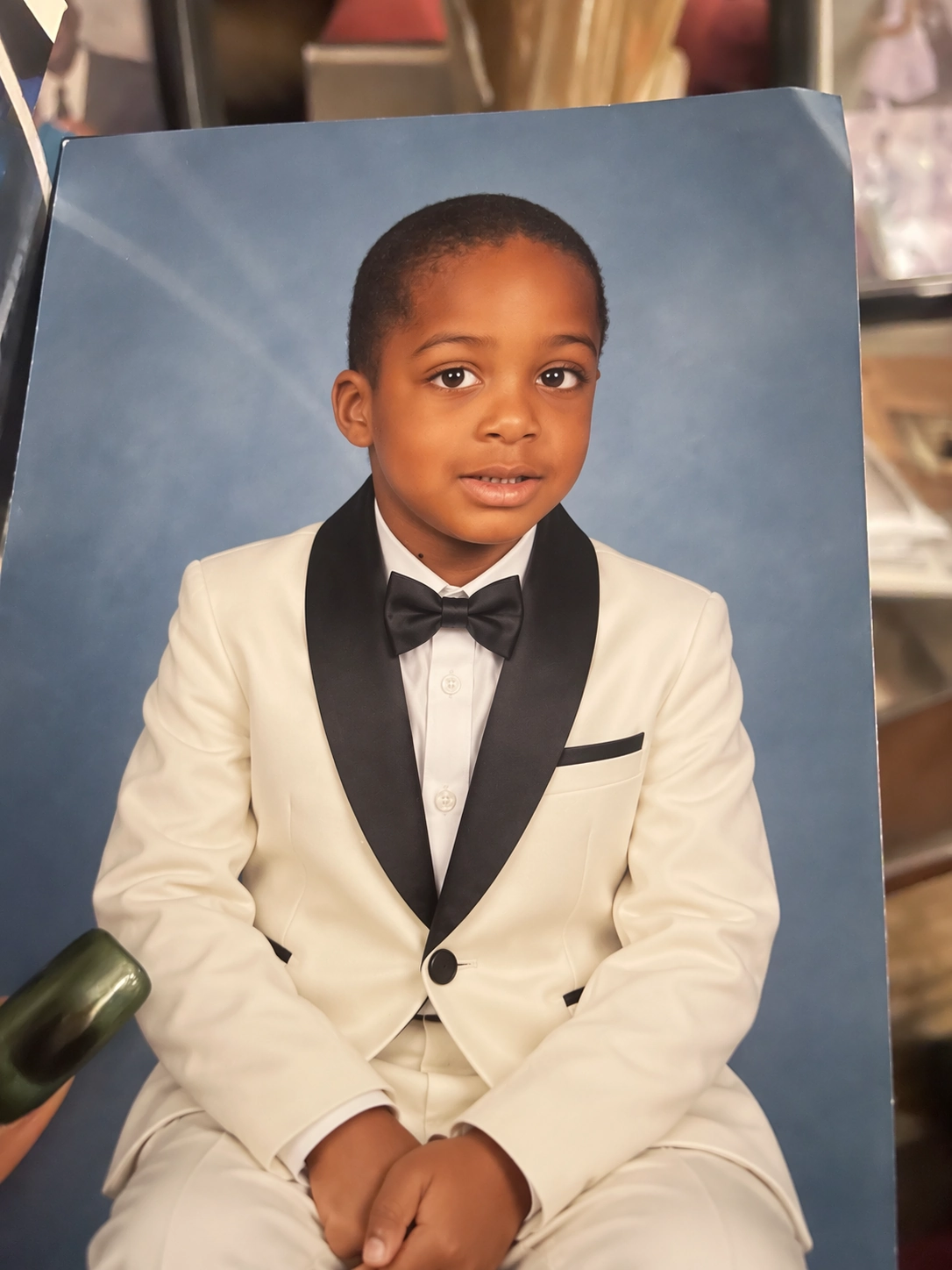 |
That matters for portraits, profile pictures, and character styling: you can continue working from an existing photo without describing the person again from scratch. Product photography has an equivalent requirement—preserve the shape, colors, and markings while changing the surroundings.
Outfit changes and product background replacements are two strong reasons to consider 2.5. Sunburst deserves a closer look when the final image needs to stay faithful to the reference. Flare is the more natural starting point when you want to explore several looks quickly.
Have a portrait or product photo ready to refine? Explore HiAPI GPT Image 2.5 Sunburst for its portrait and product editing capabilities.
Local Edits: Change the Background Without Rebuilding the Image
You like a product shot but want a warm gray background. A poster is almost finished, but its headline needs replacing. These sound like small requests, yet they demand precise editing: an unwanted change elsewhere can create another round of work.
Image 2 already handles image edits. The direction of the 2.5 upgrade is more accurate responses to local instructions while preserving surrounding details. That is particularly relevant near the end of a project, when the composition is settled and only a few adjustments remain.
For a product shot, a new background still needs to work with the bottle color, label, placement, and shadows. For an ad, a revised headline should leave the main visual intact. When those details matter, editing control becomes the deciding factor, making Sunburst worth considering.
Early concepts have different needs. If the composition and style are still open, generating several directions quickly is often more useful. That is where Flare fits.
Repeated Revisions: Keep What Worked in the Previous Version
An image needs to survive more than one edit to become a useful working asset. You might replace the background, add a headline, then adjust the lighting. Each new request should build on the previous version.
Consistency across revisions is a key part of the 2.5 upgrade. Product ads, portrait styling, and brand materials often take several rounds to finish. Preserving approved details helps keep each subsequent round focused on the remaining changes.
Consider 2.5 first if repeated refinement is a regular part of your work. If you mainly create one-off illustrations, multi-turn editing alone is less compelling. For an established Image 2 workflow, start with the tasks that need the most revisions and keep using the templates that already work.
Text and Posters: A More Complete Composition
The strength of these 2.5 posters is how the typography and imagery work together. Headlines have clear positions, letterforms echo the graphics, and the set maintains a consistent retro feel.
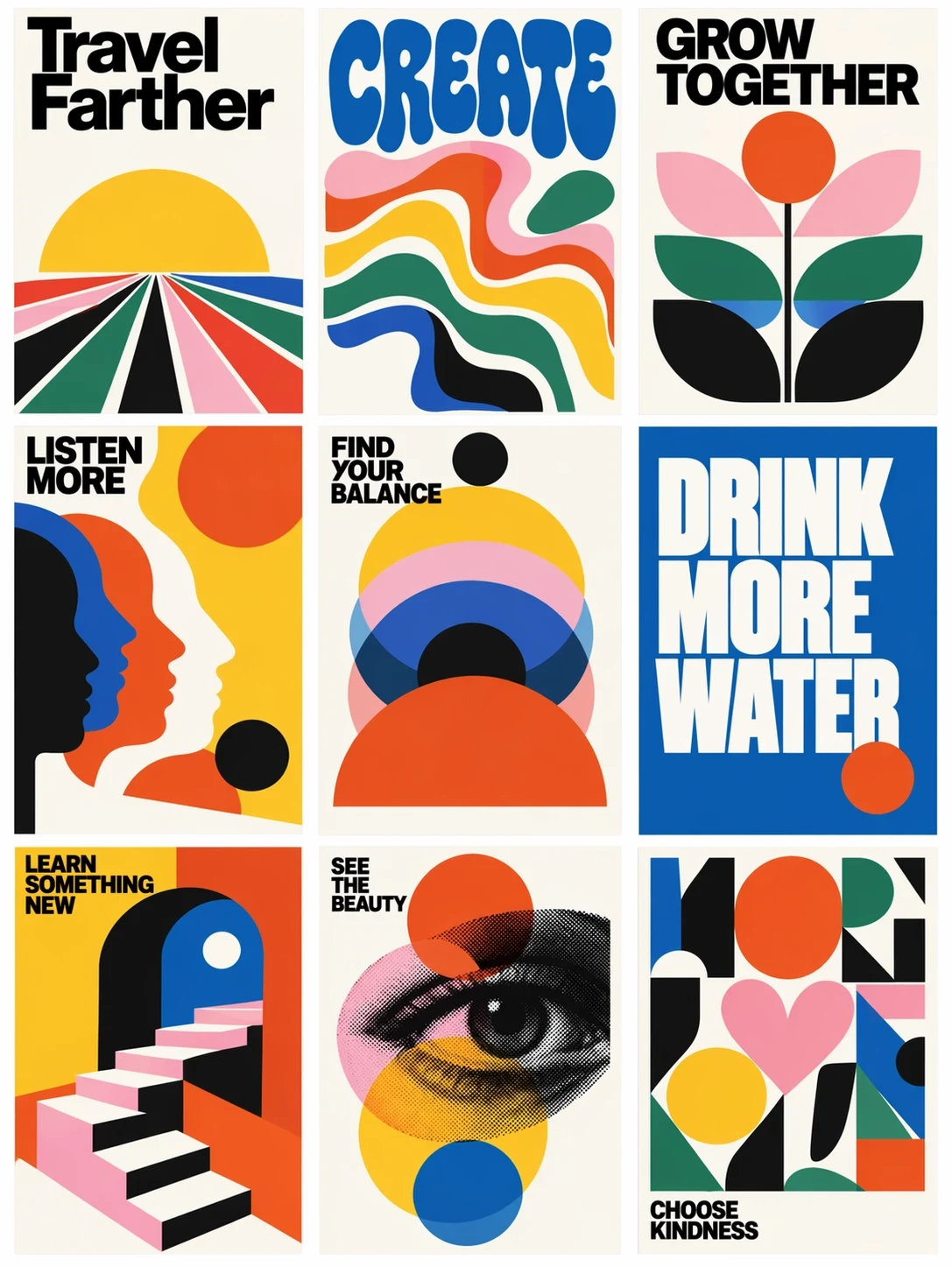
“Travel Farther” pairs large black lettering with radiating lines. “CREATE” connects rounded blue letters to colorful curves, while “GROW TOGETHER” combines the headline with flowers. The text carries the message without crowding out the main graphic.
For event covers, social posters, and recurring editorial graphics, that combination matters: the title needs to read clearly, the theme needs to feel coherent, and the design needs to remain recognizable at a smaller size.
Image 2 can already generate images containing text. The 2.5 upgrade puts more emphasis on complex instructions and layout. If your current results get the words right but still feel unfinished as a design, posters are a useful place to try the newer version. Long Chinese copy, dates, and brand names still need a final proofreading pass.
To explore several event posters or branded covers quickly, start with HiAPI GPT Image 2.5 Flare and bring your own headline, brand colors, and composition requirements.
Complex Layouts: More Detail Without Losing the Hierarchy
This invitation combines several levels of text, gold ornament, and an architectural illustration. Large script names lead the composition, the body copy sits in the middle, and the illustration anchors the lower section.
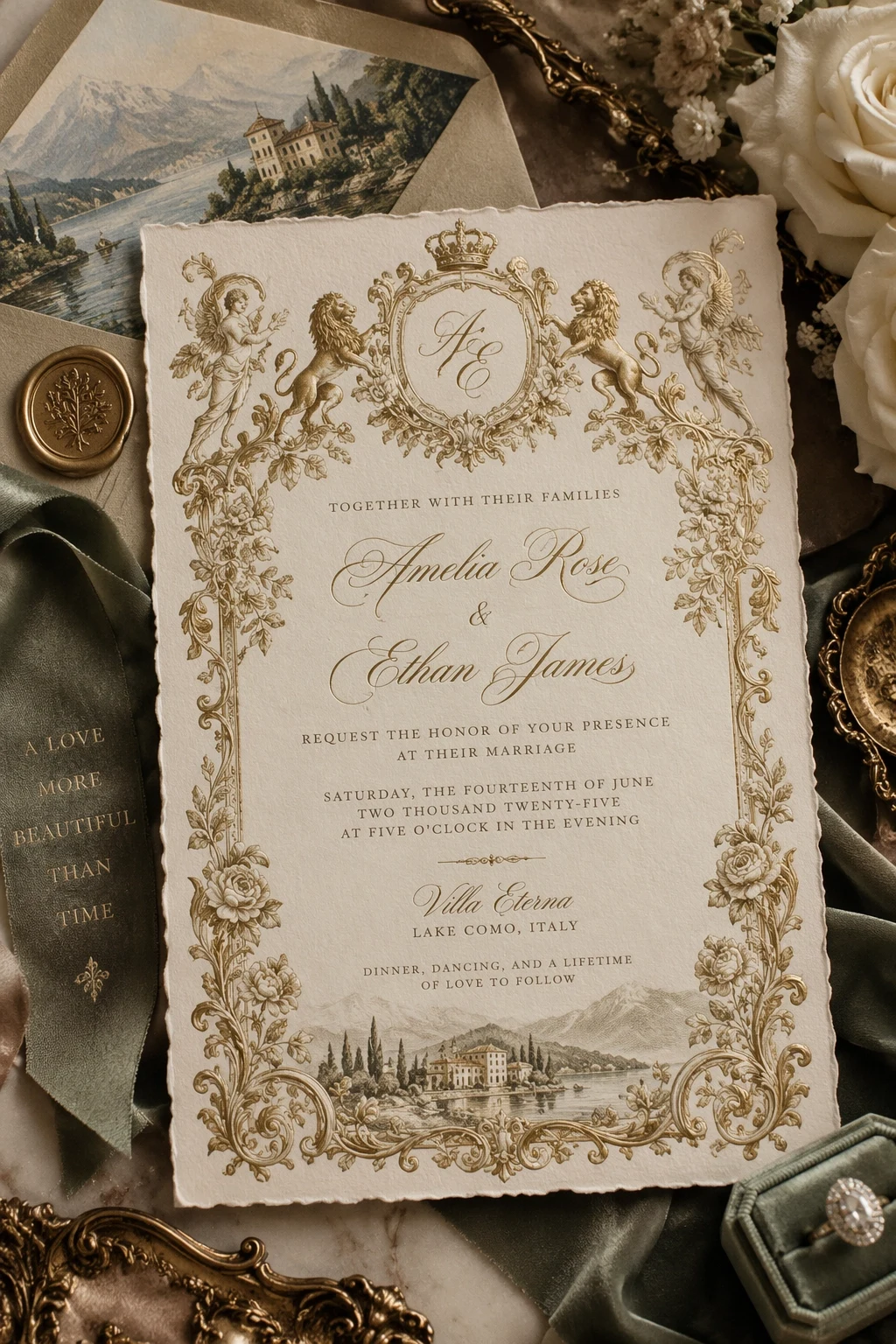
The decoration does not overwhelm the focal points. Cream paper and a gold border establish the palette, while flowers, ribbon, and metallic accessories complete the surrounding scene. Combining the design with its presentation setting makes this approach useful for invitation concepts, branded gift packaging, and event materials.
These compositions place greater demands on precision. The model has to arrange text, ornament, and negative space together. Stronger handling of complex layouts makes 2.5 worth considering for this work, with Sunburst the model to explore when further detail edits are a priority.
Visual Collections: Different Subjects, a Consistent Style
The national park stamps below share similar borders, typography, and illustration treatment while giving each landscape its own identity. The common design rules help the collection read as a set.
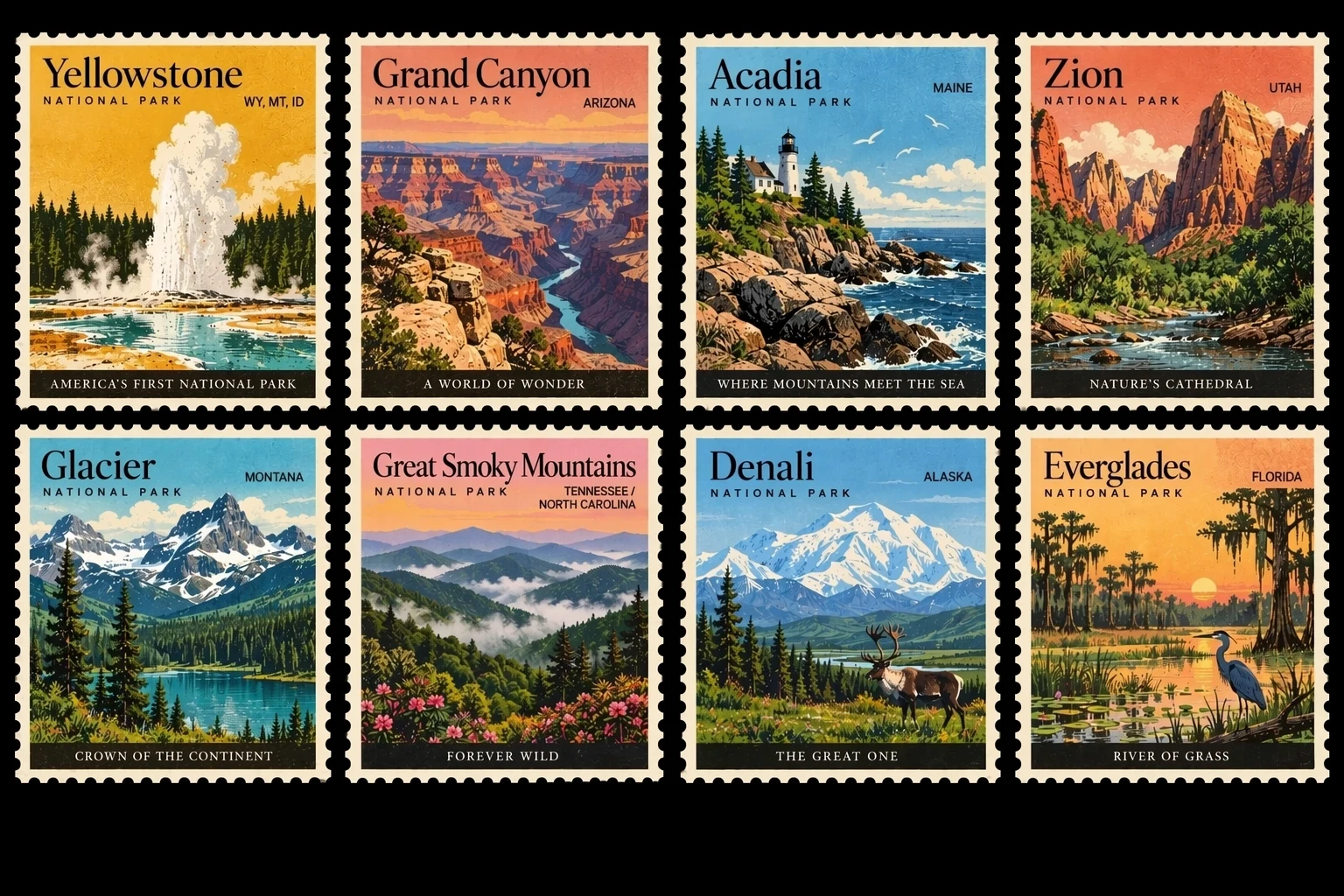
For branded stickers, themed cards, and recurring content graphics, consistency affects how finished the whole collection feels. Each item needs some variation while still belonging to the same visual family.
This example works well as a direction for a collection: establish the overall look, then develop the individual subjects. It demonstrates the organization of multiple elements within one image. For a series you plan to keep expanding, carry the same palette, typographic direction, and composition requirements into later creations.
Flare vs Sunburst: Which Model Fits Your Work?
Flare is intended for fast, everyday high-quality generation. Sunburst is aimed at work that prioritizes editing precision. They suit different stages of a project, so there is no need to use the same model for every image.
| Your Main Task | Start With | Why |
|---|---|---|
| Social graphics and cover drafts | Flare | Fast generation and exploration |
| Alternative compositions and color palettes | Flare | Quicker iteration during concept development |
| Product hero images and ad refinement | Sunburst | More emphasis on detail and local control |
| Outfit changes and repeated revisions | Sunburst | A closer fit for precise editing |
| Established Image 2 templates | Keep Image 2 | Preserve results you already like |
OpenAI's launch figures report 50% lower latency for Flare compared with Image 2. Sunburst takes longer to generate and focuses on finer creative work. Speed matters when you are exploring many directions; editing accuracy becomes more important as an asset approaches delivery.
For quick generation and creative exploration, see HiAPI Image 2.5 Flare. For repeated refinements to portraits or products, see HiAPI Image 2.5 Sunburst.
Is GPT Image 2.5 Worth the Upgrade?
Reference-based work, local changes, and repeated refinements are the strongest reasons to consider 2.5. Outfit edits, product backgrounds, text-led posters, and brand materials all line up with the newer version's priorities.
The examples here show an outfit edit that preserves the portrait's basic composition, posters that bring text and graphics together, and invitations and stamps with well-organized layouts. Those results make 2.5 a useful candidate for workflows that continue beyond the first generated image.
Start with Flare for everyday concepts and social graphics. Explore Sunburst when you repeatedly refine a portrait, product shot, or ad. Keep Image 2 where your existing templates already deliver results you are happy with.
Choose the model that fits your next image:
- Quick graphics and poster drafts: Explore HiAPI GPT Image 2.5 Flare.
- Portrait, product, and ad refinement: Explore HiAPI GPT Image 2.5 Sunburst.
You can also continue with GPT Image 2 for workflows that already work well.