Animate a first frame into a 5- or 10-second video, with optional last-frame control.

Provider: Kuaishou

Category: video generation

Endpoint: /v1/tasks

Status: Available

Cost: See live page pricing

Back to Models

Kling 2.5 Turbo Image-to-Video

by KuaishouVideo

Animate a first frame into a 5- or 10-second video, with optional last-frame control.

Pricing

Standard Usage

120 Credits/ s

Input

Frames

Use images to control the first and last frame. With a last frame, use 16:9, 9:16 or 1:1.

First frame required
0 / 2500
5s
5s5-second steps10s

More parameters

Advanced settings
0 / 2496

Describe unwanted video content; Up to 2496 characters

Adjust adherence to the description; Range: 0 - 1

Estimated cost600 Credits120 Credits / s × 5s

Output

Ready for generation

Configure your parameters and click "Run" to see the output here.

--

Bring light and motion to a still scene

Compare the first frame, last frame and video to see how character movement, position and colour changes build on the image’s composition.

Portrait · tracking5s1080p9:16

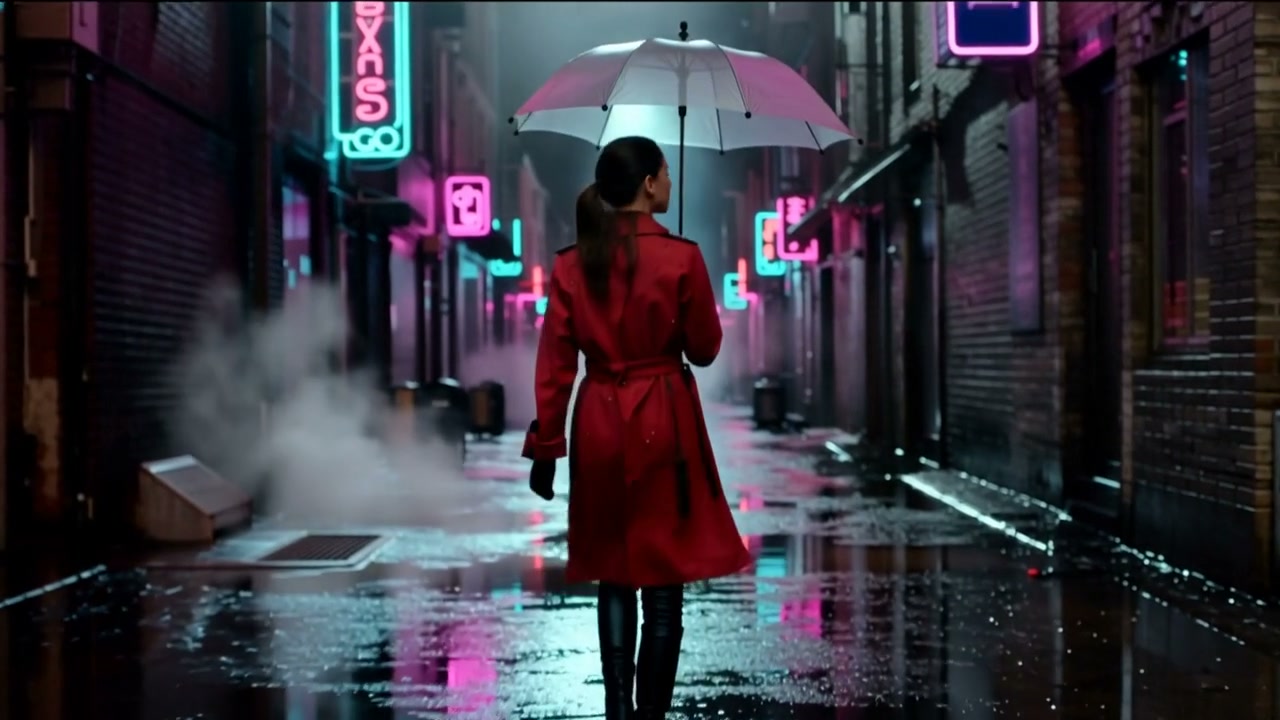
Neon rain alley

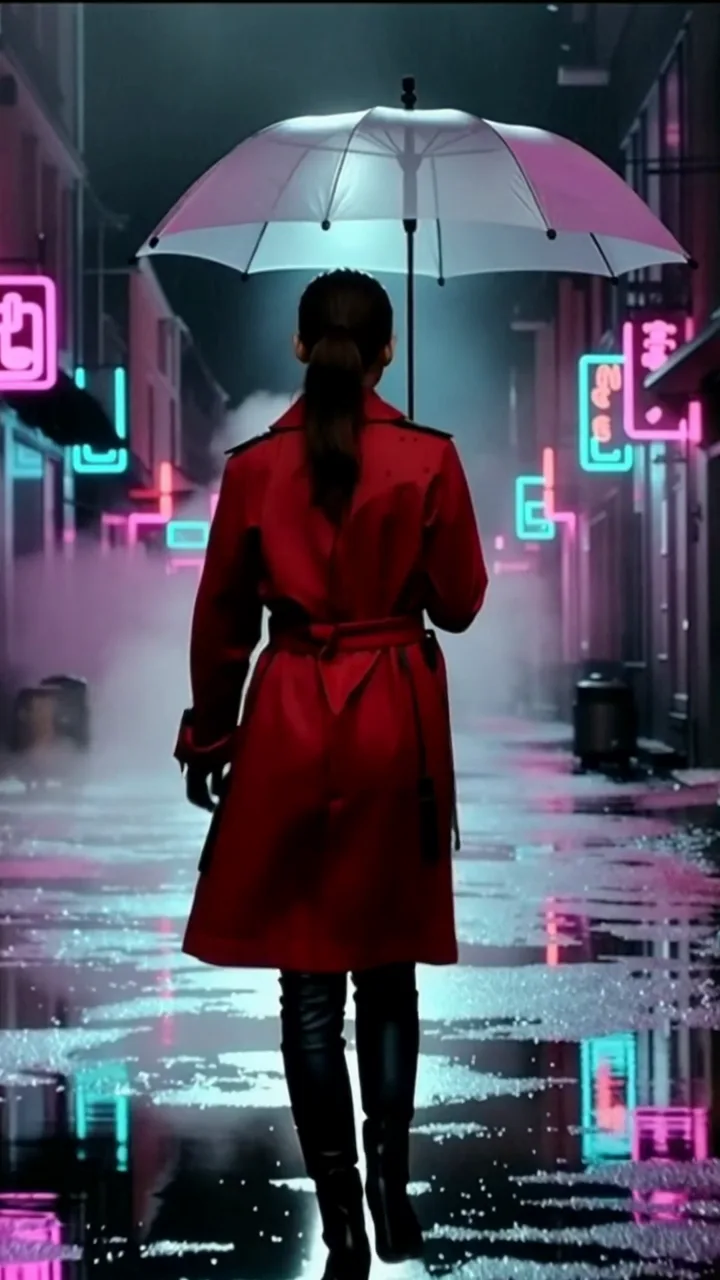
A landscape first frame is cropped to 9:16 while the figure walks forward and neon reflects off the wet street.

Prompt

The woman in the red coat walks slowly forward under the clear umbrella, rain falling, neon signs flickering and reflecting on the wet street, steam drifting, smooth tracking shot

First frame1280×720
Generated video5s · 1080p · 9:16

Input previews are center-cropped to the video shape. Open “Original” to see the full images.
First/last frames · transition5s1080p9:16

From a red car to a blue car

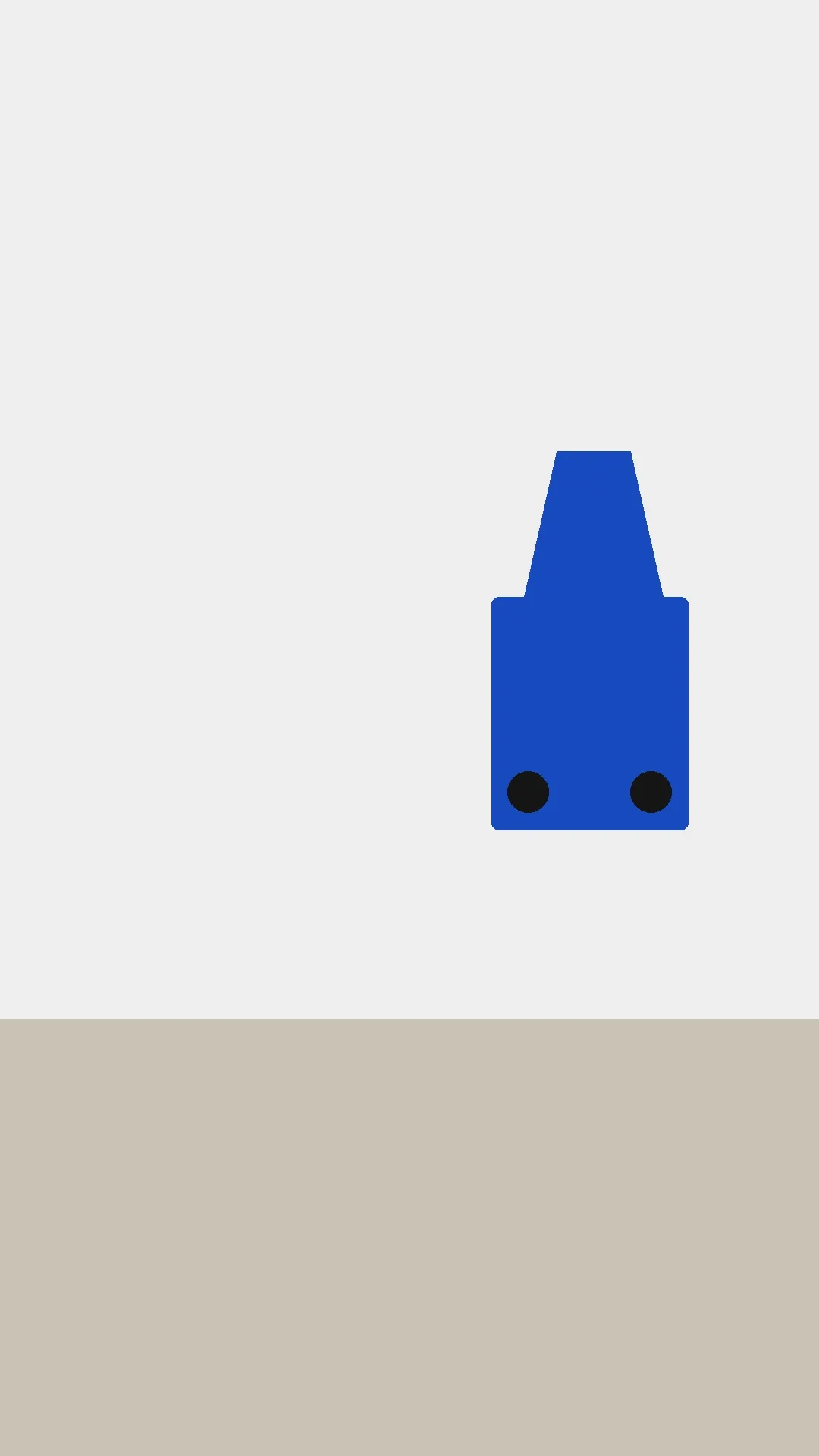
The first frame places a red car on the left; the last frame places a blue car on the right. The clip moves between those positions and changes color.

Prompt

A toy car moves smoothly from the left to the right and changes from red to blue. Keep the simple light grey background and beige ground. Continuous static camera shot.

First frame1080×1920
Last frame1080×1920
Generated video5s · 1080p · 9:16

Choosing between related video models

Choose by duration, resolution and input method:

Model specifications

Input
First frame + prompt; optional last frame
Duration
5 / 10 seconds
Output dimensions
16:9 · 1920×10809:16 · 1080×19201:1 · 1440×14404:3 · 1660×12443:4 · 1244×166021:9 · 2200×940
First/last-frame ratios
16:9 / 9:16 / 1:1
Image requirements
jpeg / png / webp, ≤10MB each
Audio
No audio track
Advanced controls
Negative prompt ≤2496 charactersPrompt adherence 0–1
Prompt length
1–2500 characters
Model ID
kling-2.5-turbo/image-to-video

Current price: View live pricing

How to use Kling 2.5 Turbo Image-to-Video

First frame
Last frame (optional)
1–2 images
01

Prepare a first frame and optional last frame

Set the opening image and add a last frame when you want to guide the ending.

Subject motion
Camera
Ratio and length
02

Describe the motion and camera

Describe the action and camera, then choose 5 or 10 seconds and a ratio. Use 16:9, 9:16 or 1:1 for two frames.

Playground
POST /v1/tasks
03

Try the Playground, then use the API

Check the result in the Playground, then use the request below in your app.

API quickstart

curl --request POST 'https://api.hiapi.ai/v1/tasks' \
  --header 'Authorization: Bearer YOUR_API_KEY' \
  --header 'Content-Type: application/json' \
  --data '{
  "model": "kling-2.5-turbo/image-to-video",
  "input": {
    "prompt": "Waves crash against the rocks below, the lighthouse beam sweeps slowly across the storm clouds, mist drifts over the sea, slow cinematic push-in",
    "image_urls": [
      "https://static.hiapi.ai/gallery/2026/10/203945404507c091.jpg"
    ],
    "duration": 5,
    "aspect_ratio": "16:9"
  }
}'
The create request returns a taskId; retrieve the result asynchronously.Open full API docs

KLING 2.5 TURBO / IMAGE-TO-VIDEO

Kling 2.5 Turbo Image-to-Video, short shots that start from one image

Kling 2.5 Turbo Image-to-Video is the image-to-video version of Kuaishou's Kling 2.5 Turbo. Give it an image as the first frame, say what moves and how the camera travels, and get a 5- or 10-second clip. Add a last frame when the shot has to end on a specific picture.

First frame + optional last frame5 or 10 secondsSix aspect ratios
Explore the model ↓
Neon rain alley · original first frame; the clip plays in the examples above

First frame · last frame · length · ratio

About Kling 2.5 Turbo Image-to-Video

The first frame is required, and it already settles what the subject looks like, where it stands and where the light falls. So the prompt skips the description and covers what happens next: where someone walks, how the mist moves, whether the camera pushes in or slides sideways. An optional last frame gives the motion somewhere to land.

Clips run 5 or 10 seconds. With a first frame alone you can pick 16:9, 9:16, 1:1, 4:3, 3:4 or 21:9; adding a last frame narrows that to 16:9, 9:16 and 1:1. Output is silent, which leaves music and voice-over to your edit.

Camera, framing and frame control in Kling 2.5 Turbo

Each clip below was generated for this page: a square product shot, a widescreen landscape, a landscape photo reframed as portrait, and a first-to-last-frame transition. Every one lists the first frame, the prompt, the ratio and length, and what actually changes on screen.

Petals fall and the camera orbits while the bottle keeps its first-frame look

The first frame is a perfume bottle on a round marble stand with a few pink petals around it. Over ten seconds more petals drift in from the top and some settle on the stand. The camera swings a short way around the bottle, and the marble veining slides across to the other side.

The prompt also asked the bottle to rotate, and in the clip it barely does: the gold cap and cut glass stay exactly as photographed. If the product itself needs to turn, describe the turn more precisely, or add a last frame that shows it already turned.

1:1 · 1440×1440 · 10 s · first frame only

View prompt

The perfume bottle rotates slowly on the marble stand, light glints across the glass, petals drift down, slow orbit

Petals fall and the camera orbits while the bottle keeps its first-frame look · first frame
First frame
Kling 2.5 Turbo · perfume bottle clip

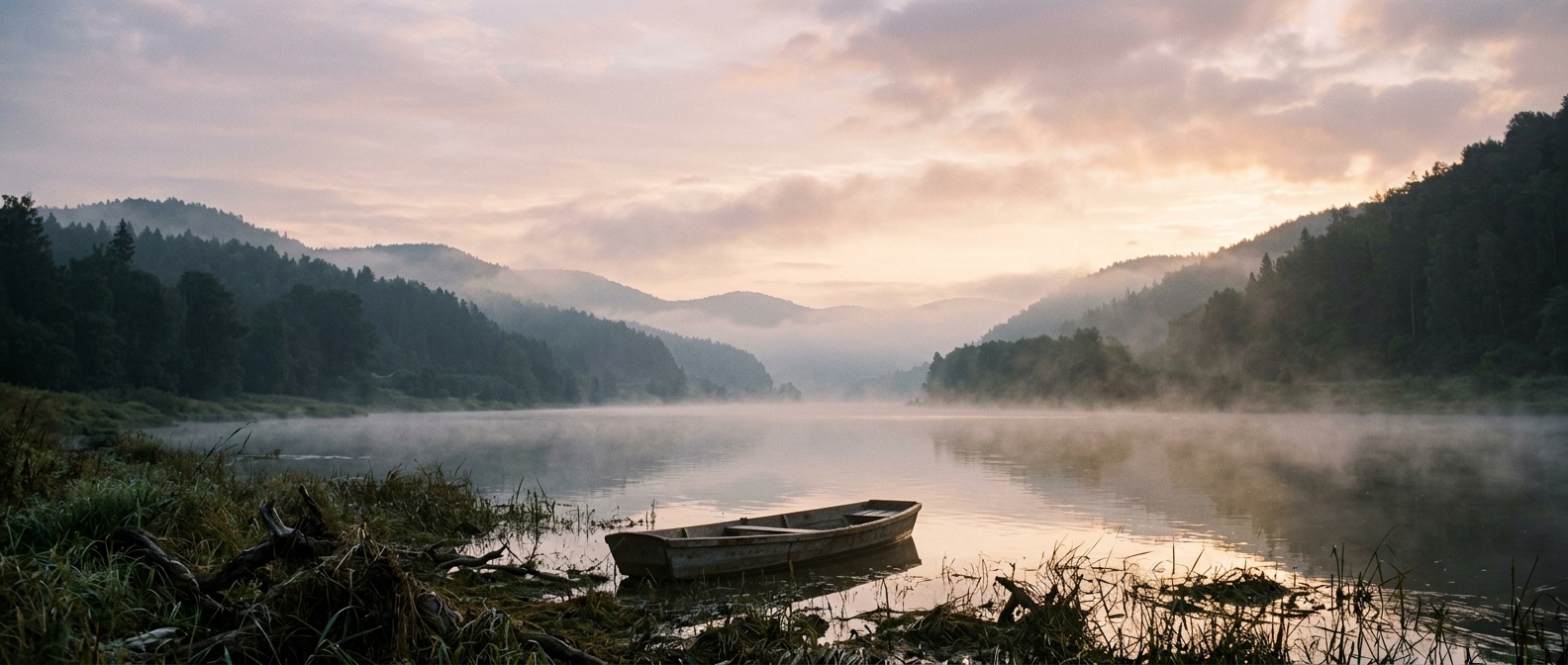
Drifting mist and layered depth across a 21:9 river valley

The first frame is a river valley at dawn, mist lying on the water and a wooden boat moored by the reeds. For five seconds the mist keeps moving. The camera shifts only slightly, yet the far ridge and the right-bank trees slide left while the boat edges right, and that offset gives the frame real depth.

The prompt asked for a slow pan, drifting mist and some foreground motion; it never mentioned the boat or the hills. 21:9 renders at 2200×940 and is only available without a last frame, which makes it a natural fit for title sequences and wide website headers.

21:9 · 2200×940 · 5 s · first frame only

View prompt

Slow cinematic pan across the wide landscape, mist drifting, subtle motion in the foreground

Drifting mist and layered depth across a 21:9 river valley · first frame
First frame
Kling 2.5 Turbo · river valley clip

Reframing a landscape image as 9:16 with the subject still centered

The first frame is a 16:9 rainy alley, a woman in a red coat with a clear umbrella standing dead center with her back to us. With 9:16 selected, the clip keeps that middle strip: the figure, the umbrella and the neon signs on both sides stay, while most of the shopfronts at the edges are cut away.

The prompt asked for a slow walk forward, neon reflected on the wet street and a steady tracking shot. She walks deeper into the alley, puddles pick up pink and teal light, and steam rises on either side. When a landscape image is headed for a vertical feed, a centered subject is the safe choice.

9:16 · 1080×1920 · 5 s · first frame only

View prompt

The woman in the red coat walks slowly forward under the clear umbrella, rain falling, neon signs flickering and reflecting on the wet street, steam drifting, smooth tracking shot

Reframing a landscape image as 9:16 with the subject still centered · original first frame
16:9 first frame · the lit strip is what stays
Reframing a landscape image as 9:16 with the subject still centered · frame from the video
9:16 frame from the clip

Watch the clip: “Neon rain alley” in the examples above ↑

Fixing the ending with a last frame: a red car rolls right and turns blue

The first frame holds a single red toy car on the left; the last frame shows the same model in blue on the right. The red car rolls right, turns pale blue around the middle, deepens in color and stops exactly where the last frame placed it. The grey backdrop and beige floor never change.

The prompt spells out left to right, red to blue, an unchanged background and a locked-off camera. Because the two images differ only in the car, the model just fills in the movement between them. With both frames the ratio is limited to 16:9, 9:16 or 1:1; this one is 9:16.

9:16 · 1080×1920 · 5 s · first + last frame

View prompt

A toy car moves smoothly from the left to the right and changes from red to blue. Keep the simple light grey background and beige ground. Continuous static camera shot.

Fixing the ending with a last frame: a red car rolls right and turns blue · First frame · red car, left
First frame · red car, left
Fixing the ending with a last frame: a red car rolls right and turns blue · Last frame · blue car, right
Last frame · blue car, right

Watch the clip: “From a red car to a blue car” in the examples above ↑

Kling 2.5 Turbo image-to-video: what it is good for

Product clips

Turn a finished product shot into a 5- or 10-second clip. The first frame keeps the product as photographed; the prompt only handles petals, light and the camera.

Openers and web banners

Use a 21:9 landscape or interior photo as a widescreen establishing shot. Slow changes in mist, water or cloud are enough to carry five seconds.

Landscape assets for vertical feeds

Pick 9:16 for an existing landscape photo. Images with a centered subject come through the crop intact, ready for short-video platforms.

Shots that have to connect

Pin the start and end with a first and last frame, so a move, color change or transformation lands on the picture you chose and cuts cleanly against its neighbours.

Need a different input or length? Three more to look at

Only text, no image? See Kling 2.5 Turbo Text-to-Video

The whole picture comes from a prompt. Clips are also 5 or 10 seconds, in landscape, portrait or square, and every one comes with an audio track.

View model details →

Want to set the length by the second? See Kling 3.0 Turbo Image-to-Video

Pick any length from 3 to 15 seconds and choose 720p or 1080p. It takes a single first-frame image and has no aspect-ratio setting.

View model details →

Need an 8-second option? See Runway Gen-4.5 Image-to-Video

Clips run 5, 8 or 10 seconds in 16:9, 9:16, 4:3, 3:4 or 1:1, with the first frame center-cropped to fit. Output is fixed at 720p and there is no last frame.

View model details →

Start Kling 2.5 Turbo image-to-video on HiAPI

Upload a first frame, say what moves and how the camera travels, and check five seconds first. Add a last frame when the ending has to be fixed, then send the same settings through the API.

Need to compare models and billing tiers?View live pricing for all models

Kling 2.5 Turbo Image-to-Video FAQ

How should I prepare the first-frame image?

Use jpeg, png or webp up to 10MB; jpeg and png are the safest choices. Try to match the image to the ratio you plan to output. When they differ, the clip may be center-cropped or may keep the image's own proportions, so keep the subject near the middle.

What does the last frame do, and how do I use it?

The last frame is an optional second image that decides where the clip ends. Keep the background and camera position the same in both images and change only what should change, like the red car turning blue on this page. With a last frame, choose 16:9, 9:16 or 1:1.

Which lengths and aspect ratios can I choose?

Pick 5 or 10 seconds. Ratios are 16:9, 9:16, 1:1, 4:3, 3:4 and 21:9, rendering at 1920×1080, 1080×1920, 1440×1440, 1660×1244, 1244×1660 and 2200×940. Resolution follows the ratio, so there is nothing else to set.

Do the videos have sound?

No. Clips come without an audio track, so add music or voice-over in your edit. If you want sound built in, Kling 2.5 Turbo Text-to-Video generates from text and every clip includes audio.

What should the prompt describe?

The first frame already shows the subject and setting, so describe motion, changes in the scene and the camera, for example “petals drift down, slow orbit”. You can also list things you don't want to see and adjust how closely the video follows the prompt.

How long are generated videos kept?

Output links last about 7 days by default. Download anything you want to keep, or choose long-term storage when you create the task; past runs stay in your task history.

Kling 2.5 Turbo Image-to-Video or Text-to-Video: which should I use?

Use Image-to-Video when you have a picture and want the subject and composition to follow it. Use Text-to-Video when you only have an idea, or when the clip needs sound. Both run 5 or 10 seconds.