TL;DR
- If 5 or 10 seconds is enough and price matters, pick Kling 2.5 Turbo: $0.06 per second, $0.60 for a 10-second 1080p clip, plus last-frame control and 21:9 on image-to-video.
- If you need any length from 3 to 15 seconds, a choice between 720p and 1080p, or sound on image-to-video too, pick Kling 3.0 Turbo: $0.13 per second at 720p, $0.16 at 1080p.
- Kling 2.5 Turbo is live on HiAPI: open the model page to try it. New accounts get 200 free credits.
At a glance
| Kling 2.5 Turbo | Kling 3.0 Turbo | |
|---|---|---|
| Per second | $0.06 | $0.13 (720p) / $0.16 (1080p) |
| 10 s at 1080p | $0.60 | $1.60 |
| Lengths | 5 / 10 s | 3–15 s, any whole second |
| Resolution | ~1080p, set by aspect ratio | 720p / 1080p |
| Text-to-video aspect ratios | 16:9, 9:16, 1:1 | 16:9, 9:16, 1:1 |
| Image-to-video input | First frame + optional last frame, 6 ratios | One first frame; output follows its shape |
| Audio | T2V always on; I2V none | Always on for T2V and I2V, no switch |
| Negative prompt, prompt adherence | negative_prompt, cfg_scale | Neither |
Same prompt, one clip from each
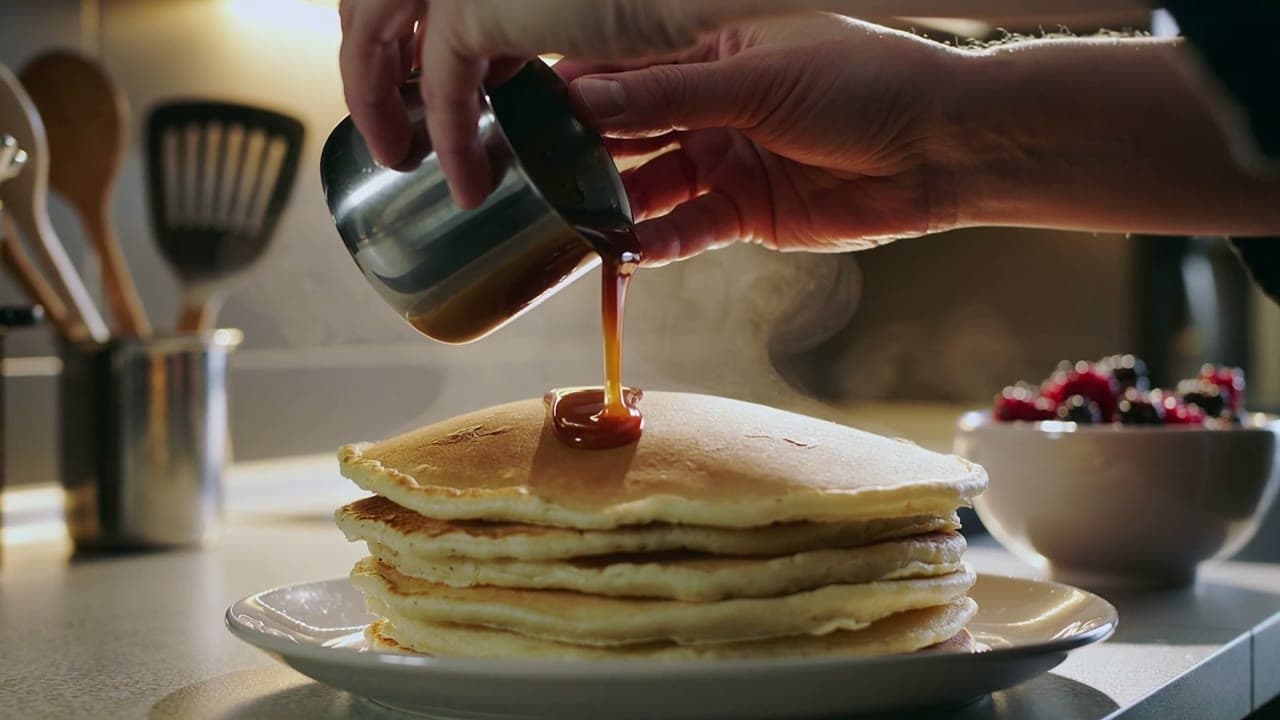
Text-to-video: caramel pancakes
Both at 16:9, 1080p, 10 seconds, one run each.
Hands pour glossy caramel over a stack of pancakes, steam rises, camera slowly pushes in, warm kitchen light
Kling 2.5 Turbo:
Generate with Kling 2.5 Turbo →
kling-2.5-turbo/text-to-video, 16:9, 1920×1080, 10 s, with audio, $0.60.
Kling 3.0 Turbo:
Generate with Kling 3.0 Turbo →
kling-3.0-turbo/text-to-video, 16:9, 1920×1080, 10 s, with audio, $1.60.
What you can see:
- Props: 2.5 Turbo uses a metal creamer and a white plate on a kitchen counter with berries behind. 3.0 Turbo uses a glass jug, a pale green plate and a wooden table, and adds a pat of butter. The prompt mentions none of this; each model filled it in.
- Steam: clearly visible behind the stack throughout on 3.0 Turbo, barely there on 2.5 Turbo.
- Push-in: 3.0 Turbo ends much tighter, with the stack filling the lower half of the frame; 2.5 Turbo's framing changes less.
- Audio: both have a track; 2.5 Turbo's is much louder (mean −31 dB vs −54 dB).
Image-to-video: same first frame
The same 1:1 first frame, 10 seconds, 1080p.

The perfume bottle rotates slowly on the marble stand, light glints across the glass, petals drift down, slow orbit
Kling 2.5 Turbo:
Generate with Kling 2.5 Turbo →
kling-2.5-turbo/image-to-video, 1:1, 1440×1440, 10 s, no audio, $0.60.
Kling 3.0 Turbo:
Generate with Kling 3.0 Turbo →
kling-3.0-turbo/image-to-video, 1440×1440 (follows the frame), 10 s, with audio, $1.60.
What you can see:
- Shot structure: 2.5 Turbo is one continuous medium shot. 3.0 Turbo starts medium and cuts to a close-up of the cap at about 5 seconds, so one clip holds two shots.
- Petals: denser and faster in 3.0 Turbo's first half.
- Product: bottle and cap match the first frame on both, and neither makes the bottle spin as the prompt asked.
- Audio: 3.0 Turbo has a track; 2.5 Turbo image-to-video doesn't.
Which one for which job
- High-volume short clips on a budget: Kling 2.5 Turbo. 10 seconds is $0.60; the same length at 1080p with sound on 3.0 Turbo is $1.60.
- Odd lengths like 7 or 12 seconds: Kling 3.0 Turbo, set to the second from 3 to 15.
- Cheap 720p drafts: Kling 3.0 Turbo at $0.13 per second. Kling 2.5 Turbo has no low-res tier, but its 5-second clip ($0.30) already costs less than 3.0 Turbo's at 720p ($0.65).
- Ending on a specific shot, or transitions: Kling 2.5 Turbo. 3.0 Turbo image-to-video takes one frame only.
- Cropping one image to another shape (landscape to vertical, or 21:9 ultrawide): Kling 2.5 Turbo image-to-video lets you pick the ratio and center-crops the frame; 3.0 Turbo keeps the frame's own shape.
- Sound on image-to-video: Kling 3.0 Turbo. Kling 2.5 Turbo image-to-video has no audio track.
Switching cost
Both run on the same POST /v1/tasks with the same API key. Switching means changing model and a few input fields:
{"model": "kling-2.5-turbo/text-to-video",
 "input": {"prompt": "...", "duration": 10, "aspect_ratio": "16:9"}}

{"model": "kling-3.0-turbo/text-to-video",
 "input": {"prompt": "...", "duration": 10, "aspect_ratio": "16:9", "resolution": "1080p"}}
Going from 2.5 to 3.0: add resolution, drop negative_prompt and cfg_scale. For image-to-video, also drop the second image and aspect_ratio, since 3.0 Turbo follows the frame's shape.
FAQ
Is Kling 3.0 Turbo simply the better one?
Both are available on HiAPI, so choose by need. 3.0 Turbo adds length and resolution choices; 2.5 Turbo adds a last frame, more aspect ratios and a lower price. For how the pictures differ, see the same-prompt clips above.
Do both have sound?
On text-to-video, both always include an audio track with no switch. On image-to-video they differ: Kling 2.5 Turbo is silent, Kling 3.0 Turbo has sound.
How big is the price gap?
At 10 seconds and 1080p, Kling 2.5 Turbo is $0.60 and Kling 3.0 Turbo is $1.60. Against 3.0 Turbo at 720p, a 5-second clip is $0.30 versus $0.65.
Can I mix them in one project?
Yes. Same key, same endpoint; change model.
Pricing details are in Kling 2.5 Turbo API pricing, code in the Kling 2.5 Turbo API guide, and 3.0 Turbo usage in the Kling 3.0 Turbo API guide. To compare for yourself, copy the pancake prompt above and run it on the Kling 2.5 Turbo model page.