OmniHuman 1.5 API: turn one portrait and an audio clip into a lip-synced talking video with natural gestures for short videos and lessons. Try it online.

Provider: ByteDance

Category: video generation

Endpoint: /v1/tasks

Status: Available

Cost: See live page pricing

Back to Models

OmniHuman 1.5

by ByteDanceVideo

OmniHuman 1.5 API: turn one portrait and an audio clip into a lip-synced talking video with natural gestures for short videos and lessons. Try it online.

Pricing

Standard Usage

386 Credits/ s

Input

Frames

Use images to control the first and last frame.

First frame required
0 / 5000
BillingBilled by actual output duration386 Credits / sSettled from the actual output duration

Output

Ready for generation

Configure your parameters and click "Run" to see the output here.

--

OmniHuman 1.5 examples: portrait plus audio to talking video

See how the pictured person speaks from a recording, how lips, blinks and shoulder motion follow the voice, and how the frame stays true to the portrait.

Audio-driven

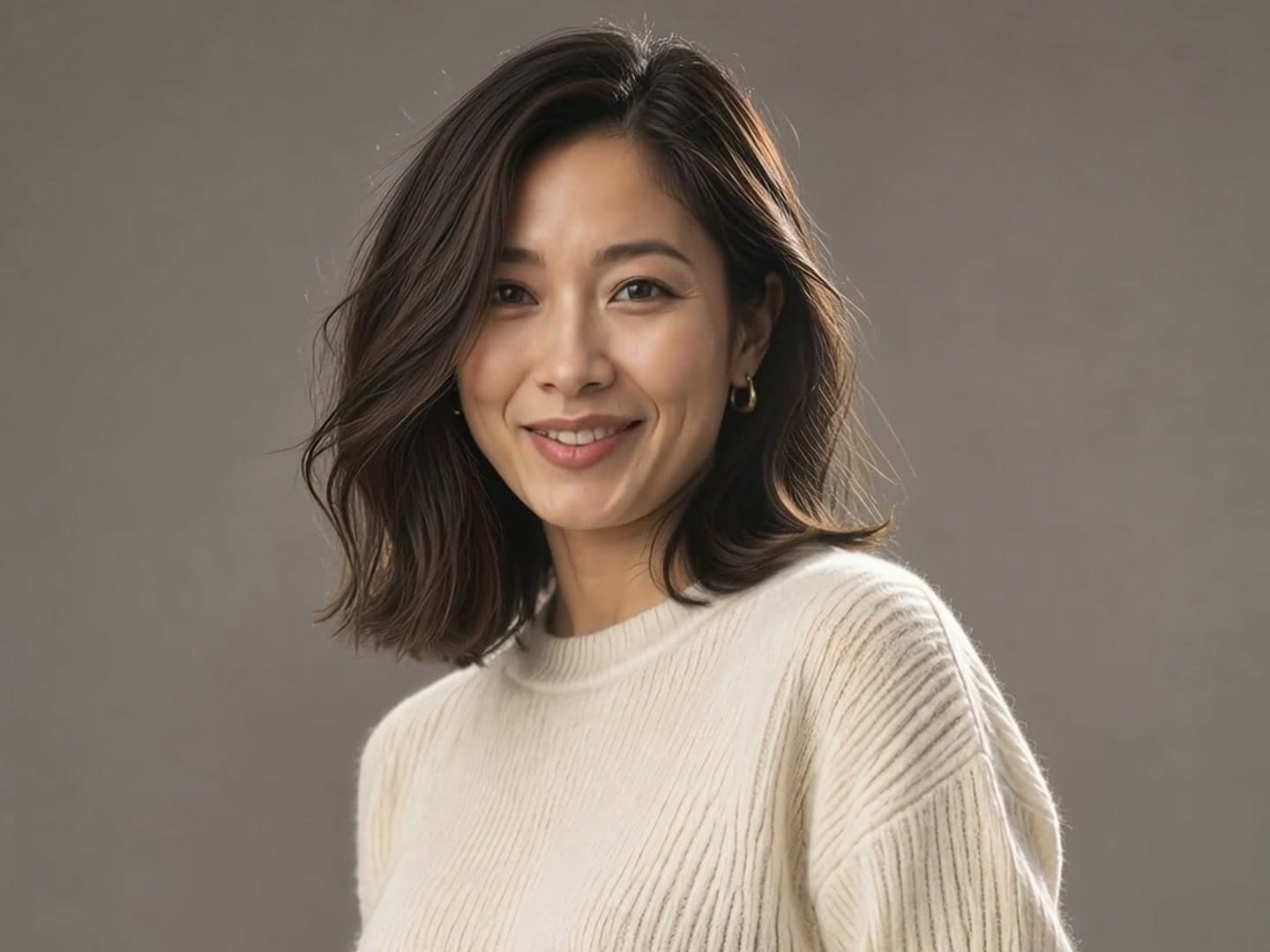
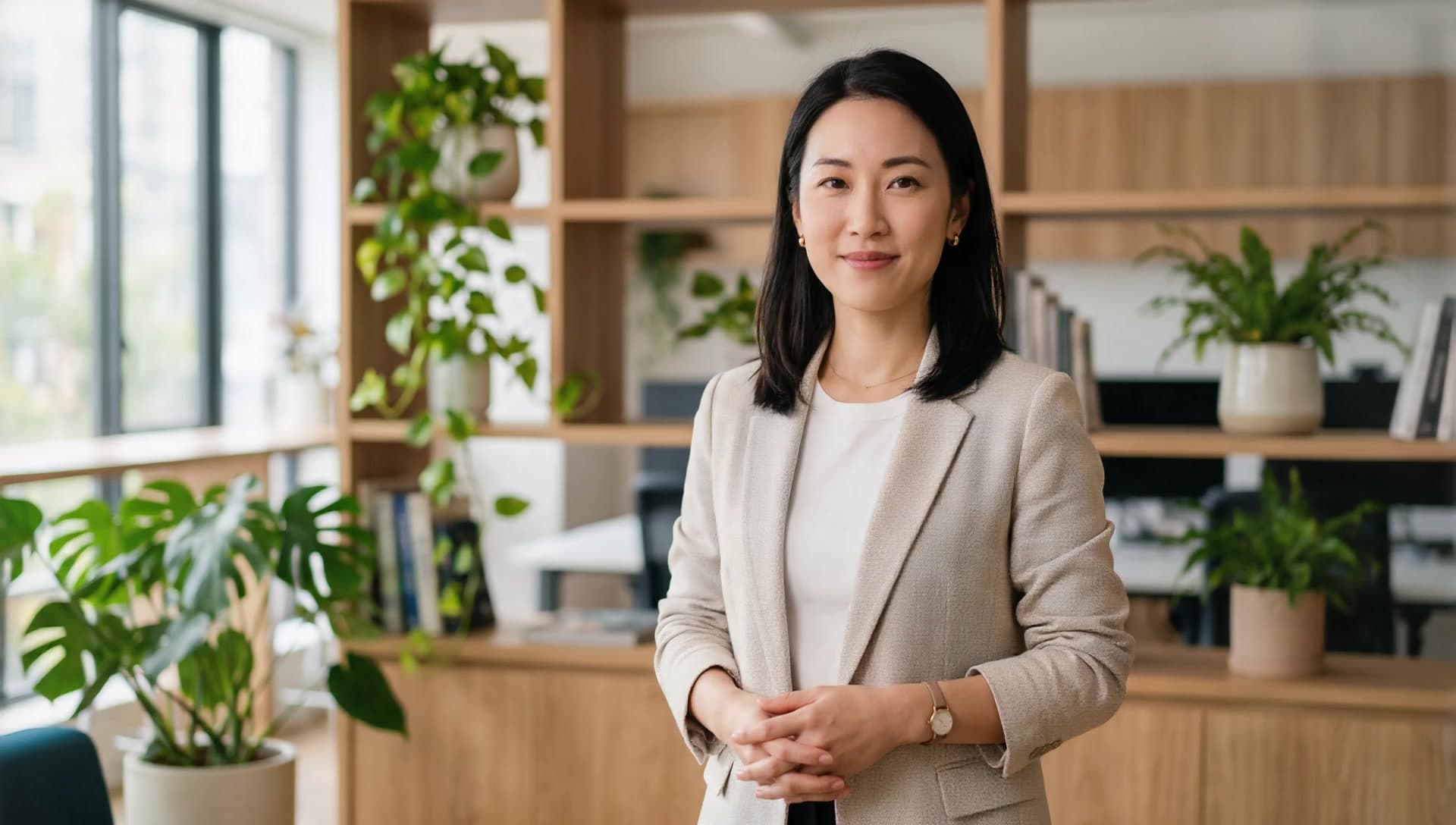
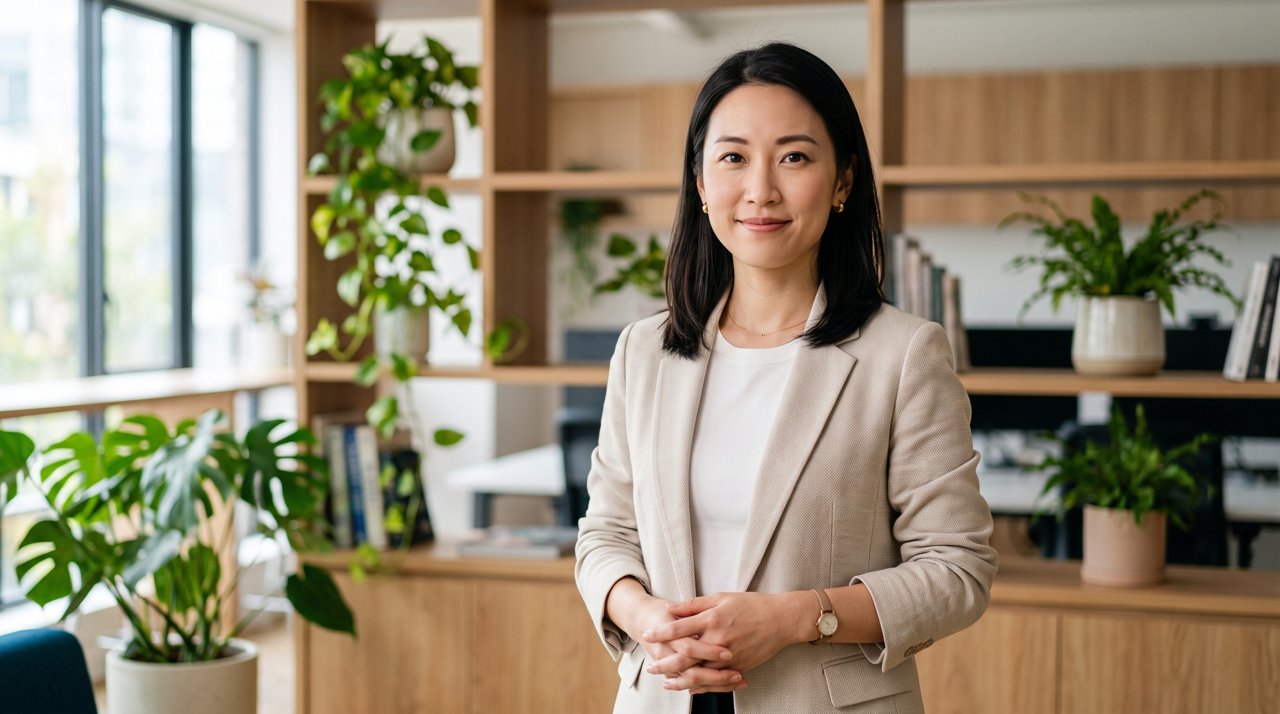
A landscape half-body photo becomes a product-launch talk

The portrait supplies the presenter, outfit and office setting, the audio decides what is said and the pacing, and the prompt has her open her hands when she reaches the features. The output keeps the 16:9 frame, the lips follow the Chinese voice-over, and nods, gestures and shoulder movement rise and fall with the sentence while the background and lighting match the photo.

8s1080p16:9

Driving audio

A roughly 8-second Chinese product-launch voice-over; the lips and pacing follow it.

Prompt: 自然地微笑讲话,说到功能时双手轻轻打开做手势,偶尔点头
Input · portrait
A landscape half-body photo becomes a product-launch talk: input portrait
Output · talking video

Pets & characters

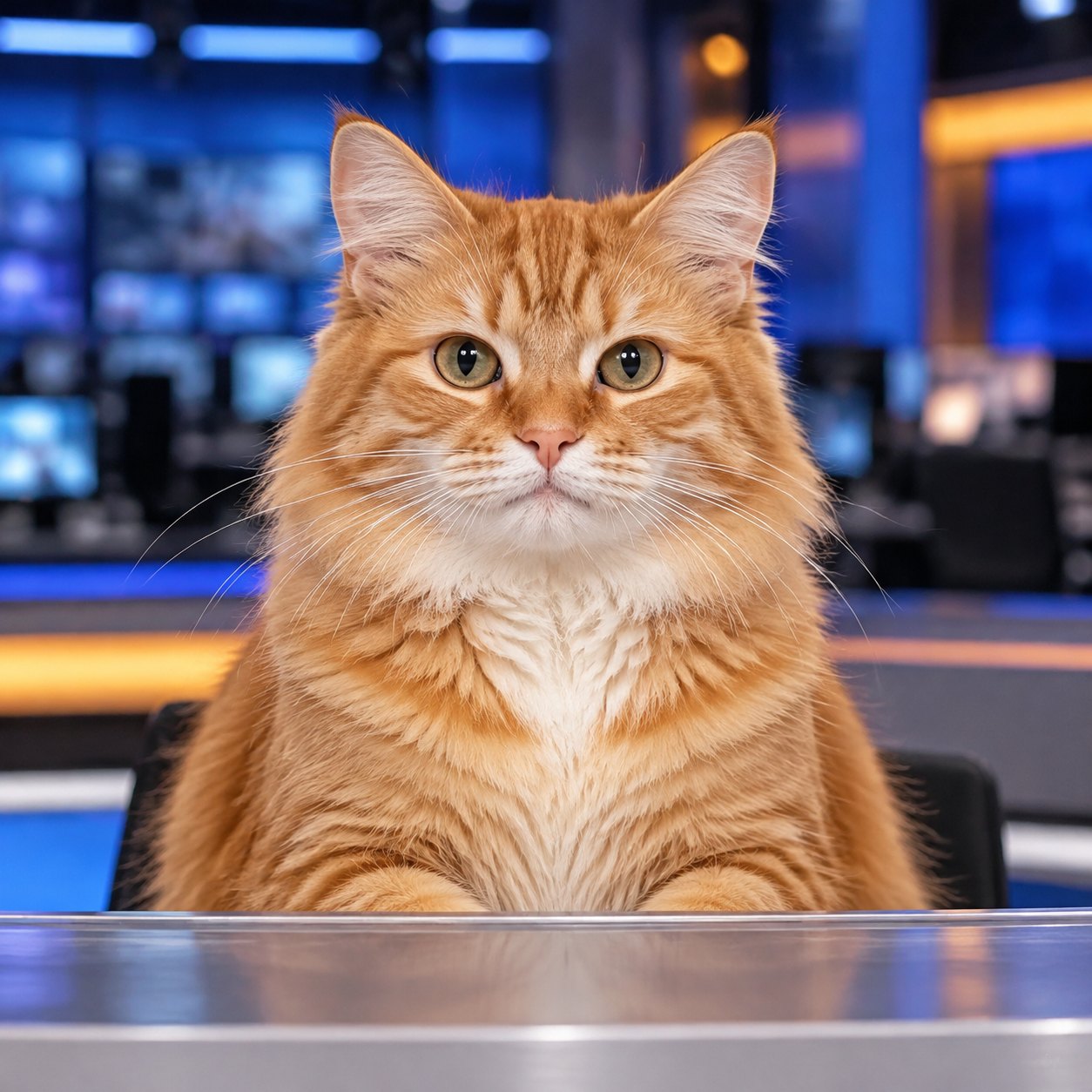
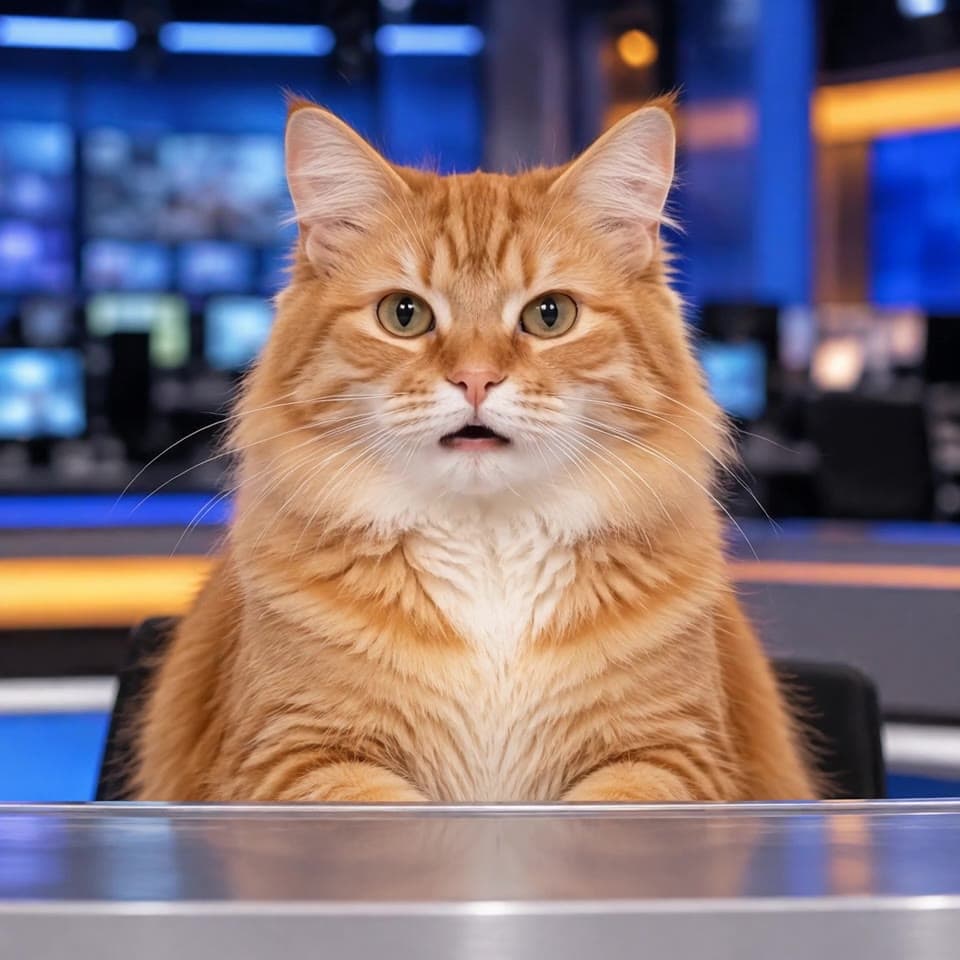
A cat takes the anchor desk and reads the news in Chinese

The input is a square portrait of an orange tabby at a newsroom desk, facing the camera. An 8-second Chinese clip makes it speak; ears, whiskers and blinks follow the sentence, and the output stays 1:1 with the mouth and head motion driven by that recording.

8s720p1:1

Driving audio

An 8-second Chinese news read; the input is a square cat portrait.

Prompt: 对着镜头自然地播报新闻,说话时耳朵轻动,偶尔眨眼

Input · portrait
A cat takes the anchor desk and reads the news in Chinese: input portrait
Output · talking video

Full-body motion

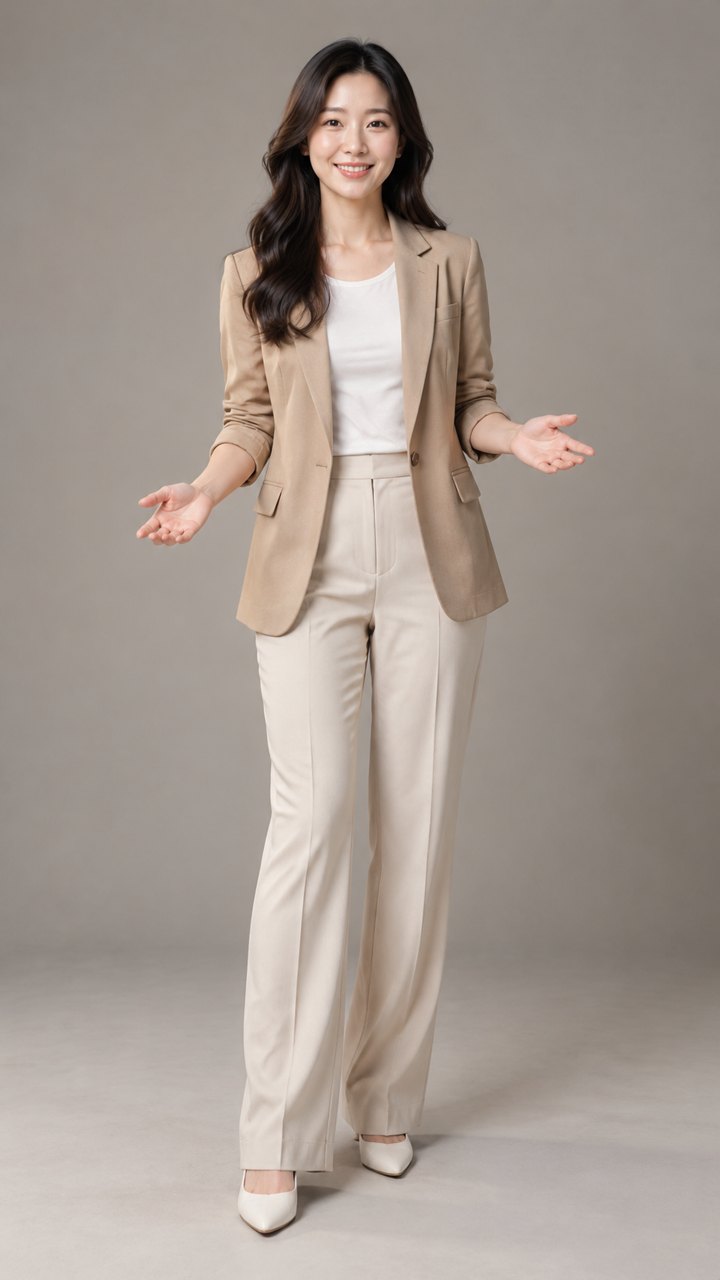
A full-body presenter opens her hands on the key point

The input is a vertical full-body portrait against a plain background, hands already slightly open. An 8-second Chinese clip drives the lips, and the prompt opens the hands on the key point; the output keeps 9:16 while shoulders, arms and weight shift with the sentence.

8s720p9:16

Driving audio

An 8-second Chinese explanation; full-body portrait, 9:16 output.

Prompt: 自然微笑讲话,双手随着讲解轻轻打开做手势,偶尔点头

Input · portrait
A full-body presenter opens her hands on the key point: input portrait
Output · talking video

Multilingual

The same portrait, now speaking English

The landscape portrait above stays the same; only the driving audio changes to a 7.5-second English introduction. Lip-sync realigns to English pronunciation, pauses and stress follow the new recording, and the background, outfit and frame stay unchanged.

8s720p16:9

Driving audio

A 7.5-second English product introduction sharing the same portrait as the Chinese example.

Prompt: Speak naturally to camera with a slight smile, open your hands when making a point, and nod occasionally.

Speaker mask

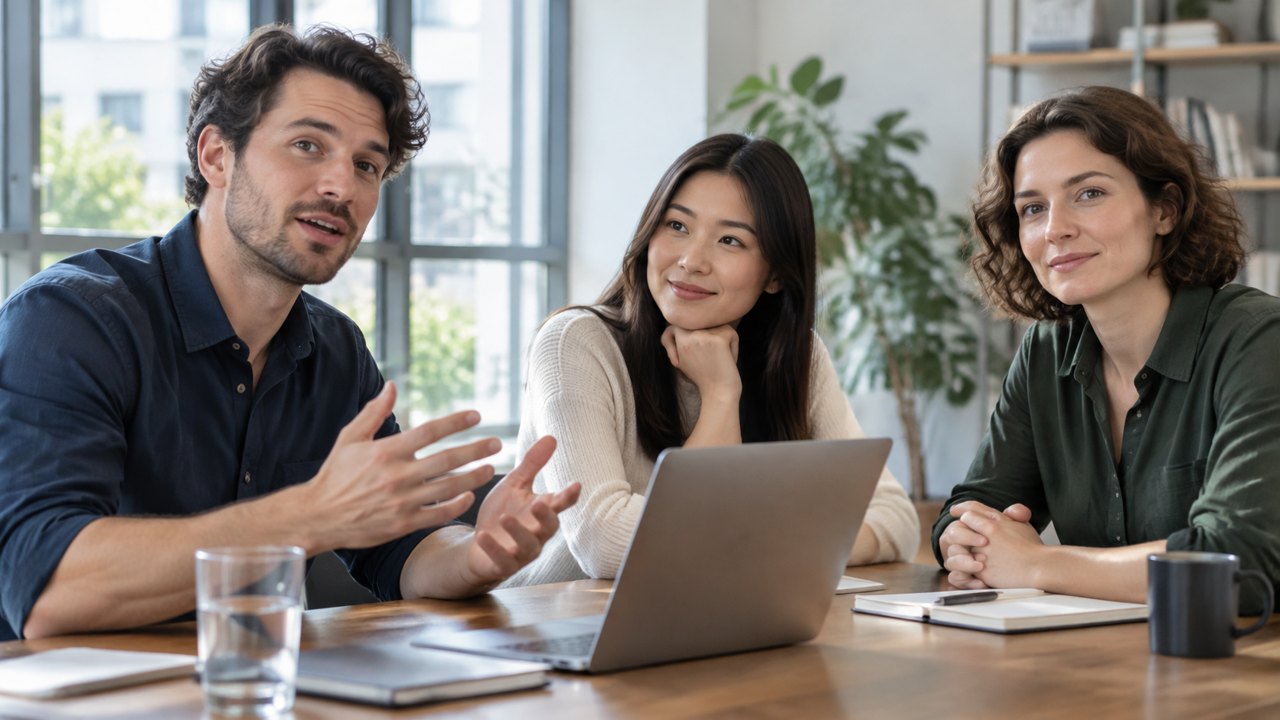
Three people at a table, only the man on the left speaks

The input is a 16:9 meeting shot with a same-size mask: the man on the left is white, everyone else black. An 8-second Chinese clip drives only him; the two colleagues keep listening with small natural head and body movement.

8s720p16:9

Driving audio

An 8-second Chinese meeting remark; the mask selects the man on the left.

Prompt: 只有左侧的男士开口说话,中间和右侧的两位保持微笑聆听,身体轻微自然移动

Speaker mask

Speaker mask
Input · portrait
Three people at a table, only the man on the left speaks: input portrait
Output · talking video

Related AI video generation APIs

For script-driven avatars, full motion transfer or general image-to-video, these models on HiAPI cover it.

OmniHuman 1.5 specs and pricing

Provider

  • ByteDance

Portrait

  • 1 image, jpeg / png / webp, ≤10MB
  • Person, pet or anime character

Driving audio

  • 1 clip, mp3 / wav / aac / ogg / m4a, ≤10MB
  • Under 60s, 15s or less is best

Prompt

  • Optional, ≤300 characters

Speaker masks

  • Optional, up to 5

Resolution

  • 720p
  • 1080p

Output

  • MP4, keeps the portrait ratio, as long as the audio

Endpoint

  • POST /v1/tasks
  • model: omnihuman-1.5

Price

  • 386 Credits / second

How to use the OmniHuman 1.5 API

Three steps from portrait to talking video: prepare the image, prepare the audio, submit the task. Validate with 720p and a few seconds of audio first, then render the final version.

Portrait
1 image
01

Upload a portrait

Choose a single subject with a clear, unobstructed face as image_url; a person, pet or anime character all work, and the video keeps this image's ratio.

Audio
Prompt
Masks
02

Upload the driving audio

Pass speech or singing as audio_url, under 60 seconds and ideally 15 or less. Add a short prompt to steer expression or camera, and use masks to pick the speaker in a group shot.

Playground
POST /v1/tasks
03

Submit and get the video

Create an async task with omnihuman-1.5 and get the result via callback.url or GET /v1/tasks/:id; billing settles on the real output seconds.

OmniHuman 1.5 API quickstart

One POST /v1/tasks request submits a talking avatar task; see the API docs for every parameter, callbacks and error handling.

curl -X POST "https://api.hiapi.ai/v1/tasks" \
  -H "Authorization: Bearer YOUR_API_KEY" \
  -H "Content-Type: application/json" \
  -d '{
  "model": "omnihuman-1.5",
  "input": {
    "image_url": "https://example.com/portrait.jpg",
    "audio_url": "https://example.com/greeting.mp3",
    "resolution": "1080p"
  }
}'
Replace example URLs with publicly accessible media.Open full API docs

OMNIHUMAN 1.5 API

OmniHuman 1.5: one portrait and one audio clip become a talking avatar video

OmniHuman 1.5 is ByteDance's audio-driven avatar model: upload one portrait and one clip of speech or singing, and get a video of that character speaking. There is no footage to record and no avatar to train; the portrait is the presenter and the audio decides what is said.

Portrait + audioPeople, pets, anime720p / 1080pBilled per output second
Explore the model ↓
OmniHuman 1.5: one portrait and one audio clip become a talking avatar video

What is OmniHuman 1.5

The portrait sets the face, clothing and setting; the audio sets the content, pace and emotional rise and fall. The model handles lip-sync and adds blinks, nods, gestures and shoulder motion that follow the speech rhythm so a still image reads as someone talking to camera. The video is as long as the audio and keeps the portrait's aspect ratio.

It suits teams that already have a picture of an instructor, host, brand character or virtual persona and want to drive it with their own recording or voice-over. Swap the audio and regenerate instead of reshooting.

What OmniHuman 1.5 can do

From voice-overs, pets and anime characters, singing and other languages to making a chosen person speak in a group shot.

01

The audio decides what is said: lips, pauses and body follow the recording

Upload speech and the lips, pauses and emotional swings follow it, with blinks, nods, gestures and shoulder motion added on top; the video is as long as the audio, so there is no duration parameter. Audio must be under 60 seconds, and 15 seconds or less gives the best quality; longer clips lose detail.

To steer expression, gestures or camera, add a prompt of up to 300 characters such as “open the hands when reaching the features, nod now and then”. The product-launch example works exactly this way: the recording supplies the content and pacing, and the prompt only adds the gestures.

The driving audio can also be singing. Held notes keep the mouth shape longer and the beat brings out nods and body sway, which suits a virtual idol, a brand character or a short jingle. Songs share the 60-second limit, so trim to a chorus or the most memorable passage.

See “A landscape half-body photo becomes a product-launch talk”

02

The portrait is the presenter: people, pets and anime characters all speak

The model animates the portrait you upload rather than swapping in a stock character. Hair, fur, clothing, background and lighting carry into the video, and the frame follows the image, so landscape, vertical and square all work without a separate ratio setting.

Inputs are not limited to photos of people: pets, illustrations and anime characters can be driven too. The cat-anchor example above pairs a square cat portrait with a Chinese news read, with ears, whiskers and blinks following the sentence. A clear, unobstructed face gives the steadiest result; half-body or full-body images bring out more gestures.

See “A cat takes the anchor desk and reads the news in Chinese”

03

Full-body shots: hands, shoulders and weight follow the explanation

Half-body images bring out expressions and shoulder motion; full-body images also let hands, weight and stance take part. In the vertical full-body example above, the presenter starts with her hands slightly open, the prompt opens them further on the key point, and her body leans gently with the sentence.

Full-body shots suit lessons, launches and vertical presentations. Keep hands, feet and background inside the frame rather than cropping them; if you only need upper-body control, a half-body portrait gives steadier motion and a tighter frame.

See “A full-body presenter opens her hands on the key point”

04

Any language lip-syncs: localized versions from one portrait

Lip-sync does not depend on language, so recordings, voice-overs and TTS all work. The two examples above use the same landscape portrait with one Chinese and one English clip; the lips realign to each pronunciation while the background, outfit and frame stay the same.

Give the same portrait voice-overs in different languages and you get the localized versions without reshooting. The prompt accepts Chinese, English, Japanese, Korean, Spanish and Indonesian, so you can describe the motion in the same language as the voice-over.

See “The same portrait, now speaking English”

05

Group shots: masks decide who speaks

When the image contains several people, the model picks the speaker by default. To pin it down, upload a mask the same size as the portrait (speaker in white, the rest in black), up to five masks. The three-person meeting example above uses a mask to lock the man on the left while the other two keep listening.

Masks suit meetings, interviews, group portraits and multi-person scenes; switch speakers by submitting another mask. Fast mode trades a little quality for shorter generation time and is useful for batch previews; fixing the seed with everything else unchanged gives highly consistent results.

See “Three people at a table, only the man on the left speaks”

ONE PORTRAIT · TWO LANGUAGES

One portrait, one Chinese version and one English version

Localized video does not need a new set or a new shoot. Keep the portrait, outfit, background and frame, replace only the driving audio, and the model realigns lips, pauses and stress to the new language; the two versions can sit side by side on a site, social channel or ad campaign.

The same workflow extends to Japanese, Korean, Spanish and other voice-overs. For more languages, submit the matching audio one by one and reuse the portrait and prompt.

Where OmniHuman 1.5 fits

Short-video pitches

Pair a host's or staff member's photo with recorded voice-over to produce vertical explainers and product pitches in volume; full-body portraits add gestures, and swapping the audio changes the content.

Courses and training

An instructor supplies a full- or half-body photo and the audio for each lesson to get chapter intros and concept videos without repeated studio sessions.

Virtual personas and IP characters

Illustrated, anime or pet characters plus a voice-over become talking brand mascots; the square cat-anchor example can be swapped for any IP character.

Multilingual localization

One portrait with voice-overs in different languages yields localized videos, with lip-sync realigned to each language while the look and composition stay fixed.

Meetings, interviews and groups

In group shots, masks decide who speaks while the others keep listening and move naturally, which suits meeting recaps, interview clips and multi-person scenes.

Product launches and ads

A short prompt controls gestures, nods or camera presence on the key point; the recording carries the content while the person and scene stay consistent.

Three prompts you can reuse

The prompt only directs motion and camera; the audio decides what is said. These three cover a news read, a product launch and a group meeting, and the wording can be adapted to the character and scene.

News read

For a seated anchor in a square or landscape frame; keep the pace steady with a small nod.

Read the news naturally to camera at a steady pace, nod slightly on the key point, and blink occasionally.

Product launch

For a half- or full-body presenter; open the hands when reaching the features instead of gesturing throughout.

Speak with a natural smile, open your hands gently when reaching the features, nod occasionally, and keep the body steady.

Group meeting

Use with a mask; state that only one person speaks while the others keep listening.

Only the man on the left speaks; the two people in the middle and on the right keep smiling and listening with small natural movement.

Choosing between OmniHuman and other avatar models

All three can make a person speak or move; they differ in where the driving signal comes from and how much you can control.

OmniHuman 1.5

You already have a recording or voice-over and want any portrait, including pets and anime characters, to speak it with natural expressions and body motion.

HeyGen Avatar IV

You have a script but no audio and want a preset voice, or you need a specific aspect ratio with background padding.

Kling 3.0 Motion Control

You want to transfer full-body motion, gestures or dance from a reference video onto the pictured person, not only speech.

Using OmniHuman 1.5 on HiAPI

On HiAPI, every generated video, the settings behind it and what it cost stay in your account, so you can review results, reuse settings and reconcile spend.

For batches of localized versions, receive results through callback.url or poll GET /v1/tasks/:id. Each task holds 20 seconds at creation, settles to the real output seconds afterwards, and both the charge and the timing stay in the same logs.

Review every result

Generated videos are listed in your outputs for viewing and download, so you can pick the best take for editing and publishing.

Pay for real seconds

A 20-second hold is taken at creation and settled to the real output seconds, with the difference refunded or charged; a failed task produces no video and its hold is handled by the platform refund process.

Batches and callbacks

Get results through callback.url or GET /v1/tasks/:id, which suits generating several language versions or a set of talking clips in one run.

One API key

The same key calls image, speech and other video models, so you can generate the portrait and the voice-over before the talking video.

Try it with one portrait and one audio clip

Upload a portrait and an audio clip in the Playground above to see a result in a few minutes.

Need to compare models and billing tiers?View live pricing for all models

Frequently asked questions

What inputs does OmniHuman 1.5 need?

One portrait image (image_url) and one audio clip (audio_url); both are required. Prompt, masks, resolution, fast mode and seed are optional.

What kind of portrait works best?

A single subject with a clear, unobstructed face gives the steadiest result; photos of people, pets, illustrations and anime characters all work, and half- or full-body images bring out more gestures. The video keeps the image's aspect ratio, so there is no ratio setting.

What are the audio requirements?

Speech or singing in mp3, wav, aac, ogg or m4a, up to 10MB. It must be shorter than 60 seconds, and 15 seconds or less gives the best quality. The video is as long as the audio.

What if the audio is longer than 60 seconds?

A single request accepts less than 60 seconds of audio. For longer content, split it into sections, generate each one, and edit them together; the same portrait and prompt can be reused so lip-sync and look stay continuous between sections.

Can pets, illustrations and anime characters be animated?

Yes. The portrait is not limited to a photo of a person; pets, illustrations and anime characters can speak the audio too. A clear, unobstructed face gives the steadiest result; the cat-anchor example above pairs a square cat portrait with a Chinese news read.

Can I use singing or audio in English and other languages?

Yes. The driving audio can be speech or singing, and lip-sync does not depend on language; give the same portrait voice-overs in different languages to generate a version for each. The Chinese and English examples above share one portrait.

Is the prompt required?

No. Without a prompt the model chooses expressions and motion from the audio. Add one of up to 300 characters to steer expression, gestures or camera; Chinese, English, Japanese, Korean, Spanish and Indonesian are supported.

How do I pick the speaker in a group shot?

Upload mask images the same size as the portrait (speaker in white, the rest in black) as mask_urls, up to five; the masked person lip-syncs. The three-person meeting example above uses a mask to lock the man on the left while the other two listen.

What output format and aspect ratio do I get?

The output is MP4 and keeps the portrait's aspect ratio, so landscape, vertical and square all work without a separate ratio setting. Choose 720p or 1080p; the video is as long as the audio.

Does it support batches and callbacks?

Yes. Submit tasks with POST /v1/tasks, receive results through callback.url, or poll GET /v1/tasks/:id. For batches of localized versions, the application manages concurrency and task volume.

Are failed tasks charged?

A failed task produces no video. Its hold is handled by the platform refund process; the task review page shows the current refund status.

How is it different from HeyGen Avatar IV?

OmniHuman 1.5 is audio-driven only but supports pets and anime characters, produces richer expressions and body motion, and can pick the speaker with masks. HeyGen Avatar IV can work from a script with a preset voice and lets you set the aspect ratio and background padding.

How is OmniHuman 1.5 billed?

By the real seconds of generated video, with 720p and 1080p at the same rate. A 20-second hold is taken at creation and settled to the actual output seconds afterwards, with the difference refunded or charged. See the live price on this page.