TL;DR
- An AI Instagram model generator is really a three-stage pipeline: create one persona, lock that face so it reappears in every shot, then turn the best stills into short video. hiapi runs all three stages through a single async endpoint,
POST /v1/tasks. - This guide uses the reference-image route to lock identity — you feed a base portrait back in as
image_inputand change only the scene. That is different from the text-only "character bible" method covered in Consistent Characters with Nano-Banana; use that one when you have no seed image yet, and this one when you want a fixed face. - Tested in this post on nano-banana-2: one base portrait anchored three completely different scenes — a Paris café, a city crosswalk, and a rooftop gym — and the face, hair, skin tone, gold hoops, and layered necklace held across all of them.
- The video stage is real, not a mock-up: the café still below was animated into a 5-second clip with
grok-imagine-1.5/image-to-video. She lifts the cup and sips; identity survives the motion. - Budget for the whole post: ~$0.30 — four 2K images on nano-banana-2 at $0.057 each ($0.228) plus one 480p/5s reel at $0.015/s ($0.075).
What you are actually building
"Virtual influencer," "AI UGC model," "AI Instagram model generator" — the marketing names differ, the engineering is the same three stages:
- Persona — generate (or pick) one base portrait that becomes your model's canonical face.
- Identity lock — render that same person across many outfits, poses, and locations so a feed looks like one consistent creator, not forty different people.
- Motion — animate the strongest stills into short, scroll-stopping clips for Reels / Shorts.
The hard part is stage 2. Everything downstream — a believable grid, product try-ons, branded posts — collapses the moment the face drifts. There are two ways to hold it steady on hiapi.
Two ways to lock a face (and why this guide picks the reference-image one)
| Method | How identity is anchored | Best when |
|---|---|---|
| Character bible (text) | A dense, reusable prompt prefix describing the face, hair, and wardrobe, concatenated onto every render. No seed image. | You are inventing a character from scratch and want it defined in version-controllable text. |
| Reference image (this guide) | A base portrait is passed back in as image_input; the prompt only changes the scene. | You already have one approved face (a hero render, a brand mascot) and want that exact face everywhere. |
The character-bible approach is written up in full in Consistent Characters with Nano-Banana — including storyboard and e-commerce look-book examples. This guide takes the other road: lock a specific portrait with a reference image, then fan it out across scenes and into video. The two are complementary; many teams write the bible once, generate one hero portrait, and then switch to reference-image mode for the rest of the shoot.
Step 1 — Generate the base persona
Start with a clean, well-lit portrait. Detail is your friend here: the more specific the invariant features (a beauty mark, a hair parting, a piece of jewelry), the easier they are to carry forward.
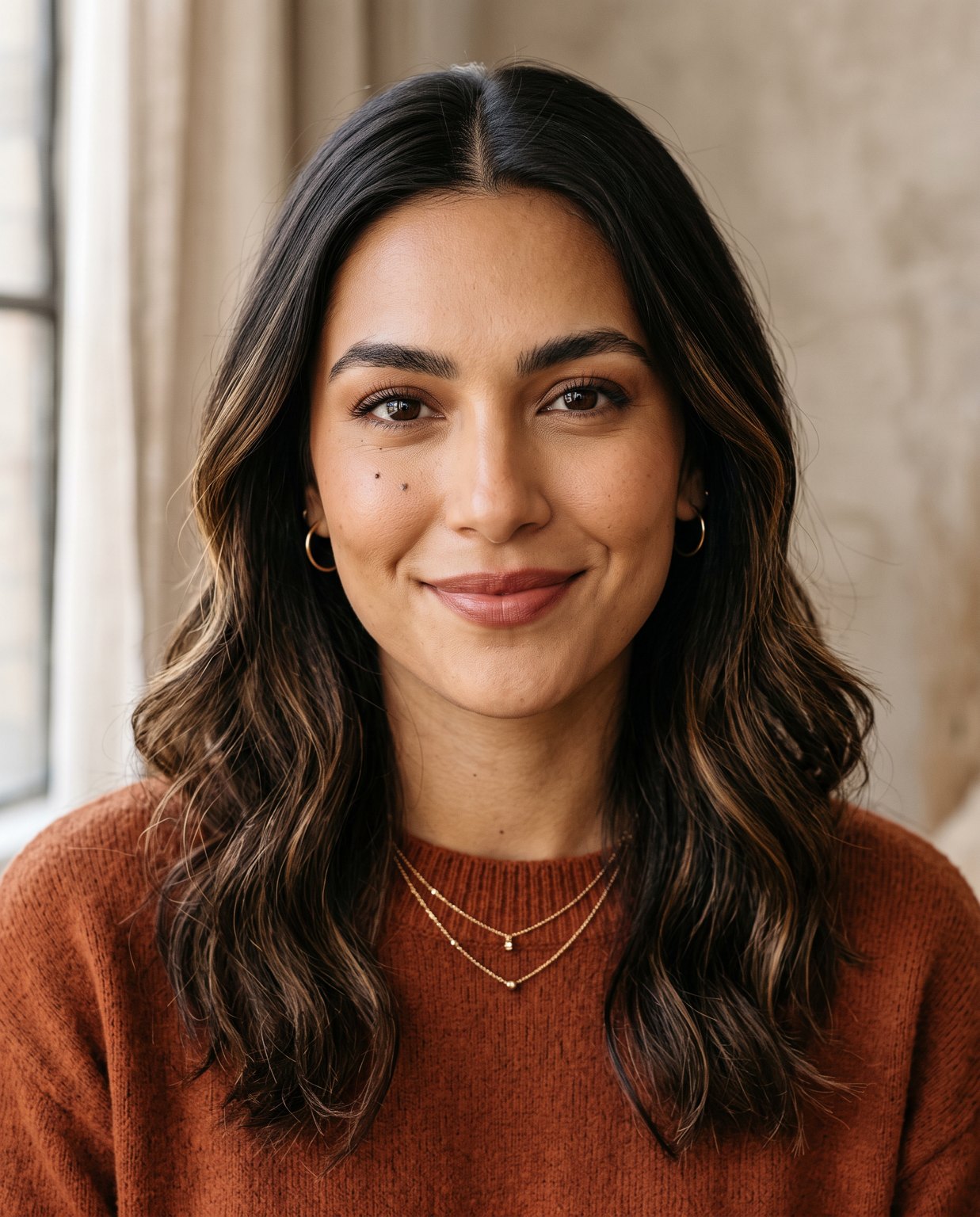
curl -s -X POST https://api.hiapi.ai/v1/tasks \
  -H "Authorization: Bearer $HIAPI_TOKEN" \
  -H "Content-Type: application/json" \
  -d '{
    "model": "nano-banana-2",
    "input": {
      "prompt": "Editorial portrait of a 25-year-old woman, warm olive skin, oval face, a small beauty mark just below her left eye, deep brown almond eyes, shoulder-length dark brown wavy hair with a center part and subtle caramel balayage, tiny gold hoop earrings, a thin layered gold necklace, natural bronze makeup, soft confident smile, 85mm f/1.8, soft window light, clean neutral background, true-to-life skin texture, 4k",
      "aspect_ratio": "4:5",
      "resolution": "2K"
    }
  }'
POST /v1/tasks returns a taskId; poll GET /v1/tasks/{taskId} until status is success, then download output[0].url. That URL is temporary (it carries an expireAt), so save the bytes immediately — do not hot-link it. Upload the portrait somewhere reachable (your own CDN) because the next step needs it as an input URL. nano-banana-2 is priced $0.036 / $0.057 / $0.086 for 1K / 2K / 4K respectively; the shoot here used 2K.
Step 2 — Lock the identity across scenes
This is the move that makes it an influencer, not a gallery of strangers. Pass the base portrait back in as image_input, then write a prompt that explicitly says keep this person and describes only the new scene.
curl -s -X POST https://api.hiapi.ai/v1/tasks \
  -H "Authorization: Bearer $HIAPI_TOKEN" \
  -H "Content-Type: application/json" \
  -d '{
    "model": "nano-banana-2",
    "input": {
      "prompt": "Keep the exact same woman from the reference image: identical face and bone structure, the beauty mark below her left eye, same hair color and style, same gold hoop earrings and layered necklace. Full-body candid photo of her at a sunlit Parisian sidewalk cafe holding a cappuccino, cream knit sweater and beige trousers, warm morning light, shallow depth of field, photorealistic, 4k",
      "image_input": ["https://your-cdn.example.com/base-portrait.jpg"],
      "aspect_ratio": "4:5",
      "resolution": "2K"
    }
  }'
The field name that matters is image_input — an array of reference URLs. Here is the same base portrait dropped into three unrelated environments, each a separate render anchored to that one portrait:
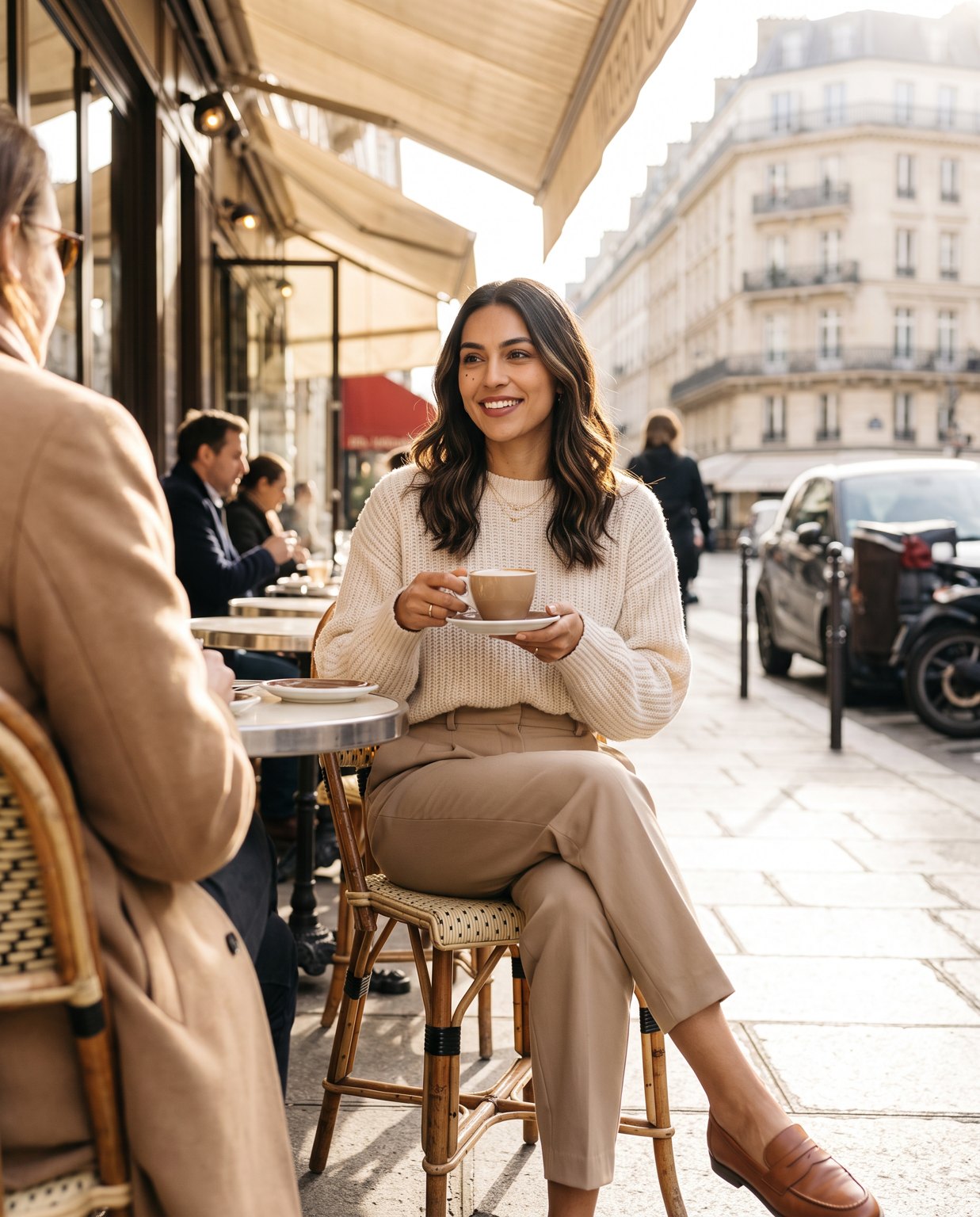
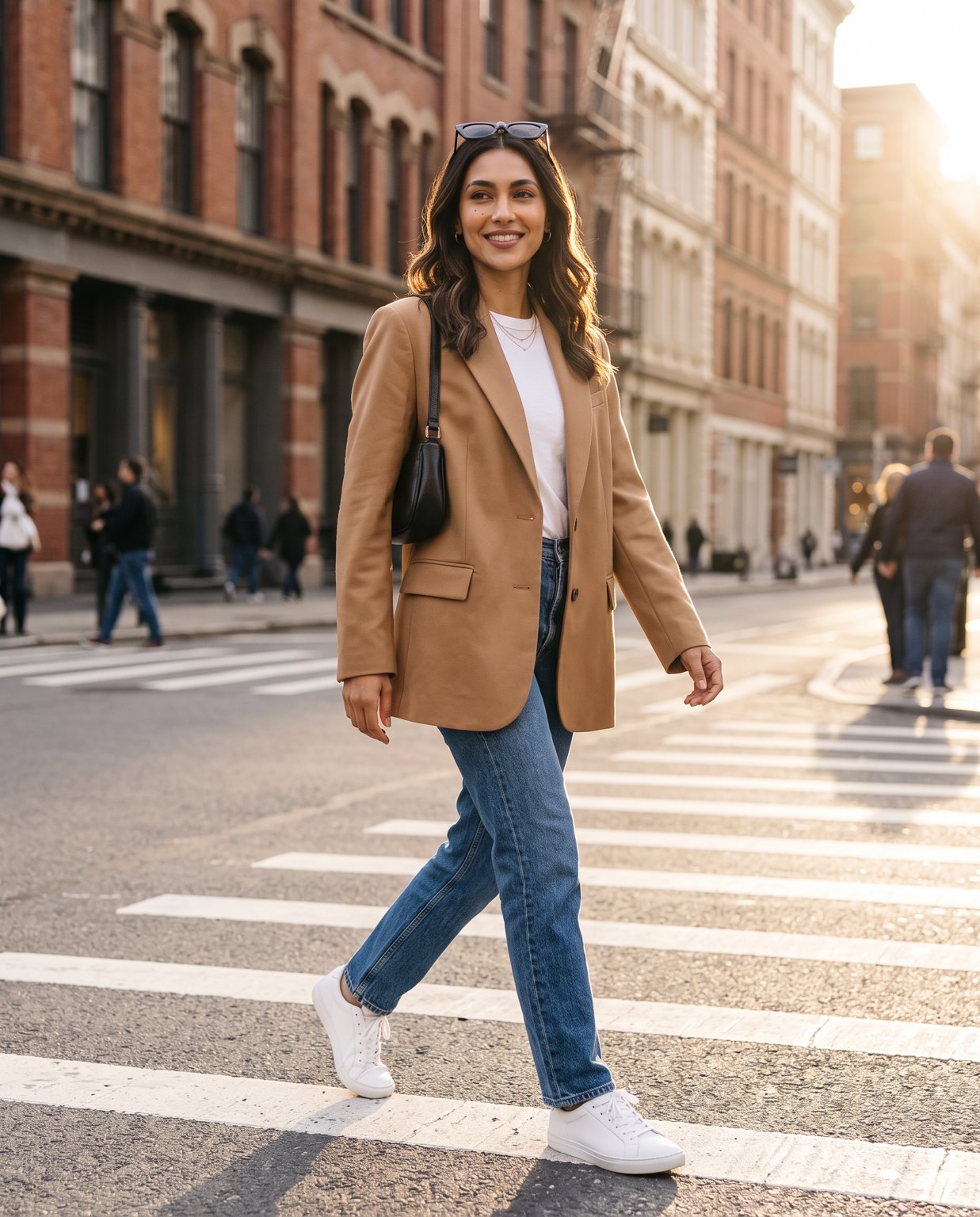
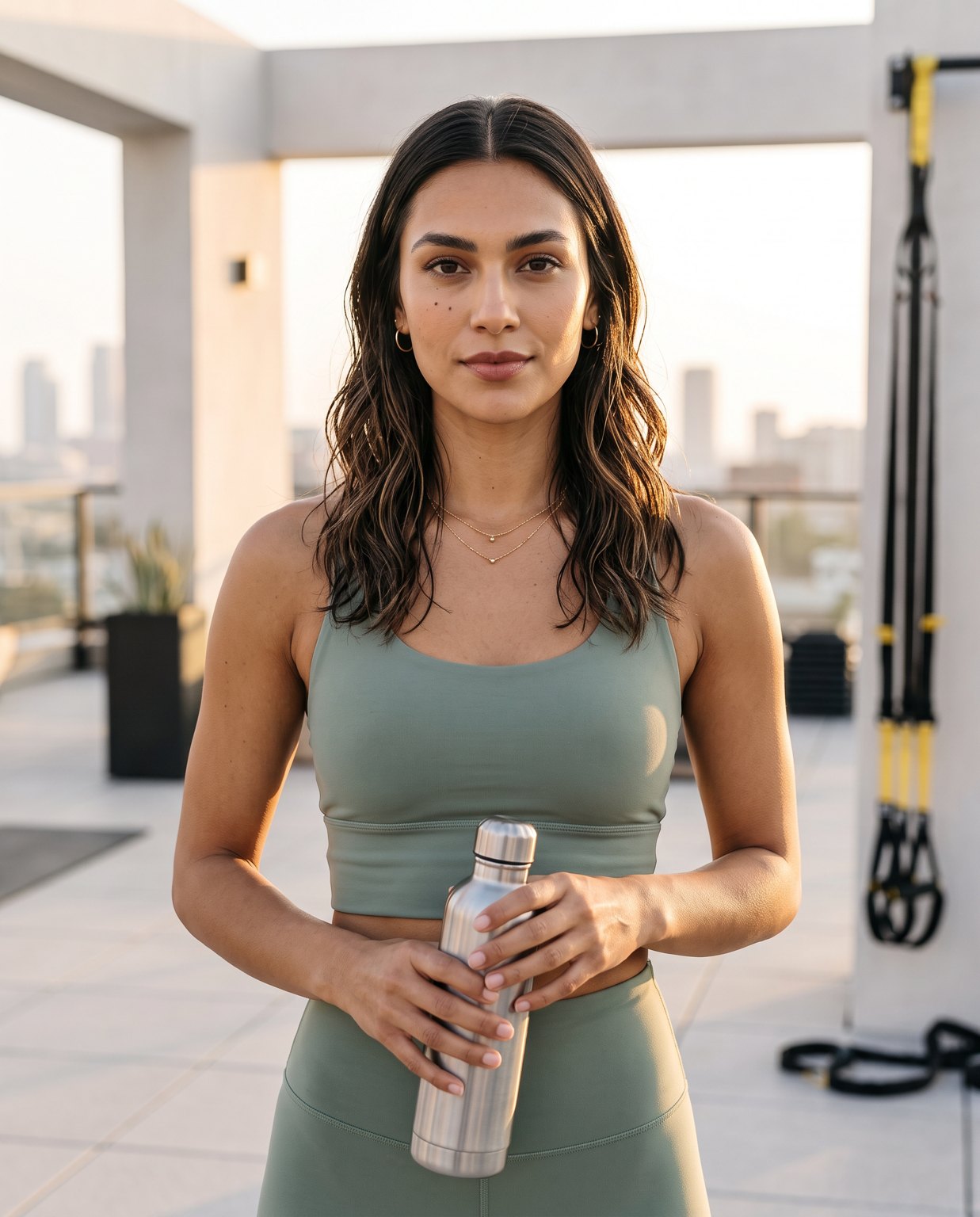
What actually held, from this run: across the café, street, and gym renders the face geometry, skin tone, wavy hair with the caramel balayage, the gold hoops, and the thin layered necklace all stayed recognizably the same person. The one thing to watch is micro-detail — the exact position of a beauty mark or a stray hair is the first thing to wander. The fix that worked was anchoring every render to the one original portrait rather than chaining (feeding scene A's output in to make scene B). Chaining lets small drifts compound; a single fixed anchor does not.
Step 3 — Turn a still into a Reel
A feed needs motion. Take any locked still and send it to an image-to-video model. The clip below is the café shot above, animated for real with grok-imagine-1.5/image-to-video:
curl -s -X POST https://api.hiapi.ai/v1/tasks \
  -H "Authorization: Bearer $HIAPI_TOKEN" \
  -H "Content-Type: application/json" \
  -d '{
    "model": "grok-imagine-1.5/image-to-video",
    "input": {
      "prompt": "The woman lifts her cappuccino and takes a gentle sip, then lowers it with a soft smile; steam rises faintly, her hair sways slightly, pedestrians stroll past in the soft-focus background. Subtle, natural, cinematic handheld motion.",
      "image_urls": ["https://your-cdn.example.com/02-cafe.jpg"],
      "duration": 5
    }
  }'
Note the different input field here: video models take image_urls (plus a duration in seconds), not image_input. The tested clip came back at 480p, portrait orientation, 5 seconds — she raised the cup and sipped on cue, and the face stayed the same person in motion. At $0.015/s that reel cost about $0.075. If you want crisper output, the same still goes straight into veo-3.1-lite, kling-3.0, or hailuo-2.3 — see the table below.
Batch it: one reference, many scenes
The whole point of a virtual model is volume. Keep a list of scene prompts and loop them against the single base portrait:
import os, json, time, subprocess

TOKEN = os.environ["HIAPI_TOKEN"]
BASE = "https://api.hiapi.ai/v1/tasks"
REFERENCE = "https://your-cdn.example.com/base-portrait.jpg"
ANCHOR = ("Keep the exact same woman from the reference image: identical face, "
          "beauty mark below the left eye, same hair, same gold hoops and necklace. ")

scenes = {
    "beach":   "Full-body photo on a golden-hour beach, linen dress, wind in her hair.",
    "office":  "Candid shot at a bright co-working desk, blazer, laptop, coffee.",
    "market":  "Walking through a flower market, tote bag, relaxed smile.",
}

def post(model, payload):
    r = subprocess.run(["curl","-s","-X","POST",BASE,
        "-H",f"Authorization: Bearer {TOKEN}","-H","Content-Type: application/json",
        "-d",json.dumps(payload)], capture_output=True, text=True)
    return json.loads(r.stdout)["data"]["taskId"]

def wait(task_id):
    while True:
        r = subprocess.run(["curl","-s",f"{BASE}/{task_id}",
            "-H",f"Authorization: Bearer {TOKEN}"], capture_output=True, text=True)
        t = json.loads(r.stdout)["data"]
        if t["status"] == "success": return t["output"][0]["url"]
        if t["status"] == "fail":    raise RuntimeError(t.get("error"))
        time.sleep(5)

for name, scene in scenes.items():
    tid = post("nano-banana-2", {"input": {
        "prompt": ANCHOR + scene,
        "image_input": [REFERENCE],
        "aspect_ratio": "4:5", "resolution": "2K",
    }, "model": "nano-banana-2"})
    print(name, "->", wait(tid))
Swap the model string and you can run the same loop on any reference-capable image model, or feed the finished stills into a video loop.
Models for the identity-lock stage
Prices are the current per-image /api/pricing values at the time of writing; always re-check before a big batch.
| Model | Reference input | Price (USD) | Notes |
|---|---|---|---|
| nano-banana-2 | image_input | $0.036 / $0.057 / $0.086 (1K/2K/4K) | Used in this post; strong face carry-over, 4K available |
| nano-banana-pro | image_input | $0.057 (1K & 2K) / $0.10 (4K) | Premium tier of the same family |
gpt-image-2 /image-to-image@ext | up to 16 refs | from $0.007 (low, 1K) | Cheapest multi-reference route, 4K output |
flux-2 /image-to-image | multi-reference | $0.035 (1K) / $0.05 (2K) | High-fidelity multi-ref editing |
seedream-5.0-pro /image-to-image | multi-reference | $0.06 (1K) / $0.10 (2K) | Flagship-quality multi-ref |
Browse the full line-up on the model marketplace. For a single fixed face, one reference is plenty; the 16-reference route on gpt-image-2 shines when you want to blend a face, an outfit, and a product in one render.
Models for the video stage
Pricing models differ — most bill per second, but hailuo bills a flat rate per fixed clip length. Mind that difference when you budget a batch.
| Model | Billing | Example cost | Notes |
|---|---|---|---|
grok-imagine-1.5 /image-to-video | per second | $0.015/s (480p), $0.0282/s (720p) | Used here; cheapest, 1–15s |
veo-3.1-lite /image-to-video | per second | $0.06/s (720p, no audio) → $0.14/s (1080p) | Good quality-to-cost balance |
kling-3.0 /image-to-video | per second | $0.10/s (720p) → $0.129/s (1080p); +audio costs more | Native audio, up to 4K |
hailuo-2.3-fast /image-to-video | per clip | $0.27 (6s) / $0.46 (10s) | Flat per duration bucket |
wan2.7-video /image-to-video | per second | $0.10/s (720P) / $0.167/s (1080P) | First-frame driven |
veo-3.1 /image-to-video | per second | $0.57/s w/audio → $0.86/s (4K) | Cinematic tier; a 5s clip ≈ $2.85, so cap duration |
A 5-second reel therefore ranges from about $0.075 on grok-imagine-1.5 to ~$2.85 on full veo-3.1 — a 38× spread. Prototype on the cheap tier, upgrade only the clips you will actually post.
Consistency tips that moved the needle
- Anchor, don't chain. Feed the original base portrait into every render. Using the previous output as the next input lets tiny drifts stack up until the face is a cousin, not the same person.
- Name the invariants in the prompt. "Same beauty mark below the left eye, same gold hoops" is worth more than "same woman." You are telling the model what it is not allowed to change.
- Keep one aspect ratio per channel. 4:5 for the grid, 9:16 for Reels. Switching mid-shoot forces awkward recrops that can clip the face.
- Lock resolution to the model's tier.
nano-banana-2takes1K/2K/4K; set it explicitly so a batch does not silently mix sizes. - Keep the strongest portrait as a permanent asset. It is your "casting" — re-use it for months instead of re-rolling a new face each campaign.
What this post cost
| Item | Model | Qty | Unit | Subtotal |
|---|---|---|---|---|
| Base + 3 scene renders | nano-banana-2 (2K) | 4 | $0.057 | $0.228 |
| Café reel | grok-imagine-1.5 (480p, 5s) | 1 | $0.015/s | $0.075 |
| Total | ~$0.30 |
A full 30-post launch grid plus a handful of reels lands in the low single-digit dollars — which is the real reason teams reach for a generator instead of a photoshoot.
FAQ
Is the face guaranteed identical every time? No model guarantees pixel-identical faces, but reference-image anchoring on nano-banana-2 held the same recognizable person across three very different scenes in this test. Treat occasional outliers as a reason to generate a few extra and cull, not a reason to re-shoot.
Can I lock a real person's face? Only one you have the rights to — your own, a consenting model, or a brand ambassador under contract. Do not clone a stranger or a celebrity.
Do I need a fine-tune or a LoRA? No. This whole workflow is zero-training — a reference image plus a prompt. That is what keeps the per-image cost in cents.
Which model should I start with? Start identity lock on nano-banana-2, and start the video stage on grok-imagine-1.5. Both are cheap enough to iterate freely; upgrade only once the look is dialed in.
Start building
Generate one portrait on nano-banana-2, feed it back in as image_input for every scene, and animate your favorite frames with an image-to-video model — all on one key through POST /v1/tasks. The quickstart docs walk through authentication and polling, and you can compare every image and video model on pricing before you scale a batch.