An image from OpenAI's GPT Image models takes about 45 seconds to 1.5 minutes, and up to 3 minutes at the highest quality. We timed 24 generations through the API on September 29, 2026: GPT Image 2.5 Flare was the fastest at a median of 43 seconds, and GPT Image 2 at high quality was the slowest at 175 seconds. OpenAI's own help page says a ChatGPT image "may take a few minutes, depending on the complexity of your request."
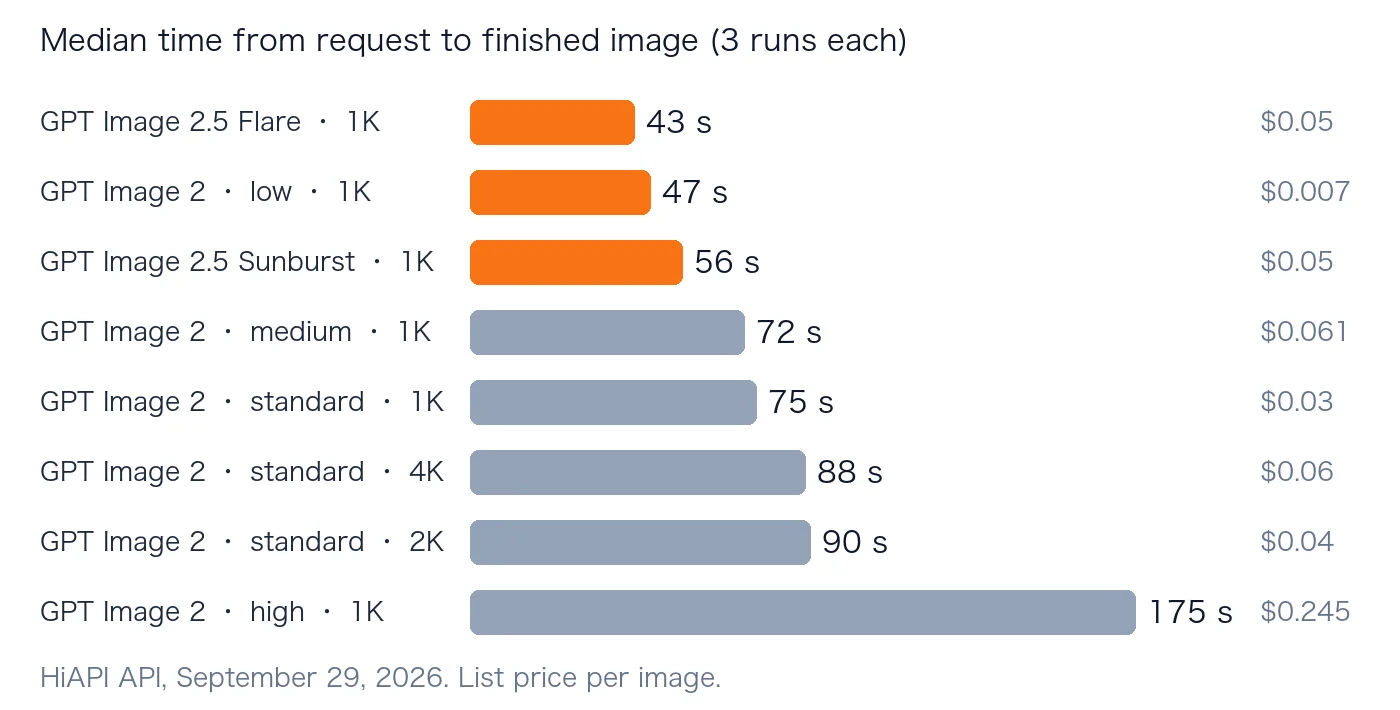
| Model and setting | Median time | Range (3 runs) | Price per image on HiAPI |
|---|---|---|---|
| GPT Image 2.5 Flare, 1K | 43 s | 42–54 s | $0.05 ($0.025 until Nov 8) |
| GPT Image 2, low quality, 1K | 47 s | 37–61 s | $0.007 |
| GPT Image 2.5 Sunburst, 1K | 56 s | 52–58 s | $0.05 ($0.025 until Nov 8) |
| GPT Image 2, medium quality, 1K | 72 s | 72–87 s | $0.061 |
| GPT Image 2, standard, 1K | 75 s | 68–88 s | $0.03 |
| GPT Image 2, standard, 2K | 90 s | 88–97 s | $0.04 |
| GPT Image 2, standard, 4K | 88 s | 85–104 s | $0.06 |
| GPT Image 2, high quality, 1K | 175 s | 168–177 s | $0.245 |
Time from sending the request to the image being ready, through HiAPI's API, on September 29, 2026. All 24 runs succeeded.
What Makes an Image Slower
Quality matters most. The same prompt at 1K took 47 seconds at low quality, 72 at medium and 175 at high. High quality is almost four times slower than low, and costs 35 times more.
Resolution matters less than you'd think. Standard GPT Image 2 took 75 seconds at 1K and about 90 at both 2K and 4K. Going from 2K to 4K added no time in our runs.
GPT Image 2.5 is faster than GPT Image 2. Flare finished in 43 seconds and Sunburst in 56, against 75 for standard GPT Image 2 at the same size. OpenAI said Images 2.5 cut generation time "by up to 50%" compared with Images 2.0, and our numbers are in line with that.
Here is what the three quality levels of GPT Image 2 look like for the same prompt:
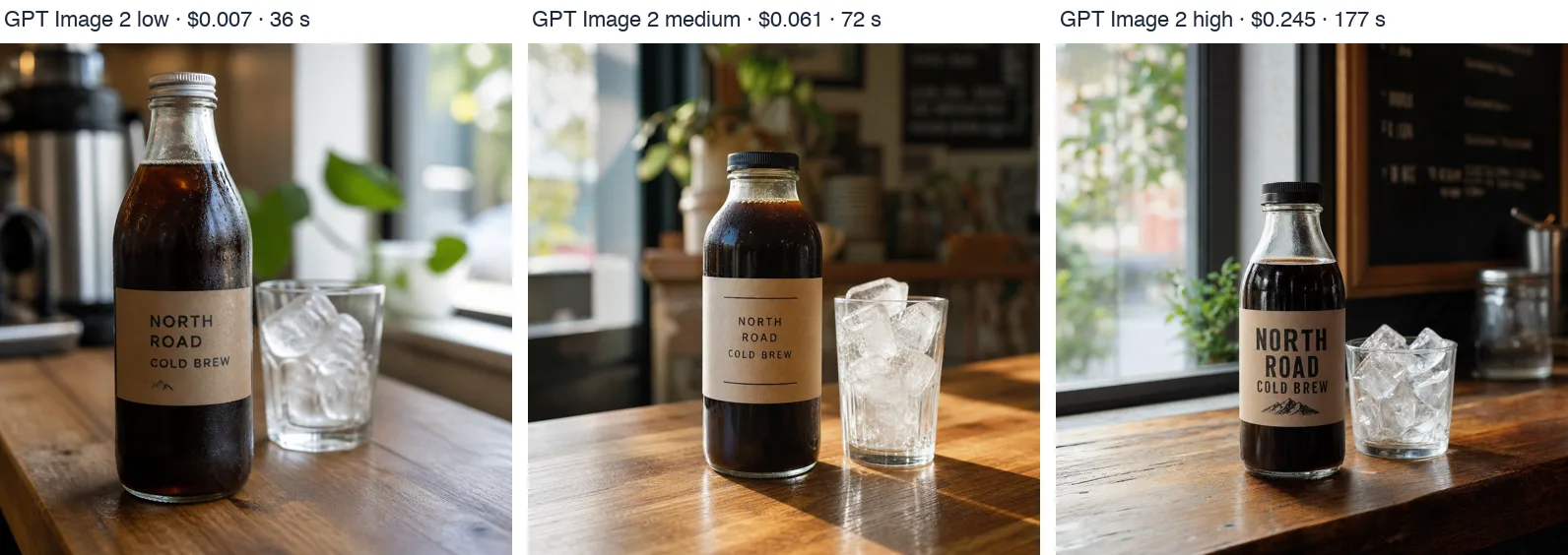
GPT Image 2, 1K. From left: low ($0.007, 36 s), medium ($0.061, 72 s), high ($0.245, 177 s).
All three spell the label "NORTH ROAD COLD BREW" correctly. High quality adds sharper texture and a bolder label, but for web images and social posts, low quality at 36 seconds and $0.007 is often enough.
GPT Image 2.5 is faster at the same resolution and also gets the small text right:
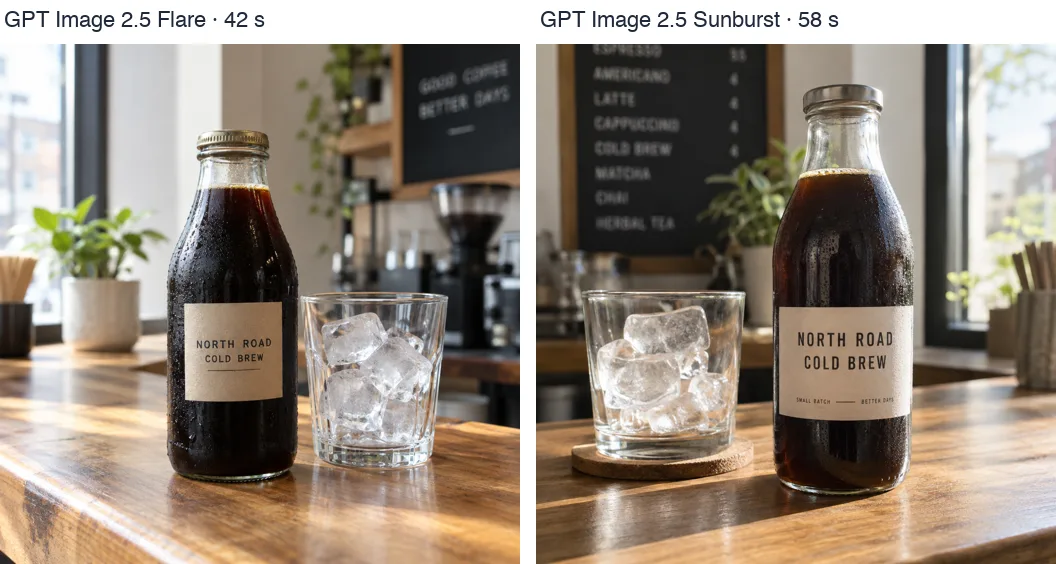
GPT Image 2.5, 1K. Flare 42 s, Sunburst 58 s.
Where the Time Goes
An API image task passes through a few states. Our runs spent their time like this:
| Status | What's happening | Time in our runs |
|---|---|---|
queued | Waiting for a free worker | Under 12 s, often skipped |
handling | The model is drawing the image | Most of the total |
archiving | Saving the finished file | 3–11 s |
success | The image URL is ready | — |
This script prints each status as it changes, so you can time your own prompts:
import os
import time

import requests

API = "https://api.hiapi.ai/v1"
HEADERS = {"Authorization": f"Bearer {os.environ['HIAPI_API_KEY']}"}

start = time.monotonic()
task_id = requests.post(f"{API}/tasks", headers=HEADERS, json={
    "model": "gpt-image-2/text-to-image@ext",
    "input": {"prompt": "a glass bottle of cold brew coffee on a wooden cafe counter",
              "aspect_ratio": "1:1", "resolution": "1K", "quality": "low"},
}).json()["data"]["taskId"]

last = None
while True:
    task = requests.get(f"{API}/tasks/{task_id}", headers=HEADERS).json()["data"]
    if task["status"] != last:
        last = task["status"]
        print(f"{time.monotonic() - start:5.1f}s  {last}")
    if last in ("success", "fail"):
        break
    time.sleep(3)

print(task["output"][0]["url"] if last == "success" else task.get("error"))
A low-quality run of this script printed:
  3.7s  handling
 49.2s  archiving
 57.4s  success
It needs pip install requests and a HiAPI API key in HIAPI_API_KEY.
How to Get Images Faster
- Use low quality, or GPT Image 2.5 Flare. Both finished in under a minute, at $0.007 and $0.05 ($0.025 during the current discount).
- Stay at 1K unless you need the pixels. 2K and 4K each added about 15 seconds.
- Send images in parallel. Each image still takes its own time, but many run at once. In our ChatGPT Plus comparison, 12 images sent together were all done in 97 seconds.
- Poll every 3–5 seconds, and allow 5 minutes before treating a high-quality task as stuck. If a task really does hang, see what to do when a task times out.
To try the settings yourself, open GPT Image 2 or GPT Image 2.5 Flare and run a prompt at 1K.
FAQ
How long does ChatGPT take to make an image?
OpenAI says a ChatGPT image "may take a few minutes, depending on the complexity of your request." ChatGPT uses GPT Image 2.5, and through the API that model took 43 to 56 seconds per image at 1K in our test.
How long does GPT Image 2 take to generate an image?
About 75 seconds at standard 1K, and about 90 seconds at 2K or 4K. At low quality it took 47 seconds; at high quality, about 3 minutes.
Is GPT Image 2.5 faster than GPT Image 2?
Yes. At 1K, GPT Image 2.5 Flare took 43 seconds and Sunburst 56, against 75 seconds for standard GPT Image 2.
Why is GPT Image so slow?
It draws the whole image at high detail before returning anything, and higher quality means more work per image. Low quality or GPT Image 2.5 Flare cuts the wait to under a minute.
What is the fastest way to generate many images?
Send them in parallel instead of one after another. With the API, 12 images took 97 seconds in total, about as long as one standard 2K image.




