GPT Image 2.5 FlareFrom $0.050/image
Choose a model, enter your prompt, and see the result.
HiAPI Blog
HiAPI
Generate it with HiAPI
Nano-Banana-2 is the mid-tier model in hiapi's Nano Banana image family: text-to-image from a prompt alone, image-to-image editing from up to 14 reference URLs, and resolution control up to 4K. This tutorial covers authentication, the exact request schema for both modes, working curl/Python/Node examples, and the errors you'll actually hit in production.
Goal: send a request to nano-banana-2, wait for the image, and download it — first from a text prompt, then from a reference image.
You need one thing: a hiapi API key (sk-...). Grab it from your hiapi dashboard. Per-image pricing (it varies by resolution) is on the pricing page and the Nano Banana 2 model page.
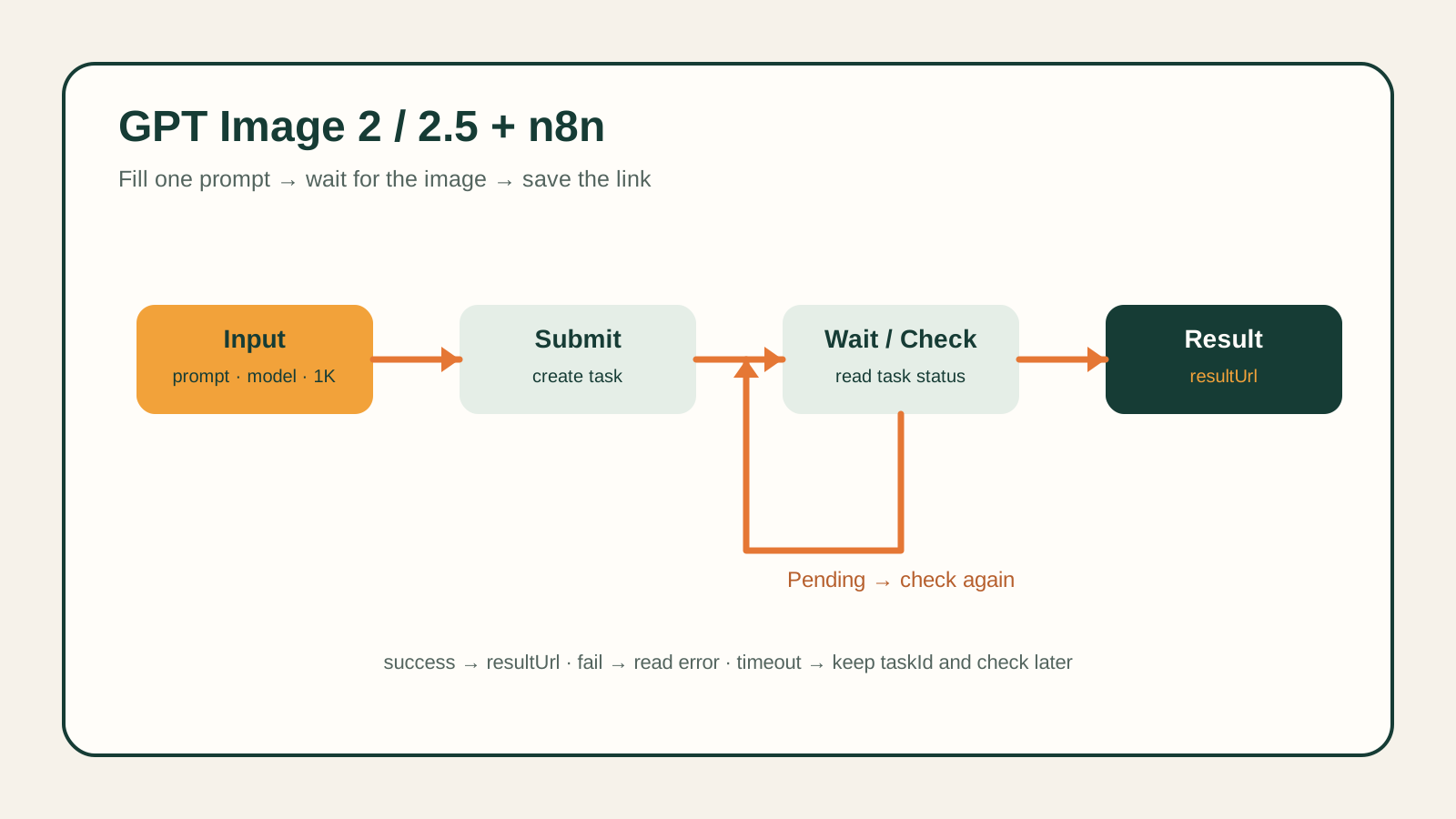
Like every image model on hiapi, Nano-Banana-2 runs through the unified async task API: POST /v1/tasks creates a job, then you either poll GET /v1/tasks/{id} or receive a webhook when it's done.
Create the task:
curl -s -X POST https://api.hiapi.ai/v1/tasks \
  -H "Authorization: Bearer sk-YOUR_KEY" \
  -H "Content-Type: application/json" \
  -d '{
    "model": "nano-banana-2",
    "input": {
      "prompt": "A mystical tropical rainforest at night with hundreds of glowing fireflies, warm golden lights floating among dark green ferns and moss, soft mist, dreamy bokeh, cinematic fantasy photography",
      "aspect_ratio": "4:3",
      "resolution": "1K",
      "output_format": "png"
    }
  }'
The response carries the task id at data.taskId. Poll it:
curl -s https://api.hiapi.ai/v1/tasks/YOUR_TASK_ID \
  -H "Authorization: Bearer sk-YOUR_KEY"
Once data.status is "success", the image is at data.output[0].url. Download it immediately — output URLs are signed and carry an expireAt, so persist the bytes, not the link.
prompt is the only required field (model aside). Everything else defaults: aspect_ratio defaults to "auto", resolution defaults to "1K", output_format defaults to "png". The full set of accepted aspect_ratio values is 1:1, 1:4, 1:8, 2:3, 3:2, 3:4, 4:1, 4:3, 4:5, 5:4, 8:1, 9:16, 16:9, 21:9, auto — send anything else and you get a 400 naming the valid set. The schema is strict (additionalProperties: false), so a typo'd field name 400s immediately rather than silently defaulting.
Pass reference image URLs in image_input (not image_urls — that field name belongs to the smaller Nano-Banana-2-Lite tier, and mixing them up is the single most common integration bug people hit switching between the two):
import requests, time

payload = {
    "model": "nano-banana-2",
    "input": {
        "prompt": "Restyle this product photo with a warm studio lighting setup and a soft gradient background",
        "image_input": [
            "https://example.com/your-product-photo.jpg"
        ],
        "resolution": "2K",
    },
}

resp = requests.post(
    "https://api.hiapi.ai/v1/tasks",
    headers={
        "Authorization": "Bearer sk-YOUR_KEY",
        "Content-Type": "application/json",
    },
    json=payload,
)
task_id = resp.json()["data"]["taskId"]

while True:
    task = requests.get(
        f"https://api.hiapi.ai/v1/tasks/{task_id}",
        headers={"Authorization": "Bearer sk-YOUR_KEY"},
    ).json()["data"]
    if task["status"] in ("success", "fail"):
        break
    time.sleep(3)

if task["status"] == "success":
    image_url = task["output"][0]["url"]
    print(image_url)
else:
    print("generation failed:", task.get("error"))
image_input accepts up to 14 reference URLs (they must be publicly fetchable — hiapi's servers download them). You can combine references with any of aspect_ratio, resolution, and output_format in the same request; Nano-Banana-2 doesn't require an explicit "mode" flag — supplying image_input is what switches it into editing behavior.
const payload = {
  model: "nano-banana-2",
  input: {
    prompt: "A mystical tropical rainforest at night with hundreds of glowing fireflies, warm golden lights, dreamy bokeh",
    aspect_ratio: "16:9",
    resolution: "1K",
  },
};

const response = await fetch("https://api.hiapi.ai/v1/tasks", {
  method: "POST",
  headers: {
    Authorization: "Bearer sk-YOUR_KEY",
    "Content-Type": "application/json",
  },
  body: JSON.stringify(payload),
});

const { data } = await response.json();
console.log(data.taskId);
Poll GET /v1/tasks/{taskId} the same way as the curl example above.
Use webhooks instead of polling when you can. Add a callback block and hiapi POSTs the terminal result to your endpoint instead of you polling for it:
{
  "model": "nano-banana-2",
  "input": { "prompt": "...", "resolution": "1K" },
  "callback": { "url": "https://your-app.com/webhooks/hiapi", "when": "final" }
}
when only accepts "final" — exactly one callback, whether the task succeeds or fails. If your callback endpoint is flaky or you're just scripting locally, polling every 2–5 seconds with a hard timeout is fine; see this checklist if a callback you set up stops arriving.
Make task creation idempotent on your side. POST /v1/tasks is not idempotent — retrying a timed-out create can spin up two billed tasks. Persist the taskId the moment you receive it, and on restart, resume polling the saved id instead of re-creating.
Handle both error layers. Request-level failures come back as HTTP errors before any task is created: an invalid key returns 401 with {"error": {"code": "permission_denied", "type": "hiapi_error", ...}} (see the API key troubleshooting guide if this happens with a key you believe is valid), and a bad field or value returns 400 INVALID_REQUEST with the specific violation. Task-level failures arrive later, once a task has actually been dispatched — those show up as status: "fail" with an error object on the task, and there's no cancel endpoint once a task is running.
Store bytes, not URLs. Output URLs are signed and expire. Download the image into your own storage before doing anything else with it.
What's the difference between Nano-Banana-2 and Nano-Banana-2-Lite?
Both run the same task API, but the reference-image field is different — Nano-Banana-2 uses image_input (up to 14 URLs) and supports explicit resolution control (1K/2K/4K); Lite uses image_urls (up to 10 URLs) and has no resolution parameter. Sending the wrong field name for the tier you're calling returns a 400 additional properties not allowed.
Does Nano-Banana-2 do text-to-image, or does it need a reference image?
Both. prompt alone is enough for text-to-image; adding image_input switches the same call into image-to-image editing. There's no separate endpoint or mode flag.
How many reference images can I send?
Up to 14 URLs in image_input. They must be public, fetchable URLs — hiapi's backend downloads them before generation starts.
What resolutions are available, and how do I pick an aspect ratio?
resolution accepts 1K, 2K, or 4K (default 1K). aspect_ratio is independent of resolution and accepts 15 values from square (1:1) through wide (21:9) and tall (9:16) ratios, plus auto to let the model choose based on the prompt or references.
Why do I get a 400 "additional properties not allowed"?
The input schema is strict — every field name is checked, and unknown or misspelled fields (like image_urls instead of image_input, or size instead of resolution) are rejected immediately rather than ignored.
What does a 401 permission_denied mean?
Your API key is invalid, revoked, or malformed. Confirm it in your dashboard and make sure you're sending Authorization: Bearer sk-... exactly.
How long are output image URLs valid?
They're signed URLs with an expireAt timestamp in the output object. Download and store the bytes yourself immediately — don't hot-link the task output in production.