TL;DR
- For fixed single-image generation and editing rates, FIBO Gen 1.5 charges $0.0575 for each operation. Ideogram 4.5 generation offers LOW $0.043, MEDIUM (default) $0.086, and HIGH $0.3145. See FIBO pricing.
- At the default tiers, FIBO costs $0.0285 less per image than Ideogram MEDIUM: $57.50 versus $86.00 for 1,000 images. Both currently return 1 image per task.
- Both are on HiAPI: FIBO model page · Ideogram model page. Both use the HiAPI
/v1/tasksendpoint to submit a single-image task with your chosen parameters.
At a glance
| Item | FIBO Gen 1.5 | Ideogram 4.5 |
|---|---|---|
| Per image | $0.0575, one tier | LOW $0.043; MEDIUM $0.086; HIGH $0.3145 |
| Shape field | aspect_ratio, 9 ratios | image_size, 6 presets |
| Images per task | 1 | 1; num_images must be 1 |
| Prompt expansion | No such field | enable_prompt_expansion, default true |
| Companion editor | fibo-edit-1.5/image-to-image, $0.0575 per image | ideogram-v4.5/image-to-image, regular VERY_LOW from $0.0115 |
| Selection basis | Fixed rate and required ratio | Quality tier and Precise editing needs |
Two square-image scenes, with prompt differences made explicit
All images below are original 1024×1024 PNGs. FIBO uses aspect_ratio=1:1; Ideogram uses MEDIUM, square_hd, enable_prompt_expansion=false, and num_images=1. The ramen pair shares a prompt. The wordmark examples show their actual prompts separately, including the added text constraints.
Group A: Coffee-shop wordmarks with different prompts
| FIBO Gen 1.5 · Original prompt | Ideogram 4.5 · Stronger text constraints |
|---|---|
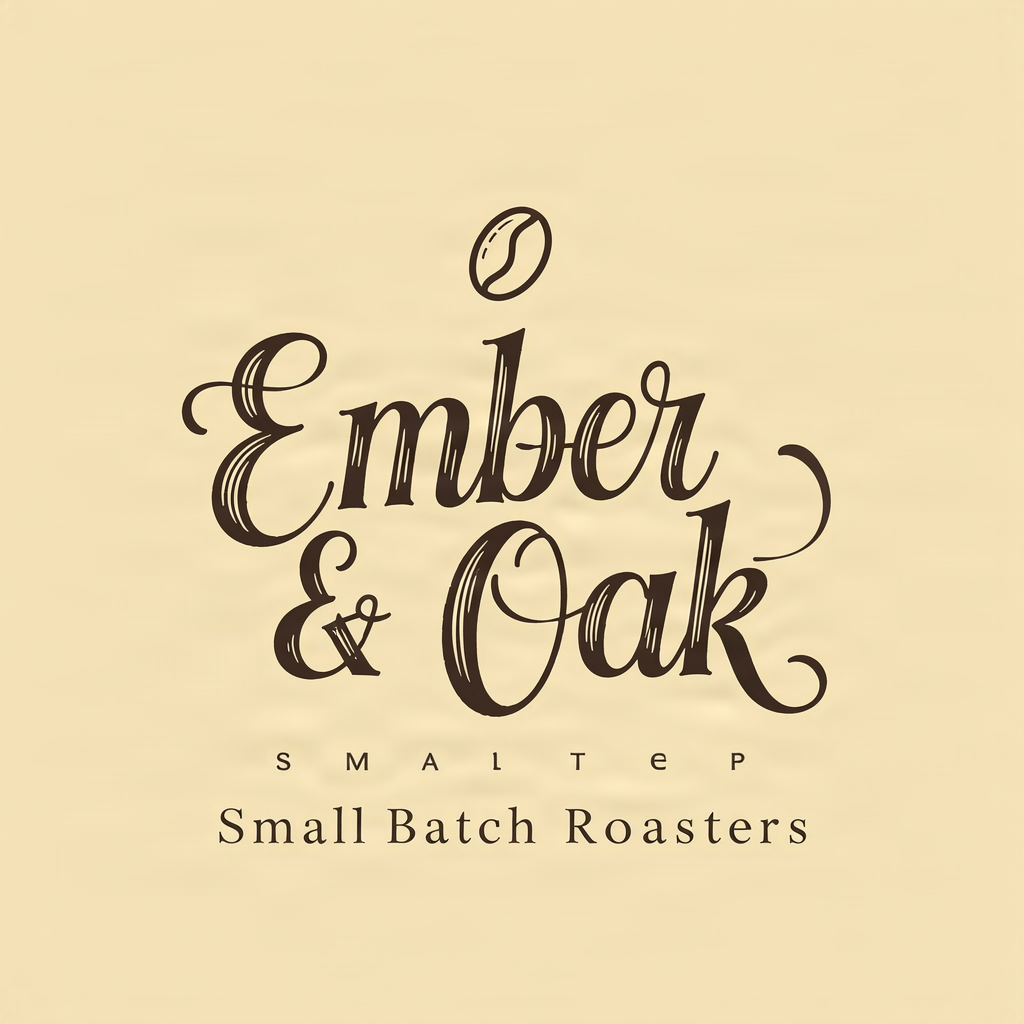 | 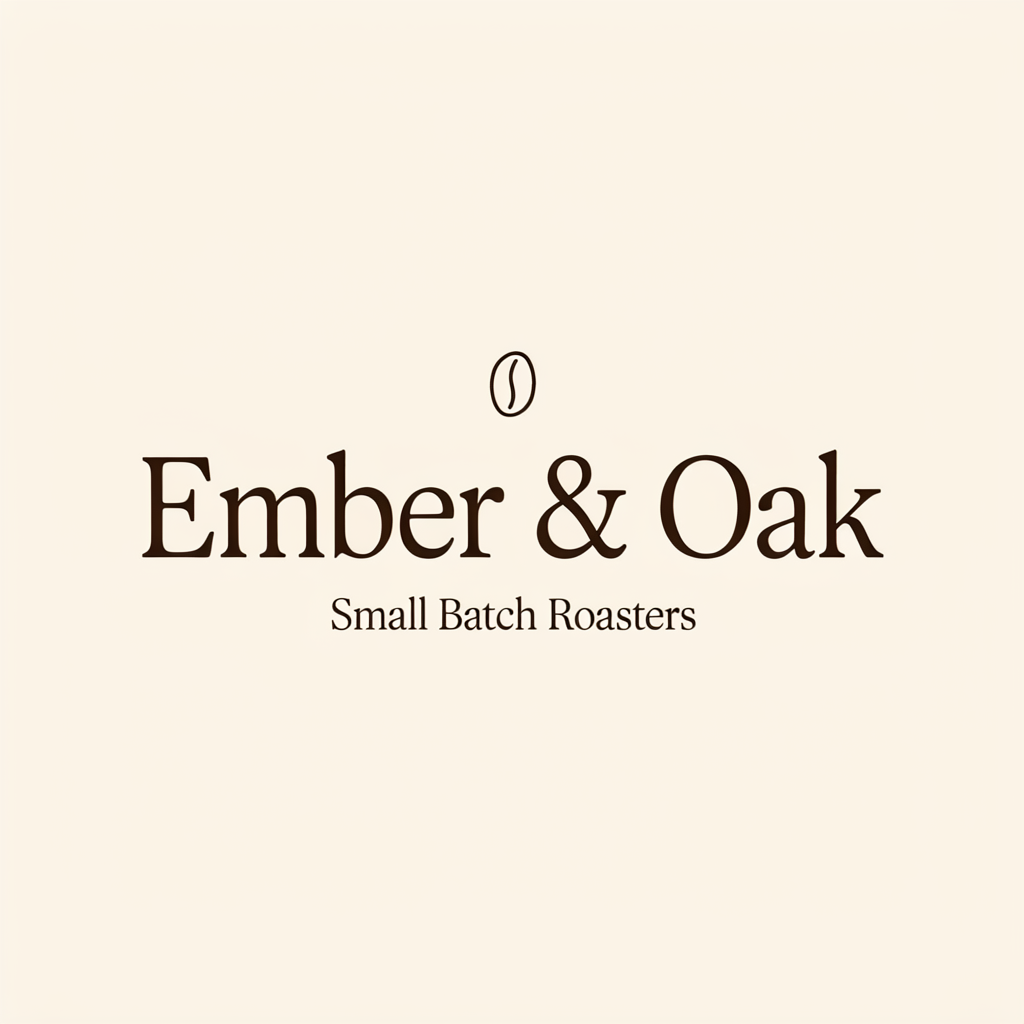 |
Left: FIBO at $0.0575 per image. Right: Ideogram MEDIUM at $0.086. Both are 1:1, 1024×1024 PNGs, but the right-hand prompt explicitly places the bean above the text and requires a literal ampersand. This group is not a same-prompt comparison.
Complete prompt used for FIBO:
Elegant wordmark logo for a specialty coffee shop called "Ember & Oak", hand-drawn serif lettering with a small coffee bean emblem, tagline "Small Batch Roasters" beneath, cream background, dark brown ink, centered, vector style
Try this prompt with FIBO →, selecting 1:1.
Complete prompt used for Ideogram:
Elegant wordmark logo for a specialty coffee shop called "Ember & Oak", hand-drawn serif lettering with a small coffee bean emblem placed separately above the text, tagline "Small Batch Roasters" beneath, cream background, dark brown ink, centered, vector style. The brand name must read exactly "Ember & Oak"; render the ampersand character & literally between the two words, do not replace it with an icon or a coffee bean.
Try this prompt with Ideogram →, selecting MEDIUM, square_hd, and disabling expansion.
Visible differences: the left image has a readable shop name and tagline, with an extra line of meaningless characters between them. The right shows “Ember & Oak” and “Small Batch Roasters,” with the bean above the text. These outputs use different prompts, so their character differences cannot be attributed entirely to the models. The left image is not an example of flawless text rendering.
Group B: Overhead ramen with the same prompt
Overhead food photograph of a bowl of ramen with soft-boiled egg, chashu and scallions on a dark wooden table, chopsticks, steam
| FIBO Gen 1.5 | Ideogram 4.5 MEDIUM |
|---|---|
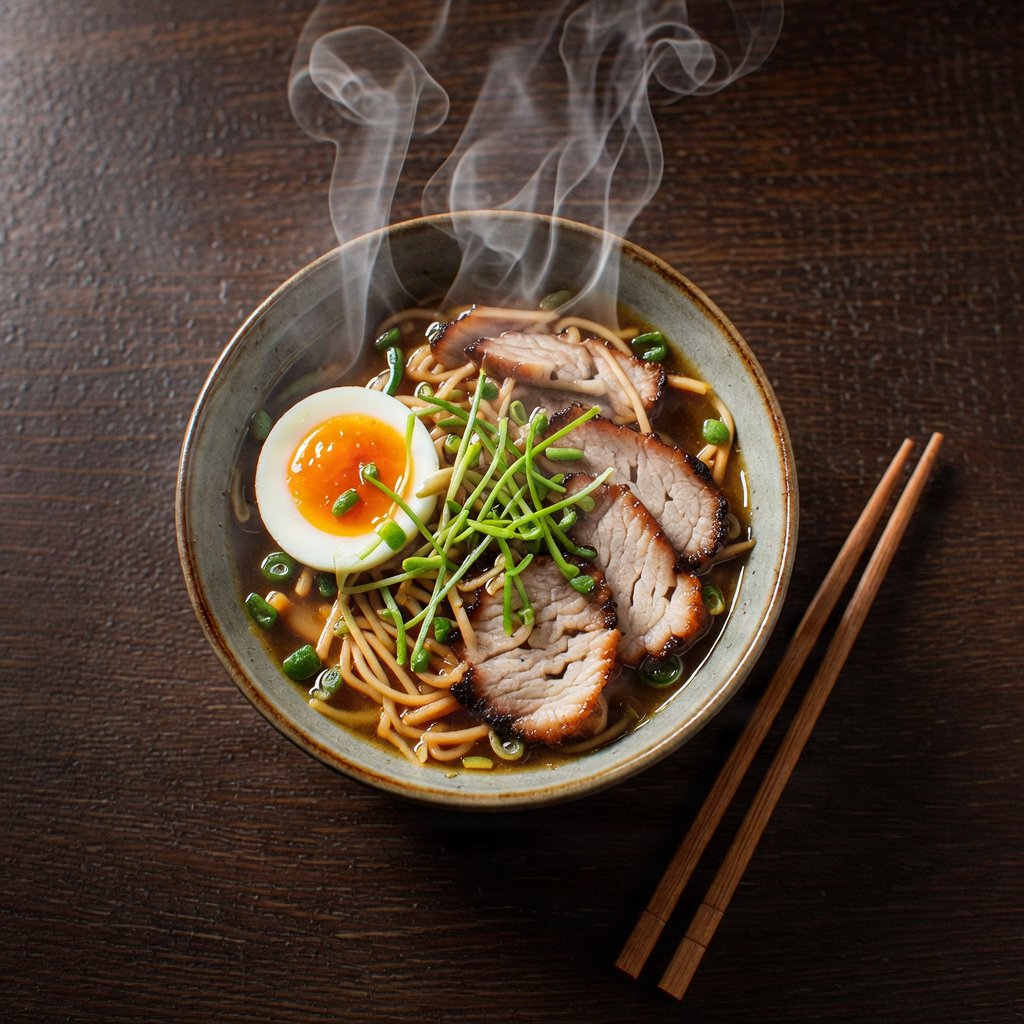 | 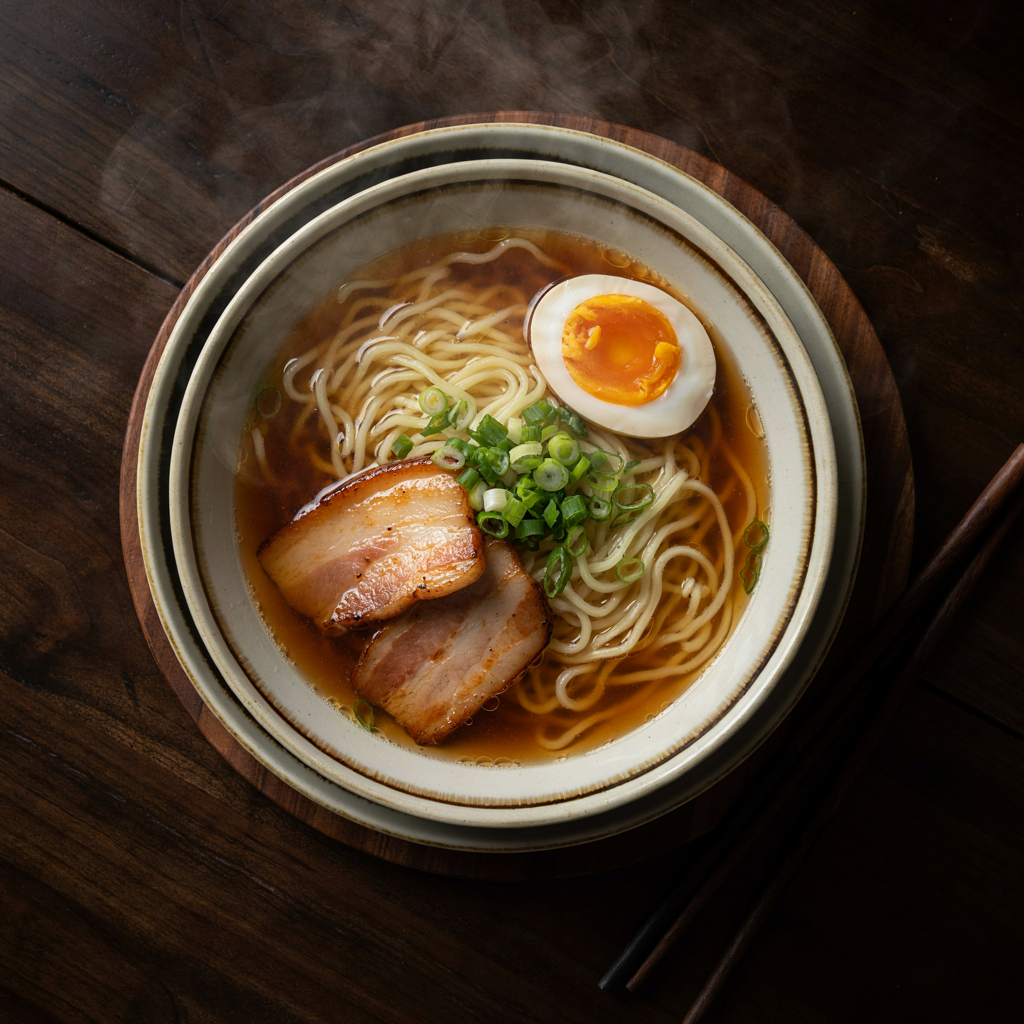 |
Both use the same prompt and produce 1:1, 1024×1024 PNGs. Left: aspect_ratio=1:1, $0.0575. Right: MEDIUM, square_hd, expansion disabled, num_images=1, $0.086.
Visible differences: both show egg, chashu, scallions, chopsticks, and steam. On the left, the egg sits toward the left of the bowl, the pork is concentrated on the right, and steam forms more distinct lines. On the right, the bowl fills more of the frame, with the egg at the upper right and pork toward the lower left. These are composition and detail observations, not an overall ranking from one pair.
Choosing for a workflow
- For a fixed operation budget, FIBO generation and editing each cost $0.0575; one of each totals $0.115.
- To begin with a lower-priced generation tier, Ideogram LOW is $0.043, below FIBO's rate. Keep tier selection separate from judging the result.
- For shapes such as 5:4 and 2:3, inspect FIBO's 9 ratios; Ideogram offers 6 size presets.
- To change a name or date in an existing image, consider Ideogram Precise LOW at $0.043, with
image_size: "auto". - Alternatives require separate tasks on both models, not several images in one request.
Switching: model ID and shape field
{
  "model": "fibo-gen-1.5/text-to-image",
  "input": {
    "prompt": "Overhead food photograph of a bowl of ramen with soft-boiled egg, chashu and scallions on a dark wooden table, chopsticks, steam",
    "aspect_ratio": "1:1"
  }
}
{
  "model": "ideogram-v4.5/text-to-image",
  "input": {
    "prompt": "Overhead food photograph of a bowl of ramen with soft-boiled egg, chashu and scallions on a dark wooden table, chopsticks, steam",
    "quality": "medium",
    "image_size": "square_hd",
    "enable_prompt_expansion": false,
    "num_images": 1
  }
}
FIBO uses aspect_ratio; Ideogram uses image_size and an explicit quality. These are complete request examples for the ramen scene. For the wordmarks, use the actual prompt listed below each image; do not treat the right-hand image’s added constraints as inputs used for the left-hand image.
FAQ
Does each task return only one image on both models?
Yes. FIBO returns 1 image, and Ideogram currently requires num_images: 1. Submit separate tasks for alternatives.
Which rate is lower: default or entry tier?
FIBO is fixed at $0.0575. Ideogram defaults to MEDIUM at $0.086 but offers LOW at $0.043. State the quality tier before comparing.
Can the shape field be copied unchanged?
No. FIBO uses aspect_ratio and Ideogram uses image_size. For the square target here, use 1:1 and square_hd, respectively.
Can the wordmark pair establish which model renders text more accurately?
No. The right-hand prompt adds character and icon-placement constraints; the left uses the original prompt and contains an extra garbled line. A matched-input comparison requires the same complete prompt on both sides. Only the ramen pair meets that condition here.
How can I disable Ideogram prompt expansion?
Set enable_prompt_expansion: false explicitly. This disables expansion without changing the selected quality-tier rate.
Next: read the FIBO API guide and prices and budgets, then submit separate single-image tasks with the square prompts above.