FLUX.2 [klein] 4B is hiapi's fast, budget image-editing model — the tier developers reach for when they need to change one thing in a photo without repainting the whole scene. We ran five real image-to-image prompts against it end to end through the live /v1/tasks API, with the actual outputs embedded below, real cost, and one honest miss the model made along the way. Every prompt here is copy-paste ready.
Why Image-to-Image Prompting Is Different
Text-to-image prompts describe an entire scene from scratch. Image-to-image prompts do the opposite: you're giving the model an existing photo and a narrow instruction. The single biggest lever for predictable results is anchoring the prompt with what to keep unchanged before describing what to change — "keep the bottle shape, lighting, and camera angle unchanged. Add..." rather than just "add a label." Every recipe below follows that pattern.
Recipe 1: Add a Text Label to a Product Photo
Keep the bottle shape, lighting, and camera angle unchanged. Add a crisp engraved label on the bottle front reading AMBER NOIR in a clean serif font, small readable text below it saying EAU DE PARFUM
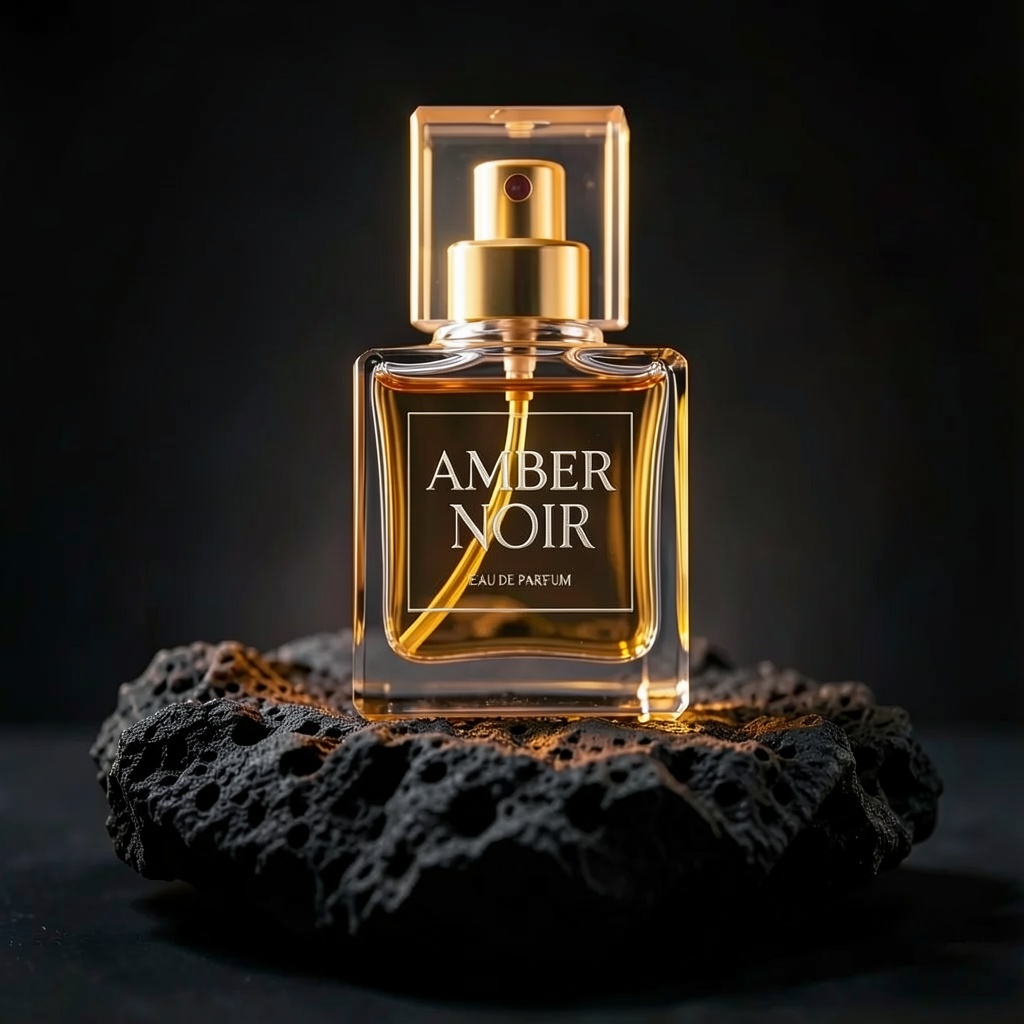
This one landed clean on the first try. Both text lines rendered correctly and legibly, the label reads as genuinely engraved rather than pasted on, and the bottle, lighting, and camera angle from the source photo were untouched.
Recipe 2: Swap the Background and Add Rim Light
Keep the bottle subject, its position, and the camera angle unchanged. Replace the background with a deep blue photography studio gradient backdrop, and add soft rim lighting along the bottle edges
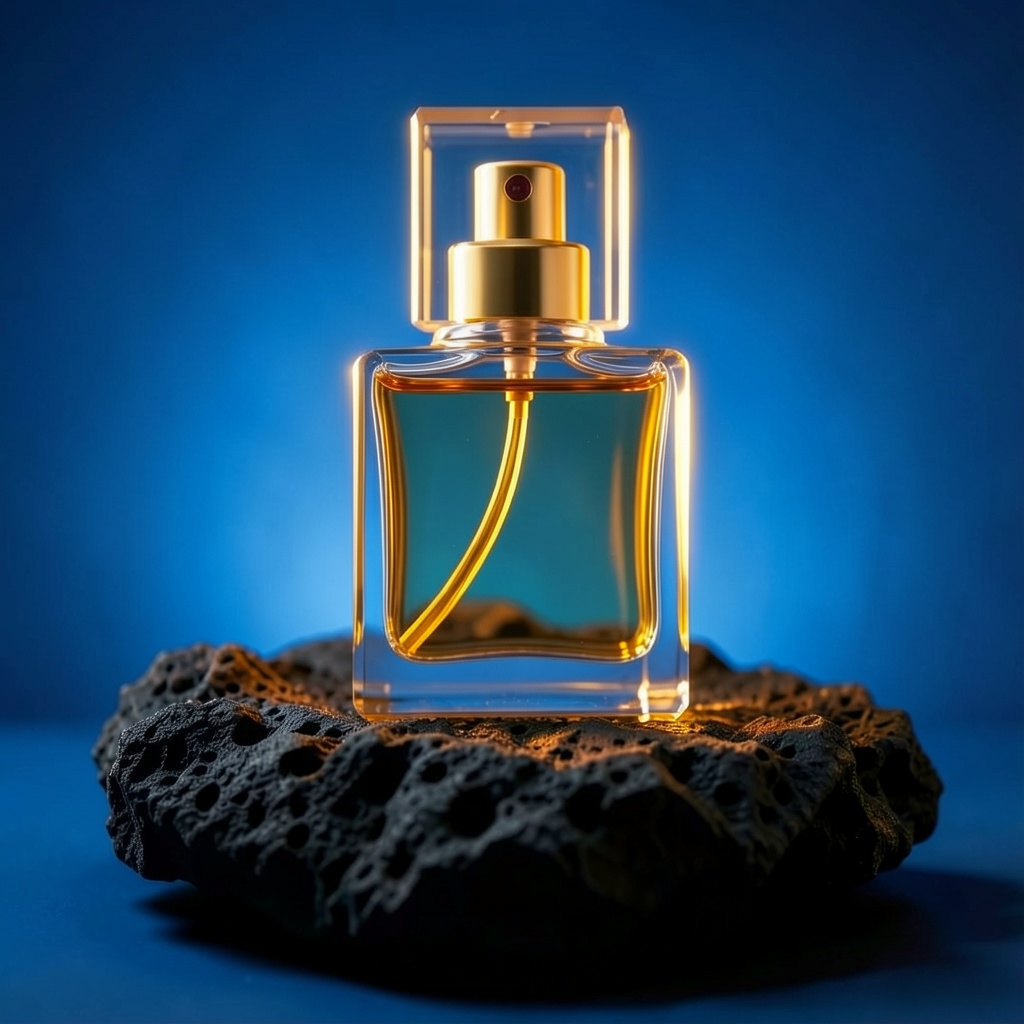
Also a clean, faithful edit — background swapped to the requested deep blue gradient, soft rim light visible along the glass edges, subject position and camera angle preserved. This recipe branches from the same plain source photo as Recipe 1, not chained from it, which is why there's no label text on this bottle.
Recipe 3: Change Material and Color While Keeping the Label
Keep the bottle shape, cap, and engraved label text exactly as is. Change the glass material from clear glass to matte black ceramic, keep the gold cap and gold liquid visible through a small clear window on the front
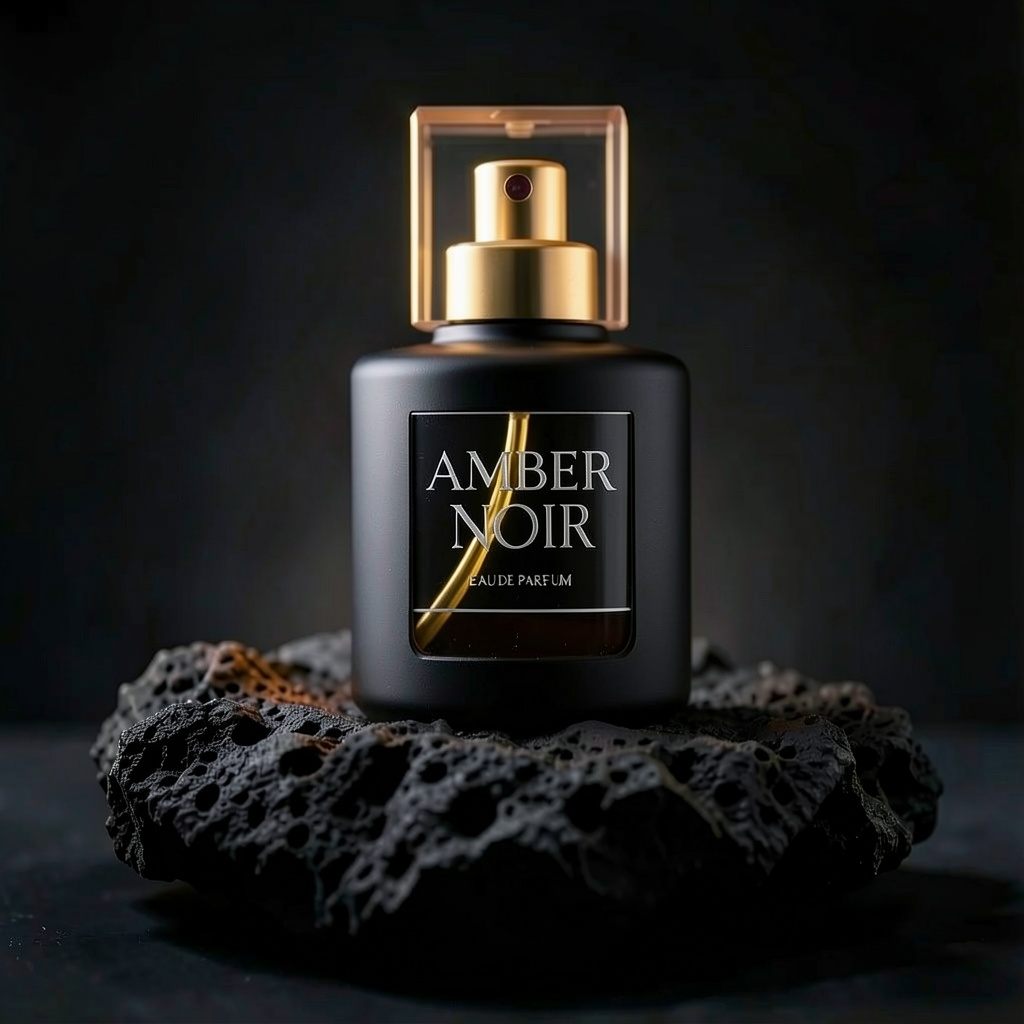
This is a chained edit — it's built on top of Recipe 1's labeled output, not the original source photo. The material and color change from clear glass to matte black ceramic came through correctly, the gold cap and liquid window survived, and — the harder part — the "AMBER NOIR" / "EAU DE PARFUM" label text carried over crisply onto the new material instead of getting garbled or dropped.
Recipe 4: Edit Text in a Complex Scene (and Where the Model Fell Short)
Keep the market stalls, lanterns, crowd, and every other sign exactly unchanged. Change only the large overhead sign text from NIGHT BLOOM to LANTERN FEST, keep the same bold serif font style, banner shape, and warm lighting
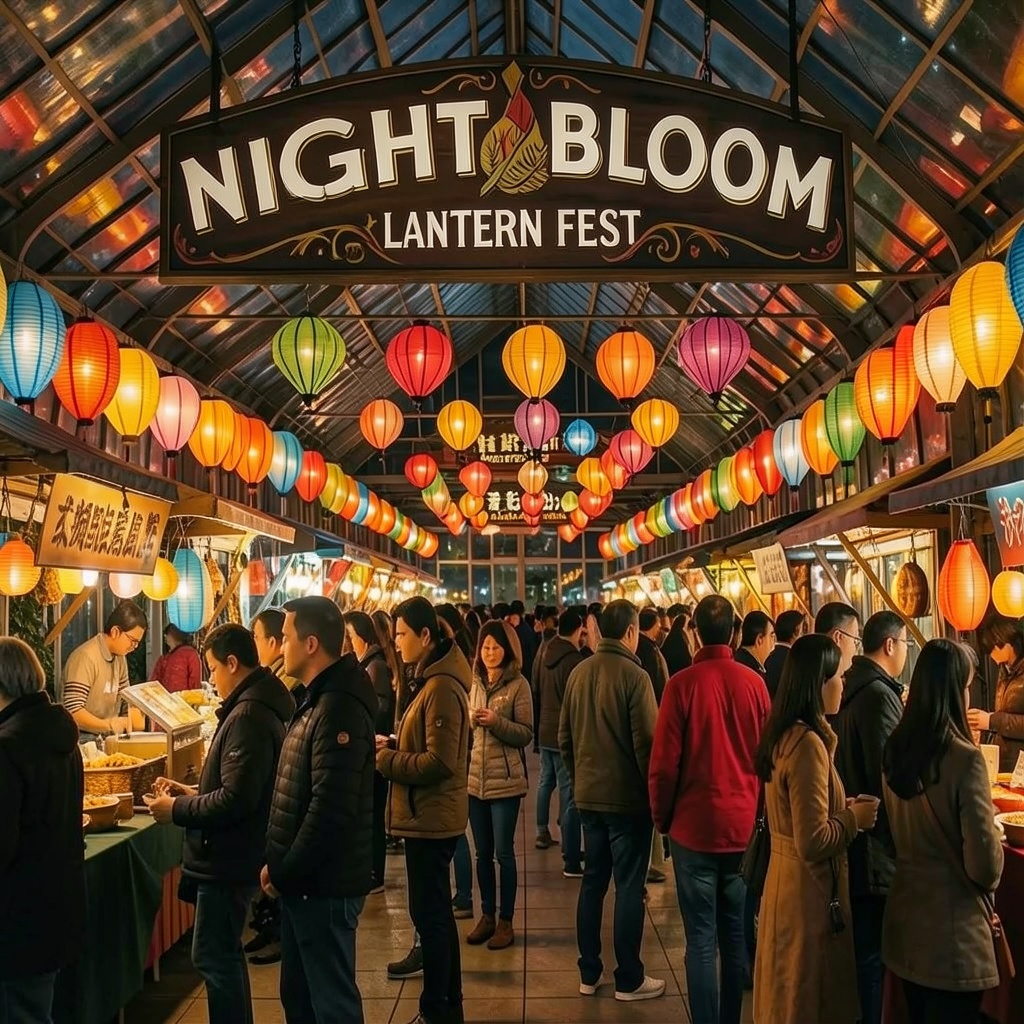
Here's the honest miss: the model did not replace "NIGHT BLOOM" with "LANTERN FEST" as instructed. Instead it kept the original sign text intact and added "LANTERN FEST" underneath as a smaller subtitle line. Everything else in the scene — the market stalls, lanterns, crowd, and other signage — stayed unchanged exactly as asked, and the new text itself rendered cleanly with no misspellings. But a straight text replacement in a busier scene is clearly a harder ask for this model than the simpler label edits in Recipes 1 and 3. If you're doing text swaps like this, plan to proofread every output and re-run any that don't fully commit to the replacement — don't assume a "change X to Y" instruction always means the old text disappears.
Recipe 5: Reformat to Vertical for Social Stories
Keep the black ceramic bottle, gold cap, and engraved label exactly as is and centered. Naturally extend the dark studio background and volcanic rock base to fill a taller vertical frame for a social media story crop
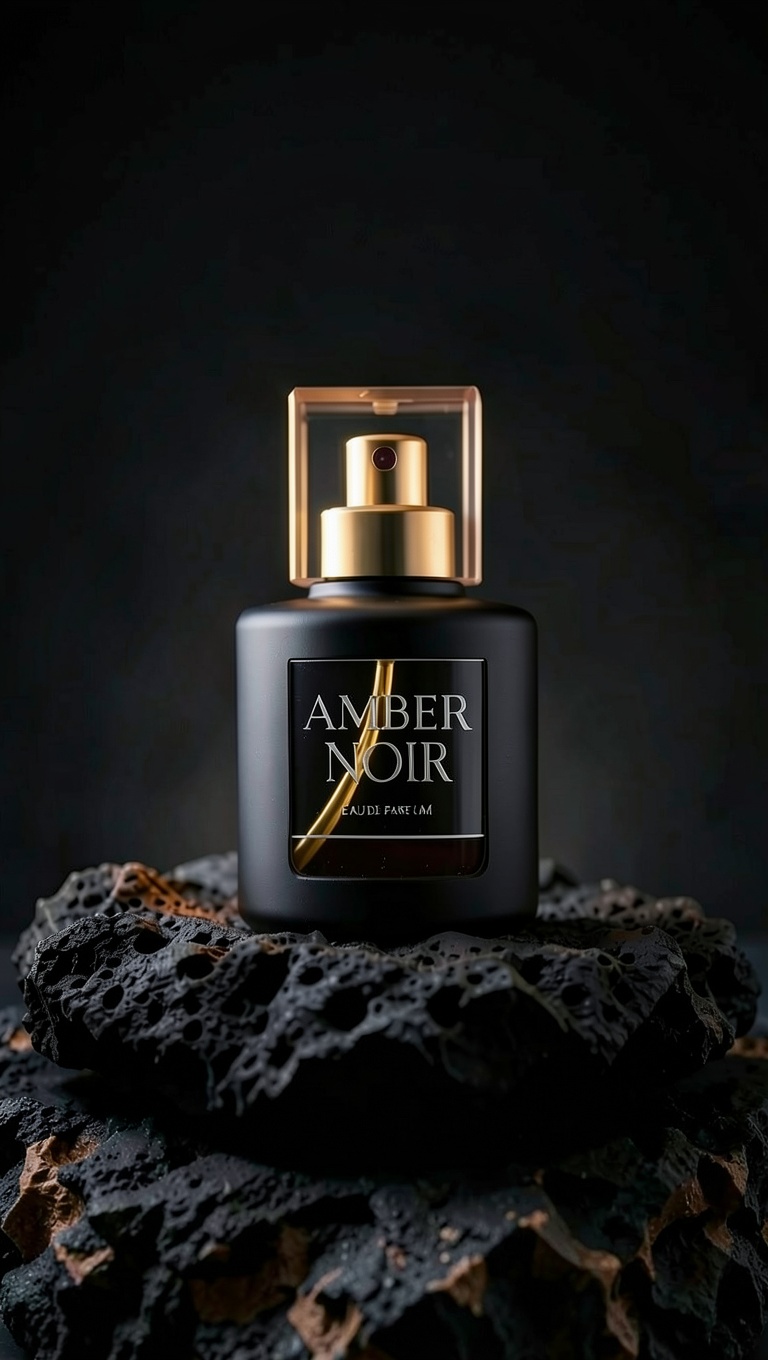
Another chained edit, this time reformatting Recipe 3's output into a 9:16 vertical frame. The bottle, cap, and label stayed centered and intact, and the background/rock base extended naturally to fill the taller crop with no visible seams. One minor thing worth flagging under the same "proofread AI text" rule from Recipe 4: the smaller "EAU DE PARFUM" subtext looked slightly softer at the reduced relative scale in the vertical crop compared to the bold "AMBER NOIR" title line — still legible, but worth a close look before shipping a story-format asset with fine print on it.
How to Reproduce These With the API
All five edits above use the same flux-2-klein-4b image-to-image model through hiapi's async task endpoint: submit a POST to /v1/tasks with your prompt and a source image_urls array, poll the task until it reports success, then pull the result from output[0].url. Two optional input fields worth knowing: resolution (an MP-tier enum — all five recipes above used the 1MP tier) and aspect_ratio (used in Recipe 5 to force the 9:16 vertical crop). For the full request/response shape and code samples, see the flux-2-klein-4b API guide.
On pricing: the 1MP tier used throughout this article runs $0.00715 per image, scaling up to $0.01143 at the 4MP tier for larger outputs — check hiapi's live pricing page before budgeting a production run, since resolution tier is the main cost lever here.
FAQ
Does flux-2-klein-4b support image-to-image editing? Yes — it accepts a source image via image_urls plus a text prompt describing the edit, and is one of the faster, cheaper tiers in the FLUX.2 Klein family for this.
How much does each edit cost? $0.00715 per image at the 1MP tier used in every recipe above, rising to $0.01143 at 4MP.
Why does every prompt say "keep X unchanged" before describing the edit? Because it's the most reliable way to stop an image-to-image model from quietly redrawing parts of the photo you didn't ask it to touch — anchor what stays, then describe what changes.
Does it always get text edits right? Not always. Simple label additions (Recipes 1 and 3) came out clean, but a text replacement in a busier scene (Recipe 4) only partially followed instructions. Always proofread AI-rendered text before publishing, and re-run anything that doesn't fully commit to the requested change.
Try It Yourself
All five prompts above are ready to copy into your own request. Start with the source image you want to edit, drop one of these prompts in, and swap the details for your own product or scene. For more chained-edit and reformatting patterns on the wider FLUX.2 family, see FLUX.2 image-to-image prompt recipes, or head straight to the flux-2-klein-4b playground to try these prompts on your own images.




