TL;DR
- Krea 2 Medium Turbo costs $0.0215 per image on HiAPI: $2.15 for 100 images or $21.50 for 1,000.
- All 8 aspect ratios and 4 creativity settings use the same rate. A $10 generation budget covers 465 successful images.
- The model is available on HiAPI. Open the model page and start with the cafe prompt below to establish a visual direction.
What is the price, and which settings affect it?
| Model | Billing unit | Per image | 100 images |
|---|---|---|---|
| Krea 2 Medium Turbo | Output image | $0.0215 | $2.15 |
HiAPI prices checked October 25, 2026.
Each task produces one image, and your generation budget follows the number of images produced. The raw, low, medium, and high creativity settings control how freely the prompt is interpreted. All use the same per-image rate. Choosing 1:1 or 2.35:1 also leaves that rate unchanged, so the basic calculation is simply planned image count multiplied by $0.0215.
The task fee is reserved when a task is created and refunded in full when it reaches a failed terminal state. A successfully generated image still counts toward spending when you decide against using it. Include alternative compositions and rejected candidates in your forecast, alongside the images you ultimately publish.
A budget example for one cafe image
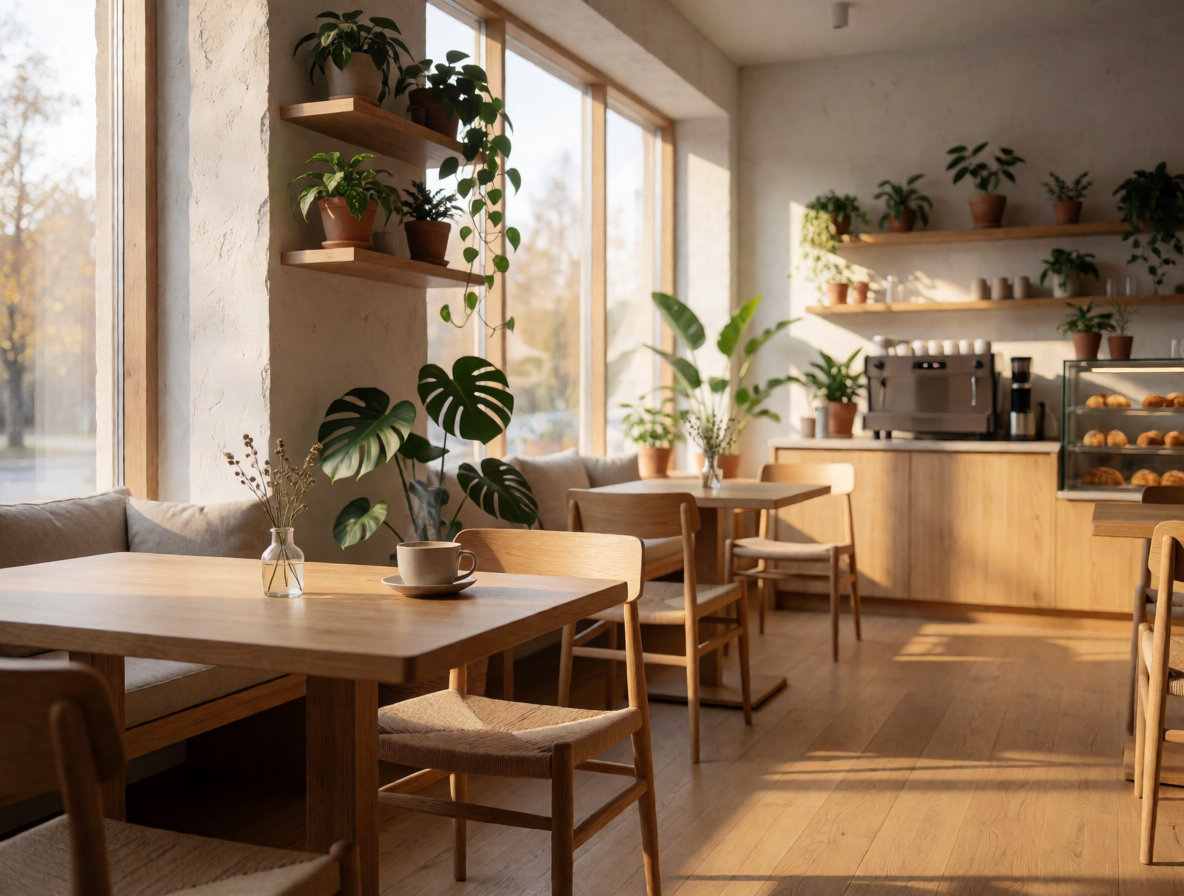
Cozy Scandinavian cafe interior at morning, warm sunlight through windows, wooden tables, plants
Krea 2 Medium Turbo; requested aspect_ratio=4:3, creativity=low; displayed file: 1184×896 PNG. Generating one image at the current rate is $0.0215. The link prefills the prompt; select ratio and creativity manually.
This description establishes a location, time of day, lighting, and furniture. It gives you a concrete starting point for a cafe introduction page. In this example, a wooden table fills the foreground while plants and the counter extend into the room. If the layout needs space for a headline, the next candidate can change the composition instructions while retaining the light and materials you already like.
How much should you budget each month?
| Successful images | Krea 2 Medium Turbo | Krea 3 | Difference |
|---|---|---|---|
| 100 | $2.15 | $3.60 | $1.45 |
| 1,000 | $21.50 | $36.00 | $14.50 |
| 10,000 | $215.00 | $360.00 | $145.00 |
These are arithmetic usage estimates: image count multiplied by unit price. The table introduces no monthly plan or volume discount. For example, delivering 100 images with 3 successful candidates for each final image means paying for 300 images, or $6.45. Allowing 5 candidates instead means 500 images, or $10.75.
Decide how many attempts each subject can use before allocating the month's budget. This makes the relationship between generation volume and delivered work explicit. A $10 budget covers 465 whole images when rounded down; generating a 466th would take the total beyond $10. The calculation is useful for setting an application limit, provided the application counts all successful candidates rather than only downloaded favorites.
How can you reduce unnecessary repeat generations?
- Choose the aspect ratio for the placement first. An ultrawide banner can use
2.35:1; a vertical product illustration can use4:5. This helps avoid discovering that the subject will be cropped after the image is finished. - Specify the subject, composition, light, and style. Change the one element that matters most in each round so you can identify which revision helped.
- Set a candidate allowance for each subject and save accepted original files. Every successful candidate counts, and asking for the same subject again creates another task.
Choose creativity for the visual brief. Start with low, then try medium when you want to explore another interpretation. Increasing creativity leaves the unit price unchanged and gives no guarantee of a more suitable image. The five-scenario prompt guide supplies complete examples that you can adapt one subject at a time.
How does the Krea 3 price difference work?
Krea 3 costs $0.036 per image, making Krea 2 $0.0145 less per image. Relative to Krea 3, Krea 2 is approximately 40.3% lower. Measured in the opposite direction, Krea 3 is approximately 67.4% higher than Krea 2. Both percentages describe the same difference with different denominators.
Krea 3 offers variant and reasoning_level; Krea 2 offers creativity and 8 aspect ratios. Choose based on your budget and the controls your workflow needs, then judge the resulting images against your specific brief. For the complete submission, result lookup, and file-saving flow, use the API tutorial.
FAQ
Does high creativity cost more than low?
No. All four creativity settings cost $0.0215 per image. They change how freely the model interprets the prompt.
Does cinematic widescreen cost extra?
No. All 8 supported ratios share one rate. The ratio selects the composition; read the actual pixel dimensions from the returned file.
How are failed tasks billed?
The fee is reserved at creation and refunded in full after a failed terminal state. Successfully generated candidates that you do not use still count.
Approximately how many images does $10 cover?
465 images. This calculation covers Krea 2 image generation only, rounded down at $0.0215 each.
Copy the cafe prompt and Generate with this prompt →. Select 4:3 and low before submitting.