TL;DR
- Recraft Crisp Upscale (
recraft/crisp-upscale) does one thing: it doubles an image's width and height with crisper edges and texture while keeping the content and lettering exactly as they were. No prompt — the request body is a singleimage_url. Try it on the model page; new accounts get 200 free credits. - $0.004 per image: 1,000 images cost $4.00, and $10 buys about 2,500; input size never changes the price (full tiers on the pricing page).
- Everything runs on HiAPI
/v1/tasks: submit for ataskId, poll, download fromoutput[0].url(JPEG, no transparency).
What it does
- Faithful upscaling, not repainting: dial textures, skin wrinkles, and poster small print get sharper while content, composition, and text stay untouched — lettered assets won't "become a different image" at 2×.
- One field to call: pass a public URL in
image_url(JPEG / PNG / WebP, ≤10 MB); no prompt, no scale option. - Built for product photos, lettered posters, and design assets: any case where "the image is right, the resolution isn't."
- Where it doesn't fit: 4K-grade repainted detail, or changing the content along the way, calls for generative repainting (see the resolution tutorial); Crisp Upscale only doubles the size without redrawing.
- The output is one JPEG; for transparent results, upscale first, then remove the background (see the background-removal guide).
Here's a real "original → 2×" pair:
| Original 640×640 | Upscaled 1280×1280 |
|---|---|
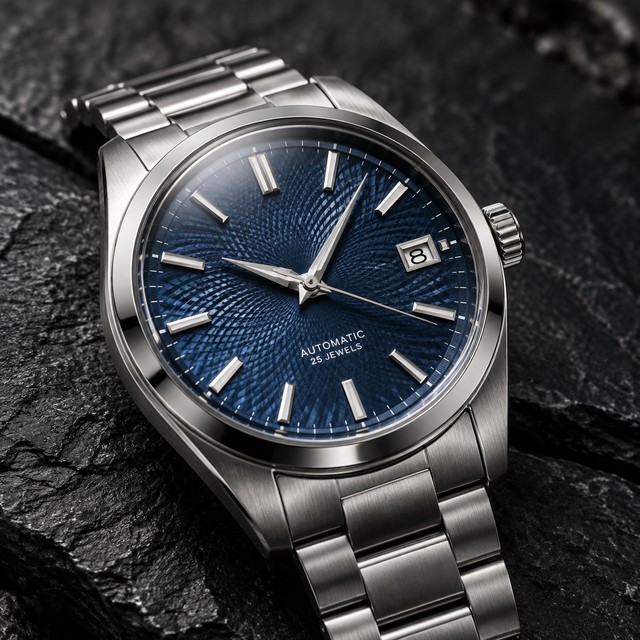 | 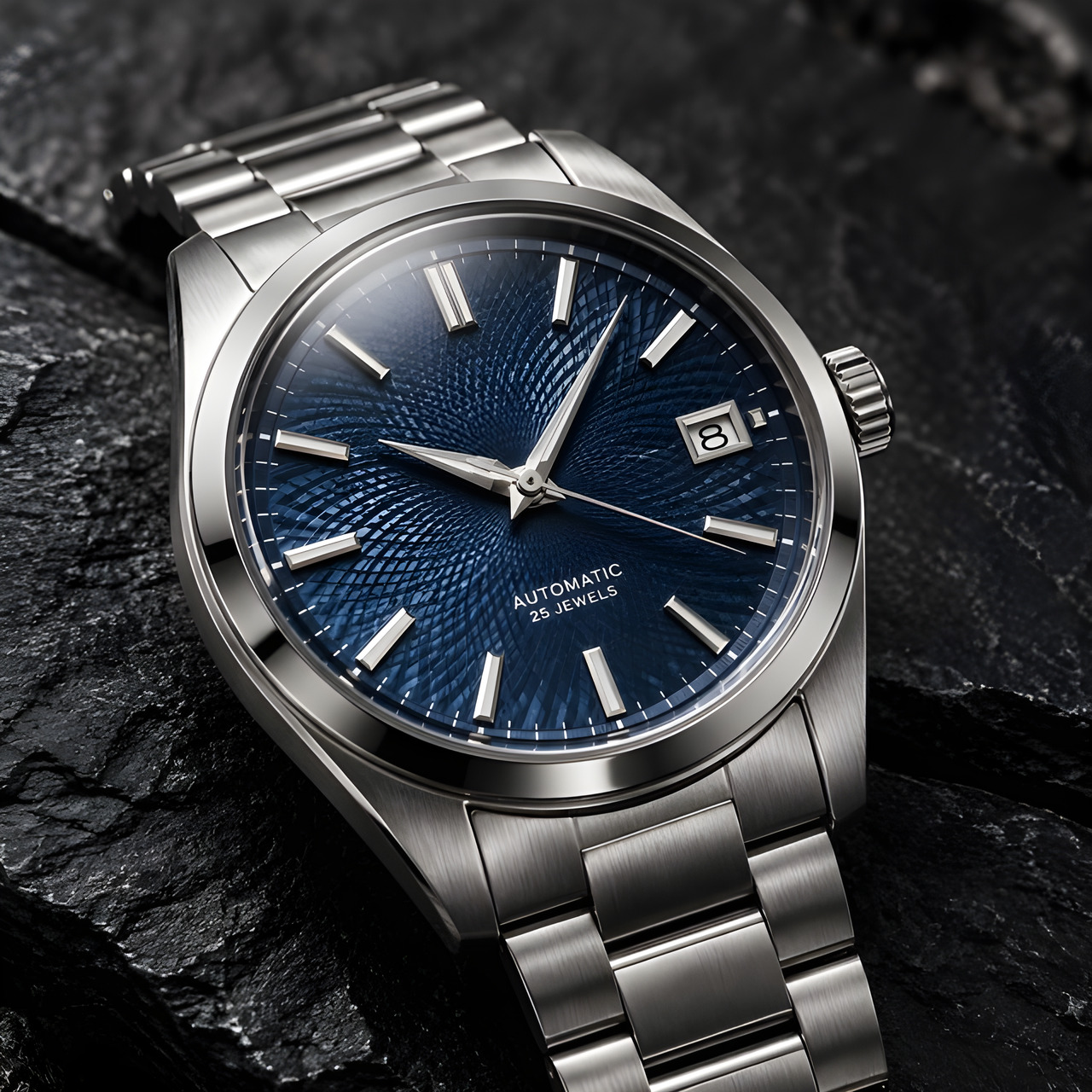 |
recraft/crisp-upscale, 640×640 → 1280×1280, $0.004. The guilloché dial, brushed steel, and small dial text stay crisp at double size.
Open the model page and upload one →
Two ways to start
Browser, 3 steps: open the model page → upload the image → hit upscale. One image is $0.004.
API, 3 steps: POST /v1/tasks to submit → take the taskId → poll to success, then download. For batches, loop those three steps once per image.
curl: your first image
curl -X POST https://api.hiapi.ai/v1/tasks \
  -H "Authorization: Bearer YOUR_API_KEY" \
  -H "Content-Type: application/json" \
  -H "Idempotency-Key: your-unique-key-001" \
  -d '{
  "model": "recraft/crisp-upscale",
  "input": {
    "image_url": "https://static.hiapi.ai/gallery/2026/10/4fdfd6b43b638849.jpg"
  }
}'
That's the whole request body — any extra field (like prompt or scale) returns a 400.
Python: submit, poll, download
import time, uuid, requests

BASE = "https://api.hiapi.ai/v1/tasks"
HEADERS = {
    "Authorization": "Bearer YOUR_API_KEY",
    "Content-Type": "application/json",
}

payload = {
    "model": "recraft/crisp-upscale",
    "input": {
        "image_url": "https://example.com/your-image.jpg",
    },
}

resp = requests.post(
    BASE,
    headers={**HEADERS, "Idempotency-Key": str(uuid.uuid4())},
    json=payload,
    timeout=30,
)
resp.raise_for_status()
task_id = resp.json()["taskId"]

while True:
    task = requests.get(f"{BASE}/{task_id}", headers=HEADERS, timeout=30).json()
    print(task["status"])
    if task["status"] in ("success", "fail"):
        break
    time.sleep(5)

if task["status"] == "success":
    image_url = task["output"][0]["url"]   # temporary URL — download promptly
    img = requests.get(image_url, timeout=60)
    with open("upscaled.jpg", "wb") as f:
        f.write(img.content)
    print("saved upscaled.jpg")
Parameters
| Field | Required | Values | Notes |
|---|---|---|---|
image_url | yes | public http/https URL | JPEG / PNG / WebP, up to 10 MB |
That's it. The scale is fixed at 2× on both axes; there is no prompt and no output-format field.
Errors you'll actually hit
| Status | Meaning | What to do |
|---|---|---|
| 400 INVALID_REQUEST | image_url missing, not an http/https URL, or extra fields like prompt / scale sent | Keep only image_url in the body |
| 402 INSUFFICIENT_QUOTA | Out of credits (no charge) | Top up and retry |
| 429 RATE_LIMITED | Rate limited | Slow your submissions |
| 409 / 422 IDEMPOTENCY_KEY_* | Same idempotency key resubmitted | Generate a fresh key |
Terminal failures use TASK_FAILED, TASK_TIMEOUT, and similar codes; failed tasks are not billed.
Before you ship
- Callbacks: pass
"callback": {"url": "https://..."}at the request top level. - Persist outputs:
output[0].urlis temporary — download it right away. - Latency: one image usually takes 10 seconds to about a minute; don't poll too aggressively.
- Transparency: the output is JPEG without an alpha channel; upscale first, then remove backgrounds.
- Batch math is simple: five images per SKU = $0.02; 1,000 catalog assets = $4.00 — submit them in one batch; each task is timed independently.
- Source quality sets the ceiling: 2× sharpens edges, but blurred areas will not grow new detail; test one key asset before batching.
FAQ
Is it really 2×?
Yes — both axes double (640×640 → 1280×1280, 480×640 → 960×1280). The scale is fixed with no 4× option; run it twice for more.
Does the lettering change?
No. Poster text keeps its exact letterforms — nothing rewritten or added.
How much is one image?
$0.004 each, or $4.00 per 1,000; input size never changes the price. Failed tasks are not billed, and validation rejections never bill.
Can I send base64?
No. image_url needs a public http/https URL; upload local files to your storage first.
How long does one take?
Usually 10 seconds to about a minute; batch jobs queue per image, so submit in waves when time matters.
Next: take one of your product shots and upscale it on the model page; five real "original → 2×" pairs are in the examples page; the same-source test against generative repainting is in the comparison.