TL;DR
- What this is: a real, end-to-end workflow for turning a single still photo into a native-audio, vertical short-form video clip using veo-3.1-lite/image-to-video on the hiapi API. Every image, prompt, and API call on this page is the actual output from the requests shown.
- Why image-to-video for short-form content: you keep full control of composition, branding, and product framing in a still image, then let the model add motion and ambient sound — instead of hoping a text-to-video prompt lands on the right shot.
- Verified API facts: the task takes exactly five input fields —
prompt,image_url(a single public URL, not an array),duration(4, 6, or 8 seconds),resolution(720por1080p), andgenerate_audio(boolean). The schema is strict — anything else is rejected. - Real cost: a 4-second 720p clip with native audio runs $0.40 ($0.10/second); dropping audio brings it to $0.24 ($0.06/second). See pricing for current rates.
- Real render time: the 4-second clip embedded below went from submitted task to a downloadable file in about 55 seconds.
Why Image-to-Video Fits Short-Form Content
TikTok and Reels-style clips live and die on the first frame — the thumbnail people decide to tap on. Text-to-video is a gamble on composition: you describe a scene and hope the model frames it the way you need. Image-to-video flips that around. You lock in the exact shot — product placement, lighting, aspect ratio — as a still image, then hand only the motion to the model: what should drift, steam, ripple, or shift while the camera holds.
That split is exactly what veo-3.1-lite/image-to-video is built for: feed it one photo and a motion prompt, and it returns a native 9:16-capable MP4 with synced audio, without you touching a video editor.
The Demo: One Still Photo, Then Motion
To keep this concrete, we ran the full pipeline ourselves on a simple subject: an iced matcha latte, framed the way a drink-recipe or cafe account would shoot it for a vertical feed.
Step 1 — The source photo
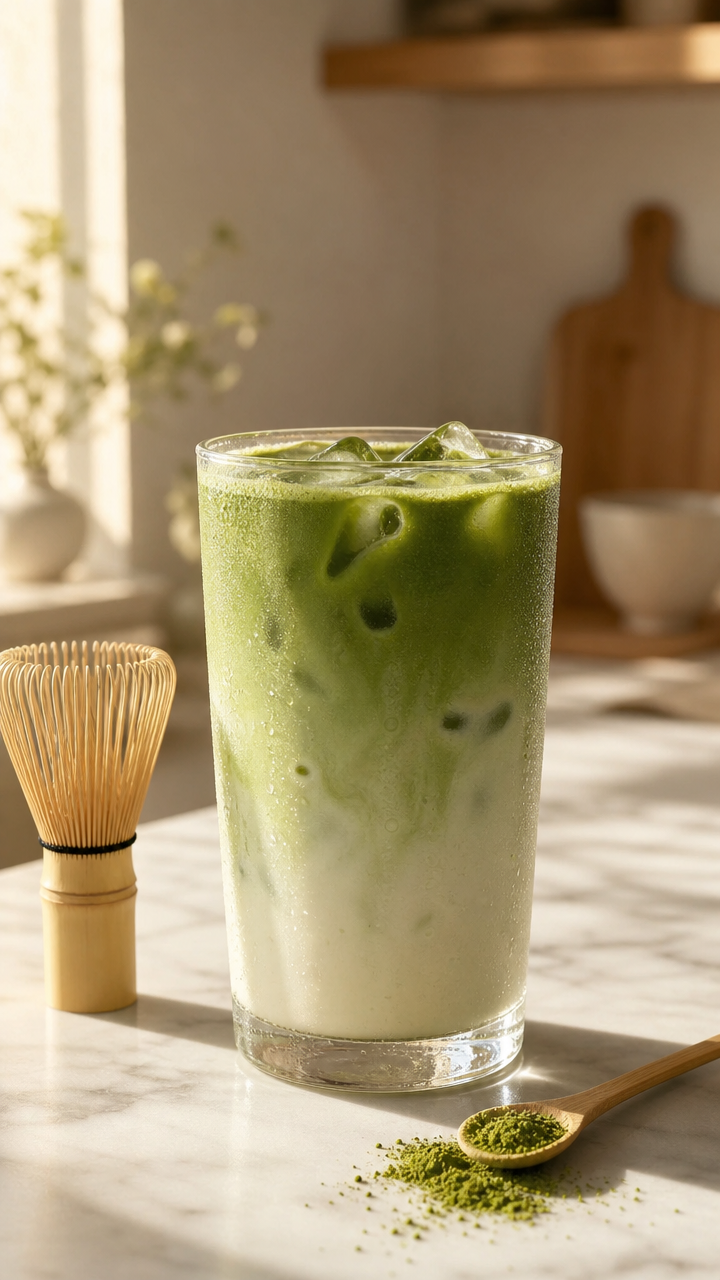
This still was generated with gpt-image-2/text-to-image at a 9:16 aspect ratio, using this exact prompt:
A vertical 9:16 studio product photograph of an iced matcha latte in a clear glass
on a white marble countertop, visible ice cubes and vivid green matcha layered against
milk, soft warm morning sunlight streaming in from the left casting a long soft shadow,
a small bamboo matcha whisk and a light wooden scoop with loose matcha powder resting
beside the glass, fine condensation droplets on the glass exterior, a blurred
cream-and-beige kitchen background with shallow depth of field, warm natural color
grade, high-resolution commercial beverage photography, no text, no watermark,
no hands, no logos
Any static image works as long as it's a public URL — a real product photo, a screenshot, or, as here, an AI-generated still.
Step 2 — Animating it
That's the actual output — a 4-second, 720p, 9:16 MP4 with synced audio, generated from the still above using this motion prompt:
Camera holds a slow, steady static shot with no camera movement or zoom. Gentle
wisps of steam rise from the iced matcha latte, fine condensation droplets slowly
trickle down the glass, and the ice cubes shift subtly with a soft clink. Warm
morning sunlight flickers gently as if from a light breeze outside a nearby window.
Soft ambient cafe background sound with a faint ceramic clink and quiet room tone.
Notice the prompt says almost nothing about the subject itself — the photo already defines that. It only describes what should move and what should be heard, which is the whole point of using image-to-video instead of text-to-video for a shot you've already composed.
Making the API Call
Under the hood, every model on hiapi — image or video — runs through the same async task pattern: submit, poll, download. For veo-3.1-lite/image-to-video the request looks like this:
curl -s -X POST https://api.hiapi.ai/v1/tasks \
  -H "Authorization: Bearer $HIAPI_API_KEY" \
  -H "Content-Type: application/json" \
  -d '{
    "model": "veo-3.1-lite/image-to-video",
    "input": {
      "prompt": "Camera holds a slow, steady static shot with no camera movement or zoom. Gentle wisps of steam rise from the iced matcha latte...",
      "image_url": "https://your-cdn.example.com/still.jpg",
      "duration": 4,
      "resolution": "720p",
      "generate_audio": true
    }
  }'
That returns a taskId immediately. Poll it until the status flips to success, then grab the file from output[0].url — that link expires, so download it right away instead of linking to it directly:
import subprocess, json, time

def animate_still(token, image_url, prompt, duration=4, resolution="720p", audio=True):
    def curl(args):
        r = subprocess.run(
            ["curl", "-s", "--max-time", "60", *args,
             "-H", f"Authorization: Bearer {token}"],
            capture_output=True, check=True,
        )
        return json.loads(r.stdout)

    payload = {
        "model": "veo-3.1-lite/image-to-video",
        "input": {
            "prompt": prompt,
            "image_url": image_url,
            "duration": duration,
            "resolution": resolution,
            "generate_audio": audio,
        },
    }
    task = curl(["-X", "POST", "https://api.hiapi.ai/v1/tasks",
                 "-H", "Content-Type: application/json",
                 "-d", json.dumps(payload)])
    task_id = task["data"]["taskId"]

    while True:
        status = curl([f"https://api.hiapi.ai/v1/tasks/{task_id}"])["data"]
        if status["status"] in ("success", "fail"):
            break
        time.sleep(5)

    if status["status"] != "success":
        raise RuntimeError(status.get("error"))
    return status["output"][0]["url"]  # download immediately — this link expires
This is the same pattern documented for any task-based model on hiapi, and the same one we used to render the clip above.
What the schema actually accepts
We verified this by hand against the live endpoint, so treat it as ground truth rather than a guess:
prompt— string, describes motion (and, ifgenerate_audiois on, sound).image_url— a single public URL. Not an array like some other i2v models on the platform use — passing a list here will fail.duration— integer, one of4,6, or8seconds. No other values are accepted.resolution—"720p"or"1080p".generate_audio— boolean. Turns native synced audio on or off.- The schema is strict: send an unrecognized field and the request is rejected outright rather than silently ignored.
What a Clip Actually Costs
Pricing is per output second and depends on resolution and whether audio is enabled (current as of September 2026 — check the live pricing page before budgeting at scale):
720pwith audio: $0.10/s — a 4-second clip is $0.40.720pwithout audio: $0.06/s — the same clip drops to $0.24.1080pwith audio: $0.14/s.1080pwithout audio: $0.10/s.
For a short-form content calendar, that math is the real lever: a batch of ten 4-second 720p clips with audio runs about $4.00; the same batch without audio is $2.40. If the sound design matters to the post (ambient cafe noise, a product's tactile click, footsteps), keep audio on — it's the difference between a demo clip and something that feels shot on location.
If you need more than 8 seconds per clip, or want independent control over camera motion at longer durations, hiapi also runs veo-3.1-fast (higher fidelity, from $0.25/s) and the flagship veo-3.1 tier (from $0.57/s) — both text-to-video and image-to-video. For most short-form social cuts, though, lite is the right default: it's a fraction of the cost and the output is already tuned for vertical, sub-10-second clips.
For a different take on the same short-form problem — longer clips, more manual control over first/last frame — we've also run the numbers on building a short-form workflow with seedance-2.0-mini, which trades native audio-from-photo for durations up to 15 seconds at a lower per-second rate.
FAQ
Does veo-3.1-lite/image-to-video accept multiple reference images?
No. image_url takes exactly one public URL. If you need a model that blends several reference images, that's a different call — check the model's own page for its exact input schema before assuming it matches this one.
Can I get more than 8 seconds out of a single call?
Not on lite. The duration field only accepts 4, 6, or 8. For longer single clips, look at other video models on the platform's video API collection, several of which support durations past 15 seconds.
Does the output already have native audio, or do I need to add sound in post?
If generate_audio is true, the returned MP4 already has a synced AAC audio track — no separate sound design pass needed. Set it to false if you plan to score the clip yourself or don't need ambient sound.
Do I need a video model at all, or can gpt-image-2 output already be posted directly?
Plenty of short-form feeds mix static and motion content, so a still from gpt-image-2/text-to-image is a fine post on its own. Image-to-video is for when the platform (or the moment) calls for motion — a product detail, a subtle before/after, a loop — without reshooting.
What happens if I pass an invalid duration, like 5?
The request is rejected before any task is created — you get a schema error back immediately rather than a wasted render.
Ready to try it? The veo-3.1-lite/image-to-video model page has a live playground where you can drop in your own photo and prompt before writing a single line of code.