Most "prompt tips" articles hand you a sentence and leave you to guess the rest. This one is built the other way around: three complete, copy-paste prompts for Wan 3.0 Prime (wan3.0-video-prime on HiAPI), each shown next to the exact request that produced the clip under it. One is plain text-to-video, one adds synchronized audio, and one drives a reference image to keep a specific subject on-model. Open the model page if you want to run them while you read.
Every clip below was rendered at 480P for 5 seconds — $0.4375 each, $1.31 for all three. That is the deliberately cheap setting for drafting; the same prompt at 720P or 1080P is identical in wording, just a higher resolution value. Treat 480P as your idea-testing tier and re-run keepers at full resolution.
What makes Wan 3.0 Prime prompts different
Prime is the fast tier of the Wan 3.0 video family. Three things about it change how you write prompts:
- It listens for motion and camera language. Verbs like dolly-forward, 180-degree orbit, slow push-in actually steer the shot. A static noun-pile ("a cat, a street, neon") wastes the model; a directed sentence gets you a directed clip.
- It can generate sound. Set
audio: trueand the model scores the scene — ambience, foley, a light music bed — timed to what it rendered. Leave itfalseand you get a silent clip. (We checked:audio: trueclips come back with a real audio track,falseclips have none.) - It takes references, not just words. A text prompt describes a category ("a ceramic fox"); a reference image fixes an identity. Pass one or more images and Prime animates that exact subject instead of inventing a new one each run.
The input schema, in 30 seconds
| Field | Type | Notes |
|---|---|---|
prompt | string | Required. Subject + camera + motion + lighting + (optional) audio cues |
resolution | string | 480P, 720P, or 1080P |
duration | integer | 2–30 seconds |
aspect_ratio | string | adaptive, 16:9, 4:3, 1:1, 3:4, 9:16 |
audio | boolean | true adds synchronized sound; false is silent |
reference_image_urls | string[] | Images of the subject to keep on-model (reference-to-video) |
seed | integer | Reuse for repeatable results |
That is the whole surface you need for the recipes below. Spec-level details and live prices live on the model page and the pricing page — this guide stays on the prompts.
Recipe 1 — Cinematic product shot (text-to-video)
The prompt (copy-paste):
A single scoop of pistachio gelato in a frosted coupe glass on a pale marble
counter; slow 180-degree orbit as a bead of condensation slides down the glass,
soft window light from the left, shallow depth of field, warm late-afternoon
tones, faint steam curling from an espresso cup just behind in soft focus.
The request:
{
  "model": "wan3.0-video-prime",
  "input": {
    "prompt": "A single scoop of pistachio gelato in a frosted coupe glass ...",
    "resolution": "480P",
    "duration": 5,
    "aspect_ratio": "16:9",
    "audio": false
  }
}
Why it works: the sentence is ordered the way the model reads a shot — subject, camera move, a single hero detail, light direction, depth, color grade. "Slow 180-degree orbit" gives it one clear camera instruction instead of asking for everything at once, and "a bead of condensation slides down the glass" gives it one small motion to animate, which reads as realism. Naming the light direction ("from the left") and "shallow depth of field" is what keeps the background creamy instead of busy. This is the template for any product or food clip: one subject, one camera move, one micro-motion.
Recipe 2 — Atmosphere with synchronized audio (text-to-video)
Turn your sound on for this one — audio: true scored the rain, the traffic hiss and the grill sizzle to match the picture.
The prompt (copy-paste):
Rain streaking down a narrow neon-lit alley at night; a slow dolly-forward past
steaming street-food stalls, magenta and cyan reflections rippling in the wet
pavement, a tabby cat darting between crates mid-shot. Ambient sound: steady
rain, distant traffic hiss, the sizzle of a grill and a low synth drone.
The request:
{
  "model": "wan3.0-video-prime",
  "input": {
    "prompt": "Rain streaking down a narrow neon-lit alley at night ...",
    "resolution": "480P",
    "duration": 5,
    "aspect_ratio": "16:9",
    "audio": true
  }
}
Why it works: audio prompting is its own little skill. Put the visual scene first, then add a dedicated "Ambient sound:" clause listing 3–4 concrete, layered sources — a continuous bed (rain), a distant layer (traffic), a close foley hit (the grill), and a tonal layer (the synth drone). Vague requests like "cinematic audio" give you mush; naming the layers gives the model a mix to build. The visual side follows the same one-camera-move rule as Recipe 1 ("slow dolly-forward"), plus one moving subject (the cat) so the frame is alive without being chaotic.
Recipe 3 — Keep a subject on-model (reference-to-video)
This is Prime's headline trick. A plain prompt reinvents the subject every run; a reference image locks it. We generated one still of a ceramic fox figurine, then passed it in reference_image_urls so the clip animates that fox — same glaze, same scarf — instead of a random one.
Reference image in →
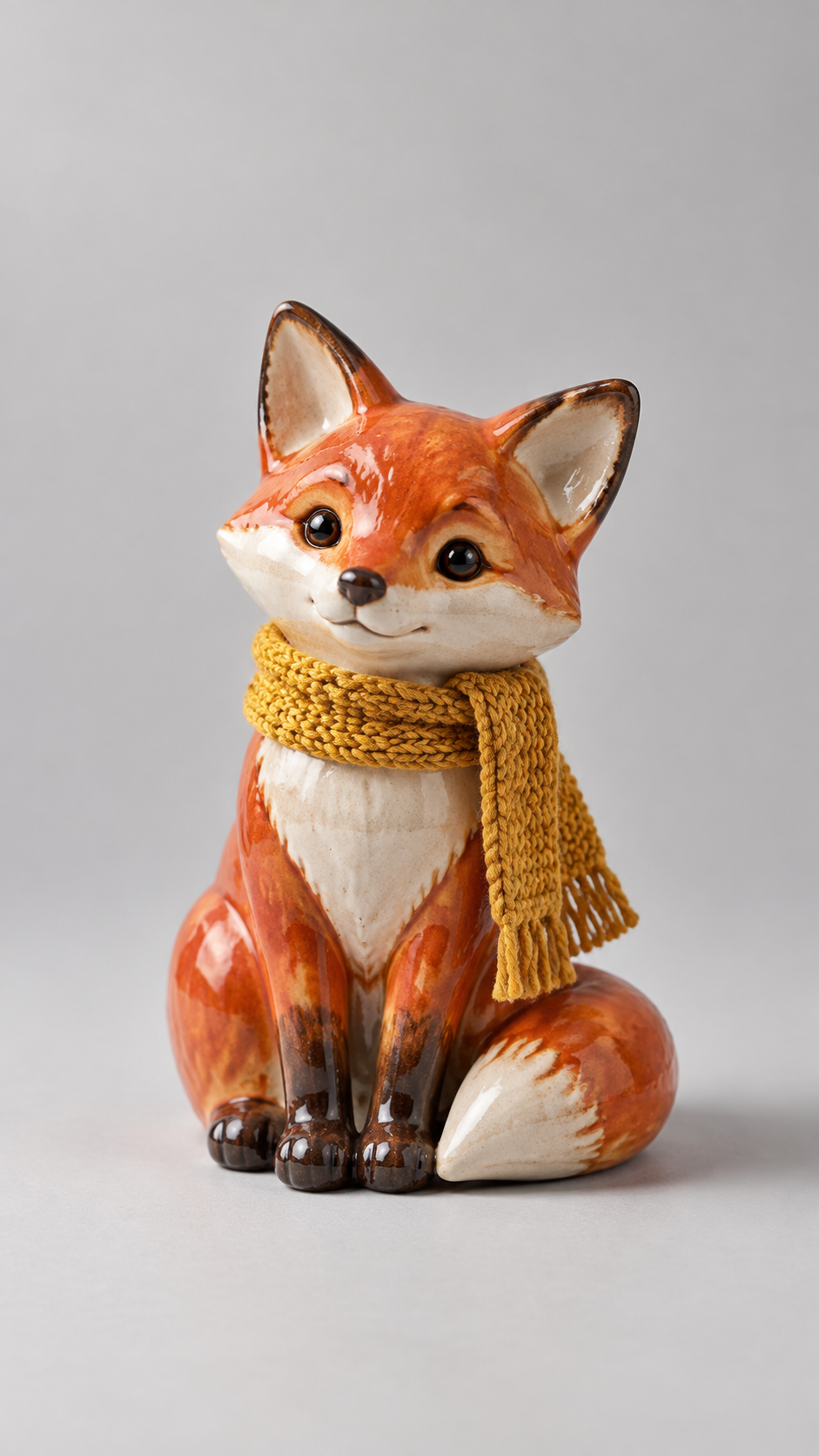
→ animated clip out:
The prompt (copy-paste):
Bring the referenced ceramic fox figurine to life: it slowly turns its head
toward camera, blinks, and tilts with a curious expression; subtle idle
breathing, a light breeze stirring the tiny scarf, soft studio key light on a
clean seamless backdrop, smooth loopable motion.
The request:
{
  "model": "wan3.0-video-prime",
  "input": {
    "prompt": "Bring the referenced ceramic fox figurine to life ...",
    "resolution": "480P",
    "duration": 5,
    "aspect_ratio": "9:16",
    "audio": false,
    "reference_image_urls": [
      "https://static.hiapi.ai/blog/wan3-0-video-prime-prompt-recipes/recipe-3-reference-fox.jpg"
    ]
  }
}
Why it works: when you supply a reference, stop describing the subject and start directing it. The prompt opens with "Bring the referenced … to life" so the model knows the image is the source of truth, then spends every word on motion the image can't contain — "turns its head," "blinks," "idle breathing," "a light breeze stirring the scarf." "Smooth loopable motion" nudges it toward a clean start/end for social loops, and aspect_ratio: 9:16 keeps it vertical. Give the reference a clean, well-lit subject on a simple background and the identity holds; busy references with multiple subjects are where consistency slips.
A pattern you can reuse
Every prompt above is the same skeleton, which is the real takeaway:
- Subject — one clear hero (or "the referenced …" when you pass an image).
- Camera — exactly one move (orbit, dolly-forward, push-in). Not three.
- Motion — one or two small things that actually move. Life, not chaos.
- Look — light direction, depth of field, color grade.
- Audio (optional) — an "Ambient sound:" clause with named, layered sources.
Change the nouns, keep the shape.
Reproduce any recipe with the API
Prime runs on the async task API. Submit a job, poll until it is success, then download the clip from the output URL (it is a temporary link — save it straight away).
# 1) submit
curl -s -X POST https://api.hiapi.ai/v1/tasks \
  -H "Authorization: Bearer $HIAPI_KEY" \
  -H "Content-Type: application/json" \
  -d '{
    "model": "wan3.0-video-prime",
    "input": {
      "prompt": "A single scoop of pistachio gelato ...",
      "resolution": "480P", "duration": 5, "aspect_ratio": "16:9", "audio": false
    }
  }'
# -> { "data": { "taskId": "tk-..." } }

# 2) poll until data.status == "success"
curl -s https://api.hiapi.ai/v1/tasks/tk-... \
  -H "Authorization: Bearer $HIAPI_KEY"
# success payload carries the clip URL under output[0].url
Rendering a 5-second clip takes well under a couple of minutes in our runs. Keep your draft loop at 480P, and only spend on 720P/1080P once a prompt is locked. Full reference lives in the HiAPI docs.
What it costs
Billing is per second of output, as of 2026-10:
- 480P — $0.0875/s (a 5s clip is $0.4375)
- 720P — $0.18/s (a 5s clip is $0.90)
- 1080P — $0.36/s (a 5s clip is $1.80)
So a tight draft cycle at 480P costs cents, and you reserve the real money for the one clip you ship. If you only need all-purpose generation without the Prime speed tier, the standard wan3.0-video model is cheaper per second. Live numbers are always on the pricing page.
FAQ
Does wan3.0-video-prime really generate sound?
Yes. Set audio: true and the clip comes back with a synchronized audio track scored to the scene; audio: false returns a silent clip. Recipe 2 above was rendered with audio: true.
How long can a clip be?
duration is an integer from 2 to 30 seconds. Cost scales linearly with length, so a 10-second 480P clip is double a 5-second one.
What resolutions and aspect ratios are supported?
resolution is 480P, 720P, or 1080P. aspect_ratio accepts adaptive, 16:9, 4:3, 1:1, 3:4, and 9:16 — use 9:16 for vertical social clips, as in Recipe 3.
How do I keep the same character or product across clips?
Pass images in reference_image_urls and write the prompt about motion rather than appearance. For multi-subject consistency and a deeper walkthrough of the reference workflow, see our reference-to-video prompt recipes.
Can I get repeatable results?
Pass a fixed integer seed with the same prompt and settings to stay close to a previous render.
Why do my drafts look soft?
They are 480P on purpose — the cheap draft tier. Bump resolution to 720P or 1080P once the wording is right; the prompt does not change.
Takeaway
Prime rewards direction, not description: one subject, one camera move, one or two real motions, a stated look, and — when you want it — a named audio layer. Draft at 480P for cents, lock the prompt, then re-run the keeper at 720P or 1080P. For reference work, let the image carry the identity and spend your words on movement. When you are ready to try your own, open wan3.0-video-prime and paste in one of the prompts above — then change the nouns. For more camera-and-motion ideas, the Kling 3.0 Motion Control recipes use the same prompt skeleton.




