Four Wan 3.0 prompts with real outputs: two from text, one from a reference image, one from a first frame. Every clip is 480P, 5 seconds, with sound, and cost $0.20. Standard Wan 3.0 (wan3.0-video) is live on HiAPI: click any "Generate" link and the model page opens with the prompt filled in. New accounts get 200 free credits.
1. Street food with sound
A steaming noodle stall at a night market, close on the cook's hands as she
lifts a tangle of noodles from a boiling pot and swirls them into a
blue-rimmed bowl; slow push-in, warm tungsten light against cool blue street
glow, steam drifting through the frame. Sound: rolling boil, the clink of a
ladle, crowd murmur and a scooter passing in the distance.
Generate with this prompt → (480P, 5 seconds, 16:9, sound on)
wan3.0-video, text-to-video, 480P, 5 seconds, $0.20.
The hands, noodles, steam and passing scooters all came through, and the soundtrack follows the "Sound:" line. Write sound as its own sentence at the end of the prompt, listing two to four specific noises.
2. Landscape with a person for scale
Aerial shot rising slowly over layered rice terraces at sunrise, mist pooling
in the valleys, a single farmer in a straw hat walking along a narrow ridge,
golden light catching the water in each terrace; smooth continuous camera,
no cuts. Sound: soft wind, distant birdsong.
Generate with this prompt → (480P, 5 seconds, 16:9, sound on)
wan3.0-video, text-to-video, 480P, 5 seconds, $0.20.
The farmer walks the ridge in one continuous shot, and the light catches each terrace. The camera rose only slightly in 5 seconds; for a stronger move, ask for it twice ("rising steadily, climbing higher") or give it 8–10 seconds.
3. Animate a product from a reference image
Reference image (Image1):
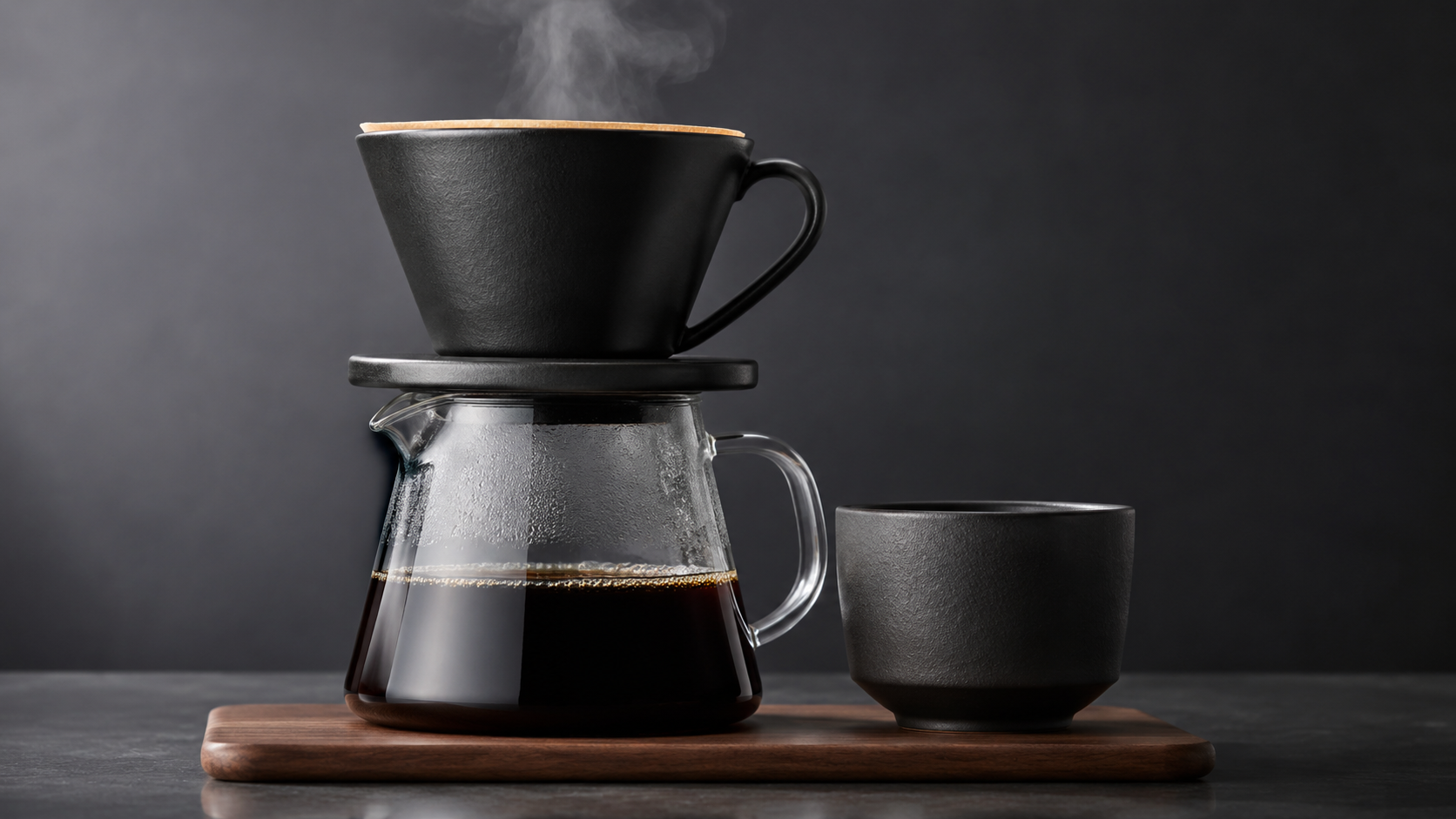
Use Image1 as the product: the ceramic pour-over coffee set. Slow quarter
orbit around it on the wooden counter, a thin stream of hot water pours into
the dripper and steam rises, soft morning window light, shallow depth of
field, keep the shapes and glaze of the set exactly as in Image1. Sound:
gentle pouring water and a quiet kitchen.
Open the model page with this prompt → (add your product photo as a reference image, 480P, 5 seconds)
wan3.0-video, one reference image, 480P, 5 seconds, $0.20. Reference images don't add to the price.
The matte black dripper, glass server, cup and walnut tray match Image1, and the dark studio became the bright kitchen the prompt asked for. The orbit came out as a gentle drift. Refer to your images as Image1, Image2 in the order you send them.
4. Bring a still to life from its first frame
First frame:
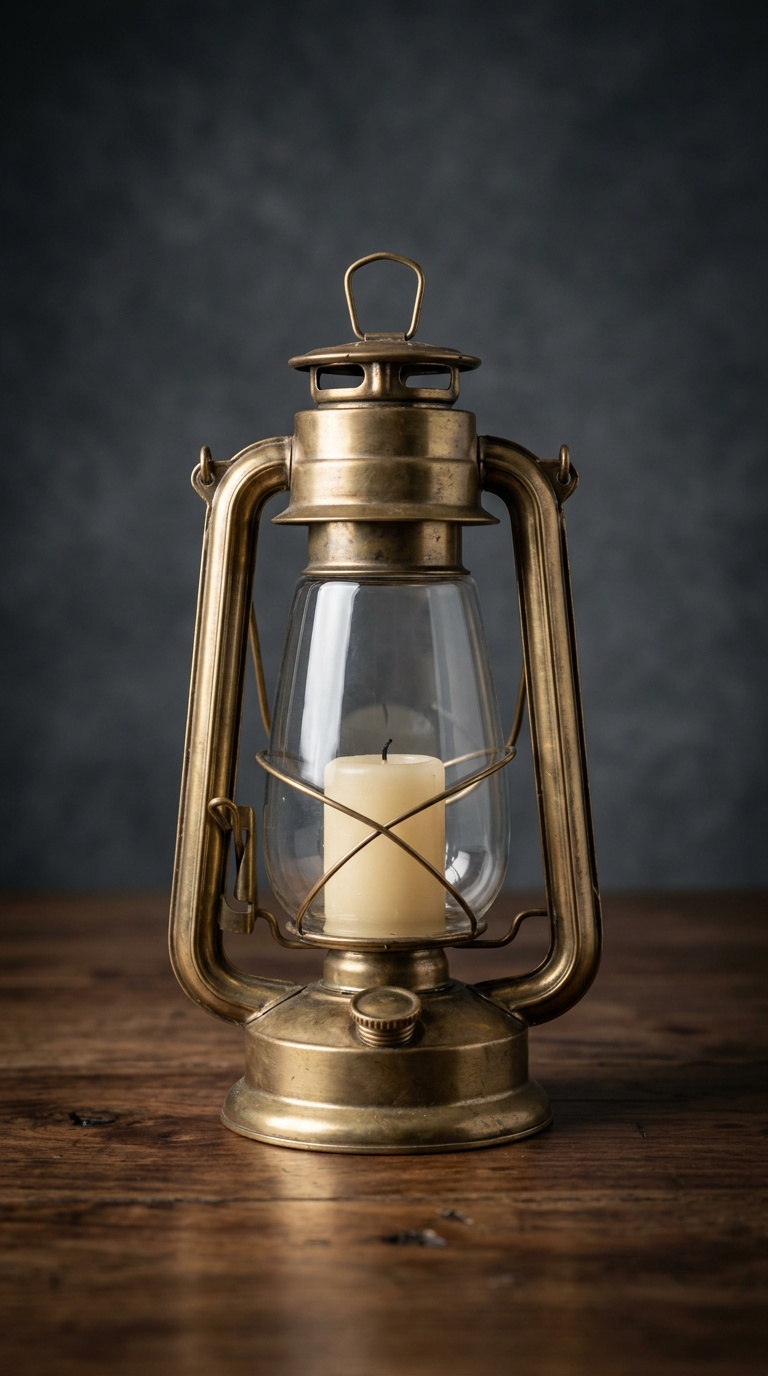
The candle inside the brass lantern catches and flares into a steady flame,
warm light blooms across the glass and the walnut table, the camera pushes
in slowly; dust motes float in the glow. Sound: a soft match strike and a
faint crackle.
Open the model page with this prompt → (add your first frame, 480P, 5 seconds, aspect ratio adaptive)
wan3.0-video, first frame, 480P, 5 seconds, vertical, $0.20.
Asking for the sound of a match strike made the model add a hand with a match. If you want the flame to appear on its own, drop the match from the sound line. With aspect_ratio set to adaptive, the clip followed the vertical first frame.
Writing tips in three lines
- Scene, action, camera, light, then a separate "Sound:" line. Sound is on by default and free, so use it.
- Sounds can add things to the picture. A "match strike" brought a hand into frame; name only the sounds you want to see the source of.
- Draft at 480P for $0.20, then re-run the keeper at 720P ($0.40) or 1080P ($0.80) with the same prompt.
Request shapes for the three modes
{"model": "wan3.0-video", "input": {"prompt": "...", "resolution": "480P", "duration": 5, "aspect_ratio": "16:9"}}
{"model": "wan3.0-video", "input": {"prompt": "Use Image1 as the product ...", "reference_image_urls": ["https://your-cdn.example.com/product.jpg"], "resolution": "480P", "duration": 5}}
{"model": "wan3.0-video", "input": {"prompt": "...", "first_frame_url": "https://your-cdn.example.com/frame.jpg", "resolution": "480P", "duration": 5, "aspect_ratio": "adaptive"}}
Resolution must be uppercase, and it defaults to 1080P, so always set it. First frame and reference inputs can't be combined in one request.
Full prices are in Wan 3.0 API pricing, and code in the Wan 3.0 API guide. Copy the noodle-stall prompt and generate your first clip for $0.20.