If you only have time to run one test before picking an image model, run this one: the same prompt, through both models, side by side. That's what this article does with GPT Image 2 and Grok Imagine Image 2.0 — two text-to-image models available on the same hiapi API — so you can see the actual difference in detail, color, and price instead of guessing from spec sheets.
Short answer: GPT Image 2 renders more texture and a punchier, warmer cinematic grade on close-up photoreal subjects, and its tiered pricing ($0.03–$0.06) rewards picking a lower resolution when you don't need 2K/4K. Grok Imagine Image 2.0 produces a softer, more muted result at a flat $0.052 per image regardless of resolution — simpler to budget, but not automatically cheaper. Neither is a universal winner; the side-by-side below shows you why.
Same Prompt, Two Models: The Side-by-Side Test
We wrote one prompt, ran it through each model with no edits, and generated both images at 2K / 16:9. No cherry-picking, no re-rolls — what you see below is the first output from each model.
GPT Image 2

Prompt used:
A close-up portrait of an elderly fisherman mending a net on a wooden dock at sunrise, deep wrinkles and sea-weathered skin, thick grey beard flecked with salt, wearing a faded navy wool sweater, soft golden rim light from the rising sun, misty harbor in the background with silhouetted fishing boats, shot on an 85mm lens with shallow depth of field, ultra-detailed skin texture, photorealistic, cinematic color grading
GPT Image 2 leans into the "ultra-detailed skin texture" and "cinematic color grading" parts of the prompt hardest: the wrinkles, beard, and net fibers all carry fine, almost tactile detail, and the light reads as a saturated, warm golden-orange with teal-tinted shadows in the harbor mist — a more graded, "finished photograph" look.
Grok Imagine Image 2.0
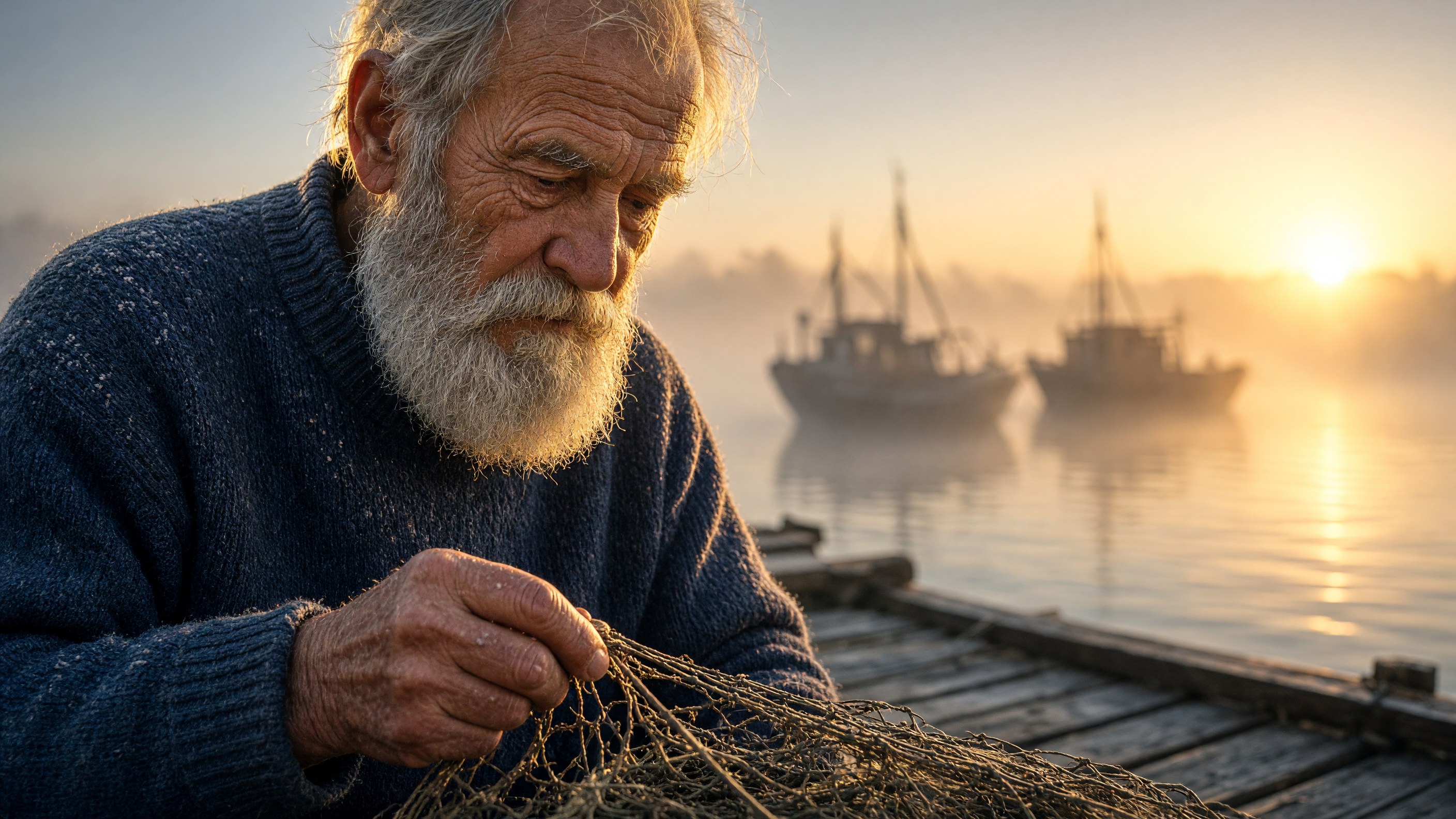
Prompt used:
A close-up portrait of an elderly fisherman mending a net on a wooden dock at sunrise, deep wrinkles and sea-weathered skin, thick grey beard flecked with salt, wearing a faded navy wool sweater, soft golden rim light from the rising sun, misty harbor in the background with silhouetted fishing boats, shot on an 85mm lens with shallow depth of field, ultra-detailed skin texture, photorealistic, cinematic color grading
Grok Imagine Image 2.0 composes a slightly wider shot, pulling back enough to show the sun itself as a soft disc on the horizon and more of the dock and boats. The color palette is cooler and more pastel — a gentle blue-to-gold gradient rather than GPT Image 2's saturated warmth — and the skin, beard, and net texture are smoother and less granular. It's a believable photo, just a calmer, more muted one.
What the Difference Actually Means for You
Neither output is "wrong" — they're two different stylistic defaults from the same instructions. If your use case depends on fine texture reading clearly at full size (product close-ups, skin/fabric detail, anything a user will zoom into), GPT Image 2's denser detail and stronger contrast will usually serve you better. If you want a softer, more atmospheric or editorial look straight out of the model — and you're fine doing less post-processing to tone down contrast — Grok Imagine Image 2.0's native palette is closer to that starting point.
Pricing: What You Actually Pay (as of 2026-10)
Pricing is where the two models diverge most clearly in structure, not just amount:
- GPT Image 2 is priced by output resolution: $0.03 at 1K, $0.04 at 2K, $0.06 at 4K. The image above was generated at 2K, so it cost $0.04.
- Grok Imagine Image 2.0 is a flat $0.052 per image, regardless of whether you generate at 1K or 2K.
That structure matters more than the headline number. If most of your generations only need 1K output, GPT Image 2 at $0.03 undercuts Grok Imagine Image 2.0's flat rate by nearly half. If you consistently need 2K, the gap narrows to $0.04 vs. $0.052 — still cheaper on GPT Image 2, but not by much. Grok Imagine Image 2.0's flat pricing is easier to forecast at scale since resolution choice doesn't change your unit cost, which is worth something even where it isn't the cheapest option. Full parameter and resolution details for each model live on their respective detail pages — check GPT Image 2's model page for the complete spec before you budget a production run.
Which Model Should You Use?
- Pick GPT Image 2 if you're generating photoreal portraits, product shots, or anything where fine texture needs to hold up at full resolution, and if you can route most calls through 1K or 2K to take advantage of the lower tiered pricing.
- Pick Grok Imagine Image 2.0 if you want a consistently softer, more muted aesthetic as your default output, or if flat, resolution-independent pricing simplifies your cost modeling more than saving a cent or two per image does.
- Test both if you're building a feature where output style directly affects user perception (e.g., a creative tool where users pick their own "vibe") — the two models are different enough that offering both as options can be a feature in itself.
FAQ
Is Grok Imagine Image 2.0 cheaper than GPT Image 2? Not universally. Grok Imagine Image 2.0 is a flat $0.052 per image. GPT Image 2 starts lower, at $0.03 for 1K output, and only crosses above Grok Imagine Image 2.0's price at the 4K tier ($0.06). Which is cheaper depends entirely on the resolution you actually need.
Do GPT Image 2 and Grok Imagine Image 2.0 use the same prompt format? Yes — both accept a plain text prompt with no special syntax, which is why we could run the exact same prompt string through both without modification for this comparison.
Can I use both models in the same product? Yes. Both are available through the same hiapi API, so switching — or offering a user-facing choice between them — is a model-name change in your API call, not a separate integration.
Which model is better for photorealistic portraits specifically? Based on the side-by-side above, GPT Image 2 held more fine detail (skin texture, net fibers) and a stronger contrast grade on the same portrait prompt. Grok Imagine Image 2.0 produced a softer, flatter-contrast version of the same scene.
Try It Yourself
The real test is your own prompt, not ours. Head to the GPT Image 2 model page to try it in the Playground, or see how GPT Image 2 stacks up against another model in GPT Image 2 vs Nano Banana Pro.