Both models live on hiapi, both take a text prompt, and both bill per image — so the real question is which one fits the job in front of you. FLUX.2 and Nano Banana 2 pull in different directions: one is a control-first renderer with a clean, filmic look, the other a context-rich generator with a 4K tier and editing built into the same model.
To keep this honest, we ran the same prompts through both models and looked at the actual outputs — text on a sign, hands on a pottery wheel, and a product shot with a countable detail. Everything below pairs those real generations with current per-image pricing pulled from hiapi's live pricing data (as of October 2026). Capability notes are general observations from these generations, not benchmark scores; run your own prompts before committing a pipeline to either model.
At a glance
| Dimension | FLUX.2 | Nano Banana 2 |
|---|---|---|
| hiapi model | flux-2/text-to-image | nano-banana-2 |
| Maker | Black Forest Labs | Google (Gemini 3.1 Flash Image) |
| Text-to-image | Yes | Yes |
| Built-in editing (image-to-image) | Separate model | Yes, in the same model (up to 14 reference images) |
| Max resolution | 4 MP | 4K tier |
| Entry price / image | $0.05 (1 MP); $0.0375 at the 0.5 MP draft tier | $0.036 (1K) |
| Top price / image | $0.125 (4 MP) | $0.086 (4K) |
| Tends to shine at | Prompt control, clean studio look, crisp in-image text | Rich real-world scenes, higher resolution, in-model editing |
Both are genuinely strong image models. Neither is a weak choice — they just optimize for different things, which the test images below make concrete.
The same prompts, both models
Every pair uses an identical prompt. The only variable is the model.
Text on a sign
A photorealistic storefront chalkboard A-frame sign reading MORNING ROAST / Single-Origin Pour-Over / Open 7am to 2pm with a chalk coffee-cup doodle, sunny cafe sidewalk
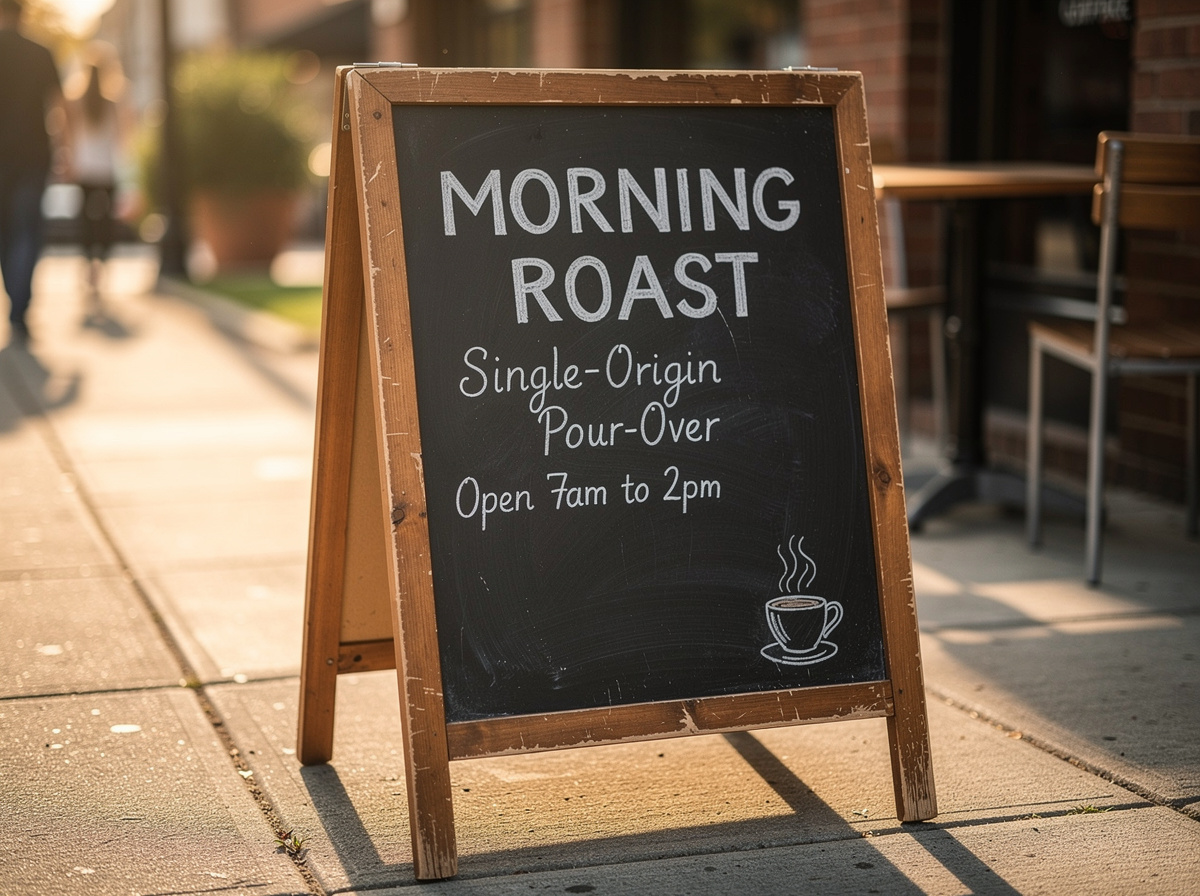 FLUX.2 — clean, tightly framed, controlled chalk texture.
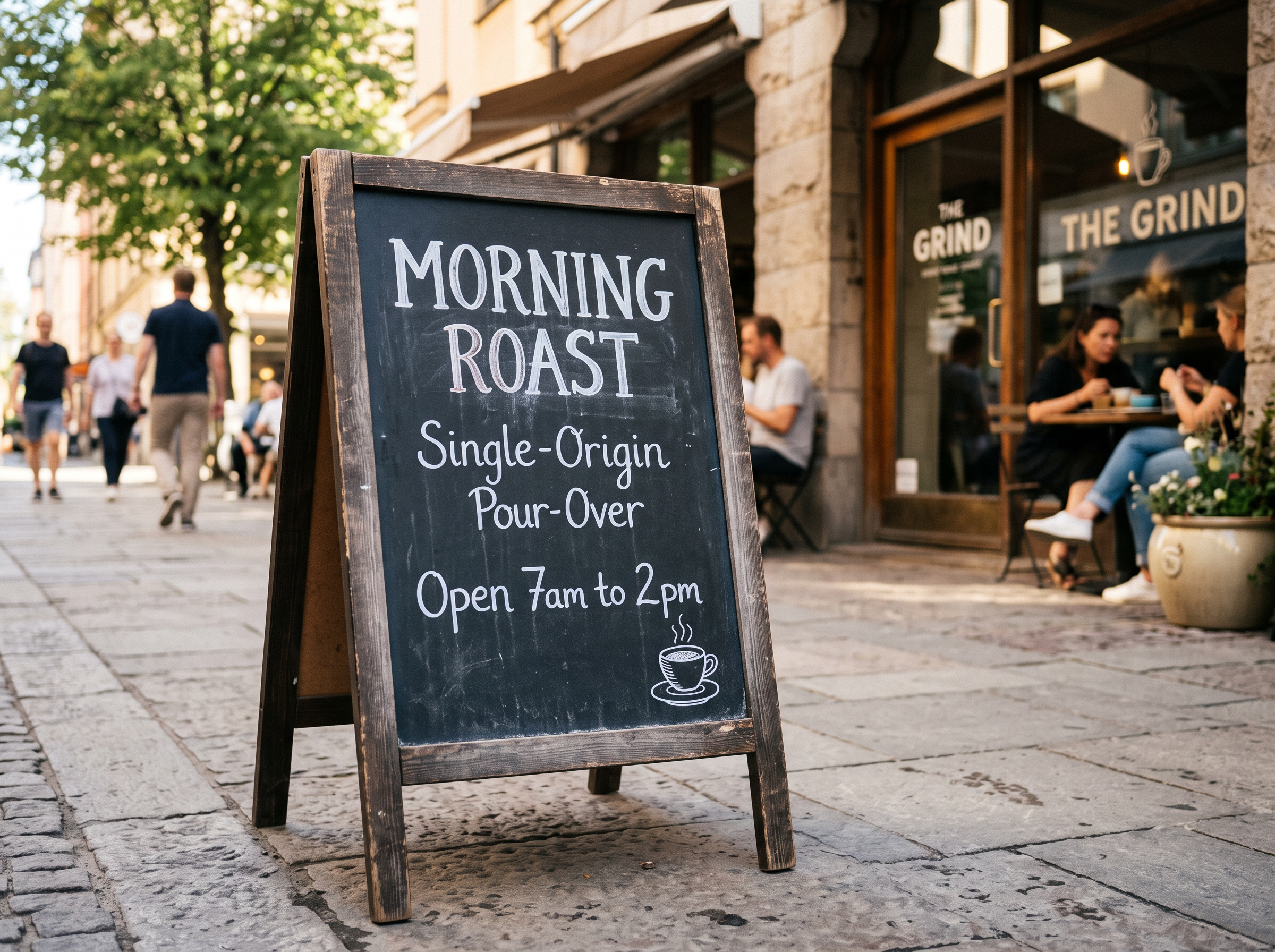 Nano Banana 2 — the same sign copy inside a fuller street scene.
Both models spelled the full three-line sign correctly — "MORNING ROAST", "Single-Origin Pour-Over", and "Open 7am to 2pm" are all legible and correct in each. The difference is interpretation, not accuracy. FLUX.2 kept the frame tight and the background simple, which reads like a controlled product shot. Nano Banana 2 built out a whole photojournalistic sidewalk — people seated, a planter, depth — and even added a correctly spelled "THE GRIND" storefront it was never asked for. If you want the sign and nothing else, FLUX.2 stays on subject; if you want the sign living in a believable place, Nano Banana 2 fills in the world.
Realism and hands
Editorial photograph of a ceramicist's hands shaping a tall clay vessel on a spinning pottery wheel, golden hour light streaming through a dusty workshop window, shallow depth of field, warm earthy palette, 35mm film grain, quiet concentration, no text
 FLUX.2 — an intimate, filmic close-up with strong grain and atmosphere.
 Nano Banana 2 — a documentary-style frame showing the whole potter and studio.
Both outputs are photoreal and attractive, and both honored "no text." FLUX.2 read the brief literally — a tight crop on the hands and vessel, bathed in golden-hour light, with a convincing film look; one hand's fingers go slightly soft on close inspection. Nano Banana 2 widened the shot to the whole ceramicist and a detailed workshop, and the anatomy held up well across the larger scene. For a texture-forward hero crop, FLUX.2's controlled aesthetic is easy to art-direct. For a complete scene that tells a story, Nano Banana 2 gives you more to work with.
A product shot with a countable detail
A single matte sage-green ceramic pour-over coffee dripper on a light oak wood table, exactly three whole roasted coffee beans lined up in a row in front of it, a folded white paper filter tucked inside the dripper, soft morning light from the left, shallow depth of field, photorealistic, clean minimal background
 FLUX.2 — clean studio isolation, catalog-ready.
 Nano Banana 2 — the same objects placed in a warm, lived-in setting.
Countable details are where image models quietly fail — "exactly three" often becomes two or five. Here both models placed exactly three beans in a row, with the sage-green dripper and white filter intact. FLUX.2 isolated the subject on a clean background, which is what you want for a catalog or a cutout, though its vessel reads a touch more like a cup than a classic cone. Nano Banana 2 rendered a more accurate pour-over dripper shape and dropped it into a window-lit home scene — less isolated, more lifestyle. Same instruction followed; two different jobs served.
Pricing: what you actually pay
Prices below come from hiapi's live pricing data (as of October 2026). Confirm the current number on the pricing page before you budget, and remember that failed tasks are not billed.
The two models even price along different axes. FLUX.2 charges by output size in megapixels; Nano Banana 2 charges by resolution class.
| Tier | FLUX.2 (per image) | Nano Banana 2 (per image) |
|---|---|---|
| Draft / entry | $0.0375 (0.5 MP) | $0.036 (1K) |
| Standard | $0.05 (1 MP) | $0.057 (2K) |
| Large | $0.075 (2 MP) | — |
| Max | $0.125 (4 MP) | $0.086 (4K) |
For a standard single image, the two are close at the low end. The gap opens at the top: Nano Banana 2's 4K tier ($0.086) comes in well under FLUX.2's 4 MP ceiling ($0.125), and because 4K is a higher pixel count than 4 MP, Nano Banana 2 also reaches a larger native output. FLUX.2's lever is the 0.5 MP draft tier at $0.0375 — a cheap way to iterate on composition before committing to a full-size render. If high-volume or high-resolution cost is your main constraint, Nano Banana 2 is usually the lighter bill; if you iterate at draft size and only occasionally render large, FLUX.2's draft tier keeps experiments inexpensive.
Editing and reference images
This is a structural difference worth knowing before you build.
Nano Banana 2 does text-to-image and image-to-image in one model. To edit or remix, you pass reference image URLs in the image_input field (up to 14 of them) in the same request surface you already use for generation — handy when your workflow is "generate, then iterate with references."
FLUX.2 splits the two. Text-to-image is flux-2/text-to-image; editing is a separate model, flux-2/image-to-image, which takes up to 8 reference images for instruction-precise edits with consistent subjects and logos. That's an extra endpoint to wire up, but it gives you a dedicated multi-reference editor when brand consistency across edits matters.
Neither approach is strictly better. One call surface is simpler to operate; a dedicated editor is easier to tune.
Reproduce these tests
Both models run on hiapi's async task API: submit to POST /v1/tasks, poll the task, then download the output URL. Same auth, same shape — you swap the model field to A/B them.
FLUX.2 text-to-image:
curl -s https://api.hiapi.ai/v1/tasks \
  -H "Authorization: Bearer $HIAPI_API_KEY" \
  -H "Content-Type: application/json" \
  -d '{
    "model": "flux-2/text-to-image",
    "input": {
      "prompt": "A photorealistic storefront chalkboard A-frame sign reading MORNING ROAST / Single-Origin Pour-Over / Open 7am to 2pm with a chalk coffee-cup doodle, sunny cafe sidewalk",
      "aspect_ratio": "4:3",
      "resolution": "1 MP"
    }
  }'
Nano Banana 2 (same prompt — note resolution uses 1K/2K/4K):
curl -s https://api.hiapi.ai/v1/tasks \
  -H "Authorization: Bearer $HIAPI_API_KEY" \
  -H "Content-Type: application/json" \
  -d '{
    "model": "nano-banana-2",
    "input": {
      "prompt": "A photorealistic storefront chalkboard A-frame sign reading MORNING ROAST / Single-Origin Pour-Over / Open 7am to 2pm with a chalk coffee-cup doodle, sunny cafe sidewalk",
      "aspect_ratio": "4:3",
      "resolution": "2K",
      "output_format": "png"
    }
  }'
One trap to note: FLUX.2's resolution values carry a space ("1 MP", not "1MP"), and both models reject unknown field names rather than ignoring them. For full parameter tables and polling code, see the FLUX.2 text-to-image API guide and the Nano Banana 2 API tutorial.
When to choose each
Choose FLUX.2 when:
- You want tight, predictable control and a clean, art-directable studio look.
- Your shots are product cutouts or catalog images that benefit from an isolated subject.
- You like iterating cheaply at the 0.5 MP draft tier before rendering full size.
- You need a dedicated multi-reference editor for consistent, instruction-precise edits.
Choose Nano Banana 2 when:
- You want rich, believable, "shot in the real world" scenes with environmental detail.
- You need higher resolution — its 4K tier reaches a larger native output than FLUX.2's 4 MP cap.
- You want generation and editing in one model and one request surface.
- Per-image cost at scale or at high resolution is a priority.
FAQ
Is FLUX.2 or Nano Banana 2 cheaper? Nano Banana 2 is generally the lower per-image cost — $0.036 at 1K versus FLUX.2's $0.05 at 1 MP, and $0.086 at 4K versus $0.125 at 4 MP. FLUX.2's cheapest option is its 0.5 MP draft tier at $0.0375, which is great for iteration.
Which one renders text better? In our same-prompt tests, both rendered the requested sign copy correctly and legibly; the differences were in scene density, not spelling. AI text rendering is reliable but not perfect, so always proofread generated text before you publish it.
Can I edit images or use reference images with both?
Yes. Nano Banana 2 handles editing in the same model via the image_input field (up to 14 references). FLUX.2 uses a separate image-to-image model that accepts up to 8 reference images.
Which has the higher maximum resolution? Nano Banana 2 — it offers a 4K tier, while FLUX.2 caps at 4 MP. In pixel count, 4K is larger than 4 MP, so Nano Banana 2 reaches a bigger native output.
Can I call both with one API key?
Yes. Both models use the same hiapi /v1/tasks task API and the same key. You only change the model field, which makes running your own A/B test straightforward.
The bottom line
FLUX.2 is the control-and-clean choice: tight prompt adherence, an art-directable filmic look, cheap draft-tier iteration, and a dedicated multi-reference editor. Nano Banana 2 is the scene-and-scale choice: richer real-world context, a higher-resolution 4K tier, editing inside the same model, and a lower bill at volume. Both followed instructions faithfully in our tests, down to a countable "exactly three beans."
The honest answer is to try both on your own prompts — and since they share one API and one key on hiapi, that costs you a model-name change, not a rebuild. Grab a free HiAPI key and run the same prompt through each.