Pick Nano Banana 2.1 for high-volume, budget-first work and for 1:8 banners or 4:5 portrait crops; pick GPT Image 2.5 when you need transparent PNGs or more than 10 reference images in one request.
Nano Banana 2.1 is live on HiAPI. Open the model page to generate right away; new accounts get 200 free credits.
Nano Banana 2.1 vs GPT Image 2.5 at a glance
| Nano Banana 2.1 | GPT Image 2.5 (Flare / Sunburst) | |
|---|---|---|
| Price at 1K / 2K / 4K | $0.022 / $0.036 / $0.058 | $0.05 / $0.08 / $0.12 |
| 1K images per $10 | about 450 | 200 |
| Max reference images | 10 | 16 (image-to-image) |
| Aspect ratios | 15, incl. 1:4, 4:1, 1:8, 8:1, 4:5, 5:4 | 13, incl. 27:16, 16:27, 9:8, 8:9 |
| Transparent background | Not available | Yes (1K only) |
| Prompt length | Up to 20,000 characters | Up to 8,000 characters |
| Quality tiers | Priced by resolution | @pro route offers low through max |
| Model IDs | One ID covers text-to-image and reference editing | Separate IDs for text-to-image and image-to-image |
At the same resolution, Nano Banana 2.1 costs 44%–48% of what GPT Image 2.5 does. Flare and Sunburst share identical parameters and prices: Flare is built for fast everyday generation, Sunburst for edits where precision comes first.
What do the two models make from the same prompt?
Both prompts come from the Nano Banana 2.1 prompt guide. Both pairs were rendered at 2K.
E-commerce product shot: ceramic pour-over dripper (1:1)
| Nano Banana 2.1 | GPT Image 2.5 Sunburst |
|---|---|
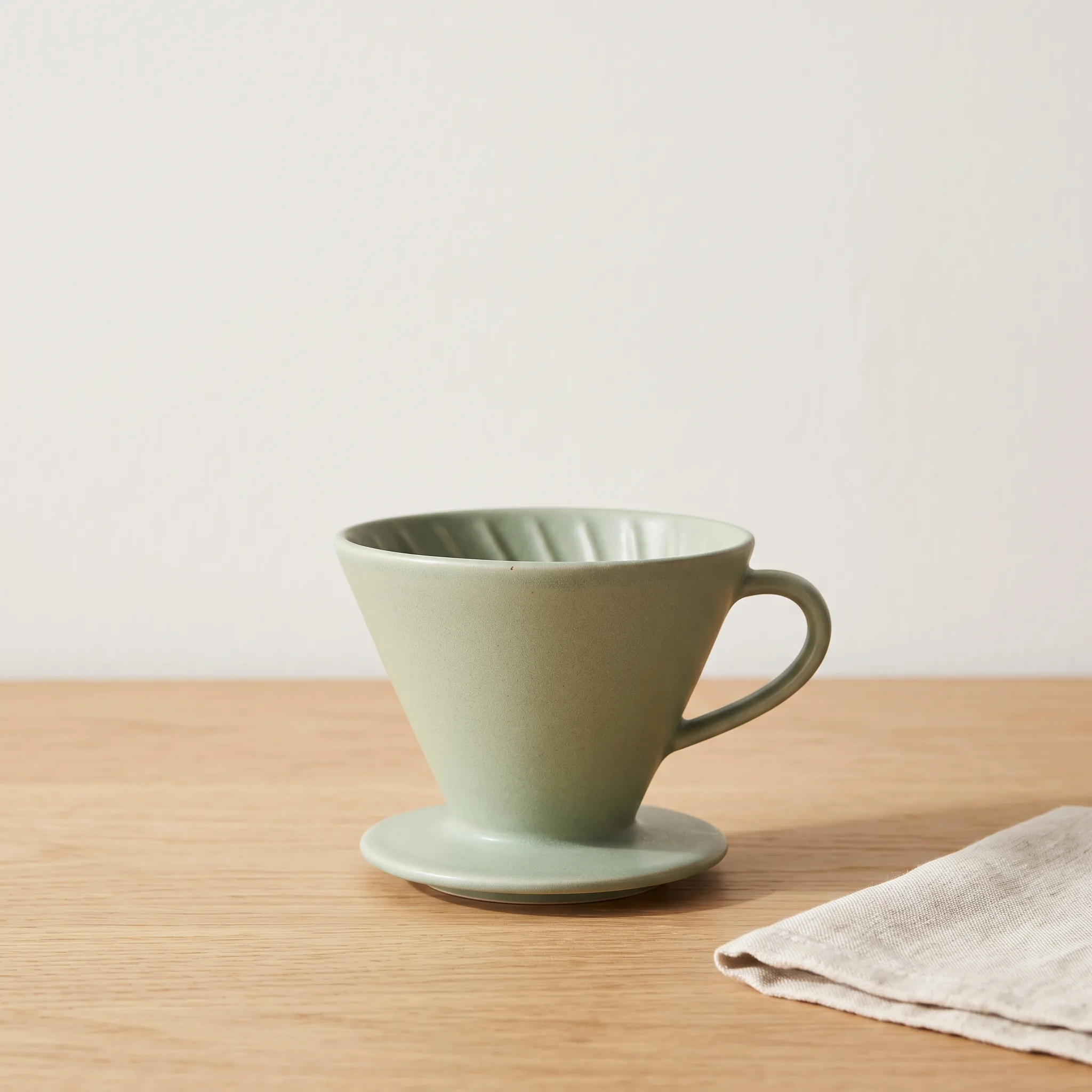 | 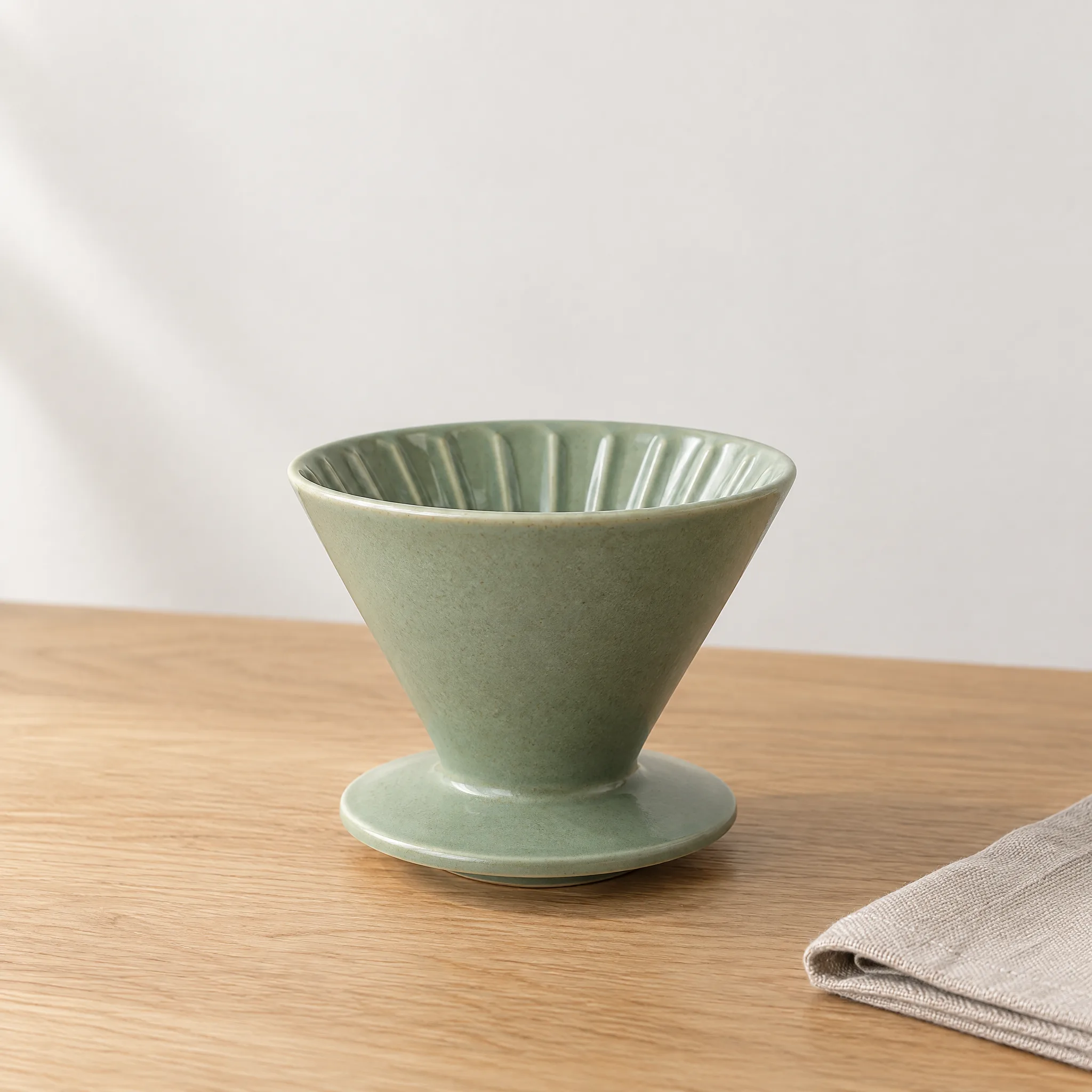 |
Same prompt, same settings, one generation each.
Both frames hold just the dripper and a folded linen napkin, clean and free of stray text. Nano Banana 2.1 nails the matte glaze the prompt asks for and adds a handle on its own. GPT Image 2.5 gives the glaze a light sheen and leaves the handle off.
Text poster: BREW DAY coffee festival (3:4)
| Nano Banana 2.1 | GPT Image 2.5 Sunburst |
|---|---|
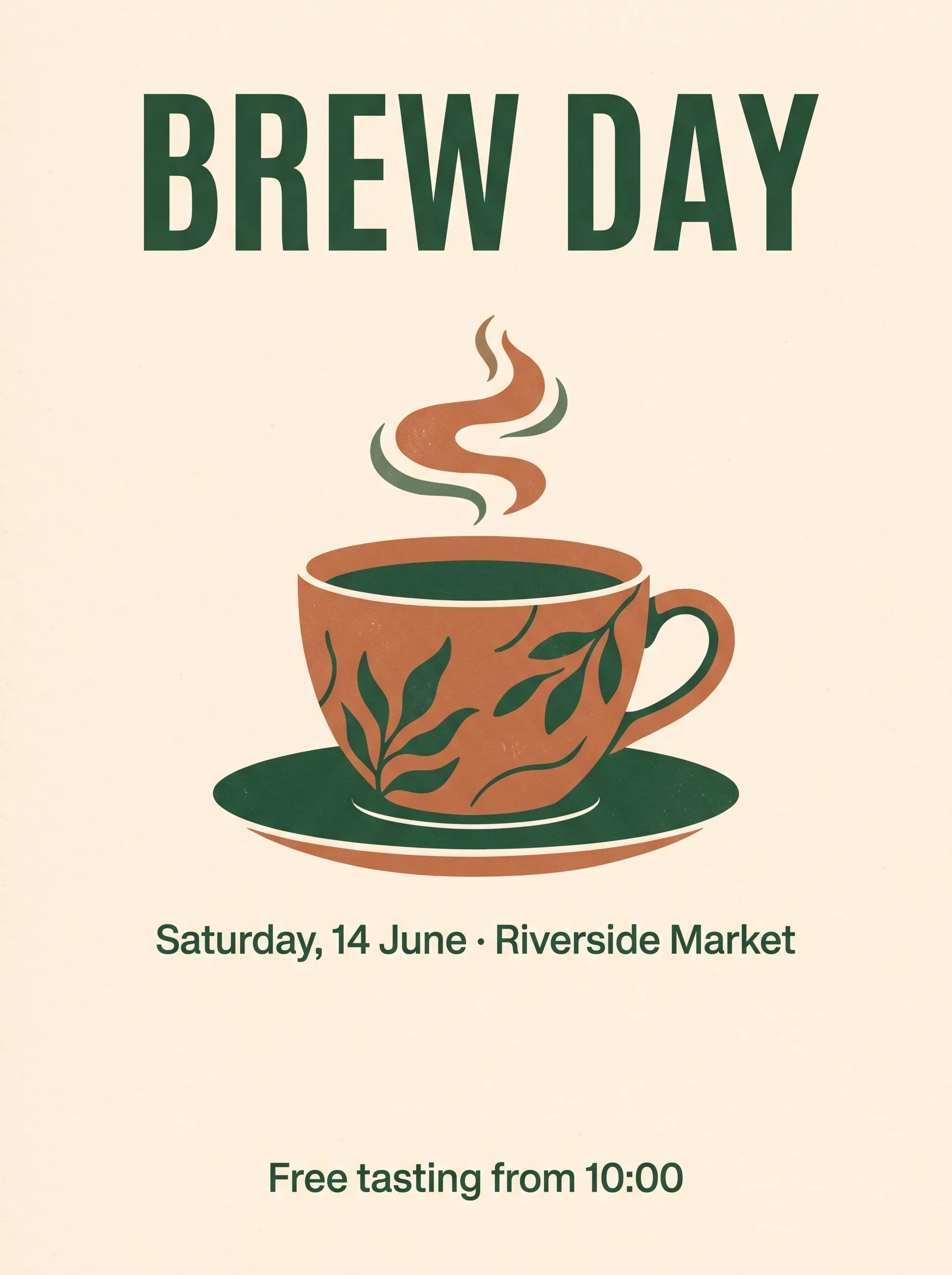 | 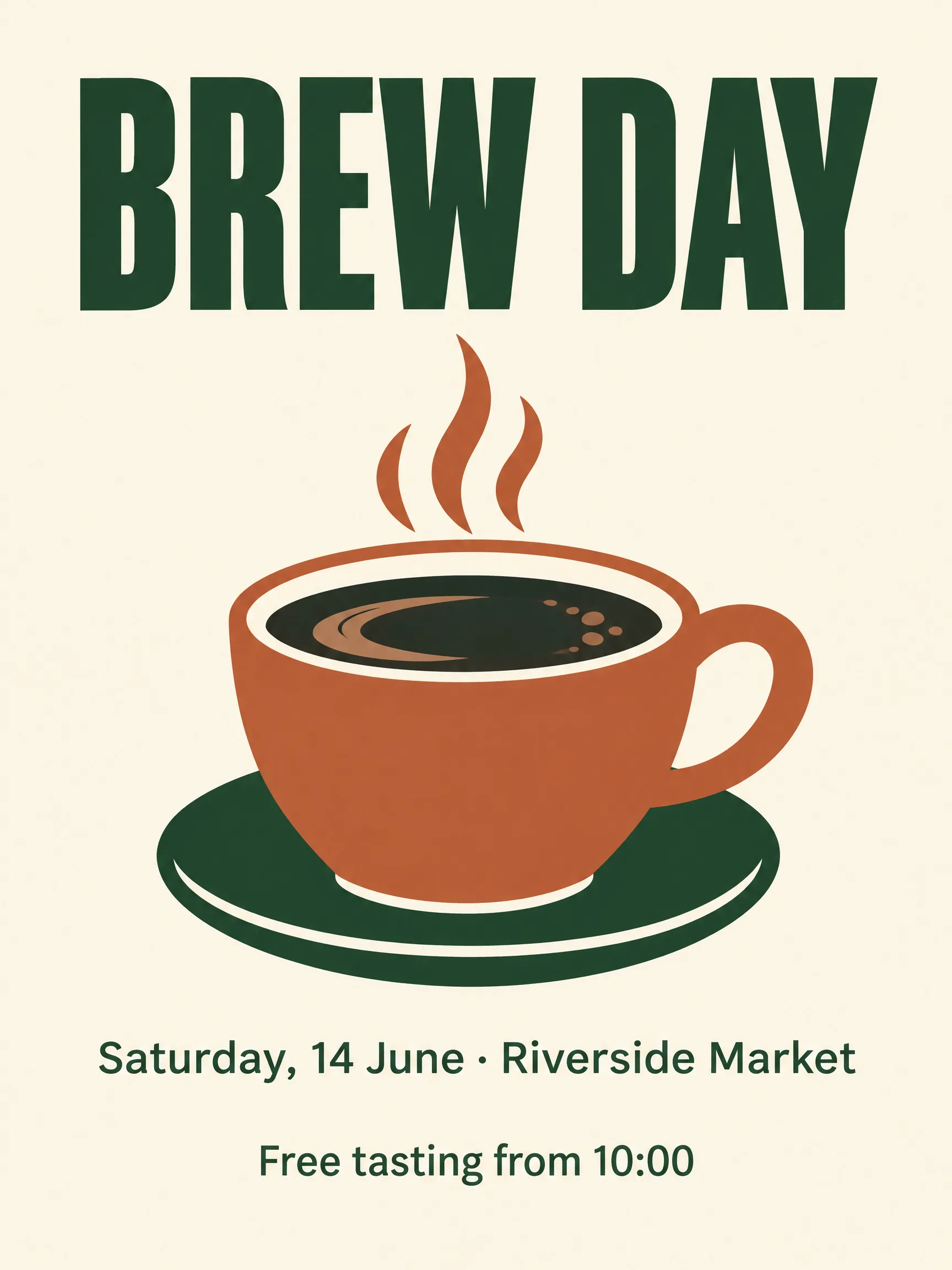 |
Same prompt, same settings, one generation each.
Both models spell all three lines exactly as written and put each one where the prompt says. The pixel sizes differ even though both are 2K at 3:4: Nano Banana 2.1 returns 1792 × 2400, GPT Image 2.5 returns 1728 × 2304. If your layout has fixed slots, crop to the actual dimensions.
Which one should you use?
Reach for Nano Banana 2.1 when:
- You're generating product images in bulk and watching the budget.
- You need 1:8 or 8:1 banners, or 1:4 and 4:1 strips.
- You're cropping for social feeds in 4:5 portrait or 5:4 landscape.
- Your prompt is long: a full brand spec or shot list pasted in.
- You want one model ID for both generation and reference-based edits.
Reach for GPT Image 2.5 when:
- You need transparent PNGs for stickers, cutouts or UI assets (set 1K).
- You're blending more than 10 reference images.
- You want draft-quality and final-quality runs from one model via the
@protiers.
For standard ratios like 1:1, 16:9, 9:16 and 3:4 with up to 10 references, both work. Start on Nano Banana 2.1 and keep the other half of the budget.
What does a usable image actually cost?
List price is only the starting point. The number that matters is cost per image you actually ship. At standard pricing, 1,000 images cost:
| Resolution | Nano Banana 2.1 | GPT Image 2.5 |
|---|---|---|
| 1K | $22 | $50 |
| 2K | $36 | $80 |
| 4K | $58 | $120 |
Even if Nano Banana 2.1 needed two tries for every keeper, a usable 1K image would cost $0.044, still under the $0.05 GPT Image 2.5 charges for a single attempt. So the cheapest way to decide is to run 20 of your own prompts on Nano Banana 2.1 and count the keepers. At standard pricing, 20 images at 1K cost $0.44.
Through November 8, Nano Banana 2.1 is 50% off for Programmers' Day, which brings 1K down to $0.011 per image. Run your first batch on the model page →
How hard is it to switch between them?
Not hard at all. Both models use the same async endpoint, POST https://api.hiapi.ai/v1/tasks, with the same API key. Both return a taskId, and you collect results by polling or via callback.url. Switching touches two fields:
model: swapgemini-nano-banana-2.1forgpt-image-2.5-sunburst/text-to-image(or…/image-to-imagewhen you pass references).- References: rename
image_inputtoimage_urls. For transparency, addbackground: "transparent"and setresolutionto1K.
prompt, aspect_ratio and resolution work the same way on both. Full request examples are in the Nano Banana 2.1 API guide.
FAQ
How much cheaper is Nano Banana 2.1 than GPT Image 2.5? It costs 44%–48% as much at the same resolution: $0.022 vs $0.05 at 1K, and $0.058 vs $0.12 at 4K.
Can Nano Banana 2.1 output a transparent background?
No. It outputs jpg or png without a transparency option. For transparent assets, use GPT Image 2.5 with background: "transparent" at 1K.
What if I have more than 10 reference images? Use GPT Image 2.5 image-to-image, which accepts up to 16. With 10 or fewer, Nano Banana 2.1 handles edits and blends directly.
Can I use both in one product? Yes. Same API key, same endpoint. Route by use case: bulk images to Nano Banana 2.1, transparent assets to GPT Image 2.5.
Want to see it now? Hit "Generate with this prompt" under the poster and the prompt fills in for you, or open the model page and write your own. Your 200 signup credits cover about 4 images at 1K.
Nano Banana 2.1 series
- Nano Banana 2.1 model page: try it online with 200 free credits
- Nano Banana 2.1 API pricing: cost per image at 1K, 2K and 4K
- Nano Banana 2.1 API guide: your first image with curl and Python
- Nano Banana 2.1 prompts: 5 ready-to-use templates with real outputs
- GPT Image 2.5 Flare model page: fast everyday generation
- GPT Image 2.5 Sunburst model page: precision-first editing