TL;DR
- What this is: five copy-paste editing prompts for grok-imagine/image-to-image — the $0.035 base tier of xAI's image editor on hiapi — each shown with the exact input image(s), the prompt, and the raw first-take output from the live API. No retries hidden, all media hosted here permanently.
- What the model is for: cheap, fast instruction-driven edits. You pass 1–3 reference images plus a plain-English instruction and it re-renders the scene — recolor a product, move it to a new setting, restyle a photo, or composite two references — while preserving what you tell it to keep.
- Schema facts (verified against the live task API on 2026-07-13):
promptandimage_urlsare required;image_urlstakes 1 to 3 publicly reachable URLs; optionalresolutionis lowercase1kor2k; optionalaspect_ratioacceptsautoplus 13 fixed ratios from2:1to9:20. There is nostrength, noseed, non— unknown fields are rejected with a 400, so the prompt does all the steering. - Pricing (from the pricing page): flat $0.035 per output image — half the price of the quality tier. Every edit below cost three and a half cents and came back in well under a minute in our runs.
- Total media bill for this article: four grok-imagine/text-to-image reference images at $0.03, five base-tier edits at $0.035, one gpt-image-2 cover at $0.03 — $0.325 all in.
Base Tier or Quality Tier?
hiapi serves two editing tiers from the same family, with the same request schema:
grok-imagine/image-to-image | grok-imagine-quality/image-to-image | |
|---|---|---|
| Price | $0.035/image, flat | $0.07 at 1k, $0.10 at 2k |
| References | 1–3 URLs | 1–3 URLs |
| Best for | recolors, restyles, scene swaps, batch/production volume | maximum identity fidelity on faces and fine detail |
This post is about the base tier. At half the price it handled every recipe below on the first take — if you are iterating on prompts or generating variants in volume, start here and move up only if you see fidelity you don't like. We ran the same kind of experiments on the quality tier in a separate recipe post if you want the comparison.
How These Recipes Were Made
Each recipe has three parts: the input image(s), the exact editing prompt (copy it as-is), and the raw output. I generated every reference image with grok-imagine/text-to-image ($0.03 each), wrote each editing prompt myself, and ran it once through grok-imagine/image-to-image on the live hiapi task API. Every output you see is the first take — settings and real cost are printed under each one.
Because the schema has no edit-strength knob, two prompt habits carried all five recipes:
- Change-clause first, keep-clause second. State the edit, then enumerate everything that must survive: "Keep the exact same shoe shape, camera angle, lighting, background and ground shadow." The keep-clause is your only consistency control — treat it as load-bearing, not decoration.
aspect_ratio: "auto"inherits the input frame — from the first URL. All five edits usedauto. In Recipe 4, the first reference was square and the second was 4:3; the output came back square. If you composite two references, put the one whose framing you want first inimage_urls.
Recipe 1 — Product Recolor: New Colorway, Same Everything
Goal: the bread-and-butter e-commerce edit — change a product's colorway without re-shooting.
The input, a $0.03 grok-imagine/text-to-image still:
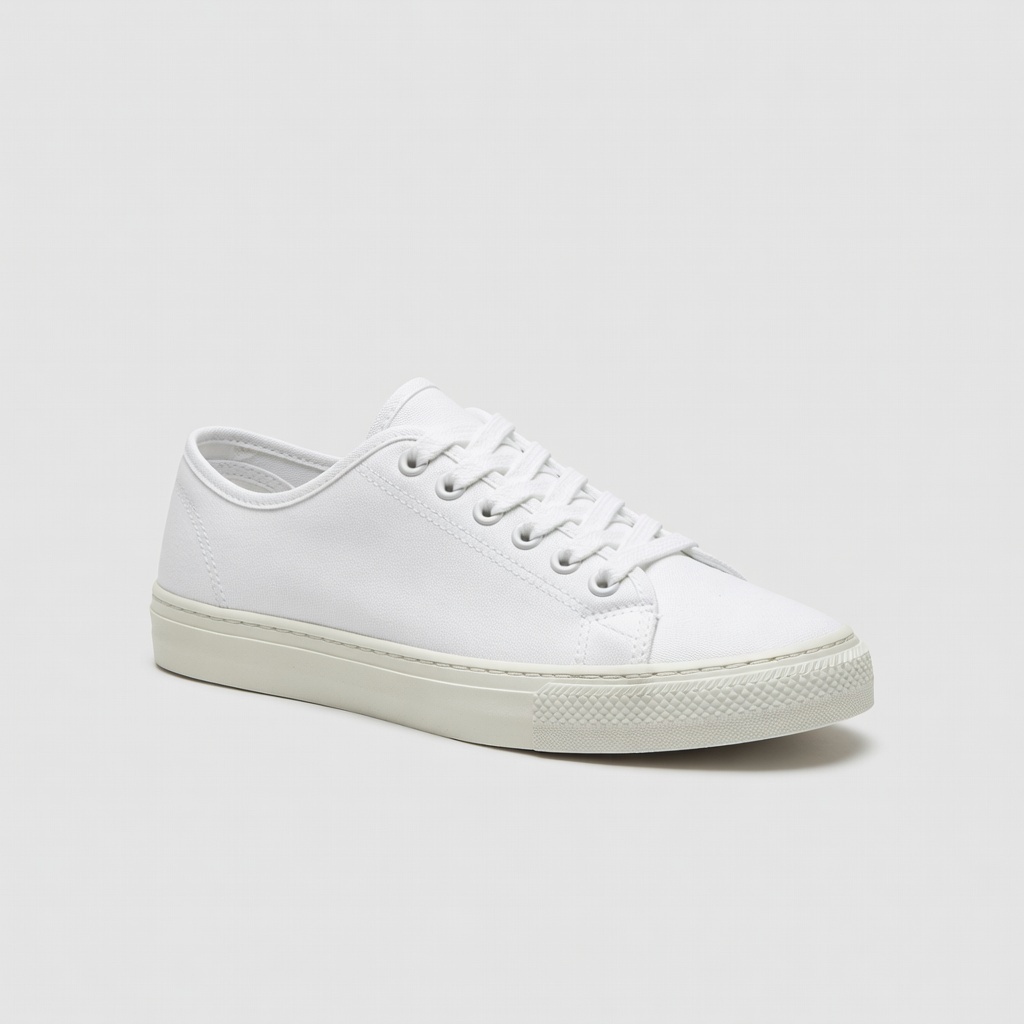
The prompt:
Recolor the sneaker to a muted sage green canvas with a cream rubber sole and
matching sage laces. Keep the exact same shoe shape, camera angle, lighting,
background and ground shadow. Do not add any other objects.
The raw output:
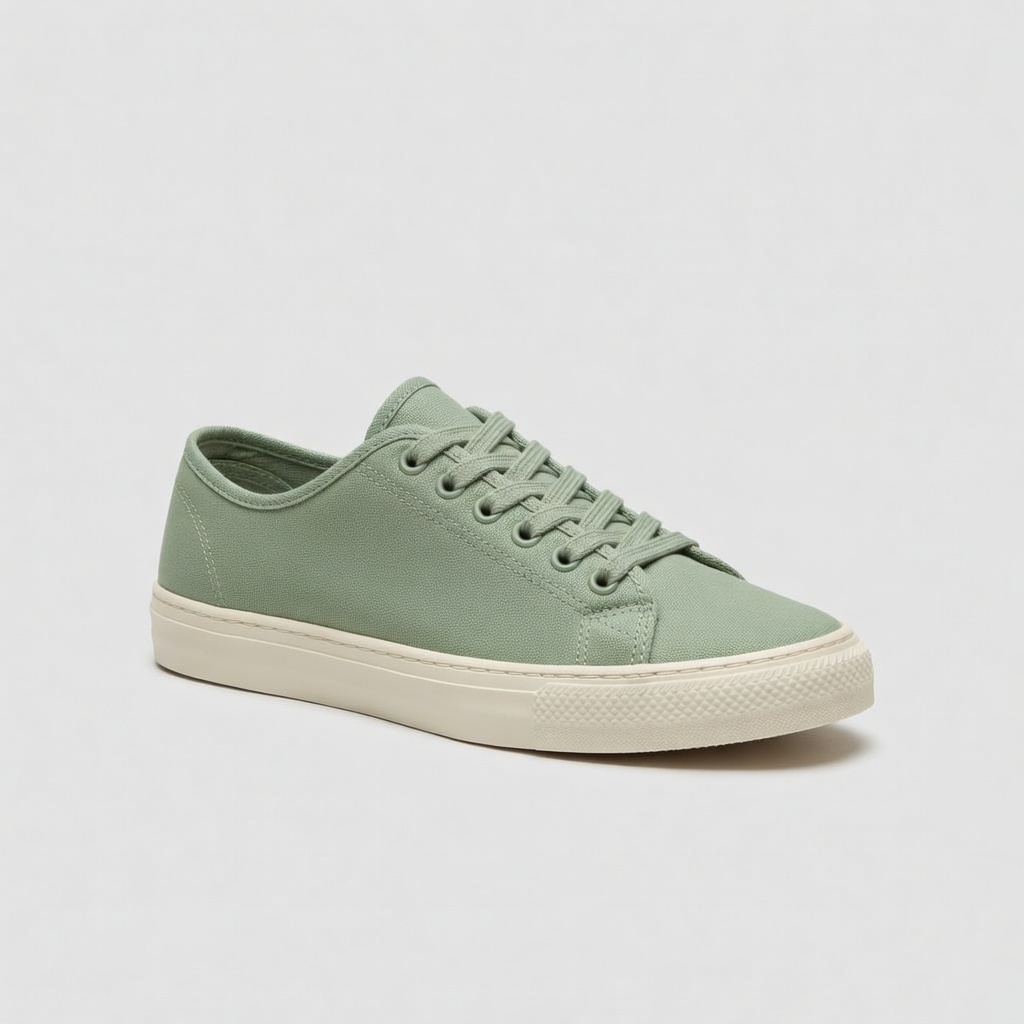
grok-imagine/image-to-image · resolution: "1k" · aspect_ratio: "auto" (1:1 in → 1:1 out) · $0.035
Why it works: the change-clause names three specific materials (canvas, sole, laces) with specific colors, and the keep-clause pins shape, angle, lighting, background and shadow. The stitching, eyelet count and toe-cap texture all carried over. Naming the parts — "sole", "laces" — matters: a bare "make it green" prompt gives the model license to tint whatever it likes.
Recipe 2 — Scene Relocation: Studio Shot to Night Street
Goal: take the same catalog sneaker and drop it into a moody lifestyle scene for a campaign visual.
Same input as Recipe 1. The prompt:
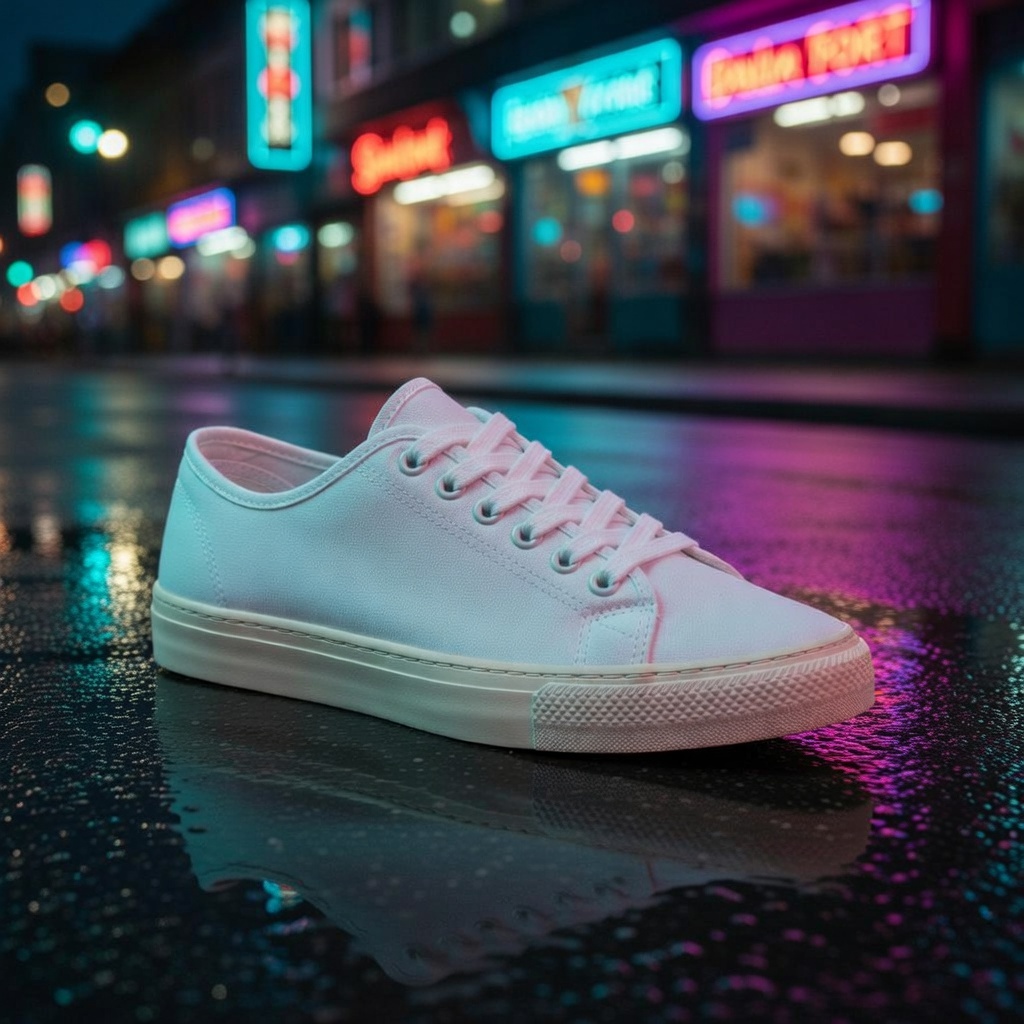
Place this exact sneaker on wet asphalt on a city street at night, neon shop
signs reflecting in shallow puddles around it, cinematic teal and magenta
lighting, low camera angle. Keep the sneaker's design, colors and proportions
unchanged.
The raw output:
grok-imagine/image-to-image · resolution: "1k" · aspect_ratio: "auto" · $0.035
Why it works — and one honest caveat: the scene brief is dense (surface, weather, signage, palette, camera height) so the model has no gaps to fill with generic filler. Design and proportions survived. But notice the shoe reads slightly pink: the model relit the product with the scene's magenta neon, exactly as real ambient light would. That's physically plausible rendering, not a defect — but if brand color accuracy is non-negotiable, say so explicitly: "the canvas stays pure white with no color cast from the environment."
Recipe 3 — Style Transfer: Photo to Watercolor
Goal: turn a photographic portrait into an illustration while keeping the person recognizable.
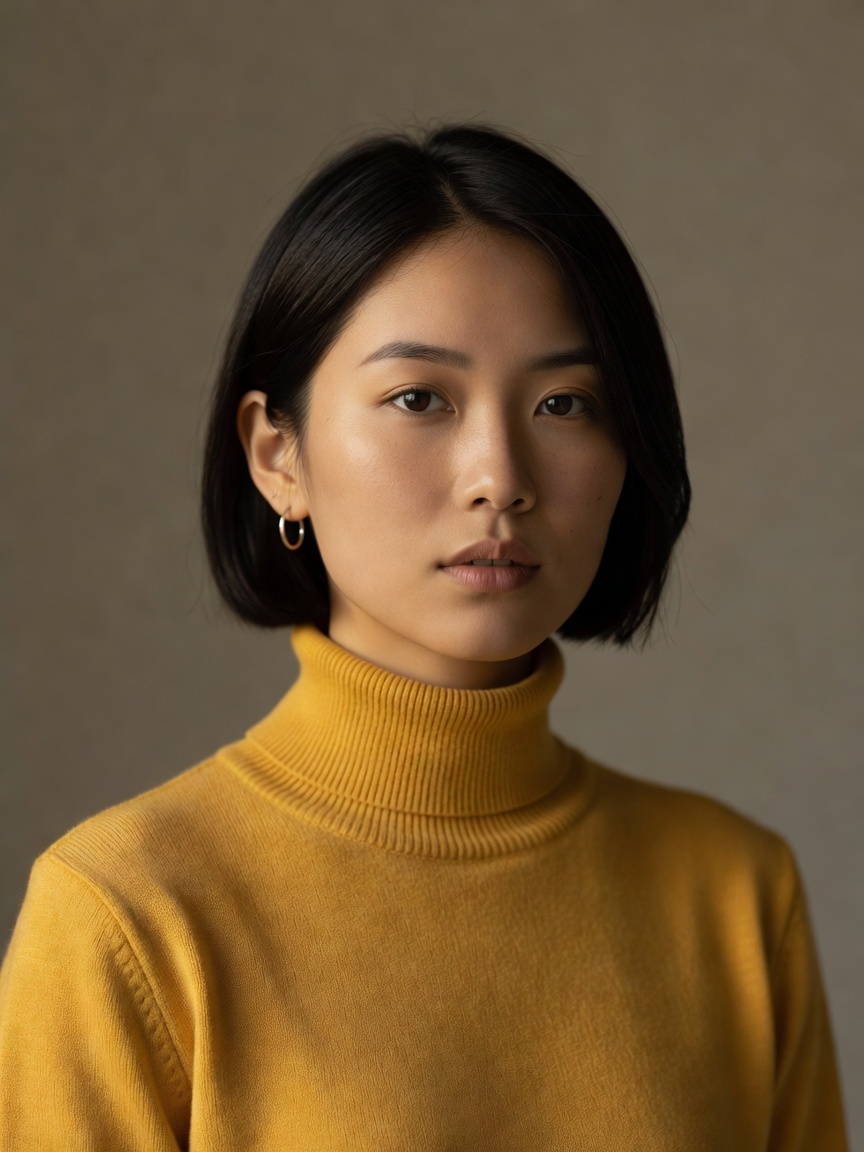
The input, a $0.03 grok-imagine/text-to-image portrait:
The prompt:
Turn this photo into a loose watercolor illustration: soft washes of pigment,
visible paper texture, bleeding edges, minimal linework. Keep the pose, short
black hair, hoop earrings and yellow turtleneck clearly recognizable.
The raw output:
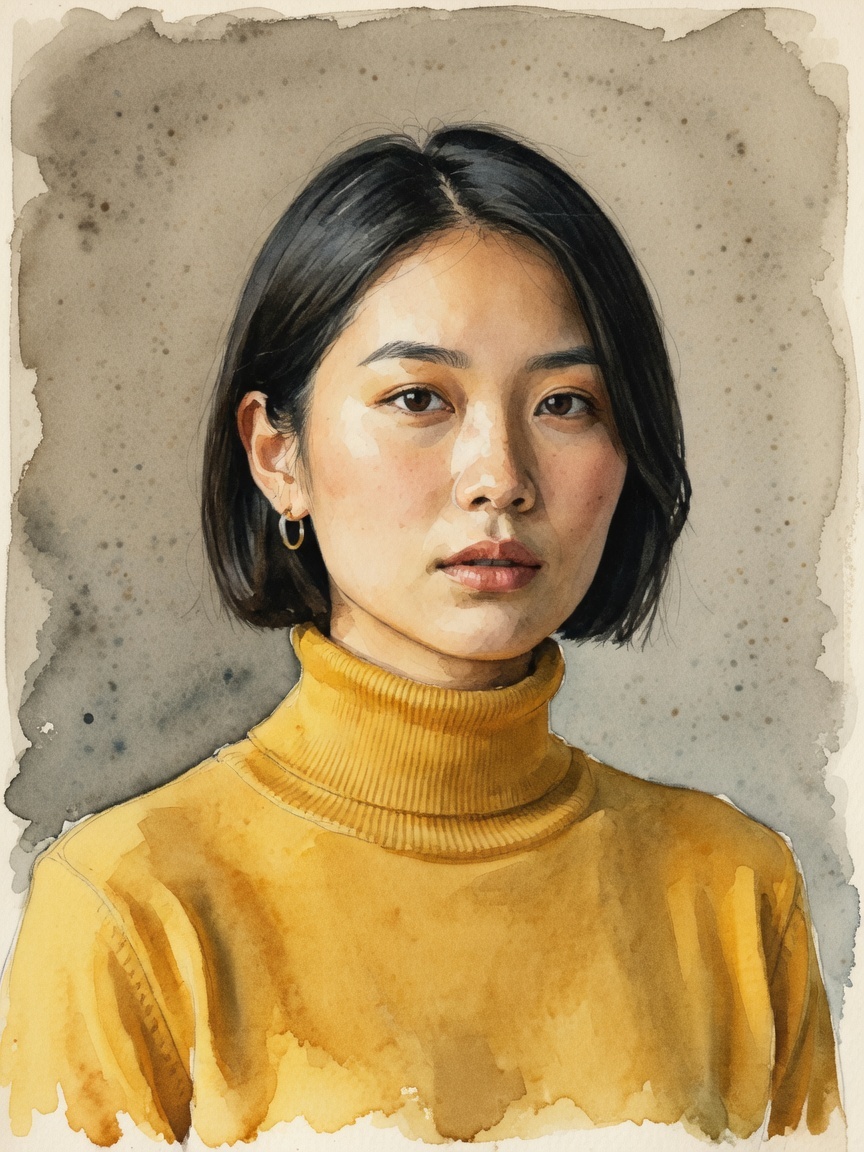
grok-imagine/image-to-image · resolution: "1k" · aspect_ratio: "auto" (3:4 in → 3:4 out) · $0.035
Why it works: the style is described by medium mechanics — washes, paper texture, bleeding edges, linework — not by artist names or vague labels like "artistic". The keep-clause anchors identity to four concrete attributes (pose, hair, earrings, sweater), and all four survived the medium change, down to the single visible hoop earring.
Recipe 4 — Two References: Put This Product in That Scene
Goal: composite a product from one image into an environment from another — the edit that usually requires masks and a compositor.
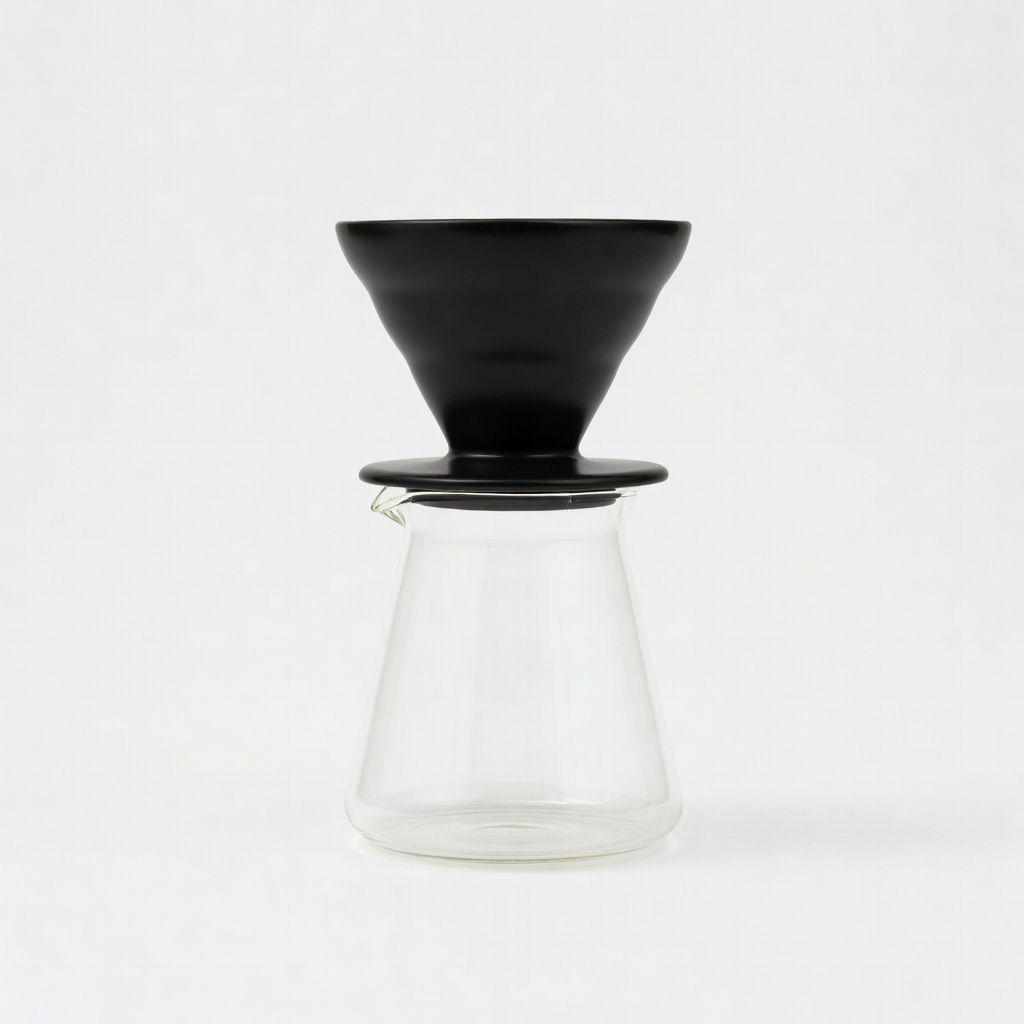
Reference 1 (the product, and the frame the output will follow):
Reference 2 (the scene):
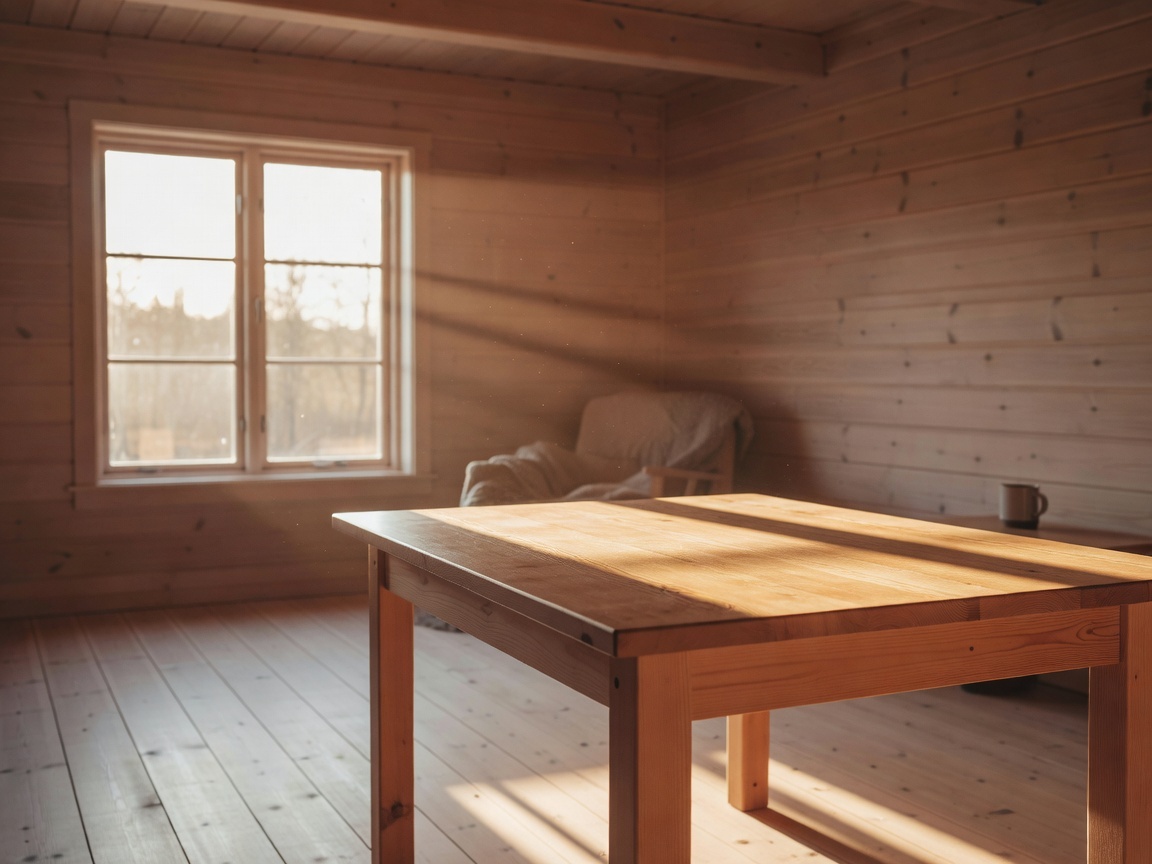
The prompt:
Place the black ceramic coffee dripper and glass carafe from the first image
onto the wooden table in the second image, golden-hour window light catching
the glass, keep the product design exactly as shown in the first image, warm
film photography mood.
The raw output:
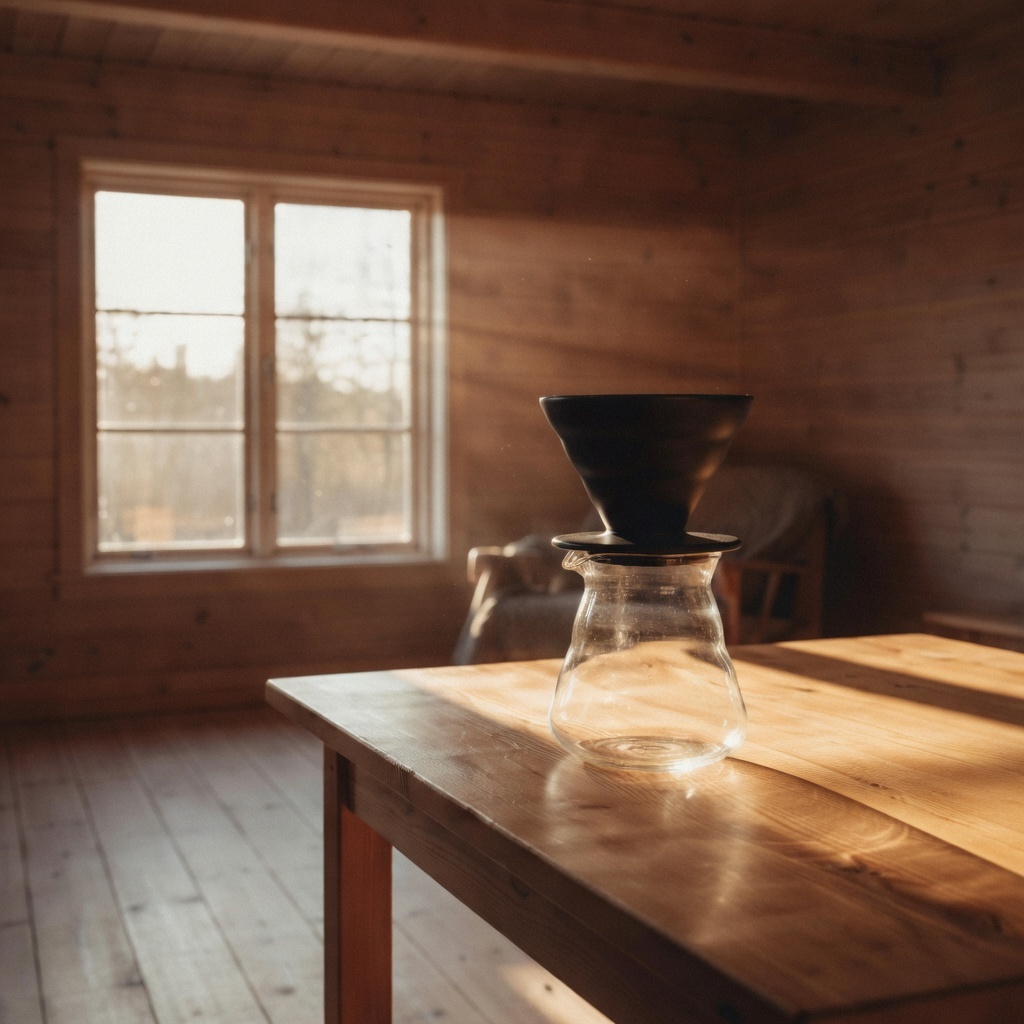
grok-imagine/image-to-image · two image_urls · resolution: "1k" · aspect_ratio: "auto" (followed the first reference: 1:1) · $0.035
Why it works: the prompt assigns each reference a role by position — "from the first image", "in the second image" — so the model knows which is subject and which is stage. The dripper's silhouette and the carafe's spout match the reference, and the golden-hour beam falls across the tabletop right where the scene reference had it. Note the square output: with multiple references, the first URL sets the output frame, so order image_urls deliberately.
Recipe 5 — Asset Conversion: Photo to Die-Cut Sticker
Goal: turn a photo into a flat vector-style sticker — a one-prompt shortcut to social and merch assets.
Same portrait input as Recipe 3. The prompt:
Convert this portrait into a flat vector die-cut sticker: bold clean outlines,
simple cel shading, thick white sticker border around the figure, plain pale
background. Keep the short black hair, hoop earrings and yellow turtleneck.
The raw output:
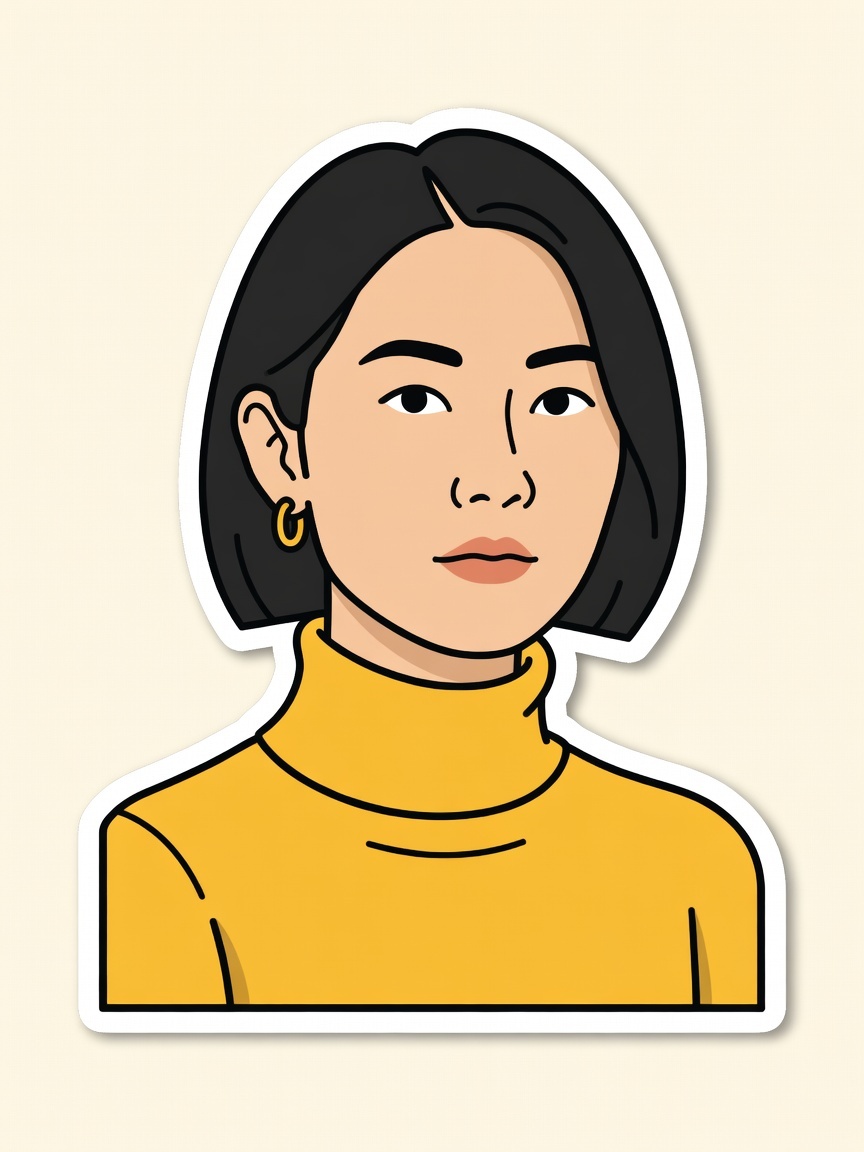
grok-imagine/image-to-image · resolution: "1k" · aspect_ratio: "auto" · $0.035
Why it works: "flat vector die-cut sticker" alone is ambiguous, so the prompt defines it operationally — outlines, cel shading, border, background. The identity attributes from the keep-clause survive a total medium change for the second time, which is the point: one reference portrait can fan out into a whole asset kit (watercolor, sticker, and whatever style you write next) at $0.035 a piece.
Run the Exact Same Call
Everything above is the async task API: create a task, poll it, download the output. With curl:
curl -X POST https://api.hiapi.ai/v1/tasks \
  -H "Authorization: Bearer $HIAPI_API_KEY" \
  -H "Content-Type: application/json" \
  -d '{
    "model": "grok-imagine/image-to-image",
    "input": {
      "prompt": "Recolor the sneaker to a muted sage green canvas with a cream rubber sole and matching sage laces. Keep the exact same shoe shape, camera angle, lighting, background and ground shadow. Do not add any other objects.",
      "image_urls": ["https://your-cdn.example.com/sneaker.jpg"],
      "resolution": "1k",
      "aspect_ratio": "auto"
    }
  }'
The response returns a taskId. Poll it until status is success, then download the image from output[0].url (the URL is short-lived — save the file, don't hot-link it):
curl https://api.hiapi.ai/v1/tasks/$TASK_ID \
  -H "Authorization: Bearer $HIAPI_API_KEY"
Three schema rules that will save you a 400:
image_urlsmust be publicly reachable — no auth headers, no localhost. Push references to a bucket or CDN first.resolutionis lowercase1kor2k;aspect_ratioisautoor one of 13 fixed ratios (2:1,20:9,19.5:9,16:9,4:3,3:2,1:1,2:3,3:4,9:16,9:19.5,9:20,1:2).- Anything else —
strength,seed,n,negative_prompt— is rejected:additional properties not allowed. The prompt is the entire control surface, which is exactly why the keep-clause pattern matters.
Setup, Python examples and error handling are covered in the companion guide: How to Use grok-imagine Image-to-Image via the hiapi API.
FAQ
Does grok-imagine/image-to-image support strength, seeds, or negative prompts?
No. The input schema is prompt, image_urls, and optional resolution / aspect_ratio — verified against the live API on 2026-07-13; unknown fields return a 400. Steer with the change-clause/keep-clause pattern instead.
How many reference images can I pass, and does order matter?
1 to 3 public URLs, and yes — with aspect_ratio: "auto" the output frame follows the first URL, and role phrases like "from the first image / in the second image" bind each reference to its job.
When should I pay for the quality tier instead?
The base tier handled recolors, scene swaps, restyles and a two-reference composite first-take at $0.035. Reach for grok-imagine-quality/image-to-image ($0.07 at 1k) when you need maximum fidelity on faces or fine product detail, or 2K output. For a cross-model comparison, see Best Image-to-Image API in 2026.
Why did my white product come back tinted? The model relights the subject with the scene's ambient light (see Recipe 2's magenta cast). If exact color matters, pin it in the keep-clause: "the canvas stays pure white with no color cast from the environment."
Where do the reference images come from? Any public URL works — your own product shots included. Ours were generated with grok-imagine/text-to-image at $0.03 each, so this entire post — references, five edits and cover — cost $0.325.
Every prompt in this post is copy-paste ready. Grab an API key, point image_urls at one of your own product shots, and run Recipe 1 as-is on the grok-imagine/image-to-image model page — your first recolor costs three and a half cents.