TL;DR
- What this is: four copy-paste image editing prompts for grok-imagine-quality/image-to-image, each shown with the exact input image(s) it started from and the raw output it produced on the live API — first takes, no retries hidden, hosted here permanently.
- What the model is for: high-consistency edits. You hand it 1–3 reference images plus an instruction, and it re-renders the scene — relight it, restyle it, swap the setting, or composite two references together — while keeping the parts you told it to keep.
- Schema facts (verified against the live task API on 2026-07-12):
promptandimage_urlsare required;image_urlstakes 1 to 3 publicly reachable URLs; optionalresolutionis lowercase1kor2k; optionalaspect_ratioacceptsautoplus 13 fixed ratios up to ultra-wide20:9and tall9:20. There is nostrength, no seed, no negative prompt — unknown fields are rejected with a 400. - Pricing (from the pricing page): $0.08 per output image at 1K, $0.10 at 2K, plus $0.015 per reference image. A one-reference 1K edit in this post is $0.095 at current rates, and every edit finished in 27–39 seconds.
- Current estimated media budget for this article: two gpt-image-2 base images and one cover at $0.03 each, plus four quality-tier edits (three one-reference edits at $0.095, one two-reference composite at $0.11) — $0.485 all in at current rates.
How These Recipes Were Made
Each recipe has three parts: the input image(s), the exact editing prompt (copy it as-is), and the raw output. I generated both base images with gpt-image-2, wrote every editing prompt myself, and ran each one through grok-imagine-quality/image-to-image on the live hiapi task API. Settings and real cost are printed under every output so you can reproduce the exact call.
Since the schema exposes no edit-strength knob, the prompt does all the steering. Habits that consistently paid off:
- Split the prompt into a change-clause and a keep-clause. Say what to change first, then spell out everything that must survive: "Keep her face, expression, pose, the corduroy jacket, the marble table… exactly the same." The keep-clause is not decoration — it is your only consistency control.
- Name objects by their attributes, not just their category. "The mustard-yellow corduroy jacket" and "the black over-ear headphones" anchor the model to the specific items in your reference far better than "the jacket" or "the product".
- Use
aspect_ratio: "auto"to inherit the input frame. In our runs, a 3:2 input came back 3:2 (1248×832) and a square input came back square. With two references, the output followed the first URL inimage_urls— order matters. - Expect re-staging, not pixel-freezing. The model re-renders the scene rather than masking pixels. Identity, wardrobe, layout and light survive impressively well, but object poses may re-settle naturally (you'll see this in Recipes 3 and 4) — if an exact orientation matters, lock it in the keep-clause.
Recipe 1 — Targeted Relight: Golden Hour, Nothing Else Touched
Goal: change the light and only the light — the classic test of whether an editing model actually preserves identity.
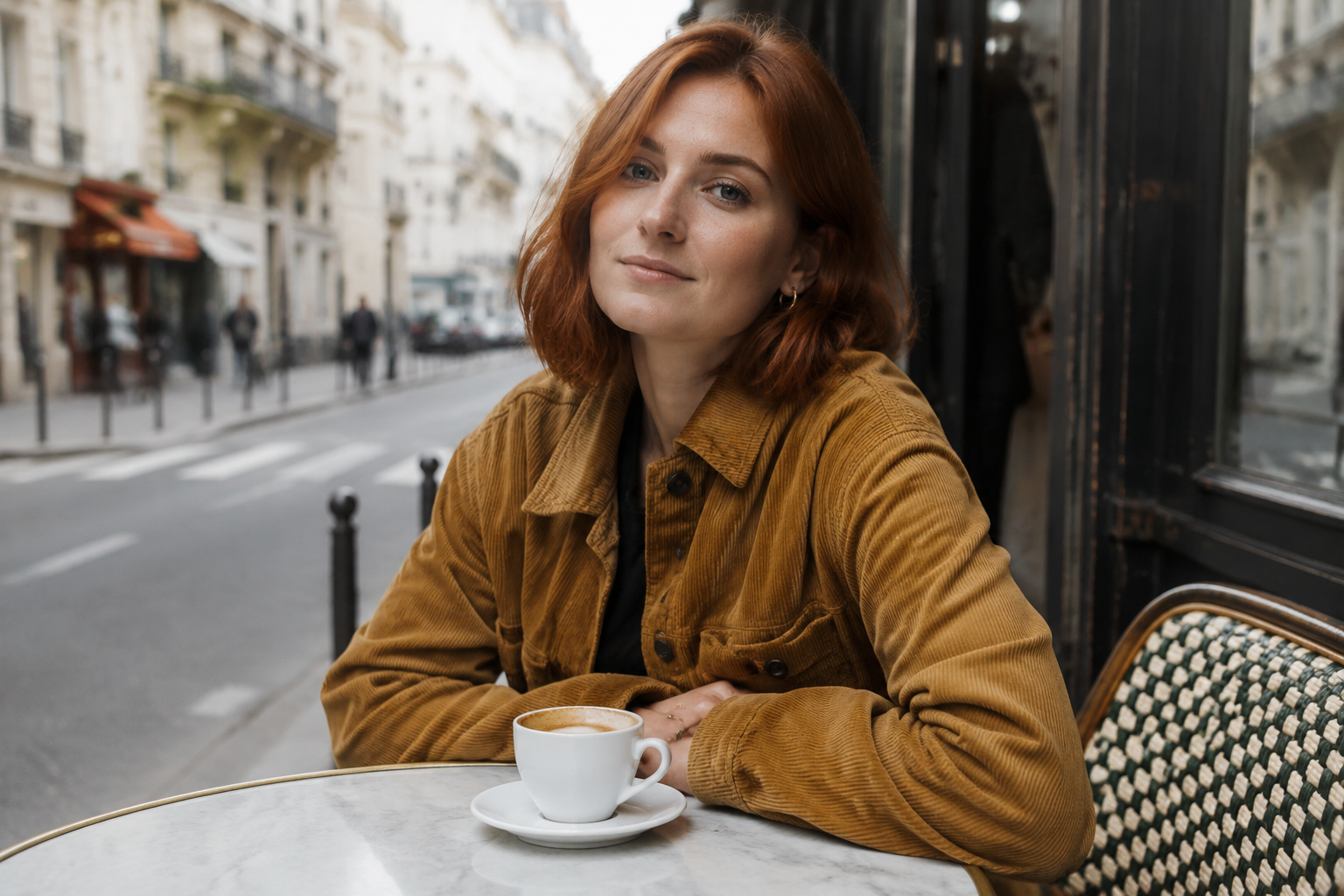
The input, a $0.03 gpt-image-2 still:
The prompt:
Relight this photo as late golden hour: warm low sun coming from the left,
long soft shadows across the table, amber rim light on her hair and jacket.
Keep her face, expression, pose, the corduroy jacket, the marble table, the
coffee cup and the entire composition exactly the same. Photorealistic, same
camera angle, same framing.
The raw output:
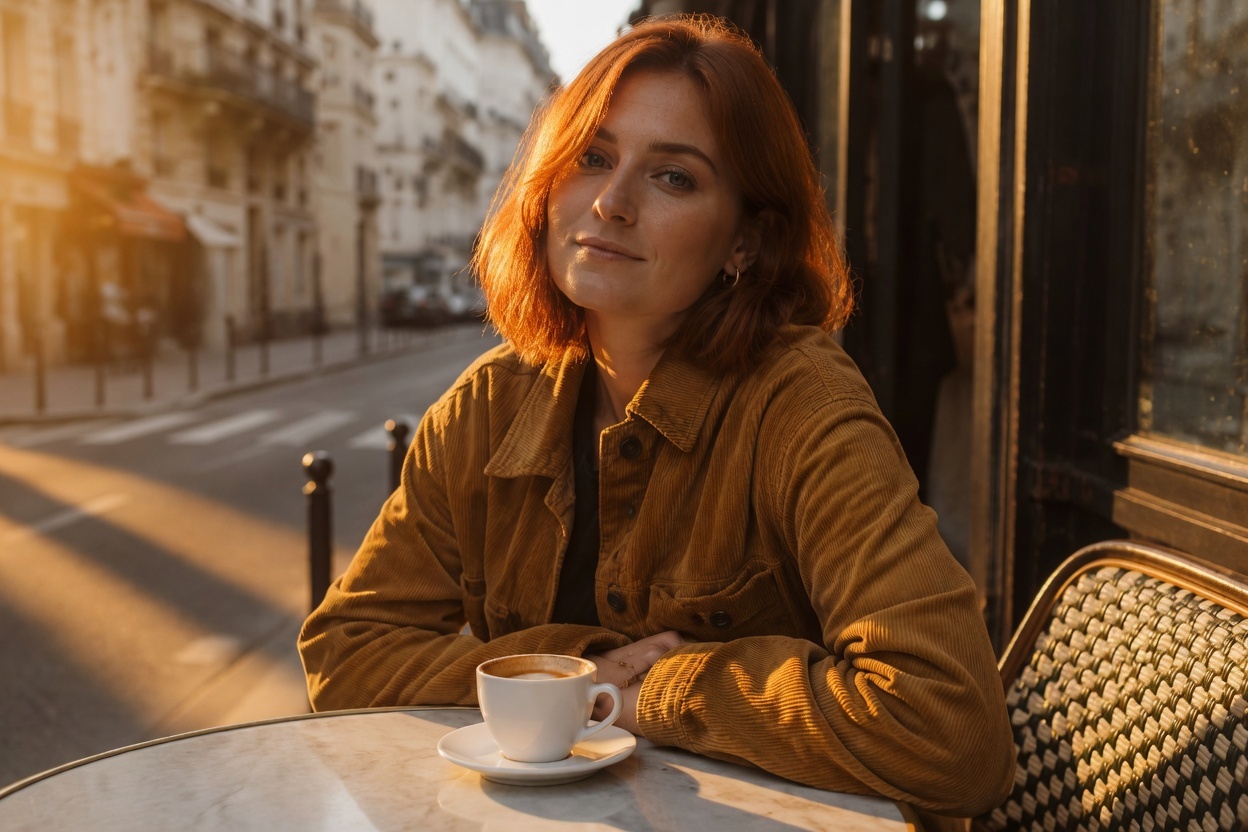
grok-imagine-quality/image-to-image · resolution: "1k" · aspect_ratio: "auto" (3:2 in → 1248×832 out) · 39s · current estimate: $0.095
Why it works: the change-clause is purely about light (direction, temperature, shadow length, rim light), and the keep-clause enumerates every element that must not move. Face, freckles, jacket buttons, cup position and street background all came through — only the sun moved. This pattern (relight + exhaustive keep-clause) is the single most reusable recipe here: swap "late golden hour" for "blue hour just after sunset", "overcast diffused daylight" or "neon-lit night" and keep the rest verbatim.
Recipe 2 — Full Style Transfer: Photo → Watercolor
Goal: the opposite of Recipe 1 — change the entire rendering style while preserving the content: pose, expression, composition, scene.
Same input still as Recipe 1. The prompt:
Repaint this exact scene as a loose watercolor illustration: soft translucent
washes, visible cold-press paper texture, fine ink outlines, muted earth
palette with the mustard-yellow jacket as the main color accent. Preserve the
composition, her pose and expression, the round marble table and the cafe
street behind her.
The raw output:
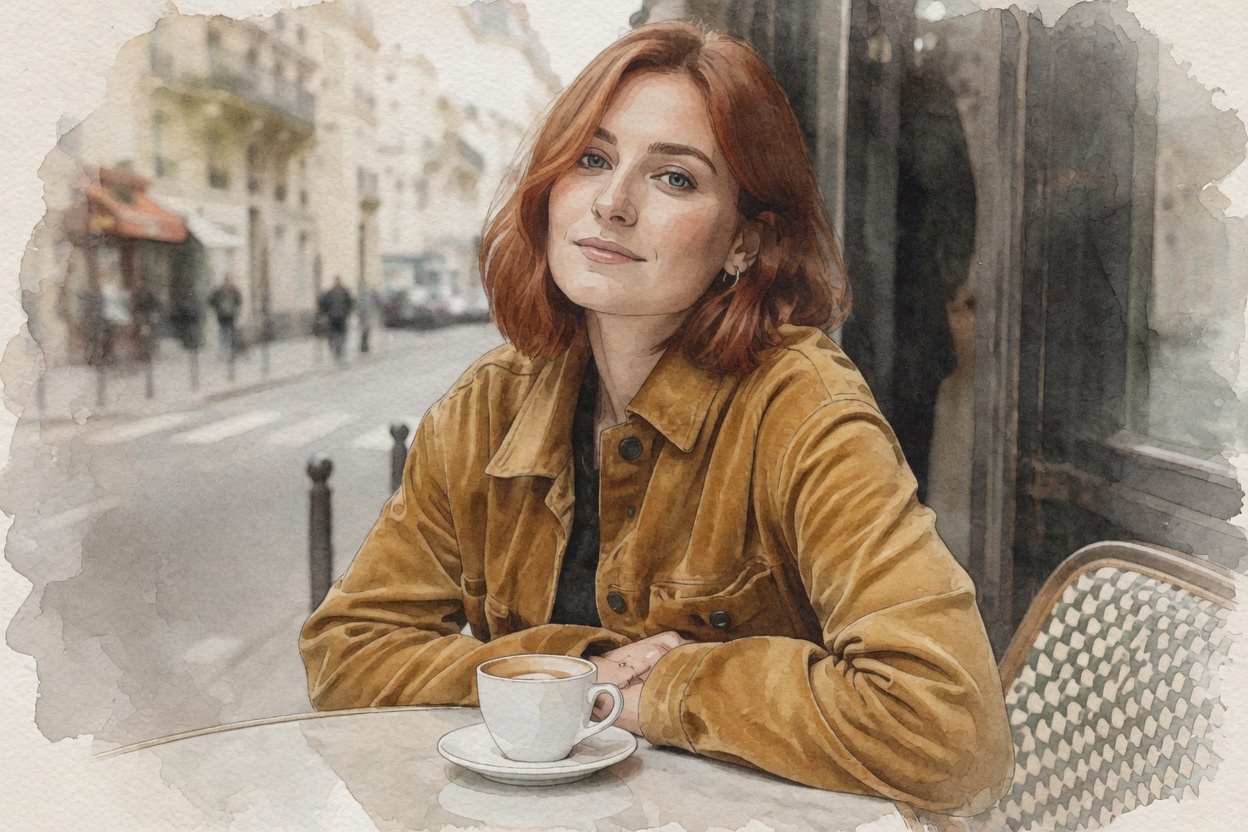
grok-imagine-quality/image-to-image · resolution: "1k" · aspect_ratio: "auto" · 38s · current estimate: $0.095
Why it works: style transfer prompts fail when they only name a style ("make it watercolor"). Naming the mechanics of the medium — translucent washes, cold-press paper texture, ink outlines — gives the model something concrete to render, and picking one element as the color accent keeps the palette from going muddy. Honest note: the corduroy texture reads closer to smooth suede in the output; fabric weave is the kind of fine detail a full restyle will smooth over.
Recipe 3 — Scene Swap: Studio Product Shot → Lifestyle Photo
Goal: take one clean e-commerce packshot and relocate it into a styled scene — the highest-volume commercial use of image-to-image.
The input, a $0.03 gpt-image-2 packshot:
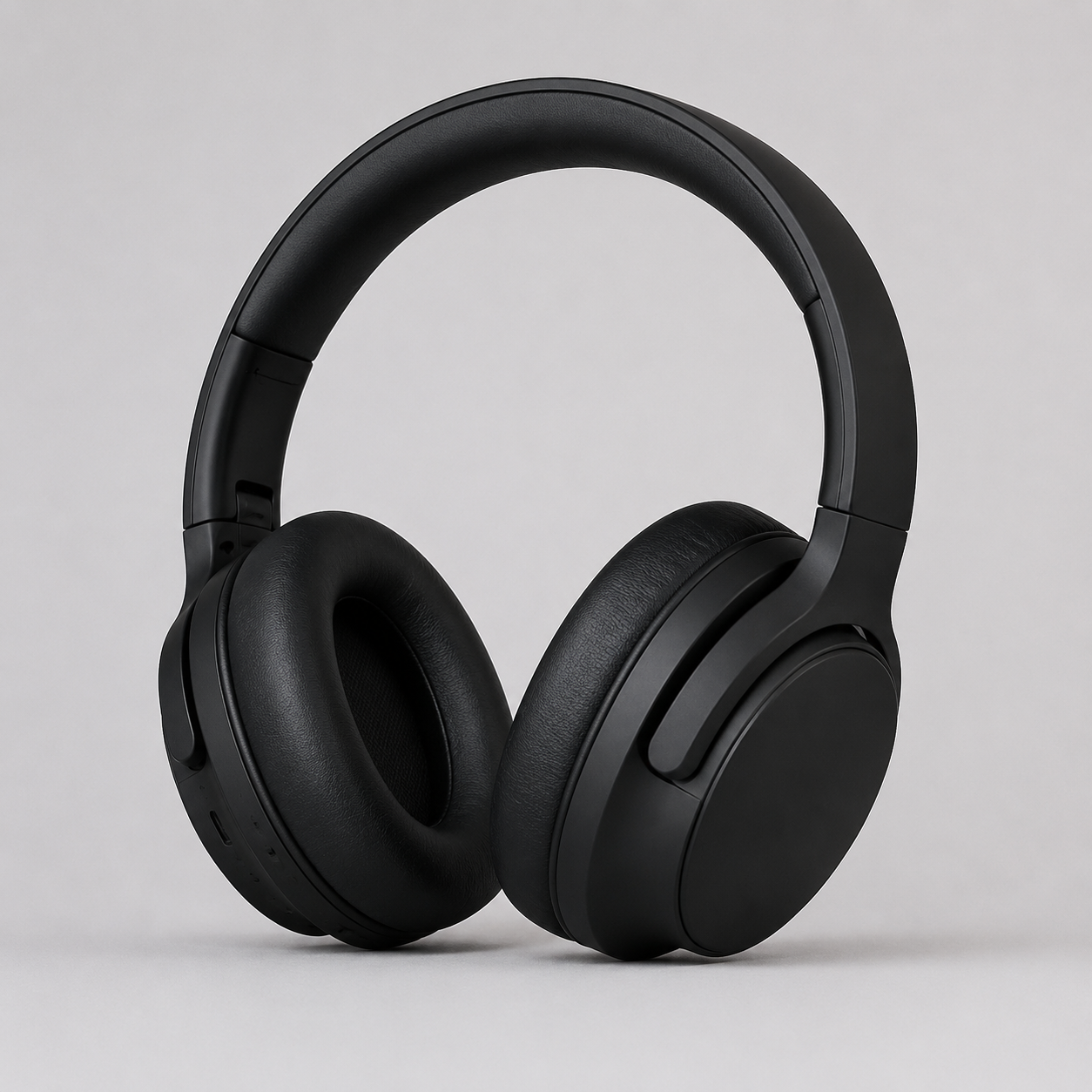
The prompt:
Place these exact headphones on a sunlit wooden desk beside an open laptop
and a small potted plant, warm morning window light from the right, cozy
blurred home-office background, shallow depth of field. Do not change the
headphones themselves: same shape, same matte black finish, same angle, no
logos.
The raw output:
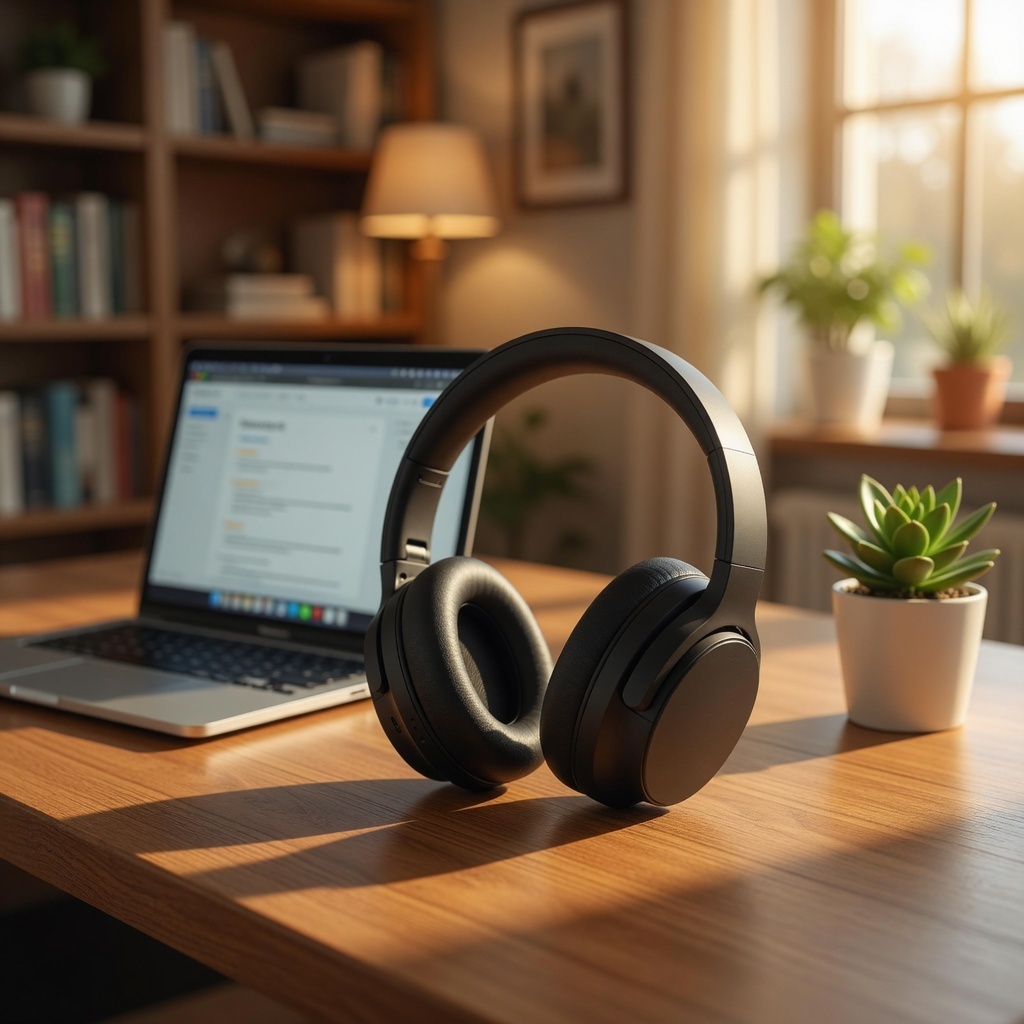
grok-imagine-quality/image-to-image · resolution: "1k" · aspect_ratio: "auto" (1:1 in → 1024×1024 out) · 27s · current estimate: $0.095
Why it works: the scene description carries the staging (desk, laptop, plant, window light, shallow depth of field) while the keep-clause locks the product's shape and finish. One honest caveat from this run: despite "same angle", the model re-posed the headphones to rest naturally against the desk instead of standing bolt upright — earcup shape, matte finish and logo-free design all survived, but the orientation re-settled to fit the scene's physics. If the exact catalog angle is non-negotiable, say so explicitly: "standing upright in exactly the same orientation as the reference".
Recipe 4 — Two References: Composite a Product Into a Scene
Goal: use the multi-reference slot (image_urls takes up to 3) to merge two images — the packshot from Recipe 3 dropped into the café scene from Recipe 1.
Inputs: the headphones packshot (first URL) and the café portrait (second URL). The prompt:
Combine these two images: place the black over-ear headphones from the first
image on the marble cafe table from the second image, next to the coffee cup,
resting naturally on the tabletop. Match the soft overcast daylight and
shallow depth of field of the cafe photo. Keep the woman, her pose and the
entire cafe scene from the second image unchanged.
The raw output:
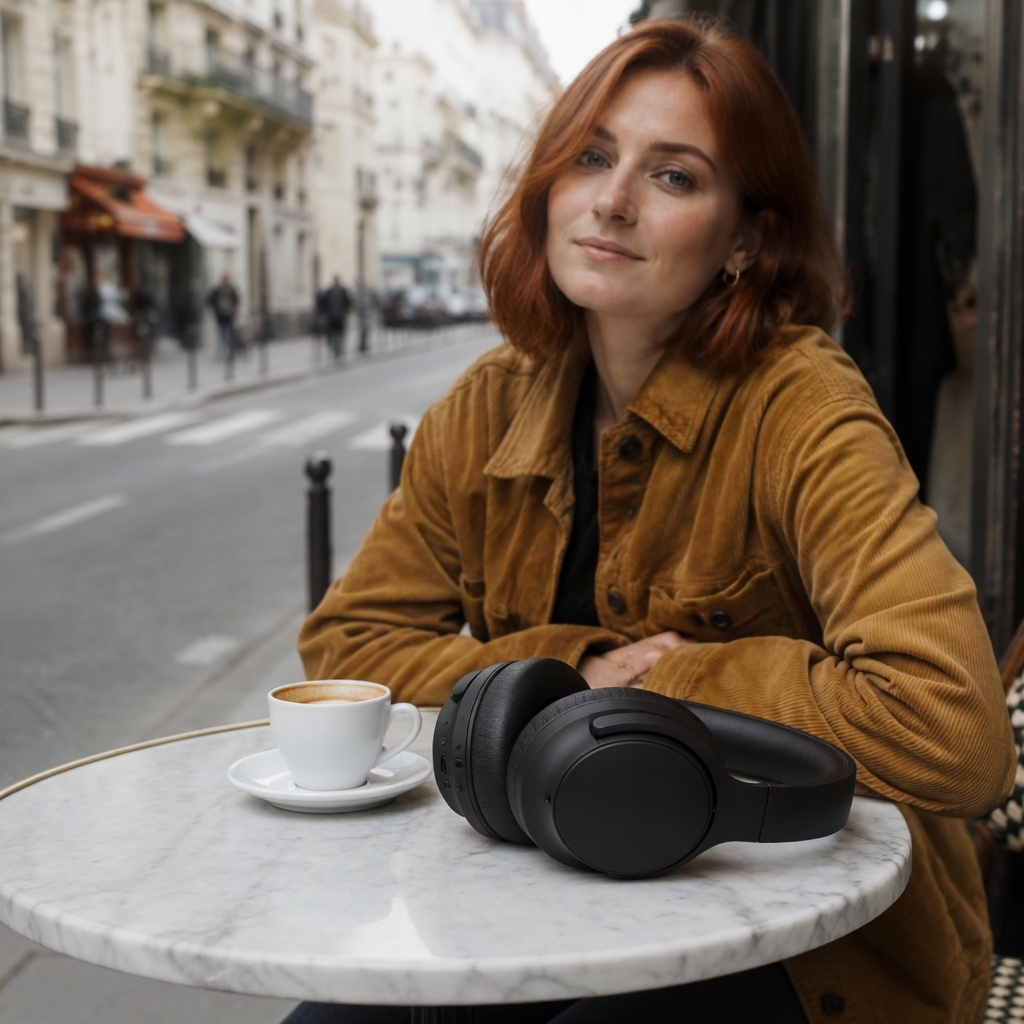
grok-imagine-quality/image-to-image · image_urls: [product, café] · resolution: "1k" · aspect_ratio: "auto" (followed the first reference's 1:1 frame) · 33s · current estimate: $0.11
Why it works: referring to the images by position ("from the first image", "from the second image") maps cleanly onto the image_urls array, and giving the object a physical relationship to the scene ("resting naturally on the tabletop, next to the coffee cup") is what sells the composite — the model matched the overcast light and even grounded the earcups with a soft contact shadow. Two things to know: the output frame followed the first URL (square, like the packshot — put the scene first if you want its frame), and the composition re-staged slightly to make room for the product rather than freezing the second image pixel-for-pixel.
Run These Yourself
Submit to the task endpoint, poll until success, download the output. The reference images must be publicly reachable URLs — presigned S3/R2 links work fine.
curl -s -X POST https://api.hiapi.ai/v1/tasks \
  -H "Authorization: Bearer $HIAPI_API_KEY" \
  -H "Content-Type: application/json" \
  -d '{
    "model": "grok-imagine-quality/image-to-image",
    "input": {
      "prompt": "Relight this photo as late golden hour: warm low sun from the left, long soft shadows. Keep the subject, wardrobe and composition exactly the same.",
      "image_urls": ["https://your-host.com/your-photo.jpg"],
      "resolution": "1k",
      "aspect_ratio": "auto"
    }
  }'
The same flow in Python:
import time, requests

API = "https://api.hiapi.ai/v1/tasks"
HEADERS = {"Authorization": "Bearer YOUR_HIAPI_KEY"}

task = requests.post(API, headers=HEADERS, json={
    "model": "grok-imagine-quality/image-to-image",
    "input": {
        "prompt": ("Repaint this exact scene as a loose watercolor illustration: "
                   "soft translucent washes, visible paper texture, fine ink "
                   "outlines. Preserve the composition and the subject's pose."),
        "image_urls": ["https://your-host.com/your-photo.jpg"],  # 1-3 public URLs
        "resolution": "1k",        # 1k | 2k (lowercase)
        "aspect_ratio": "auto",    # auto follows the input frame
    },
}).json()
task_id = task["data"]["taskId"]

while True:
    t = requests.get(f"{API}/{task_id}", headers=HEADERS).json()["data"]
    if t["status"] in ("success", "fail"):
        break
    time.sleep(5)

assert t["status"] == "success", t.get("error")
url = t["output"][0]["url"]  # expiring link - download it now
open("edit.jpg", "wb").write(requests.get(url).content)
Full request walkthroughs (headers, error handling, task lifecycle) are in the grok-imagine-quality image-to-image API guide, and general platform docs live here.
Quick Schema Reference
| Field | Required | Values (verified live, 2026-07-12) |
|---|---|---|
prompt | yes | free text, min 1 character — your only edit control |
image_urls | yes | array of 1–3 publicly reachable image URLs |
resolution | no | 1k, 2k — lowercase (1K is rejected) |
aspect_ratio | no | auto, 2:1, 20:9, 19.5:9, 16:9, 4:3, 3:2, 1:1, 2:3, 3:4, 9:16, 9:19.5, 9:20, 1:2 |
There is no strength, no seed, no negative prompt, no mask — the schema rejects unknown fields with a 400, so every edit decision is prompt wording. With aspect_ratio: "auto", the output followed the input's frame in all our runs; with multiple references it followed the first URL.
FAQ
How is this different from plain grok-imagine/image-to-image? Same API shape, different tier. grok-imagine/image-to-image costs $0.03 per image plus $0.003 per reference — about a third of the price — and is the right default for high-volume drafts. The quality tier's edge is exactly what these recipes lean on: fidelity to the reference under aggressive edits. Prototype on the base tier, re-run keepers on quality.
Can I control how strong the edit is?
Not with a parameter — there is no strength field, and sending one returns a 400. Edit intensity lives in the wording: "relight as golden hour" is a light touch, "repaint as watercolor" is a full re-render, and the keep-clause length controls how much survives either way.
Do faces stay consistent? In our relight run (Recipe 1), yes — same face, expression and freckles with only the lighting changed. That's one run, not a benchmark: for face-critical work, keep the keep-clause explicit ("keep her face and expression exactly the same") and review outputs before shipping.
All four prompts are yours to copy — the change-clause/keep-clause split transfers to any edit you can describe. Grab a key, point the snippet above at grok-imagine-quality/image-to-image, and your first edit ($0.095 with one reference) will be back in about half a minute.