TL;DR
- Grok Imagine's image API on HiAPI has four endpoints: standard and Quality, each with text-to-image and image-to-image. All four use the same request shape; only the model id changes.
- Standard is $0.03 per image at 1K or 2K. Quality is $0.07 at 1K and $0.10 at 2K. Image-to-image adds a small fee per reference image (1–3 references).
- With the same prompt, standard drew a plain cone with no handle or ribs; Quality drew a recognizable pour-over dripper. Use standard for drafts and volume, Quality for the shot you ship. Open the text-to-image model page to try it; new accounts get 200 free credits.
Which endpoint to use
| Model id | Input | Price per image | Use it for |
|---|---|---|---|
grok-imagine/text-to-image | prompt | $0.03 (1K and 2K) | Drafts, batches, ultra-wide banners |
grok-imagine-quality/text-to-image | prompt | $0.07 (1K) / $0.10 (2K) | Final product shots, detail and materials |
grok-imagine/image-to-image | prompt + 1–3 images | $0.03 + $0.003 per reference | Compositing a product into a scene, batch edits |
grok-imagine-quality/image-to-image | prompt + 1–3 images | $0.08 (1K) / $0.10 (2K) + $0.015 per reference | Relighting and restyling while keeping the subject identical |
Live HiAPI prices, checked October 19, 2026. Failed tasks aren't charged.
A one-reference edit costs $0.033 on standard and $0.095 on Quality at 1K. For the full family, including video and Grok Imagine Image 2.0, see Grok Imagine API pricing.
Same prompt, standard vs Quality
1:1, 2K, PNG, one run each:
matte ceramic pour-over coffee dripper on a pure white seamless background, studio softbox lighting, centered, no shadow gradient beyond a soft contact shadow, no text, no watermark, no props, e-commerce product photography, sharp focus
Standard:
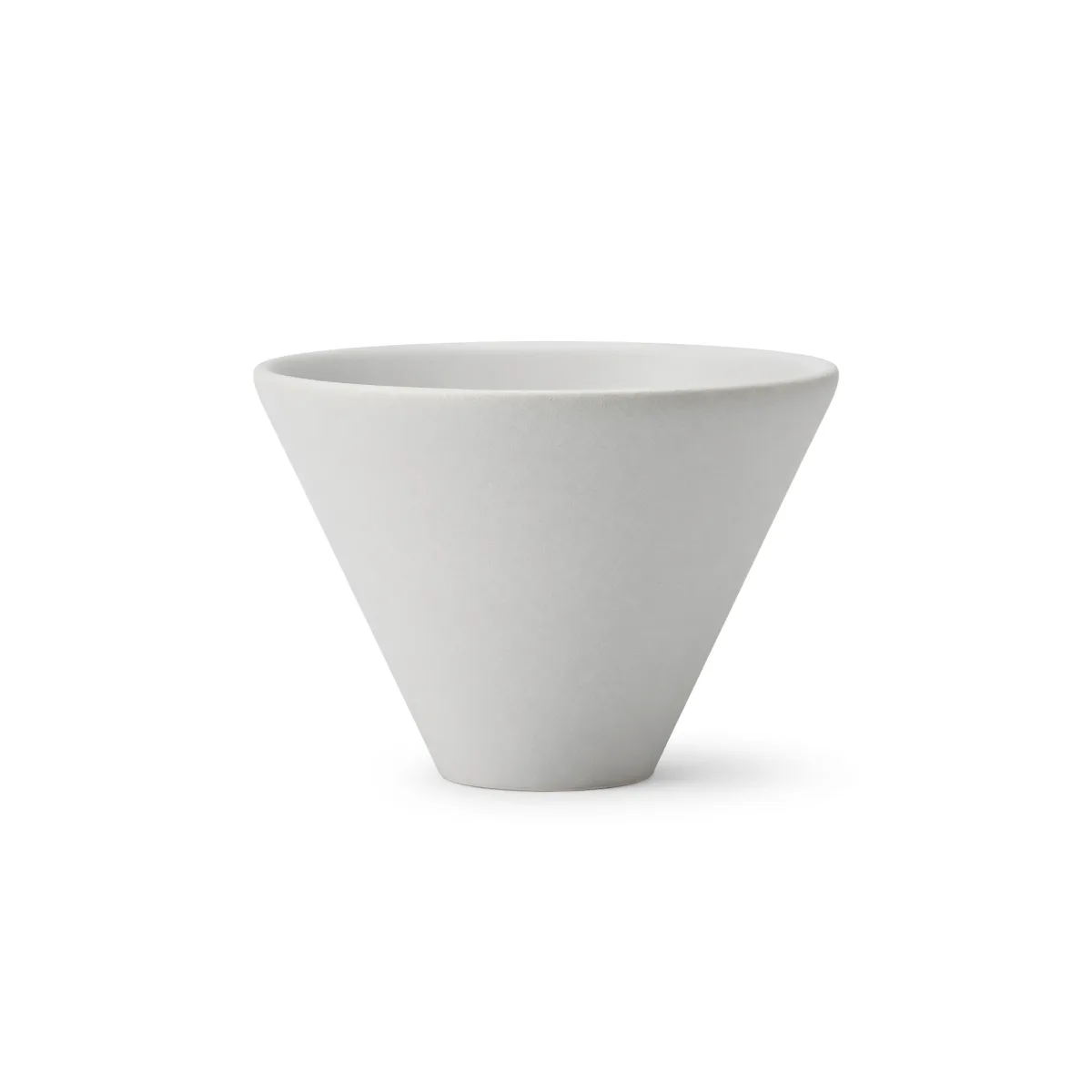
grok-imagine/text-to-image, 1:1, 2K, 2048×2048, $0.03, about 80 seconds.
Quality:
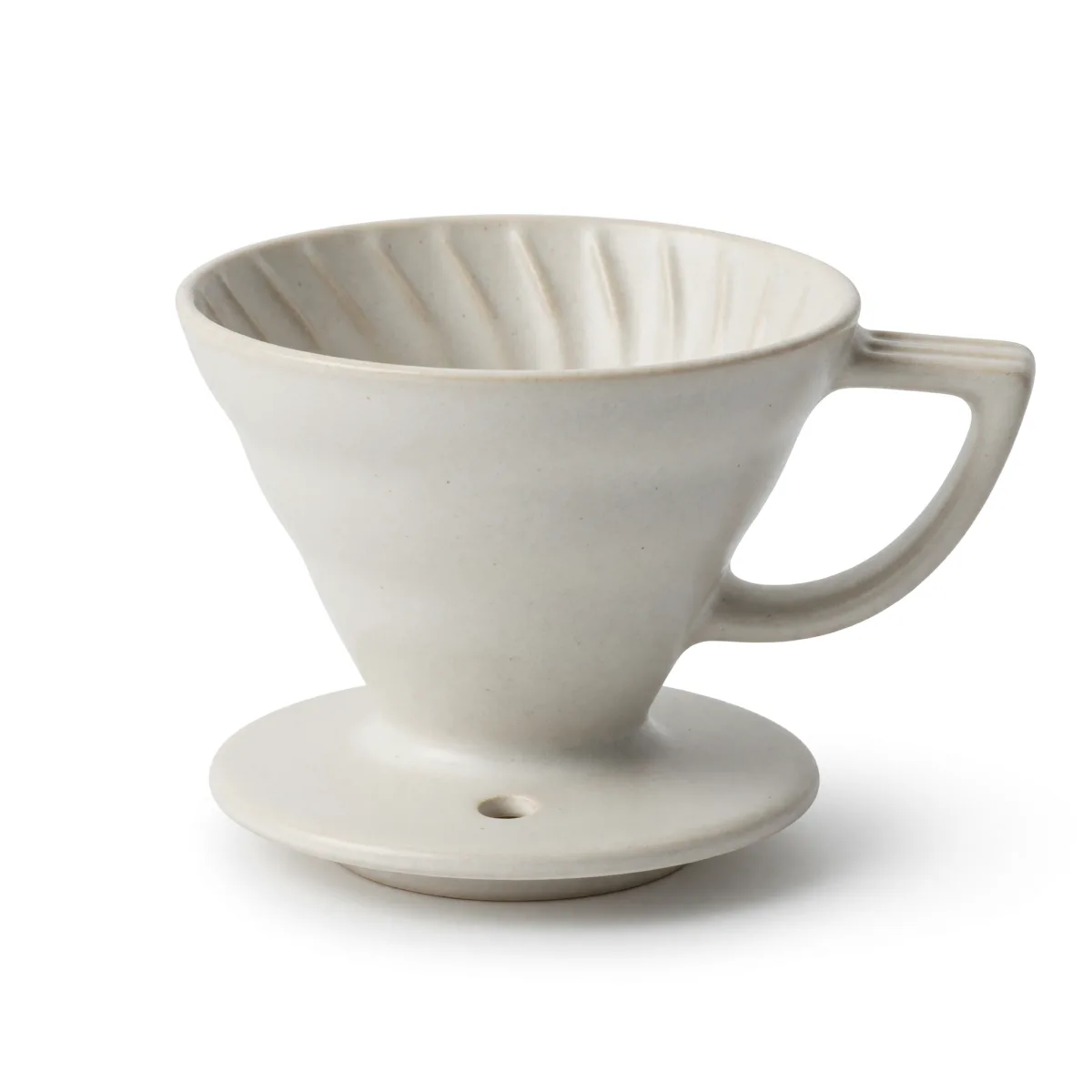
Generate this prompt on Quality →
grok-imagine-quality/text-to-image, 1:1, 2K, 2048×2048, $0.10, about 78 seconds.
What's different:
- The object itself: standard rendered a clean but generic cone, closer to a bowl than a dripper. Quality drew the parts that make it a pour-over: spiral ribs inside, a handle, and a base with a drain hole.
- Both followed the background brief: pure white, centered, one soft contact shadow, no props or text.
- Same size and speed: both came back at 2048×2048 in about 80 seconds. The tier changes the detail, not the output size.
For a known product, Quality is worth the extra $0.07. For mood boards or layouts where the object is generic, standard is enough.
Image-to-image: put your product into a scene
Pass 1–3 public image URLs in image_urls and describe the change. With aspect_ratio set to auto (the image-to-image default), the output takes the shape of the first image in the list. The same prompt and the same two images, with only the order swapped, gave two different crops:
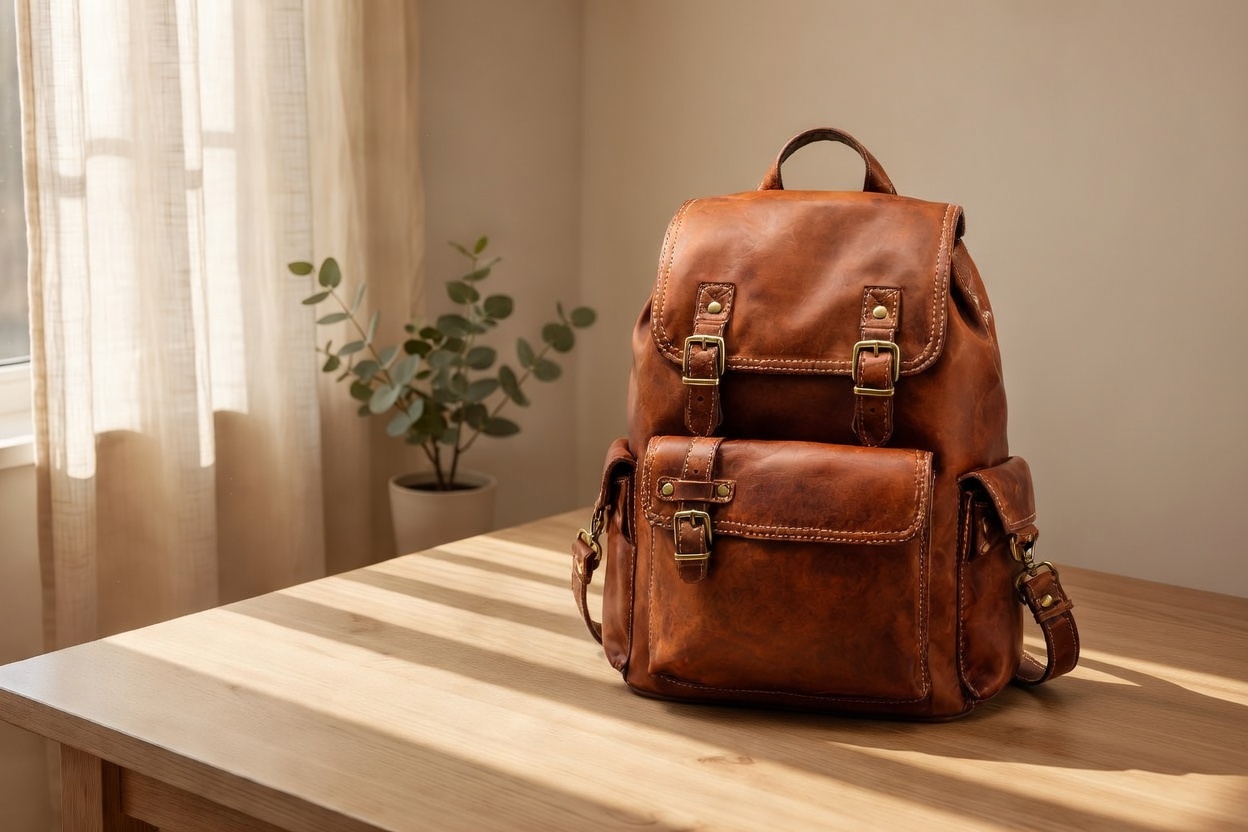
grok-imagine/image-to-image, product photo first, came back 1248×832 (3:2).
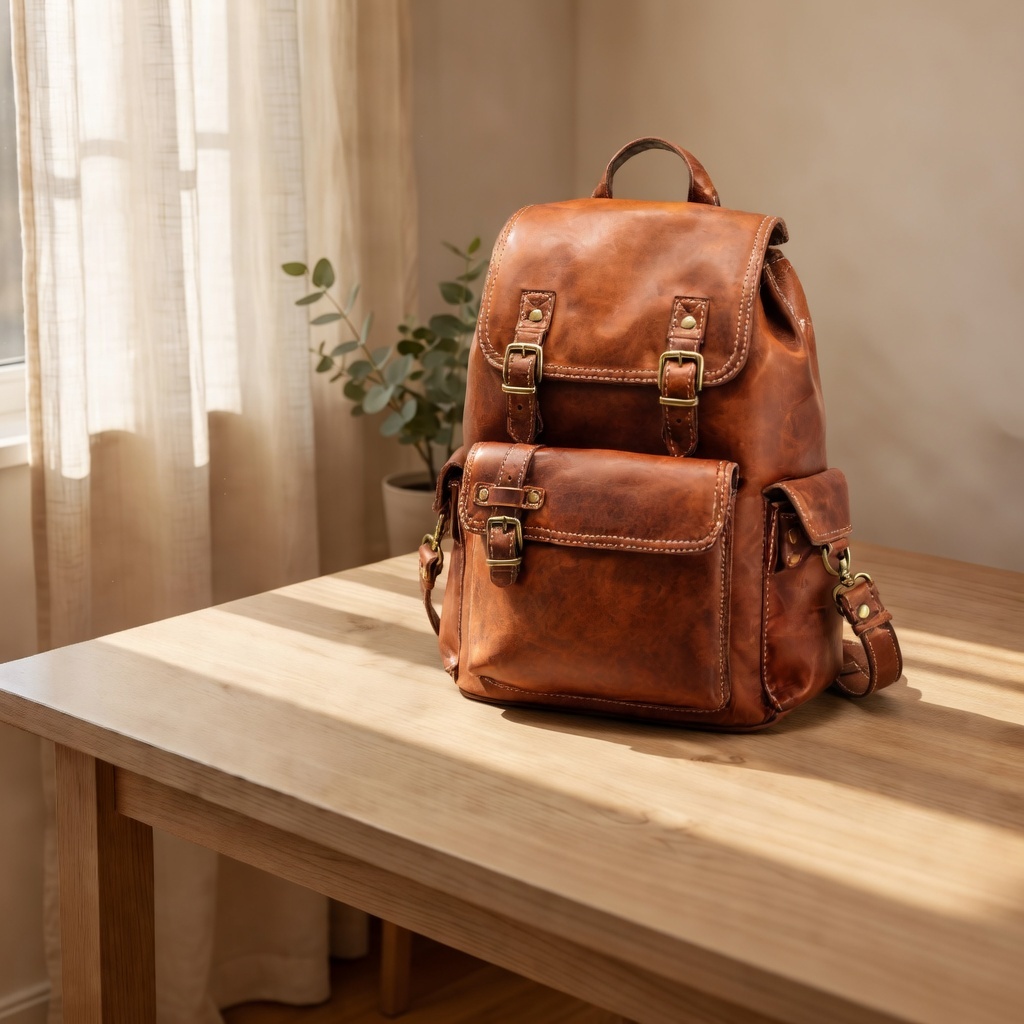
Same request with the scene image first, came back 1024×1024 (1:1).
To control the crop, put the image whose shape you want first, or set aspect_ratio explicitly.
On Quality, the strength is changing one thing while keeping everything else. This relight kept the face, jacket, cup and framing:
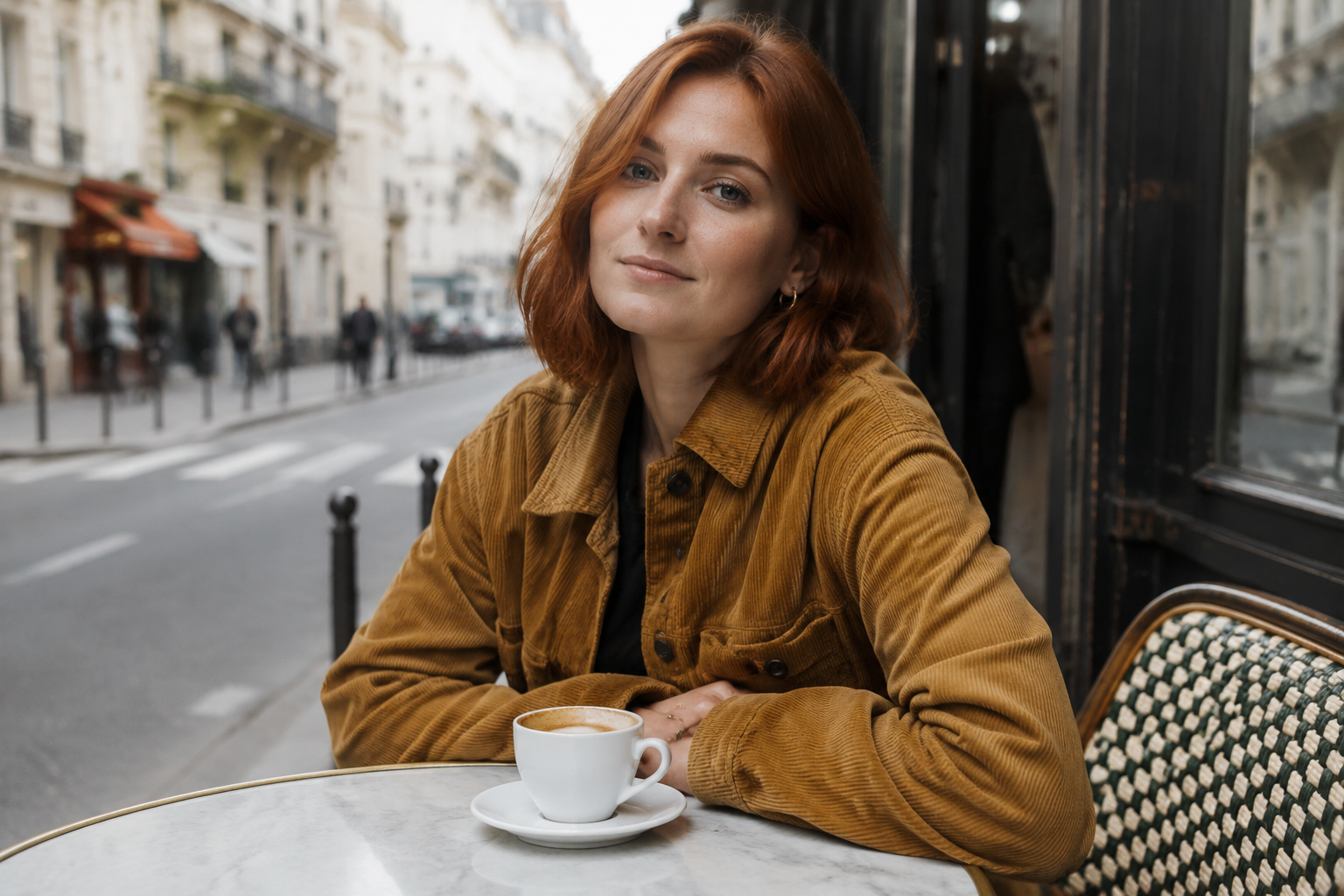
Relight this photo as late golden hour: warm low sun coming from the left,
long soft shadows across the table, amber rim light on her hair and jacket.
Keep her face, expression, pose, the corduroy jacket, the marble table, the
coffee cup and the entire composition exactly the same. Photorealistic, same
camera angle, same framing.
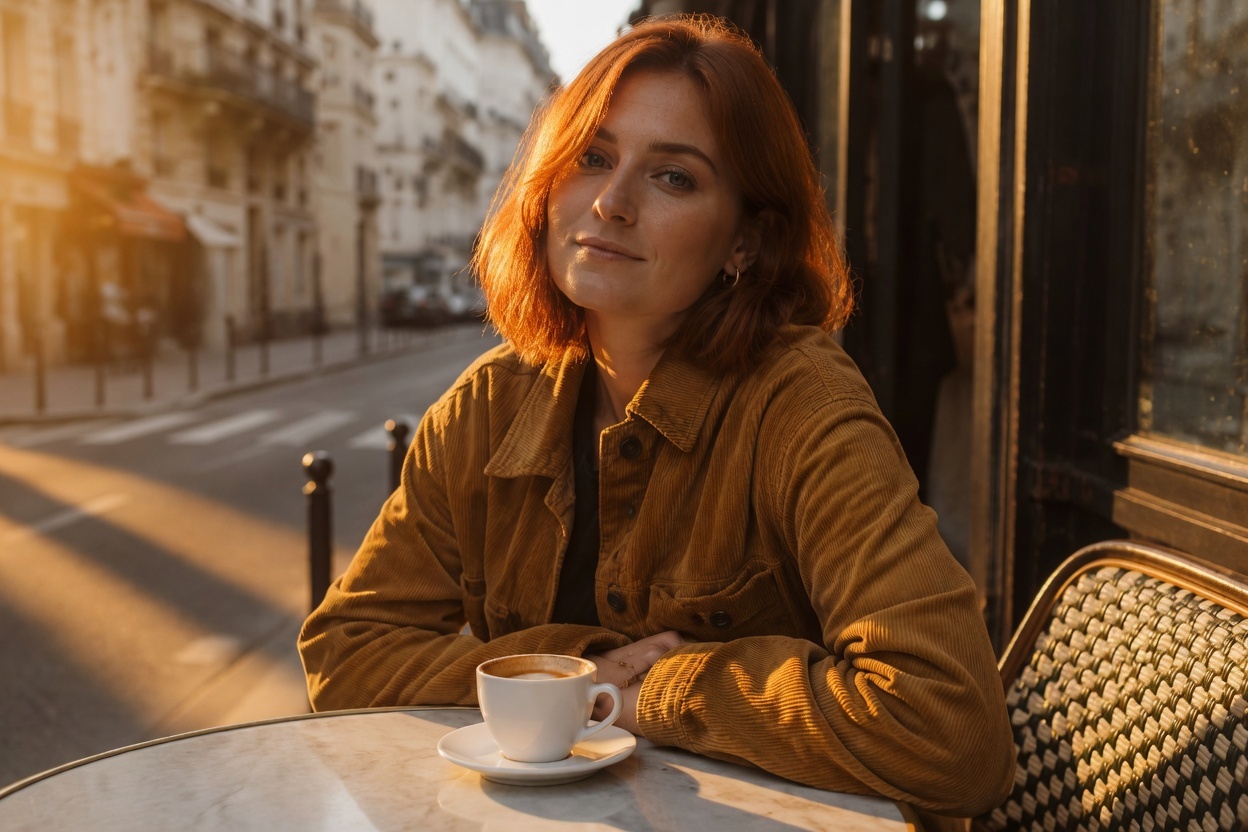
grok-imagine-quality/image-to-image, 1K, auto (3:2 in, 1248×832 out), one reference, $0.095, 39 seconds.
The pattern that works: one sentence for what changes, then a list of everything that must stay. More recipes in Grok Imagine Quality image-to-image prompts.
curl
curl -s -X POST https://api.hiapi.ai/v1/tasks \
  -H "Authorization: Bearer $HIAPI_KEY" \
  -H "Content-Type: application/json" \
  -d '{
    "model": "grok-imagine/text-to-image",
    "input": {
      "prompt": "A lighthouse on a rocky cliff at golden hour, waves crashing below, photorealistic",
      "aspect_ratio": "2:1",
      "resolution": "2k",
      "output_format": "png"
    }
  }'
You get a taskId back. Poll GET https://api.hiapi.ai/v1/tasks/{taskId} until data.status is success, then download data.output[0].url. The link expires, so save the file right away.
Python: all four endpoints
# pip install requests; export HIAPI_KEY=your-key first
import os, time, uuid, requests

API = "https://api.hiapi.ai/v1/tasks"
H = {"Authorization": f"Bearer {os.environ['HIAPI_KEY']}"}

def generate(model, prompt, image_urls=None, timeout_s=300, **params):
    body = {"model": model, "input": {"prompt": prompt, **params}}
    if image_urls:
        body["input"]["image_urls"] = image_urls
    # Reuse the same Idempotency-Key if you retry a submit, so a retry never bills twice
    r = requests.post(API, json=body, headers={**H, "Idempotency-Key": str(uuid.uuid4())}, timeout=30)
    res = r.json()
    if res.get("code") != 200:
        raise RuntimeError(res)  # 400s list every invalid field
    task_id = res["data"]["taskId"]
    deadline = time.time() + timeout_s
    while time.time() < deadline:
        d = requests.get(f"{API}/{task_id}", headers=H, timeout=30).json()["data"]
        if d["status"] == "success":
            return d["output"][0]["url"]
        if d["status"] == "fail":
            raise RuntimeError(d)
        time.sleep(5)
    raise TimeoutError(task_id)

# Draft on standard, then re-run the keeper on Quality
draft = generate("grok-imagine/text-to-image", "matte ceramic pour-over dripper, white background",
                 aspect_ratio="1:1", resolution="1k")
final = generate("grok-imagine-quality/text-to-image", "matte ceramic pour-over dripper, white background",
                 aspect_ratio="1:1", resolution="2k")

# Composite a product into a scene; the first image sets the shape
edit = generate("grok-imagine/image-to-image",
                "Place the product from the first image on the desk in the second image, matching its light",
                image_urls=["https://your-cdn.example.com/product.jpg",
                            "https://your-cdn.example.com/scene.jpg"])
Parameters
| Field | Required | Values | Notes |
|---|---|---|---|
prompt | Yes | text | Everything you want or want to avoid goes here |
image_urls | Image-to-image only | 1–3 URLs | jpeg, png or webp; no SVG; each reference adds to the price |
aspect_ratio | No | 2:1, 20:9, 19.5:9, 16:9, 4:3, 3:2, 1:1, 2:3, 3:4, 9:16, 9:19.5, 9:20, 1:2; image-to-image also takes auto | auto follows the first image |
resolution | No | 1k (default), 2k | Lowercase; price changes only on Quality |
output_format | No | jpeg (default), png, webp |
The ultra-wide 2:1 and 20:9 suit banners. There's no 21:9; use 20:9.
Errors you'll hit
All of these return HTTP 400 when you submit, so no task is created and nothing is billed:
resolution: value must be one of '1k', '2k': you sent2K. Use lowercase.aspect_ratio: value must be one of ...: usually21:9. Use20:9.additional properties 'n' not allowed(orseed,negative_prompt,size): these fields don't exist. One task makes one image; for several images, send several tasks.image_urls: missing required field: image-to-image needs at least one image.
A bad key returns 401. Failures after the task is created show up as status: "fail" when you poll, so check data.status, not just the HTTP code.
FAQ
Standard or Quality?
Draft on standard at $0.03. Once the prompt and layout work, re-run the keeper on Quality. 2K on standard costs the same as 1K, so always ask for 2k there.
Is this the same as Grok Imagine Image 2.0?
No. grok-imagine-image-2.0 is a separate, newer model at $0.052 per image. See the Grok Imagine Image 2.0 text-to-image guide.
Can I get several images from one request?
No. There's no n field. Send one task per image; they run in parallel.
How long do outputs stay available?
The output[0].url link expires. Download it as soon as the task succeeds and store it yourself.
More real outputs: catalog shots on standard and scene compositing for product photos. For video, see the Grok Imagine video API guide.





