TL;DR
- On HiAPI, removing an object from a photo is an instruction edit: send the image and describe what to remove. The general image-to-image models don't take a mask.
- Good starting points:
flux-2/image-to-image($0.035 at 1K, keeps your framing withaspect_ratio: "auto"),gpt-image-2/image-to-image($0.03 at 1K, image field isinput_urls),seedream-4.5/image-to-image($0.045, up to 4K) andqwen-image-3.0/image-to-image($0.0358). - A mask-based inpainting model, FLUX.1 Fill Pro, is listed on HiAPI as coming soon. Until it opens, the prompt is your mask.
Same photo, same instruction, two models
The source: a product shot with a price tag we want gone.
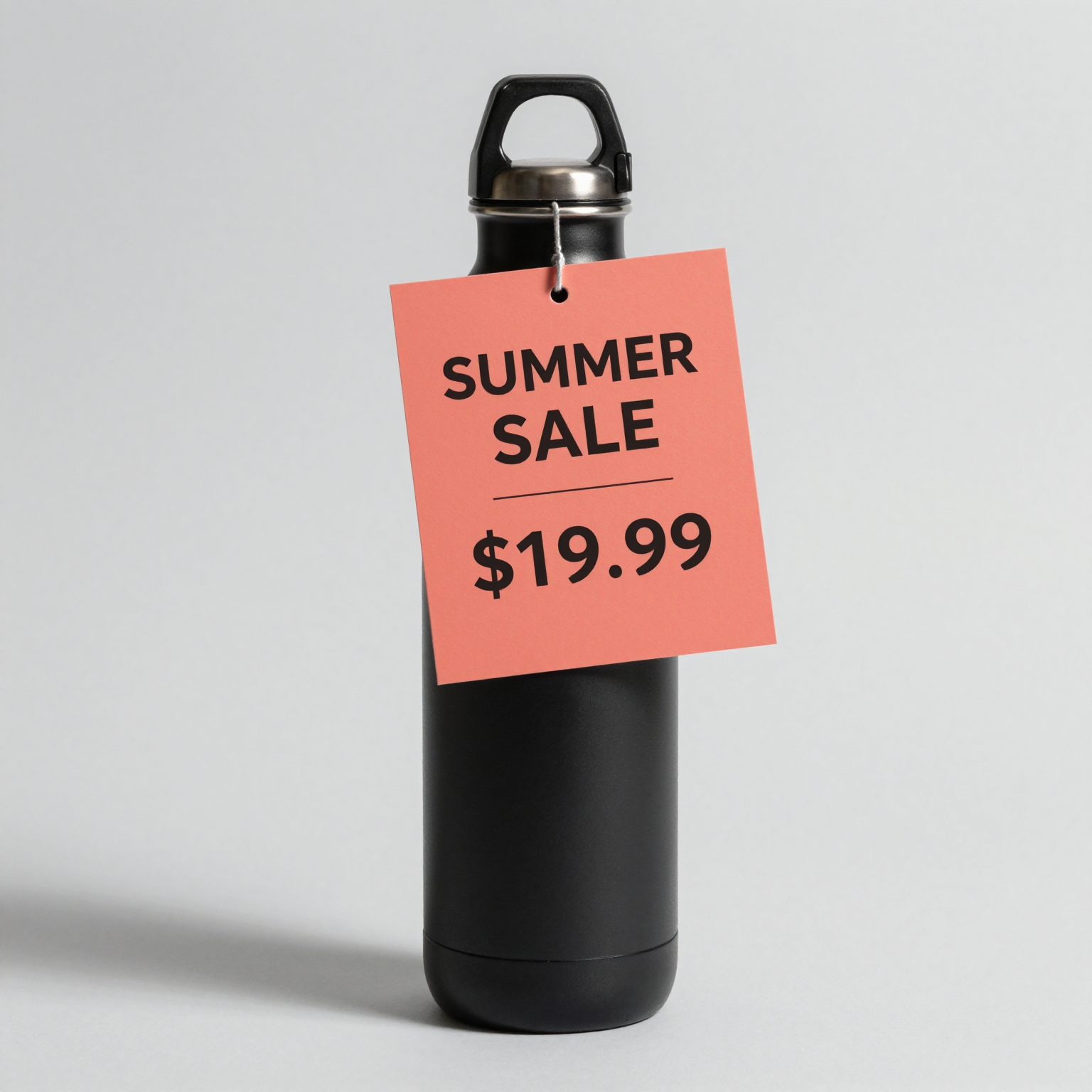
Remove the coral price tag and its string from the bottle. Rebuild the bottle surface and the gray background that were behind it. Keep the bottle, lighting, shadow and everything else unchanged.
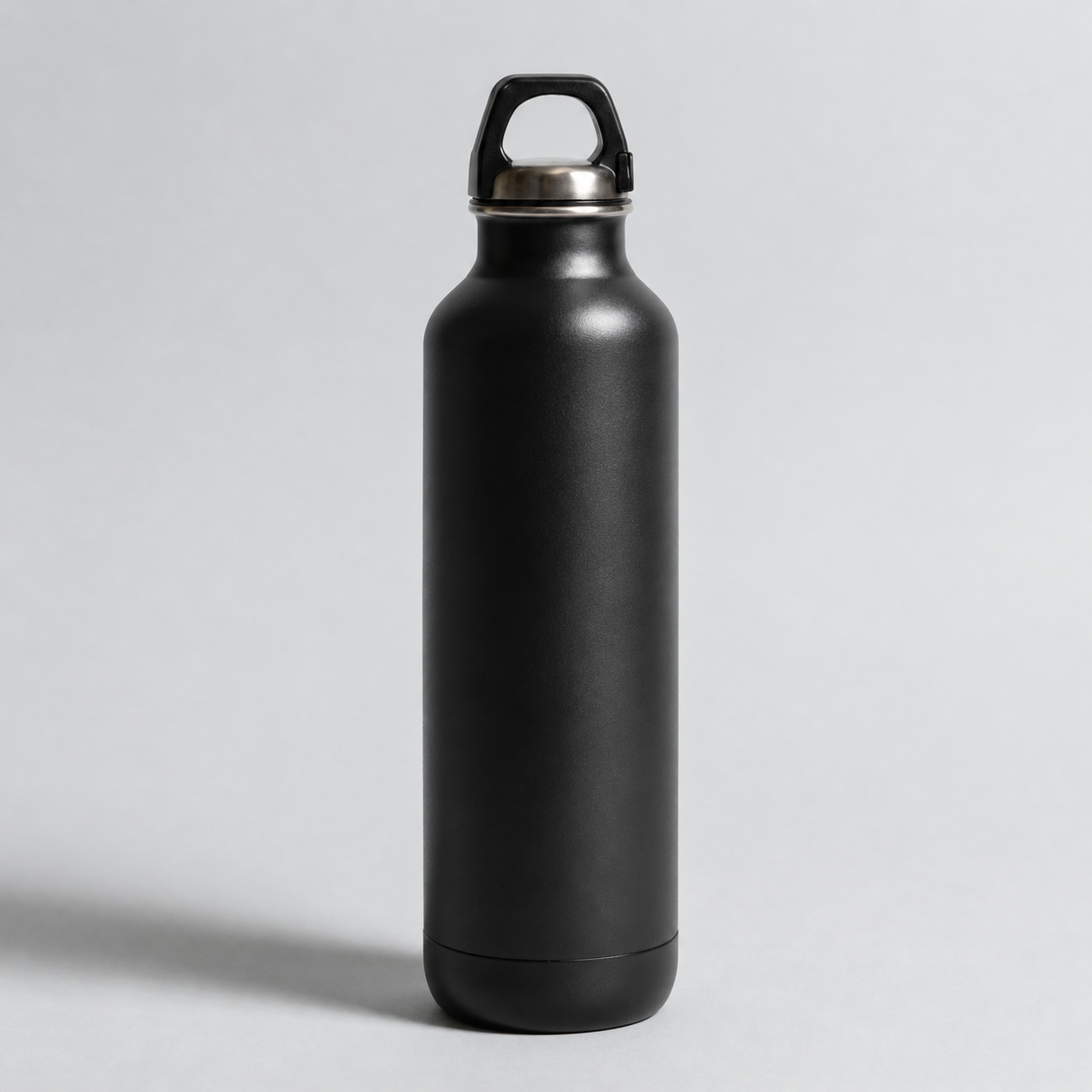
gpt-image-2/image-to-image, resolution 1K, 1254×1254, 112 seconds, $0.03.
The tag and its string are gone. The bottle surface that was behind the tag is rebuilt with matching curvature and highlights, the gray background has no leftover patch, and the cap, base and shadow match the source.
We sent the same request to flux-2/image-to-image. That task ended in fail after 16 seconds with only TASK_FAILED as the reason, and the charge was refunded. One failure doesn't tell you much about a model, but it's a reason to handle fail in your code and retry on a second model.
Which model to use
| Model id | Image field | Keeps source framing | Output size | Price |
|---|---|---|---|---|
flux-2/image-to-image | image_urls (1–8) | Yes, aspect_ratio: "auto" | resolution 1K / 2K | $0.035 at 1K |
gpt-image-2/image-to-image | input_urls (1–16) | Yes, aspect_ratio: "auto" (default) | resolution 1K / 2K / 4K | $0.03 at 1K |
qwen-image-3.0/image-to-image | image_urls (1–3) | No, pick from 8 ratios | resolution 1K / 2K | $0.0358 |
seedream-4.5/image-to-image | image_urls (1–14) | No, pick from 8 ratios | resolution 2K / 4K | $0.045 |
seedream-5.0-pro/image-to-image | image_urls (1–10) | No, pick from 7 ratios | resolution 1K / 2K | $0.06 at 1K |
Live HiAPI prices, checked October 20, 2026. Failed tasks aren't charged.
- Default for object removal: a model with
aspect_ratio: "auto", so the output keeps the photo's shape and you can drop it back where it came from. - Large prints or zoomable product pages: Seedream 4.5 outputs 4K at the same price as 2K.
- Only removing a background: use a dedicated tool such as
851-labs/background-remover($0.002 per image), which takes a singleimage_urland no prompt.
curl
curl -s -X POST https://api.hiapi.ai/v1/tasks \
  -H "Authorization: Bearer $HIAPI_KEY" \
  -H "Content-Type: application/json" \
  -d '{
    "model": "flux-2/image-to-image",
    "input": {
      "prompt": "Remove the white delivery van parked on the right. Rebuild the storefront and sidewalk behind it. Keep everything else unchanged.",
      "image_urls": ["https://your-cdn.example.com/street.jpg"],
      "aspect_ratio": "auto",
      "resolution": "1K"
    }
  }'
You get a taskId back. Poll GET https://api.hiapi.ai/v1/tasks/{taskId} until data.status is success, then download data.output[0].url. The source image must be at a public URL; the model fetches it server-side.
Python: one function for every model
# pip install requests; export HIAPI_KEY=your-key first
import os, time, requests

API = "https://api.hiapi.ai/v1/tasks"
H = {"Authorization": f"Bearer {os.environ['HIAPI_KEY']}"}

def edit(model, timeout_s=300, **inp):
    r = requests.post(API, json={"model": model, "input": inp}, headers=H, timeout=30).json()
    if r.get("code") != 200:
        raise RuntimeError(r)  # a 400 lists every invalid field at once
    task_id = r["data"]["taskId"]
    deadline = time.time() + timeout_s
    while time.time() < deadline:
        d = requests.get(f"{API}/{task_id}", headers=H, timeout=30).json()["data"]
        if d["status"] == "success":
            return requests.get(d["output"][0]["url"], timeout=120).content
        if d["status"] == "fail":
            raise RuntimeError(d.get("error"))
        time.sleep(4)
    raise TimeoutError(task_id)

prompt = ("Remove the tourists from the plaza. Extend the paving stones and the fountain base. "
          "Keep the buildings, light and everything else unchanged.")
src = "https://your-cdn.example.com/plaza.jpg"

# FLUX.2 keeps the source shape
img = edit("flux-2/image-to-image", prompt=prompt, image_urls=[src], aspect_ratio="auto", resolution="1K")

# GPT Image 2: note the field name is input_urls
img = edit("gpt-image-2/image-to-image", prompt=prompt, input_urls=[src], resolution="1K")

# Seedream 4.5 at 4K: aspect_ratio and resolution are required
img = edit("seedream-4.5/image-to-image", prompt=prompt, image_urls=[src], aspect_ratio="3:2", resolution="4K")

with open("plaza-clean.png", "wb") as f:
    f.write(img)
Writing removal prompts
With no mask, the prompt has to say exactly what goes and what stays:
- Name the object and where it is. "The white delivery van parked on the right" works better than "the van".
- Say what fills the gap. "Rebuild the storefront and sidewalk behind it."
- Pin everything else. End with "keep the lighting, colors and everything else unchanged" so the model doesn't restyle the whole photo.
The same pattern covers related jobs:
- Erase and fill: "Remove the power lines across the sky. Fill with clear sky matching the gradient. Keep everything else unchanged."
- Replace: "Replace the paper coffee cup with a white ceramic mug. Match the lighting and shadows. Keep everything else unchanged."
- Repair: "The bottom-left corner of this scanned photo is torn. Rebuild the missing grass and path. Do not change the rest."
- Several objects: "Remove the trash bin by the bench and the two traffic cones. Fill each area with the background. Keep everything else unchanged."
For heavy cleanup, do one removal per call and chain them. Save each result to your own storage and pass that URL to the next call; HiAPI output links expire about 7 days after the task finishes.
Errors you'll hit
All of these are HTTP 400 at submit, so nothing is created or billed:
additional properties 'mask_url' not allowed(ormask): these models don't take a mask. Describe the area in the prompt.input_urls: missing required field "input_urls": you sentimage_urlstogpt-image-2/image-to-image.additional properties 'quality' not allowed: Seedream 5.0 Pro usesresolution(1K or 2K), notquality.aspect_ratio: value must be one of ...:autoworks on FLUX.2, GPT Image and Grok Imagine, not on Seedream or Qwen.
If a task ends in fail, read data.error. The usual cause is a source URL the model couldn't fetch.
FAQ
Does HiAPI have a mask-based inpainting API?
Not yet for general use. FLUX.1 Fill Pro, which takes an image plus a black-and-white mask, is listed as coming soon. The models above edit from the prompt alone.
Which model is best for object removal?
Start with one that keeps the source framing: flux-2/image-to-image or gpt-image-2/image-to-image with aspect_ratio: "auto". GPT Image 2 handled the example above cleanly. Compare two models on a few of your own photos before you pick one.
Can I remove several objects in one call?
Yes, list them in one prompt. Each call returns one image. If the result misses one, run a second pass on the output.
Can I use the edited image commercially?
Generated output follows your plan's usage terms. You still need the rights to the source photo you edit.
More editing prompts: Seedream 4.5 prompt recipes and Qwen Image 3.0 API guide.





