Magnific is the upscaler many teams reach for when they want an image enlarged and reimagined. On its API, one request can go up to 16×. Four sliders control how far the result may drift from the source, and nine presets tune the output for portraits, illustration, game assets and more. If those controls are central to your workflow, keep that in mind as you read this page.
This page is for a narrower case: you already generate images through an API, you want upscaling on the same key and invoice, and you need to know what hiapi actually offers today. We checked both platforms on 2026-11-03, ran a real upscale on hiapi, and wrote down where each one fits.

Platform Overview
| Magnific API | hiapi | |
|---|---|---|
| Upscaling endpoints | Creative upscaler (/v1/ai/image-upscaler), plus a Precision upscaler | Two models: recraft/creative-upscale and recraft/crisp-upscale |
| Scale control | scale_factor: 2×, 4×, 8×, 16× (output capped at 25.3 MP) | None. Creative returned 4096×4096 in our test, and Crisp is fixed at 2× |
| Fidelity / style controls | creativity, hdr, resemblance, fractality (−10 to 10), optimized_for (9 presets), engine (4 options), prompt | None. Both models accept only image_url |
| Image input | Base64 string in the JSON body | Public https URL |
| Async model | Returns task_id, statuses CREATED → IN_PROGRESS → COMPLETED / FAILED, optional webhook_url | Returns taskId, poll GET /v1/tasks/:id or set a top-level callback |
| Billing unit | Credits. API calls always draw from your credit balance, including on plans marketed as unlimited | USD per image: Creative $0.3575, Crisp $0.004 |
| Other models on the same key | Image, video and audio models, sold under the same credit plans | Image, video, audio and LLM models on one key |
Magnific details come from its public API reference and pricing page. hiapi prices come from the live pricing API (see the pricing page). Both change, so check them again before you commit.
Key Differences
Control over the result
This is Magnific's home turf, and hiapi does not compete on it. Magnific lets you choose the scale factor and decide whether the AI may invent detail or must stay close to the source. hiapi's two upscalers have one input field each. Extra parameters are rejected at submit time. Sending scale_factor to either model returned:
{"code":400,"error_code":"INVALID_REQUEST","message":"invalid input: <root>: additional properties 'scale_factor' not allowed"}
So your settings do not carry over. You choose between two fixed behaviors instead of tuning sliders.
What "creative" means in practice
We downscaled a sunset cabin scene to 640×640, uploaded it, and sent it to recraft/creative-upscale with no other input. The task went handling → archiving → success in about 85 seconds and returned a 4096×4096 WebP (17.9 MB).
The output is sharp, but it is a repaint, not an enlargement. Look at the cabin:
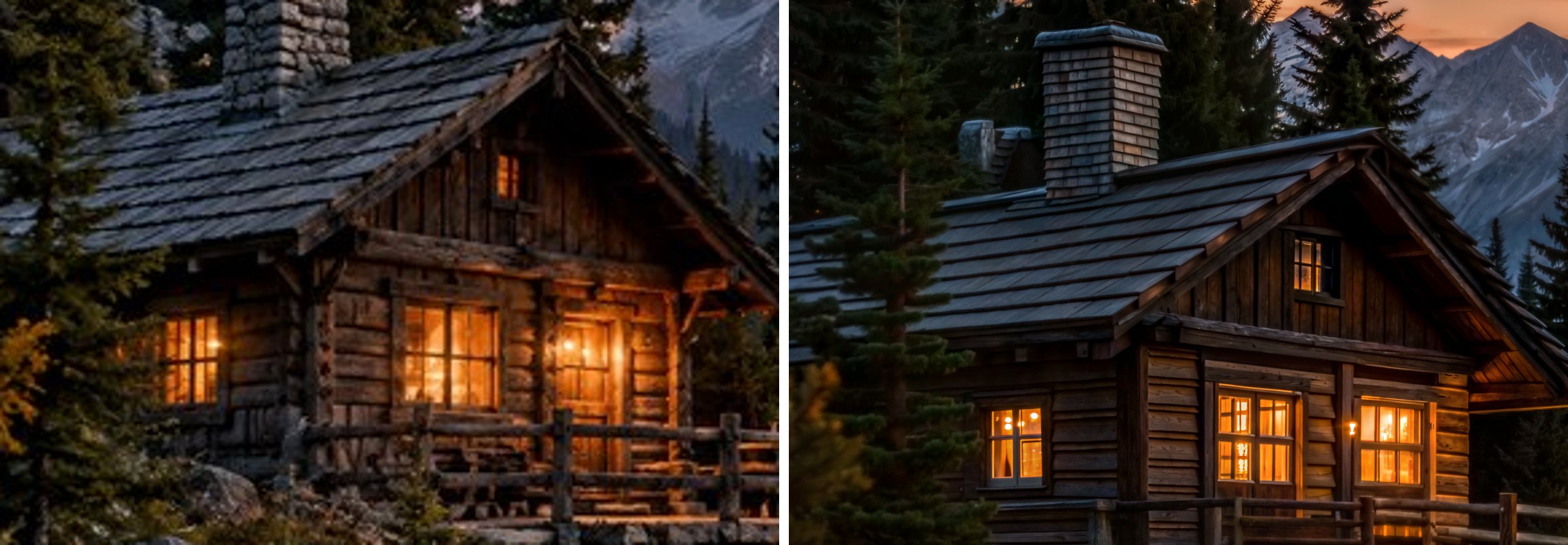
The stone chimney became a shingled one, and a second chimney appeared. The lit doorway turned into a window, and the cabin moved lower in the frame. A tree now stands in front of the wall. The mountains and sky keep their overall layout, but the peaks are redrawn. For a landscape hero image that may be exactly what you want. For product photos, a logo, or any image where the details must match the original, it is not. On Magnific, resemblance is the slider for that case. On hiapi, the fidelity-first option is Crisp Upscale.
The fidelity option: Crisp Upscale
recraft/crisp-upscale is sold as a 2× upscale that keeps content and lettering unchanged, at $0.004 per image. On 2026-11-03 we could not produce an output with it. Three test runs, one using the model page's own sample input, each ended in TASK_FAILED within about 4 seconds. hiapi does not charge for failed tasks, so the runs cost nothing. Still, run a few of your own images through it before you plan a migration around it. Our earlier hands-on results for this model are in the related reading below.
Pricing
Magnific bills in credits. Its pricing page lists Premium at $20/month, Premium+ at $45 and Pro Starter at $110 (lower with annual billing). As an example of the rates, the Precision upscaler is listed at 90 credits per 2K image. What one upscale costs you in dollars depends on your plan and scale factor, so we have not converted it into a single number here.
hiapi charges a flat amount per output image ($0.3575 for Creative, $0.004 for Crisp), with no subscription and no charge for failed tasks. That makes cost per call easy to predict. It does not make hiapi cheaper for every workload. At 4× and above, or on a plan you already pay for, Magnific may cost less per image. Price your own volume on both before you decide.
Migration Mapping
If you are moving an existing Magnific integration, here is how the parts line up:
| Magnific | hiapi equivalent | Note |
|---|---|---|
POST /v1/ai/image-upscaler | POST https://api.hiapi.ai/v1/tasks with "model": "recraft/creative-upscale" | Single model id per behavior |
| Precision upscaler | "model": "recraft/crisp-upscale" | Fixed 2×. Re-test availability first |
image (Base64) | input.image_url (public URL) | Host the source first, e.g. on your own bucket |
scale_factor, creativity, hdr, resemblance, fractality, optimized_for, engine, prompt | No equivalent | Remove them. They cause a 400 |
x-magnific-api-key header | Authorization: Bearer <key> | See authentication |
webhook_url | Top-level callback: {"url": "...", "when": "final"} | Fires once on success or fail. Dedupe by taskId |
data.generated[0] | data.output[0].url | hiapi result URLs carry an expireAt (temporary). Download right away |
A working request, the same shape we used for the test above:
curl -s -X POST https://api.hiapi.ai/v1/tasks \
  -H "Authorization: Bearer $HIAPI_API_KEY" \
  -H "Content-Type: application/json" \
  -d '{
    "model": "recraft/creative-upscale",
    "input": { "image_url": "https://static.hiapi.ai/blog/magnific-ai-alternative/input-640.jpg" },
    "callback": { "url": "https://your-app.example.com/hiapi/webhook", "when": "final" }
  }'
# -> {"code":200,"data":{"taskId":"tk-hiapi-..."},"message":"success"}

curl -s https://api.hiapi.ai/v1/tasks/tk-hiapi-... \
  -H "Authorization: Bearer $HIAPI_API_KEY"
# terminal: data.status = "success", data.output[0].url = "https://temp.hiapi.ai/....webp"
Put callback next to model and input, not inside input, or the per-model schema rejects it. The full field reference is in the create-task docs.
When to Choose Each
Choose hiapi when:
- You already generate images or video through hiapi and want upscaling on the same key, balance and webhook handler.
- A fixed behavior is acceptable: one call returns a high-resolution repaint, with no tuning step.
- You want a flat per-image dollar price and no subscription.
- Upscaling is one step in a larger multi-model pipeline, not the product itself.
Choose Magnific when:
- You need to choose the scale factor, especially 8× or 16×.
- You need to balance invented detail against faithfulness. Our test shows a no-control creative upscale can change the subject.
- Your images fall into a niche its presets target, such as portraits, game assets or 3D renders.
- Your team also works in a web app on the same images, or you already pay for a plan that covers your volume.
FAQ
Is hiapi a good Magnific AI alternative? For pipelines that need one-call, high-resolution output and already run on hiapi, yes. For work that depends on Magnific's creativity and resemblance sliders or 8×–16× scaling, no. hiapi has no equivalent controls.
Which is cheaper? It depends on scale and plan. hiapi is a flat $0.3575 (Creative) or $0.004 (Crisp) per image. Magnific uses plan credits that vary by tool and output size. Compare using your own volume.
How do I migrate from the Magnific API?
Host your source images at public URLs. Swap the endpoint and auth header. Drop every tuning parameter. Map webhook_url to a top-level callback. Read data.output[0].url and download it before it expires.
Does hiapi's creative upscale keep the original details? Not reliably. In our test it redrew the chimney, windows and door and shifted the composition. Use it when a repainted, sharper image is acceptable.
Can I keep using my other models on the same key?
Yes. Upscaling runs through the same /v1/tasks endpoint as hiapi's image and video models, so one key, balance and callback handler cover all of them.
Conclusion
Magnific stays the stronger tool for controlled, high-factor upscaling. hiapi makes sense when upscaling is one step in a pipeline you already run on one key, and a fixed, repaint-style output works for you. Run your own images through the Creative Upscale model page before you migrate. If fidelity matters, test Crisp Upscale too.