TL;DR
Choose Recraft Creative Upscale to rework texture in an old illustration when changes to stone, wood and foliage are acceptable. Start with Recraft Crisp Upscale when original shapes and layout matter more, or when planning a large batch. Creative costs $0.3575 per image, with calculations on the pricing page; Crisp costs $0.004 per image. In the cabin and lake pairs, Creative redraws local structures while Crisp stays closer to the source layout.
Neither needs a prompt. Prepare one original image and open Creative Upscale, or take the same source to Crisp Upscale.
Decide which details may change before enlarging
| Decision | Recraft Creative Upscale | Recraft Crisp Upscale |
|---|---|---|
| Main reason to choose it | You accept redrawn texture and local structure | You prioritize source layout and edges |
| Input | One image_url | One image_url |
| Prompt and scale | No prompt, scale or style setting | No prompt or adjustable scale field |
| Input limits | Up to 20 MB, each side 256 to 4096 pixels, at most 16 MP; PNG input | JPEG, PNG or WebP, up to 10 MB |
| Cabin result | 1254×1254 → 4096×4096 WebP | 1254×1254 → 2508×2508 PNG |
| Lake file available to inspect | 768×768 input; only a 1280×1280 display WebP | 768×768 → 1536×1536 PNG |
| Price per image | $0.3575 | $0.004 |
Each pair uses an identical source with the same enlargement goal and no prompt. Output dimensions and formats differ, and the Creative lake file is only a display preview. Compare visible layout and detail at the same display size; more pixels do not establish higher quality. Both supplied Crisp examples double width and height, which does not by itself establish a fixed multiplier for every input.
Cabin: more regular stonework also changes the structure
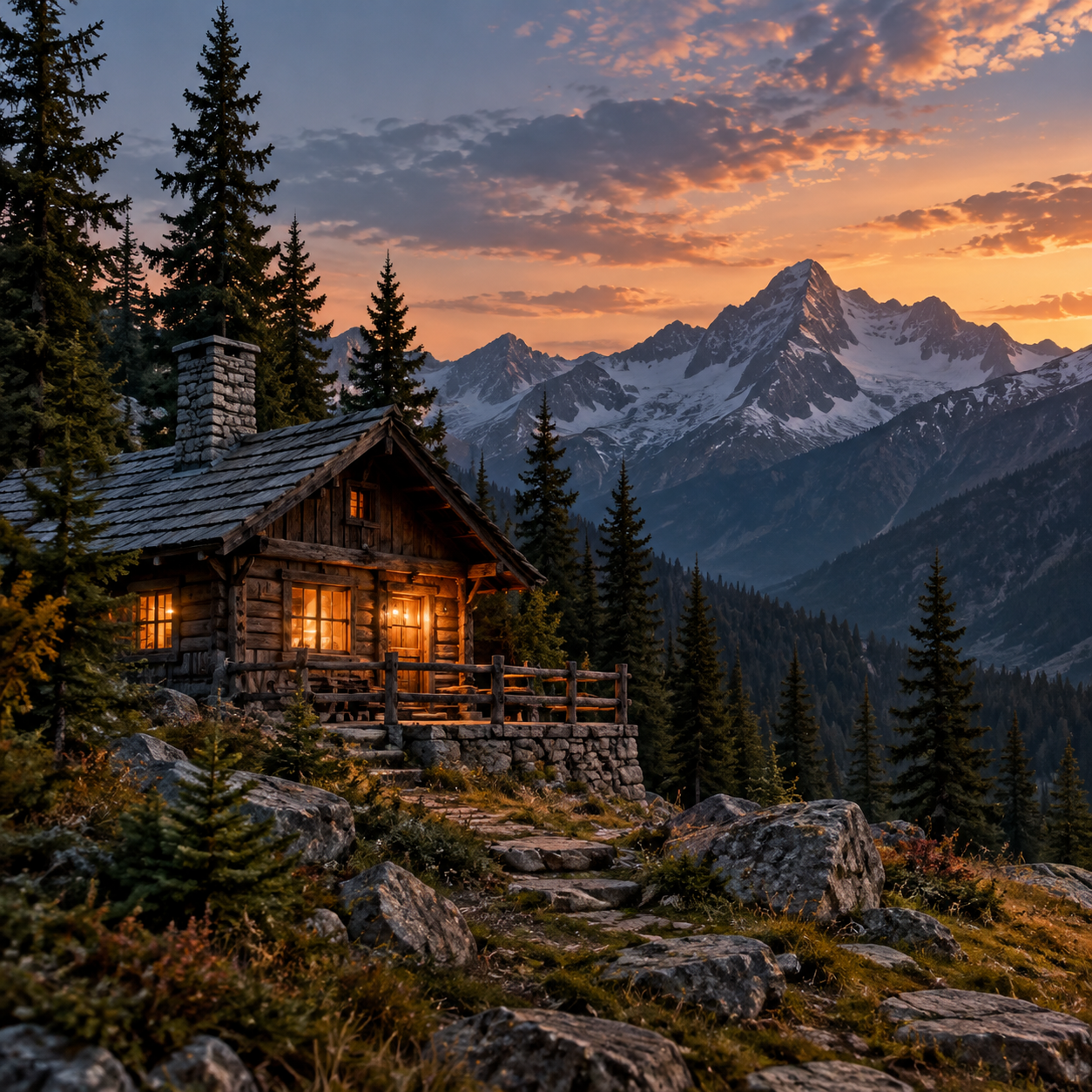
Prepare this source image and open Creative · Prepare the same source and open Crisp
| Recraft Creative Upscale | Recraft Crisp Upscale |
|---|---|
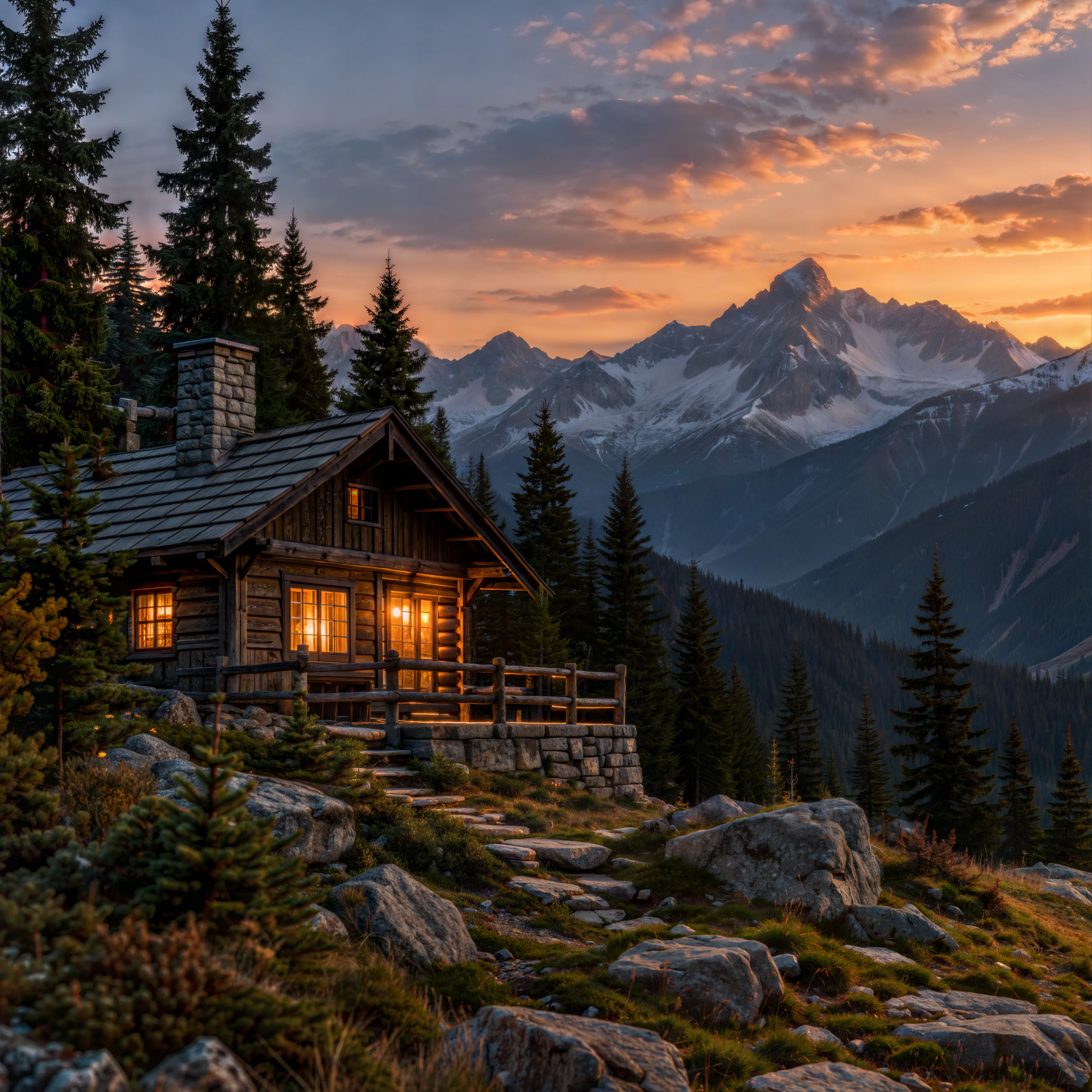 |  |
| Prepare this source image and open Creative | Prepare the same source and open Crisp |
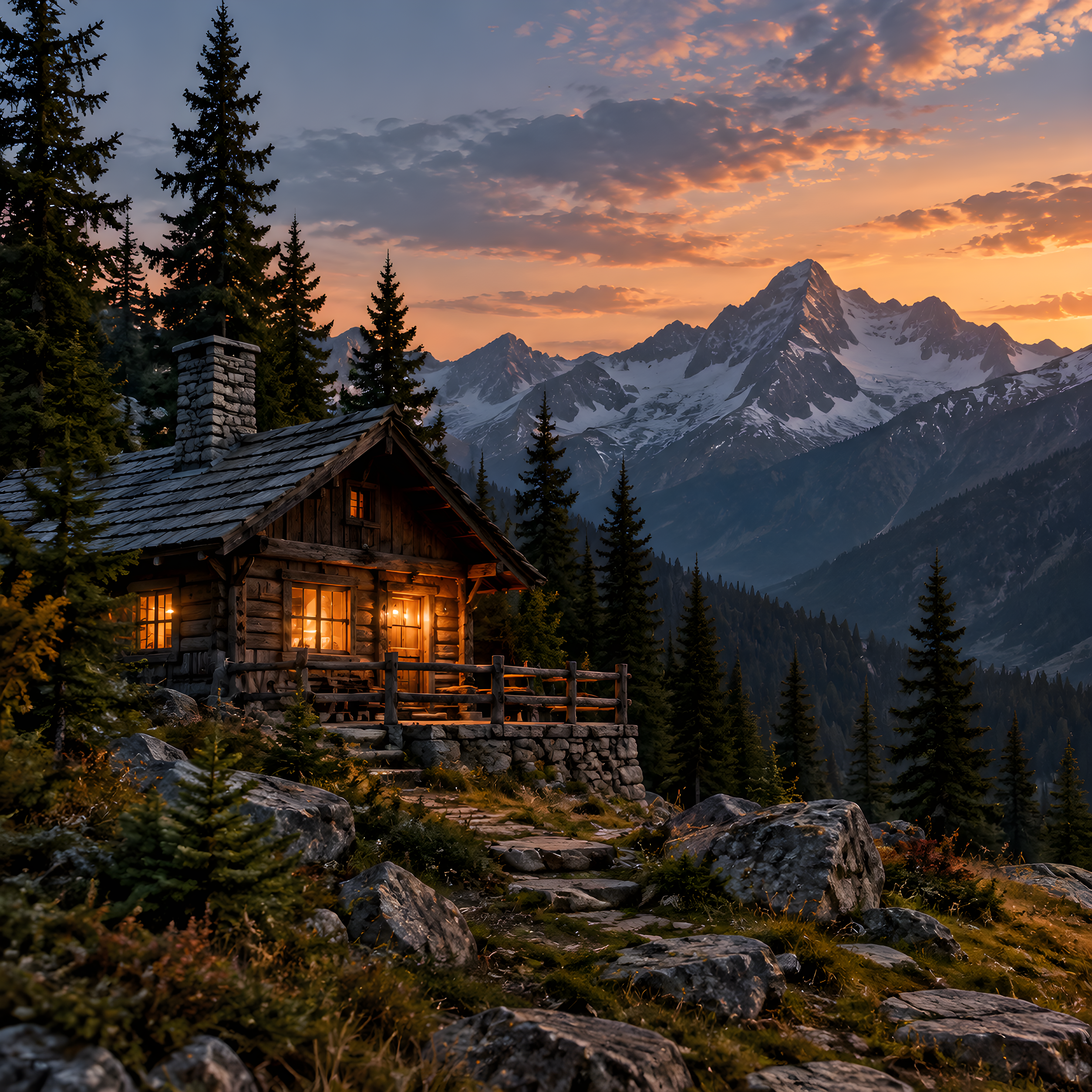
Shared input: 1254×1254 PNG. Creative: full 4096×4096 WebP, $0.3575. Crisp: 2508×2508 PNG, $0.004. Neither uses a prompt; output specifications differ.
The source places a cabin below snowy peaks and a warm evening sky, with pines on either side. Both outputs retain this recognizable composition, lit windows and a warm porch. The main building remains recognizable.
Around the porch and foundation, Creative turns irregular stonework into more regular blocks with distinct joints and edges. Log ends, window divisions, steps and a nearby small tree also change. These choices can give an illustration a tidier appearance, but they cannot establish what the original building details were.
Crisp keeps the distribution of stones, porch edges and tree outlines closer to the source, making the positions of the main objects easier to match. Local edges still need review. This supports saying the particular result is closer to the original, without guaranteeing unchanged lettering, window divisions or every pixel.
For an atmospheric illustration, Creative's redraw may be the desired result. If the cabin represents a property, architectural proposal or specific product that must be depicted accurately, inspect Crisp first. Keep the source alongside it and review the stonework, windows and stairs individually.
Lake: inspect boat planks, rocks and the tree line
Prepare this source image and open Creative · Prepare the same source and open Crisp
| Recraft Creative Upscale | Recraft Crisp Upscale |
|---|---|
 |  |
| Prepare this source image and open Creative | Prepare the same source and open Crisp |
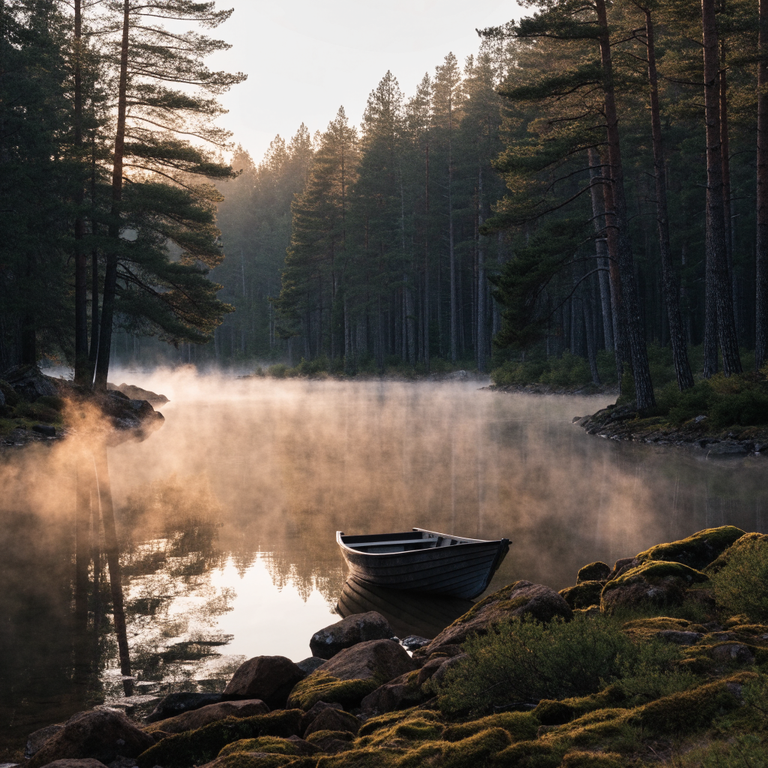
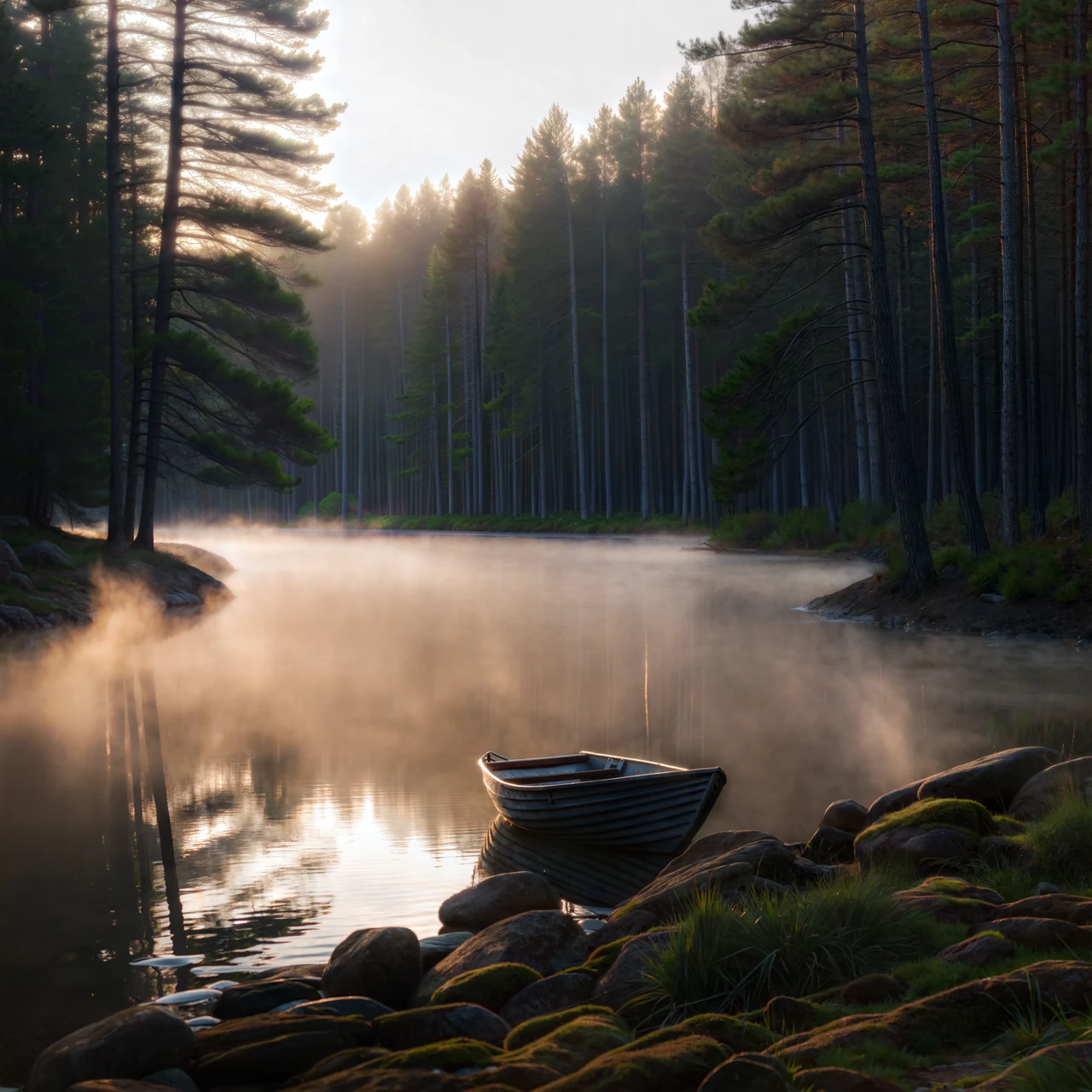
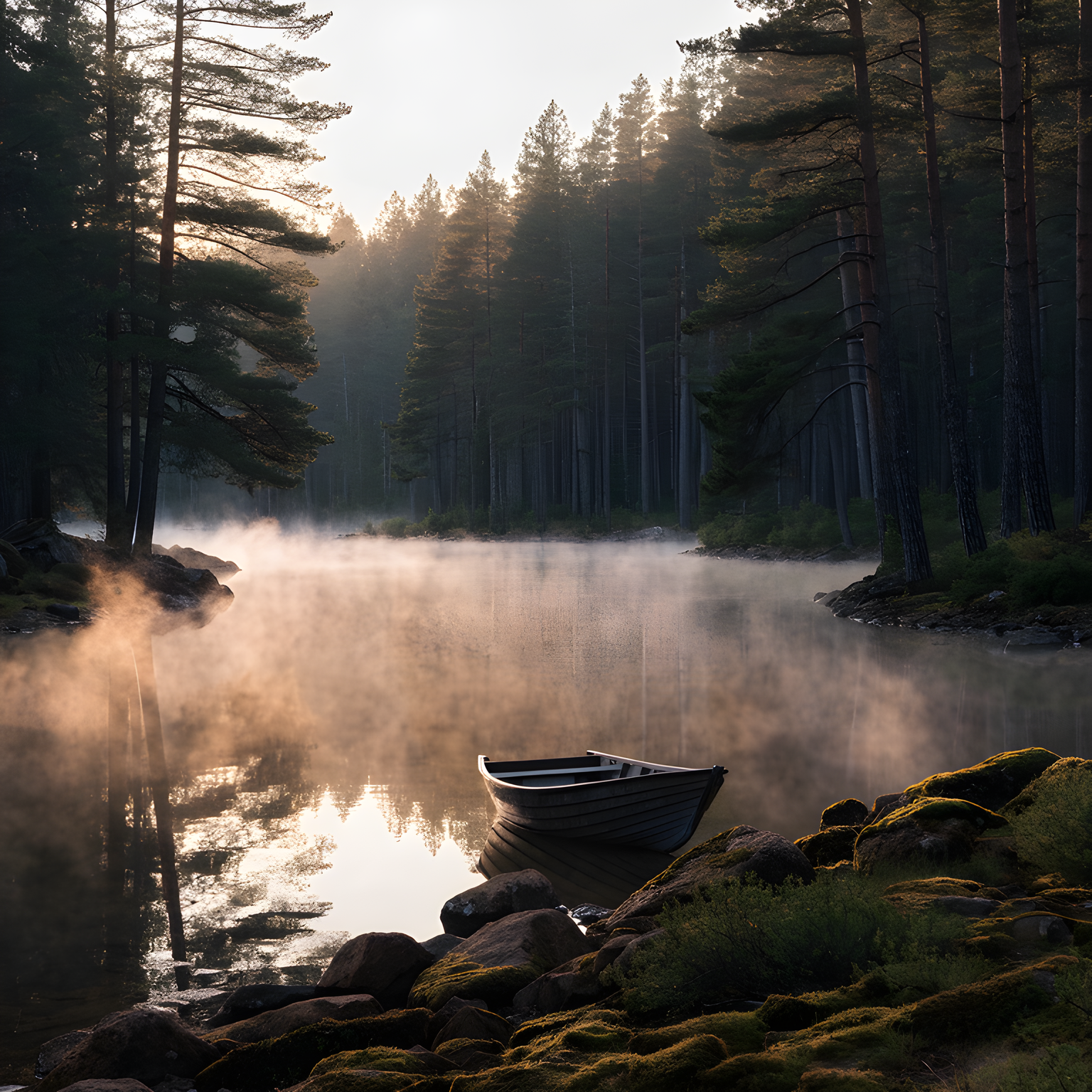
Shared input: 768×768 PNG. Creative: only a 1280×1280 display WebP, $0.3575. Crisp: 1536×1536 PNG, $0.004. The Creative preview cannot substitute for the full-resolution result or establish its enlargement factor.
The source shows a wooden boat by a misty lake, moss-covered rocks in the foreground, and a distant forest and mountain. Both results preserve the recognizable boat, water and mist scene, allowing a comparison of atmosphere and overall placement.
In the Creative preview, the planks and interior of the boat are reorganized. Foreground rock shapes and texture, as well as tree distribution, also change. Crisp's hull outline, rock positions and tree line stay closer to the input. These visible differences help decide whether a redraw is acceptable, but the Creative preview cannot establish the full file's detail at high magnification.
For wallpaper or concept scenery, changes to planks and foliage may be acceptable. For an asset that must reproduce the source scene, inspect Crisp's correspondence first. If delivery requires a large file, this lake pair only helps with visual direction; obtain and inspect the complete chosen result before accepting the final asset.
How much does a batch cost?
| Result count | Creative: count × $0.3575 | Crisp: count × $0.004 |
|---|---|---|
| 10 | $3.575 | $0.04 |
| 100 | $35.75 | $0.40 |
| 1,000 | $357.50 | $4.00 |
Creative costs 89.375 times as much per image, a difference of $0.3535. This makes the need for a redraw worth deciding before a batch; the price ratio is not a quality ratio.
Assign 10 of 100 assets to Creative because their illustrations allow redrawing, and send the other 90 to Crisp. The budget is 10 × $0.3575 + 90 × $0.004 = $3.935. This is an allocation example, not a prediction that 10% of any collection needs Creative. Each request produces one candidate; additional candidates add their respective unit prices. Manual review is separate.
Which tasks should start with which model?
- For old illustrations, atmospheric artwork or concept scenery where rocks and plants may be redrawn, start with Creative and check whether the new texture fits the artwork.
- For product shapes, buildings or structures that should stay close to the source, start with Crisp and review individual details. These landscape pairs do not prove error-free text or logo preservation.
- For large batches whose main requirement is a larger display image, plan around Crisp's budget first, avoiding a paid redraw the task does not need.
- For large screens or print, inspect the complete file from either model, its actual dimensions and the final layout. The lake display preview cannot serve as full-output acceptance evidence.
Switching requests is simple; check input limits again
Both use HiAPI /v1/tasks: submit a task to obtain a taskId, then query its result. Each request has an outer model and input.image_url. The actual bodies for both pairs appear below. The Creative integration guide covers authentication and result queries.
Creative accepts inputs up to 20 MB, each side from 256 to 4096 pixels and at most 16 MP total. All conditions apply together: a 4096×4096 file should not be accepted solely because each side fits the range while ignoring total pixels. Prepare a PNG source image. Crisp accepts JPEG, PNG and WebP up to 10 MB. Check the target model's requirements before reusing a URL.
Cabin request bodies
Recraft Creative Upscale:
{
  "model": "recraft/creative-upscale",
  "input": {
    "image_url": "https://static.hiapi.ai/model-covers/2026/10/22/1792647323763-1285c89c961a9550-1792546247120-1285c89c961a9550-input-mountain-cabin-1254.png"
  }
}
Recraft Crisp Upscale:
{
  "model": "recraft/crisp-upscale",
  "input": {
    "image_url": "https://static.hiapi.ai/model-covers/2026/10/22/1792647323763-1285c89c961a9550-1792546247120-1285c89c961a9550-input-mountain-cabin-1254.png"
  }
}
Lake request bodies
Recraft Creative Upscale:
{
  "model": "recraft/creative-upscale",
  "input": {
    "image_url": "https://static.hiapi.ai/model-covers/2026/10/22/1792647330566-d855771457d60c69-1792564455909-d855771457d60c69-input-misty-lake-768.png"
  }
}
Recraft Crisp Upscale:
{
  "model": "recraft/crisp-upscale",
  "input": {
    "image_url": "https://static.hiapi.ai/model-covers/2026/10/22/1792647330566-d855771457d60c69-1792564455909-d855771457d60c69-input-misty-lake-768.png"
  }
}
Keep the slash in API IDs: recraft/creative-upscale and recraft/crisp-upscale. The hyphenated model-page address is not the API ID. Do not add prompt, scale, style or another model's resolution field. Save the complete result, record actual dimensions and format, then inspect both at a matched display size and at the intended delivery size.
FAQ
Can prompts control detail in Creative or Crisp?
No. Both take one image and have no prompt field. Decide whether local redrawing is acceptable, then compare results against the original. The links on this page explicitly ask you to prepare an image.
Does Creative's higher pixel count make it right for my image?
Not necessarily. The complete cabin result is 4096×4096, but stonework, window divisions and steps change. Acceptability depends more directly on those changes than on the pixel count.
Can the lake preview establish Creative's full output?
It shows the composition and redraws visible in that preview only. The 1280×1280 display WebP cannot establish full-output dimensions, fine detail or enlargement factor.
Does Crisp always double every input?
These examples go from 1254×1254 to 2508×2508 and from 768×768 to 1536×1536, doubling both dimensions. This page does not turn two cases into a guarantee for other inputs; read actual returned dimensions in your integration.
Pricing and budgets · API integration · Examples and input selection · Prepare images and open the model page