Vidu Q4 Preview (vidu-q4-preview/image-to-video) does one thing: it takes a single still image as the first frame and animates it into a 3–16 second clip, up to true 4K, with sound baked in. This post is a working cookbook of vidu-q4-preview image-to-video prompts — three copy-paste recipes that cover the moves you'll actually reach for: a slow cinematic push-in, a product orbit, and a vertical short-form action shot.
Every clip below is a real, first-take output from the exact prompt shown next to it — no cherry-picking across runs — and every price was checked against the live pricing page before publishing. If you need several reference images or a specific voice to stay consistent across shots, that's a different endpoint — reference-to-video — not this one.
The 30-second schema recap
Vidu i2v runs on hiapi's async task endpoint (POST /v1/tasks) with a deliberately small, strict input schema:
| Field | Required | Notes |
|---|---|---|
prompt | yes | The motion and the camera, not the scene — the image already is the scene |
image_url | yes | One publicly fetchable URL (singular — not image_urls); becomes the first frame |
resolution | no | One of 540p, 720p, 1080p, 2k, 4k |
duration | no | Integer seconds, 3–16 (an integer, not a string) |
Two behaviors are worth burning into memory, because both are easy to get wrong:
- There is no
aspect_ratiofield. Passing one returns400 additional properties 'aspect_ratio' not allowed. The clip inherits the shape of your first frame, so a 16:9 still gives a 16:9 clip and a 9:16 still gives a vertical one. You control aspect by choosing (or cropping) the image, not the prompt. reference_image_urlsis rejected too. That field belongs to reference-to-video. Image-to-video is strictly one first frame.
Pricing is per second, by resolution — the duration is the multiplier:
| Resolution | Price / second | 5-second clip |
|---|---|---|
| 540p | $0.0515 | $0.26 |
| 720p | $0.109 | $0.55 |
| 1080p | $0.1375 | $0.69 |
| 2K | $0.2175 | $1.09 |
| 4K | $0.446 | $2.23 |
Because cost scales with seconds, resolution is really a budget dial. Keep drafts at 540p/720p, then re-render the keeper at 1080p or 4K. (Full, current numbers always live on the pricing page.)
The i2v prompt formula
Image-to-video flips the usual mental model: the image is the scene, so the prompt is only the motion and the lens. Don't re-describe what's already in the frame — you'll fight the model. A reliable structure:
[what moves, in order]→[one camera instruction]→[the ambient sound you want]→[a "no cuts / unbroken shot" clause]
That last two points matter more than on most i2v models. Vidu renders audio natively — every clip below came back with a matching sound track even though I passed no audio reference at all — so if you mention wind, a sizzle, or footsteps, you tend to get them. And naming a single, clear camera move ("slow push-in," "half-circle orbit") keeps the shot coherent; stacking three competing moves is how you get mush.
Recipe 1 — Cinematic push-in at 4K, with native audio
The flagship move: start on a quiet establishing frame and let the camera creep in while small things move. This is the recipe that justifies the 4K tier.
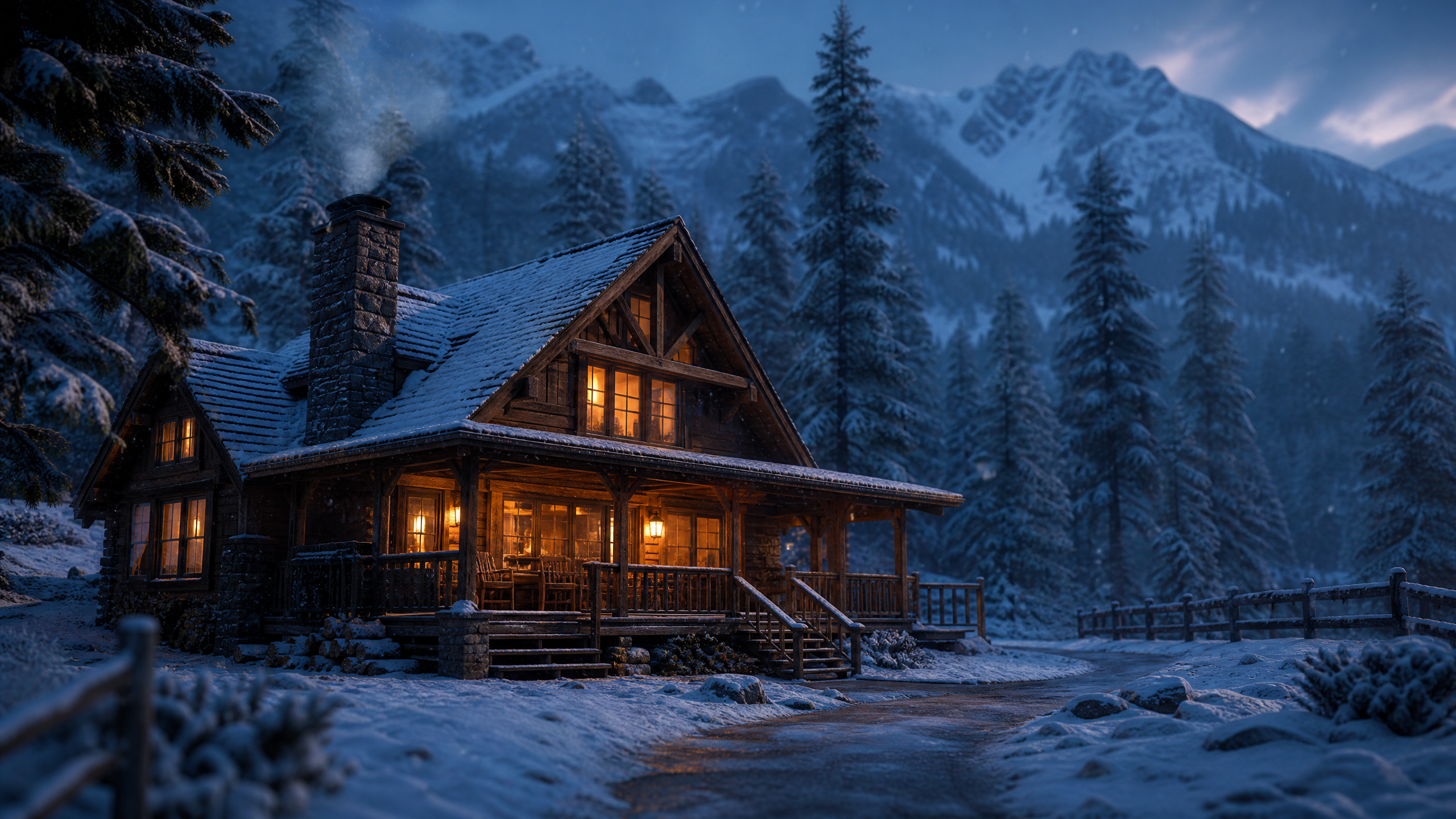
First frame (a still generated separately, then passed as image_url):
Motion prompt:
The camera slowly pushes in toward the glowing cabin window as snowflakes drift
down and the warm lamplight gently flickers; the thin chimney smoke curls and
rises into the dusk air. Soft ambient wind with a faint, cozy crackle of a fire
inside. Calm, unbroken cinematic shot, no cuts.
Real output (resolution: "4k", duration: 4):
What came back: a genuine 3840×2160 clip, 4 seconds, carrying an AAC audio track of low wind and a soft crackle — generated from the prompt's sound description alone. Cost: 4s × $0.446 = $1.78.
Teardown:
- One camera verb. "Slowly pushes in" is the whole camera direction. The push-in gives the static cabin a sense of arrival without any cut.
- Secondary motion keeps it alive. Drifting snow, flickering lamplight, and curling smoke are small, physically plausible movements — exactly what i2v is good at. They read as "the photo came to life," which is the effect you want.
- Sound is described, not uploaded. "Soft ambient wind… faint, cozy crackle" is enough; the native audio track matched it. For a dialogue-free atmosphere clip, that's all you need.
- Reserve 4K for keepers. At $0.446/second it's the most expensive tier by far. Prototype this exact prompt at 720p ($0.44 for the same 4 seconds) and only spend the 4K render once the motion looks right.
Recipe 2 — A smooth product orbit at 1080p
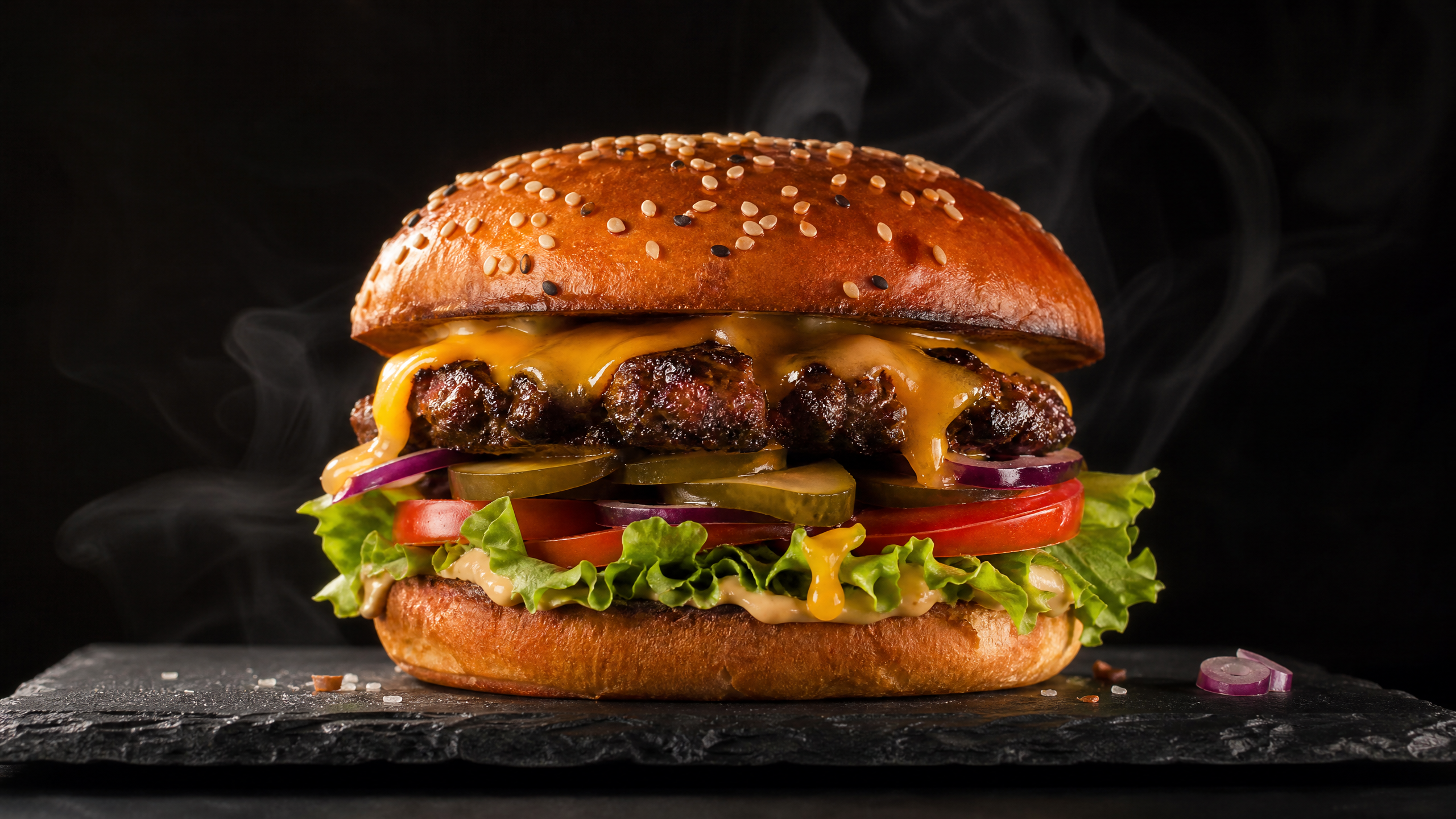
Orbits are the i2v party trick for e-commerce and food: one clean arc around a hero object, with the surface materials doing the work. 1080p is the sweet spot — crisp enough to sell, a fraction of 4K's cost.
First frame:
Motion prompt:
The camera smoothly orbits a slow half-circle around the burger while thin steam
keeps rising and the melted cheddar glistens as the warm light sweeps across it;
subtle reflections travel over the dark slate. Ambient kitchen room tone with a
faint sizzle. Locked focus on the burger, no cuts.
Real output (resolution: "1080p", duration: 5):
What came back: a 1920×1080 clip, 5 seconds, with a quiet kitchen room tone. Cost: 5s × $0.1375 = $0.69.
Teardown:
- "Half-circle," not "spin." Bounding the orbit ("a slow half-circle") keeps the subject centered and the move readable. "Rotate around" with no limit tends to over-travel and lose the product.
- Let the light move, not just the camera. "Warm light sweeps across it… reflections travel over the slate" gives the orbit something to reveal, so the clip feels three-dimensional instead of like a turntable.
- Name the materials you want to animate. "Thin steam," "melted cheddar glistens" — calling out the physics is what gets you rising steam and specular highlights. Unnamed surfaces often stay flat.
- "Locked focus on the burger" is a cheap way to stop the model from drifting attention to the background.
Recipe 3 — Vertical short-form action at 720p
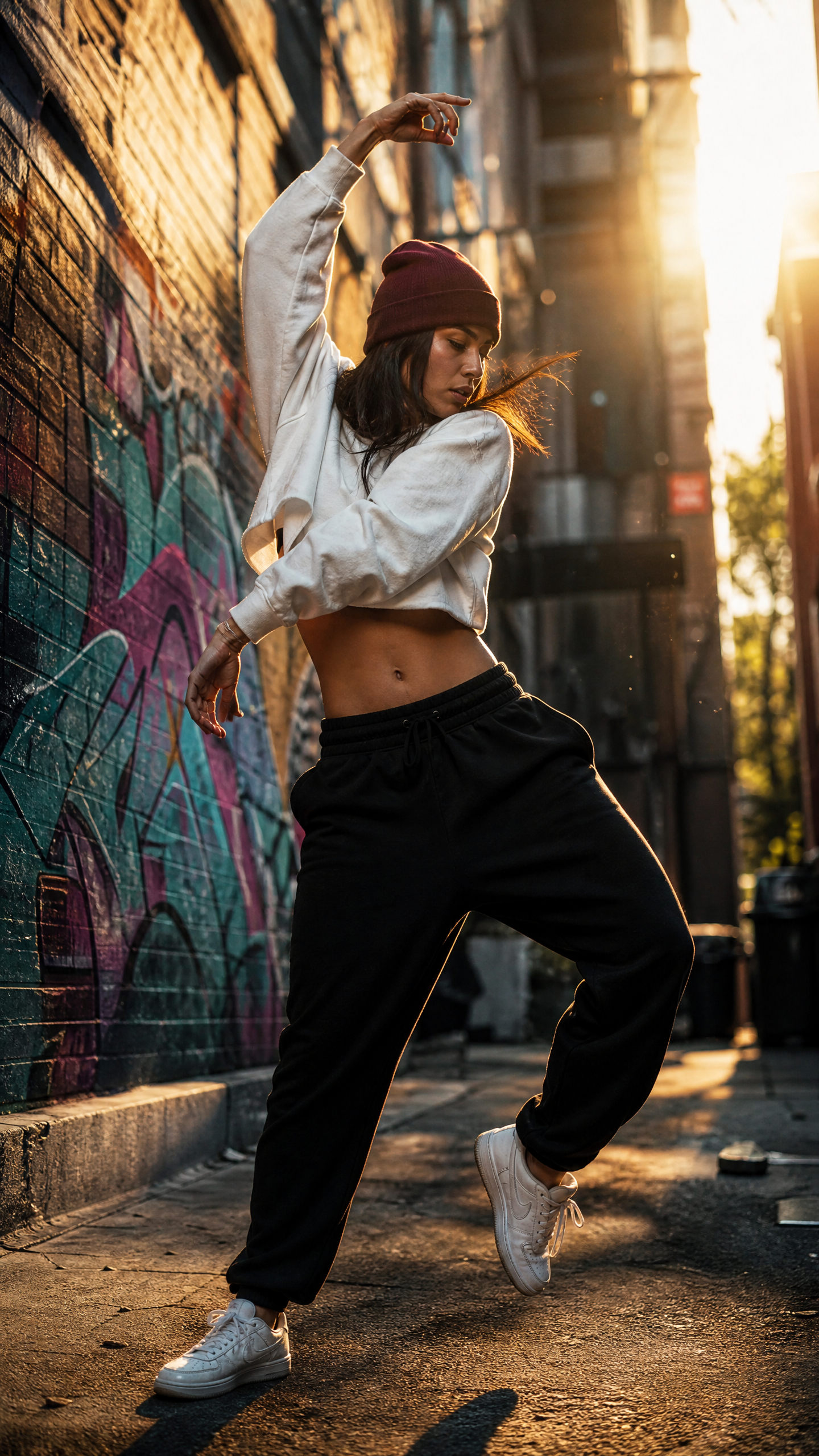
For Reels/TikTok/Shorts you want 9:16, a single beat of human motion, and a cost low enough to iterate. Because i2v has no aspect field, the vertical shape comes entirely from a vertical first frame — this is the clearest demonstration of that rule.
First frame (a 9:16 still):
Motion prompt:
The dancer breaks from the frozen pose into one smooth spin and settles back into
a confident stance on the beat; a light handheld camera sway follows the motion as
dust motes swirl through the golden backlight. Ambient city-street tone with soft
footsteps and distant traffic.
Real output (resolution: "720p", duration: 6):
What came back: a 720×1280 vertical clip, 6 seconds, with a street-ambience track. Note what 720p did here — it set the short edge to 720 and kept the 9:16 shape of the first frame. Cost: 6s × $0.109 = $0.65.
Teardown:
- One beat of motion. "Breaks from the pose into one smooth spin and settles" is a complete, bounded action. Vague "dancing" prompts drift; a start-move-end arc lands.
- Handheld sway sells "shot on a phone." A gentle follow adds life without the vertigo of a big camera move — ideal for short-form.
- Aspect is the frame's job. There's no field to set here; the vertical result is a direct consequence of feeding a vertical still. Want square? Feed a 1:1 image. Want widescreen? Feed 16:9.
Reproduce any recipe with /v1/tasks
The call is the same for all three — only image_url, resolution, and duration change. Submit, then poll the returned taskId until status is success and read output[0].url.
curl -X POST https://api.hiapi.ai/v1/tasks \
  -H "Authorization: Bearer $HIAPI_KEY" \
  -H "Content-Type: application/json" \
  -d '{
    "model": "vidu-q4-preview/image-to-video",
    "input": {
      "prompt": "The camera slowly pushes in toward the glowing cabin window as snowflakes drift down...",
      "image_url": "https://your-cdn.example.com/first-frame.jpg",
      "resolution": "4k",
      "duration": 4
    }
  }'
import os, time, requests

BASE = "https://api.hiapi.ai/v1/tasks"
headers = {"Authorization": f"Bearer {os.environ['HIAPI_KEY']}"}

payload = {
    "model": "vidu-q4-preview/image-to-video",
    "input": {
        "prompt": "The camera smoothly orbits a slow half-circle around the burger...",
        "image_url": "https://your-cdn.example.com/burger.jpg",
        "resolution": "1080p",
        "duration": 5,
    },
}

task_id = requests.post(BASE, json=payload, headers=headers).json()["data"]["taskId"]

while True:
    task = requests.get(f"{BASE}/{task_id}", headers=headers).json()["data"]
    if task["status"] == "success":
        print(task["output"][0]["url"])   # expiring link — download it immediately
        break
    if task["status"] == "fail":
        raise RuntimeError(task.get("error"))
    time.sleep(8)
Two gotchas worth knowing before you call it:
durationis an integer, not a string —4, not"4". (If you've used some other video models on the platform that take"6", this one is the opposite.) Values above16come back as400 duration: maximum: got N, want 16.- The output URL expires.
output[0].urlis a time-limited link; download the bytes and move them to your own storage right away rather than hot-linking it.
Dialing in resolution, duration, and aspect
A few verified behaviors that save money and surprises:
- Resolution sets the short edge, aspect follows the frame.
720pon a 9:16 still gave 720×1280 above. The number is quality, not shape. - 4K is delivered as HEVC (H.265). The 4K render came back as an HEVC
.mp4; it's higher quality but larger, and some browsers won't play HEVC inline. For web embedding we re-encoded the clip above to H.264 — the pixels are the model's, just a friendlier container. If you're delivering to the open web, plan a transcode step for 4K. - Audio is free and automatic. Every clip carried a sound track without any audio reference, driven by the words in the prompt. If you want silence, don't describe sound.
- Duration is linear cost. A 4-second 4K clip ($1.78) costs more than a 16-second 540p clip ($0.82). Match the tier to the deliverable, not the other way around.
For deeper dives on the two levers this model leans on, hiapi has focused write-ups on cinematic camera movements in AI video prompts and first- and last-frame control — both apply directly to the recipes above.
FAQ
Does vidu-q4-preview image-to-video really do 4K?
Yes. The push-in recipe above was rendered at resolution: "4k" and the file is a true 3840×2160 clip. It's the most expensive tier at $0.446/second, so use it for finals, not drafts.
How do I set the aspect ratio?
You don't — there's no aspect_ratio field, and passing one returns a 400. The clip takes the shape of your first frame: 16:9 in, 16:9 out; 9:16 in, vertical out. Crop your still to the aspect you want.
Does it add sound on its own? Yes. Every output ships with an audio track even if you pass no audio reference. The prompt's sound description (wind, sizzle, footsteps) shapes what you get. For a silent clip, simply don't mention sound.
What's the difference between image-to-video and reference-to-video? Image-to-video animates one first frame — it's about motion. Reference-to-video takes 1–15 reference images (and optional voice references) to keep characters, scenes, and voices consistent across a shot. If you're starting from a single picture, you want this page's endpoint; for consistency work, see reference-to-video.
How much does one clip cost? Seconds × the per-second rate for your resolution. The three clips here cost $1.78 (4K, 4s), $0.69 (1080p, 5s), and $0.65 (720p, 6s). Current rates are on the pricing page.
What makes a good first frame? A clean, well-composed still with obvious "potential energy" — something that clearly wants to move (smoke, water, a poised figure, a light source). The sharper and less cluttered the frame, the cleaner the motion.
Start animating your stills
Pick a still with something that wants to move, write the motion in order, name one camera move and the sound you want, and start at 720p to dial it in. When the motion looks right, re-render the keeper at 1080p or 4K.
Grab your key and the full input schema on the vidu-q4-preview image-to-video model page, or start from the task API quickstart and paste in any recipe above.