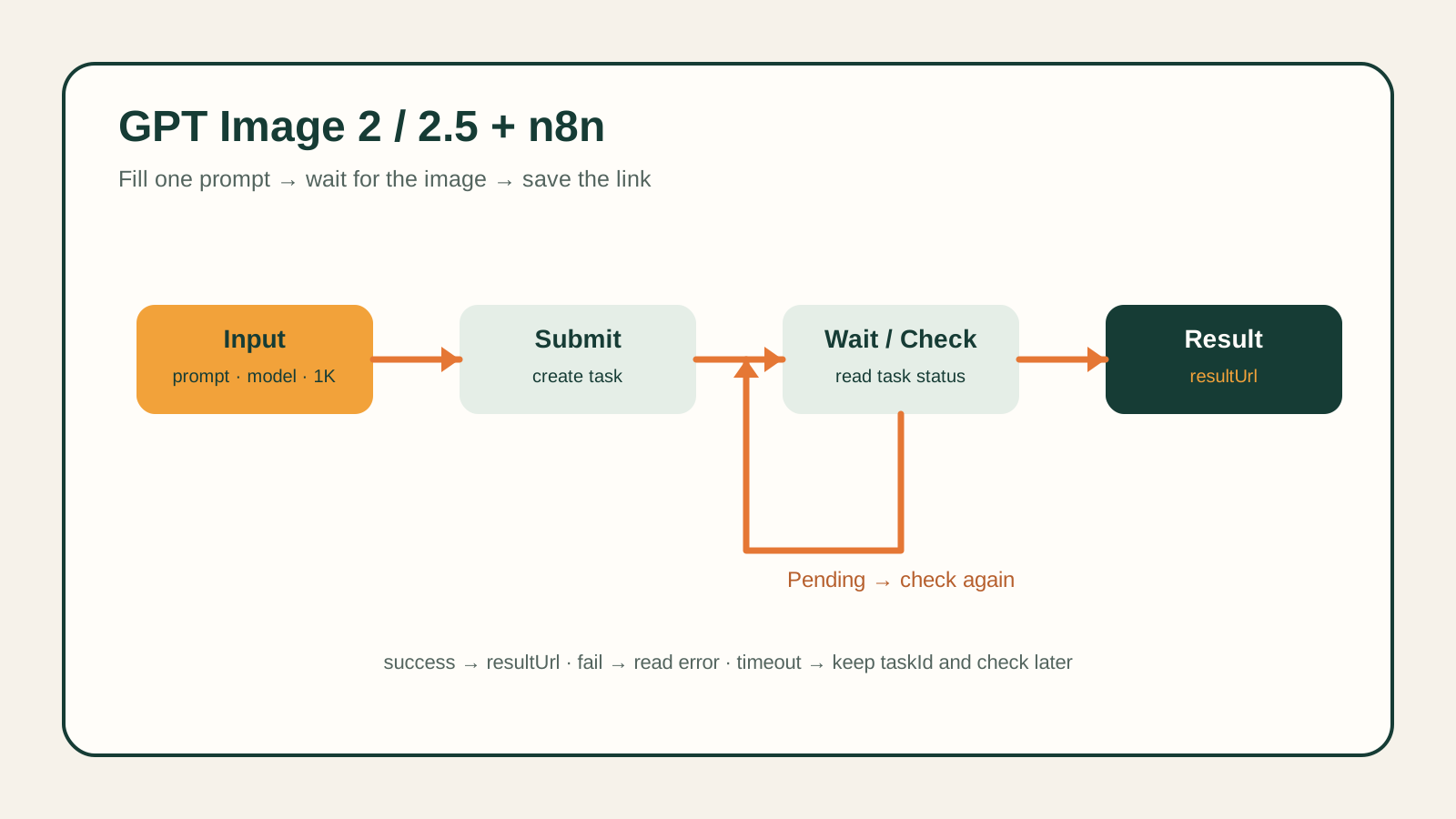
A vacant listing photo tells a buyer less than a furnished one. Physical staging fixes that but costs real money and takes days to schedule per unit. An image-to-image API can do the same job from a single empty-room photo: keep the real room — its walls, floor, window, and camera angle — and add furniture around it.
This guide walks through that workflow end to end using the canonical model ID gpt-image-2/image-to-image, called with POST https://api.hiapi.ai/v1/tasks. It includes two real before/after pairs generated for this guide (a living room and a bedroom), their exact prompts, a reusable batch script, and verified pricing.
How image-to-image staging keeps the room real
Text-to-image generation invents a room from a description. That is the wrong tool for staging, because the output has to match the actual unit a buyer will walk into. Image-to-image generation instead takes the empty-room photo as a reference and edits it, so the room's real geometry survives.
The request has two parts: a prompt describing only what should change (the furniture and decor to add), and an input_urls array holding the reference photo — the empty room, hosted at a public URL. The model reads the reference image, keeps the camera angle, walls, floor, and window fixed, and renders furniture into the scene as if it were placed in that exact room.
POST https://api.hiapi.ai/v1/tasks
{
  "model": "gpt-image-2/image-to-image",
  "input": {
    "prompt": "<furniture and decor to add, plus an instruction to keep the room unchanged>",
    "input_urls": ["<public URL of the empty-room photo>"],
    "aspect_ratio": "16:9",
    "resolution": "1K"
  }
}
That single design choice — reference in, edit out — is what separates virtual staging from generic room generation. The two examples below show it on a real unvarnished photo of an empty living room and an empty bedroom.
Before / after: living room
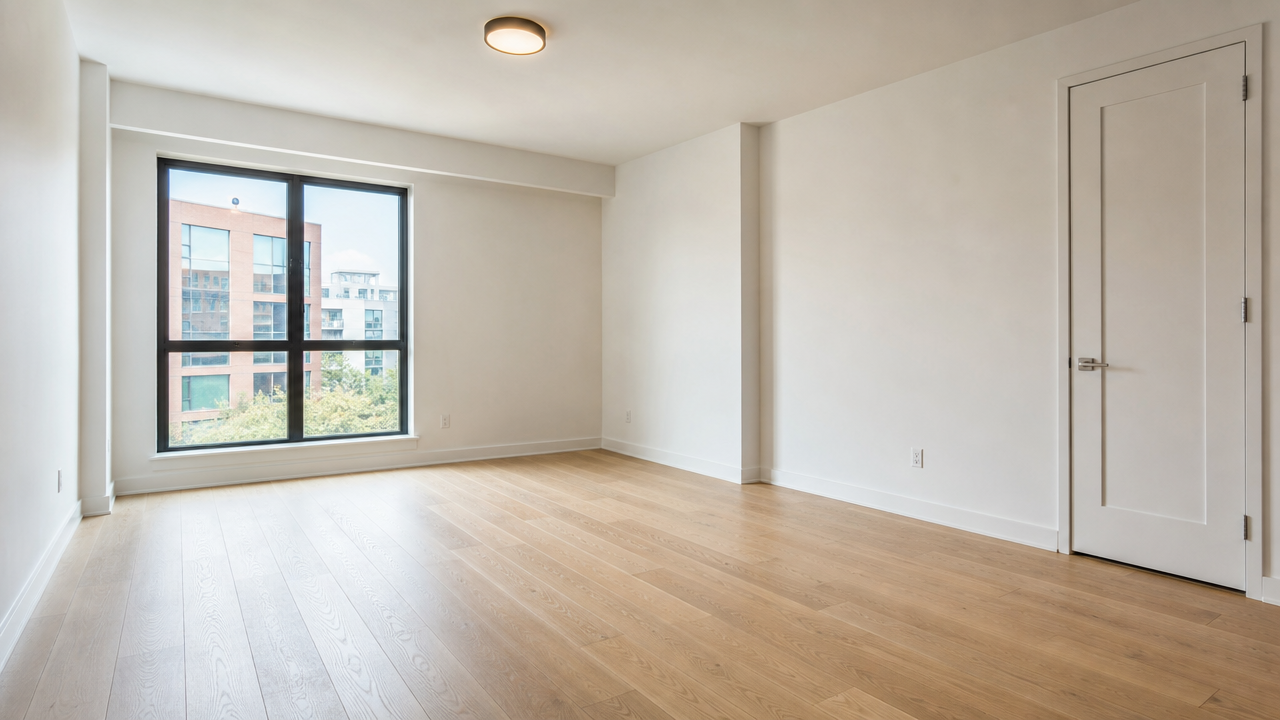
A professionally lit real estate photograph of a completely empty living room in
a modern apartment: light oak hardwood floors, plain white walls, one large
window with soft daylight, closed white door on the right wall, ceiling with a
single flush-mount light fixture, no furniture, no people, no text or
watermarks, wide-angle real estate listing photography style, sharp focus,
natural color grading.
That first image is the reference photo, generated with gpt-image-2/text-to-image to stand in for a real listing photo of a vacant unit (aspect ratio 16:9, resolution 1K, recorded cost $0.03, generated 2026-09-23). In a production workflow this would simply be the agent's own uploaded photo — the staging step below works the same way regardless of where the empty-room photo came from.
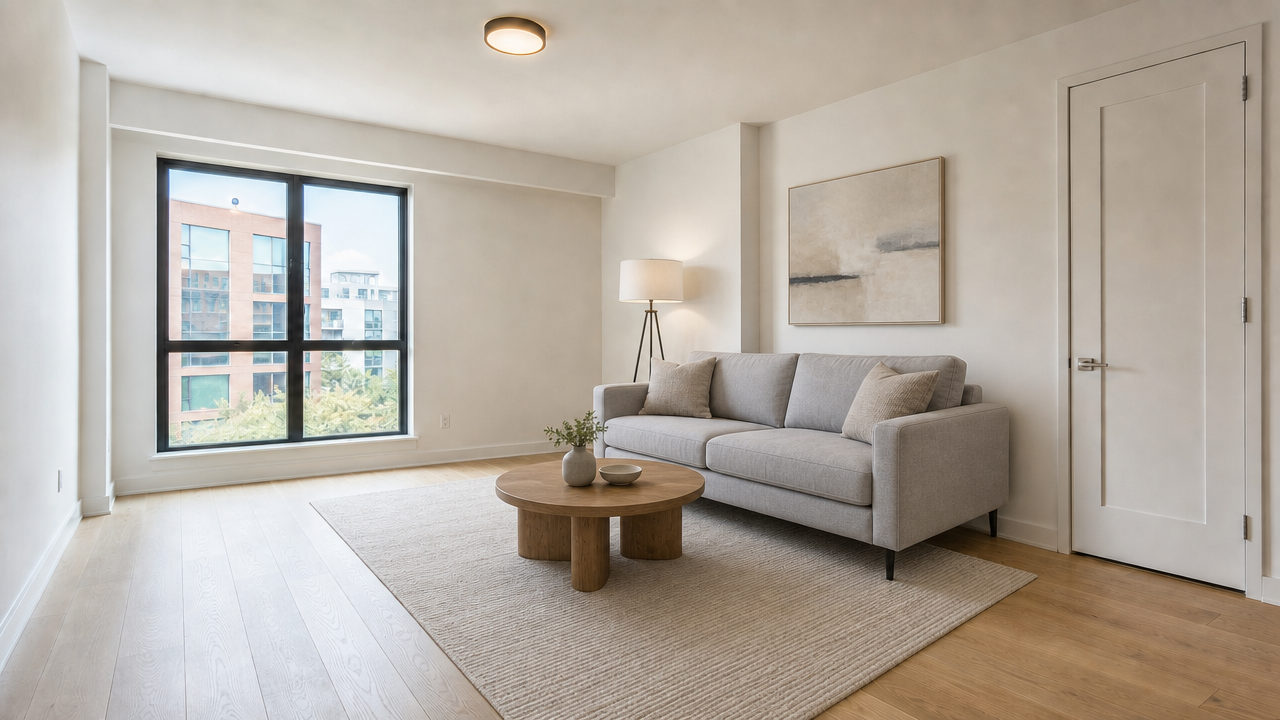
Using the empty room in the reference photo, keep the exact room geometry,
floor, walls, window, and door unchanged, and add tasteful modern furniture to
stage it as a livable listing photo: a light gray fabric sofa with two throw
pillows, a round wooden coffee table, a neutral area rug, a floor lamp in the
corner, and a piece of abstract wall art above the sofa. Keep the camera angle
and lighting identical to the reference photo. No people, no text or
watermarks, real estate listing photography style.
Evidence: model gpt-image-2/image-to-image, input_urls set to the empty-room photo above, aspect_ratio: 16:9, resolution: 1K, recorded cost $0.03, generated 2026-09-23. The window position, the door on the right wall, and the floor and wall tone all carry over from the reference photo — only the furniture is new.
Before / after: bedroom
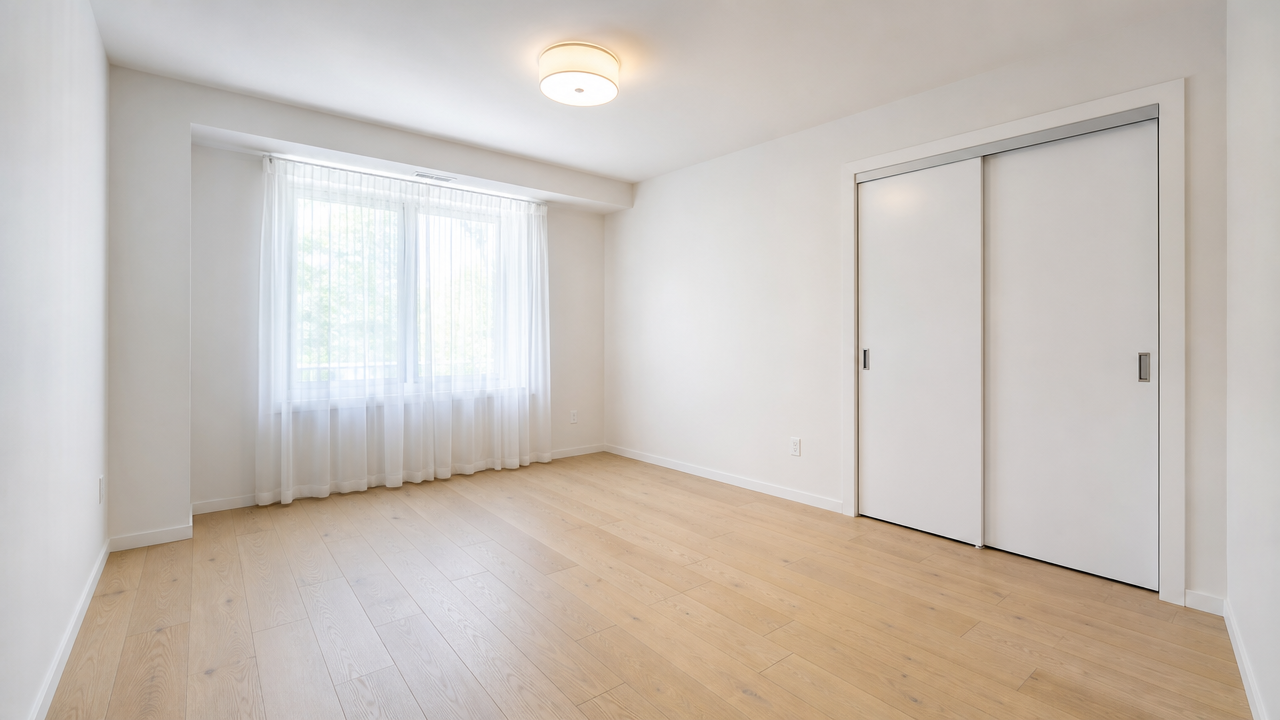
A professionally lit real estate photograph of a completely empty bedroom in a
modern apartment: light oak hardwood floors, plain white walls, one window with
sheer curtains letting in soft daylight, a closet with sliding white doors on
one wall, ceiling with a single flush-mount light fixture, no furniture, no
people, no text or watermarks, wide-angle real estate listing photography
style, sharp focus, natural color grading.
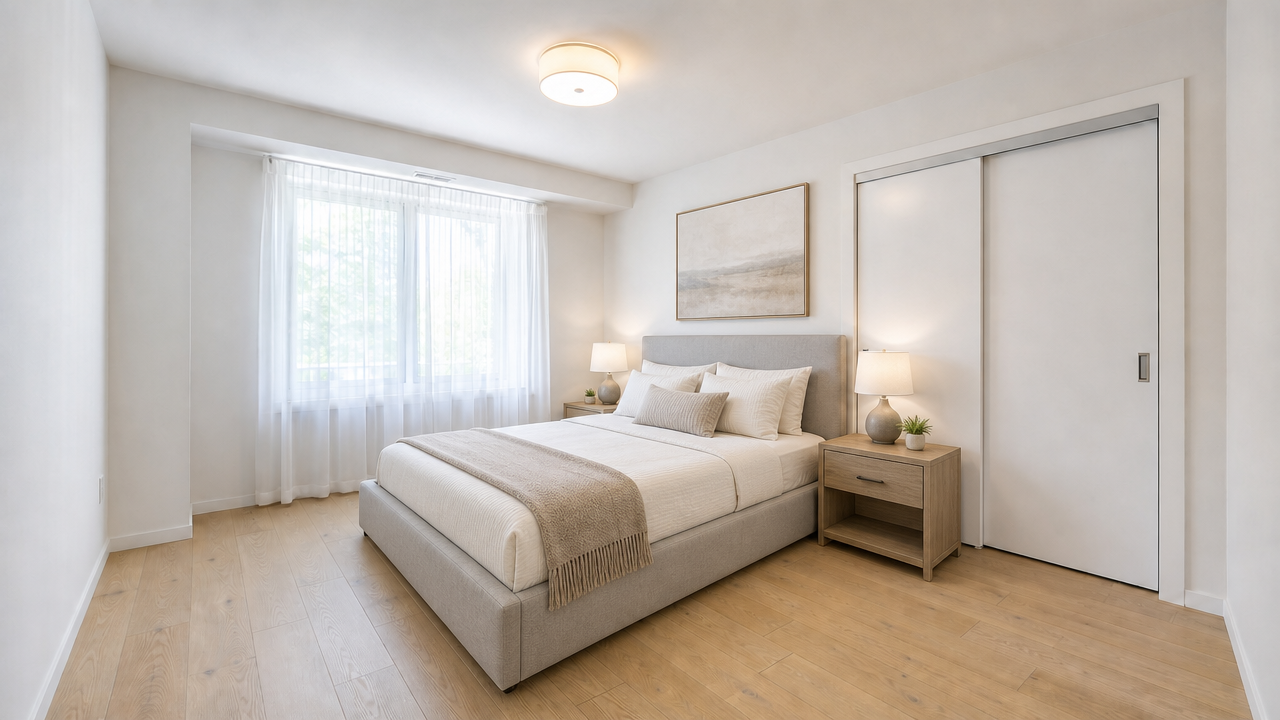
Using the empty room in the reference photo, keep the exact room geometry,
floor, walls, window, and closet doors unchanged, and add tasteful modern
furniture to stage it as a livable listing photo: a queen-size bed with a light
gray upholstered headboard and neutral bedding, two matching nightstands with
small lamps, a folded throw blanket at the foot of the bed, and a framed piece
of wall art above the headboard. Keep the camera angle and lighting identical to
the reference photo. No people, no text or watermarks, real estate listing
photography style.
Evidence: model gpt-image-2/image-to-image, input_urls set to the empty bedroom photo above, aspect_ratio: 16:9, resolution: 1K, recorded cost $0.03, generated 2026-09-23. The sliding closet doors and window placement stay put; the bed, nightstands, and art are the only additions.
Both staged outputs came from a prompt structure with three parts every time: an instruction to preserve the reference room, a specific furniture list, and a photography style tag. Dropping the preservation instruction is the most common way this goes wrong — without it, the model treats the reference more loosely and can shift the camera angle or room proportions.
Batch-run a staging job with the task API
A single listing usually needs more than one room staged, and a brokerage needs many listings. The script below takes a dictionary of empty-room photo URLs, submits a staging task for each one, and polls until every output is ready.
import os
import time
import requests

API_URL = "https://api.hiapi.ai/v1/tasks"
HEADERS = {
    "Authorization": f"Bearer {os.environ['HIAPI_TOKEN']}",
    "Content-Type": "application/json",
}

STAGING_BRIEF = (
    "keep the exact room geometry, floor, walls, and window unchanged, and add "
    "tasteful modern furniture to stage it as a livable listing photo, real "
    "estate listing photography style, no people, no text or watermarks"
)

# name -> public URL of the empty-room photo
ROOMS = {
    "unit-204-living-room": "https://your-storage.example.com/unit-204-living-room.jpg",
    "unit-204-bedroom": "https://your-storage.example.com/unit-204-bedroom.jpg",
}


def submit_staging_job(empty_room_url, aspect_ratio="16:9", resolution="1K"):
    response = requests.post(
        API_URL,
        headers=HEADERS,
        json={
            "model": "gpt-image-2/image-to-image",
            "input": {
                "prompt": STAGING_BRIEF,
                "input_urls": [empty_room_url],
                "aspect_ratio": aspect_ratio,
                "resolution": resolution,
            },
        },
        timeout=60,
    )
    response.raise_for_status()
    return response.json()["data"]["taskId"]


def wait_for_output(task_id, timeout_s=300, poll_interval=5):
    deadline = time.time() + timeout_s
    while time.time() < deadline:
        r = requests.get(f"{API_URL}/{task_id}", headers=HEADERS, timeout=30)
        r.raise_for_status()
        task = r.json()["data"]
        if task["status"] == "success":
            return task["output"][0]["url"]  # expires — download immediately
        if task["status"] == "fail":
            raise RuntimeError(task["error"])
        time.sleep(poll_interval)
    raise TimeoutError(f"task {task_id} did not finish in {timeout_s}s")


task_ids = {name: submit_staging_job(url) for name, url in ROOMS.items()}
staged_urls = {name: wait_for_output(tid) for name, tid in task_ids.items()}
print(staged_urls)
Two details matter for a real batch. First, input_urls takes one reference photo per task — stage one room per call rather than trying to combine several rooms into a single request. Second, each output[0].url in the response is a time-limited link: download the bytes and store them in your own bucket right after the task succeeds, the same way this guide immediately uploaded its own outputs to permanent storage.
Pricing a staging batch
gpt-image-2/image-to-image is priced by output resolution, confirmed against HiAPI's live pricing endpoint on 2026-09-23:
| Resolution | Price per staged image |
|---|---|
| 1K | $0.03 |
| 2K | $0.04 |
| 4K | $0.06 |
The planning formula is:
batch cost = units × rooms staged per unit × price per image
Using the 1K price from the table:
| Listing batch | Rooms per unit | Staged images | Batch cost |
|---|---|---|---|
| 1 unit | 3 | 3 | $0.09 |
| 10 units | 3 | 30 | $0.90 |
| 50 units | 4 | 200 | $6.00 |
| 200 units | 4 | 800 | $24.00 |
Prices change, so check the live pricing page before committing to a large batch, and add a regeneration allowance based on your own review pass — the two examples in this guide are not a claim about a universal first-pass approval rate.
What virtual staging can't do
Image-to-image staging edits pixels, not the physical unit. Keep three limits in mind before shipping it into a listing workflow:
- It can't fix the room. Damage, mold, or a structural issue in the reference photo should not be edited out, and a staged photo should never misrepresent the unit's actual condition.
- It doesn't guarantee pixel-perfect geometry. The prompt asks the model to preserve the room, and both examples above kept their layout, but a human should still compare each staged photo to its source before it goes on a listing.
- Disclosure rules still apply. Many MLS systems and local real estate regulations require listings to disclose which photos are virtually staged — check the rules that apply to your market before publishing.
FAQ
Which model should I use for AI virtual staging?
Use gpt-image-2/image-to-image with POST /v1/tasks, passing the empty-room photo's public URL in input_urls and a prompt that names the furniture to add. See the model documentation for the full input schema.
Does the staged photo really match the real room?
It should, but verify it. The prompt structure in this guide — preserve the reference, then list only the furniture to add — kept the window, doors, floor, and wall tone consistent in both examples here. Still, review each output against its source photo before publishing, since generation quality can vary by room and lighting.
How much does staging a full listing cost?
At the 1K price of $0.03 per image, staging three rooms in one unit costs $0.09. Multiply by rooms-per-unit and units-in-batch to plan a larger run, and confirm the current price first since resolution and future pricing changes affect the total.
Do I need to disclose that a photo is virtually staged?
Check the rules for your market. Many MLS systems and local regulations require a disclosure label on virtually staged photos, separate from any general accuracy requirement for listing images.
Can this same image-to-image approach do more than staging?
Yes — preserving a reference image while changing a described element is a general pattern. The GPT Image 2 e-commerce workflow uses the same underlying task API for product photography batches, with a comparable prompt and pricing structure.
Start with one vacant-unit photo on the GPT Image 2 image-to-image model page, confirm the staged room matches the real unit, then move the same input_urls call into the batch script above for the rest of the listing.