TL;DR
- LTX 2.5 Fast Text to Video (
ltx-2.5-fast/text-to-video) turns a text prompt into a 2–20 second video at 720p or 1080p, landscape or vertical, with native audio. Try it on the model page; new accounts get 200 free credits. - Pricing is per second: 720p at $0.043/s (a 6-second clip is $0.258) and 1080p at $0.086/s; the
generate_audioswitch never changes the price. - Everything runs on HiAPI
/v1/tasks: submit for ataskId, poll, then take the video URL fromoutput(temporary — save it).
What it does
- One sentence in, a sounding shot out: scene, motion, camera, and sound go into one prompt, and the audio generates with the picture.
- 2–20 seconds in 12 steps:
durationtakes 2, 3, 4, 5, 6, 8, 10, 12, 14, 16, 18, or 20 (default 6). - Landscape or vertical, two resolutions: 16:9 / 9:16 at 720p / 1080p; fixed 25fps MP4.
- A sibling animates stills:
ltx-2.5-fast/image-to-videotakes a first frame (optionally a last frame) under the same pricing — see the image-to-video model page.
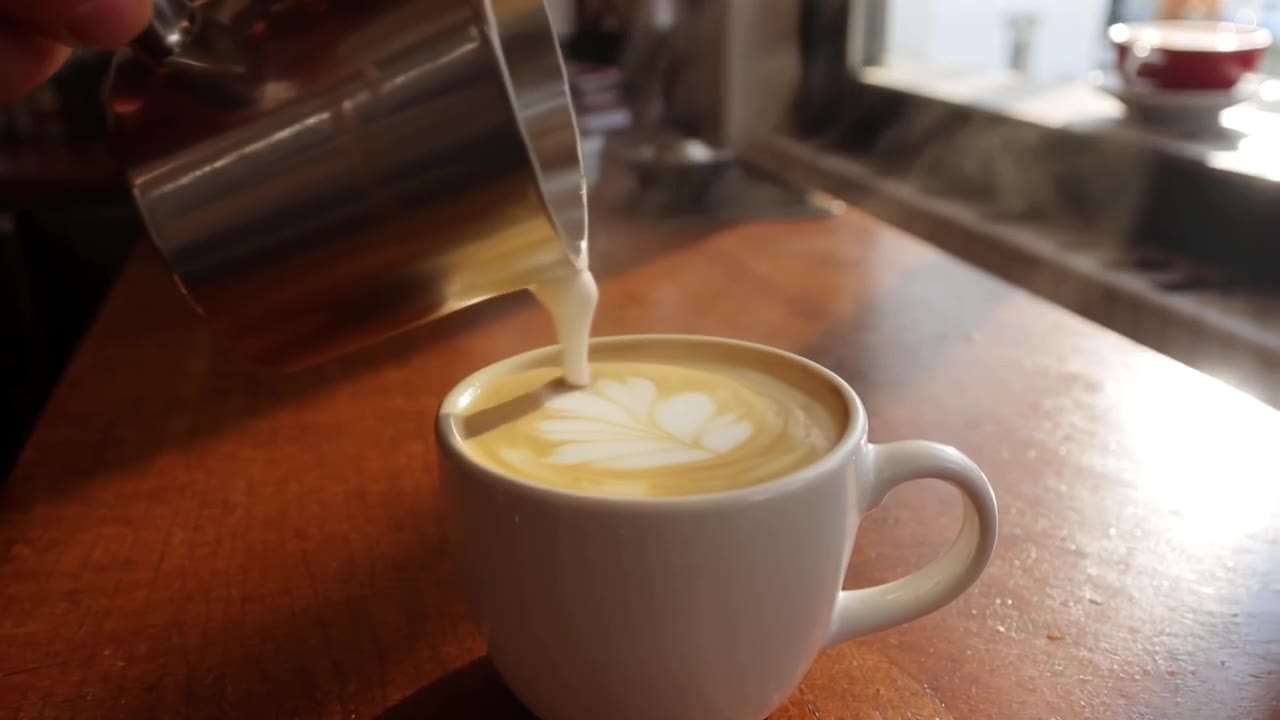
Here's a real clip (720p · 6 s, with native audio):
A barista pours steamed milk into a latte, creating a leaf pattern, close-up, soft morning light through a café window, gentle clinking cups and café ambience
ltx-2.5-fast/text-to-video, 720p, 6 s, 16:9, 1280×720, audio, $0.258. Watch the full clip →
Two ways to start
Browser, 3 steps: open the model page → paste the prompt, pick duration and resolution → generate. A 720p 6-second clip is $0.258.
API, 3 steps: POST /v1/tasks to submit → take the taskId → poll to success.
curl: your first clip
curl -X POST https://api.hiapi.ai/v1/tasks \
  -H "Authorization: Bearer YOUR_API_KEY" \
  -H "Content-Type: application/json" \
  -H "Idempotency-Key: your-unique-key-001" \
  -d '{
  "model": "ltx-2.5-fast/text-to-video",
  "input": {
    "prompt": "A barista pours steamed milk into a latte, creating a leaf pattern, close-up, soft morning light through a café window, gentle clinking cups and café ambience",
    "resolution": "720p",
    "duration": 6,
    "aspect_ratio": "16:9",
    "generate_audio": true
  }
}'
This one bills 720p × 6 s = $0.258.
Python: submit, poll, download
import time, uuid, requests

BASE = "https://api.hiapi.ai/v1/tasks"
HEADERS = {
    "Authorization": "Bearer YOUR_API_KEY",
    "Content-Type": "application/json",
}

payload = {
    "model": "ltx-2.5-fast/text-to-video",
    "input": {
        "prompt": "A barista pours steamed milk into a latte, creating a leaf pattern, close-up, soft morning light through a café window, gentle clinking cups and café ambience",
        "resolution": "720p",
        "duration": 6,
        "aspect_ratio": "16:9",
        "generate_audio": True,
    },
}

resp = requests.post(
    BASE,
    headers={**HEADERS, "Idempotency-Key": str(uuid.uuid4())},
    json=payload,
    timeout=30,
)
resp.raise_for_status()
task_id = resp.json()["taskId"]

while True:
    task = requests.get(f"{BASE}/{task_id}", headers=HEADERS, timeout=30).json()
    print(task["status"])
    if task["status"] in ("success", "fail"):
        break
    time.sleep(5)

if task["status"] == "success":
    video = next(o for o in task["output"] if o.get("type") == "video")
    video_url = video["url"]   # temporary URL — download promptly
    mp4 = requests.get(video_url, timeout=120)
    with open("output.mp4", "wb") as f:
        f.write(mp4.content)
    print("saved output.mp4")
Parameters
| Field | Required | Values | Notes |
|---|---|---|---|
prompt | yes | 1–5,000 chars | One line covering scene, motion, camera, and sound |
resolution | no | 720p / 1080p, default 720p | 1080p is about twice the per-second rate |
duration | no | 2/3/4/5/6/8/10/12/14/16/18/20, default 6 | Enumerated values only (no 7 or 9) |
aspect_ratio | no | 16:9 / 9:16, default 16:9 | 9:16 for vertical feeds |
generate_audio | no | default true | Native audio; turning it off doesn't cut the price |
Any field outside the table returns a 400.
Errors you'll actually hit
| Status | Meaning | What to do |
|---|---|---|
| 400 INVALID_REQUEST | Malformed body (missing prompt, non-enum duration like 7, unknown fields) | Fix the payload against the table |
| 402 INSUFFICIENT_QUOTA | Out of credits (no charge) | Top up and retry |
| 429 RATE_LIMITED | Rate limited | Slow your submissions |
| 409 / 422 IDEMPOTENCY_KEY_* | Same idempotency key resubmitted | Generate a fresh key |
Terminal failures use CONTENT_POLICY_VIOLATION, TASK_FAILED, and TASK_TIMEOUT; failed tasks refund in full.
Before you ship
- Callbacks: pass
"callback": {"url": "https://..."}at the request top level — video tasks run long, callbacks pay off. - Persist outputs: the video URL in
outputis temporary; download immediately. - Set duration and resolution explicitly: they drive the bill — don't rely on defaults.
- To animate stills: use the sibling image-to-video model page with a first frame for control.
FAQ
- Yes, audio comes with the video:
generate_audiodefaults on; describe the sound in the prompt (wind, clinking cups) and the track follows the picture. - Yes, duration has 12 steps: enumerated 2–20; sending 7 or 9 returns a 400.
- Yes, price = per-second rate × seconds: 720p 6 s is $0.258 and 1080p 6 s is $0.516; muting doesn't save.
- Yes, $10 buys about 38 clips: at 720p, 6 seconds each.
- Yes, 9:16 gives vertical output: 720×1280 (720p) or 1080×1920 (1080p), ready for short-video feeds without cropping.
- Yes, start low and go high: iterate prompts and framing at 720p, then rerun the same prompt at 1080p for the final; the per-second price doubles but you only keep one final.
- Yes, for post-scoring, mute it: pass
generate_audio: falsewhen you'll add music or voice in post — clean footage at the same price.
Next: take the latte prompt and generate your first clip; four scene templates are in the text-to-video prompt guide.