Pick Qwen Image 2.1 Pro for up to 10 reference images, 2K-level output, and one flat price across five aspect ratios. Pick GPT Image 2.5 Flare for a transparent-background parameter, up to 16 references, or wide ratios like 21:9.
Qwen Image 2.1 Pro is live on HiAPI. Open the model page to generate right away; new accounts get 200 credits.
Qwen Image 2.1 Pro vs GPT Image 2.5 Flare at a glance
| Qwen Image 2.1 Pro | GPT Image 2.5 Flare | |
|---|---|---|
| Model ID | qwen-image-2.1-pro, one ID for text-to-image and editing | gpt-image-2.5-flare/text-to-image, gpt-image-2.5-flare/image-to-image |
| Max reference images | 10 | 16 |
| Output size | 2K level, fixed pixels per ratio | 1K tier |
| Aspect ratios | 1:1 / 16:9 / 9:16 / 4:3 / 3:4, same price on all five | 13 options, including auto, 21:9, 27:16, 9:8 and 8:9 |
| Transparent background | Produced through prompt wording | background parameter: transparent / opaque / auto |
| Price per image | $0.05 | $0.025 (1K) |
| Prompt length | 4,500 characters | 20,000 characters |
Each Qwen Image 2.1 Pro ratio maps to fixed pixels: 2048×2048 at 1:1, 2688×1536 at 16:9, 1536×2688 at 9:16, 2368×1728 at 4:3, and 1728×2368 at 3:4. Billing is flat per image, so every ratio costs $0.05; failed jobs are refunded and reference images add nothing. GPT Image 2.5 Flare is quoted here at the 1K tier: $0.025 per image, 1024×1536 at 3:4 and 1024×1024 at 1:1.
Same prompt, one generation each
Both pairs use one prompt and one generation per model. The first pair tests Chinese typography; the second tests a material swap on the same reference image.
Chinese event poster: text block size and position
| Qwen Image 2.1 Pro (1728×2368) | GPT Image 2.5 Flare (1024×1536) |
|---|---|
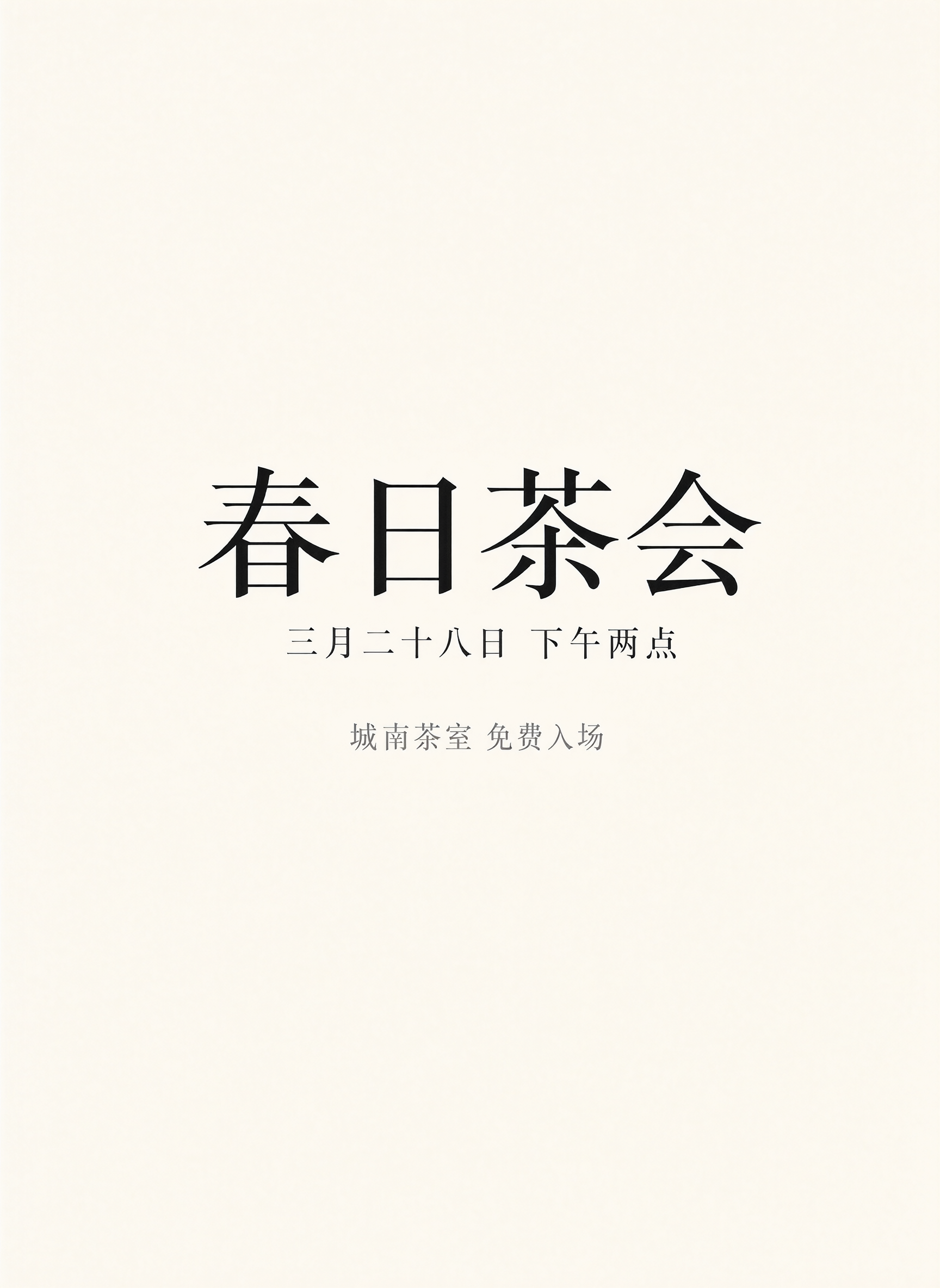 | 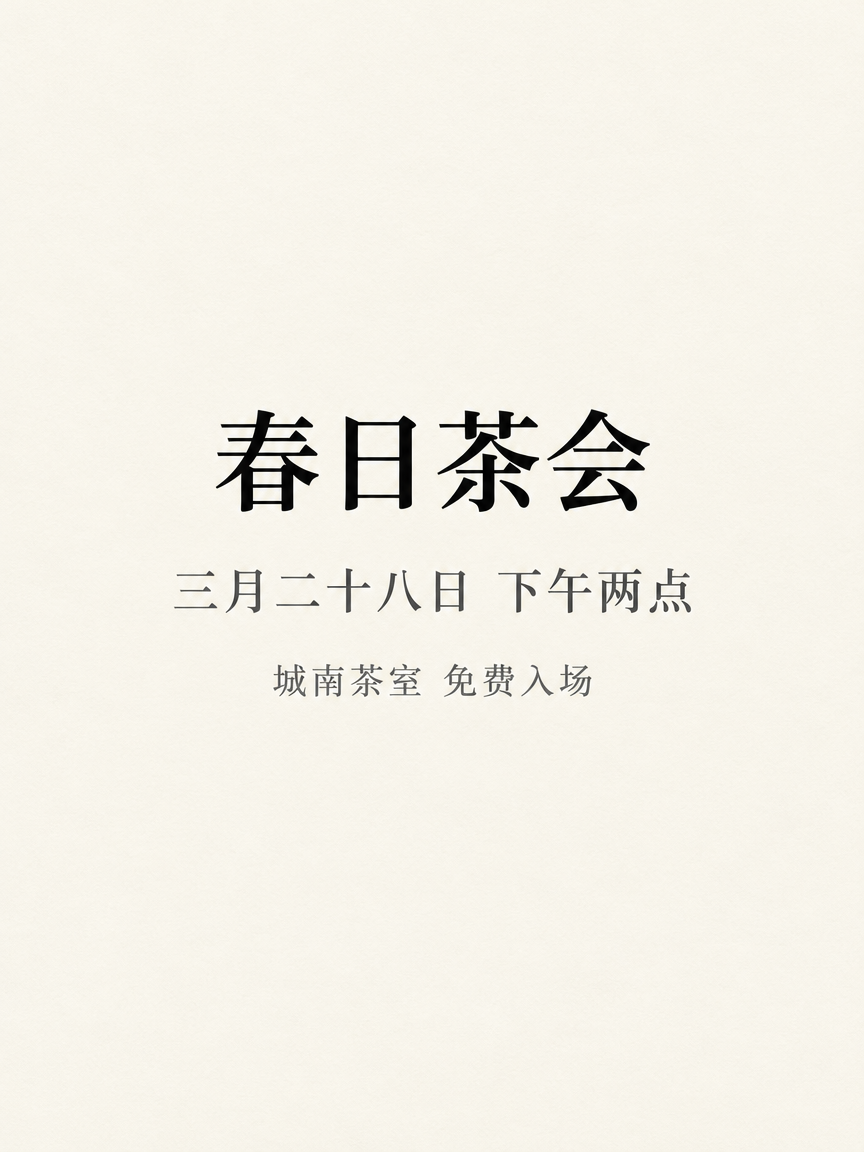 |
Same prompt and one generation each; each model uses its own resolution tier (Qwen 2K-level, GPT 1K).
Qwen 2.1 Pro returns 1728×2368 at 3:4. All three Chinese lines are correct, and the headline fills most of the image width. GPT Image 2.5 Flare returns 1024×1536 at 3:4 in the 1K tier. All three lines are also correct; the text block sits higher and is smaller relative to the canvas, and the paper shows a faint texture.
一张极简中文活动海报,米白色纸张背景,画面中央只排版以下三行中文字并全部水平居中:第一行是大号黑色衬线字“春日茶会”,第二行是中号深灰色字“三月二十八日 下午两点”,第三行是小号灰色字“城南茶室 免费入场”。字距均匀,四周留白充足,除了这三行字以外画面中没有任何其他文字、图形、线条或装饰,哑光印刷质感。
The prompt is in Chinese because the test targets Chinese poster typography. Paste it as-is.
Generate with this prompt →. After it opens, choose 3:4; if the layout must follow the text exactly, set prompt_extend to false.
Perfume bottle material swap: bottle position and light beam
| Qwen Image 2.1 Pro (2048×2048) | GPT Image 2.5 Flare (1024×1024) |
|---|---|
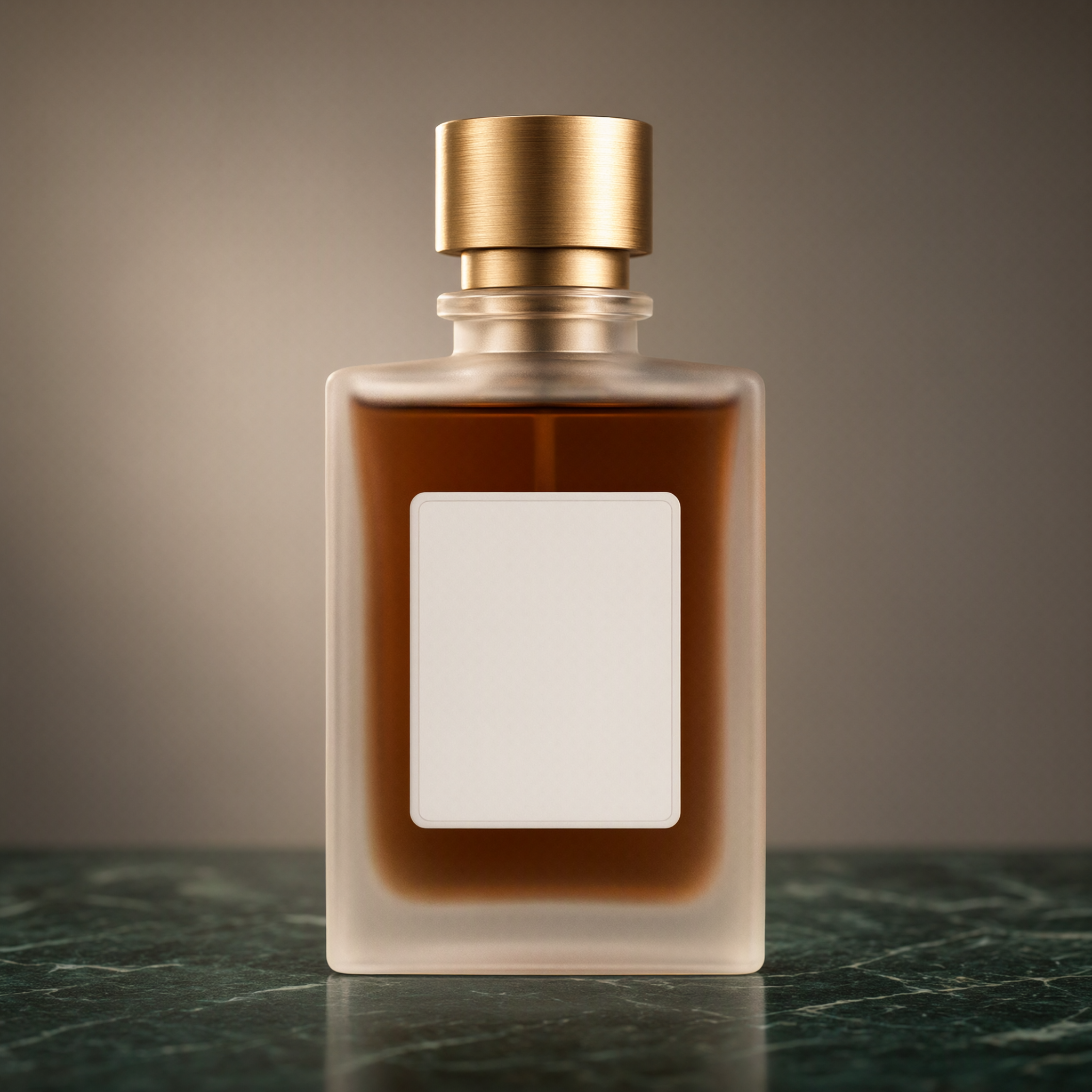 | 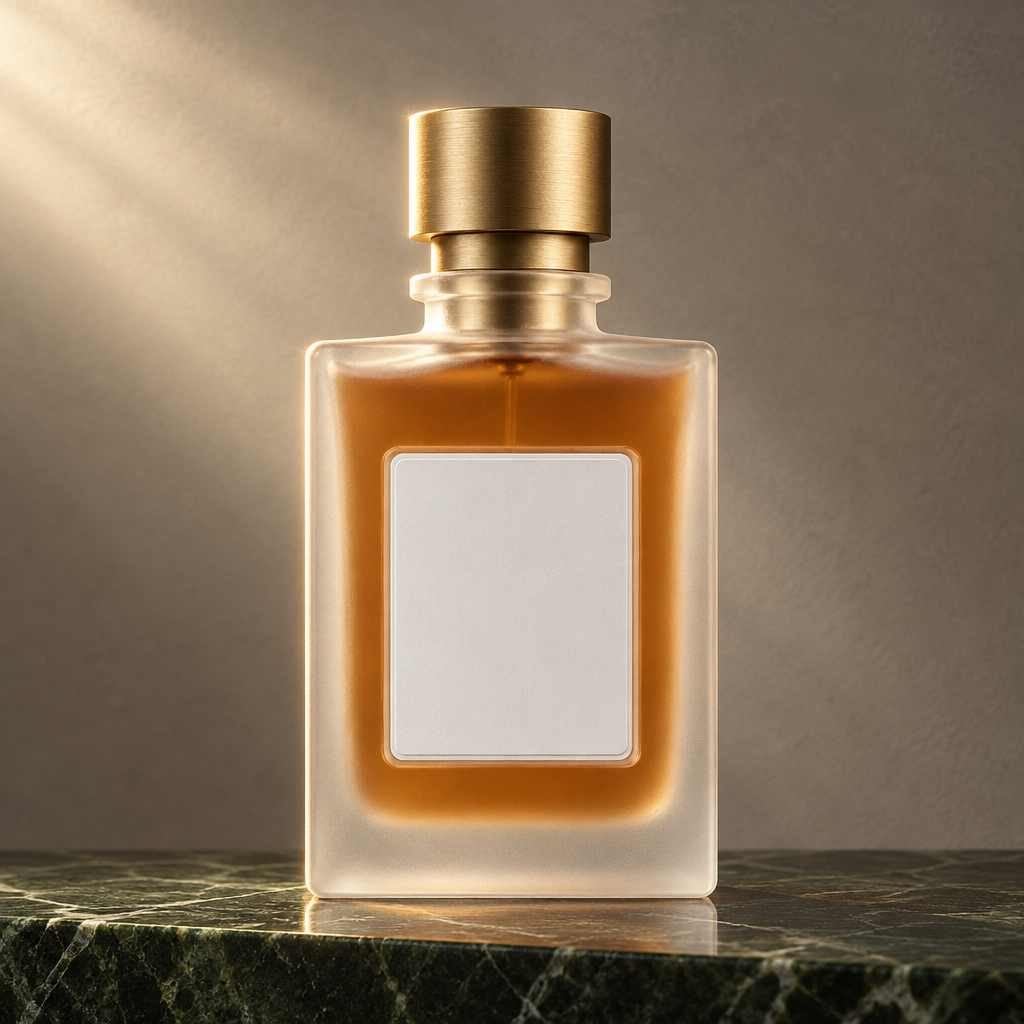 |
Same prompt and one generation each; each model uses its own resolution tier (Qwen 2K-level, GPT 1K).
Qwen 2.1 Pro returns 2048×2048. The frosted glass, brushed brass cap, deep amber liquid, dark green marble counter, and warm grey wall all land; the label area stays blank and centered, with soft backlight from the upper left. GPT Image 2.5 Flare returns 1024×1024. The same material changes all land, but the bottle sits slightly left of center, a brighter diagonal beam crosses the upper left, and the label area is a little larger.
以图1的香水瓶为基础做电商产品图改造:瓶身玻璃改成磨砂半透明质感,瓶盖由银灰色金属换成拉丝黄铜,瓶内的香液改成深琥珀色,瓶子放到一块深绿色大理石台面上,背景换成暖灰色墙面,左上方侧逆光勾出瓶身轮廓,保留图1的瓶身形状、比例、瓶盖高度与标签区域形状不变。
Generate with this prompt →. After it opens, upload the same perfume reference image and choose 1:1.
Which one for which job
- 2K-level product shots and event posters → Qwen Image 2.1 Pro
- A Chinese poster where the headline fills the width → Qwen Image 2.1 Pro
- Transparent stickers and UI assets → GPT Image 2.5 Flare
- More than 10 reference images in one request → GPT Image 2.5 Flare
- 21:9 or 27:16 framing → GPT Image 2.5 Flare
- Low-cost draft batches → Qwen Image 2.1 Turbo at $0.02 per image
What changes when you switch
Both models use POST https://api.hiapi.ai/v1/tasks with the same API key. Both return a taskId, and you collect the result by polling or through callback.url. These fields differ:
model: swapqwen-image-2.1-proforgpt-image-2.5-flare/text-to-image, orgpt-image-2.5-flare/image-to-imagewhen you pass references.- References: both use
image_urls; Qwen accepts up to 10, GPT Image 2.5 Flare up to 16. - Aspect ratio: Qwen takes one of five values; GPT Image 2.5 Flare takes 13 options, including
auto. - Resolution: Qwen takes no
resolutionand returns fixed pixels per ratio; GPT Image 2.5 Flare takesresolution, set here to1K. - Transparent background: only GPT Image 2.5 Flare has the
backgroundparameter. - Prompt expansion: only Qwen has
prompt_extend, on by default.
Auth, callbacks, and polling stay the same.
FAQ
Can Qwen Image 2.1 Pro output a transparent background?
Transparency comes from prompt wording and is sensitive to how it is described, so it is not guaranteed on every run. For parameter-level control, use GPT Image 2.5 Flare's background.
How many reference images fit in one request? Up to 10 on Qwen Image 2.1 Pro and up to 16 on GPT Image 2.5 Flare.
How large is the output? Qwen Image 2.1 Pro is 2K level, 1728×2368 at 3:4. GPT Image 2.5 Flare is in the 1K tier here, 1024×1536 at 3:4.
Do both models render Chinese correctly? In this pair, all three Chinese lines are correct on both. The difference is where the text block sits and how large it is relative to the canvas.
Copy the Chinese poster prompt above, open the Qwen Image 2.1 Pro model page, choose 3:4, and generate one 1728×2368 poster. For the material test, upload the perfume reference image and run 1:1.
Related: Qwen Image 2.1 Pro model page · Qwen Image 2.1 Turbo model page · GPT Image 2.5 Flare model page · Qwen Image 2.1 Pro API docs