ChatGPT added a Try on button for clothing and accessories on October 1, 2026. You upload a selfie, pick a product, and ChatGPT Images 2.5 renders you wearing it. It works well for shoppers. It is not something you can call from your own store, app, or catalog pipeline: there is no try-on endpoint, no fixed person-plus-garment input, and your result depends on how the chat interprets your request.
If you need the same thing as an API, there are two kinds of model to choose from: dedicated try-on models, which take exactly one person photo and one garment photo, and multi-reference image editors, which take both images plus a written instruction. We ran the same two input pairs through four live HiAPI models of both kinds, 12 real /v1/tasks runs in total, and show every output below.
Quick answer
| FASHN Try-On v1.6 | Google Virtual Try-On | FIBO Edit 1.5 | GPT Image 2.5 Sunburst (edit) | |
|---|---|---|---|---|
| Model page | fashn-tryon-v1.6 | google-virtual-try-on | fibo-edit-1.5 | gpt-image-2.5-sunburst |
| Type | Dedicated try-on | Dedicated try-on | Multi-reference edit (1–4 images) | Multi-reference edit |
| Prompt needed | No | No | Yes (instruction) | Yes (prompt) |
| Garment controls | category, garment_photo_type, mode, seed | None, two image fields only | Wording of the instruction, plus seed | Wording of the prompt |
| Output in our runs | 832×1248 (matched input) | 832×1248 (matched input) | 768×1152 | 832×1248 at 1K, 2:3 |
| Price per image (HiAPI, 2026-11-03) | $0.1072 | $0.1075 | $0.0575 | $0.025 at 1K ($0.04 2K, $0.06 4K) |
Our short version, based on these 12 runs:
- GPT Image 2.5 Sunburst produced the most faithful garment in both tests at about a quarter of the try-on models' price. It is the closest API counterpart to the model behind ChatGPT's feature. The tradeoff is that you write a prompt, and the model is free to change anything that prompt doesn't lock down.
- Google Virtual Try-On is the simplest integration: two image URLs, no prompt, and the person's face and pose kept intact. It placed the garment cleanly but cropped the first letter of a chest print.
- FASHN Try-On v1.6 is the most controllable dedicated model, with category, photo-type, mode, and
seedfields. On our hip-length overshirt it returned a cropped length twice in a row. - FIBO Edit 1.5 rendered the chest print most cleanly of the four. At $0.0575 it costs about half as much as the dedicated models, but it shifted the person's face more than the others.
What ChatGPT's try-on is, and what it isn't
According to coverage of the October 2026 launch, the Try on button appears on clothing and accessory listings inside ChatGPT. You take or upload a reference photo, which ChatGPT saves for future try-ons, and the image is generated by ChatGPT Images 2.5. You can also upload a screenshot of an item and ask for a try-on. Reports note the result may not represent fit or size accurately.
For a developer, three things are missing:
- No endpoint. The feature lives in the chat product. Your storefront can't send it a shopper photo and a SKU image and get a URL back.
- No fixed contract. Whether the garment lands correctly depends on the conversation, not on named input fields.
- No batch path. A catalog team that wants 500 SKUs on three house models needs a queue, retries, and callbacks.
On the API side, the image models from the same release are available as gpt-image-2.5-flare and gpt-image-2.5-sunburst. If you want to see how the product name maps to those IDs, see ChatGPT Images 2.5 vs Flare and Sunburst. In the tests below we used Sunburst's edit line, since it is the tier aimed at precise edits.
How we tested
We generated two original input pairs with gpt-image-2/text-to-image and uploaded them to a public URL, then sent the identical pair to all four models.
- Pair 1, structure test. A woman in a white t-shirt and light-blue jeans, plus a flat-lay mustard wide-wale corduroy overshirt: five buttons, one flap chest pocket, pointed collar, curved hem that falls below the waist.
- Pair 2, print test. A man in a grey t-shirt and olive chinos, plus a flat-lay cream t-shirt with an orange sun and the words
SUNDAY CLUBprinted in navy capitals.
Settings, unchanged across runs:
- FASHN:
category: "tops",garment_photo_type: "flat-lay",mode: "quality",output_format: "jpeg",seed: 42(plus one repeat withseed: 7) - Google:
person_image_url+product_image_urlonly - FIBO: both images in
image_urls, a one-sentence instruction,aspect_ratio: "2:3" - GPT Image 2.5 Sunburst: both images in
image_urls,aspect_ratio: "2:3",resolution: "1K"
Each task took roughly 25–60 seconds from submit to result, measured with a 5-second polling interval. All 12 tasks succeeded on the first submit.
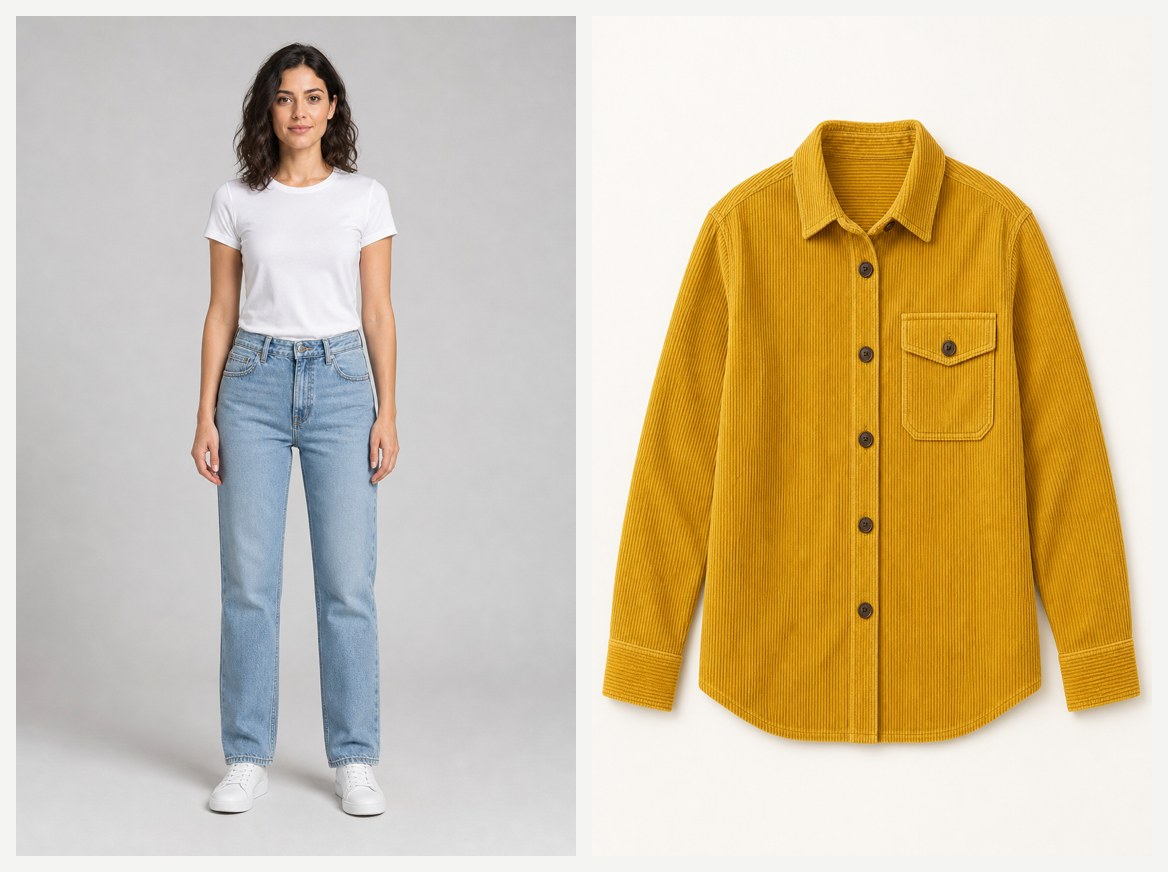
Test 1: corduroy overshirt (structure and length)
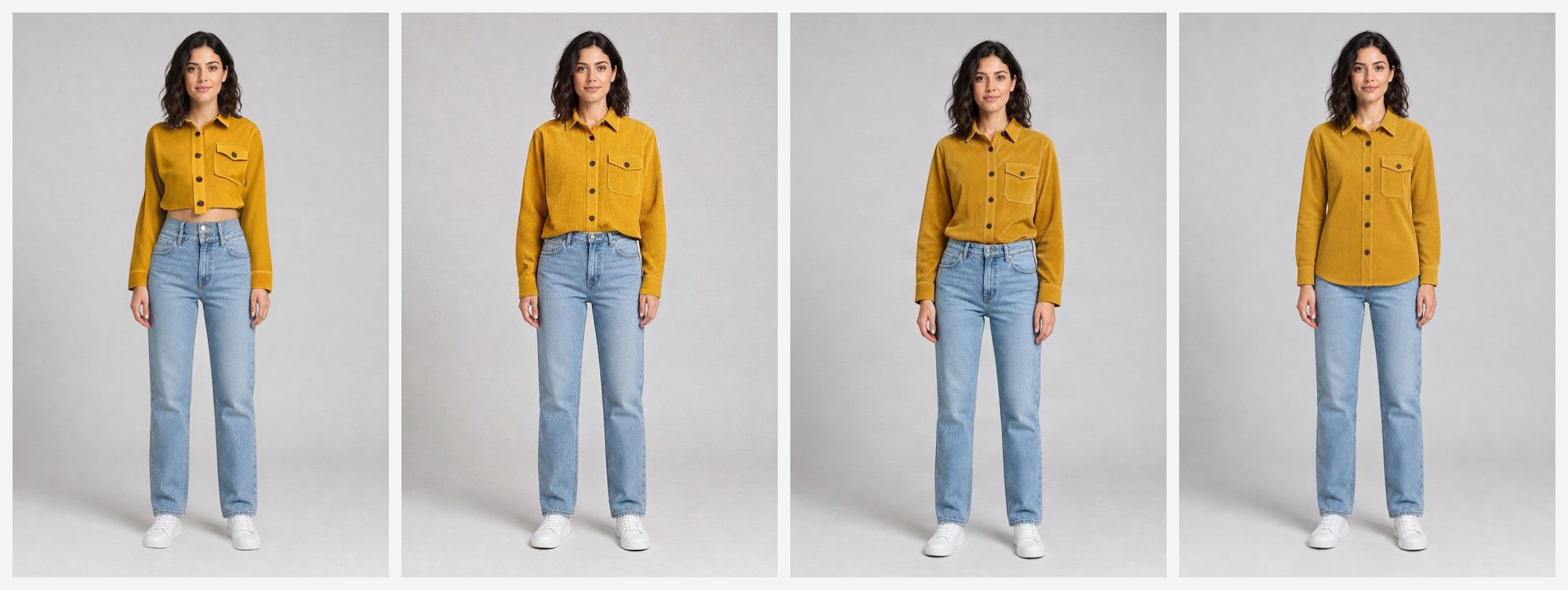
Left to right: FASHN, Google, FIBO, GPT Image 2.5 Sunburst. Here are the upper bodies at full resolution, with the original person photo first:
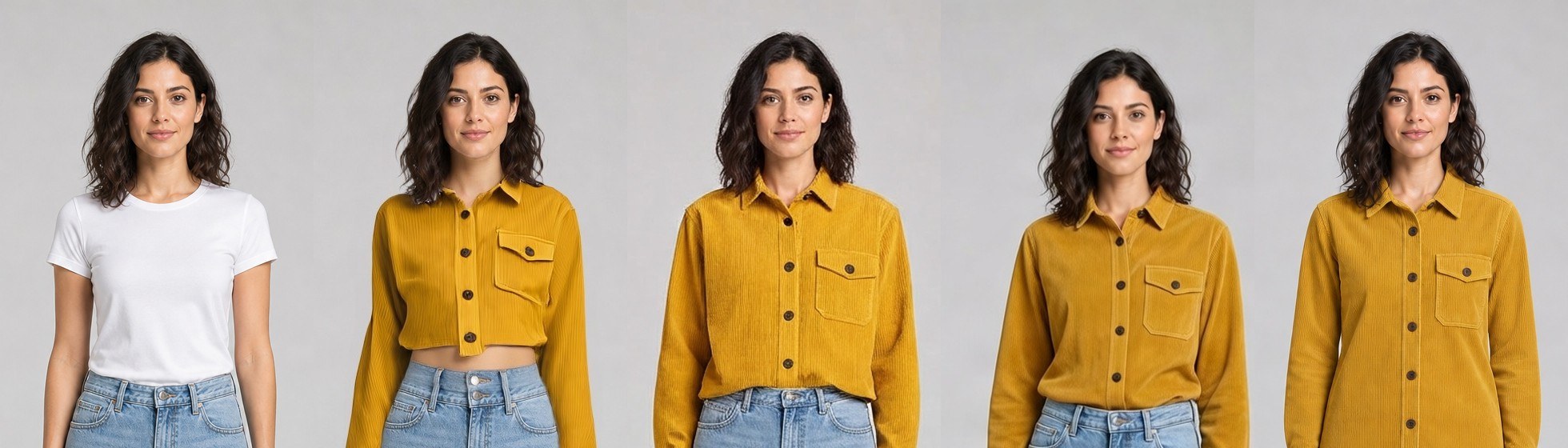
What we saw:
- All four kept the mustard color, the dark buttons, the pointed collar, and the single flap pocket on the wearer's left chest. None of them moved the pocket to the wrong side.
- FASHN shortened the overshirt into a cropped top that exposes the midriff. The corduroy ribs are rendered, but the garment's length is wrong.
- Google kept a full-length shirt that ends at the jeans waistband with a slight blouse. The face, hair, and pose are the closest match to the input photo.
- FIBO produced a plausible shirt with softer ribs. The face drifted noticeably: the jawline, hair volume, and expression differ from the input.
- GPT Image 2.5 Sunburst was the only one to reproduce the curved hem falling below the waist, matching the flat-lay, with visible wide-wale ribs and the face kept intact.
Is that repeatable?
We re-ran FASHN with a different seed and GPT Image 2.5 Sunburst with the same prompt:
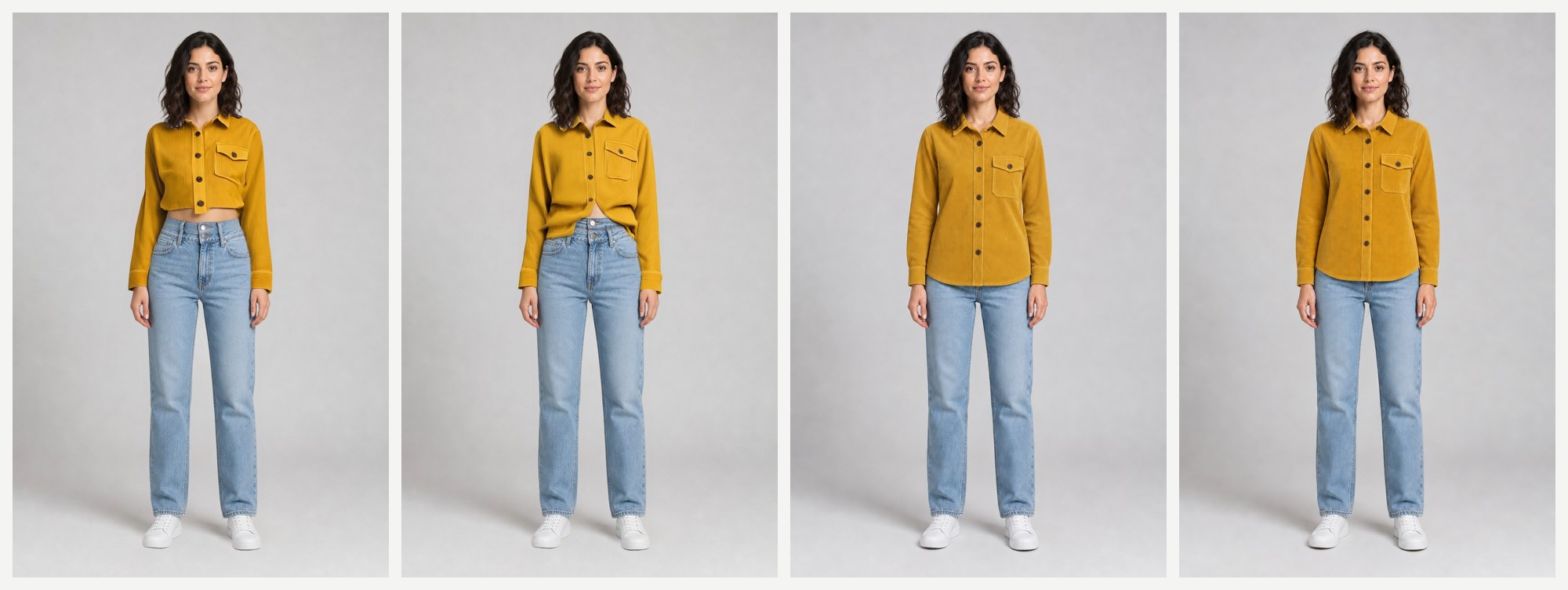
FASHN with seed: 7 again came out short: the shirt is open at the bottom with the midriff showing. GPT Image 2.5 Sunburst returned nearly the same result twice. On this garment, the length problem with FASHN is a pattern, not a one-off.
Test 2: printed t-shirt (logo and text)
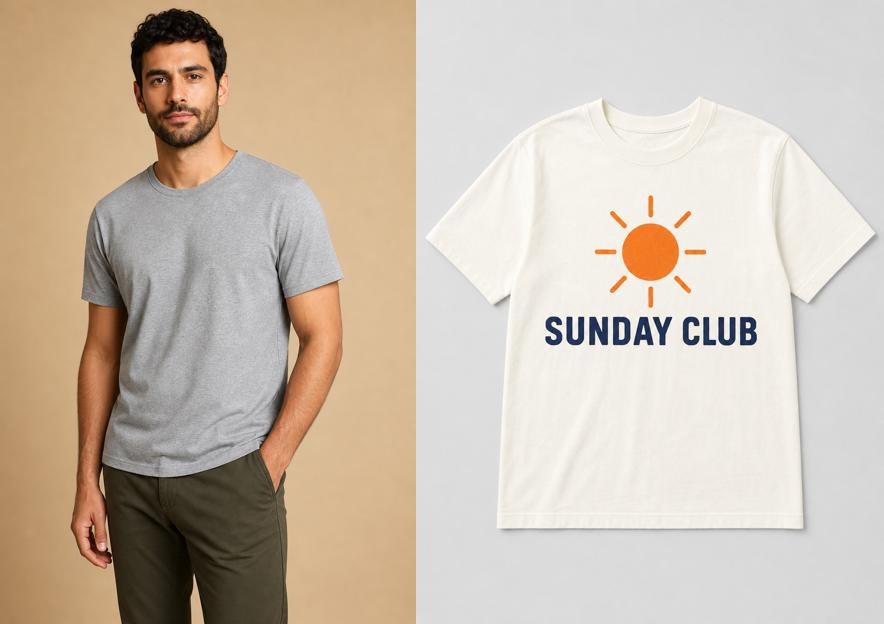
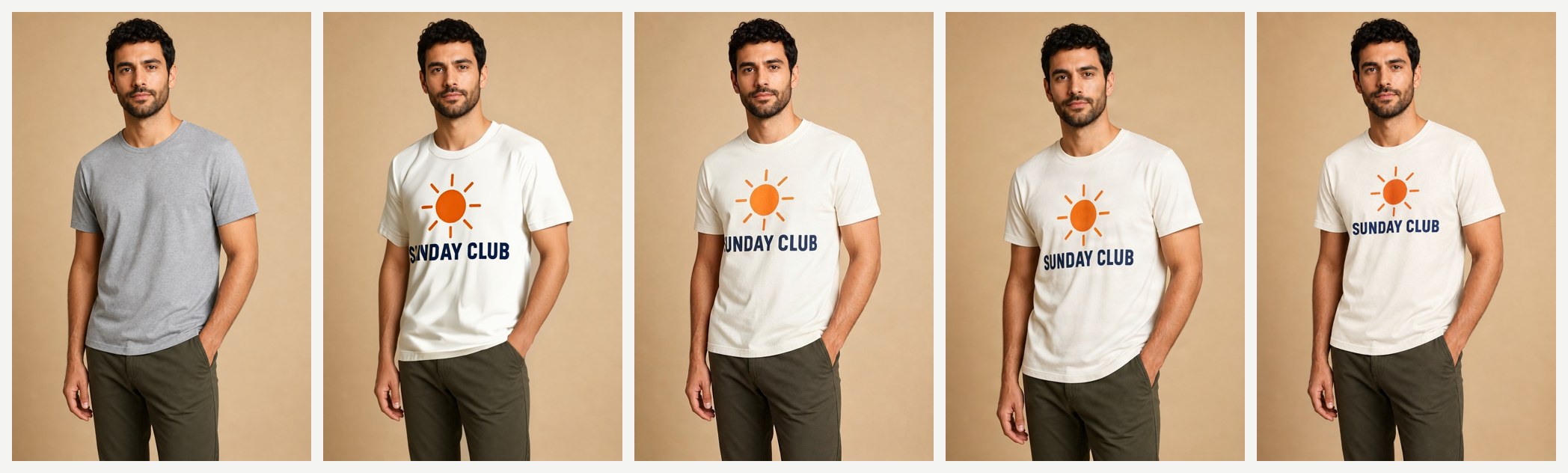
The print is where try-on usually breaks, so here it is up close (FASHN, Google, FIBO, GPT Image 2.5 Sunburst with our specific prompt, and Sunburst with a generic prompt):

- FASHN scaled the print up so far that the
SinSUNDAYruns into the side of the shirt and is partly cut off. - Google placed the print at a natural size, but the first letter also falls on the side fold and is partly hidden.
- FIBO rendered the sun and the full
SUNDAY CLUBcleanly, at a size close to the flat-lay. - GPT Image 2.5 Sunburst rendered the full text correctly in both runs, but placed the print smaller and higher on the chest than the original.
- All four kept the hand in the pocket, the olive trousers, and the beige background.
If chest prints, logos, or text matter for your catalog, add a quality-control check on the print, whichever model you choose.
Does the editor need a detailed prompt?
Our Sunburst prompts described each garment's details (pocket side, rib width, print layout). To check how much that mattered, we re-ran both pairs with one generic prompt that never mentions the garment:
Image 1 is a person. Image 2 is a garment product photo. Dress the person from image 1 in the garment from image 2. Keep the person's face, hair, body, pose, all other clothing, background and lighting unchanged. Reproduce the garment's color, fabric, length, construction details and any print or text exactly. Photorealistic catalog photo.
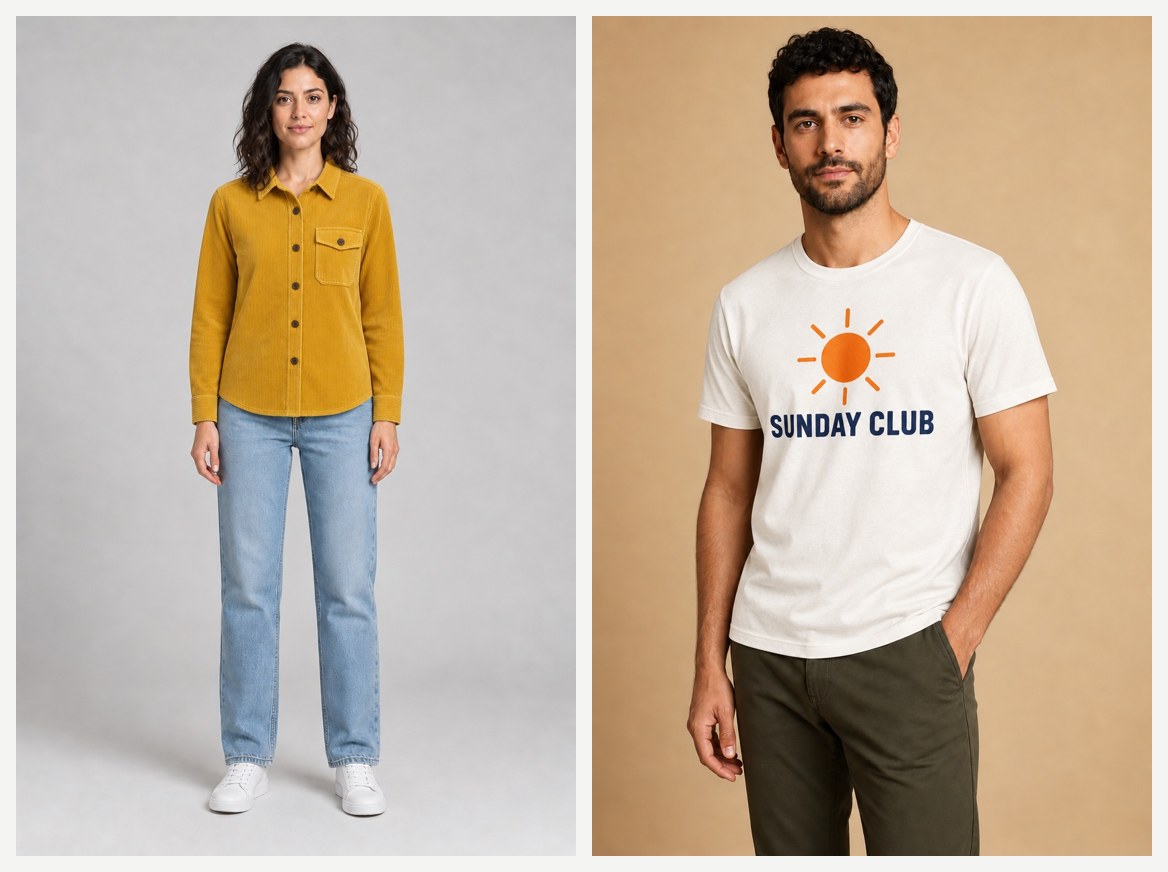
Both results held up: the overshirt kept its curved hem, and the print was spelled correctly. So one templated prompt can serve a catalog, and you don't need to write a prompt per SKU. The risk is different: since an edit model will change whatever the prompt doesn't protect, keep the "keep unchanged" list in every request.
The prompt we used for pair 1 with the detailed version:
Image 1 is a person. Image 2 is a mustard-yellow corduroy overshirt. Dress the person from image 1 in the overshirt from image 2, buttoned up. Keep her face, hair, body shape, pose, jeans, sneakers, background and lighting exactly as in image 1. Reproduce the overshirt exactly: same mustard color, wide-wale corduroy ribs, dark-brown buttons, one button-flap chest pocket on her left chest, pointed collar, long sleeves with cuffs. Photorealistic full-length catalog photo, no text.
Calling them through one API
All four models use the same async flow: POST /v1/tasks, then poll GET /v1/tasks/{taskId} until status is success or fail. Only the input object changes. The full contract, including callbacks and Idempotency-Key, is in the async API docs.
import os, time, requests

API = "https://api.hiapi.ai/v1/tasks"
HEADERS = {"Authorization": f"Bearer {os.environ['HIAPI_API_KEY']}"}

PERSON = "https://your-cdn.example.com/person.jpg"
GARMENT = "https://your-cdn.example.com/garment.jpg"

REQUESTS = {
    "fashn-tryon-v1.6": {
        "model_image": PERSON,
        "garment_image": GARMENT,
        "category": "tops",              # tops | bottoms | one-pieces | auto
        "garment_photo_type": "flat-lay",  # auto | model | flat-lay
        "mode": "quality",               # performance | balanced | quality
        "seed": 42,
    },
    "google-virtual-try-on": {
        "person_image_url": PERSON,
        "product_image_url": GARMENT,
    },
    "fibo-edit-1.5/image-to-image": {
        "image_urls": [PERSON, GARMENT],
        "instruction": "Dress the person in image 1 in the garment from image 2. "
                       "Keep the face, pose, other clothing and background unchanged.",
        "aspect_ratio": "2:3",
    },
    "gpt-image-2.5-sunburst/image-to-image": {
        "image_urls": [PERSON, GARMENT],
        "prompt": "Image 1 is a person. Image 2 is a garment product photo. "
                  "Dress the person from image 1 in the garment from image 2. "
                  "Keep the person's face, hair, body, pose, all other clothing, "
                  "background and lighting unchanged.",
        "aspect_ratio": "2:3",
        "resolution": "1K",              # 1K | 2K | 4K
    },
}

def try_on(model: str) -> str:
    r = requests.post(API, headers=HEADERS, json={"model": model, "input": REQUESTS[model]})
    r.raise_for_status()
    task_id = r.json()["data"]["taskId"]
    while True:
        task = requests.get(f"{API}/{task_id}", headers=HEADERS).json()["data"]
        if task["status"] == "success":
            return task["output"][0]["url"]   # temporary URL: download and store it
        if task["status"] == "fail":
            raise RuntimeError(task.get("error"))
        time.sleep(5)

print(try_on("google-virtual-try-on"))
Three details from our runs:
- The edit line rejects
quality. Sending"quality": "medium"togpt-image-2.5-sunburst/image-to-imagereturned400 INVALID_REQUEST: additional properties 'quality' not allowed. Control output size withresolutionandaspect_ratioonly. - Output URLs expire. The result URL is temporary (
expireAtis in the task output), so download the image and store it on your own storage. - Inputs must be public
http(s)URLs. All four models take image URLs, not base64. Upload the shopper photo first, then submit the task.
How to choose
Choose a dedicated try-on model (FASHN or Google) when:
- Shoppers or ops staff will submit images and you want no prompt anywhere in the loop
- You want the face and pose kept as close to the input as possible (Google was strongest here)
- You need explicit category and garment-photo-type controls, plus a
seedfor reproducible reruns (FASHN)
Choose a multi-reference editor (GPT Image 2.5 Sunburst or FIBO) when:
- Garment structure and length matter more than zero-prompt simplicity (Sunburst was strongest in our overshirt test)
- Cost per image drives the decision: $0.025 at 1K for Sunburst, $0.0575 for FIBO, against about $0.107 for the dedicated models
- You want to style beyond a straight swap, such as buttoned versus open, tucked versus untucked, or a background change, in the same call
- Prints and text must stay readable (FIBO and Sunburst both spelled the print fully in our test)
Stay in ChatGPT when you are one person checking how one item might look on you. You don't need any code.
FAQ
Does ChatGPT have a virtual try-on API?
No. As of November 2026, try-on is a feature of the ChatGPT app, triggered from product listings or uploaded images. The image models from the same release are available as API models, but there is no try-on-specific endpoint with person and garment fields. On HiAPI you can call those image models or a dedicated try-on model through /v1/tasks.
Which model is closest to what ChatGPT uses?
ChatGPT's try-on runs on ChatGPT Images 2.5. The API models from that release are GPT Image 2.5 Flare and Sunburst. We tested Sunburst's image-to-image line, which takes several reference images plus a prompt.
Is a dedicated try-on model better than a general image editor?
Not automatically. In our two tests, the dedicated models were easier to call and kept faces closest to the input, while GPT Image 2.5 Sunburst reproduced garment length and the full print more faithfully. Run your own garments through both kinds before deciding. One image on each costs well under $0.25.
How much does each try-on cost?
On HiAPI as of 2026-11-03: FASHN Try-On v1.6 $0.1072, Google Virtual Try-On $0.1075, FIBO Edit 1.5 $0.0575, and GPT Image 2.5 Sunburst image-to-image $0.025 at 1K ($0.04 at 2K, $0.06 at 4K). Check the pricing page for current rates. Failed tasks are not charged.
Can I keep a shopper's face and pose unchanged?
The dedicated models are designed to do that, and Google came closest in our runs. With an editor, state it explicitly ("keep the face, hair, body, pose, background unchanged"). Our generic prompt kept faces well with Sunburst, while FIBO drifted more.
Can I run it on bottoms or dresses?
FASHN accepts category values for tops, bottoms, and one-pieces. Google's model page lists common tops, jackets, and dresses as good candidates. We only tested tops here.
Bottom line
ChatGPT's try-on is a shopper feature. For a product, you need an endpoint, and there are four solid ones on HiAPI behind a single key. If you want the least integration work, start with Google Virtual Try-On. If you want explicit controls and reproducible seeds, use FASHN Try-On v1.6. If garment fidelity and cost matter most, test GPT Image 2.5 Sunburst with a templated prompt. Send the same two images to two of them, and let your own garments decide. You can try any of them on its model page Playground before writing code.