Qwen Image 3.0 is a high-fidelity image family in the Qwen series, known for dependable Chinese and bilingual text and clean poster layouts. On HiAPI it comes in two tiers — Standard and Pro — across two modes, text-to-image and image-to-image, and every call is billed per image with no subscription and no per-token math. This guide breaks down the real 2026 numbers (re-checked against HiAPI's live pricing on 2026-10-16), shows what the price gap actually looks like with the same prompt, and explains how to start.
Qwen Image 3.0 API pricing at a glance (2026)
All figures are per image, in USD. See live pricing for the current numbers.
Text-to-image
| Model | 1K | 2K |
|---|---|---|
| Qwen Image 3.0 (Standard) | $0.0358 | $0.0358 (flat) |
| Qwen Image 3.0 Pro | $0.0497 | $0.0993 |
Standard is a single flat price at any resolution. Pro bills by output size, and 2K is exactly double its 1K rate.
Image-to-image (editing)
| Model | Per image | Reference images |
|---|---|---|
| Qwen Image 3.0 (Standard) | $0.0358 (flat) | 1–3, no extra charge |
| Qwen Image 3.0 Pro | $0.0497 (1K) · $0.0993 (2K) | 1–3, no extra charge |
Image-to-image costs the same per image as text-to-image on both tiers, and the 1–3 reference images add nothing.
The two Qwen Image 3.0 tiers, and who each is for
Qwen Image 3.0 (Standard) is the cost-efficient workhorse at $0.0358 per image, flat. It is tuned for Chinese text, posters, concept art, and everyday visual creation — the bread-and-butter jobs where you want reliable typography without paying a premium. See the Qwen Image 3.0 model page.
Qwen Image 3.0 Pro is the quality tier at $0.0497 at 1K, aimed at high-fidelity final images, complex materials, and refined, dense layouts. Reach for it on hero shots, client deliverables, and busy compositions with a lot of small elements to keep crisp. See the Qwen Image 3.0 Pro model page.
At 1K, Pro costs about 39% more than Standard ($0.0497 vs $0.0358) — a real but modest gap, which makes the choice less about budget and more about how much layout density and polish a given image needs.
How resolution changes the price
This is the single biggest lever on Pro's cost, and a non-issue on Standard.
- Standard is flat: $0.0358 whether you render at 1K or 2K. Per-image budgeting is dead simple.
- Pro doubles from $0.0497 at 1K to $0.0993 at 2K. The 1K tier is the sweet spot for web, social, and most print-at-arm's-length work; reserve 2K for large-format or heavy-crop use where you will actually see the extra pixels.
Practical tip: compose and iterate at 1K, then re-render only the final keeper at 2K if you truly need it. You pay the 1K rate to explore and the 2K rate just once.
Text-to-image vs image-to-image
Editing (image-to-image) is priced the same as generating on each tier:
- Both tiers accept 1 to 3 references at no extra charge.
- On Standard, an edit is $0.0358 whatever the resolution.
- On Pro, a 1K edit is $0.0497 and a 2K edit is $0.0993.
If your workflow is reference-heavy — product redraws, composition preservation, style transfer from a few source images — budget it exactly like text-to-image. See the Qwen Image 3.0 image-to-image model page for inputs.
What the price actually buys: one prompt, two tiers
To make the gap concrete, I ran the same prompt through Standard and Pro, both at 1K.
Editorial storefront photograph of a small specialty bakery on a quiet tree-lined street at golden hour. A hand-painted wooden sign above the glass door is naturally integrated and reads, in clean type, the exact Chinese characters "晨光烘焙" with the exact English words "MORNINGLIGHT BAKERY" directly beneath. Beside the door a small chalkboard lists three items in neat handwriting. Warm amber window light, soft morning haze, wet cobblestone reflecting the glow, realistic wood and glass materials, shallow depth of field, cinematic warm color grade, premium commercial photography, 16:9 composition.
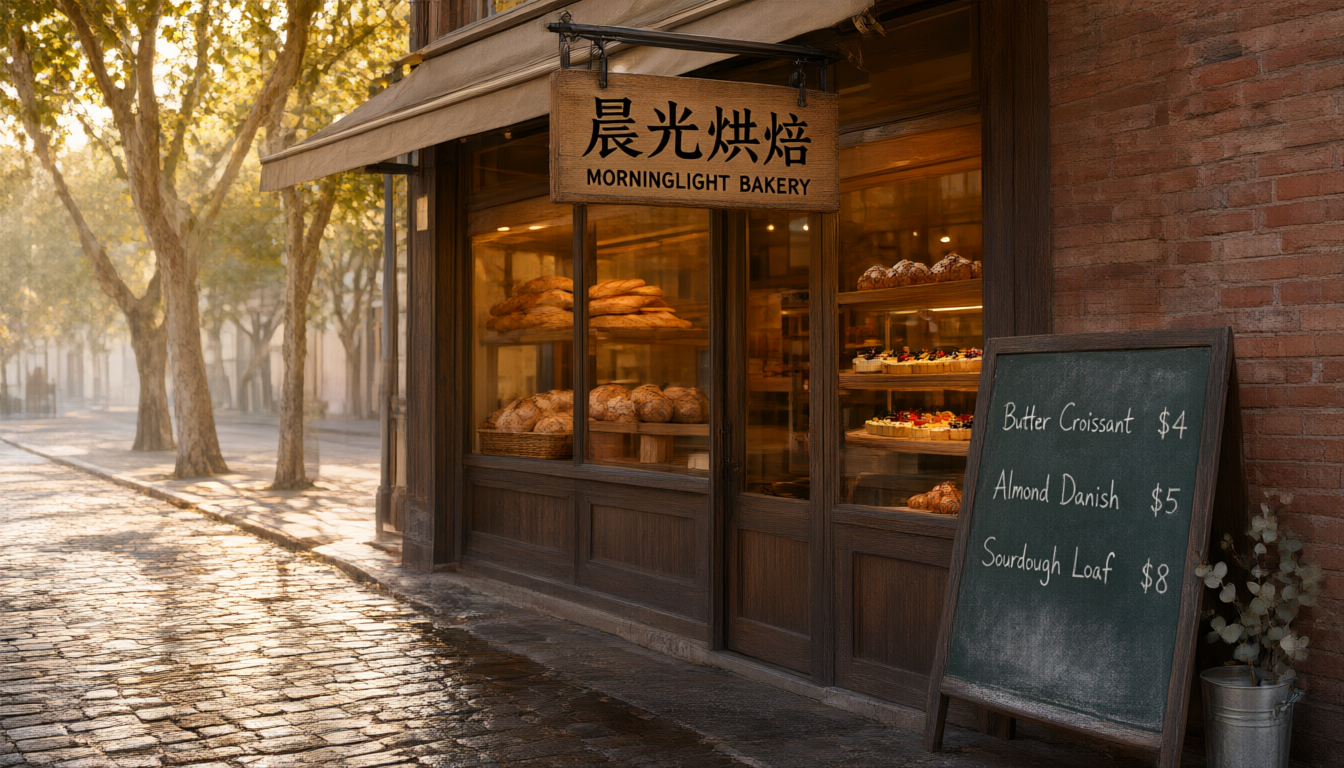
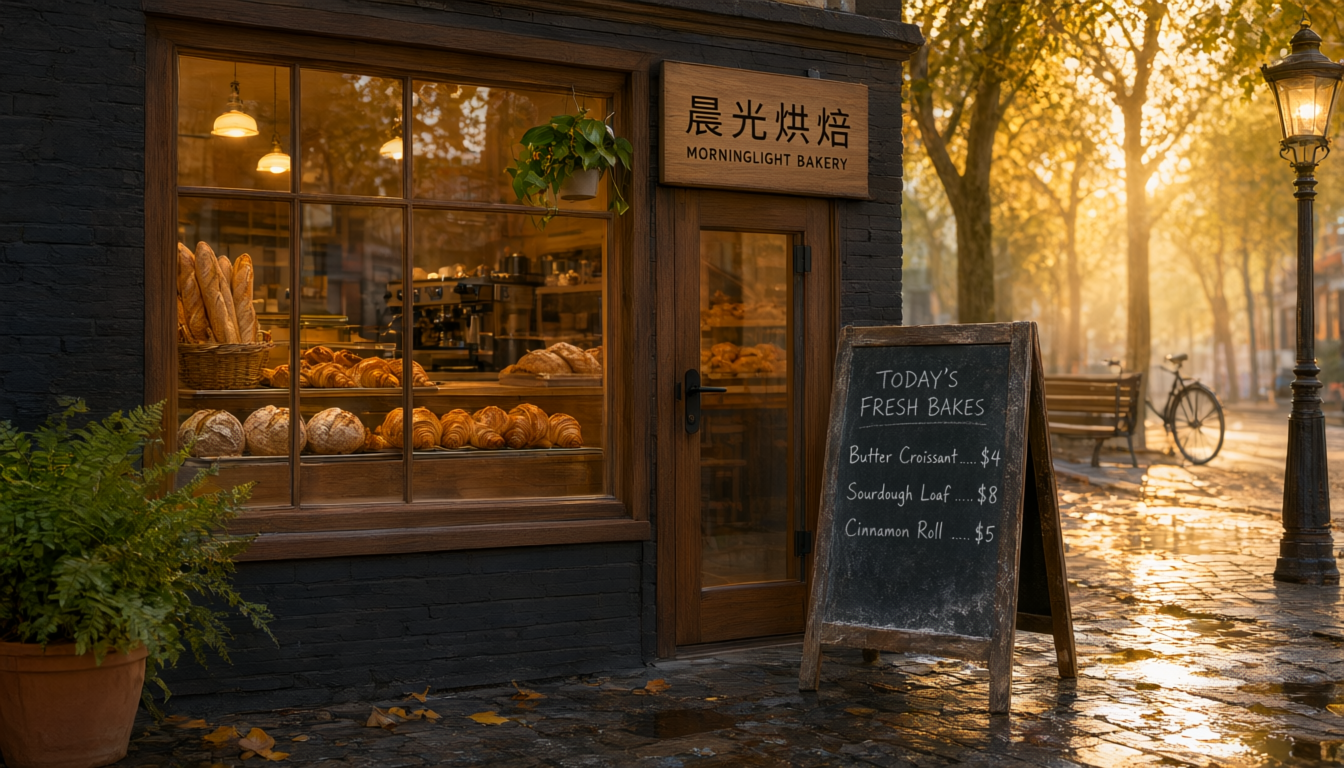
The interesting part is what did not change. Both tiers rendered the Chinese shop name 晨光烘焙, the English MORNINGLIGHT BAKERY, and the hand-written chalkboard prices correctly and legibly. Dependable bilingual text is Qwen Image 3.0's core strength, and you get it on the cheaper tier.
Where Pro pulls ahead is density and atmosphere. Its chalkboard adds a "TODAY'S FRESH BAKES" header and dotted price leaders, and the scene gains a lit street lamp, a bicycle, wet reflective cobblestones, and a stronger golden-hour sunburst. Standard's version is a clean, correct, publishable shot; Pro's is a richer set piece. So the Qwen pricing question is rarely "will the text come out right" — it usually does on both — but "do I need the extra layout density and polish," which is what the ~39% premium buys.
What $1 and $10 buy
Straight from the per-image prices above (text-to-image):
| Tier | Per image | Images per $1 | Images per $10 |
|---|---|---|---|
| Standard · flat | $0.0358 | ~27 | ~279 |
| Pro · 1K | $0.0497 | ~20 | ~201 |
| Pro · 2K | $0.0993 | ~10 | ~100 |
New accounts start with free credits, so your first batch of test images costs nothing out of pocket.
How to access Qwen Image 3.0 on HiAPI
One API key covers both tiers and both modes. Image models run on an async task endpoint:
- Sign up and grab your key. New accounts start with free credits; billing is pay-as-you-go with no minimum, and failed tasks are not charged.
POST /v1/taskswith a body like{"model": "qwen-image-3.0/text-to-image", "input": {"prompt": "...", "aspect_ratio": "16:9", "resolution": "1K"}}and you receive ataskId. For the quality tier, swap in"qwen-image-3.0-pro/text-to-image"and set"resolution"to"1K"or"2K"; for editing, use the/image-to-imageroute and pass"image_urls"with 1–3 references.- Poll
GET /v1/tasks/{taskId}untilstatusissuccess, then downloadoutput[0].url.
Full parameters and copy-paste code live in the qwen-image-3.0 API guide and the HiAPI docs.
FAQ
How much does the Qwen Image 3.0 API cost? Per image on HiAPI: Standard is a flat $0.0358 at any resolution, and Pro is $0.0497 at 1K (doubling to $0.0993 at 2K). Image-to-image costs the same, with 1–3 reference images at no extra charge.
What is the difference between Qwen Image 3.0 and Qwen Image 3.0 Pro? Standard is the cost-efficient tier for Chinese text, posters, and everyday work. Pro targets high-fidelity finals, complex materials, and dense layouts. In a same-prompt test both rendered bilingual text correctly; Pro added denser layout and richer lighting.
Does resolution change the price? Only on Pro, which bills $0.0497 at 1K and $0.0993 at 2K. Standard is flat regardless of output size.
Is image-to-image more expensive than text-to-image? No. It uses the same per-image price, and the 1 to 3 reference images are free.
Is Qwen Image 3.0 good at Chinese and in-image text? Yes — it is one of its headline strengths. In our test, even the Standard tier rendered both the Chinese and English sign text and the chalkboard prices correctly.
Takeaways
For Chinese or bilingual text and everyday posters, Standard already nails the hard part, which makes it the default value pick at $0.0358. Pay for Pro when you need dense layouts, fine typography, or richer scene detail — and keep it at 1K unless you truly need 2K, which doubles the price. And always iterate cheap before you render expensive.
Ready to try it? Start on Standard to get your bilingual text and composition right for pennies, then switch to Pro for the polished final — browse the full lineup on HiAPI and ship your first image today.