Choose PixVerse V6 for lower-priced 720p generation, more aspect ratios, and built-in style presets. Choose standard Kling 3.0 for 4K delivery and image-to-video with both a first and last frame. PixVerse V6 is live on HiAPI: open the text-to-video model page to try the coastal prompt below, or open Kling 3.0 to compare the same scene.
A five-second silent 720p clip costs $0.3225 with PixVerse V6 and $0.50 with Kling 3.0. At silent 1080p, both cost $0.645. Your delivery format and the control you need over the final frame can matter more than that first price difference.
Which Differences Affect the Choice?
| Decision | PixVerse V6 | Standard Kling 3.0 |
|---|---|---|
| Clip duration | 1–15 seconds | 3–15 seconds |
| Resolution | 360p, 540p, 720p, 1080p | 720p, 1080p, 4K |
| Text-to-video shapes | Eight, including 21:9, 4:3, and 2:3 | 16:9, 9:16, 1:1 |
| Style presets | anime, 3d_animation, clay, comic, cyberpunk | Style described in the prompt |
| Audio input | generate_audio | sound |
| Image-to-video input | One first frame | First frame, plus optional last frame |
| Five seconds, silent 720p | $0.3225 | $0.50 |
| Five seconds, silent 1080p | $0.645 | $0.645 |
PixVerse's additional shapes are useful when a project needs several placements. Choose the shape at generation time so you can compose the scene for a tall panel or a wide banner. Kling's 4K tier serves a different requirement: more output resolution for the delivery and editing workflow.
For image-to-video, the extra Kling input lets you supply a target ending image. PixVerse takes a single starting image and a motion prompt. Use the text-to-video routes when the scene should start from a written description.
Coastal Push-In: The Same Text Prompt
Both examples use the full prompt below with 16:9, five seconds, 720p, and audio enabled. Each delivered file is 1280 × 720, approximately five seconds long, and includes an audio stream.
| PixVerse V6 | Kling 3.0 |
|---|---|
Cinematic slow dolly push-in across a windswept coastal cliff at golden hour. Tall grass ripples in the sea breeze, waves crash against dark rocks far below, warm low sunlight rakes across the scene. The camera glides forward steadily toward the cliff edge, revealing a wide ocean horizon. Shallow depth of field, gentle lens flare, realistic film grain, soft natural ambience of wind and distant surf.
Generate the coastal shot with PixVerse V6 → · Generate it with Kling 3.0 →
PixVerse starts over the grassy slope and moves toward the sea. Kling keeps the horizon and right-hand rock face in view, with a larger splash near the end. Set the shape, duration, resolution, and audio after opening either link; choose the composition that gives your edit the right foreground and ocean balance.
Cabin Push-In: The Same First Frame
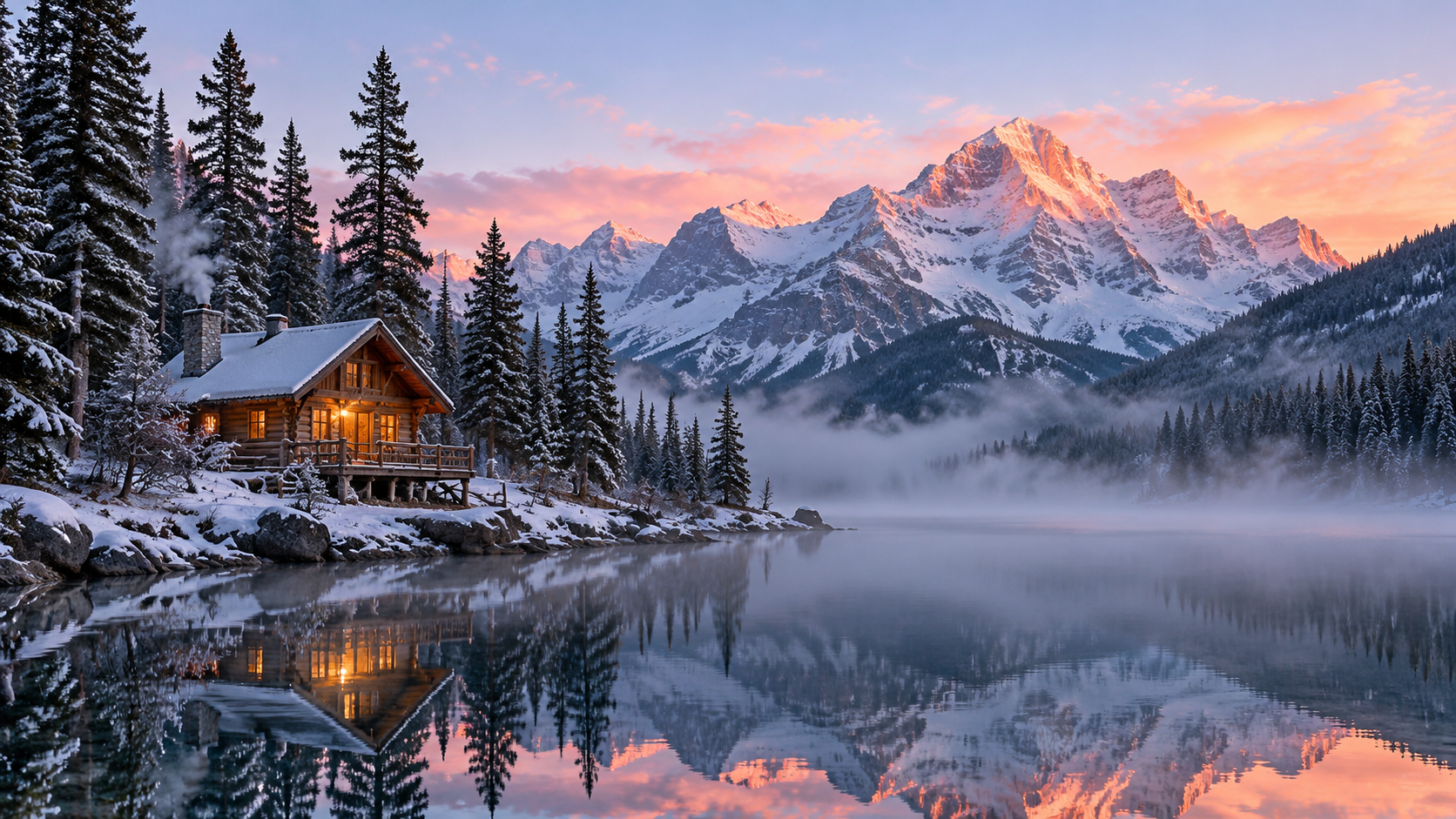
This pair uses image-to-video with the same starting image, motion prompt, five-second duration, 720p, and audio enabled. Both delivered files are 1280 × 720 and approximately five seconds long, with audio streams.
| PixVerse V6 | Kling 3.0 |
|---|---|
Slow, steady cinematic push-in toward the cabin. Mist drifts low across the lake and the water ripples gently. The pines sway in a soft breeze. Unhurried early-morning motion; the horizon stays level throughout.
Animate this frame with PixVerse V6 → · Animate it with Kling 3.0 →
PixVerse retains a wider area of lake and the pines on the left at the end of its push-in. Kling moves closer, leaving the cabin larger in the frame. Download the shared first frame and upload it after opening the model page. The links fill only the prompt; choose five seconds, 720p, and enable audio separately.
Which Model Fits Your Project?
- Several social and editorial placements: start with PixVerse V6 text-to-video and select each target shape before generating.
- A series built around a named visual style: use PixVerse's style presets, then describe the subject and movement in the prompt.
- A short motion sketch: PixVerse accepts one-second clips; use a longer duration when the action needs time to read clearly.
- A 4K deliverable: use Kling 3.0 and include that tier in the budget. Five seconds with sound off costs $2.395.
- A shot with a specific ending image: use Kling 3.0 image-to-video with the first and last frames in order.
For sound-on 720p work, five seconds costs $0.43 with PixVerse and $0.715 with Kling. The PixVerse V6 pricing guide includes monthly totals and a test-budget table. Match duration, resolution, and audio before comparing expenses.
What Changes in an API Migration?
Both use POST https://api.hiapi.ai/v1/tasks, return a taskId, and expose the result through task polling. Keep that submission-and-polling workflow, then map the model-specific input fields deliberately:
| Input choice | PixVerse V6 | Kling 3.0 |
|---|---|---|
| Text model ID | pixverse-v6/text-to-video | kling-3.0/text-to-video |
| Image model ID | pixverse-v6/image-to-video | kling-3.0/image-to-video |
| Generated audio | generate_audio: true | sound: true |
| Starting image | image_url: "https://…" | image_urls: ["https://…"] |
| Duration | Integer from 1 to 15 | Integer from 3 to 15 |
Set resolution explicitly: PixVerse defaults to 720p, while Kling defaults to 1080p. Translate the audio flag when switching models. For image-to-video, both routes derive framing from the image inputs; keep aspect_ratio in text-to-video requests.
PixVerse's style, negative_prompt, and seed belong to its own input schema. Build a Kling input object using its supported fields, and express the intended style in the prompt. In the reverse direction, choose a PixVerse-supported resolution and shape. The PixVerse V6 API guide has the complete request and polling examples.
FAQ
Do both models support generated audio? Yes. Enable PixVerse's generate_audio or Kling's sound. Both flags default to false.
Does the lowest price decide which to use? Start with the format and input controls the job requires. The price matches for silent 1080p, while PixVerse is 35.5% lower for silent 720p.
What should I try first? Use the coastal prompt for a scene created from text, or upload the cabin frame for image-to-video. For additional subjects and styles, open the PixVerse V6 prompt recipes.