Qwen Image 2.1 Turbo (qwen-image-2.1-turbo) is the $0.02-per-image tier of the Qwen 2.1 family on hiapi. We ran five text-to-image prompts and eight edit requests on it on 2026-11-02, and re-ran three of them on Qwen Image 2.1 Pro ($0.05) with the same seed. Below are the prompts we used, the images we got back, and the cases where Turbo did not do what we asked.
Short version: Turbo got every Chinese character right on a poster, a tea label and a six-line menu. Single-change edits worked. Edits that asked for several changes at once, or for a new background, mostly failed, and every edit added visible grain.
If you have not called the model yet, start with the Qwen Image 2.1 Turbo API guide. It covers auth, polling and the full input schema. This page covers prompts only.
The request shape every recipe uses
Every recipe below is a POST /v1/tasks body. Only input.prompt, aspect_ratio and (for edits) image_urls change:
curl -s -X POST https://api.hiapi.ai/v1/tasks \
  -H "Authorization: Bearer $HIAPI_KEY" \
  -H "Content-Type: application/json" \
  -d '{
    "model": "qwen-image-2.1-turbo",
    "input": {
      "prompt": "<recipe prompt>",
      "aspect_ratio": "1:1",
      "seed": 42
    }
  }'
Poll GET /v1/tasks/<taskId> until data.status is success, then download data.output[0].url right away (it is a temporary link). aspect_ratio accepts 1:1, 16:9, 9:16, 4:3 and 3:4. The output sizes we measured were the same on both tiers:
| aspect_ratio | Output (Turbo and Pro) |
|---|---|
1:1 | 2048×2048 PNG |
3:4 | 1728×2368 PNG |
16:9 | 2688×1536 PNG |
All runs used seed: 42 and left prompt_extend unset.
Recipe 1: Studio product shot (photoreal)
Studio product photo of a matte black wireless earbuds charging case, lid open,
resting on a wet dark slate surface with small water droplets, single softbox
from the upper left, crisp reflections, shallow depth of field, 85mm lens,
photorealistic, no text
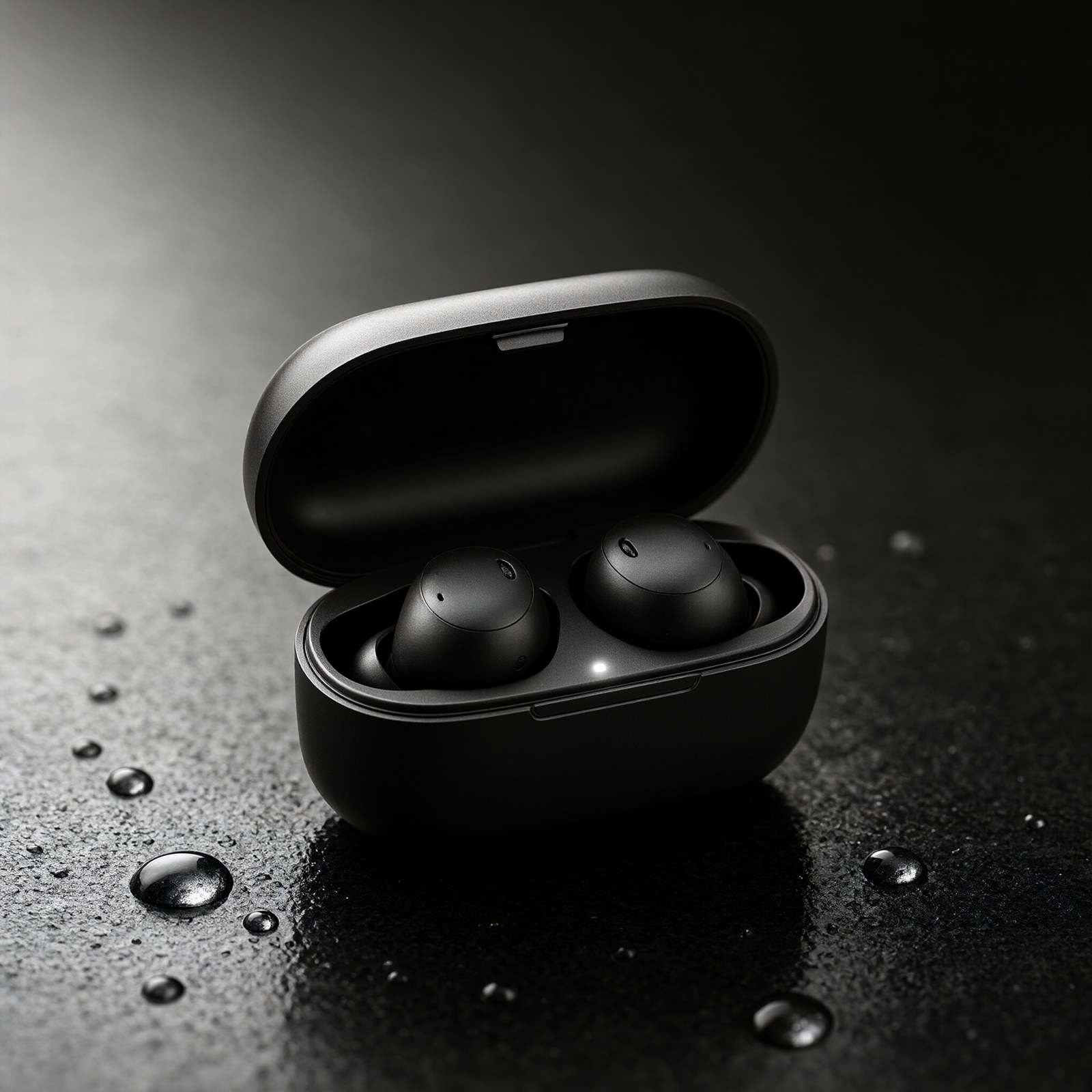
The output follows the prompt closely: the lid is open, both earbuds are seated, the droplets have highlights, and the light falls off from upper left. "No text" held, with no logo or lettering on the case. The prompt names a surface, one light source and a lens, and that was specific enough. A dark product on a dark surface also hides small rendering flaws, which helps a fast tier.
Recipe 2: Night street photography
Candid street photograph at night: an elderly vendor flipping scallion pancakes
at a small food stall in a narrow alley, steam rising under a warm tungsten bulb,
wet pavement reflecting neon, 35mm film look, natural skin texture, slight motion
blur on the hands
We ran this one on both tiers. Turbo is on the left and Pro on the right, with the same prompt and seed:
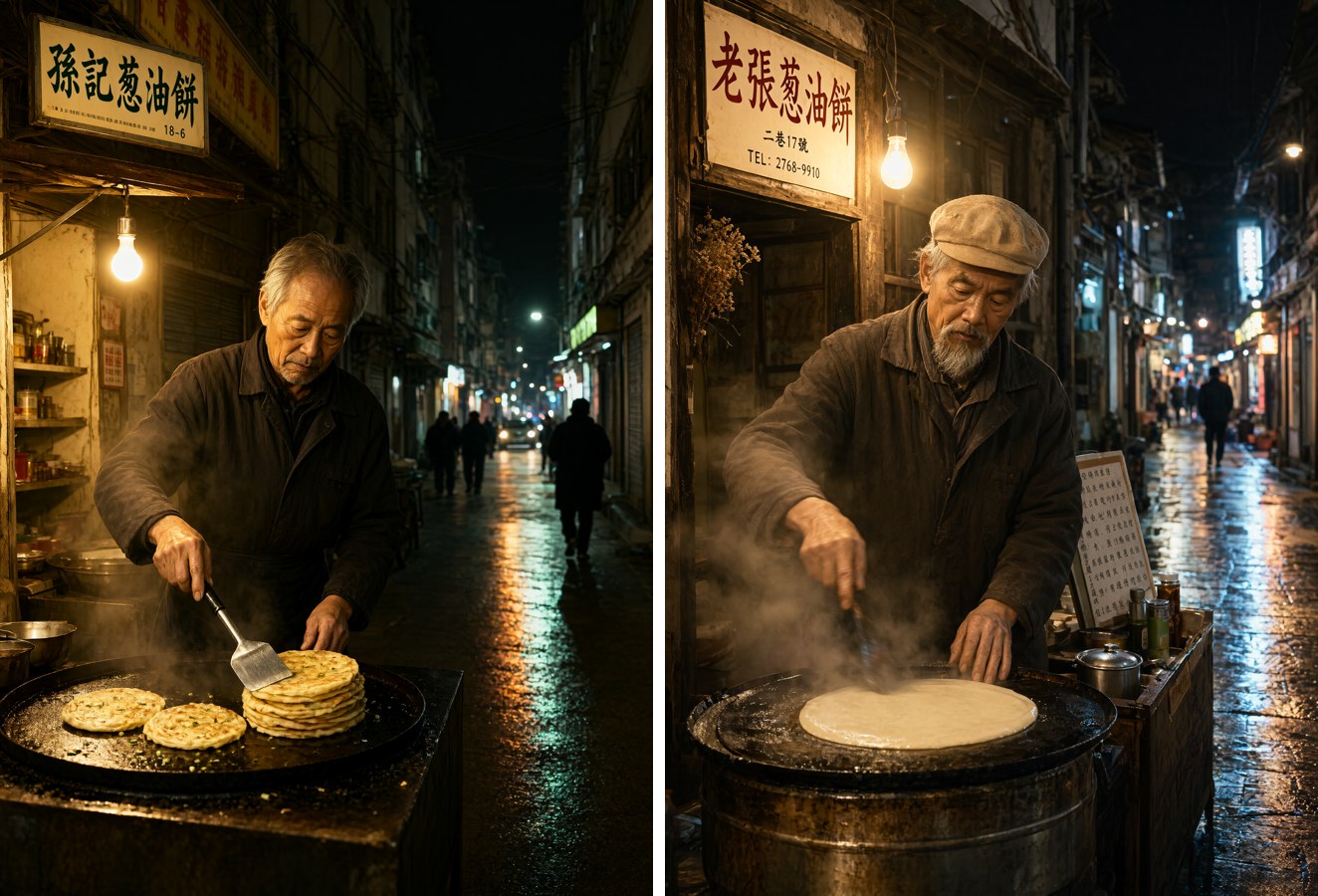
Both outputs have the bulb, steam, wet reflective alley and a convincing face. Neither showed the motion blur on the hands that we asked for. Pro's frame has more steam and a more weathered stall, while Turbo's is cleaner and more evenly lit.
Both tiers added text we did not ask for. Each one invented a shop sign in traditional characters: Turbo's reads 孫記葱油餅 and Pro's reads 老張葱油餅 with a made-up phone number. Pro also added a small menu board covered in characters that do not read as real text. The model clearly treats signage as part of a Chinese street scene. If you plan to publish the image, add no signs, no readable text to the prompt, or check every sign before you use it.
Recipe 3: Chinese event poster with a headline
一张竖版活动海报:顶部是大号黑体中文标题“秋日咖啡节”,标题下方一行小字“11月8日 · 城南旧仓库”,
画面中央是一杯拿铁和几片枫叶,暖橙色与奶油色配色,扁平插画风格,大量留白,文字清晰、无错字
(Vertical event poster. Large bold title "秋日咖啡节" at the top, the line "11月8日 · 城南旧仓库" below it, a latte with maple leaves in the center, warm orange and cream palette, flat illustration, lots of white space.)

We checked every character: the title 秋日咖啡节 and the subline 11月8日 · 城南旧仓库 are correct, including the middle dot. The model also drew thin rules on either side of the subline without being asked. One instruction was not followed: we asked for a "flat illustration" and got a soft painted cup and leaves. If you need a truly flat vector look, describe it more concretely ("solid color fills, no gradients, no shading").
Two things made this prompt work. Each exact string sits inside Chinese quotation marks “ ”, and the prompt says where each string goes (top title, small line below).
Recipe 4: Dense Chinese text, a six-line chalkboard menu
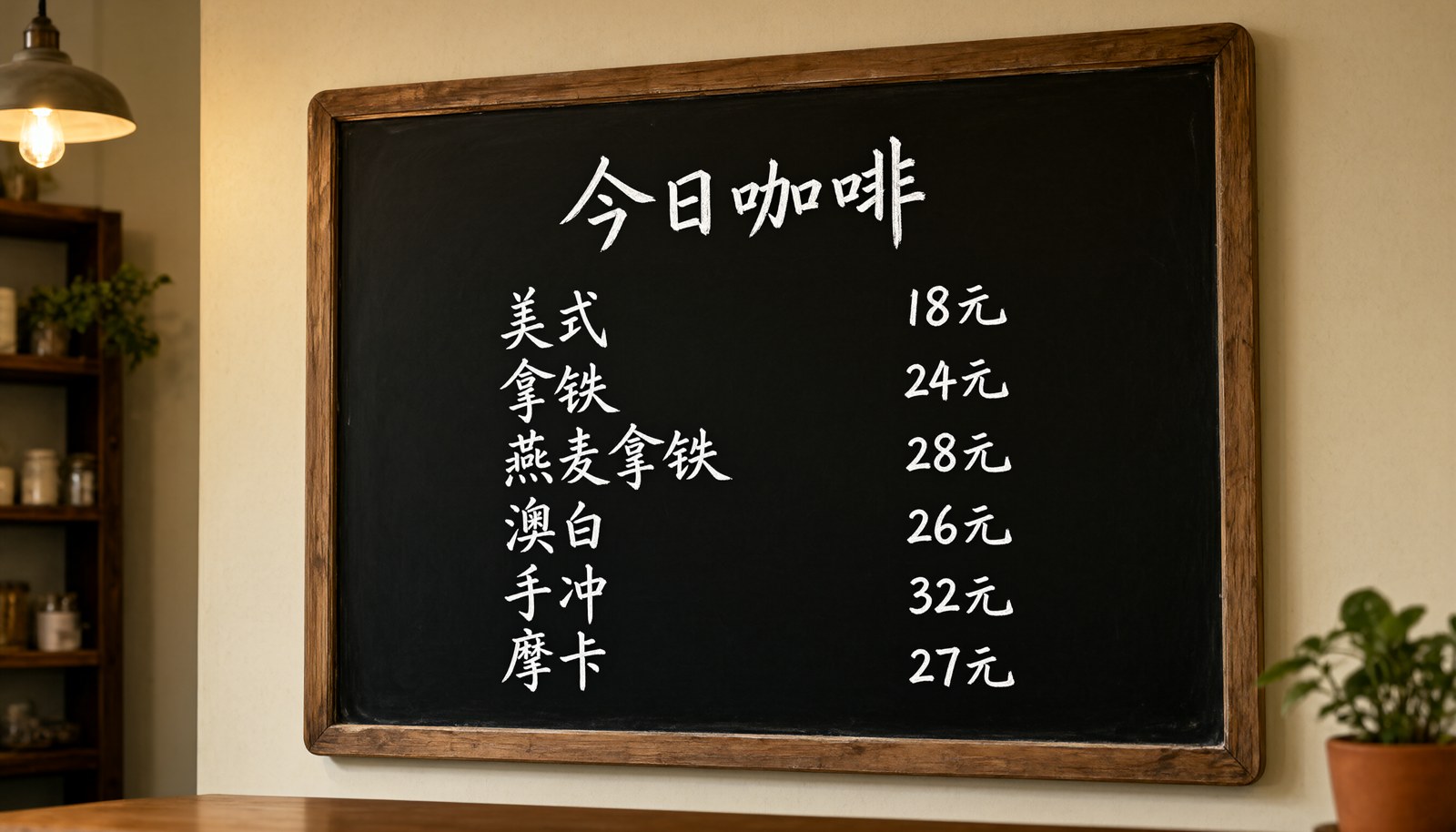
This was the hardest text test we ran: 13 separate strings (a title, six item names and six prices) on a 16:9 board.
咖啡店墙上的黑板菜单,白色粉笔手写字,标题“今日咖啡”,下面六行,每行左边是品名右边是价格:
美式 18元、拿铁 24元、燕麦拿铁 28元、澳白 26元、手冲 32元、摩卡 27元,黑板边缘是木框,暖光照明,写实摄影
Turbo output:
Pro output, same prompt and seed:
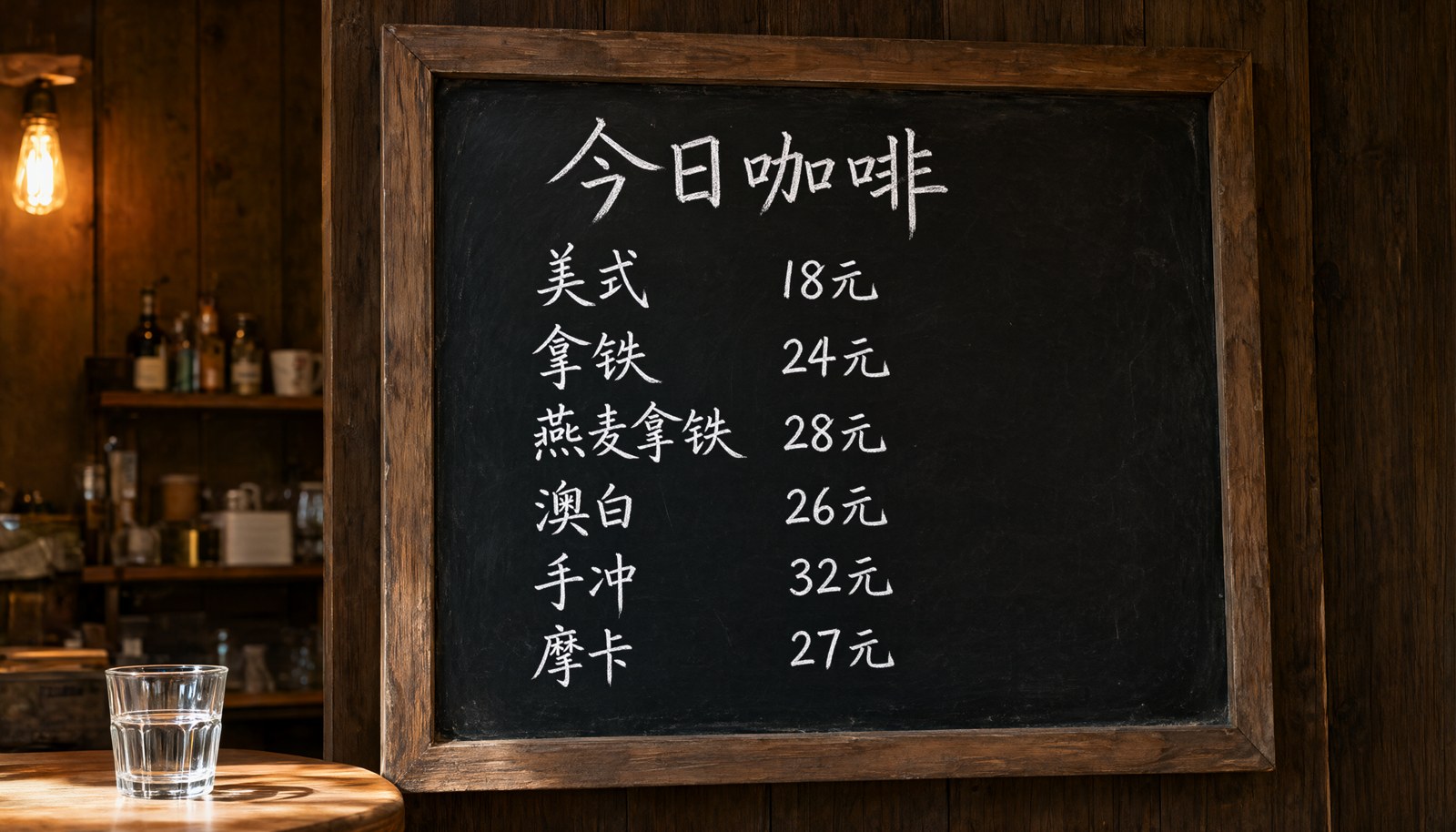
Both tiers rendered all 13 strings correctly, in the right order with the right prices. So the extra $0.03 for Pro did not buy text accuracy on this test. The difference is in texture. Here is a crop of the item list, Turbo left and Pro right:
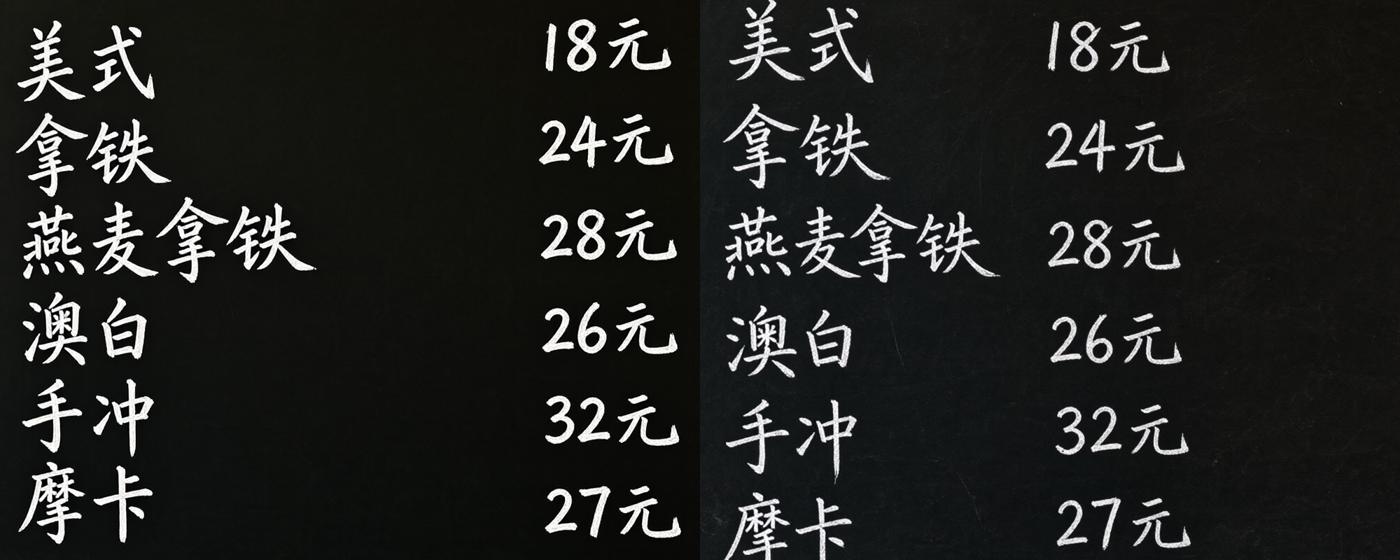
Turbo's board is almost flat black and its letters look like a clean handwriting font. Pro's board shows chalk dust and smudging, and its strokes look closer to real chalk. If the image has to pass as a photo of a real board, that difference is visible. For a menu graphic or a mockup where only legibility matters, Turbo's version is usable as is.
Recipe 5: Bilingual packaging label
Product shot of a round green tea tin on a linen cloth. The front label reads "龙井"
in large brush calligraphy and "LONGJING GREEN TEA" in small serif capitals underneath,
plus "100g" at the bottom. Soft daylight, photorealistic packaging photography
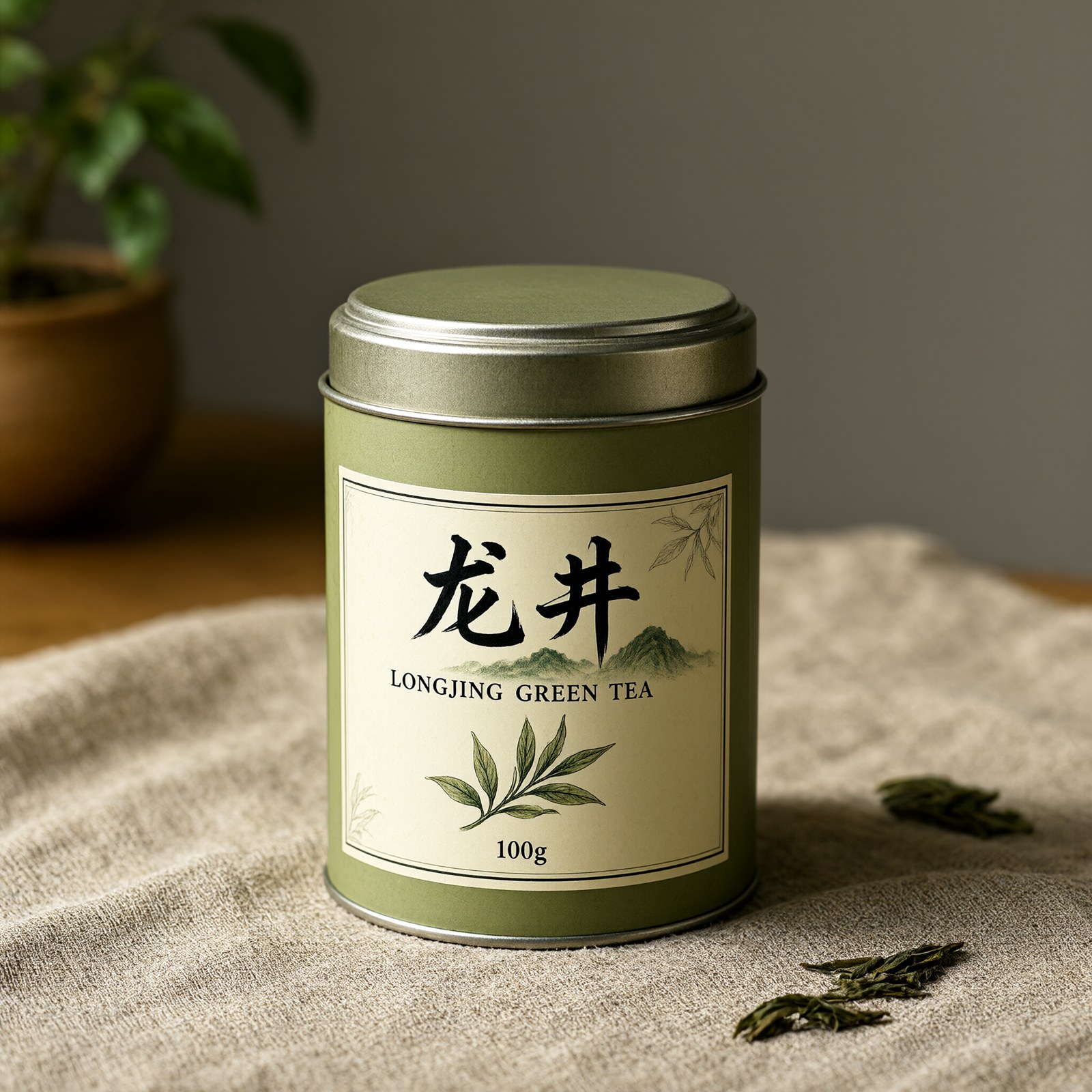
All three strings are correct, and each is in the type style we asked for: brush calligraphy for 龙井, serif capitals for the English line, and a small "100g" at the bottom. The model also added a mountain and tea-leaf illustration that fits the label. Mixed-script labels like this worked well on Turbo when the prompt gave the type style for each string and a position (underneath, at the bottom).
Fast-tier edits: what worked and what didn't
Edits use the same model id. You pass the source in image_urls and describe the change in prompt. We ran eight edit requests: seven on Turbo and one on Pro. Results first, then the prompts.
| Edit | Tier | Result |
|---|---|---|
| Change only the poster title (秋日 → 冬日) | Turbo | Worked |
| Title + subline date + swap leaves for snow, in one prompt (JPG source) | Turbo | Failed: text unchanged, leaves only desaturated |
| Same multi-change prompt (PNG source) | Turbo | Failed the same way |
| Same multi-change prompt | Pro | Failed: text unchanged, one snowflake added |
| Change only the date line, on the already-edited poster | Turbo | Failed: date unchanged, heavy grain |
| Product background → birch desk, long instruction (JPG source) | Turbo | Failed: droplets kept, background turned to noise |
| Same, PNG source | Turbo | Failed the same way |
| "Place this earbuds case on a pale birch wood desk." | Turbo | Failed the same way |
The edit that worked: one change per request
只修改标题文字:把“秋日咖啡节”改为“冬日咖啡节”。其他内容完全不变。
(Change only the title text from 秋日咖啡节 to 冬日咖啡节. Keep everything else unchanged.)
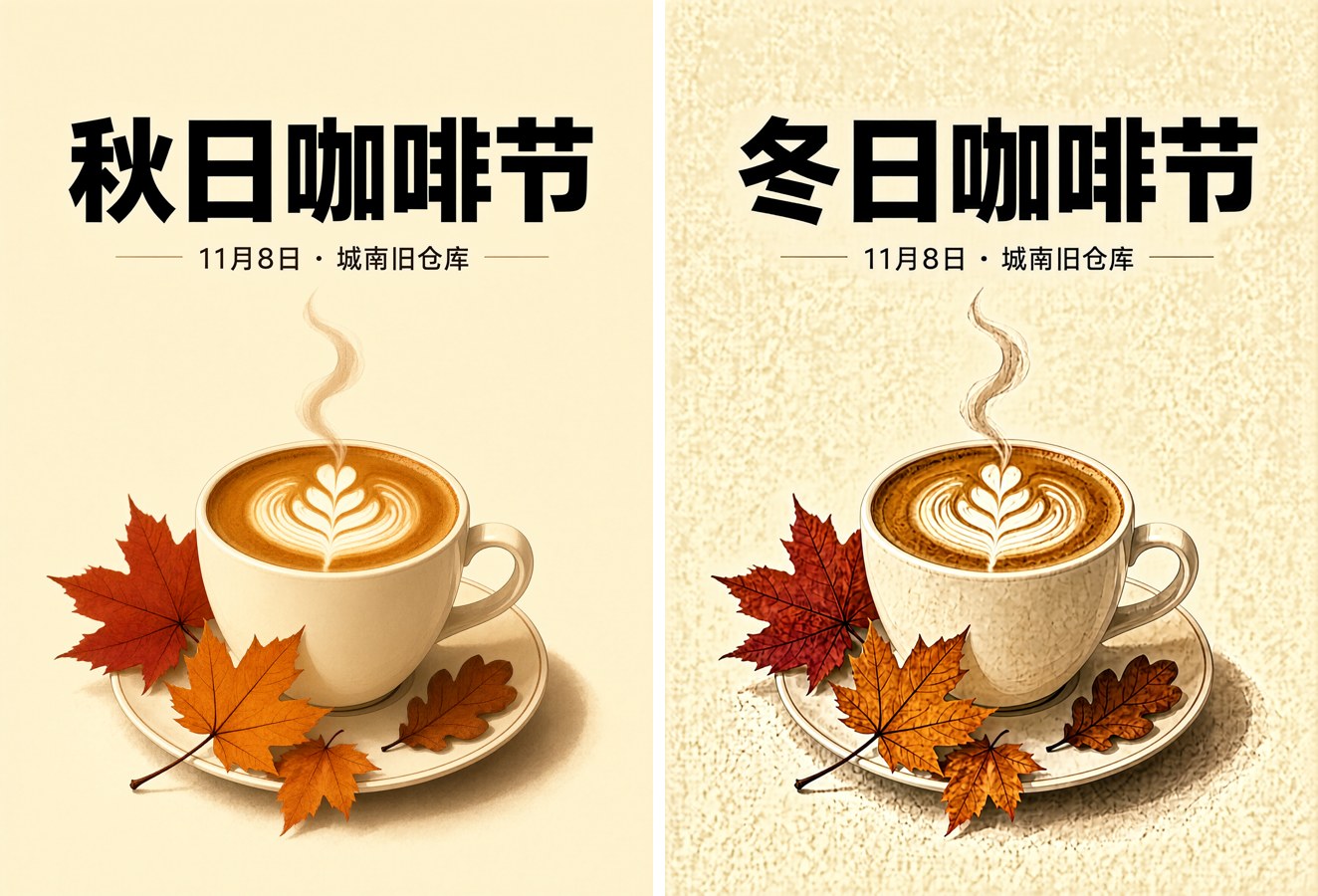
The title changed, the character 冬 is correct, and it matches the original font weight. Layout, cup and subline are unchanged. The same change failed when it was one of three changes in a single prompt. The table shows the multi-change prompt failing on both JPG and PNG sources, so the input format was not the cause. This is what we saw on Turbo and on Pro with the same multi-change prompt:
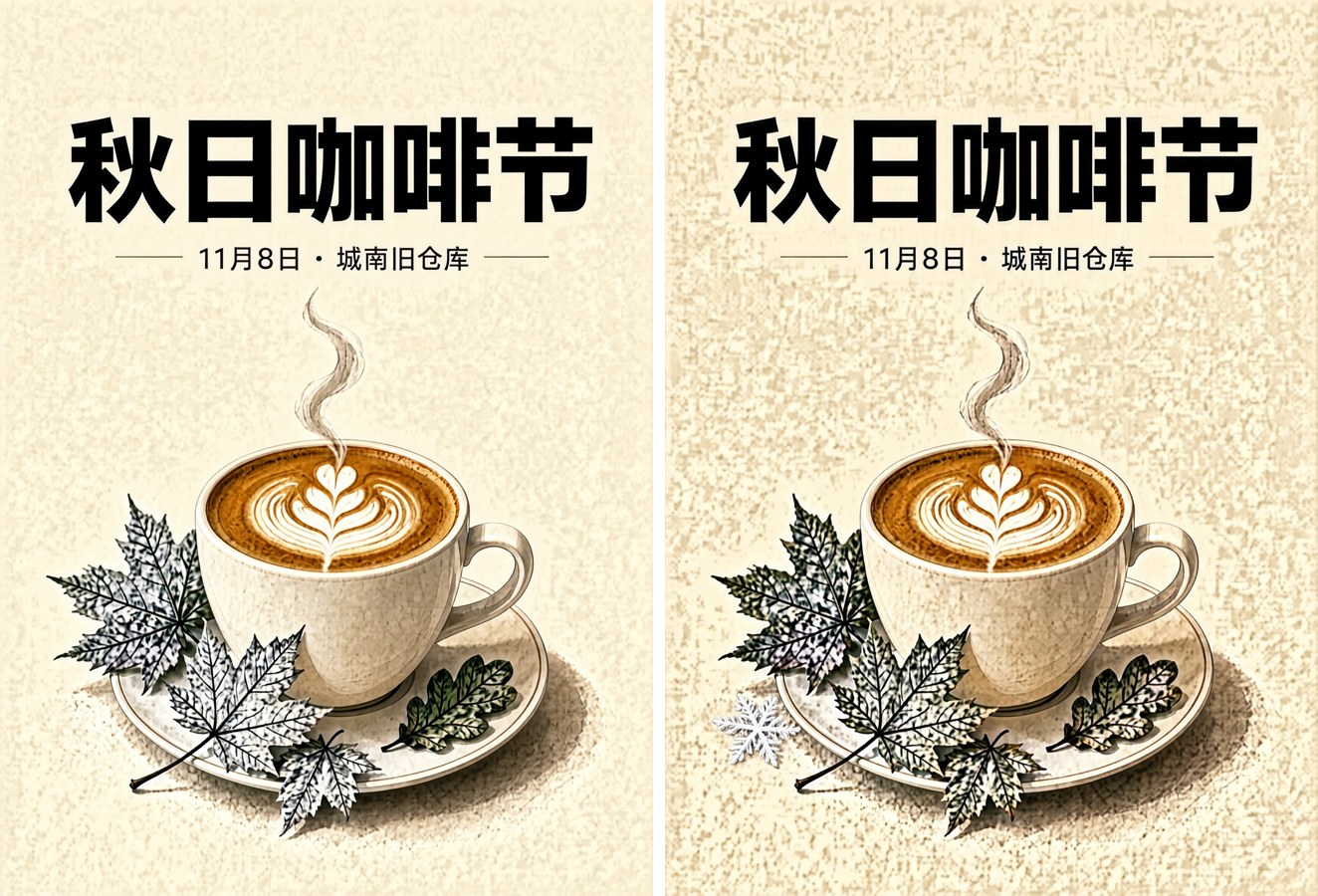
Both tiers left 秋日咖啡节 and 11月8日 as they were and only partly changed the leaves. On this one paired test, Pro was no better at following a multi-part edit. Our recipe: send one change per request, start the prompt with 只修改… ("change only…"), and quote the old and new strings exactly.
Edits add grain, and chained edits add a lot
Every edit output had grain that the source did not have. We measured it as the luminance standard deviation of a flat background patch on the poster (higher means noisier):
| Image | Background noise (std dev) |
|---|---|
| Original poster (text-to-image) | 0.8 |
| After one edit (title) | 8.7 |
| After a second edit on that result (date) | 96.5 |
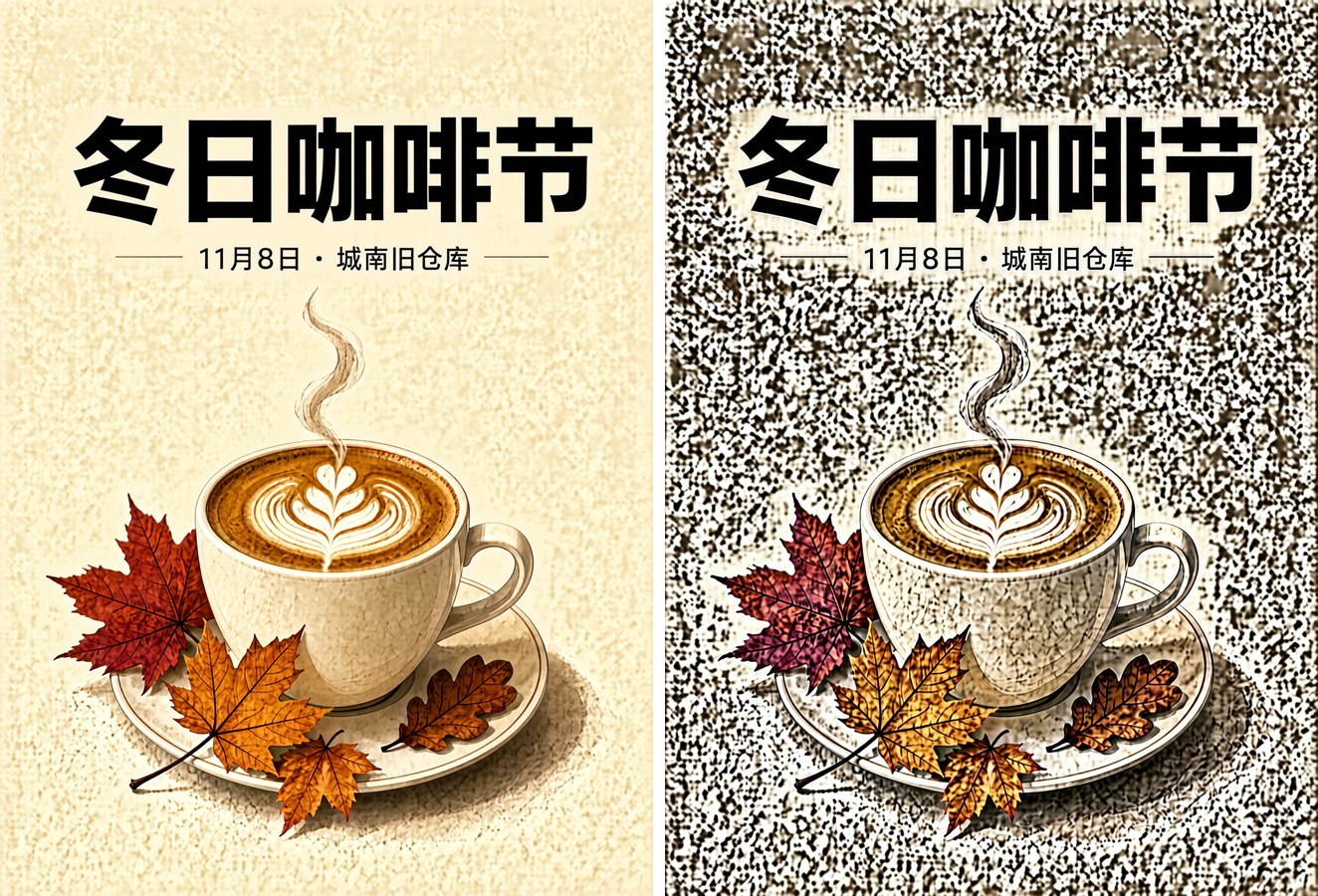
The second edit did not change the date, and it turned the cream background into coarse noise. In our runs, editing an edit made the image unusable. If you need several changes, it works better to regenerate from an updated text-to-image prompt. For a poster, that means putting the new title and date straight into Recipe 3. Edit the original output only once.
Background swaps did not work in our runs
We asked three times, in two wordings and from both a JPG and a PNG source, to put the earbuds case on a birch desk. Each time Turbo kept the product and the water droplets and replaced the slate with beige-and-black speckle instead of wood:
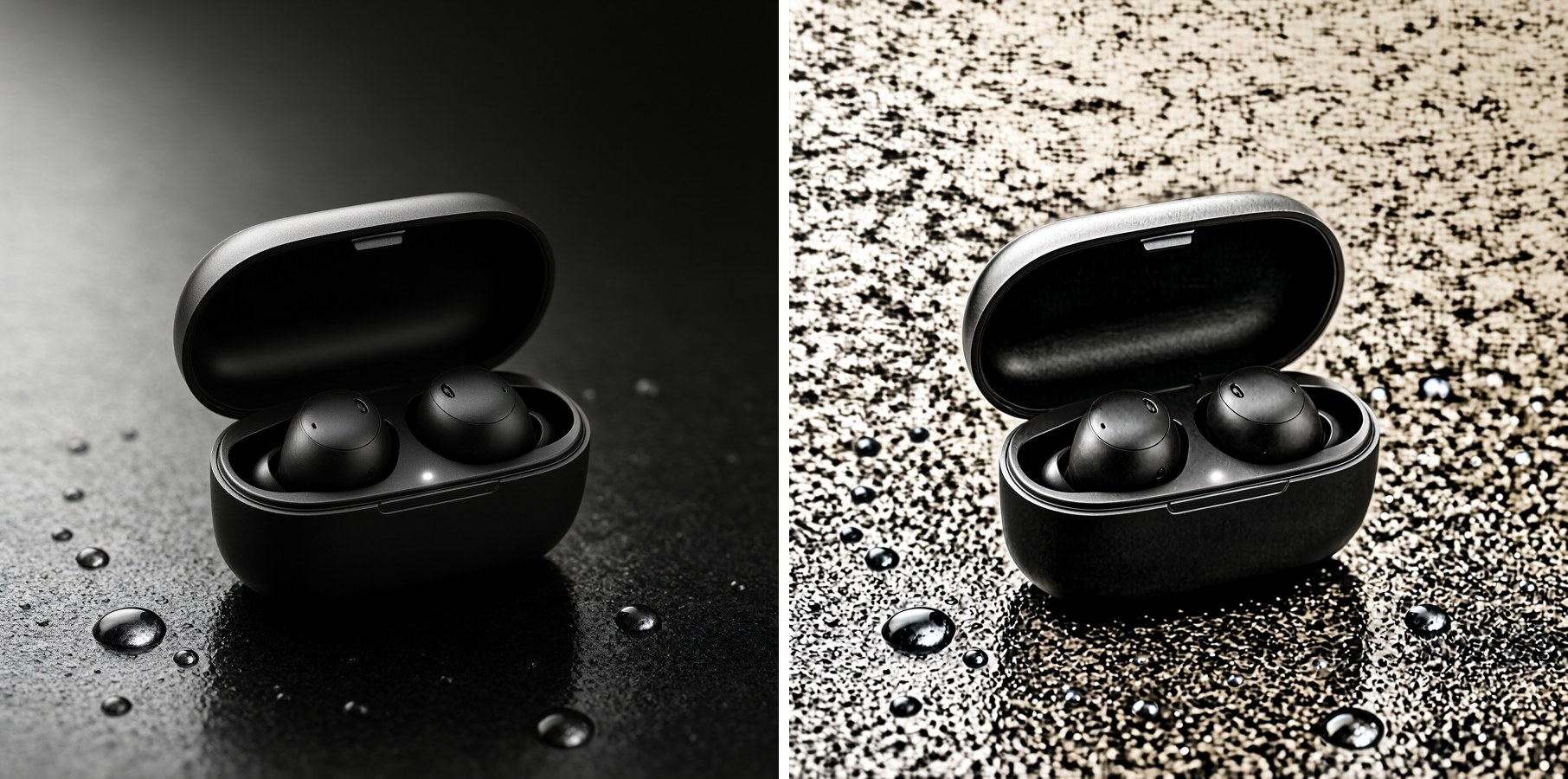
The product itself held up well. Its shape, the open lid and the LED dot all survived. The scene around it is what broke. For a new backdrop, either regenerate the product shot with the new surface in the text-to-image prompt (Recipe 1 with "pale birch wood desk"), or cut the product out and composite it. For the cut-out step, see the background remover guide.
Turbo or Pro?
From these paired runs (three prompts, one seed each, so treat it as a small sample):
| Test | Turbo ($0.02) | Pro ($0.05) |
|---|---|---|
| 13-string Chinese menu | All correct | All correct |
| Chalk / surface texture | Clean, close to a font | Visible chalk dust, more photographic |
| Night street photo | Clean and evenly lit | Grittier, more steam and wear |
| Unrequested signage | Yes, legible | Yes, plus an illegible board |
| Multi-change edit | Failed | Failed |
Prices are the per-image list prices on the pricing page on the day we ran these. Turbo is a good default for text-heavy graphics (posters, labels, menus, mockups) and for clean product shots. In our runs it was accurate on Chinese text and cost 40% of Pro's price. Pro made more photographic surfaces, which may matter for hero images. It did not do better on the edit we tested on both. To compare the two for your own content, run the same prompt and seed on both tiers.
Prompt rules that held across these runs
- Put every exact string in quotes (
“ ”for Chinese,"…"for English) and say where it goes: top title, line below, bottom of the label. - Give each string a type style (brush calligraphy, serif capitals, bold sans), or the model picks one.
- Add
no signs, no readable textto photoreal scenes set in Chinese streets or shops, or the model invents signage. - For edits, make one change per request, start with 只修改 / "Change only", and do not chain edits.
- To change the scene, regenerate from text instead of editing.
FAQ
What does qwen-image-2.1-turbo cost per image? $0.02 per image on the hiapi pricing page at the time of testing. Qwen Image 2.1 Pro was $0.05.
Is Turbo good at Chinese text? In our runs, yes. It rendered a 5-character headline, a dated subline, a bilingual label and a 13-string menu with no character errors. Proofread every output anyway. This was a single seed per prompt.
Can Turbo edit text inside an existing image? It changed one title correctly when the prompt asked for that change alone. It failed when the same change was combined with two others, and it failed on a second edit applied to an already-edited image.
Why do my edited images look grainy? Every edit we ran added grain, and editing an edited image added much more (background noise rose from 0.8 to 96.5 in our measurement). Edit the original output once, and regenerate from text for further changes.
Can I set the output resolution?
No. Choose an aspect_ratio. The output size follows from it: 2048×2048 for 1:1, 1728×2368 for 3:4, 2688×1536 for 16:9.
Try it
Copy any of the prompts above into the Qwen Image 2.1 Turbo model page to run them. To call the model from code, the API guide and the docs have the full polling loop. For the newer generation, see the Qwen Image 3.0 prompt recipes.