Most short-form "AI video" tutorials give you one good standalone clip. A branded short needs the opposite: three or four clips in a row where the same mascot, the same product, and the same narrator voice carry through every cut. That consistency is exactly what vidu-q4-preview/reference-to-video is built for — you hand it a small kit of reference images (and, optionally, a voice sample) and reuse that kit across every render instead of re-rolling the look each time.
This is a workflow walkthrough, not a prompt list. I built one finished ~14-second vertical short end to end — hook, narrated body, and call-to-action — from a two-image brand kit and a single voice sample, then batched, stitched, and exported it for a 9:16 feed. Every clip, cost, and field below came out of that run on the hiapi Vidu Q4 Preview reference-to-video model.
TL;DR
- Lock a brand kit once.
reference_image_urls(1–15 images) keeps your character and product consistent;reference_audio_urls(up to 3) keeps the narrator voice consistent. Reuse the same kit across every clip in the short. - Shoot vertical natively.
aspect_ratio: "9:16"renders a true 1080×1920 (or 2160×3840 at 4K) frame — no post-crop. - Master at 4K, deliver at 1080p. 4K comes back as 2160×3840 HEVC/H.265; re-encode it to H.264 and downscale to 1080×1920 for the feed. I kept my hook at 4K and the body/CTA at 1080p.
- Batch, don't wait. It's an async task API — submit all three clips, then poll. Wall-clock is the slowest clip, not the sum.
- Budget by the second. 1080p is $0.1375/s, 4K is $0.446/s, billed by
duration. My three-clip short cost $3.16 of video.
Why reference-to-video fits a narrated short (and i2v doesn't)
Short-form that sells something has a structure — a hook to stop the scroll, a body that explains, a CTA that converts. If each of those is a separate render, your biggest risk isn't motion quality, it's drift: the mascot's proportions change, the product's finish shifts, the voice sounds like a different brand. Reference-to-video attacks that directly:
reference_image_urlsis your visual lock. One portrait of the character plus one product still become the fixed kit for all three clips. You address them by index in the prompt ("the robot from reference image 1", "the device from reference image 2"), so the model knows which asset is which.reference_audio_urlsis your voice lock. Pass a short voice sample once and reuse it on every narrated clip so the spoken track keeps the same timbre. (Vidu Q3 accepts this field too, so voice reference isn't the Q4 edge — Q4's edge over Q3 is 4K output and up to 15 reference images.)- 4K + native 9:16 give you a crisp vertical master you can reframe or repurpose later.
That's the line between this and image-to-video. The Vidu Q4 Preview image-to-video model animates a single first frame — great for one shot, but it can't hold a character and a product and a voice together across a multi-clip sequence. Reference-to-video is the one you reach for when the deliverable is a whole short, not a single beat.
Step 1 — Build the brand kit once
The entire short runs on two reference stills and one voice clip. I generated the two stills on hiapi (any clean, well-lit studio shot works — the model reads shape, material, and color, so a plain background helps it isolate the subject):
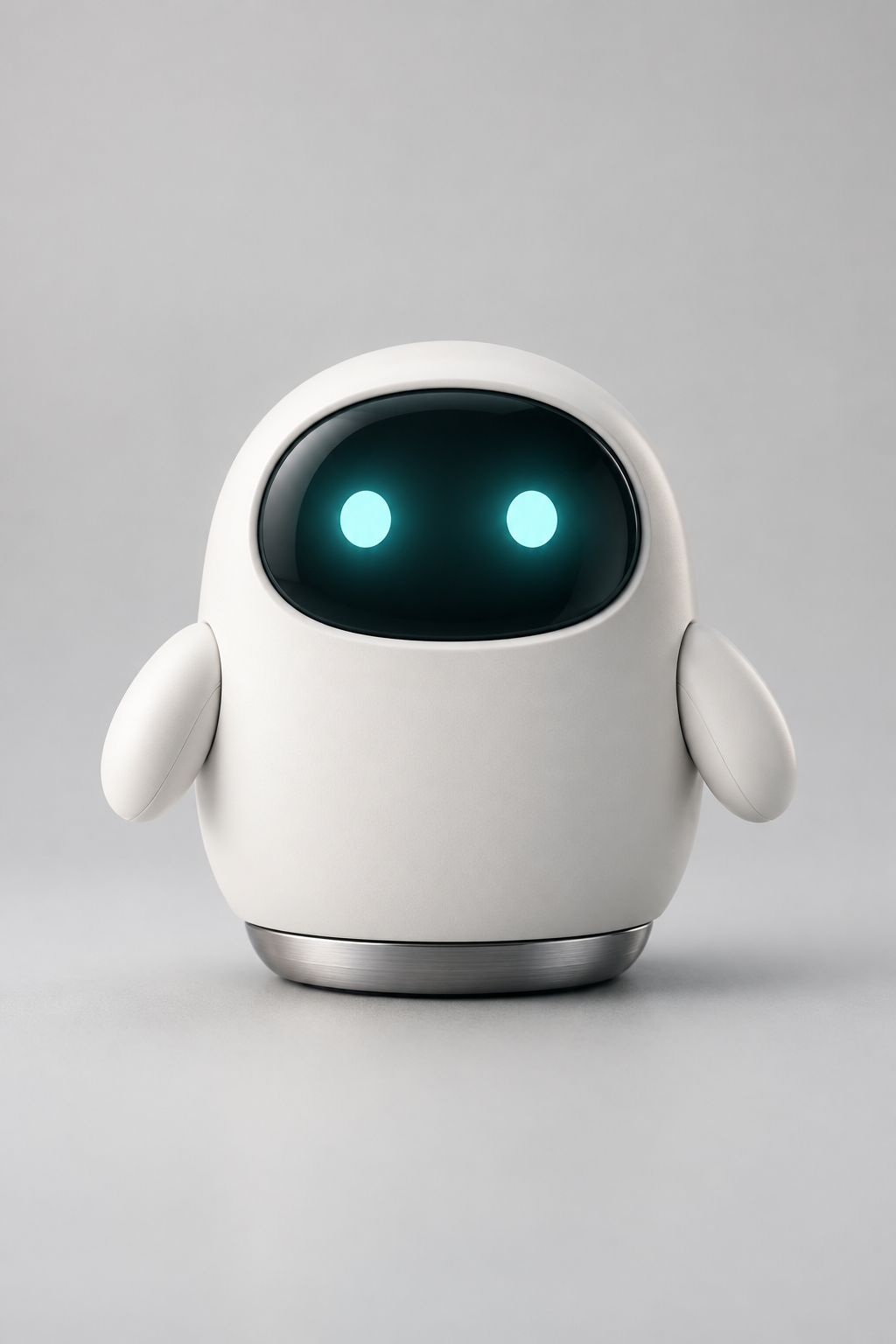
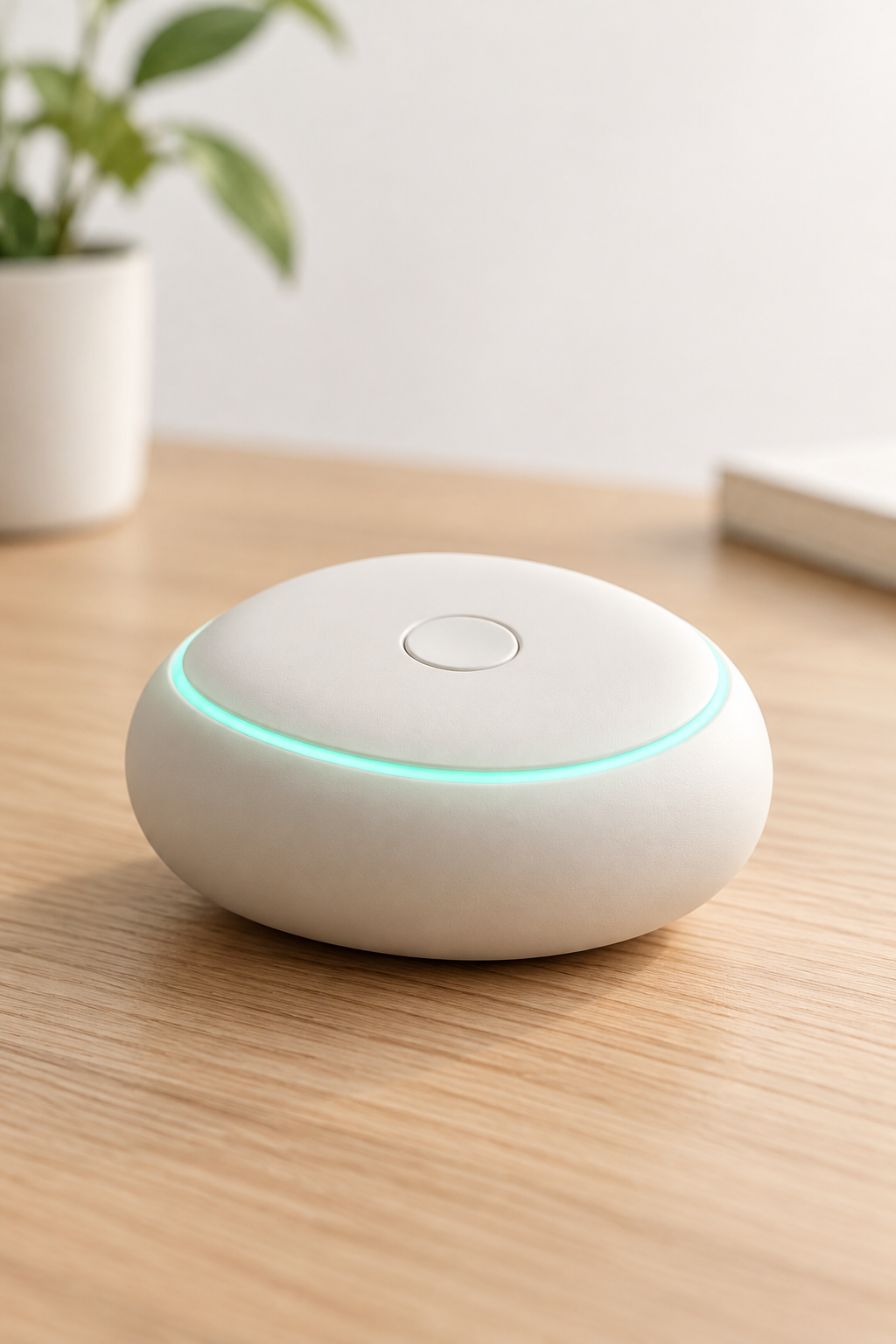
For the voice, I made a ~10-second narration sample with a text-to-speech model, uploaded it to a public URL, and that single file became the voice reference for the narrated clip. The point of the kit is reuse: these three asset URLs get pasted into every relevant request below, which is what keeps the short cohesive whether you render three clips or thirty.
A few prep rules that mattered:
- Keep reference stills on clean, even backgrounds so the subject reads clearly.
- Host every reference (images and audio) at a reachable public URL before you submit — the task API fetches them server-side.
- Decide your brand's canonical aspect up front; for a feed short that's
9:16on every clip.
Step 2 — The hook (render at 4K, export to 1080×1920)
The opening clip has one job: motion in the first frame. I rendered it at 4K on purpose — not because the feed needs 4K (it doesn't), but because a 2160×3840 master gives you room to punch in, reframe to 1:1 or 16:9 for other placements, and keep a high-quality archive. You then export a 1080×1920 copy for the platform.
The prompt I ran (one reference image, no audio):
The rounded white robot mascot from reference image 1 bounces up into the
centre of a bright minimalist desk scene, its teal eyes brightening as it
gives a cheerful two-arm wave toward the camera. Soft studio light, shallow
depth of field, gentle bokeh, clean pastel background, playful energetic
motion, subtle teal rim light. Vertical social-video framing.
{
  "model": "vidu-q4-preview/reference-to-video",
  "input": {
    "prompt": "...",
    "reference_image_urls": ["https://.../paxel-mascot.jpg"],
    "resolution": "4k",
    "duration": 4,
    "aspect_ratio": "9:16"
  }
}
What came back, verified: a 4-second 2160×3840 file — confirming that resolution sets the short edge of a 9:16 frame, not a fixed label. The 4K output is delivered as HEVC/H.265 (10-bit), which most browsers and some editors won't play inline, so the one non-optional step here is a re-encode:
ffmpeg -i hook_4k.mp4 -vf "scale=1080:1920" \
  -c:v libx264 -profile:v high -pix_fmt yuv420p -crf 20 \
  -c:a aac -movflags +faststart hook_1080.mp4
That gives you an H.264 1080×1920 clip that plays everywhere, plus the 4K original kept as a master. (If you don't need a 4K master, render the hook at 1080p and skip the downscale — it's also ~3× cheaper per second.)
Step 3 — The narrated body (voice reference)
This is the clip that uses the whole kit: both reference images and the voice sample. The model places the mascot next to the product and has it speak, borrowing the timbre of the reference audio.
The white robot mascot from reference image 1 stands beside the matte-white
pebble focus device from reference image 2 on a tidy wooden desk, turns to the
camera and speaks warmly, gesturing toward the glowing teal device as if
introducing it; it speaks in the voice of reference audio 1. Soft daylight,
cosy home-office background, gentle handheld sway, friendly inviting mood.
Vertical framing.
{
  "model": "vidu-q4-preview/reference-to-video",
  "input": {
    "prompt": "...",
    "reference_image_urls": ["https://.../paxel-mascot.jpg",
                             "https://.../paxel-device.jpg"],
    "reference_audio_urls": ["https://.../paxel-narrator.mp3"],
    "resolution": "1080p",
    "duration": 6,
    "aspect_ratio": "9:16"
  }
}
Two things to know from the run:
- The field is
reference_audio_urls. I probedvoice_reference_urlsand the API rejected it (additional properties 'voice_reference_urls' not allowed), so use the exact name. It accepts up to three audio clips. - Every output carries an AAC track regardless. Clips with no audio reference still come back with a sound track. The difference shows up in level: my narrated body clip measured a mean loudness around -20 dB — clearly the vocal clip — versus roughly -35 dB on the near-silent CTA. If you want a consistent narrator across a series, reuse the same audio URL on every narrated clip; that's the whole reason to lock the voice once.
Step 4 — The CTA
A short, tight closer: the mascot interacts with the product, the brand's teal accent lights up, and it looks back at camera. Both reference images, no voice this time.
Close vertical shot: the white robot mascot from reference image 1 reaches out
and taps the top button of the pebble device from reference image 2; the teal
LED ring pulses to life with a soft glow, and the mascot looks up at the camera
with bright teal eyes and a small confident nod. Clean minimalist desk, soft
light, crisp focus, upbeat finish. Vertical framing.
Rendered at 1080p for 4 seconds — the product's teal ring held its color from the reference still, which is the payoff of feeding the device as a dedicated reference image rather than describing it in words.
Step 5 — Batch the renders, don't babysit them
Reference-to-video is an async task API: you POST a task, get a taskId, and poll for the result. For a three-clip short, submit all three first, then poll — your wall-clock becomes the slowest single clip instead of the sum of three.
import requests, time

BASE = "https://api.hiapi.ai/v1/tasks"
H = {"Authorization": "Bearer YOUR_KEY", "Content-Type": "application/json"}

clips = [hook_input, body_input, cta_input]   # the three input dicts above
ids = []
for c in clips:
    r = requests.post(BASE, headers=H, json={
        "model": "vidu-q4-preview/reference-to-video", "input": c})
    ids.append(r.json()["data"]["taskId"])     # save IDs immediately

results = {}
while len(results) < len(ids):
    for tid in ids:
        if tid in results:
            continue
        data = requests.get(f"{BASE}/{tid}", headers=H).json()["data"]
        if data["status"] == "success":
            results[tid] = data["output"][0]["url"]   # download now — URLs expire
        elif data["status"] == "fail":
            results[tid] = None                        # handle/retry
    time.sleep(6)
Save each taskId the moment you get it, and download output URLs as soon as a task succeeds — they're time-limited direct links. For the full integration contract — polling, callbacks, idempotency, and the validation error table — see the Vidu Q4 Preview reference-to-video API guide and the tasks API reference.
Step 6 — Stitch and export for the feed
Once the three clips are down, assemble the short with ffmpeg. Normalize everything to the same codec, resolution, and frame rate first (my clips came back at 24 fps; I re-encoded to 30), then concatenate:
ffmpeg -i hook_1080.mp4 -i body.mp4 -i cta.mp4 \
  -filter_complex "[0:v][0:a][1:v][1:a][2:v][2:a]concat=n=3:v=1:a=1[v][a]" \
  -map "[v]" -map "[a]" -c:v libx264 -pix_fmt yuv420p \
  -c:a aac -movflags +faststart short_full.mp4
That produced the 14-second 1080×1920 short at the top of this page. Export notes that matter for short-form:
- Keep it vertical, keep it short.
durationis an integer from 3 to 16 seconds per clip; a 3–4 clip sequence lands comfortably inside a feed's attention window. - Downscale the 4K master. The assembled version uses the 1080×1920 export of the hook, not the HEVC original.
- Mind the audio track. Because every clip ships with AAC, set levels deliberately during the stitch rather than assuming silence.
What it cost
Pricing is per second of output, flat by resolution, multiplied by duration (confirmed against the live pricing page):
| Resolution | Price / second |
|---|---|
| 540p | $0.0515 |
| 720p | $0.109 |
| 1080p | $0.1375 |
| 2K | $0.2175 |
| 4K | $0.446 |
My actual short:
| Clip | Resolution | Duration | Cost |
|---|---|---|---|
| Hook | 4K | 4s | $1.784 |
| Body (voice) | 1080p | 6s | $0.825 |
| CTA | 1080p | 4s | $0.550 |
| Total video | 14s | $3.159 |
The brand-kit prep — two reference stills and one short TTS voice sample — added only a few cents on top. The single biggest lever is the hook's 4K: drop it to 1080p and the whole short falls to about $1.92. Render the hook at 4K only when you genuinely want a reframe-ready master.
Field reference (short-form cheat sheet)
| Field | Notes |
|---|---|
prompt | Required. Address references by index ("reference image 1", "reference audio 1"). |
reference_image_urls | Required. Array, 1–15 images. Your visual brand kit. |
reference_audio_urls | Optional. Array, up to 3. The voice lock. Exact field name — voice_reference_urls is rejected. |
resolution | 540p / 720p / 1080p / 2k / 4k. Sets the short edge. 4K returns HEVC. |
duration | Integer 3–16 seconds. (A value like 99 returns 400 … want 16.) |
aspect_ratio | 16:9 / 9:16 / 1:1 / 4:3 / 3:4. Use 9:16 for feed-native vertical. |
FAQ
Is this different from the prompt-recipes article? Yes. The reference-to-video prompt recipes are standalone creative shots you copy-paste. This piece is the production pipeline for a finished short — locking one brand kit, batching the clips, and exporting a sequenced 9:16 deliverable.
Do I have to use a voice reference?
No — reference_audio_urls is optional. Clips still render (and still carry an AAC track) without it. Add it when you want a consistent narrator across a series.
Can I render the whole short at 4K? You can, but it's rarely worth it for a feed: 4K is $0.446/s versus $0.1375/s at 1080p, and feeds display at 1080×1920 anyway. Reserve 4K for the one shot you might reframe or repurpose.
How long can a clip be?
duration caps at 16 seconds per clip. For short-form, 3–6 seconds per clip and a 3–4 clip sequence is the sweet spot.
Why did my 4K file fail to play?
4K comes back as HEVC/H.265 (10-bit). Re-encode to H.264 yuv420p with +faststart for web and most editors, as shown in Step 2.
Build your own branded short
The pattern transfers to any mascot, product, or presenter: lock a reference kit, write three prompts that reference it by index, batch the renders, and stitch. Start from the Vidu Q4 Preview reference-to-video model page, grab an API key from the quickstart, and ship your first vertical short this afternoon.