If you need to turn a product still into a short ad clip on hiapi, four image-to-video models are worth a look: Kling 4.0, Veo 3.1, Runway Gen-4.5 and Seedance 2.5. Their spec sheets look similar. Where they differ is price per second, whether they can end on a frame you choose, whether they generate sound, and whether the product still looks like your product when the clip ends.
We gave all four models the same 9:16 sneaker still and the same prompt, then watched for the thing that matters most in a product ad: does the colorway survive?
Short answer: Seedance 2.5 kept the product closest to the source. Veo 3.1 gave the most polished result at the highest price. Kling 4.0 is the most flexible on duration but repainted the shoe partway through. Runway Gen-4.5 is the cheapest per second, but it adds details that aren't in the still and outputs no audio.
The test setup
Every clip starts from the same input: a wolf-gray suede basketball sneaker with volt-yellow laces, floating above a wet stone pedestal. We generated it with gpt-image-2 for an earlier Veo 3.1 short-form walkthrough.
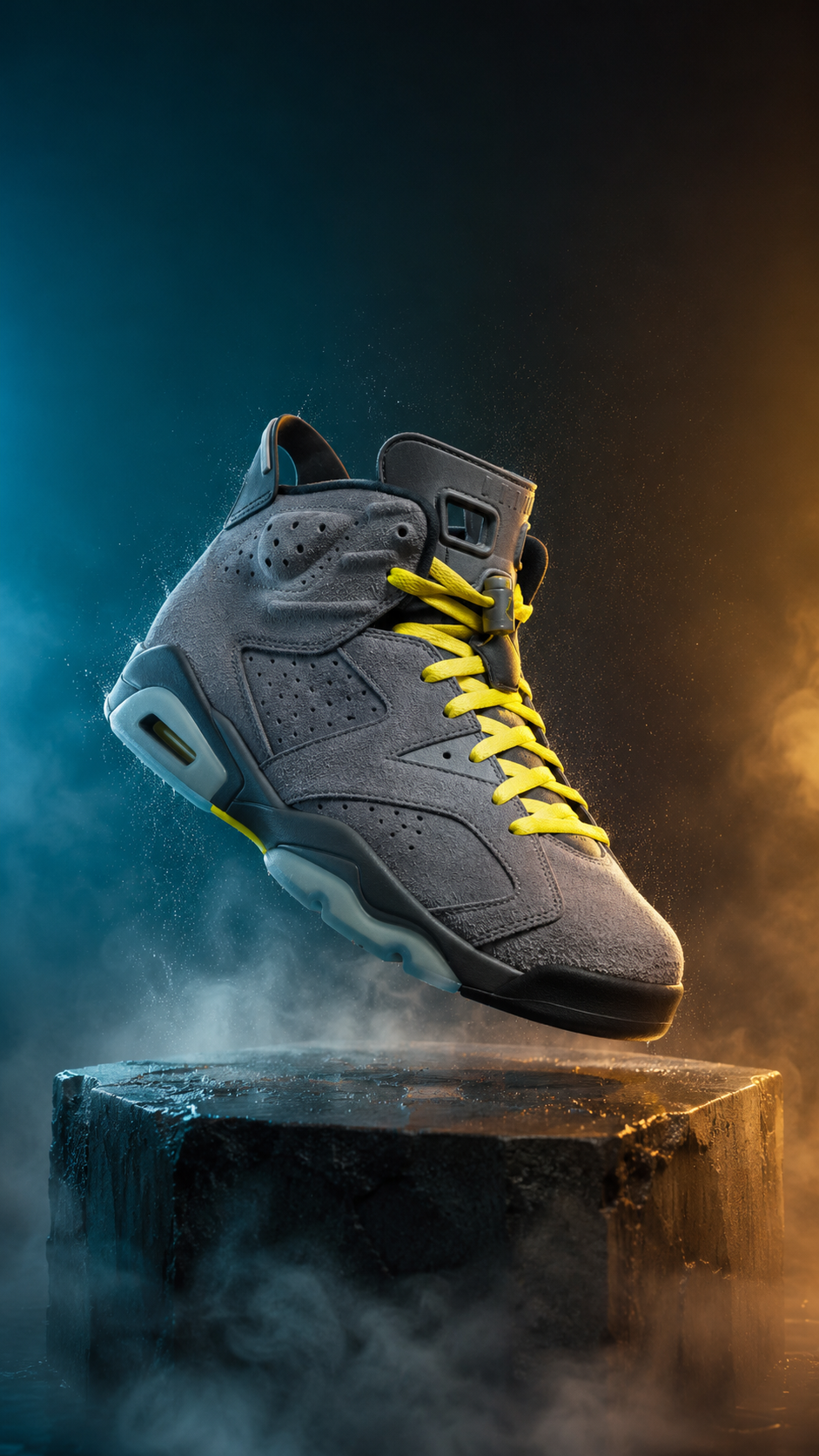
All four models got this prompt, word for word:
The sneaker slowly rotates about 90 degrees as the camera pushes in from a low angle. Dust particles drift through the rim light. The shoe settles onto the wet stone pedestal with a deep, satisfying thud, sending a soft ring of mist rolling off the edges. A warm light sweep travels across the suede texture while condensation glints. Subtle bass-heavy electronic pulse builds in the background with a low whoosh on the landing. Cinematic product commercial, smooth stabilized motion, no text overlays, no captions.
The prompt deliberately includes a "warm light sweep." A real ad brief often asks for this, and it's a good stress test: a model has to light the product without changing its color.
We ran Kling 4.0, Runway Gen-4.5 and Seedance 2.5 for this article in November 2026, each as a first take at 720p and 4–5 seconds, with nothing cherry-picked. The Veo 3.1 clip is the 6-second 1080p first take from the earlier walkthrough. It used the same still and the same prompt, minus the words "while condensation glints" and "no captions." Keep in mind that Veo has a resolution advantage in the clips below.
The four clips
Veo 3.1: the most finished-looking, and the most expensive
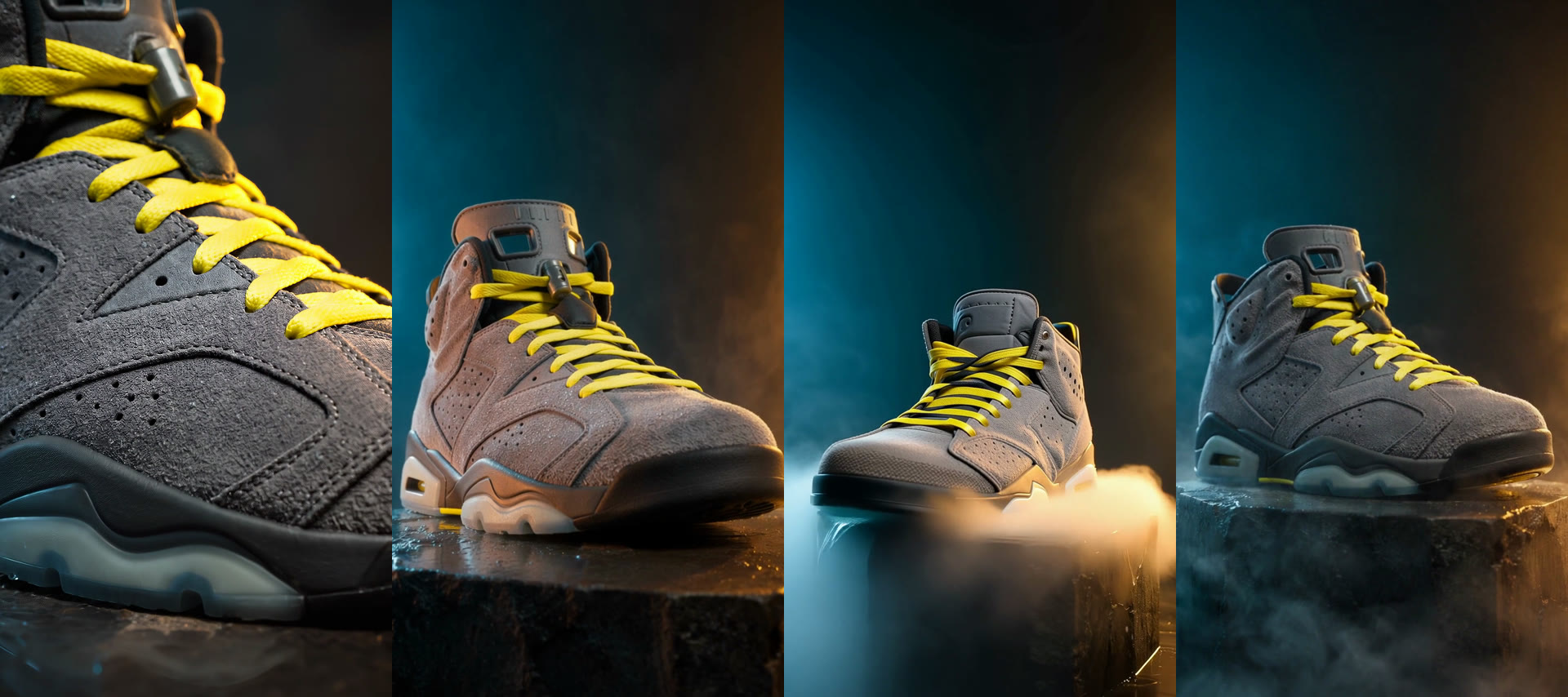
The colorway, laces and translucent sole all hold for the full clip, and the soundtrack is the loudest and fullest of the three that have audio. Its one weakness for ads: it took "camera pushes in" literally and finished on a macro shot of the laces. The whole shoe is out of frame in the last second. If your end card needs the full product, write the end framing into the prompt (for example, "ends on a full side profile of the shoe").
Kling 4.0: smooth motion, but the colorway drifted
The landing, mist and audio look good. But when the warm light sweep arrives, the gray suede turns tan-brown and stays that way to the last frame. The tan doesn't fade when the light moves on, so this isn't just a lighting effect. The model changed the material color. For a colorway ad, that means a reshoot. If you use Kling 4.0 for product work, drop warm-colored lighting cues or add an explicit constraint like "the suede stays wolf-gray throughout." Also, its "720p" output measured 724×1284, not 720×1280, so plan for a resize if your ad platform needs exact dimensions.
Runway Gen-4.5: the biggest move, but it invents details
Runway turned the shoe furthest, showing the heel side, which none of the others did. To do that it had to make up what the back of the shoe looks like: a glowing cyan midsole and a white heel panel appear that aren't in the still. Mist also swallows the landing. And the file has no audio track at all, even though the prompt asks for sound. Runway works for mood and B-roll. It's risky for a product shot that has to match the SKU.
Seedance 2.5: the most faithful to the product
The gray suede, volt laces and translucent sole all match the source from the first frame to the last, and the shoe lands cleanly with the mist ring. The tradeoff is a smaller turn than the 90 degrees we asked for. It also has the quietest audio of the four, so plan to normalize the level before uploading.
Final frames side by side
What each run measured
| Veo 3.1 | Kling 4.0 | Runway Gen-4.5 | Seedance 2.5 | |
|---|---|---|---|---|
| Settings | 6s, 1080p | 4s, 720p | 5s, 9:16 | 4s, 720p |
| Output size | 1080×1920 | 724×1284 | 720×1280 | 720×1280 |
| Audio track | Yes (48 kHz) | Yes (44.1 kHz) | None | Yes (32 kHz) |
| Mean loudness | −11.5 dB | −16.1 dB | — | −23.9 dB |
| Submit to done | 115 s | 249 s | 119 s | 185 s |
| Colorway held | Yes | No (turned tan) | Partly (invented midsole) | Yes |
| Full product in last frame | No (macro crop) | Yes | Partly (mist) | Yes |
| Cost of this run* | $3.42 | $0.88 | $0.86 | $0.82 |
*At current pricing. Each model was run once, and generation time varies with queue load, so treat the timings as a single sample.
Specs that change the decision
These are the input limits we confirmed against the live API this month. Note that the image field has a different name on each model, which matters if you're writing one pipeline for all four.
| Veo 3.1 | Kling 4.0 | Runway Gen-4.5 | Seedance 2.5 | |
|---|---|---|---|---|
| Model id | veo-3.1/image-to-video | kling-4.0/image-to-video | runway-gen-4.5/image-to-video | seedance-2.5/image-to-video |
| Image field | image_url (string) | image_urls (array, 1) | image_urls (array, 1) | first_frame_url (+ optional last_frame_url) |
| Last-frame control | No | No | No | Yes |
| Duration | 4, 6 or 8 s | 3–30 s | 5, 8 or 10 s | 4–30 s |
| Resolution | 720p, 1080p, 4k | 720p, 1080p | 720p only | 720p, 1080p |
| Aspect ratio | Follows the image | Optional: 16:9, 9:16, 1:1, 21:9 | Optional: 16:9, 9:16, 4:3, 3:4, 1:1 | Follows the image (adaptive) |
| Audio | Toggle (generate_audio) | Always on | None | Toggle (generate_audio) |
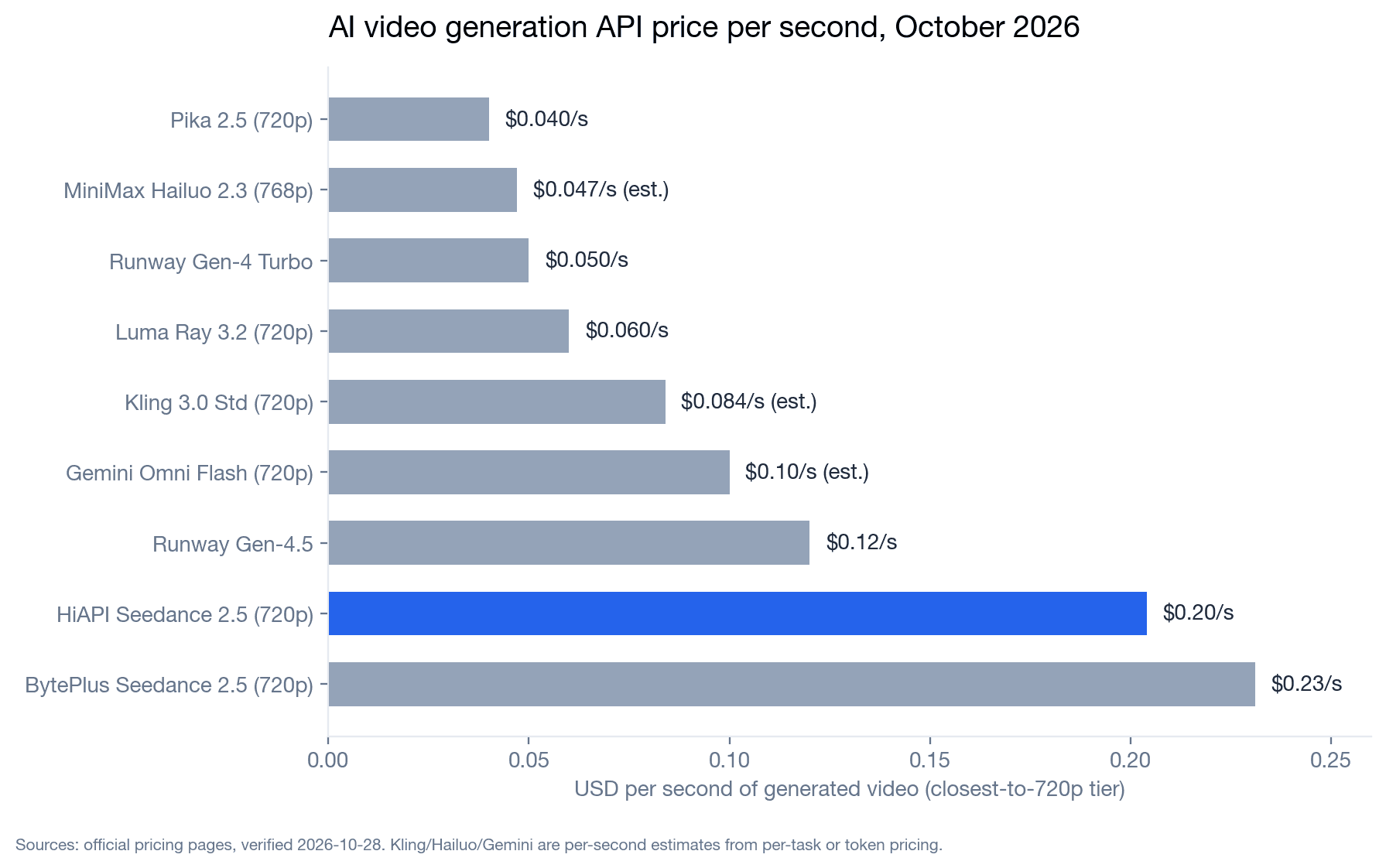
| Price per second | $0.57 with audio / $0.29 without (720p–1080p); 4k $0.86 / $0.57 | $0.22 (720p) / $0.33 (1080p) | $0.1715 | $0.204 (720p) / $0.516 (1080p) |
Seedance 2.5 is the only one of the four that can end on a frame you supply. That's handy for ads that have to land on a packshot or logo frame. Kling 4.0 and Seedance 2.5 are the only ones that produce a single take longer than 10 seconds, which is useful for a 15-second spot with no edit.
Because the image field changes from model to model, a "swap the model name" loop won't work as written. Here are the three input shapes we sent:
{"model": "kling-4.0/image-to-video",
 "input": {"prompt": "...", "image_urls": ["https://your-cdn.example.com/still.jpg"], "duration": 4, "resolution": "720p"}}

{"model": "runway-gen-4.5/image-to-video",
 "input": {"prompt": "...", "image_urls": ["https://your-cdn.example.com/still.jpg"], "duration": 5, "aspect_ratio": "9:16"}}

{"model": "seedance-2.5/image-to-video",
 "input": {"prompt": "...", "first_frame_url": "https://your-cdn.example.com/still.jpg", "duration": 4, "resolution": "720p", "generate_audio": true}}
All of them go to the same create-task endpoint and are polled the same way. For Veo's single-string image_url shape, see the Veo 3.1 walkthrough.
Cost per finished ad: a worked example
Say you need one 8-second 9:16 hero clip. You draft the motion twice at the cheapest useful setting, then render the keeper at each model's best resolution:
| Model | 2 drafts | Final 8 s render | Total |
|---|---|---|---|
| Runway Gen-4.5 | 2 × 5 s × $0.1715 = $1.72 | 720p: $1.37 | $3.09 (no audio, 720p max) |
| Kling 4.0 | 2 × 4 s × $0.22 = $1.76 | 1080p: $2.64 | $4.40 |
| Seedance 2.5 | 2 × 4 s × $0.204 = $1.63 | 1080p: $4.13 | $5.76 |
| Veo 3.1 | 2 × 4 s × $0.29 (no audio) = $2.32 | 1080p with audio: $4.56 | $6.88 |
Runway is cheapest, but you'll still need to add sound and accept 720p. For a 15-second single take, only Kling 4.0 ($4.95 at 1080p) and Seedance 2.5 ($7.74 at 1080p, $3.06 at 720p) can do it in one generation. Veo tops out at 8 seconds and Runway at 10. Prices are from /api/pricing as of November 2026.
Decision checklist
- The colorway or label must match the SKU exactly: start with Seedance 2.5. Use Veo 3.1 if you also need 1080p+ polish and a strong soundtrack.
- The clip has to end on a specific packshot or logo frame: Seedance 2.5. It's the only one with
last_frame_url. - You need 15–30 seconds in one take: Kling 4.0 (cheaper per second at 1080p) or Seedance 2.5. With Kling, keep warm-colored lighting cues out of the prompt.
- You need finished audio straight out of the API: Veo 3.1 (loudest mix), then Kling 4.0. Normalize Seedance's quieter track before upload. Runway gives you no audio.
- You want cheap mood shots or B-roll where exact product detail doesn't matter: Runway Gen-4.5 at $0.1715/s.
- You need 4K masters for other placements: Veo 3.1 is the only one of the four with a
4ktier.
Whichever you pick, draft at 720p and short durations first, and check the last frame for color drift before paying for the 1080p render.
FAQ
Which image-to-video model is best for product ads on hiapi? In our same-still test, Seedance 2.5 kept the product's color and details closest to the source, and it's the only one with last-frame control. Veo 3.1 gave the most polished 1080p clip with the strongest audio but costs the most per second.
Why did Kling 4.0 change my product's color? In our run, a "warm light sweep" in the prompt permanently shifted gray suede to tan. Remove warm color cues from lighting directions, or state the product color explicitly ("the suede stays wolf-gray throughout").
Does Runway Gen-4.5 generate sound? No. Our Runway Gen-4.5 image-to-video output had no audio stream, and the schema has no audio option. Add music or SFX in your edit.
Can I set the aspect ratio for Veo 3.1 or Seedance 2.5?
Not independently. Veo 3.1 has no aspect-ratio field, and Seedance 2.5 accepts only adaptive, so both follow your input image. Crop your still to 9:16 before submitting a vertical ad.
How long can a single clip be? Veo 3.1: 4, 6 or 8 seconds. Runway Gen-4.5: 5, 8 or 10. Kling 4.0: 3–30. Seedance 2.5: 4–30.
Next step
Put your own product still through the two models that fit your checklist above. The Seedance 2.5 image-to-video page and the Veo 3.1 image-to-video page both have live pricing and a try-it panel. If duration or price per second matters more, compare them with Kling 4.0 and Runway Gen-4.5. For request-level details, see the Kling 4.0 image-to-video API guide and the Seedance 2.5 first/last-frame guide.