Short answer: Pick FLUX.3 Image when one model should handle both generation and editing (up to 10 reference images), when you need 4K, or when the prompt has strict "leave this out" instructions. In our night-street test, FLUX.3 Image honored "no readable signs" and FLUX.2 Pro didn't. Pick FLUX.2 when you need an exact pixel size (custom width and height), a fixed seed, or a choice of output format, or when you want cheaper edits: FLUX.2 edits cost $0.035 at 1K, versus $0.048 on FLUX.3 Image. Both are live on HiAPI. Try FLUX.3 Image on its model page.
The differences at a glance
| FLUX.3 Image | FLUX.2 Pro | |
|---|---|---|
| Model id | flux-3-image (generate and edit) | flux-2/text-to-image, flux-2/image-to-image |
| Released | October 1, 2026 | Earlier generation |
| Default price | 1K $0.048 | 1 MP $0.05; edit 1K $0.035 |
| Top tier | 4K $0.607 | Text-to-image 4 MP $0.125; edit 2K $0.05 |
| Reference images | Up to 10 | Edit endpoint, 1–8 |
| Aspect ratios | 15 plus auto (21:9 to 9:21) | 9 plus custom width/height |
| Web grounding | grounding, on by default | No |
| Seed / output format | No | seed; webp, jpg, or png |
Live HiAPI prices, checked October 15, 2026.
Same prompt, side by side
Each test uses the same prompt and aspect ratio, generated once per model. Compare composition and prompt following, not sharpness.
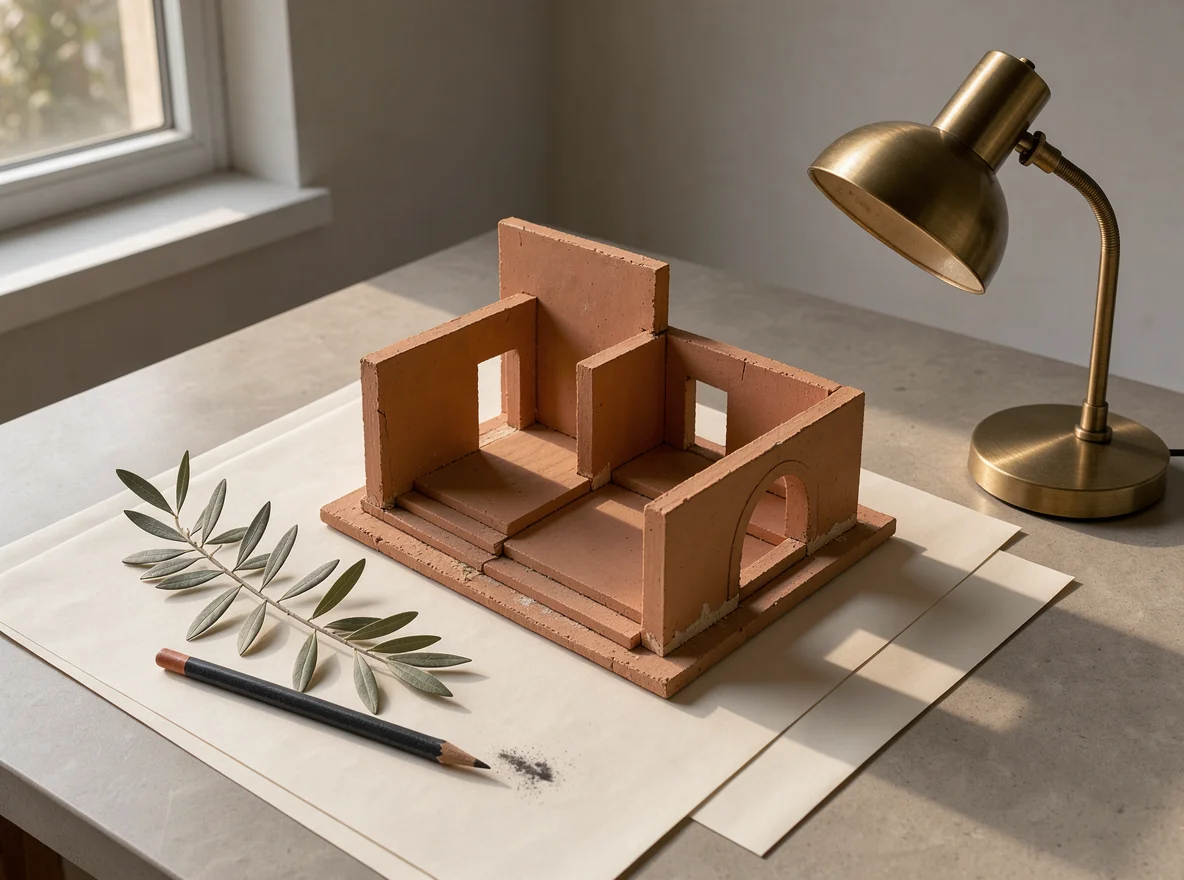
Test 1: a design-desk still life
A refined still life photograph of a miniature terracotta architectural model
on ivory paper, a warm brass desk lamp, a sprig of olive leaves and a charcoal
pencil, precise shadows and soft late-afternoon sunlight, restrained
design-magazine composition, no text.
FLUX.3 Image:
Generate this on FLUX.3 Image →
flux-3-image, 1K, 4:3, $0.048.
FLUX.2 Pro:
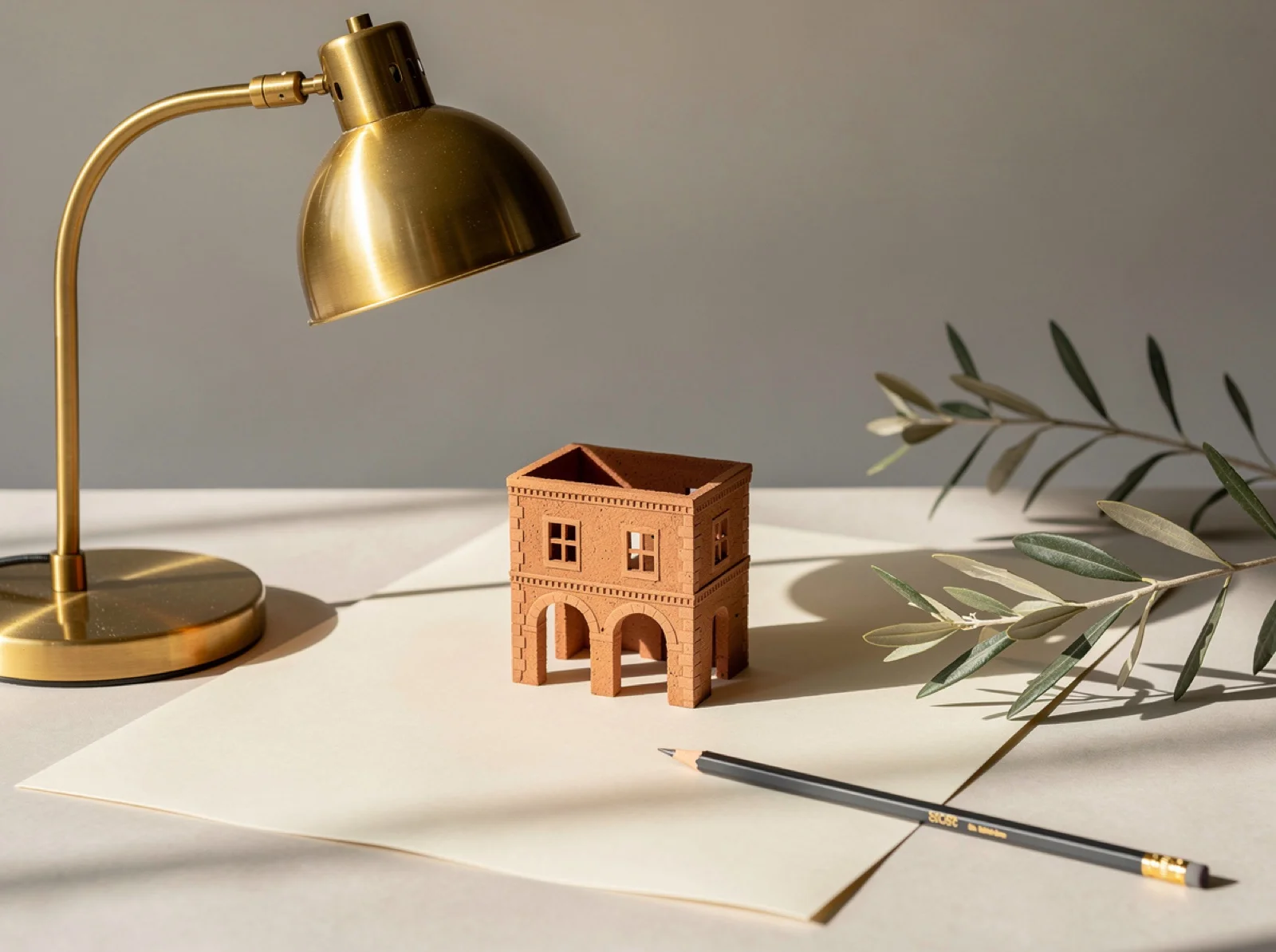
flux-2/text-to-image, 1 MP, 4:3, $0.05.
What's visibly different: both include all four objects and the low sun. FLUX.3 Image reads "architectural model" as an architect's open maquette, with walls, floor plates, and an arch seen from above, plus pencil shavings on the paper. FLUX.2 builds a small closed house with arched doorways, shot closer to eye level.
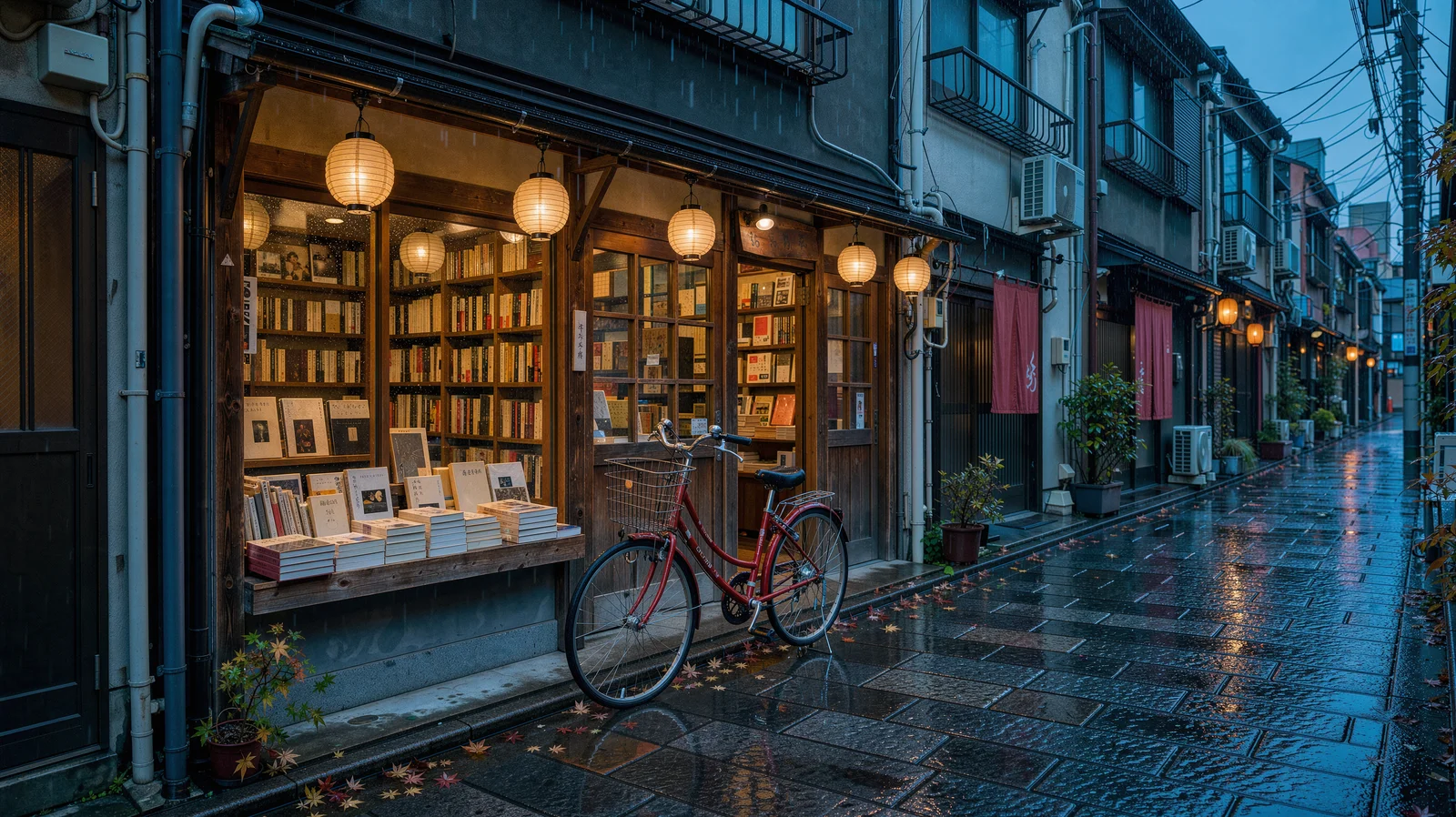
Test 2: a rainy Tokyo street, "no readable signs"
A cinematic rainy Tokyo side street at blue hour, a small independent bookstore
with warm amber windows and a red bicycle outside, glossy cobblestones
reflecting teal and vermilion light, delicate paper lanterns, no readable signs,
editorial architectural photography.
FLUX.3 Image:
Generate this on FLUX.3 Image →
flux-3-image, 2K, 16:9, $0.10.
FLUX.2 Pro:
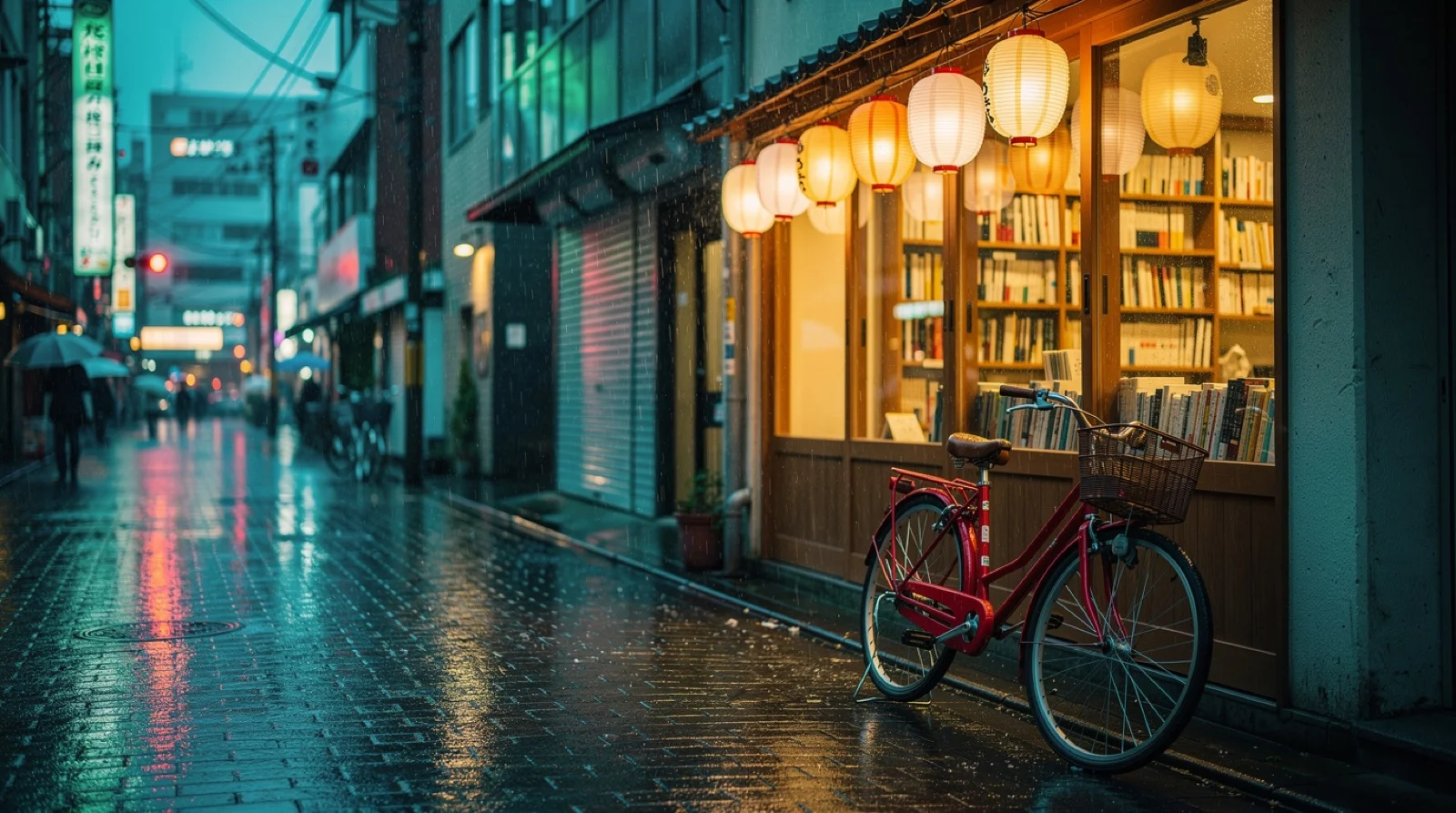
flux-2/text-to-image, 16:9.
What's visibly different: FLUX.2 adds glowing vertical signboards covered in lettering and neon shop signs down the street, despite "no readable signs". FLUX.3 Image keeps the street free of signage, showing only blank lanterns and a plain red shop curtain. FLUX.3 also scatters a few fallen leaves on the cobblestones.
Test 3: a three-image edit
Three references: a cobalt teapot (subject), a cedar reading cabin (setting), and the rainy street from Test 2 (palette only).
Create a refined product photograph. Use the cobalt blue ceramic teapot and
walnut handle from Image 1 as the main subject, place it on a pale stone side
table inside the cedar reading cabin from Image 2. Borrow only the subtle teal
and amber lighting palette from Image 3. Preserve the teapot shape and glaze,
keep the lake window visible in the background, realistic scale, no lettering.
FLUX.3 Image:
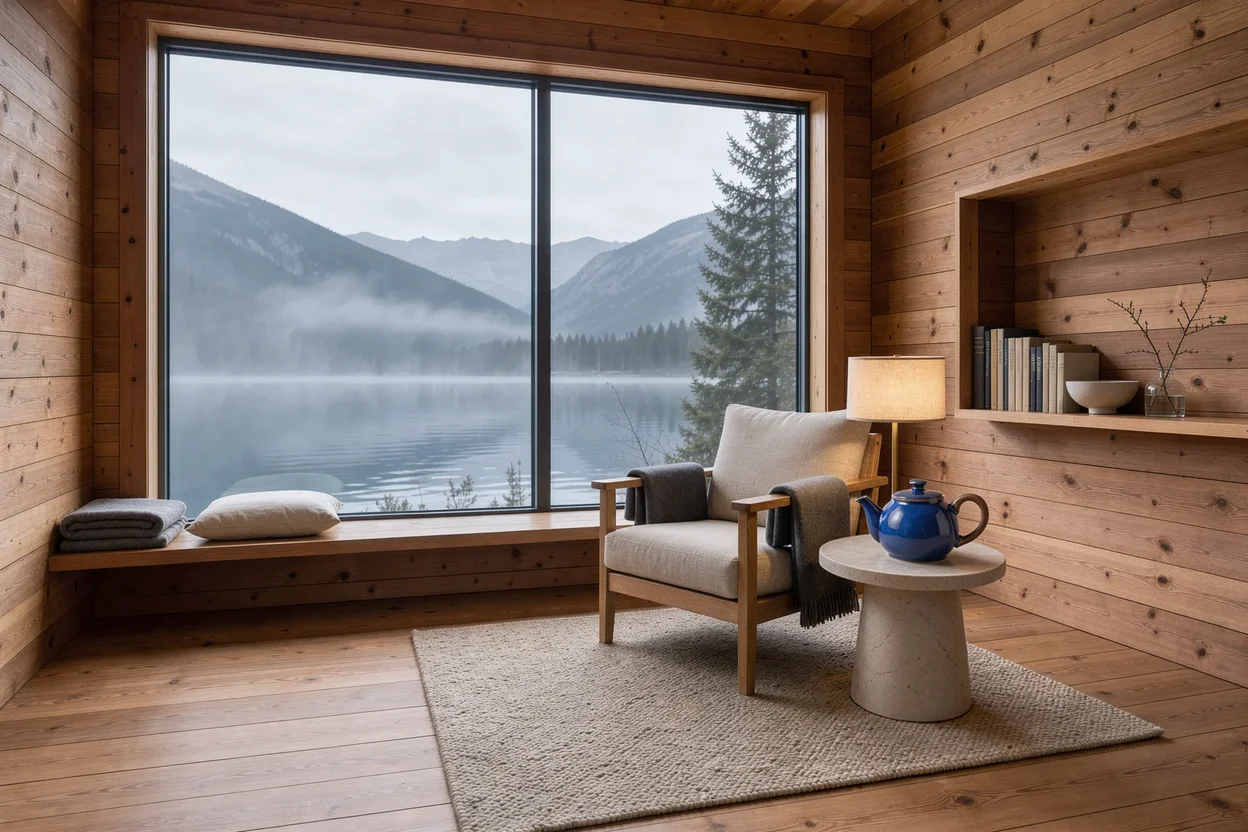
flux-3-image, three references, 3:2, $0.048.
FLUX.2 Pro:
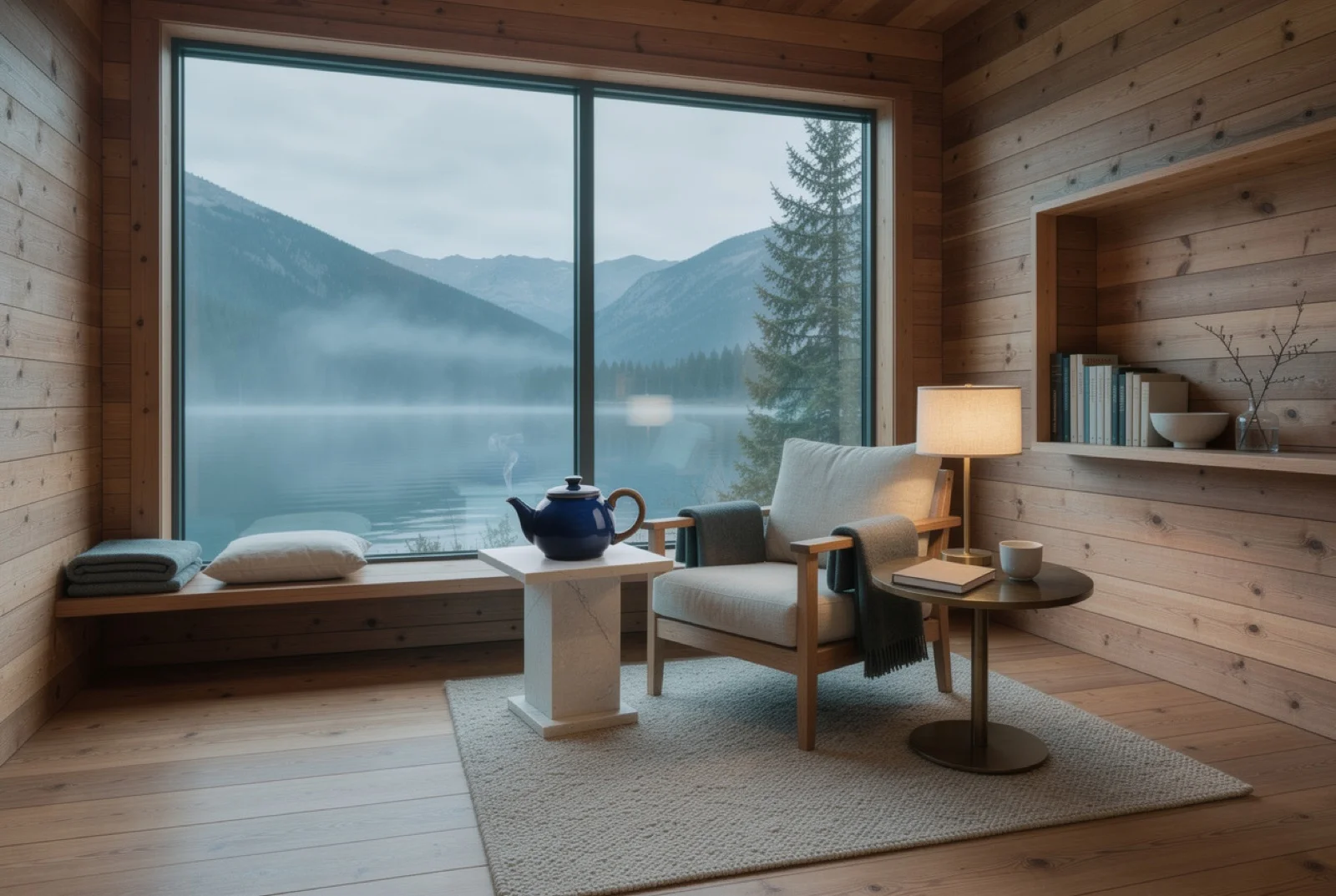
flux-2/image-to-image, three references, 3:2, 1K, $0.035.
What's visibly different: both keep the walnut handle, the cabin, and the lake window. FLUX.3 Image keeps the bright glossy cobalt of the reference and sets the pot on a round side table by the armchair. FLUX.2 renders a darker navy glaze, keeps the curl of steam, and moves the pot to a plinth in front of the window, adding a mug and a book. To run the edit yourself, upload your own three images on the FLUX.3 Image model page.
Which to choose
- One model for generating and editing: FLUX.3 Image. Pass
image_urlswhen you want to edit and leave it out when you don't. - More than 8 reference images: FLUX.3 Image, up to 10.
- Prompts with strict exclusions ("no text", "no signs"): FLUX.3 Image followed them more closely in our tests.
- Print or 4K: FLUX.3 Image, $0.607 at 4K.
- An exact pixel size or a fixed seed: FLUX.2 Pro, with
customwidth and height andseed. - Cheaper edits: FLUX.2 at $0.035 for 1K, versus $0.048 for FLUX.3 Image.
Switching from FLUX.2
Both run on the same POST /v1/tasks endpoint, so switching means changing the model and a few fields:
| FLUX.2 | FLUX.3 Image | |
|---|---|---|
| Model id | Separate text and edit ids | flux-3-image |
| Resolution | 0.5 MP / 1 MP / 2 MP / 4 MP (edit: 1K / 2K) | 768 / 1K / 1.5K / 2K / 4K |
| References | image_urls on the edit id | image_urls on the same id |
| Exact size | aspect_ratio: "custom" + width / height | Pick one of 15 ratios |
{
  "model": "flux-3-image",
  "input": {
    "prompt": "A cinematic rainy Tokyo side street at blue hour, no readable signs",
    "resolution": "1K",
    "aspect_ratio": "16:9"
  }
}
FAQ
Is FLUX.3 Image more expensive than FLUX.2?
At 1K it's $0.048 versus $0.05 for FLUX.2 Pro text-to-image. Editing costs more on FLUX.3 Image ($0.048 versus $0.035), and 4K is $0.607.
Can I turn off web grounding?
Yes, set grounding: false. It's on by default and doesn't change the price.
Does FLUX.3 Image support seed?
No. Use FLUX.2 if you need repeatable outputs from a fixed seed.
Full pricing is in FLUX.3 Image API pricing and integration code in the FLUX.3 Image API guide. Or copy the Tokyo prompt and run it on FLUX.3 Image.